

Activation Recomputation#
The input activations of network layers are stored in device memory and are used to compute gradients during back-propagation. When training a model with long sequences, large micro-batches, or heavy MoE memory pressure, these activations can quickly saturate device memory. Checkpointing some activations and recomputing the rest is a common way to trade extra compute for lower memory use.
Activation recomputation in Megatron Bridge is configured through the model
provider’s recomputation parameters, which are based on Megatron Core’s
TransformerConfig.
Quick Guidance#
As a rule of thumb:
start with selective recomputation before using full recomputation
use full recomputation only when selective recomputation still does not fit
choose selective modules from the model and measured peak:
core_attnis a common standard-attention candidate, MLA often benefits frommla_up_proj, and grouped MoE often starts withmoe_actorlayernormplusmoe_actwith TE fused or Flash Attention, compare
core_attnagainst an empty selective module list because the backend already rematerializes attention internalsrevisit recomputation after enabling CUDA graphs, because TE-scoped graphs and full recomputation are not always compatible
Transformer Layer Recomputation#
Megatron Bridge supports transformer layer recomputation, which checkpoints the input of each transformer layer and recomputes the activations for the remaining layers. This technique significantly reduces activation memory usage. However, it also adds a large compute cost because the whole layer forward is executed again during backward.
Megatron Bridge also supports partial transformer layer recomputation, which is useful when recomputing only some layers is enough to make the model fit.
Configuration#
Transformer layer recomputation is configured through the model provider’s recomputation parameters:
from megatron.bridge.models import GPTModelProvider

# Full recomputation - recompute all layers
model_config = GPTModelProvider(
    recompute_granularity="full",  # Enable full layer recomputation
    recompute_method="uniform",    # Uniform distribution across layers
    recompute_num_layers=4,        # Number of layers per recomputation block
    # ... other model parameters
)
Recomputation Methods#
Block Method#
Recomputes a specific number of transformer layers per pipeline stage:
model_config = GPTModelProvider(
    recompute_granularity="full",
    recompute_method="block",      # Block-wise recomputation
    recompute_num_layers=4,        # Recompute 4 layers per pipeline stage
)
Uniform Method#
Uniformly divides the total number of transformer layers and recomputes input activations for each divided chunk:
model_config = GPTModelProvider(
    recompute_granularity="full",
    recompute_method="uniform",    # Uniform distribution
    recompute_num_layers=8,        # Number of layers per recomputation block
)
Pipeline Parallelism Considerations#
When training with pipeline parallelism:
recompute_num_layersindicates the layers per pipeline stageWhen using virtual pipelining,
recompute_num_layersspecifies the number of layers per virtual pipeline stageThe framework automatically handles recomputation coordination across pipeline stages
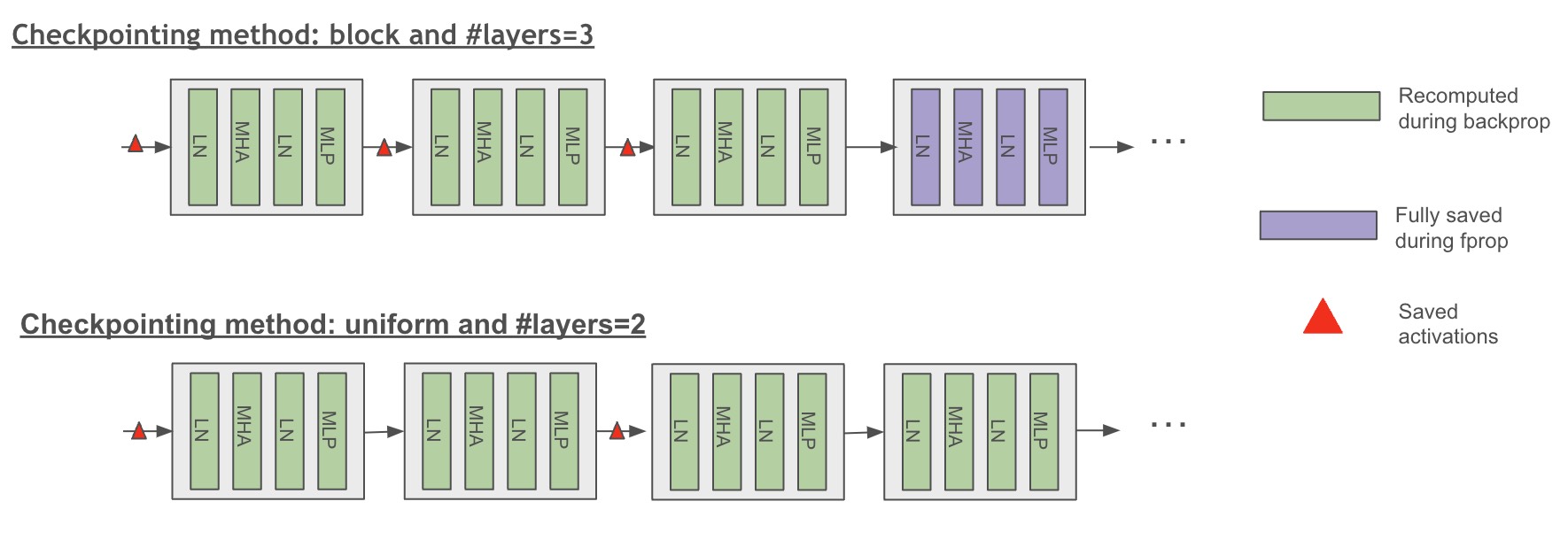 Figure 1: Scheme of uniform and block checkpointing method (full checkpointing granularity)
Self-attention Recomputation#
Megatron Bridge supports selective self-attention recomputation that checkpoints the core-attention boundary and recomputes it during backward. This can be a cost-efficient choice for standard attention, but it is not the universal first boundary for MLA, MoE, or fused-attention workloads.
The intermediate layers of the self-attention block account for a large share of activation memory because softmax, dropout, and QKV dot-product attention scale with sequence length squared. Their recomputation cost is often lower than recomputing the larger projection-heavy parts of the layer.
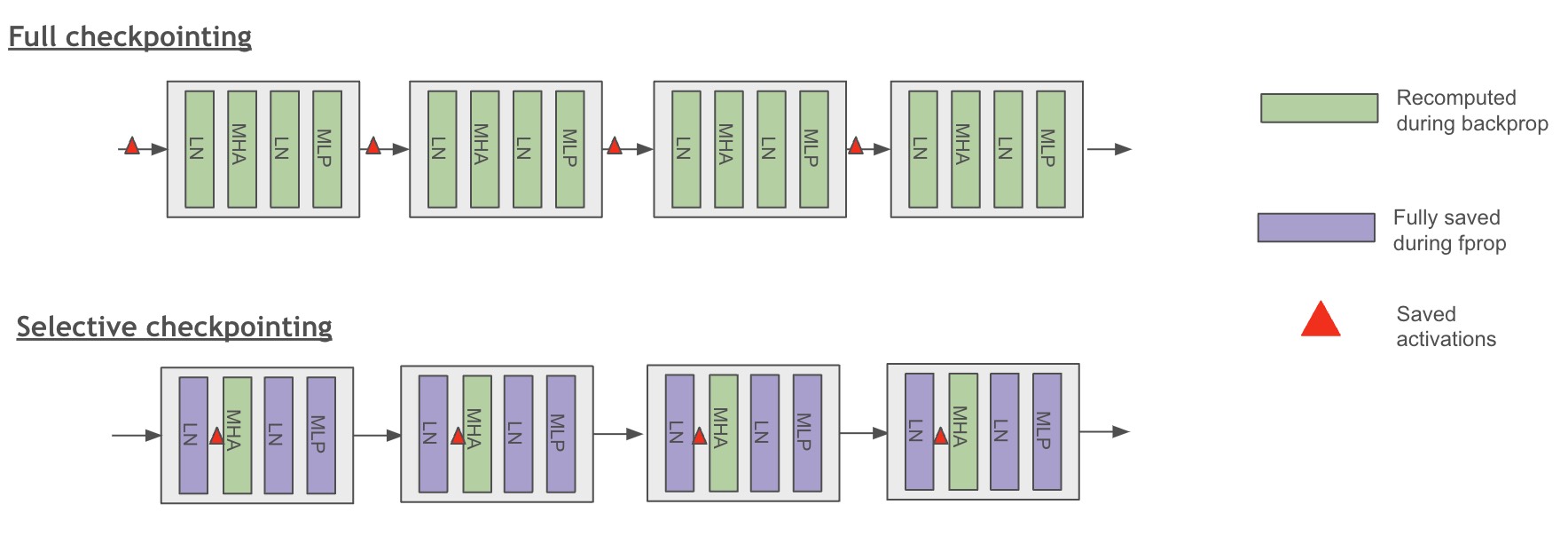 Figure 2: Scheme of full and selective checkpointing granularity
Configuration#
Self-attention recomputation is enabled using selective granularity:
from megatron.bridge.models import GPTModelProvider

model_config = GPTModelProvider(
    recompute_granularity="selective",  # Enable selective recomputation
    recompute_modules=["core_attn"],    # Common standard-attention candidate and MCore default
    # ... other model parameters
)
Recomputation Modules#
The pinned Megatron Core accepts these selective labels. Do not combine them blindly: some are architecture-specific and some checkpoint overlapping regions.
Label |
Boundary and typical use |
|---|---|
|
Core attention; a common standard-attention candidate that can replay context-parallel communication |
|
Expanded MLA Q/KV projections and RoPE; often the first MLA candidate |
|
Grouped-expert activation output without replaying dispatch or expert GEMMs |
|
Input and pre-MLP normalization outputs, often paired with a MoE or MLA boundary |
|
Whole dense MLP; broader replay and no effect on pure-MoE layers |
|
Whole MoE forward, including routing, expert compute, and communication |
|
Non-overlapped shared-expert MLP |
|
GatedDeltaNet output norm and HP-to-CP communication |
An empty list is valid under selective granularity and is useful as a matched no-recompute control.
Flash Attention Integration#
Flash Attention through Transformer Engine already recovers memory by
rematerializing attention internals. That does not automatically make
recompute_modules=["core_attn"] the right explicit setting. Compare it with an
empty selective module list; MLA up projections, MoE activations, normalization,
or another boundary may set the actual peak.
Advanced Recomputation Configuration#
Distributed Activation Checkpointing#
For models using model parallelism, you can distribute saved activations across the model parallel group:
model_config = GPTModelProvider(
    recompute_granularity="selective",
    distribute_saved_activations=True,  # Distribute across model parallel group
    # Note: Cannot be used with sequence_parallel=True
)
Memory vs Computation Trade-offs#
Different recomputation strategies offer different memory-computation trade-offs:
Selective recomputation: Usually the best first choice. Targets the most memory-expensive operations while keeping the compute penalty relatively low.
Full recomputation: Strongest memory reduction, but also the highest compute overhead.
No recomputation: Best for throughput when the model already fits.
MoE-Specific Recomputation#
For Mixture of Experts models, specialized recomputation options are available:
model_config = GPTModelProvider(
    # MoE configuration
    num_moe_experts=8,
    expert_model_parallel_size=2,
    moe_grouped_gemm=True,

    # MoE recomputation
    recompute_granularity="selective",
    recompute_modules=["moe_act", "layernorm"],  # Narrow MoE-side candidates
)
moe_act requires grouped-GEMM experts. Whole-moe recompute is a broader
alternative that replays routing, dispatch/combine communication, expert
compute, and shared-expert work; it is incompatible with expert-parallel
overlap. shared_experts recompute is likewise incompatible with shared-expert
overlap. Prefer the narrow boundary that satisfies the memory target.
Feature Interactions#
Full recomputation with CUDA graphs requires
cuda_graph_impl="full_iteration"in the pinned Megatron Core. Otherwise use selective recomputation or disable CUDA graphs.A selective checkpoint boundary must lie wholly inside or wholly outside its CUDA-graph scope.
MoE communication overlap paths often require recomputation settings that are more selective than “full.”
At long context, recomputing SDPA-heavy attention internals can cost more than recomputing smaller supporting modules.
Advancing from a forward OOM to a gradient-synchronization or optimizer OOM is useful diagnosis, but not a pass. Validate through optimizer-state initialization and multiple steady-state iterations.