

Primvars#
What Are Primvars?#
Short for primitive variables, primvars are special attributes that contain extra features. They address the following problems in computer graphics:
The need to “bind” user data on geometric primitives that becomes available to shaders during rendering.
The need to specify a set of values associated with vertices or faces of a primitive that will interpolate across the primitive’s surface under subdivision or shading.
The need to inherit attributes down namespace to allow sparse authoring of shareable data.
Some examples include, texture coordinates, vertex colors, or custom metadata, allowing for interpolating data on individual objects.
Primvars are essential for various tasks, including:
Storing UVs for texture mapping
Defining vertex colors for per-vertex shading
Deformation and animation
How Does It Work?#
Primvars are defined within the scene description and can be accessed and modified using OpenUSD APIs. Each primvar can store different types of data, such as scalar values, vectors, or arrays.
Refer to the Primvar User Guide to learn more about how primvars work including concepts like the different interpolation modes supported by primvars, indexed primvars, and primvar inheritance.
Working With Python#
Developers working with OpenUSD can interact with primvars using the Python API.
 1# Constructs a UsdGeomPrimvarsAPI on UsdPrim prim
 2primvar_api = UsdGeom.PrimvarsAPI(prim)
 3
 4# Creates a new primvar called displayColor of type Color3f[]
 5primvar_api.CreatePrimvar('displayColor', Sdf.ValueTypeNames.Color3fArray)
 6
 7# Gets the displayColor primvar
 8primvar = primvar_api.GetPrimvar('displayColor')
 9
10# Sets displayColor values
11primvar.Set([Gf.Vec3f(0.0, 1.0, 0.0)])
12
13# Gets displayColor values
14values = primvar.Get()
Examples#
Tip
You can run these examples locally as Jupyter notebooks. See How to Run Notebooks Locally for setup instructions.
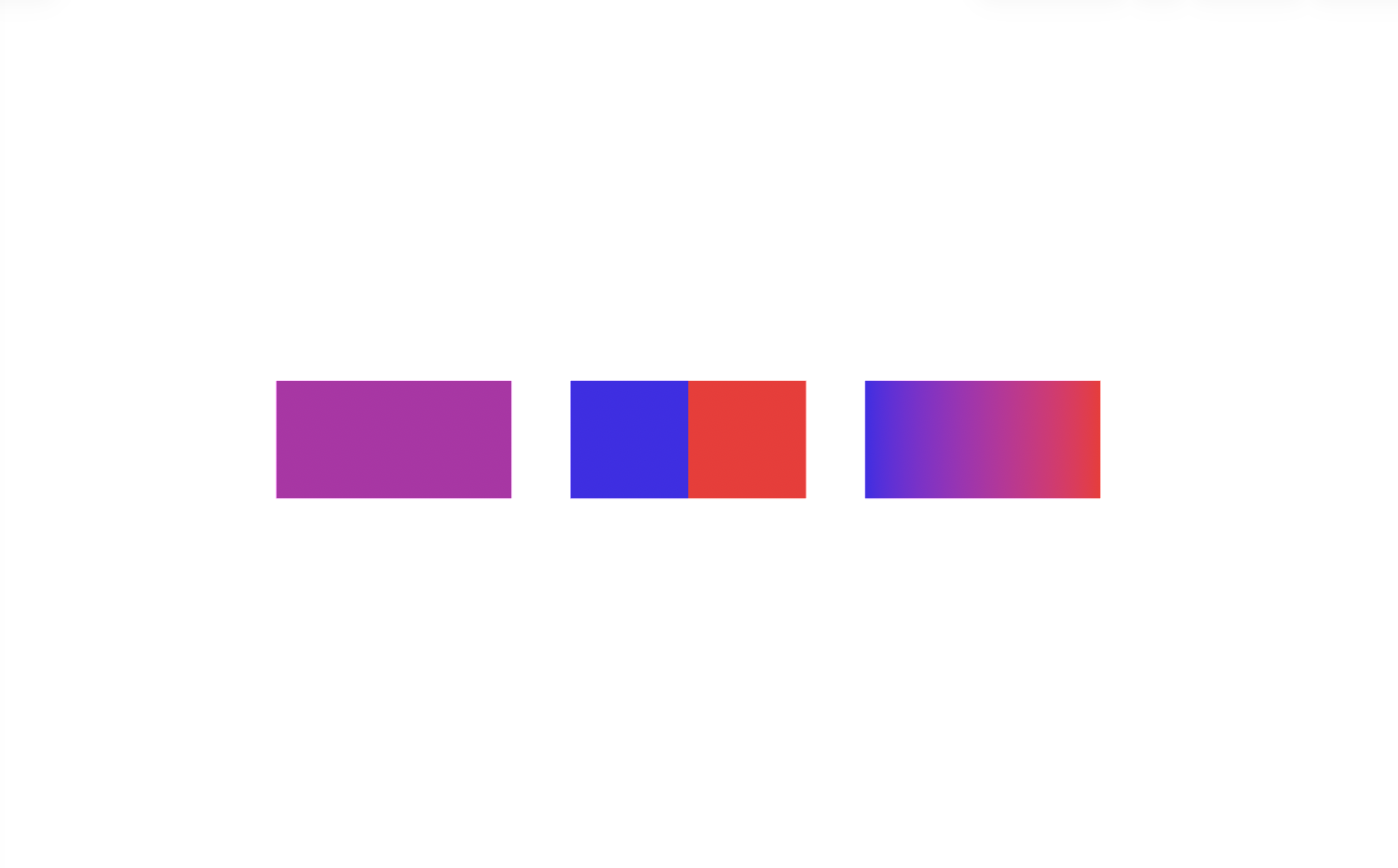
Example 1: Primvar interpolation (constant, uniform, vertex)#
This example builds the same two‑quad mesh three times and authors the displayColor primvar with three interpolation modes: constant (one value for the whole gprim), uniform (one per face), and vertex (one per point).
 1from pxr import Usd, UsdGeom, Gf
 2
 3# Create stage and default prim
 4file_path = "_assets/primvars_displaycolor.usda"
 5stage = create_new_stage(file_path)
 6world = UsdGeom.Xform.Define(stage, "/World")
 7stage.SetDefaultPrim(world.GetPrim())
 8
 9# Two-quad mesh topology (6 points, 2 faces)
10mesh_vertex_locs = [
11    Gf.Vec3f(-1, 0, 0),
12    Gf.Vec3f(0, 0, 0),
13    Gf.Vec3f(0, 1, 0),
14    Gf.Vec3f(-1, 1, 0),
15    Gf.Vec3f(1, 0, 0),
16    Gf.Vec3f(1, 1, 0),
17]
18face_vertex_counts = [4, 4]
19face_vertex_indices = [0, 1, 2, 3,  1, 4, 5, 2]
20
21per_prim_color = [Gf.Vec3f(0.5, 0.0, 0.5)]
22per_face_colors = [Gf.Vec3f(0.0, 0.0, 1.0), Gf.Vec3f(1.0, 0.0, 0.0)]
23per_vertex_colors = [
24    Gf.Vec3f(0.0, 0.0, 1.0), Gf.Vec3f(0.5, 0.0, 0.5), Gf.Vec3f(0.5, 0.0, 0.5),
25    Gf.Vec3f(0.0, 0.0, 1.0), Gf.Vec3f(1.0, 0.0, 0.0), Gf.Vec3f(1.0, 0.0, 0.0)
26    ]
27
28# Define interpolation mode and colors
29example_meshes = {
30    "PerPrim": {
31        "interpolation": UsdGeom.Tokens.constant,
32        "colors": per_prim_color
33    },
34    "PerFace": {
35        "interpolation": UsdGeom.Tokens.uniform,
36        "colors": per_face_colors
37    },
38    "PerVertex": {
39        "interpolation": UsdGeom.Tokens.vertex,
40        "colors": per_vertex_colors
41    }
42}
43
44for i, (example_mesh, color_details) in enumerate(example_meshes.items()):
45    mesh_prim = UsdGeom.Mesh.Define(stage, world.GetPath().AppendPath(example_mesh))
46    mesh_prim.CreatePointsAttr(mesh_vertex_locs)
47    mesh_prim.CreateFaceVertexCountsAttr(face_vertex_counts)
48    mesh_prim.CreateFaceVertexIndicesAttr(face_vertex_indices)
49    UsdGeom.XformCommonAPI(mesh_prim).SetTranslate(Gf.Vec3d(i * 2.5, 0, 0))
50
51    mesh_disp_color_primvar = mesh_prim.GetDisplayColorPrimvar()
52    mesh_disp_color_primvar.SetInterpolation(color_details["interpolation"])
53    mesh_disp_color_primvar.Set(color_details["colors"])
54
55stage.Save()
Example 2: Store “rest state” and “deformation” as Primvars#
This example writes two vertex primvars on a quad: rest_state and deformation. It computes new points as rest_state + deformation, then time samples Mesh.points
 1from pxr import Usd, UsdGeom, Sdf, Gf
 2
 3# set up time sampling parameters
 4start_tc = 1
 5end_tc = 90
 6time_code_per_second = 30
 7
 8# create stage and default prim
 9file_path = "_assets/primvars_mesh_deformation.usda"
10stage = create_new_stage(file_path)
11stage.SetStartTimeCode(start_tc)
12stage.SetEndTimeCode(end_tc)
13stage.SetTimeCodesPerSecond(time_code_per_second)
14world = UsdGeom.Xform.Define(stage, "/World")
15stage.SetDefaultPrim(world.GetPrim())
16
17# define base mesh
18mesh_vertex_locs = [
19    Gf.Vec3f(0, 0, 0),
20    Gf.Vec3f(1, 0, 0),
21    Gf.Vec3f(1, 1, 0),
22    Gf.Vec3f(0, 1, 0)]
23face_vertex_counts = [4]
24face_vertex_indices = [0, 1, 2, 3]
25
26# create mesh prim
27plane = UsdGeom.Mesh.Define(stage, world.GetPath().AppendPath("Plane"))
28plane.CreatePointsAttr(mesh_vertex_locs)
29plane.CreateFaceVertexCountsAttr(face_vertex_counts)
30plane.CreateFaceVertexIndicesAttr(face_vertex_indices)
31UsdGeom.XformCommonAPI(plane).SetTranslate(Gf.Vec3d(2, 0, 0))
32plane.GetDisplayColorPrimvar().Set([Gf.Vec3f(0.1, 0.8, 0.1)])
33
34# set the rest_state for the mesh
35plane_privar_api = UsdGeom.PrimvarsAPI(plane)
36plane_privar_api.CreatePrimvar(
37    "rest_state",
38    Sdf.ValueTypeNames.Float3Array,
39    UsdGeom.Tokens.vertex).Set(mesh_vertex_locs)
40
41# set deformation for vertex locations as a primvar
42deformation = [
43    Gf.Vec3f(0.0, 0.0, 0.0),
44    Gf.Vec3f(-0.3, 0.4, 0.0),
45    Gf.Vec3f(-0.3, 0.4, 0.0),
46    Gf.Vec3f(0.0, 0.0, 0.0),
47    ]
48plane_privar_api = UsdGeom.PrimvarsAPI(plane)
49plane_privar_api.CreatePrimvar(
50    "deformation",
51    Sdf.ValueTypeNames.Float3Array,
52    UsdGeom.Tokens.vertex).Set(deformation)
53
54new_points = [
55    p + o for p, o in zip(
56        mesh_vertex_locs,
57        plane_privar_api.GetPrimvar("deformation").Get())]
58
59print("Original vertex locations:", mesh_vertex_locs)
60print("\nDeforming mesh with primvar 'deformation':", deformation)
61print("\nNew vertex locations:", new_points)
62
63# Time-sample Mesh.points from rest to deformed
64plane_points = plane.GetPointsAttr()
65plane_points.Set(mesh_vertex_locs, Usd.TimeCode(start_tc))
66plane_points.Set(new_points, Usd.TimeCode(end_tc))
67
68stage.Save()
Original vertex locations: [Gf.Vec3f(0.0, 0.0, 0.0), Gf.Vec3f(1.0, 0.0, 0.0), Gf.Vec3f(1.0, 1.0, 0.0), Gf.Vec3f(0.0, 1.0, 0.0)]

Deforming mesh with primvar 'deformation': [Gf.Vec3f(0.0, 0.0, 0.0), Gf.Vec3f(-0.30000001192092896, 0.4000000059604645, 0.0), Gf.Vec3f(-0.30000001192092896, 0.4000000059604645, 0.0), Gf.Vec3f(0.0, 0.0, 0.0)]

New vertex locations: [Gf.Vec3f(0.0, 0.0, 0.0), Gf.Vec3f(0.699999988079071, 0.4000000059604645, 0.0), Gf.Vec3f(0.699999988079071, 1.399999976158142, 0.0), Gf.Vec3f(0.0, 1.0, 0.0)]

Key Takeaways#
The ability to store and manipulate hierarchical object data using primvars is a powerful feature that enables advanced 3D workflows and facilitates interoperability between different tools and applications. By leveraging primvars effectively, we’ll be able to efficiently manage and manipulate per-object data in complex 3D scenes, enabling advanced workflows and facilitating interoperability between different tools and applications.