

Exercise: Transforming the Prim Hierarchy#
In this exercise, we will create our first transformation step to turn our converted output into a asset that is easy to reference and to fix the defaultPrim validation error. Let’s look at the tree view of a USD layer produced by obj2usd.
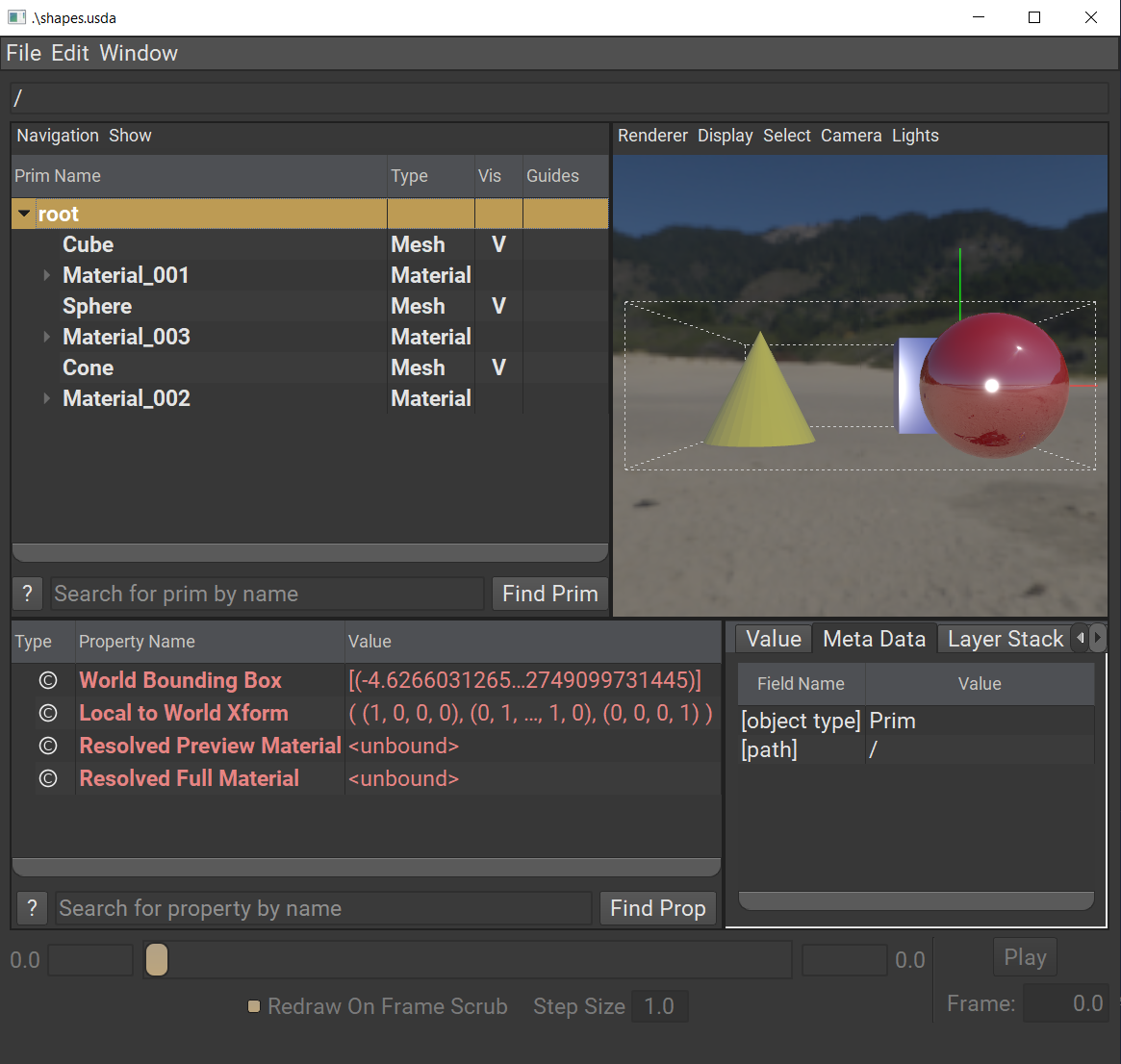
Notice that there are multiple prims under the stage pseudo-root (or root). While our converter output faithfully represents the flat hierarchy from OBJ, it creates two usability issues in OpenUSD:
There is no
defaultPrimmetadata to reference this stage without specifying a target prim.Even with
defaultPrimset, there’s no easy way to reference the entire asset since all the prims that make up the asset don’t share a common ancestor prim.
This is why we should add a transformation step to make converted OBJs easier to use out-of-box in OpenUSD. Let’s choose to make this a transformation that always runs as part of our converter because it’s critical to provide good UX for end users.
First, open
obj2usd.pyLet’s add a new function to handle this transformation. Copy and paste this code between
extract()andtransform():
 1def set_default_prim(stage: Usd.Stage):
 2    """Set a default prim to make this stage referenceable
 3
 4    OBJ has no notion of a scene graph hierarchy or a scene root.
 5    This is a mandatory chaser to move all prims under a default prim
 6    to make this asset referenceable.
 7    Args:
 8        stage (Usd.Stage): The stage to modify
 9    """
10
11    # Get the prim in the root namespace that we want to reparent under the default prim.
12    root_prims = stage.GetPseudoRoot().GetChildren()
13    world_prim = UsdGeom.Xform.Define(stage, "/World").GetPrim()
14    stage.SetDefaultPrim(world_prim)
15    editor = Usd.NamespaceEditor(stage)
16    for prim in root_prims:
17        editor.ReparentPrim(prim, world_prim)
18        editor.ApplyEdits()
This function creates a new UsdGeom.Xform prim called “/World” and sets it as the defaultPrim. It then parents all of the other prims in the root namespace to “/World” using Usd.NamespaceEditor so that they all share a common ancestor and can be reference together.
This won’t do anything until we call the new function in transform().
Copy and paste this code into
transform():
1set_default_prim(stage)
Click to reveal our Python code up to this point.
  1import argparse
  2import logging
  3import math
  4from enum import Enum
  5from pathlib import Path
  6
  7import assimp_py
  8from pxr import Gf, Sdf, Tf, Usd, UsdGeom, UsdShade
  9
 10logger = logging.getLogger("obj2usd")
 11
 12
 13class UpAxis(Enum):
 14    Y = UsdGeom.Tokens.y
 15    Z = UsdGeom.Tokens.z
 16
 17    def __str__(self):
 18        return self.value
 19
 20# ADD CODE BELOW HERE
 21# vvvvvvvvvvvvvvvvvvv
 22
 23def extract(input_file: Path, output_file: Path) -> Usd.Stage:
 24    logger.info("Executing extraction phase...")
 25    process_flags = 0
 26    # Load the obj using Assimp
 27    scene = assimp_py.ImportFile(str(input_file), process_flags)
 28    # Define the stage where the output will go
 29    stage: Usd.Stage = Usd.Stage.CreateNew(str(output_file))
 30    UsdGeom.SetStageUpAxis(stage, UsdGeom.Tokens.y)
 31    # Assume linear units as meters.
 32    UsdGeom.SetStageMetersPerUnit(stage, UsdGeom.LinearUnits.meters)
 33
 34    for mesh in scene.meshes:
 35        # Replace any invalid characters with underscores.
 36        sanitized_mesh_name = Tf.MakeValidIdentifier(mesh.name)
 37        usd_mesh = UsdGeom.Mesh.Define(stage, f"/{sanitized_mesh_name}")
 38        # You can use the Vt APIs here instead of Python lists.
 39        # Especially keep this in mind for C++ implementations.
 40        face_vertex_counts = []
 41        face_vertex_indices = []
 42        for indices in mesh.indices:
 43            # Convert the indices to a flat list
 44            face_vertex_indices.extend(indices)
 45            # Append the number of vertices for each face
 46            face_vertex_counts.append(len(indices))
 47
 48        usd_mesh.CreatePointsAttr(mesh.vertices)
 49        usd_mesh.CreateFaceVertexCountsAttr().Set(face_vertex_counts)
 50        usd_mesh.CreateFaceVertexIndicesAttr().Set(face_vertex_indices)
 51        # Treat the mesh as a polygonal mesh and not a subdivision surface.
 52        # Respect the normals or lack of normals from OBJ.
 53        usd_mesh.CreateSubdivisionSchemeAttr(UsdGeom.Tokens.none)
 54        if mesh.normals:
 55            usd_mesh.CreateNormalsAttr(mesh.normals)
 56
 57        # Get the mesh's material by index
 58        # scene.materials is a dictionary consisting of assimp material properties
 59        mtl = scene.materials[mesh.material_index]
 60        if not mtl:
 61            continue
 62        sanitized_mat_name = Tf.MakeValidIdentifier(mtl["NAME"])
 63        material_path = Sdf.Path(f"/{sanitized_mat_name}")
 64        # Create the material prim
 65        material: UsdShade.Material = UsdShade.Material.Define(stage, material_path)
 66        # Create a UsdPreviewSurface Shader prim.
 67        shader: UsdShade.Shader = UsdShade.Shader.Define(stage, material_path.AppendChild("Shader"))
 68        shader.CreateIdAttr("UsdPreviewSurface")
 69        # Connect shader surface output as an output for the material graph.
 70        material.CreateSurfaceOutput().ConnectToSource(shader.ConnectableAPI(), UsdShade.Tokens.surface)
 71        # Get colors
 72        diffuse_color = mtl["COLOR_DIFFUSE"]
 73        emissive_color = mtl["COLOR_EMISSIVE"]
 74        specular_color = mtl["COLOR_SPECULAR"]
 75        # Convert specular shininess to roughness.
 76        roughness = 1 - math.sqrt(mtl["SHININESS"] / 1000.0)
 77
 78        shader.CreateInput("useSpecularWorkflow", Sdf.ValueTypeNames.Int).Set(1)
 79        shader.CreateInput("diffuseColor", Sdf.ValueTypeNames.Color3f).Set(Gf.Vec3f(diffuse_color))
 80        shader.CreateInput("emissiveColor", Sdf.ValueTypeNames.Color3f).Set(Gf.Vec3f(emissive_color))
 81        shader.CreateInput("specularColor", Sdf.ValueTypeNames.Color3f).Set(Gf.Vec3f(specular_color))
 82        shader.CreateInput("roughness", Sdf.ValueTypeNames.Float).Set(roughness)
 83        binding_api = UsdShade.MaterialBindingAPI.Apply(usd_mesh.GetPrim())
 84        binding_api.Bind(material)
 85
 86    return stage
 87
 88
 89def set_default_prim(stage: Usd.Stage):
 90    """Set a default prim to make this stage referenceable
 91
 92    OBJ has no notion of a scene graph hierarchy or a scene root.
 93    This is a mandatory chaser to move all prims under a default prim
 94    to make this asset referenceable.
 95    Args:
 96        stage (Usd.Stage): The stage to modify
 97    """
 98
 99    # Get the prim in the root namespace that we want to reparent under the default prim.
100    root_prims = stage.GetPseudoRoot().GetChildren()
101    world_prim = UsdGeom.Xform.Define(stage, "/World").GetPrim()
102    stage.SetDefaultPrim(world_prim)
103    editor = Usd.NamespaceEditor(stage)
104    for prim in root_prims:
105        editor.ReparentPrim(prim, world_prim)
106        editor.ApplyEdits()
107
108
109def transform(stage: Usd.Stage, args: argparse.Namespace):
110    logger.info("Executing transformation phase...")
111    set_default_prim(stage)
112
113
114def main(args: argparse.Namespace):
115    # Extract the .obj
116    stage: Usd.Stage = extract(args.input, args.output)
117    # Transformations to be applied to the scene hierarchy
118    transform(stage, args)
119    # Save the Stage after editing
120    stage.Save()
121
122# ^^^^^^^^^^^^^^^^^^^^
123# ADD CODE ABOVE HERE
124
125
126if __name__ == "__main__":
127    logging.basicConfig(level=logging.DEBUG)
128    parser = argparse.ArgumentParser(
129        "obj2usd", description="An OBJ to USD converter script."
130    )
131    parser.add_argument("input", help="Input OBJ file", type=Path)
132    parser.add_argument("-o", "--output", help="Specify an output USD file", type=Path)
133    export_opts = parser.add_argument_group("Export Options")
134    export_opts.add_argument(
135        "-u",
136        "--up-axis",
137        help="Specify the up axis for the exported USD stage.",
138        type=UpAxis,
139        choices=list(UpAxis),
140        default=UpAxis.Y,
141    )
142
143    args = parser.parse_args()
144    if args.output is None:
145        args.output = args.input.parent / f"{args.input.stem}.usda"
146
147    logger.info(f"Converting {args.input}...")
148    main(args)
149    logger.info(f"Converted results output as: {args.output}.")
150    logger.info(f"Done.")
Save the file and execute the script by running the following in the terminal:
Windows:
python .\data_exchange\obj2usd.py .\data_exchange\shapes.obj
Linux:
python ./data_exchange/obj2usd.py ./data_exchange/shapes.obj
Open the output USD stage with usdview to see the result:
Windows:
.\scripts\usdview.bat .\data_exchange\shapes.usda
Linux:
./scripts/usdview.sh ./data_exchange/shapes.usda
You should now see in the usdview tree view that only “World” is parented under root (pseudo-root) and all of the mesh and material prims are parented under “World”.
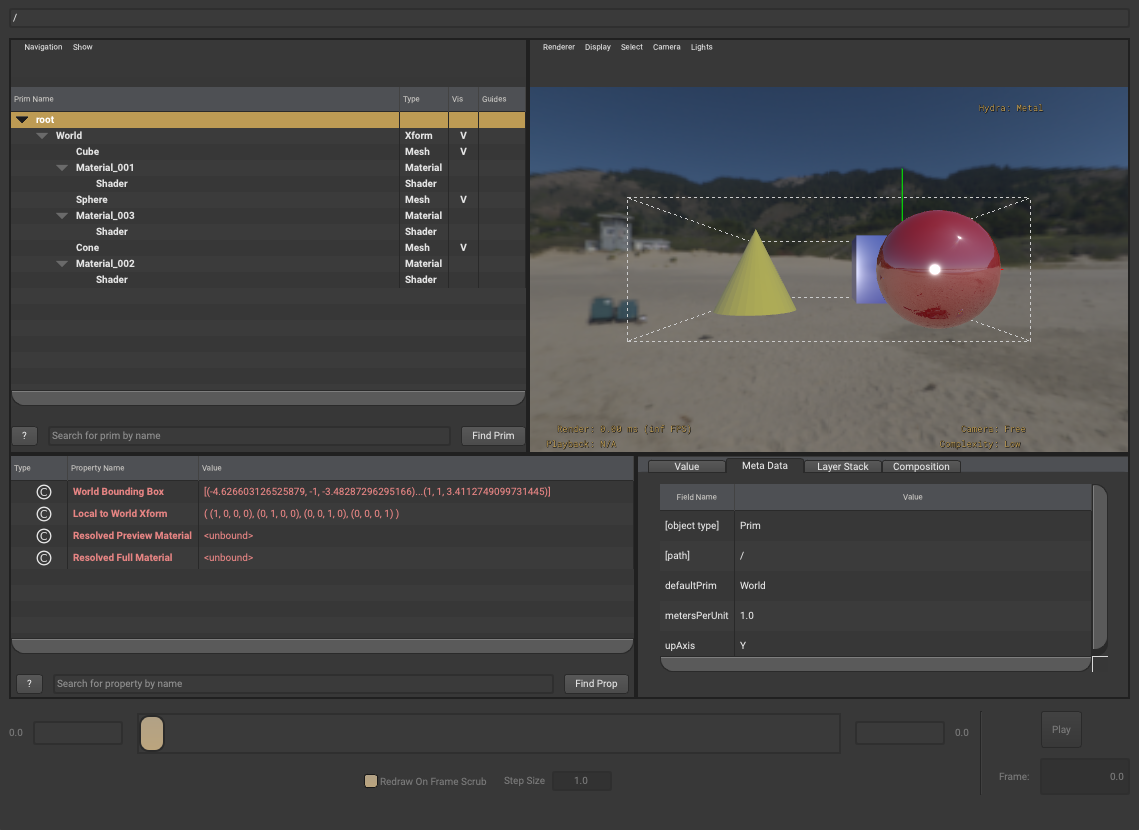
Run usdchecker to validate that
defaultPrimmetadata is now set:
Windows:
.\scripts\usdchecker.bat .\data_exchange\shapes.usda
Linux:
./scripts/usdchecker.sh ./data_exchange/shapes.usda
Congratulations! No more errors reported. You’ve now created a fully compliant OpenUSD asset.