

Digital Fingerprinting (DFP) Reference#
Morpheus Configuration#
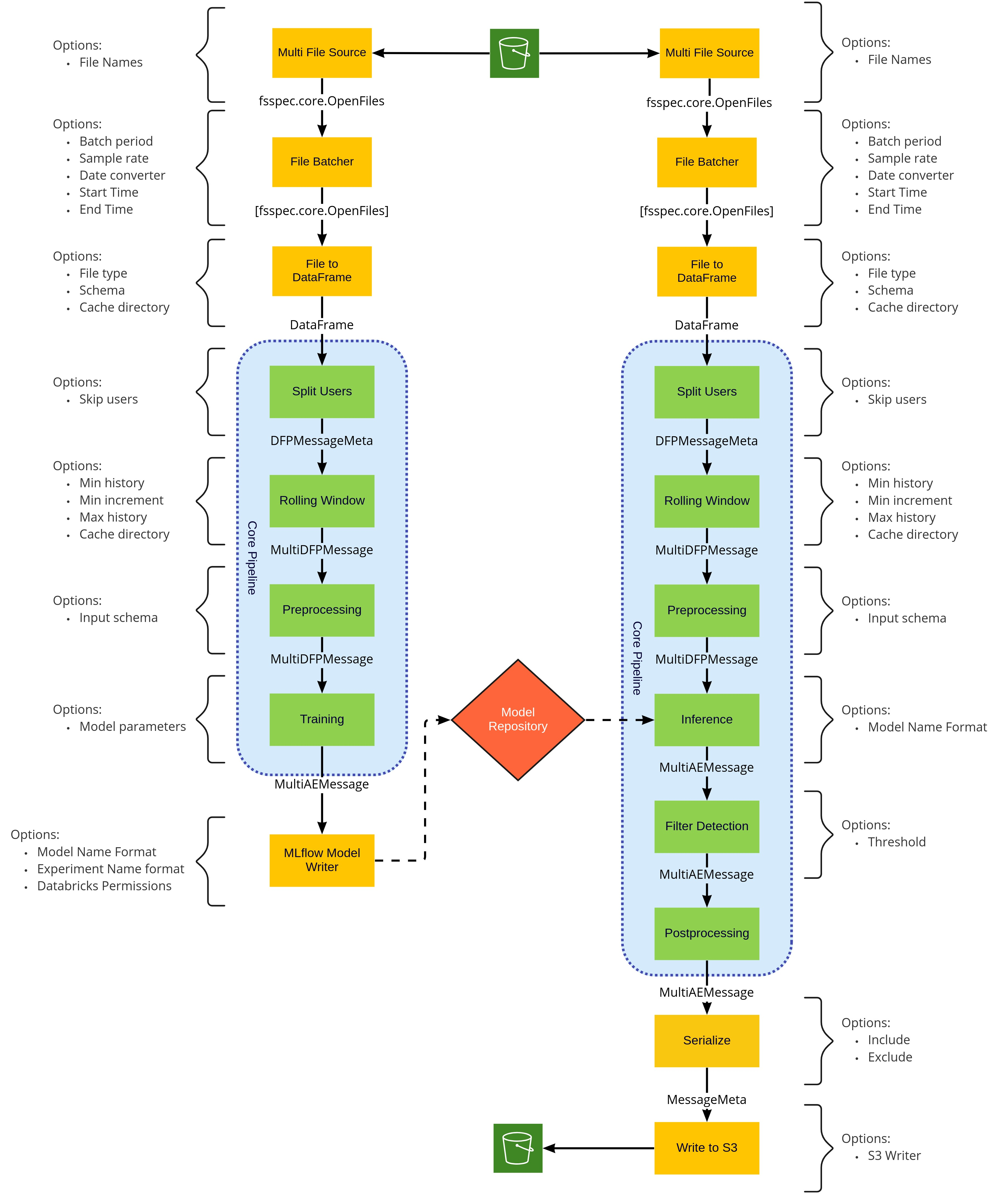
Pipeline Structure Configuration#
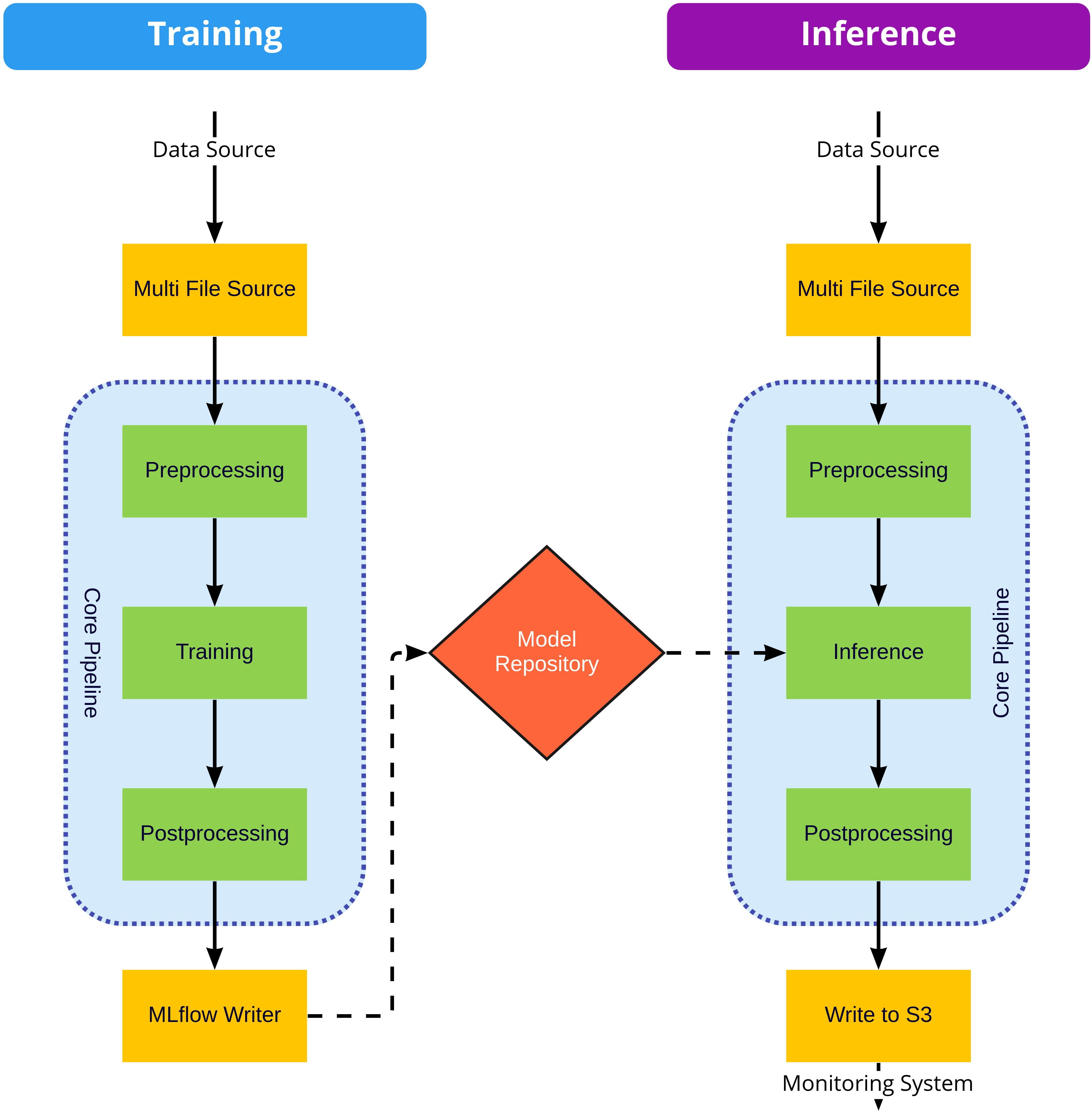
The stages in both the Training and Inference pipelines can be mixed and matched with little impact, that is, the MultiFileSource can be configured to pull from S3 or from local files and can be replaced altogether with any other Morpheus input stage. Similarly, the S3 writer can be replaced with any Morpheus output stage. Regardless of the inputs and outputs the core pipeline should remain unchanged. While stages in the core of the pipeline (inside the blue areas in the above diagram) perform common actions that should be configured not exchanged.
Morpheus Config#
For both inference and training pipeline the Morpheus Config object should be constructed with the same values, for example:
import os

from morpheus.config import Config
from morpheus.config import ConfigAutoEncoder
from morpheus.cli.utils import get_package_relative_file
from morpheus.utils.file_utils import load_labels_file
config = Config()
config.num_threads = len(os.sched_getaffinity(0))
config.ae = ConfigAutoEncoder()
config.ae.feature_columns = load_labels_file(get_package_relative_file("data/columns_ae_azure.txt"))
Other attributes which might be needed:
Attribute |
Type |
Default |
Description |
|---|---|---|---|
|
|
|
Column in the |
|
|
|
Column in the |
|
|
|
Name to use for the generic user model, should not match the name of any real users |
Schema Definition#
DataFrame Input Schema (DataFrameInputSchema)#
The DataFrameInputSchema class defines the schema specifying the columns to be included in the output DataFrame. Within the DFP pipeline there are two stages where pre-processing is performed, the DFPFileToDataFrameStage stage and the DFPPreprocessingStage. This decoupling of the pre-processing stages from the actual operations needed to be performed allows for the actual schema to be user-defined in the pipeline and re-usability of the stages. It is up to the user to define the fields which will appear in the DataFrame. Any column in the input data that isn’t specified in either column_info or preserve_columns constructor arguments will not appear in the output. The exception to this are JSON fields, specified in the json_columns argument which defines JSON fields which are to be normalized.
It is important to note that the fields defined in json_columns are normalized prior to the processing of the fields in column_info, allowing for processing to be performed on fields nested in JSON columns. For example, say we had a JSON field named event containing a key named timestamp, which in the JSON data appears as an ISO 8601 formatted date string, we could ensure it was converted to a datetime object to downstream stages with the following:
from morpheus.utils.column_info import DataFrameInputSchema
from morpheus.utils.column_info import DateTimeColumn
schema = DataFrameInputSchema(
    json_columns=['event'],
    column_info=[DateTimeColumn(name=config.ae.timestamp_column_name, dtype=datetime, input_name='event.timestamp')])
In the above examples, three operations were performed:
The
eventJSON field was normalized, resulting in new fields prefixed withevent.to be included in the outputDataFrame.The newly created field
event.timestampis parsed into adatetimefield.Since the DFP pipeline explicitly requires a timestamp field, we name this new column with the
config.ae.timestamp_column_nameattribute ensuring it matches the pipeline configuration. Whennameandinput_nameare the same the old field is overwritten, and when they differ a new field is created.
The DFPFileToDataFrameStage is executed first and is responsible for flattening potentially nested JSON data and performing any sort of data type conversions. The DFPPreprocessingStage is executed later after the DFPSplitUsersStage allowing for the possibility of per-user computed fields such as the logcount and locincrement fields mentioned previously. Both stages are performed after the DFPFileBatcherStage allowing for per time period (per-day by default) computed fields.
Argument |
Type |
Description |
|---|---|---|
|
|
Optional list of JSON columns in the incoming |
|
|
Optional list of |
|
|
Optional regular expression string or list of regular expression strings that define columns in the input data which should be preserved in the output |
|
|
Optional function to be called after all other processing has been performed. This function receives the |
Column Info (ColumnInfo)#
Defines a single column and type-cast.
Argument |
Type |
Description |
|---|---|---|
|
|
Name of the column |
|
|
Any type string or Python class recognized by pandas |
Custom Column (CustomColumn)#
Subclass of ColumnInfo, defines a column to be computed by a user-defined function process_column_fn.
Argument |
Type |
Description |
|---|---|---|
|
|
Name of the column |
|
|
Any type string or Python class recognized by pandas |
|
|
Function which receives the entire |
|
|
The input columns and the expected |
Rename Column (RenameColumn)#
Subclass of ColumnInfo, adds the ability to also perform a rename.
Argument |
Type |
Description |
|---|---|---|
|
|
Name of the destination column |
|
|
Any type string or Python class recognized by pandas |
|
|
Original column name |
Boolean Column (BoolColumn)#
Subclass of RenameColumn, adds the ability to map a set custom values as boolean values. For example say we had a string input field containing one of five possible enum values: OK, SUCCESS, DENIED, CANCELED and EXPIRED we could map these values into a single boolean field as:
from morpheus.utils.column_info import BoolColumn
field = BoolColumn(name="result",
                   dtype=bool,
                   input_name="result",
                   true_values=["OK", "SUCCESS"],
                   false_values=["DENIED", "CANCELED", "EXPIRED"])
We used strings in this example; however, we also could have just as easily mapped integer status codes. We also have the ability to map onto types other than boolean by providing custom values for true and false (for example, 1/0, yes/no) .
Argument |
Type |
Description |
|---|---|---|
|
|
Name of the destination column |
|
|
Typically this should be |
|
|
Original column name |
|
Any |
Optional value to store for true values, should be of a type |
|
Any |
Optional value to store for false values, should be of a type |
|
|
List of string values to be interpreted as true. |
|
|
List of string values to be interpreted as false. |
Date-Time Column (DateTimeColumn)#
Subclass of RenameColumn, specific to casting UTC localized datetime values. When incoming values contain a time-zone offset string the values are converted to UTC, while values without a time-zone are assumed to be UTC.
Argument |
Type |
Description |
|---|---|---|
|
|
Name of the destination column |
|
|
Any type string or Python class recognized by pandas |
|
|
Original column name |
String-Join Column (StringJoinColumn)#
Subclass of RenameColumn, converts incoming list values to string by joining by sep.
Argument |
Type |
Description |
|---|---|---|
|
|
Name of the destination column |
|
|
Any type string or Python class recognized by pandas |
|
|
Original column name |
|
|
Separator string to use for the join |
String-Cat Column (StringCatColumn)#
Subclass of ColumnInfo, concatenates values from multiple columns into a new string column separated by sep.
Argument |
Type |
Description |
|---|---|---|
|
|
Name of the destination column |
|
|
Any type string or Python class recognized by pandas |
|
|
List of columns to concatenate |
|
|
Separator string |
Increment Column (IncrementColumn)#
Subclass of DateTimeColumn, counts the unique occurrences of a value in groupby_column over a specific time window period based on dates in the input_name field.
Argument |
Type |
Description |
|---|---|---|
|
|
Name of the destination column |
|
|
Should be |
|
|
Original column name containing timestamp values |
|
|
Column name to group by |
|
|
Optional time period to perform the calculation over, value must be one of pandas’ offset strings. Defaults to |
Input Stages#
Source Stage (MultiFileSource)#
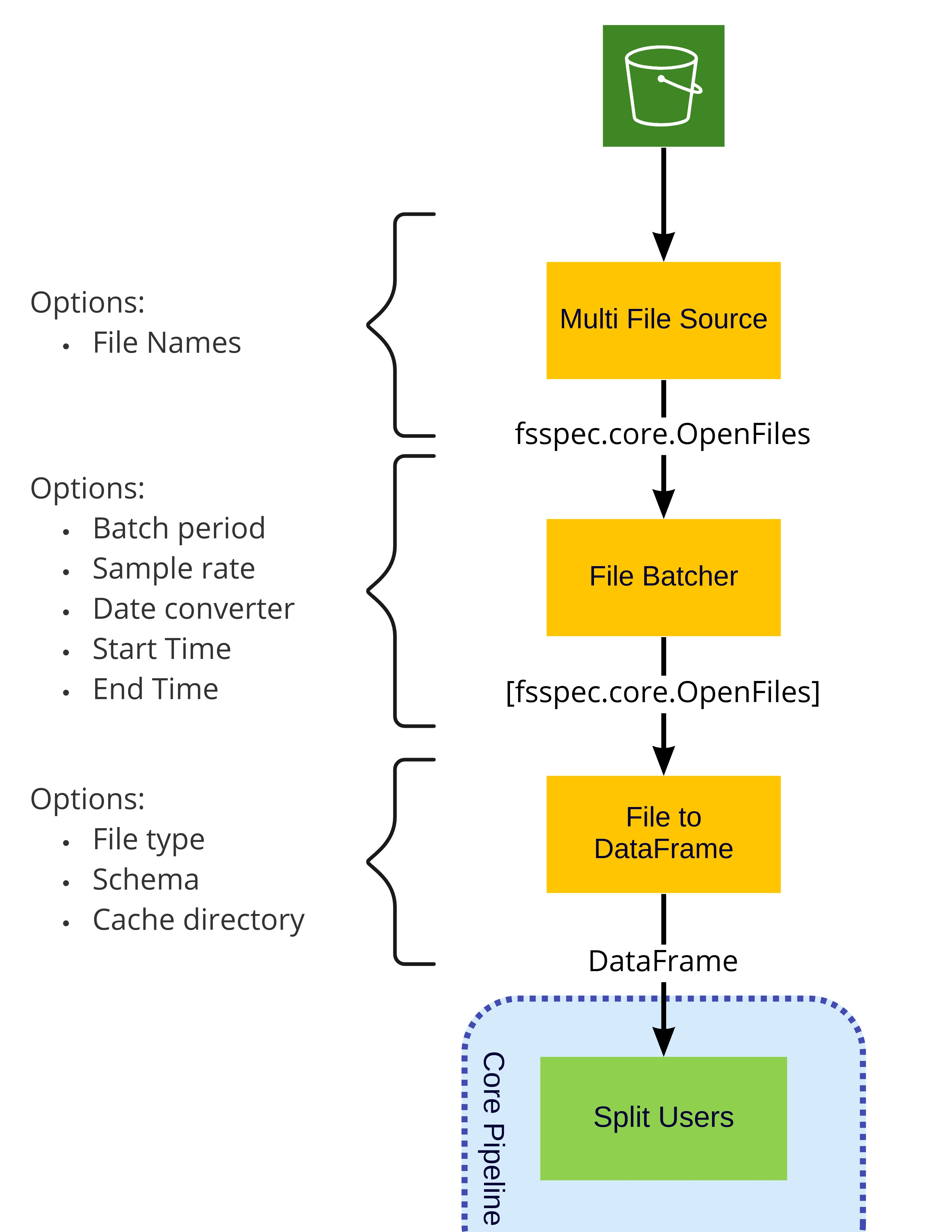
The MultiFileSource (python/morpheus/morpheus/modules/input/multi_file_source.py) receives a path or list of paths (filenames), and will collectively be emitted into the pipeline as an fsspec.core.OpenFiles object. The paths may include wildcards * as well as URLs (ex: s3://path) to remote storage providers such as S3, FTP, GCP, Azure, Databricks and others as defined by fsspec. In addition to this paths can be cached locally by prefixing them with filecache:: (ex: filecache::s3://bucket-name/key-name).
Note: This stage does not actually download the data files, allowing the file list to be filtered and batched prior to being downloaded.
Argument |
Type |
Description |
|---|---|---|
|
|
Morpheus configuration object |
|
|
Paths to source file to be read from |
|
|
Optional: when |
|
|
When |
File Batcher Stage (DFPFileBatcherStage)#
The DFPFileBatcherStage (python/morpheus_dfp/morpheus_dfp/stages/dfp_file_batcher_stage.py) groups data in the incoming DataFrame in batches of a time period (per day default), and optionally filtering incoming data to a specific time window. This stage can potentially improve performance by combining multiple small files into a single batch. This stage assumes that the date of the logs can be easily inferred such as encoding the creation time in the file name (for example, AUTH_LOG-2022-08-21T22.05.23Z.json), or using the modification time as reported by the file system. The actual method for extracting the date is encoded in a user-supplied date_conversion_func function (more on this later).
Argument |
Type |
Description |
|---|---|---|
|
|
Morpheus configuration object |
|
|
Function receives a single |
|
|
Time period to group data by, value must be one of pandas’ offset strings |
|
|
Optional, default= |
|
|
Optional, default= |
|
|
Optional, default= |
|
|
Optional, When non-None a subset of the incoming data files will be sampled. When a string, the value is interpreted as a pandas frequency. The first row for each frequency will be taken. When the value is between [0,1), a percentage of rows will be taken. When the value is greater than 1, the value is interpreted as the random count of rows to take. |
For situations where the creation date of the log file is encoded in the filename, the date_extractor in the morpheus/utils/file_utils.py module can be used. The date_extractor assumes that the timestamps are localized to UTC and will need to have a regex pattern bound to it before being passed in as a parameter to DFPFileBatcherStage. The regex pattern will need to contain the following named groups: year, month, day, hour, minute, second, and optionally microsecond. In cases where the regular expression does not match the date_extractor function will fallback to using the modified time of the file.
For input files containing an ISO 8601 formatted date string the iso_date_regex regex can be used ex:
from functools import partial

from morpheus.utils.file_utils import date_extractor
from morpheus_dfp.utils.regex_utils import iso_date_regex
# Batch files into buckets by time. Use the default ISO date extractor from the filename
pipeline.add_stage(
    DFPFileBatcherStage(config,
                        period="D",
                        date_conversion_func=functools.partial(date_extractor, filename_regex=iso_date_regex)))
Note: If
date_conversion_funcreturns time-zone aware timestamps, thenstart_timeandend_timeif notNoneneed to also be timezone awaredatetimeobjects.
File to DataFrame Stage (DFPFileToDataFrameStage)#
The DFPFileToDataFrameStage (python/morpheus_dfp/morpheus_dfp/stages/dfp_file_to_df.py) stage receives a list of an fsspec.core.OpenFiles and loads them into a single DataFrame which is then emitted into the pipeline. When the parent stage is DFPFileBatcherStage each batch (typically one day) is concatenated into a single DataFrame. If the parent was MultiFileSource the entire dataset is loaded into a single DataFrame. Because of this, it is important to choose a period argument for DFPFileBatcherStage small enough such that each batch can fit into memory.
Argument |
Type |
Description |
|---|---|---|
|
|
Morpheus configuration object |
|
|
Schema specifying columns to load, along with any necessary renames and data type conversions |
|
|
Optional: Whether to filter null rows after loading, by default True. |
|
|
Optional: Indicates file type to be loaded. Currently supported values at time of writing are: |
|
|
Optional: additional keyword arguments to be passed into the |
|
|
Optional: path to cache location, defaults to |
This stage is able to download and load data files concurrently by multiple methods. Currently supported methods are: single_thread, dask, and dask_thread. The method used is chosen by setting the MORPHEUS_FILE_DOWNLOAD_TYPE environment variable, and dask_thread is used by default, and single_thread effectively disables concurrent loading.
This stage will cache the resulting DataFrame in cache_dir, since we are caching the DataFrames and not the source files, a cache hit avoids the cost of parsing the incoming data. In the case of remote storage systems, such as S3, this avoids both parsing and a download on a cache hit. One consequence of this is that any change to the schema will require purging cached files in the cache_dir before those changes are visible.
Note: This caching is in addition to any caching which may have occurred when using the optional
filecache::prefix.
Output Stages#
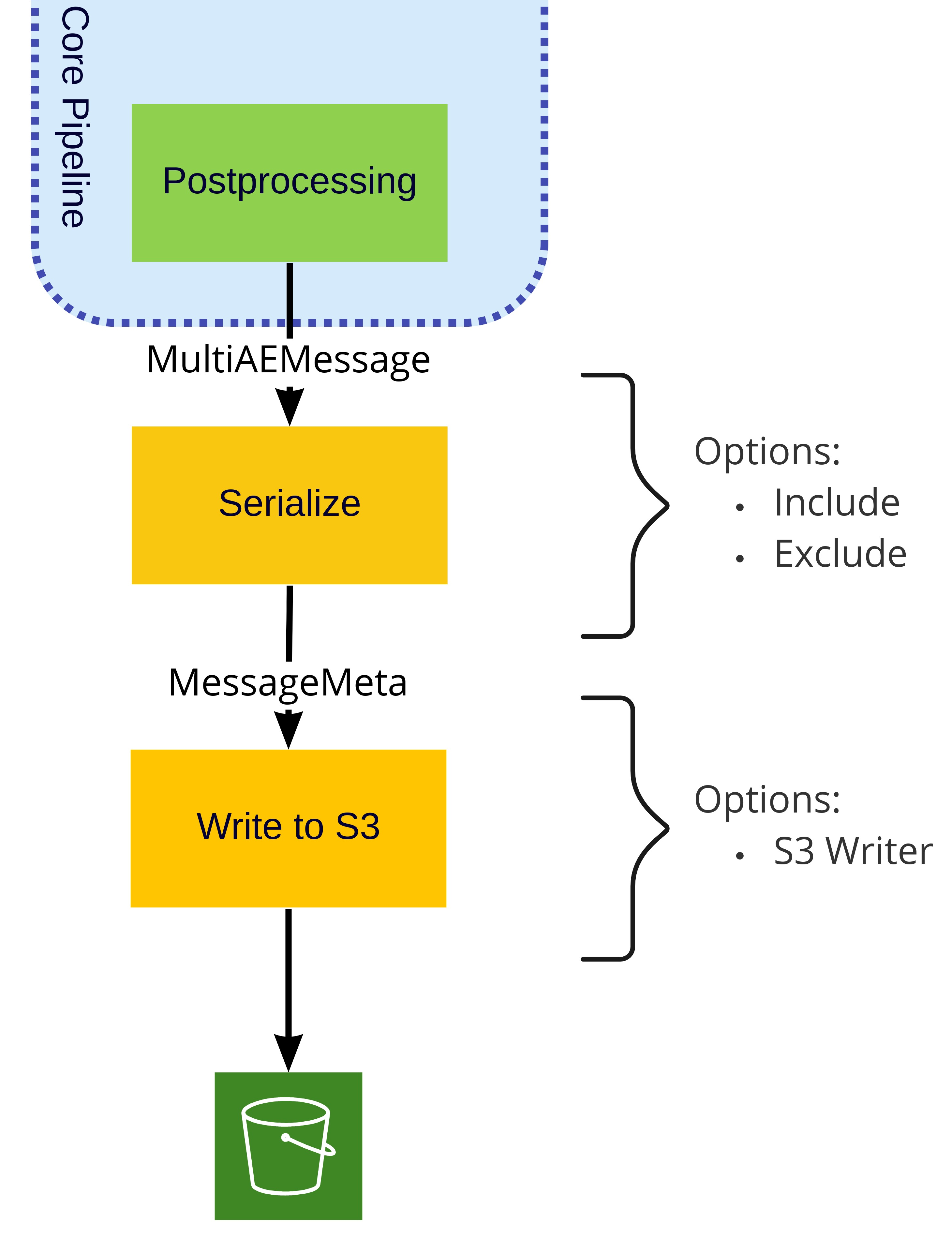
For the inference pipeline, any Morpheus output stage, such as WriteToFileStage and WriteToKafkaStage, could be used in addition to the WriteToS3Stage documented below.
Write to File Stage (WriteToFileStage)#
This final stage will write all received messages to a single output file in either CSV or JSON format.
Argument |
Type |
Description |
|---|---|---|
|
|
Morpheus configuration object |
|
|
The file to write anomalous log messages to. |
|
|
Optional, defaults to |
Write to S3 Stage (WriteToS3Stage)#
The WriteToS3Stage stage writes the resulting anomaly detections to S3. The WriteToS3Stage decouples the S3 specific operations from the Morpheus stage, and as such receives an s3_writer argument.
Argument |
Type |
Description |
|---|---|---|
|
|
Morpheus configuration object |
|
|
User defined function which receives an instance of a |
Core Pipeline#
These stages are common to both the training and inference pipelines, unlike the input and output stages these are specific to the DFP pipeline and intended to be configured but not replaceable.
Split Users Stage (DFPSplitUsersStage)#
The DFPSplitUsersStage stage receives an incoming DataFrame and emits a list of DFPMessageMeta where each DFPMessageMeta represents the records associated for a given user. This allows for downstream stages to perform all necessary operations on a per user basis.
Argument |
Type |
Description |
|---|---|---|
|
|
Morpheus configuration object |
|
|
When |
|
|
When |
|
|
List of users to exclude, when |
|
|
Limit records to a specific list of users, when |
Rolling Window Stage (DFPRollingWindowStage)#
The DFPRollingWindowStage stage performs several key pieces of functionality for DFP.
This stage keeps a moving window of logs on a per user basis
These logs are saved to disk to reduce memory requirements between logs from the same user
It only emits logs when the window history requirements are met
Until all of the window history requirements are met, no messages will be sent to the rest of the pipeline.
Configuration options for defining the window history requirements are detailed below.
It repeats the necessary logs to properly calculate log dependent features.
To support all column feature types, incoming log messages can be combined with existing history and sent to downstream stages.
For example, to calculate a feature that increments a counter for the number of logs a particular user has generated in a single day, we must have the user’s log history for the past 24 hours. To support this, this stage will combine new logs with existing history into a single
DataFrame.It is the responsibility of downstream stages to distinguish between new logs and existing history.
Argument |
Type |
Description |
|---|---|---|
|
|
Morpheus configuration object |
|
|
Exclude users with less than |
|
|
Exclude incoming batches for users where less than |
|
|
When not |
|
|
Optional path to cache directory, cached items will be stored in a subdirectory under |
Note: this stage computes a row hash for the first and last rows of the incoming
DataFrameas such all data contained must be hashable, any non-hashable values such aslistsshould be dropped or converted into hashable types in theDFPFileToDataFrameStage.
Preprocessing Stage (DFPPreprocessingStage)#
The DFPPreprocessingStage stage, the actual logic of preprocessing is defined in the input_schema argument. Since this stage occurs in the pipeline after the DFPFileBatcherStage and DFPSplitUsersStage stages all records in the incoming DataFrame correspond to only a single user within a specific time period allowing for columns to be computer on a per-user per-time period basis such as the logcount and locincrement features mentioned above. Making the type of processing performed in this stage different from those performed in the DFPFileToDataFrameStage.
Argument |
Type |
Description |
|---|---|---|
|
|
Morpheus configuration object |
|
|
Schema specifying columns to be included in the output |
Training Pipeline#
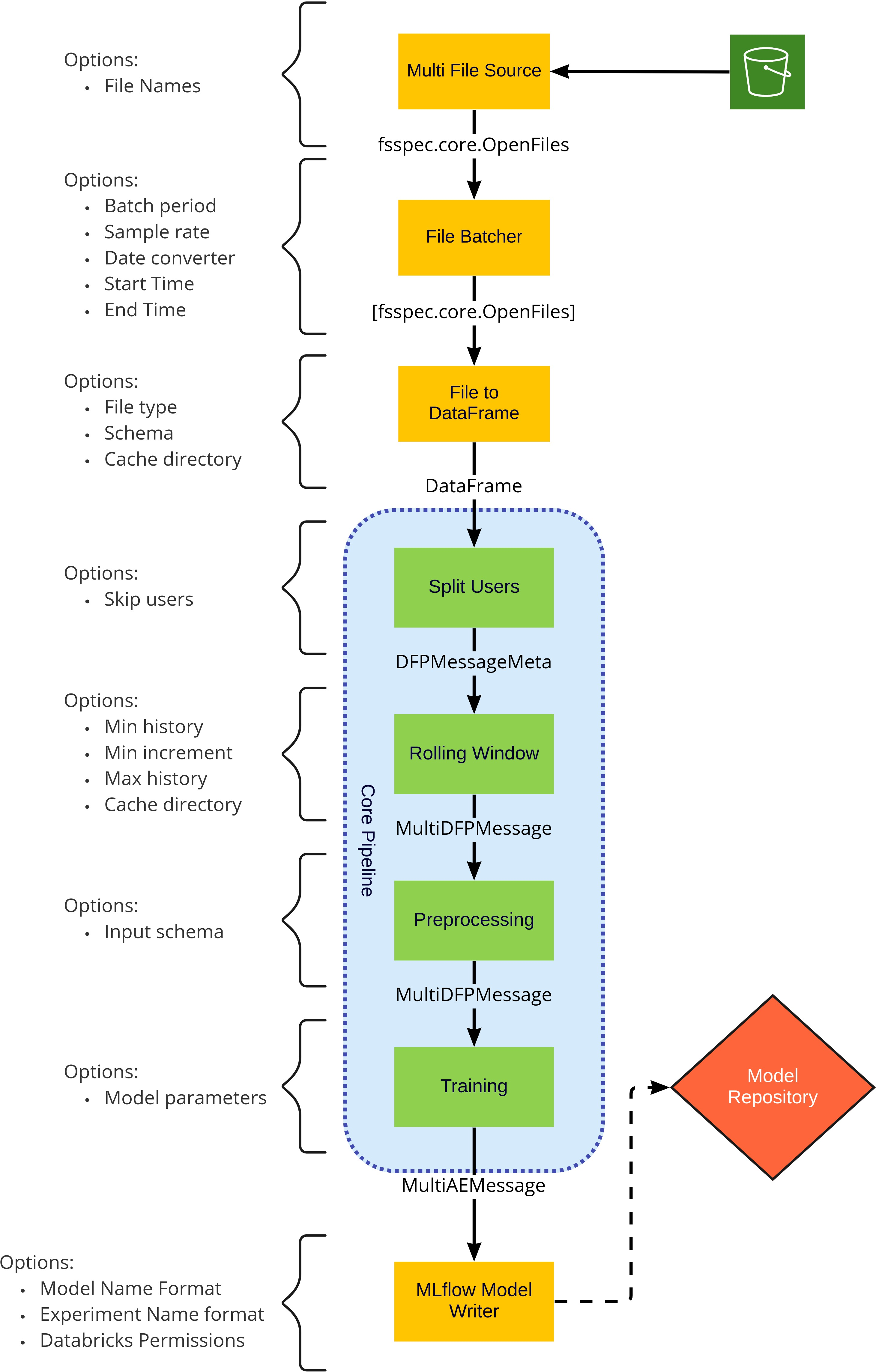
Training must begin with the generic user model which is trained with the logs from all users. This model serves as a fallback model for users and accounts without sufficient training data. The name of the generic user is defined in the ae.fallback_username attribute of the Morpheus configuration object and defaults to generic_user.
After training the generic model, individual user models can be trained. Individual user models provide better accuracy but require sufficient data. Many users do not have sufficient data to train the model accurately.
Training Stages#
Training Stage (DFPTraining)#
The DFPTraining trains a model for each incoming DataFrame and emits an instance of morpheus.messages.ControlMessage containing the trained model.
Argument |
Type |
Description |
|---|---|---|
|
|
Morpheus configuration object |
|
|
Optional dictionary of keyword arguments to be used when constructing the model. Refer to |
|
|
Number of training epochs. Default is 30. |
|
|
Proportion of the input dataset to use for training validation. Should be between 0.0 and 1.0. Default is 0.0. |
MLflow Model Writer Stage (DFPMLFlowModelWriterStage)#
The DFPMLFlowModelWriterStage stage publishes trained models into MLflow, skipping any model which lacked sufficient training data (current required minimum is 300 log records).
Argument |
Type |
Description |
|---|---|---|
|
|
Morpheus configuration object |
|
|
Optional format string to control the name of models stored in MLflow, default is |
|
|
Optional format string to control the experiment name for models stored in MLflow, default is |
|
|
Optional, when not |
Note: If using a remote MLflow server, users will need to call
mlflow.set_tracking_uribefore starting the pipeline.
Inference Pipeline#
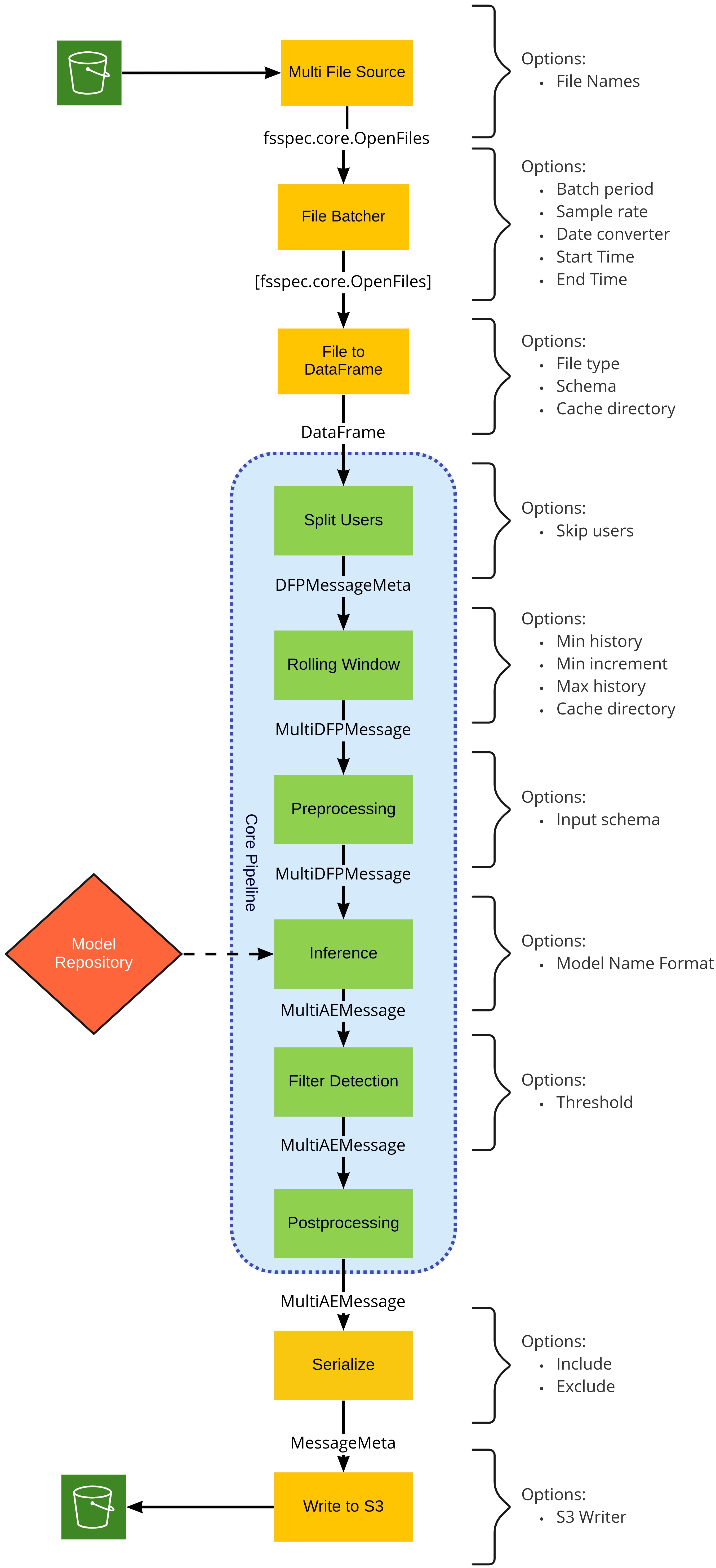
Inference Stages#
Inference Stage (DFPInferenceStage)#
The DFPInferenceStage stage loads models from MLflow and performs inferences against those models. This stage emits a message containing the original DataFrame along with new columns containing the z score (mean_abs_z), as well as the name and version of the model that generated that score (model_version). For each feature in the model, three additional columns will also be added:
<feature name>_loss: The loss<feature name>_z_loss: The loss z-score<feature name>_pred: The predicted value
For a hypothetical feature named result, the three added columns will be: result_loss, result_z_loss, result_pred.
For performance models fetched from MLflow are cached locally and are cached for up to 10 minutes allowing updated models to be routinely updated. In addition to caching individual models, the stage also maintains a cache of which models are available, so a newly trained user model published to MLflow won’t be visible to an already running inference pipeline for up to 10 minutes.
For any user without an associated model in MLflow, the model for the generic user is used. The name of the generic user is defined in the ae.fallback_username attribute of the Morpheus configuration object defaults to generic_user.
Argument |
Type |
Description |
|---|---|---|
|
|
Morpheus configuration object |
|
|
Format string to control the name of models fetched from MLflow. Currently available field names are: |
Filter Detection Stage (FilterDetectionsStage)#
The FilterDetectionsStage stage filters the output from the inference stage for any anomalous messages. Logs which exceed the specified Z-Score will be passed onto the next stage. All remaining logs which are below the threshold will be dropped. For the purposes of the DFP pipeline, this stage is configured to use the mean_abs_z column of the DataFrame as the filter criteria.
Name |
Type |
Default |
Description |
|---|---|---|---|
|
|
|
The threshold value above which logs are considered to be anomalous. The default is |
|
|
|
When the |
|
|
|
Indicates if the filter criteria exists in an output tensor ( |
|
|
|
Name of the tensor ( |
Post Processing Stage (DFPPostprocessingStage)#
The DFPPostprocessingStage stage adds a new event_time column to the DataFrame indicating the time which Morpheus detected the anomalous messages, and replaces any NAN values with the a string value of 'NaN'.