

Host Ingestion Failures
Use this playbook when a host does not enter the managed pool after being added to a site.
Ingestion Flow
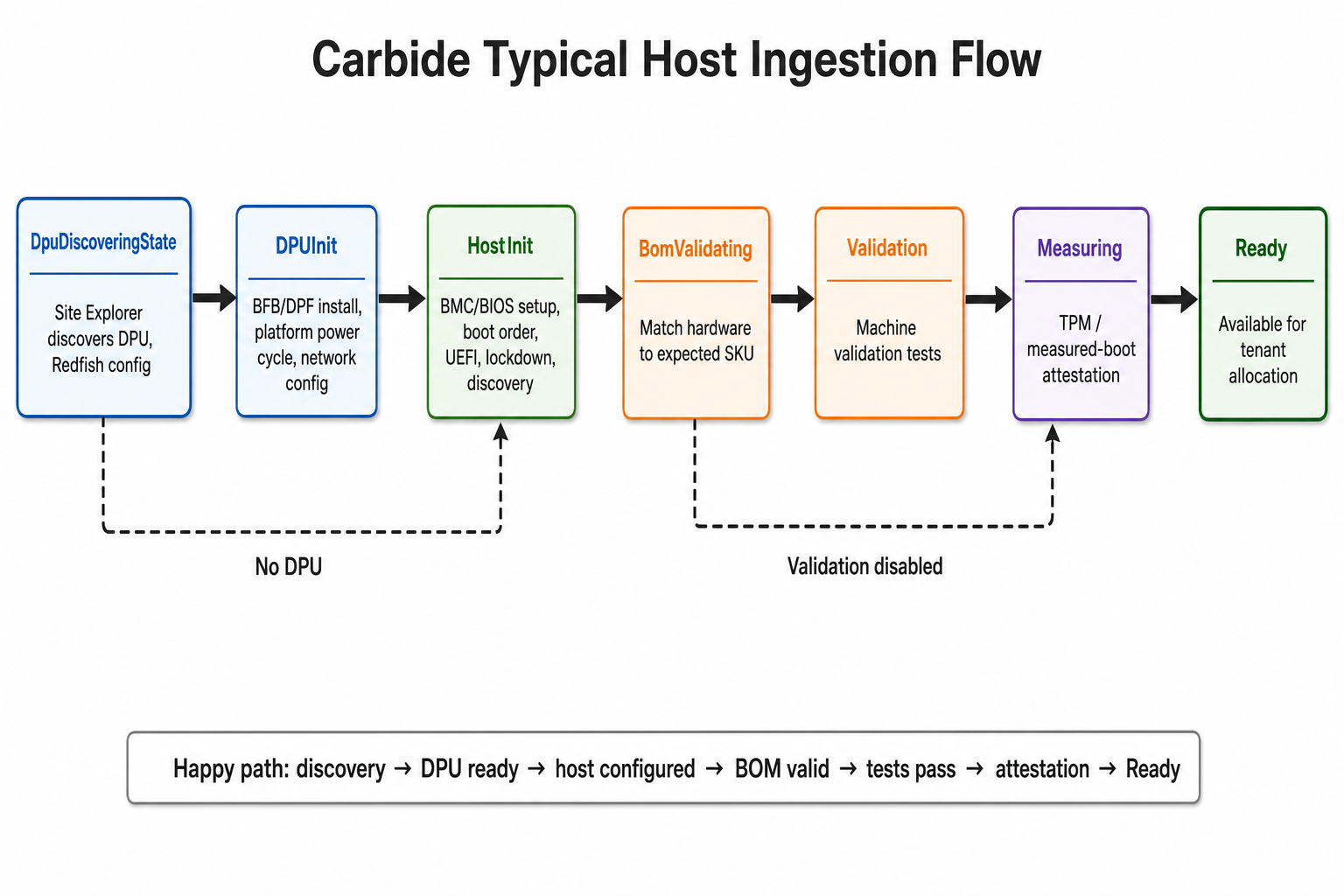
Quick Checks
- Confirm the host is listed in expected machines.
- Confirm the host BMC is reachable over the out-of-band network.
- Confirm BMC credentials are available through Vault.
- Check Site Explorer output.
- Check DHCP and PXE/HTTP boot logs.
- Check
nico-scoutlogs on the host. - Check validation and SKU validation results.
Expected Machine
Confirm the host exists in NICo inventory or expected-machine state.
If the host is missing, fix the expected-machine source before debugging host boot or discovery.
BMC and Redfish
NICo cannot ingest a host if it cannot reach the BMC.
Check:
- BMC IP is reachable from the site controller.
- BMC credentials are present and valid.
- Vault access from
nico-apiis healthy. - Site Explorer can scrape the endpoint.
Look in nico-api logs for:
- Redfish client creation errors
- missing credentials
- HTTP 401 or 403
- TLS failures
- timeout or route failures
DHCP and PXE
Host discovery depends on DHCP and PXE/HTTP boot.
Check:
Common signs:
Scout Logs
When the discovery image boots, nico-scout reports host details back to NICo.
On the host:
Look for:
- API reachability failures
- TLS or root CA problems
- hardware enumeration failures
- NIC or DPU pairing problems
- SKU or validation input mismatch
Check the Scout version
NICo records the build version of Scout most recently observed during machine discovery. Use this value to determine whether ingestion or validation failures may correlate with a specific Scout release:
The last_scout_observed_version value is updated whenever Scout registers the
host during discovery and remains associated with the machine after assignment.
It identifies the last discovery image, not necessarily a currently running agent.
The value is null for machines that have not completed discovery with a Scout
version that reports it, and a later Scout discovery replaces the stored value.
Validation and SKU
After discovery, ingestion may block on validation.
If validation failed, avoid force deleting the host until the failed test and hardware expectation are understood.
Recovery
Avoid deleting and retrying unless the object has not been created on the site or the lifecycle owner confirms it is safe.