

Driver Installation#
Attention
The NVIDIA GPU and NIC drivers only need to be installed to support both native Ubuntu software development and containerized work on the same machine. For more information, refer to Verify Installed Drivers.
Install the DOCA-OFED Driver#
Download the DOCA host repository package for your platform from the NVIDIA DOCA Downloads page.
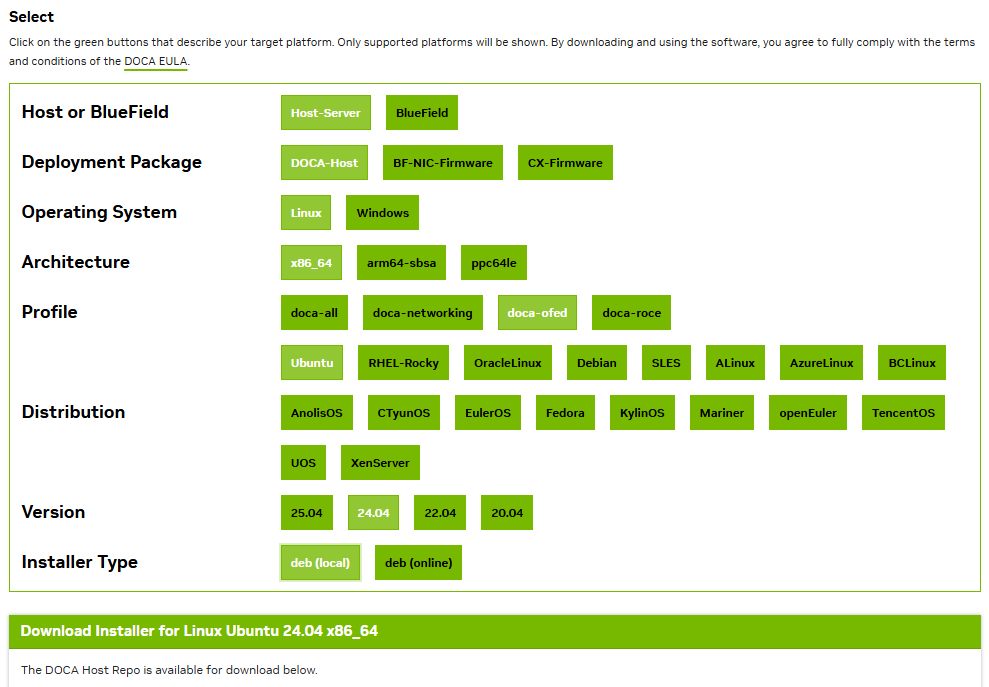
Install the repository package:
sudo dpkg -i <repo_file>
Update the package index:
sudo apt-get update
Verify that your host kernel version is supported. If your kernel is not listed in the Supported Host OS per DOCA-Host Installation Profile section, refer to the DOCA Extra Package and doca-kernel-support section.
Ensure that the installed kernel headers match the version of the running kernel.
Note
If the
/lib/modules/$(uname -r)/builddirectory exists, the kernel headers are installed.Install
doca-ofed:sudo apt install -y doca-ofed mlnx-fw-updater
Load the driver:
sudo /etc/init.d/openibd restart
Install the NVIDIA GPU Driver#
List the available NVIDIA GPU drivers for your system:
sudo ubuntu-drivers list
Install the driver:
sudo apt install nvidia-driver-580
Restart the system:
sudo reboot
Load nvidia-peermem Module#
Load the nvidia-peermem module:
sudo modprobe nvidia-peermem
echo "nvidia-peermem" | sudo tee /etc/modules-load.d/nvidia-peermem.conf
Driver Uninstallation#
Uninstalling DOCA-OFED Driver#
Remove DOCA and related packages:
for f in $( dpkg --list | grep -E 'doca|flexio|dpa-gdbserver|dpa-stats|dpaeumgmt' | awk '{print $2}' ); do echo $f ; sudo apt remove --purge $f -y ; done
sudo /usr/sbin/ofed_uninstall.sh --force
sudo apt-get autoremove
Uninstall the OFED driver:
sudo /usr/sbin/ofed_uninstall.sh --force
Clean up remaining dependencies:
sudo apt autoremove
Uninstalling the NVIDIA GPU Driver#
Determine the driver branch:
export DRIVER_BRANCH=$(nvidia-smi --query-gpu=driver_version --format=csv,noheader | head -n1 | cut -d. -f1)
Remove the GPU driver from your system:
sudo apt --purge remove "*nvidia*${DRIVER_BRANCH}*"
Clean up remaining dependencies and restart the system:
sudo apt autoremove
sudo reboot
Note
For more information, refer to the following NVIDIA and Ubuntu driver documentation: