
System Requirements#
General Requirements#
In production, Holoscan for Media runs on NVIDIA-Certified Systems, with a range of options so you can choose what works best for your workflow. Refer to the list of PCIe Optimized Reference Configurations (2-8-5-200 and 2-4-3-200) available from OEM partners.
In some cases, especially for evaluations or application development, you can use other hardware if it meets the requirements below:
Motherboard#
You need a motherboard that supports SR-IOV. SR-IOV (Single Root I/O Virtualization) is a technology that allows a physical PCIe device to present itself multiple times through the PCIe bus. You must enable SR-IOV support. You do not need other virtualization technologies used in OS virtualization, such as Intel Virtualization Technology (VT-x) or AMD-V, to develop or run Holoscan for Media applications.
In Holoscan for Media, SR-IOV networking enables ST 2110 streaming and multicast DNS Service Discovery (mDNS) by application containers on the same machine sharing a single network adapter. NMOS discovery requires mDNS.
Most server-grade motherboards have an explicit BIOS setting to enable SR-IOV. However, another option related to virtualization can imply the setting. Refer to BIOS Setup for more details.
CPU#
Depending on your application, you might need more or less CPU power. Holoscan for Media is an open platform, and you can use it to develop CPU-only software, such as a control-plane application. Evaluate how many physical cores (and other resources, such as memory and storage) your technology requires to run in the best conditions.
Networking Cards#
When developing ST 2110 applications, you can use ConnectX network interface cards (NICs) with the Linux PTP stack (PTP4L and PHC2SYS). This combination supports Precision Time Protocol (PTP) using the PTP Hardware Clock (PHC).
When running in SR-IOV mode, NVIDIA ConnectX network adapters can expose up to 127 Virtual Functions (VFs) for each port. You can then provision these Virtual Functions separately. Each VF acts as an additional PCIe device to the Physical Function.
GPU#
The type of GPU depends on your development platform and GPU needs. Although you can use compute-only GPUs like H100, these GPUs do not have embedded video encoders, so CPU cores encode the video. General-purpose GPUs like L40S or RTX PRO 6000 Blackwell enable high encoding density. Only GPUs starting with the Blackwell generation support YCbCr 4:2:2 10-bit formats.
You can use time slicing. To ensure maximum performance for your application, dedicate one GPU to it and another to run other testing applications, such as Holoscan for Media Media Gateway.
Tested Configurations#
The following table shows a few hardware configurations tested with NVIDIA graphics SDK and Rivermax SDK:
Note
NVIDIA designs its networking cards for server cooling. You can use them in a workstation, but you need additional cooling to prevent overheating and uncontrolled system behaviors.
Type |
Details |
|---|---|
Motherboard |
With SR-IOV support |
Network Adapters |
Refer to Rivermax supported cards |
GPU |
|
Production Configurations#
Servers#
For production, Holoscan for Media runs on NVIDIA-Certified Systems.
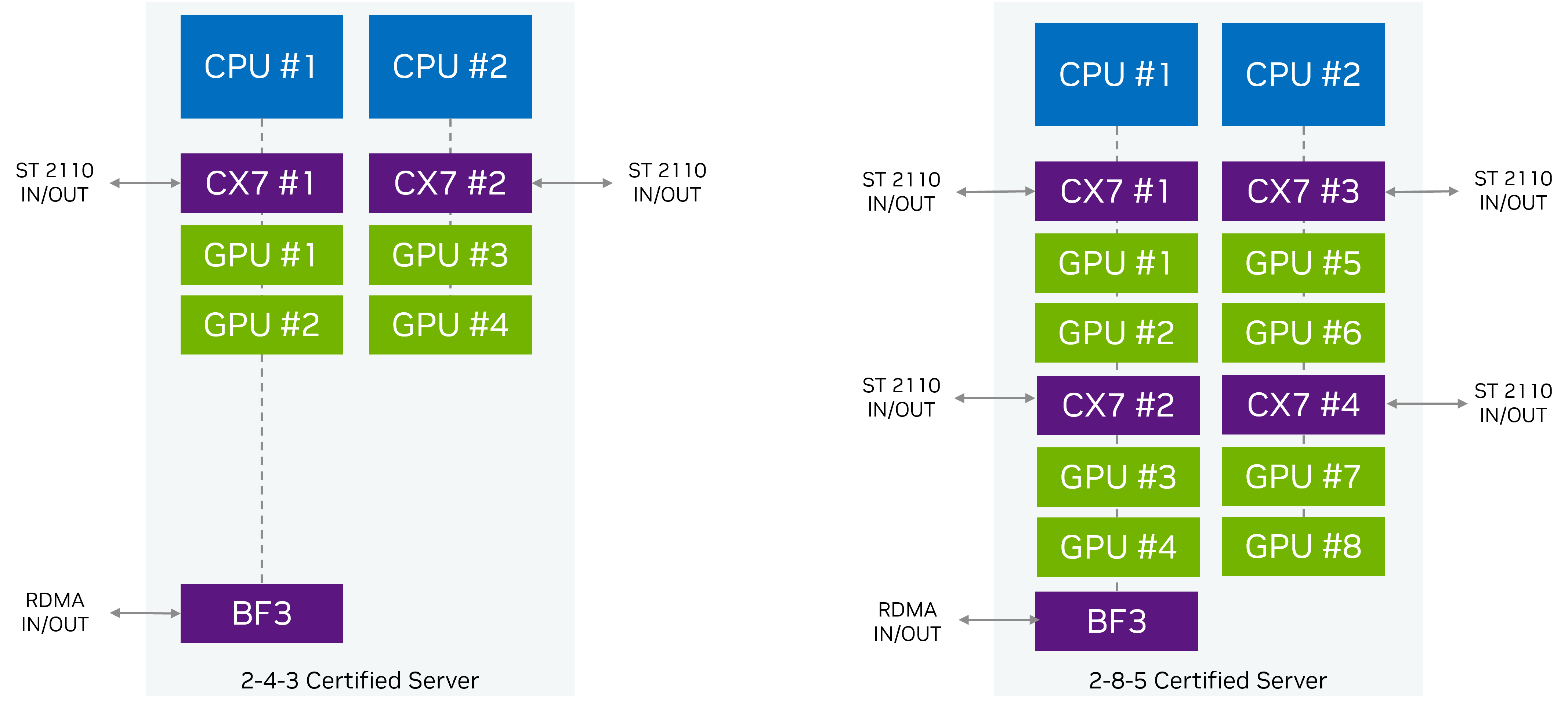
Depending on your desired GPU density, choose from the following configurations:
NVIDIA designed these reference architectures to ensure maximum throughput between the network and GPUs. Dual-port NICs provide optimal SMPTE ST 2022-7 redundant networking support.
NVIDIA recommends the following NICs:
One ConnectX-7 2x200G (MCX755106AC-HEAT / MCX755106AS-HEAT) for each pair of GPUs, which provides connectivity between servers in the cluster and the rest of the facility
Optional: one BlueField-3 2x200G (B3220) for each server, to enable communication within the cluster
Each server must use one model of GPU. NVIDIA recommends the following GPUs:
You can start production setups with one of the following configurations:
A single-node configuration with no hardware redundancy
A compact three-node cluster where all nodes act as the Kubernetes control plane and also run workloads
A standard cluster using three dedicated control-plane nodes and two or more worker nodes
Refer to Production Installation for more details.
Switches#
You need a multicast-capable and PTP-capable switch for scaling to multi-node or testing in production environments.
NVIDIA recommends 200GbE or 400GbE switches for optimal performance.
Software#
Although you can run the platform on any standard Kubernetes distribution, all Holoscan for Media QA and benchmarks use Red Hat OpenShift. NVIDIA recommends Red Hat OpenShift for production deployments. Red Hat OpenShift also offers full enterprise support.
This documentation provides all required steps to install Red Hat OpenShift from bare-metal servers through the OpenShift console for single-node, three-node, or five-node clusters. Refer to Production Installation for more details.
Developer Configurations#
Hardware#
NVIDIA recommends NVIDIA-Certified Systems but does not require them. Follow the guidelines in the General Requirements.
Switches#
You can use a switch, but it is not necessary for development. A single loop-back cable between the two ports of the networking card is sufficient to process uncompressed media during development and validation. For example, you can use a Direct Attach Copper (DAC) cable.
Software#
NVIDIA recommends Red Hat OpenShift for testing applications developed for Holoscan for Media. You can also use an automated installation of open-source Kubernetes on Ubuntu with NVIDIA Cloud Native Stack. Refer to Local Developer Setup for more details.