Optimize for Tokens/GPU Throughput

View as Markdown

Run in Google Colab

Optimize for Tokens/GPU Throughput

About

Learn how to use the NeMo Platform Customizer to create a LoRA (Low-Rank Adaptation) customization job optimized for higher tokens/GPU throughput and lower runtime.

In this tutorial, you will:

  1. Fine-tune meta-llama/Llama-3.2-1B-Instruct on the SQuAD dataset using LoRA, with sequence packing enabled for one run and disabled for another.
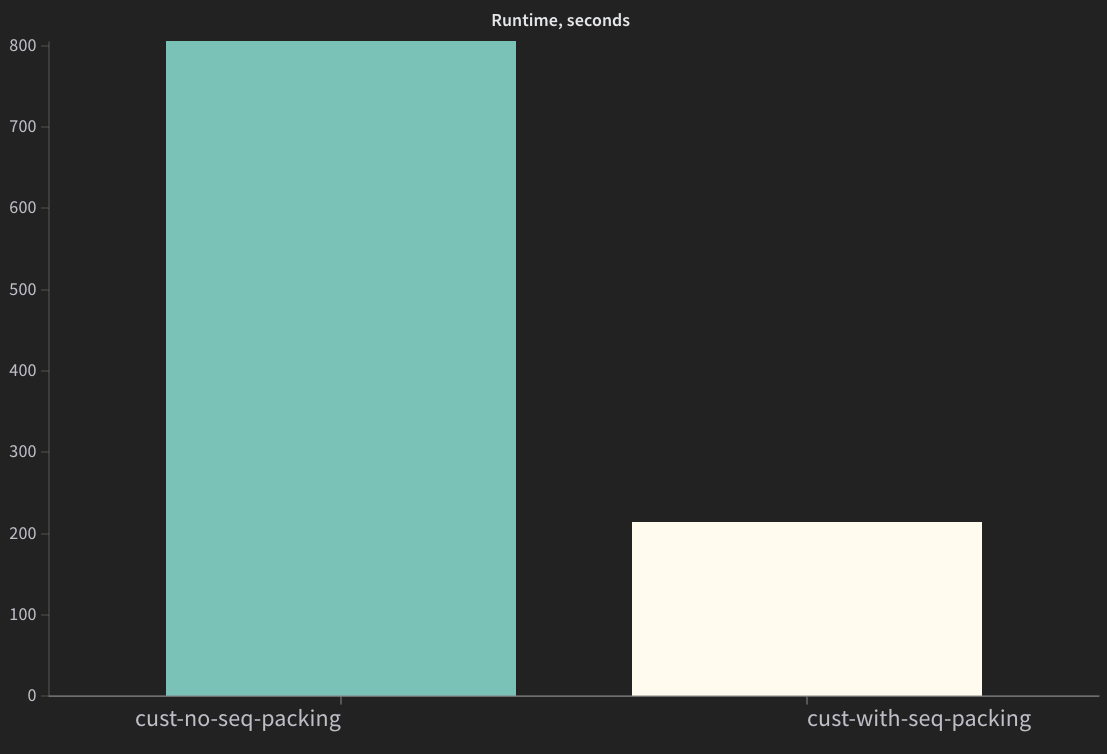
  2. Compare training runtime, GPU utilization, and memory allocation between the two runs.
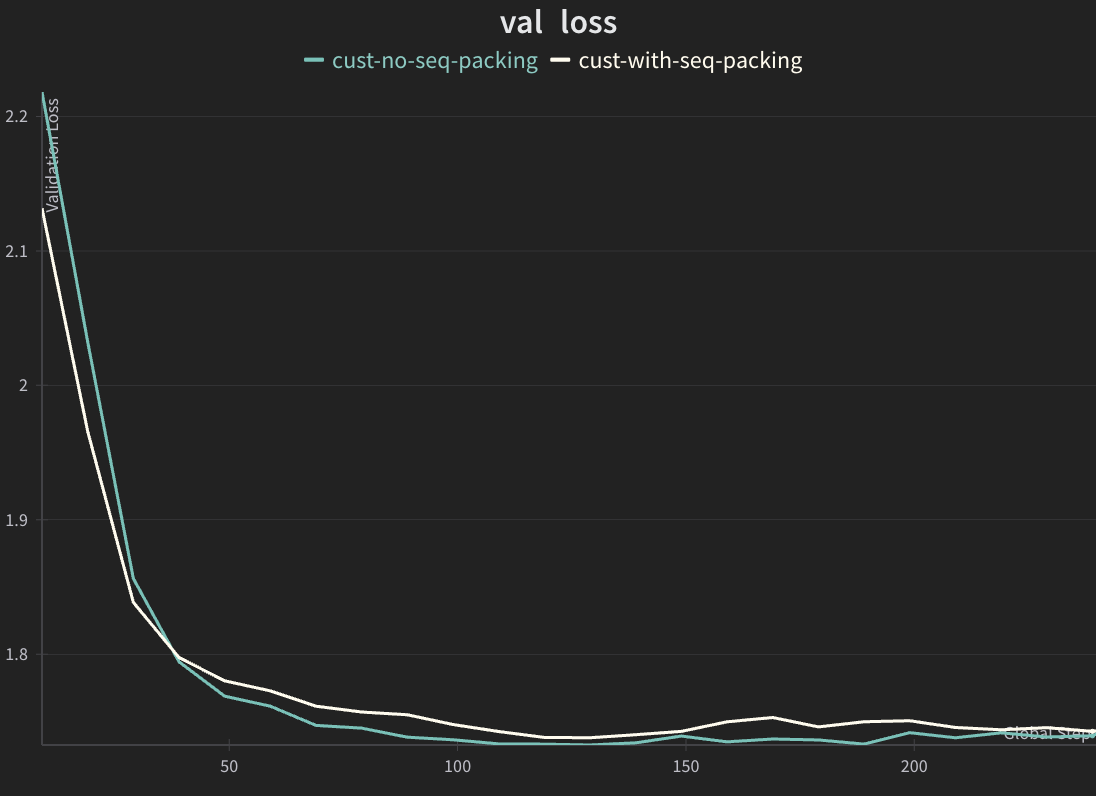
  3. Verify that validation loss remains comparable, confirming that sequence packing improves throughput without sacrificing model quality.

Note: While this tutorial demonstrates sequence packing with LoRA, the optimization is also available for all_weights (full) SFT customization jobs.

Prerequisites

Before starting this tutorial, ensure you have:

  1. Completed the Quickstart to install and deploy NeMo Platform locally
  2. Installed the Python SDK (PyPI wrapper: pip install "nemo-platform[all]"; source checkout: run make bootstrap from the repository root)

Quick Start

1. Initialize SDK

The SDK needs to know your NeMo Platform server URL. By default, http://localhost:8080 is used in accordance with the Quickstart guide. If NeMo Platform is running at a custom location, you can override the URL by setting the NMP_BASE_URL environment variable:

1export NMP_BASE_URL=<YOUR_NMP_BASE_URL>
1import json
2import os
3from nemo_platform import NeMoPlatform, ConflictError
4
5NMP_BASE_URL = os.environ.get("NMP_BASE_URL", "http://localhost:8080")
6client = NeMoPlatform(
7 base_url=NMP_BASE_URL,
8 workspace="default"
9)

2. Create Dataset FileSet and Upload Training Data

Install additional dependencies if they are not installed in your Python environment.

The cell below automatically detects your environment and uses:

  • uv pip install if you’re in a uv-managed virtual environment
  • pip install otherwise

Required packages:

  • datasets - Download the public rajpurkar/squad dataset
  • pandas - Compare job results in table format
  • matplotlib - Plot live training metrics (loss curves, GPU utilization)
  • nvidia-ml-py - Collect GPU VRAM and compute utilization metrics during training
1if command -v uv >/dev/null 2>&1 && [ -n "$VIRTUAL_ENV" ]; then
2 uv pip install datasets pandas matplotlib nvidia-ml-py
3else
4 pip install datasets pandas matplotlib nvidia-ml-py
5fi

Download rajpurkar/squad Dataset

SQuAD (Stanford Question Answering Dataset) is a reading comprehension dataset consisting of questions posed on Wikipedia articles, where the answer is a segment of text from the corresponding passage.

1import json
2import os
3from pathlib import Path
4from datasets import load_dataset, Dataset, DatasetDict
5
6# Configuration
7SEED = 1234
8DATASET_NAME = "sft-dataset"
9
10# Convert SQuAD format to prompt/completion format and save to JSONL
11def convert_squad_to_sft_format(example):
12 """Convert SQuAD format to prompt/completion format for SFT training."""
13 prompt = f"Context: {example['context']} Question: {example['question']} Answer:"
14 completion = example["answers"]["text"][0] # Take the first answer
15 return {"prompt": prompt, "completion": completion}
16
17# Load the SQuAD dataset from Hugging Face
18print("Loading dataset rajpurkar/squad")
19ds = load_dataset("rajpurkar/squad")
20if not isinstance(ds, DatasetDict):
21 raise ValueError("Dataset does not contain expected splits")
22
23print("Loaded dataset")
24
25# For the purpose of this tutorial, we'll use a subset of the dataset
26# We use a reduced dataset size (3000 training/300 validation samples) to keep tutorial runtime manageable
27# while still demonstrating the performance benefits of sequence packing. The larger the dataset,
28# the better the model will perform but the longer the training will take.
29training_size = 3000
30validation_size = 300
31DATASET_PATH = Path(DATASET_NAME).absolute()
32
33# Get training split and verify it's a Dataset (not IterableDataset)
34train_dataset = ds["train"]
35validation_dataset = ds["validation"]
36assert isinstance(train_dataset, Dataset), "Expected Dataset type"
37assert isinstance(validation_dataset, Dataset), "Expected Dataset type"
38
39# Select subsets and save to JSONL files
40training_ds = train_dataset.select(range(training_size))
41validation_ds = validation_dataset.select(range(validation_size))
42
43# Transform to SFT format (prompt/completion)
44training_ds = training_ds.map(convert_squad_to_sft_format, remove_columns=training_ds.column_names)
45validation_ds = validation_ds.map(convert_squad_to_sft_format, remove_columns=validation_ds.column_names)
46
47# Create directory if it doesn't exist
48# Note: This will create a local 'sft-dataset/' directory with training.jsonl and validation.jsonl files
49os.makedirs(DATASET_PATH, exist_ok=True)
50
51# Save subsets to JSONL files
52training_ds.to_json(f"{DATASET_PATH}/training.jsonl")
53validation_ds.to_json(f"{DATASET_PATH}/validation.jsonl")
54
55print(f"Saved training.jsonl with {len(training_ds)} rows")
56print(f"Saved validation.jsonl with {len(validation_ds)} rows")
1# Create fileset to store SFT training data
2
3try:
4 client.files.filesets.create(
5 workspace="default",
6 name=DATASET_NAME,
7 description="SFT training data"
8 )
9 print(f"Created fileset: {DATASET_NAME}")
10except ConflictError:
11 print(f"Fileset '{DATASET_NAME}' already exists, continuing...")
12
13# Upload training data files individually to ensure correct structure
14client.files.upload(
15 local_path=f"{DATASET_PATH}/", # Trailing slash uploads directory contents to fileset root
16 remote_path="",
17 fileset=DATASET_NAME,
18 workspace="default"
19)
20
21# Validate training data is uploaded correctly
22print("Training data:")
23print(json.dumps([f.model_dump() for f in client.files.list(fileset=DATASET_NAME, workspace="default").data], indent=2))

3. Secrets Setup

If you plan to use NGC or HuggingFace models, you will need to configure authentication:

  • NGC models (ngc:// URIs): Requires NGC API key
  • HuggingFace models (hf:// URIs): Requires HF token for gated/private models

Configure these as secrets in your platform. Refer to Managing Secrets for detailed instructions.

Get your credentials to access base models:


Quick Setup Example

This tutorial uses the meta-llama/Llama-3.2-1B-Instruct model from HuggingFace. Ensure that you have sufficient permissions to download the model. If you cannot access the files on the meta-llama/Llama-3.2-1B-Instruct Hugging Face page, request access.

HuggingFace Authentication:

  • For gated models (Llama, Gemma), you must provide a HuggingFace token via the token_secret parameter
  • Get your token from HuggingFace Settings (requires Read access)
  • Accept the model’s terms on the HuggingFace model page before using it. Example: meta-llama/Llama-3.2-1B-Instruct
  • For public models, you can omit the token_secret parameter when creating a fileset for the model in the next step.
1# Export the HF_TOKEN and NGC_API_KEY environment variables if they are not already set
2HF_TOKEN = os.getenv("HF_TOKEN")
3NGC_API_KEY = os.getenv("NGC_API_KEY")
4
5
6def create_or_get_secret(name: str, value: str | None, label: str):
7 if not value:
8 raise ValueError(f"{label} environment variable is not set. Set it and try again.")
9 try:
10 secret = client.secrets.create(
11 name=name,
12 workspace="default",
13 value=value,
14 )
15 print(f"Created secret: {name}")
16 return secret
17 except ConflictError:
18 print(f"Secret '{name}' already exists, continuing...")
19 return client.secrets.retrieve(name=name, workspace="default")
20
21
22# Create HuggingFace token secret
23hf_secret = create_or_get_secret("hf-token", HF_TOKEN, "HF_TOKEN")
24print("HF_TOKEN secret:")
25print(hf_secret.model_dump_json(indent=2))
26
27# Create NGC API key secret
28# Uncomment the line below if you have NGC API Key and want to finetune NGC models
29# ngc_api_key = create_or_get_secret("ngc-api-key", NGC_API_KEY, "NGC_API_KEY")

4. Create Base Model FileSet

Create a fileset pointing to the meta-llama/Llama-3.2-1B-Instruct model on HuggingFace. This step creates a pointer to the model on Hugging Face and does not download it. The model is downloaded at job creation time.

Note: for public models, you can omit the token_secret parameter when creating a model fileset.

1import time
2from nemo_platform.types.files import HuggingfaceStorageConfigParam
3
4HF_REPO_ID = "meta-llama/Llama-3.2-1B-Instruct"
5MODEL_NAME = "llama-3-2-1b-base"
6
7# Ensure you have a HuggingFace token secret created
8# Create a fileset pointing to the desired HuggingFace model
9try:
10 base_model_fs = client.files.filesets.create(
11 workspace="default",
12 name=MODEL_NAME,
13 description="Llama 3.2 1B base model from HuggingFace",
14 storage=HuggingfaceStorageConfigParam(
15 type="huggingface",
16 # repo_id is the full model name from Hugging Face
17 repo_id=HF_REPO_ID,
18 repo_type="model",
19 # we use the secret created in the previous step
20 token_secret=hf_secret.name
21 )
22 )
23 print(f"Created base model fileset: {MODEL_NAME}")
24except ConflictError:
25 print(f"Base model fileset already exists. Skipping creation.")
26 base_model_fs = client.files.filesets.retrieve(
27 workspace="default",
28 name=MODEL_NAME,
29 )
30
31# Create the Model Entity representation.
32try:
33 base_model = client.models.create(
34 workspace="default",
35 name=MODEL_NAME,
36 fileset=f"default/{MODEL_NAME}",
37 )
38 print(f"Created Model Entity: {MODEL_NAME}")
39except ConflictError:
40 print(f"Base model already exists. Updating fileset if different.")
41 base_model = client.models.update(
42 workspace="default",
43 name=MODEL_NAME,
44 fileset=f"default/{MODEL_NAME}",
45 )
46
47print(f"\nBase model fileset: fileset://default/{base_model.name}")
48print("Base model fileset files list:")
49print(json.dumps([f.model_dump() for f in client.files.list(fileset=MODEL_NAME, workspace="default").data], indent=2))
50
51# Wait for ModelSpec to be populated from the checkpoint
52print("\nWaiting for ModelSpec to be populated...")
53SPEC_TIMEOUT_SECONDS = 120
54spec_start = time.time()
55while not base_model.spec:
56 if time.time() - spec_start > SPEC_TIMEOUT_SECONDS:
57 raise TimeoutError(f"ModelSpec not populated within {SPEC_TIMEOUT_SECONDS} seconds")
58 time.sleep(2)
59 base_model = client.models.retrieve(
60 workspace="default",
61 name=MODEL_NAME,
62 )
63
64print(f"ModelSpec populated: {base_model.spec}")

5. Create LoRA Job with Sequence Packing

Create a LoRA customization job with sequence packing enabled via AutomodelJobInput (batch.sequence_packing=True).

1import uuid
2from nemo_automodel_plugin.schema import AutomodelJobInput
3
4SEQUENCE_PACKING_ENABLED = True
5
6job_suffix = uuid.uuid4().hex[:4]
7JOB_NAME = f"packing-job-{job_suffix}"
8PACK_OUTPUT_NAME = f"packing-out-{job_suffix}"
9
10spec = AutomodelJobInput(
11 model=f"default/{base_model.name}",
12 dataset={"training": f"default/{DATASET_NAME}"},
13 training={
14 "training_type": "sft",
15 "finetuning_type": "lora",
16 "max_seq_length": 4096,
17 },
18 schedule={"epochs": 1, "val_check_interval": 0.1},
19 batch={
20 "global_batch_size": 64,
21 "micro_batch_size": 1,
22 "sequence_packing": SEQUENCE_PACKING_ENABLED,
23 },
24 optimizer={"learning_rate": 5e-5},
25 parallelism={"num_gpus_per_node": 1},
26 output={"name": PACK_OUTPUT_NAME},
27)
28
29job_with_sequence_packing = client.customization.automodel.jobs.create(
30 spec=spec, workspace="default", name=JOB_NAME
31)
32
33print(f"Submitted job: {job_with_sequence_packing.job.name}")
34print(f"Output adapter: {PACK_OUTPUT_NAME}")

6. Track Finetuning Progress

A training job contains multiple steps:

  • Model and dataset downloading
  • Finetuning where LoRA adapter weights are trained
  • Creating a fileset entry for the finetuned model
  • Finetuned weights uploading

The elapsed time printed below reflects progress of the entire job. We compare the time taken by the finetuning step for both jobs in the last section of this tutorial.

Define Helper Functions

1# Helpers to draw GPU VRAM Utilization and Validation Loss
2import matplotlib.pyplot as plt
3try:
4 import pynvml
5 _PYNVML_AVAILABLE = True
6except ImportError:
7 _PYNVML_AVAILABLE = False
8 print("Note: Install nvidia-ml-py ('pip install nvidia-ml-py' or 'uv pip install nvidia-ml-py') to enable live GPU metrics.")
9
10# ---------------------------------------------------------------------------
11# GPU metrics collection (nvidia-ml-py; import name is pynvml)
12# ---------------------------------------------------------------------------
13
14def _get_gpu_snapshot() -> tuple[list[float], list[float]]:
15 """Return (vram_usage_pcts, compute_util_pcts) for each GPU."""
16 if not _PYNVML_AVAILABLE:
17 return [], []
18 pynvml.nvmlInit()
19 try:
20 vram, util = [], []
21 for i in range(pynvml.nvmlDeviceGetCount()):
22 h = pynvml.nvmlDeviceGetHandleByIndex(i)
23 mem = pynvml.nvmlDeviceGetMemoryInfo(h)
24 rates = pynvml.nvmlDeviceGetUtilizationRates(h)
25 vram.append(int(mem.used) / int(mem.total) * 100)
26 util.append(float(rates.gpu))
27 return vram, util
28 finally:
29 pynvml.nvmlShutdown()
30
31
32# ---------------------------------------------------------------------------
33# Dashboard drawing helpers
34# ---------------------------------------------------------------------------
35
36_PALETTE = {
37 "val_loss": "#E74C3C",
38 "train_loss": "#F39C12",
39 "vram": ["#3498DB", "#9B59B6", "#1ABC9C", "#E67E22"],
40 "util": ["#2ECC71", "#E74C3C", "#3498DB", "#F1C40F"],
41 "grid": "#ECECEC",
42 "title": "#2C3E50",
43 "subtitle": "#7F8C8D",
44 "spine": "#CCCCCC",
45 "tick": "#666666",
46}
47
48
49def _style_axis(ax):
50 """Apply shared cosmetic styling to a subplot axis."""
51 ax.set_facecolor("white")
52 ax.grid(True, alpha=0.4, color=_PALETTE["grid"], linewidth=0.8)
53 for spine in ("top", "right"):
54 ax.spines[spine].set_visible(False)
55 ax.spines["left"].set_color(_PALETTE["spine"])
56 ax.spines["bottom"].set_color(_PALETTE["spine"])
57 ax.tick_params(colors=_PALETTE["tick"], labelsize=9)
58
59
60def _plot_line(ax, xs, ys, color, label, fill=True):
61 """Plot a time series, gracefully skipping None values."""
62 pts = [(x, y) for x, y in zip(xs, ys) if y is not None]
63 if not pts:
64 return
65 px, py = zip(*pts)
66 ax.plot(
67 px, py, color=color, linewidth=2.2,
68 marker="o", markersize=4,
69 markerfacecolor="white", markeredgewidth=1.8, markeredgecolor=color,
70 label=label, zorder=3,
71 )
72 if fill:
73 ax.fill_between(px, py, alpha=0.08, color=color)
74
75
76def _plot_gpu_panel(ax, xs, history, colors, fallback_label):
77 """Plot per-GPU time series with area fill."""
78 if not history or not history[0]:
79 ax.text(
80 0.5, 0.5, "No GPU data", transform=ax.transAxes,
81 ha="center", va="center", fontsize=11, color="#AAAAAA",
82 )
83 return
84 n_gpus = max(len(snap) for snap in history)
85 for g in range(n_gpus):
86 vals = [snap[g] if g < len(snap) else 0 for snap in history]
87 c = colors[g % len(colors)]
88 label = f"GPU {g}" if n_gpus > 1 else fallback_label
89 ax.plot(xs[: len(vals)], vals, color=c, linewidth=2, label=label)
90 ax.fill_between(xs[: len(vals)], vals, alpha=0.08, color=c)
91 if n_gpus > 1:
92 ax.legend(fontsize=9, framealpha=0.9, edgecolor="#DDD")
93
94
95def _draw_dashboard(
96 elapsed_mins, val_losses, train_losses,
97 vram_history, util_history,
98 job_name, status_str, step_str, elapsed_str,
99):
100 """Render a live 1x3 training dashboard."""
101 fig, axes = plt.subplots(1, 3, figsize=(20, 5.5))
102 fig.patch.set_facecolor("#FAFBFC")
103
104 fig.suptitle(
105 job_name, fontsize=15, fontweight="bold",
106 color=_PALETTE["title"], y=1.10,
107 )
108 fig.text(
109 0.5, 1.01,
110 f"{status_str} | {step_str} | {elapsed_str}",
111 ha="center", fontsize=13, color=_PALETTE["subtitle"],
112 )
113
114 for ax in axes:
115 _style_axis(ax)
116
117 # -- Panel 1: Loss curves --
118 _plot_line(axes[0], elapsed_mins, val_losses, _PALETTE["val_loss"], "Val Loss", fill=True)
119 _plot_line(axes[0], elapsed_mins, train_losses, _PALETTE["train_loss"], "Train Loss", fill=False)
120 axes[0].set_title("Train/Validation Loss", fontsize=13, fontweight="bold", color=_PALETTE["title"], pad=12)
121 axes[0].set_xlabel("Time (min)", fontsize=10, color="#666")
122 axes[0].set_ylabel("Loss", fontsize=10, color="#666")
123 if any(v is not None for v in val_losses + train_losses):
124 axes[0].legend(fontsize=9, framealpha=0.9, edgecolor="#DDD")
125
126 # -- Panel 2: GPU VRAM usage --
127 _plot_gpu_panel(axes[1], elapsed_mins, vram_history, _PALETTE["vram"], "VRAM")
128 axes[1].set_title("GPU VRAM Usage", fontsize=13, fontweight="bold", color=_PALETTE["title"], pad=12)
129 axes[1].set_xlabel("Time (min)", fontsize=10, color="#666")
130 axes[1].set_ylabel("Usage (%)", fontsize=10, color="#666")
131 axes[1].set_ylim(-2, 105)
132
133 # -- Panel 3: GPU utilization --
134 _plot_gpu_panel(axes[2], elapsed_mins, util_history, _PALETTE["util"], "Utilization")
135 axes[2].set_title("GPU Utilization", fontsize=13, fontweight="bold", color=_PALETTE["title"], pad=12)
136 axes[2].set_xlabel("Time (min)", fontsize=10, color="#666")
137 axes[2].set_ylabel("Utilization (%)", fontsize=10, color="#666")
138 axes[2].set_ylim(-2, 105)
139
140 plt.tight_layout(rect=[0, 0, 1, 0.98])
141 plt.show()

Monitor the Job Until Completion

The cell below polls the job status every 10 seconds and renders a live dashboard with validation loss, GPU VRAM usage, and GPU utilization charts. The charts appear empty at first while the model and dataset download; training metrics and GPU activity populate after the finetuning step begins.

Note: This is additional code. You can also use the Weights & Biases or MLflow integrations.

1import time
2from typing import cast
3from IPython.display import clear_output
4from nemo_platform.types.shared import PlatformJobStatusResponse
5
6# Timeout set to 30 minutes to accommodate typical LoRA training duration for this dataset size.
7# Actual training time will vary based on hardware, model size, and dataset complexity.
8TIMEOUT_SECONDS = 30 * 60 # 30 minutes
9VAL_LOSS_KEY = "val_loss"
10TRAIN_LOSS_KEY = "loss"
11
12# ---------------------------------------------------------------------------
13# Job polling with live dashboard
14# ---------------------------------------------------------------------------
15
16def wait_for_job(
17 workspace: str,
18 job_name: str,
19 timeout: int = TIMEOUT_SECONDS,
20 poll_interval: int = 10,
21 val_loss_key: str = VAL_LOSS_KEY,
22 train_loss_key: str = TRAIN_LOSS_KEY,
23) -> PlatformJobStatusResponse:
24 """
25 Poll job status until completed, failed, cancelled, or timeout.
26 Displays a live dashboard with loss curves and GPU metrics.
27
28 Args:
29 workspace: The workspace where the job is running.
30 job_name: The name of the job to monitor.
31 timeout: Maximum time to wait in seconds (default: 30 minutes).
32 poll_interval: Time between status checks in seconds (default: 10).
33
34 Returns:
35 The final job status response.
36 """
37 start_time = time.time()
38
39 # Time-series accumulators required for plotting
40 elapsed_mins: list[float] = []
41 val_losses: list[float | None] = []
42 train_losses: list[float | None] = []
43 vram_history: list[list[float]] = []
44 util_history: list[list[float]] = []
45
46 while True:
47 elapsed = time.time() - start_time
48 elapsed_min = elapsed / 60
49
50 # Check for timeout
51 if elapsed > timeout:
52 error_message = f"Timeout reached after {elapsed_min:.1f} minutes"
53 print(f"\n{error_message}")
54 print("Job did not complete within the timeout period.")
55 raise Exception(error_message)
56
57 status = client.jobs.get_status(name=job_name, workspace=workspace)
58
59 # -- Extract training progress from nested steps structure --
60 step: int | None = None
61 max_steps: int | None = None
62 training_phase: str | None = None
63 val_loss: float | None = None
64 train_loss: float | None = None
65 current_step_name: str | None = None
66 current_step_phase: str | None = None
67
68 for job_step in status.steps or []:
69 # Track the current active step name and phase for progress display
70 if job_step.tasks:
71 task = job_step.tasks[0]
72 td = task.status_details or {}
73 phase = cast(str, td.get("phase", ""))
74 # Update current step if it's active or pending (not completed)
75 if job_step.status in ("active", "pending"):
76 current_step_name = job_step.name
77 current_step_phase = phase or "started"
78
79 if job_step.name == "training":
80 for task in job_step.tasks or []:
81 td = task.status_details or {}
82 step = cast(int, td["step"]) if "step" in td else None
83 max_steps = cast(int, td["max_steps"]) if "max_steps" in td else None
84 training_phase = cast(str, td["phase"]) if "phase" in td else None
85 raw_val_loss = td.get(val_loss_key)
86 val_loss = float(raw_val_loss) if raw_val_loss is not None else None
87 raw_train_loss = td.get(train_loss_key)
88 train_loss = float(raw_train_loss) if raw_train_loss is not None else None
89 break
90 break
91
92 if val_loss is None:
93 raw_val_loss = (status.status_details or {}).get(val_loss_key)
94 val_loss = float(raw_val_loss) if raw_val_loss is not None else None
95 if train_loss is None:
96 raw_train_loss = (status.status_details or {}).get(train_loss_key)
97 train_loss = float(raw_train_loss) if raw_train_loss is not None else None
98
99 # -- Collect GPU snapshot --
100 vram_pcts, util_pcts = _get_gpu_snapshot()
101
102 # -- Append to accumulators used for the plots --
103 elapsed_mins.append(elapsed_min)
104 val_losses.append(val_loss)
105 train_losses.append(train_loss)
106 vram_history.append(vram_pcts)
107 util_history.append(util_pcts)
108
109 # -- Build status strings --
110 status_str = f"Status: {status.status}"
111 if step is not None and max_steps is not None:
112 pct = step / max_steps * 100
113 step_str = f"Step {step}/{max_steps} ({pct:.0f}%)"
114 if training_phase:
115 step_str += f" - {training_phase}"
116 else:
117 if current_step_name and current_step_phase:
118 step_str = f"{current_step_name} - {current_step_phase}"
119 elif current_step_name:
120 step_str = f"{current_step_name}"
121 else:
122 step_str = "Waiting for training to start..."
123 elapsed_str = f"Elapsed: {elapsed_min:.1f} min"
124
125 # -- Redraw dashboard --
126 clear_output(wait=True)
127 _draw_dashboard(
128 elapsed_mins, val_losses, train_losses,
129 vram_history, util_history,
130 job_name, status_str, step_str, elapsed_str,
131 )
132
133 # -- Check terminal conditions --
134 if status.status.lower() == "completed":
135 # Redraw dashboard one final time with "completed" status
136 status_str = f"Status: {status.status}"
137 if step is not None and max_steps is not None:
138 step_str = f"Step {max_steps}/{max_steps} (100%)"
139 clear_output(wait=True)
140 _draw_dashboard(
141 elapsed_mins, val_losses, train_losses,
142 vram_history, util_history,
143 job_name, status_str, step_str, elapsed_str,
144 )
145 print(f"\nJob completed in {elapsed_min:.1f} minutes ({elapsed:.0f}s)")
146 return status
147 elif status.status.lower() in ("failed", "cancelled", "error"):
148 print(f"\nJob finished with status: {status.status}")
149 print(f"Total time elapsed: {elapsed_min:.1f} minutes ({elapsed:.0f}s)")
150
151 # Print error details from the job level
152 if status.error_details:
153 error_msg = status.error_details.get("message", "")
154 if error_msg:
155 print(f"\nError: {error_msg}")
156
157 # Find and print error details from the failed step/task
158 for job_step in status.steps or []:
159 if job_step.status == "error":
160 print(f"\nFailed step: {job_step.name}")
161 if job_step.error_details:
162 step_error = job_step.error_details.get("message", "")
163 if step_error:
164 print(f"Step error: {step_error}")
165 # Get error_stack from the failed task
166 for task in job_step.tasks or []:
167 if task.status == "error" and hasattr(task, "error_stack") and task.error_stack:
168 print(f"\nError stack trace:\n{task.error_stack}")
169 elif task.status == "error" and task.error_details:
170 task_error = task.error_details.get("message", "")
171 if task_error:
172 print(f"Task error: {task_error}")
173 break
174
175 raise Exception(f"Job finished with status: {status.status}")
176
177 time.sleep(poll_interval)
178
179
180# Wait for the job to complete
181job_with_sequence_packing_status = wait_for_job(
182 workspace="default",
183 job_name=job_with_sequence_packing.job.name,
184 timeout=TIMEOUT_SECONDS,
185)
186
187packed_val_loss = (job_with_sequence_packing_status.status_details or {}).get("val_loss")
188if packed_val_loss is not None:
189 print(f"Validation loss: {float(packed_val_loss):.2f}")
190else:
191 print("Validation loss: not reported in job status")

7. Create LoRA Job without Sequence Packing

Create a second Automodel LoRA job with batch.sequence_packing=False for comparison.

1import uuid
2from nemo_automodel_plugin.schema import AutomodelJobInput
3
4job_suffix = uuid.uuid4().hex[:4]
5JOB_NAME = f"no-packing-job-{job_suffix}"
6NO_PACK_OUTPUT_NAME = f"no-packing-out-{job_suffix}"
7
8spec = AutomodelJobInput(
9 model=f"default/{base_model.name}",
10 dataset={"training": f"default/{DATASET_NAME}"},
11 training={
12 "training_type": "sft",
13 "finetuning_type": "lora",
14 "max_seq_length": 4096,
15 },
16 schedule={"epochs": 1, "val_check_interval": 0.1},
17 batch={
18 "global_batch_size": 64,
19 "micro_batch_size": 1,
20 "sequence_packing": False,
21 },
22 optimizer={"learning_rate": 5e-5},
23 parallelism={"num_gpus_per_node": 1},
24 output={"name": NO_PACK_OUTPUT_NAME},
25)
26
27job_without_sequence_packing = client.customization.automodel.jobs.create(
28 spec=spec, workspace="default", name=JOB_NAME
29)
30
31print(f"Submitted job: {job_without_sequence_packing.job.name}")
32print(f"Output adapter: {NO_PACK_OUTPUT_NAME}")

8. Track Finetuning Progress for Job without Sequence Packing

1# Wait for the training step to complete
2job_without_sequence_packing_status = wait_for_job(
3 workspace="default",
4 job_name=job_without_sequence_packing.job.name,
5 timeout=TIMEOUT_SECONDS
6)
7
8no_pack_val_loss = (job_without_sequence_packing_status.status_details or {}).get("val_loss")
9if no_pack_val_loss is not None:
10 print(f"Validation loss: {float(no_pack_val_loss):.2f}")
11else:
12 print("Validation loss: not reported in job status")

9. Compare Results

  • Time to complete training should be significantly lower for the job that used sequence packing.
  • The expected validation loss for both jobs should be similar.
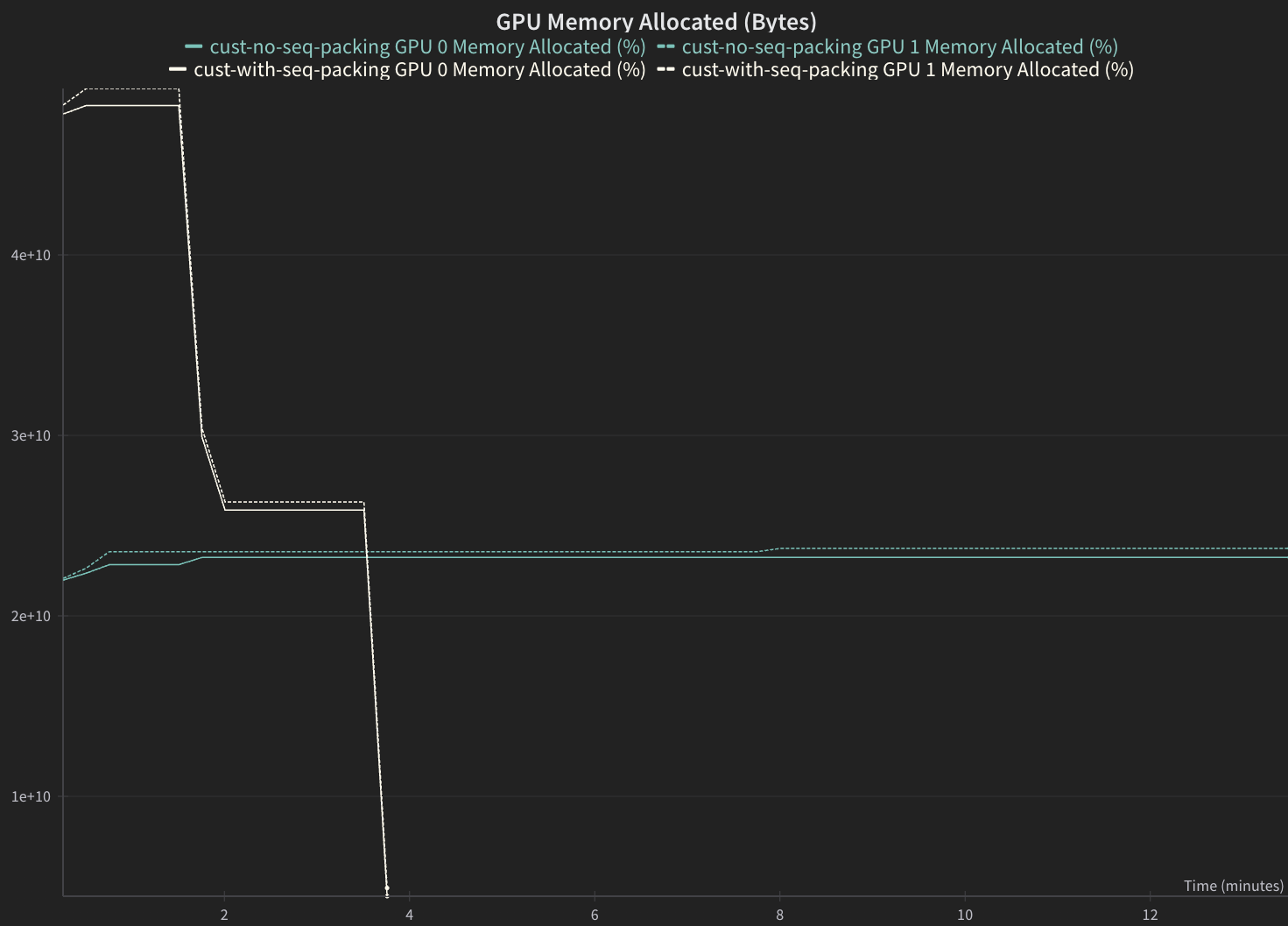
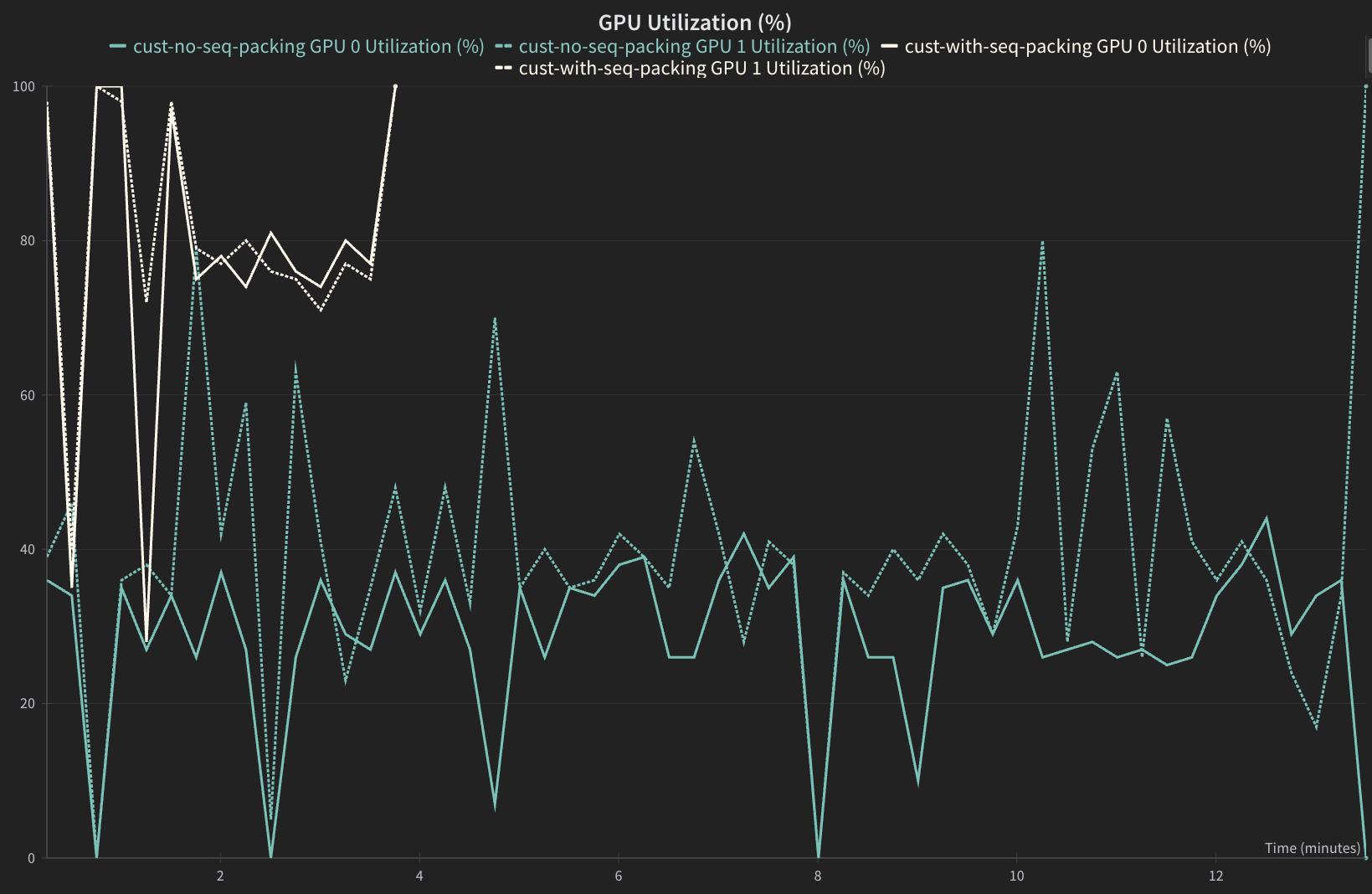
  • Sequence packed version should have a higher GPU utilization and higher GPU Memory Allocation.
1from nemo_platform.types.jobs import PlatformJobStep
2from datetime import datetime
3import pandas as pd
4
5STEP_NAME = "training"
6
7def get_elapsed_time(step: PlatformJobStep) -> float:
8 """Calculate elapsed time in seconds from step's created_at to updated_at."""
9 created_at = datetime.fromisoformat(step.created_at.replace("Z", "+00:00"))
10 updated_at = datetime.fromisoformat(step.updated_at.replace("Z", "+00:00"))
11 return (updated_at - created_at).total_seconds()
12
13step_with_sequence_packing = client.jobs.steps.retrieve(
14 name=STEP_NAME,
15 workspace="default",
16 job=job_with_sequence_packing.job.name,
17)
18
19step_without_sequence_packing = client.jobs.steps.retrieve(
20 name=STEP_NAME,
21 workspace="default",
22 job=job_without_sequence_packing.job.name,
23)
24
25time_to_complete_with_sequence_packing = get_elapsed_time(step_with_sequence_packing)
26time_to_complete_without_sequence_packing = get_elapsed_time(step_without_sequence_packing)
27
28# Display results as a table
29results_df = pd.DataFrame({
30 "Seq Packing Enabled": [True, False],
31 "Val Loss": [
32 (job_with_sequence_packing_status.status_details or {}).get("val_loss"),
33 (job_without_sequence_packing_status.status_details or {}).get("val_loss"),
34 ],
35 "Training Step Time, sec": [
36 time_to_complete_with_sequence_packing,
37 time_to_complete_without_sequence_packing
38 ]
39})
40
41results_df.style.format({"Val Loss": "{:.2f}", "Training Step Time, sec": "{:.0f}"}).hide(axis='index')

Examples of Validation Loss

The expected validation loss curves should match closely for both jobs. Validation loss comparison chart showing similar convergence patterns between sequence-packed and non-packed training runs over training steps
Sequence packed version should complete significantly faster. Runtime comparison chart demonstrating significantly reduced training time for sequence-packed job compared to non-packed baseline
GPU Utilization

Sequence packed version should have a higher GPU utilization. GPU utilization chart showing higher and more consistent GPU usage with sequence packing enabled throughout the training process
GPU Memory Allocation

Sequence packed version should have a higher GPU Memory Allocation. GPU memory allocation chart illustrating increased memory utilization efficiency with sequence packing enabled