

Getting the Right Questions From the Source Benchmark#
Choose the best rows from the Hugging Face source benchmark, such as Massive Multitask Language Understanding (MMLU), to use as few-shot examples for each target, from broad choices down to very specific tags.
You control which source questions appear as few-shots by configuring coarse filters (split, subset, hf_dataset, source_subjects) and fine filters (target_source_mapping, and optional tags backed by metadata_file).
The intent is to show the model exemplars that match the subject you are generating for.
In nemotron steps run byob/mcq, each key in target_source_mapping must match a folder of .txt files or a *.parquet file under input_dir, not an abstract label on its own.
The Funnel: Coarse to Fine-Grained Control#
Most question-answer benchmark datasets expose many subjects, such as astronomy, econometrics, elementary mathematics, nutrition, and so on. Coarse filters shrink that universe before you attach sources to each local target.
You can narrow step by step until each target draws from the pool you intend.
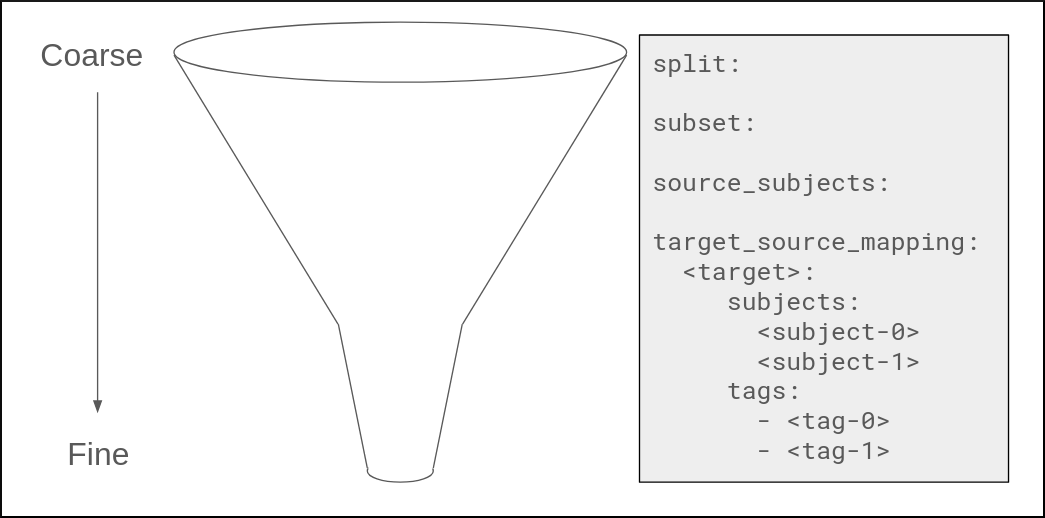
Coarse (top of funnel)
hf_dataset: which Hugging Face benchmark to load, for examplecais/mmlu.split: which split to read first, such astestortrain, applied when the loader pulls the benchmark.subset: which variant of that benchmark, such asallfor MMLU orknfor MMLU Indic, also applied at load time.source_subjects: which benchmark taxonomy labels may appear in the pool. If you leave this list empty, the pipeline expands it to every subject available for the chosenhf_dataset,subset, andsplit. Mappings only sample from subjects that remain in this pool.
Finer (middle of funnel)
target_source_mapping: for each target key that exists underinput_dir, you list which source subjects to sample and optionally assign weights. This ties each corpus folder or Parquet file to the part of the benchmark taxonomy you want the model to imitate.
Finest (bottom of funnel)
tags: optional. Whenmetadata_filelists question identifiers with tags, each target can filter few-shots further by tag strings such asreasoningorunambiguous, or by comma-joined combinations such asreasoning,unambiguous, optionally with weights. Tags are the tightest lever on which rows become few-shots.
How It Fits Together#
Load: the pipeline loads the benchmark for
hf_dataset,split, andsubset, then keeps only the subjects insource_subjects, or all subjects when that list is empty after expansion.Map: for each target,
target_source_mappingnames source subjects and optional tag sets to sample from. Source subjects and tags each support explicit weights; otherwise sampling is uniform over the listed entries.Sample: while building the seed dataset, the prepare step samples subject-tag pairs according to those weights and draws few-shot questions from the filtered source tables.
The coarse settings define the global pool.
target_source_mapping, and tags when enabled, narrow which slice of that pool each target should use when it pairs exemplars with your domain chunks.
Configuration at a Glance#
Control |
Where |
Effect |
|---|---|---|
|
Top-level config |
Which Hugging Face dataset supplies few-shot rows. |
|
Top-level config |
Dataset split, such as |
|
Top-level config |
Dataset subset, such as |
|
Top-level config |
Restricts which benchmark subjects remain in the pool; an empty list expands to all subjects for the chosen dataset, split, and subset. |
|
Per target directory or Parquet |
For each target under |