

Dataset Post-Processing
Post-processing is also a crucial step to verify the correctness of all generated data and convert the ground truth data into a specific format compatible with the model.
Generated data for MTMC training includes as follows:
- RGB images.
- 2D & 3D bboxes.
- Depth maps.
- Camera calibration.
Prerequisites
With conda installed, run the following from the repository root on Ubuntu/Debian:
Post-processing is divided into two steps:
Data Sanity Check:
- Sanity checks for RGB, depth maps, and ground truth focuses on identifying issues such as dropped frames or data corruption.
- Sanity check for calibration focuses on identifying the correctness of calibration, including intrinsic matrix, extrinsic matrix, point pairs array, projection matrix, and homography matrix.
- Sanity check for b frame focuses on identifying if the b-frames are present in a video.
Navigate to the tools/sdg-postprocessing/data_sanity_check path:
Data Conversion:
Conversions for depth maps, RGB images, and ground truth are designed to save storage space and reduce redundant ground truth data, while schema conversion is performed for downstream tasks such as E2E model & pipeline evaluation.
Navigate to the tools/sdg-postprocessing/data_conversion path:
Generate xform_info.json only when ground-truth conversion requires parent-Xform rotation overrides:
-
Load the scene in Isaac Sim.
-
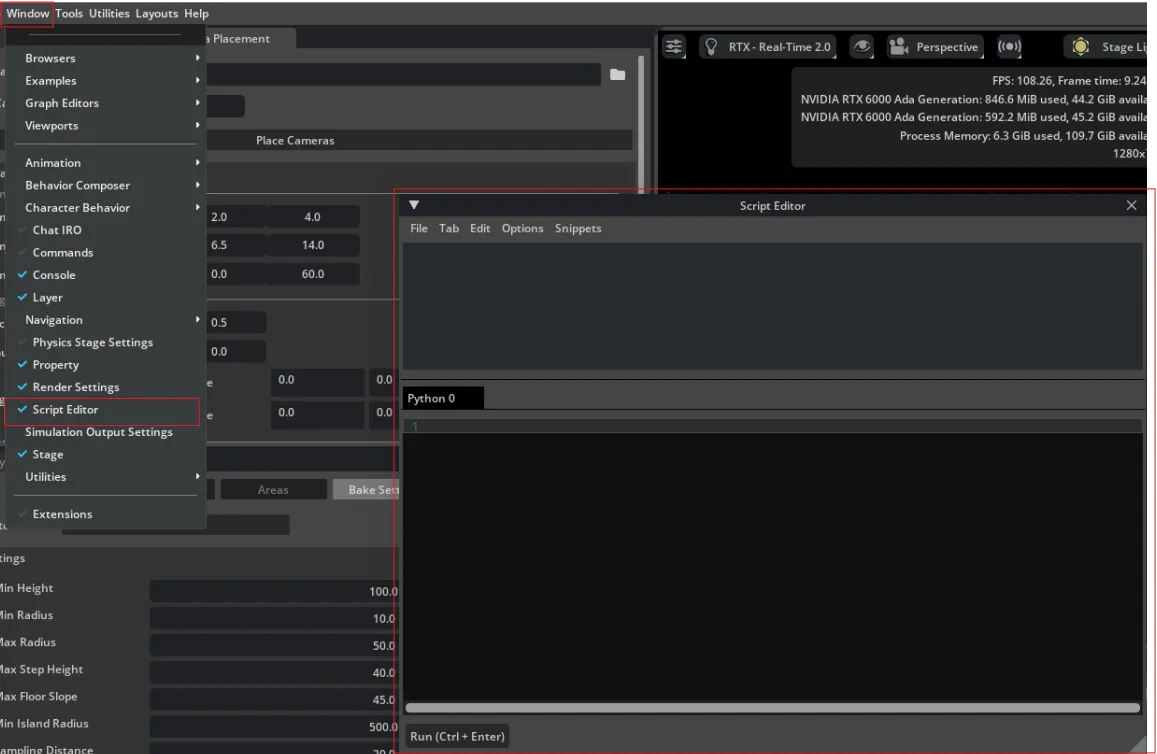
Open the Script Editor.
-
In the Script Editor, open
tools/sdg-postprocessing/utils/export_xform_semantics.pyvia File > Open, and setUSER_OUTPUT_PATHto your desired output directory or JSON file path. -
Click Run to export the JSON file to the configured path.
If the scene does not need parent-Xform rotation overrides, omit the --xform_info option from the ground-truth conversion command.