

Rack-Level Administration
NICo allows site administrators to manage bare metal for NVIDIA Multi-Node NVLink (MNNVL) systems such as GB200, providing the necessary rack-level topology, operations, and automation needed for hardware lifecycle management and resource provisioning.
NICo supports the rack component (“tray”) grouping schema with topology and location for rack, NVLink domain, and future larger rack grouping units such as row, scalable unit, and super pods. It manages the following components on GBx00 racks:
- Compute tray
- NVSwitch tray
- Powershelf tray
NICo provides APIs and automated workflows to manage these components for the following core lifecycle management task categories:
- Inventory management with topology and location
- Firmware management with NVLink domain firmware consistency
- Power management with dependency and sequencing
Dependencies
Rack-level administration does not require one fixed backend stack. NICo Core must be configured with a component-manager backend for each role being managed:
- RMS can provide compute, switch, and power-shelf management.
- An externally managed NSM is required only when the switch backend is set to
nsm. - An externally managed PSM is required only when the power-shelf backend is
set to
psm.
The NICo deployment charts do not install NSM or PSM. Their Core backend configuration remains available for sites that operate those managers as external services.
NICo Flow is required for deployments using the HW Lifecycle REST API and its workflow orchestration. Clients using NICo Core APIs directly do not require NICo Flow. The following diagram shows the Flow-based REST deployment and its control and data paths.
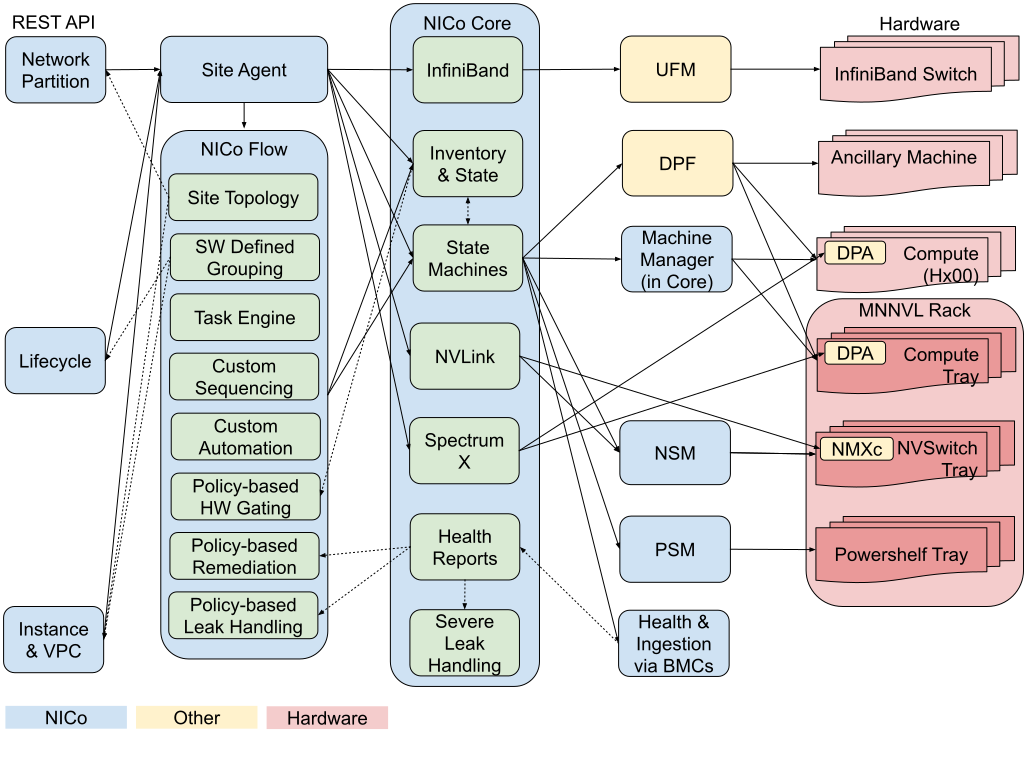
Architecture
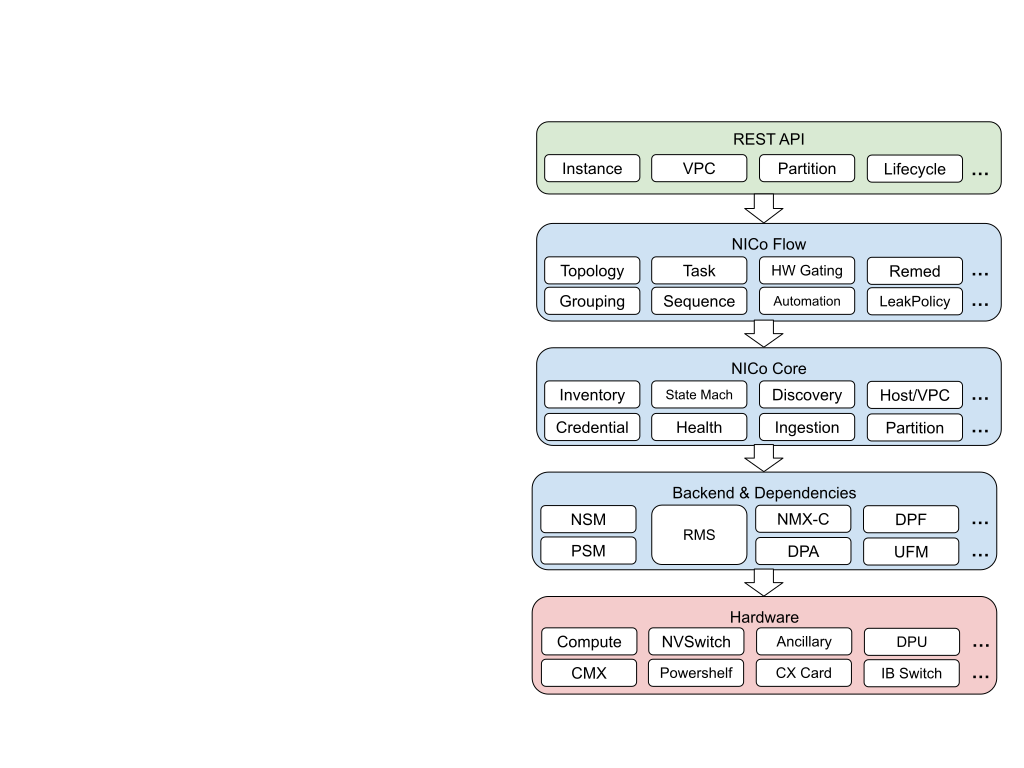
The end-to-end service path for NICo rack-level administration goes in the following order between services.
HW Lifecycle REST API -> NICo Flow -> NICo Core -> Component HW Backend
-
HW Lifecycle REST API: NICo provides all rack-level administration operations via a set of HW Lifecycle REST APIs. Besides providing inventory, bringup, validation, power control, and firmware update functionalities for racks and trays (rack components), it supports referencing racks using the DCIM-supplied rack ID (e.g., “A12”) and referencing trays using rack-based tray addressing (e.g. “Rack A12 Tray Slot 19” or “Rack A12 Compute Tray #3”), in addition to using tray serial numbers or BMC MAC addresses. It also exposes the task sequences running, pending, or completed on racks and trays, and allows cancellation. Non-rack compute machines are also supported.
-
NICo Flow: The REST APIs are supported via NICo Flow, which is a NICo software component (discrete service) that uses NICo Core APIs to orchestrate hardware operation sequences and automate hardware operations, with user-defined customization via dynamic rules and policies, in order to scale both operation of AI-factory hardware and the evolution of AI-factory software stack, by abstracting the topology and details of the mechanics of updates, maintenance, and responding to state changes in the datacenter.
NICo Flow contains software-defined states for managing a site, such as those for task and workflow, user-customizable operation sequence and automation, as well as user-defined policies such as those for HW gating (preventing risky conditions in HW automation), remediation (dealing with broken or degraded HW or services), and leak handling.
-
NICo Core: NICo Flow calls NICo Core service to perform the actual HW management operations. NICo Core is the original main NICo service that provides all the critical features for bare-metal management, such as HW inventory and credential management, discovery and ingestion, state machines for power control and firmware update of component HW, managed host and VPC resource, and HW health reports. NICo Core contains all hardware-defined states for component HW and state-based automations.
-
Backend: Previously, NICo Core accessed machines directly via BMC. With rack-scale systems, we now have more types of component HW (compute, switch, and powershelf), as well as more ways to access these components (BMC and NVUE). The complexity of these HW access and management operations are now moved out of NICo Core into the backend for NICo. NICo backend is an extensible interface for different types of hardware to be plugged into and managed by NICo.
NICo Core supports NVSwitch Manager (NSM) and PowerShelf Manager (PSM) backends for switch and power-shelf access. NVIDIA Rack Manager Service (RMS) can serve compute, switch, and power-shelf roles and provides rack-level power and firmware operations. Refer to RMS Configuration for RMS configuration requirements and a link to the RMS compatibility reference. Confirm hardware support against the deployed RMS release.
Rack-Level Operations
Expected Inventory
NICo needs to be loaded with the expected rack equipment inventory to be managed. In most cases, the information should be available from a DCIM service.
The expected inventory often contains the following information:
- NVLink Domain
- ID/Name
- Description
- Racks in the domain
- Rack
- ID/Name
- Vendor
- Model
- Serial Number
- Location
- Description
- Trays in the rack
- Tray
- ID
- Type
- Vendor
- Model
- Serial Number
- In-rack information, including the rack ID, slot number, and tray index
- Description
- SKU, including firmware-updatable devices in the tray
Inventory Bringup
After NICo imports the expected inventory, it goes through the following workflow to discover and ingest the trays and bring up the rack and NVLink domain.
- NICo discovers compute, switch, and powershelf trays via DHCP requests.
- NICo explores these trays and ingest them for management.
- The site administrator tells NICo to start the rack bringup.
- NICo waits for and verifies that all compute, switch, and powershelf trays have been discovered and ingested, updates their FW to achieve consistency and compatibility, and perform the required power control sequence to ready the use of the rack components.
- Once all the components are ready, the rack is considered ready.
Actual Inventory and Validation
NICo monitors the discovered and ingested trays and racks. It reports the actual inventory with dynamic information such as power status and installed firmware versions. It also compares the actual inventory against the expected inventory, and reports on any discrepancies (e.g. wrong rack installed, wrong slot installed, or wrong serial number).
Rack and tray inventory includes synchronized health snapshots. See Monitoring and Health for freshness and empty-report semantics, and Leak Detection and Handling for leak-specific status.
Power Control
NICo provides power control for racks as well as arbitrary groupings of trays in racks, following predefined or customized power operation sequences.
Power operations are asynchronous and tracked as Flow tasks. See REST power operations for supported states, AC power-cycle limitations, and task monitoring.
Sample Rack Power On Sequence:
- Power on power shelves.
- Wait for all compute and switch trays to show up in NICo (via DHCP and BMC exploration).
- [Future, Configurable] Perform leakage detections on all trays in the rack which are liquid cooled. If any leakage is detected, pause (or cancel) the operation.
- Power on the switch tray hosts.
- Power on the compute tray hosts.
Sample Rack Power Off Sequence
- Power off the compute tray hosts and wait for all to be off.
- Power off the switch tray hosts and wait for all to be off.
- Power off the power shelves and wait for all to be off.
Firmware Management and Upgrade
NICo provides firmware update management for racks as well as arbitrary groups of trays in racks, following predefined or customized firmware update operation sequences. The selected rule determines component ordering, verification, and any power cycles needed for activation.
See Rack and Tray Firmware Updates for request parameters, default sequencing, authentication, and task monitoring.
REST API
Use Rack endpoints for rack inventory, validation, and bringup, and Domain endpoints for domain inventory, power, and firmware operations. See Flow inventory queries for component inclusion and list ordering.
Rack Endpoints
- GET /v2/org/{org}/nico/rack: Retrieve all racks in the specified site.
- GET /v2/org/{org}/nico/rack/{id}: Retrieve a rack with the specified ID.
- GET /v2/org/{org}/nico/rack/validation: Validate components of all racks in the specified site by comparing the expected inventory data to the actual inventory data.
- GET /v2/org/{org}/nico/rack/{id}/validation: Validate components of the specified rack by comparing the expected inventory data to the actual inventory data.
- PATCH /v2/org/{org}/nico/rack/power: Control power of all or selected racks in the site.
- PATCH /v2/org/{org}/nico/rack/{id}/power: Control power of the specified rack.
- PATCH /v2/org/{org}/nico/rack/firmware: Update firmware on all or selected racks in the site.
- PATCH /v2/org/{org}/nico/rack/{id}/firmware: Update firmware on the specified rack.
- POST /v2/org/{org}/nico/rack/bringup: Bring up all or selected racks in the site.
- POST /v2/org/{org}/nico/rack/{id}/bringup: Bring up the specified rack.
- GET /v2/org/{org}/nico/rack/{id}/task: Retrieve all tasks for the specified rack.
- GET /v2/org/{org}/nico/task/{id}: Retrieve the status of the specified task.
- POST /v2/org/{org}/nico/task/{id}/cancel: Cancel the specified task.
Tray (Rack Component) Endpoints
- GET /v2/org/{org}/nico/tray: Retrieve all trays and their health snapshots in the specified site.
- GET /v2/org/{org}/nico/tray/{id}: Retrieve a tray and its health snapshot with the specified ID.
- GET /v2/org/{org}/nico/tray/validation: Validate all or selected trays in the site by comparing the expected inventory data to the actual inventory data.
- GET /v2/org/{org}/nico/tray/{id}/validation: Validate the specified tray by comparing the expected inventory data to the actual inventory data.
- PATCH /v2/org/{org}/nico/tray/power: Control the power of all or selected trays in the site.
- PATCH /v2/org/{org}/nico/tray/{id}/power: Control the power of the specified tray.
- PATCH /v2/org/{org}/nico/tray/firmware: Update the firmware on all or selected trays in the site.
- PATCH /v2/org/{org}/nico/tray/{id}/firmware: Update the firmware on the specified tray.
NVLink Domain Endpoints
- GET /v2/org/{org}/nico/domain/nvlink: Retrieve NVLink Domains in the specified Site.
- GET /v2/org/{org}/nico/domain/nvlink/{id}: Retrieve an NVLink Domain by its ID.
- PATCH /v2/org/{org}/nico/domain/nvlink/power: Control power for explicitly selected NVLink Domains.
- PATCH /v2/org/{org}/nico/domain/nvlink/{id}/power: Control power for one NVLink Domain.
- PATCH /v2/org/{org}/nico/domain/nvlink/firmware: Update firmware for explicitly selected NVLink Domains.
- PATCH /v2/org/{org}/nico/domain/nvlink/{id}/firmware: Update firmware for one NVLink Domain.