Ctrl+K
VSS - Home VSS - Home

VSS

VSS - Home VSS - Home

VSS

Table of Contents

  • Release Notes
  • Getting Started
    • Prerequisites
    • Quickstart

Vision Agent

  • Agent Workflows
    • Video Summarization
    • Search
    • Alert Verification
    • Real-Time Alerts
    • Industry-Specific Examples
      • Smart City Blueprint
        • Introduction to the NVIDIA Smart City AI Blueprint
        • Prerequisites
        • Quickstart Guide - Docker Compose
        • Development Workflow
          • Blueprint Deep Dive
          • Calibration
          • Deployment
          • Simulation and Synthetic Data Generation
          • Model Fine Tuning
        • Operations (Monitoring, Troubleshooting, FAQ, Known Limitations)
          • Known Limitations
          • Troubleshooting Guide
          • FAQ
          • License Information
      • Warehouse Operations Blueprint
        • Introduction
        • Release Notes
        • Prerequisites
        • Quickstart
        • Development Workflow
          • Deployment & Customization
          • Simulation and Synthetic Data Generation
          • Model Finetuning
        • Microservice Configuration
          • Perception
          • Behavior Analytics
          • Alerting Service
          • Agents
          • Reference Agentic UI
        • Operations (Monitoring, Troubleshooting, FAQ, Known Limitations)
          • Accuracy & Performance Benchmarks
          • System Sizing Guide
          • Known Limitations
          • Troubleshooting Guide
          • FAQ
          • License Information
  • Agent Skills
  • Agent Harnesses
    • NemoClaw
      • Setup VSS and Skills
      • VSS Orchestrator MCP
      • Additional Configuration
      • Troubleshooting
  • VSS Agents
    • Agent Overview
      • API Reference
    • Agent Profiles
    • Agent Configuration
    • Agent Customization
      • Configure the LLM
      • Configure the VLM
    • Agent Evaluation
    • Report Generation
    • Observability
    • Video-Analytics-MCP Server
    • Agent Known Issues

System Components

  • Vision Microservices
    • Object Detection and Tracking
      • API Reference
    • Real-Time VLM
      • API Reference
    • Video Embedding Generation
      • API Reference
    • Video Summarization
      • API Reference
  • Analytics Microservices
    • Behavior Analytics
    • Alerts Microservice
      • Alert Verification API
  • Middleware
    • Video IO & Storage (VIOS)
      • VIOS Microservices
      • NVStreamer
      • VST Sensor Management API
      • VST Live Stream Management API
      • VST Replay Stream Management API
      • VST Record Stream Management API
      • VST Proxy Stream Management API
      • VST Storage Management API
    • API Gateway / MCP
      • Video Analytics API
        • Video Analytics API Reference
      • Video Analytics MCP
    • Message Broker
      • Kafka
      • Redis
    • NvSchema
      • JSON Schema
      • Protobuf Schema
    • Database
      • ELK
    • Observability
  • User Interface
  • Models
    • Model customization overview
    • SigLIP 2 object embeddings
    • Cosmos-Embed1 (video embedding)
    • Sparse4D (3D multi-camera)
    • RT-DETR (2D warehouse detection)
  • Configuration
    • VSS Configurator
    • SDR Controller
    • Deepstream Configurator
    • VLM Autoscaling
  • Calibration
    • Auto Calibration
      • Overview
      • Getting Started
      • Workflow Steps
      • Custom Dataset
      • Troubleshooting
    • SDG Calibration
    • Legacy Camera Calibration
    • Calibration-Camera-Positioning-Guide
    • Calibration-Schema

Appendix

  • API Reference
  • Performance
    • Alert Verification Performance
    • Video Summarization Performance
    • Search Performance
    • RT-CV Performance
    • RT-VLM Performance
    • RT-Embed Performance
    • VIOS Performance
  • Additional Deployments
    • Brev Launchable
    • Edge Deployment
    • Helm Deployment
    • Secure Deployment
  • FAQ
  • Known Limitations
  • License Information
  • EULA
  • Agent Workflows
  • Industry-Specific Examples
  • Warehouse Operations Blueprint Documentation
  • Development Workflow
  • Simulation and Synthetic Data Generation
  • Scene Customization
  • NavMesh Setup

NavMesh Setup#

Building NavMesh is a must-have step to enable subsequent tasks, such as Camera Placement and Camera Calibration. More details can be found in the Navigation Mesh.

  • NavMesh Volume Creation:

    Check if there is a NavMeshVolume in your asset scene to cover the navigable area.

    • If there is a NavMeshVolume, you can jump to the Bake NavMesh section.
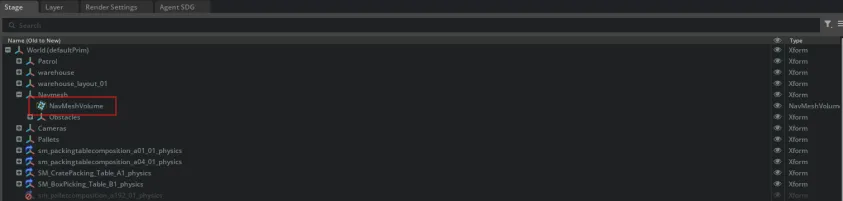
      NavMesh Volume
    • If not, go to Stage > Right Click > Create > Navigation > NavMesh Include Volume.
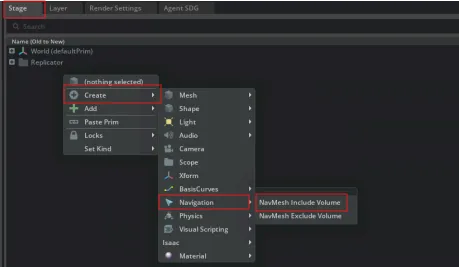
      Build NavMesh Volume
    • Set the NavMeshVolume to cover the navigable area.
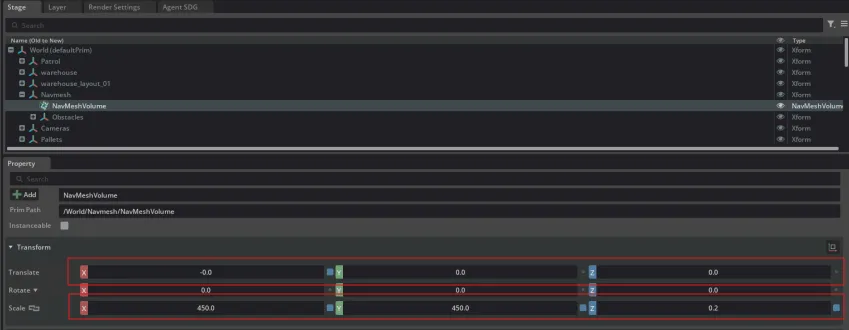
      Set NavMesh Volume

Note

It is recommended to set the height of NavMeshVolume taller than agents (e.g., characters and humanoids) in your scene, but lower than the ceiling.

  • NavMesh Baking:

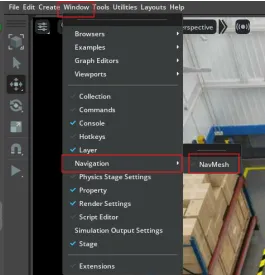
    • Open NavMesh extension. Go to Window > Navigation > NavMesh.

      Build NavMesh
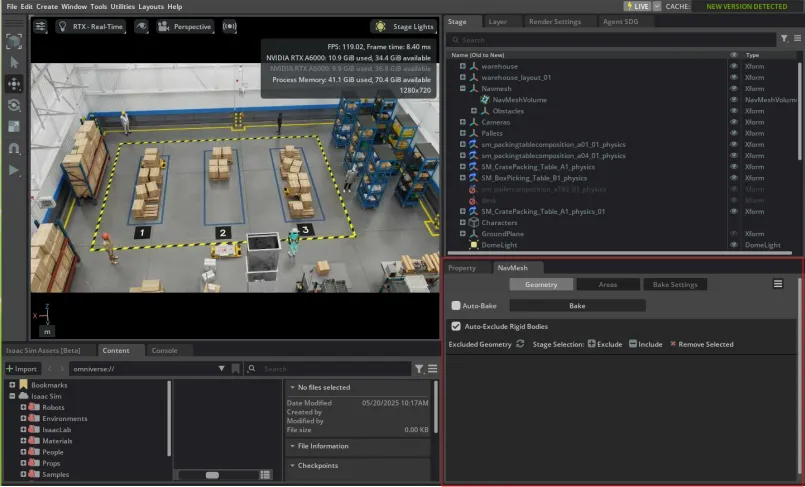
    • The NavMesh panel is shown below.

      NavMesh Panel
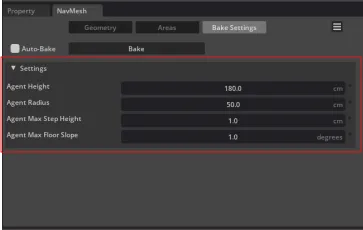
    • Go to Bake Settings > Check whether these parameters are within a reasonable range.

      Bake Settings

      Note

      The default settings are as follows: Agent Height: 180, Agent Radius: 25, Agent Max Step Height: 1, and Agent Max Floor Slope: 1.

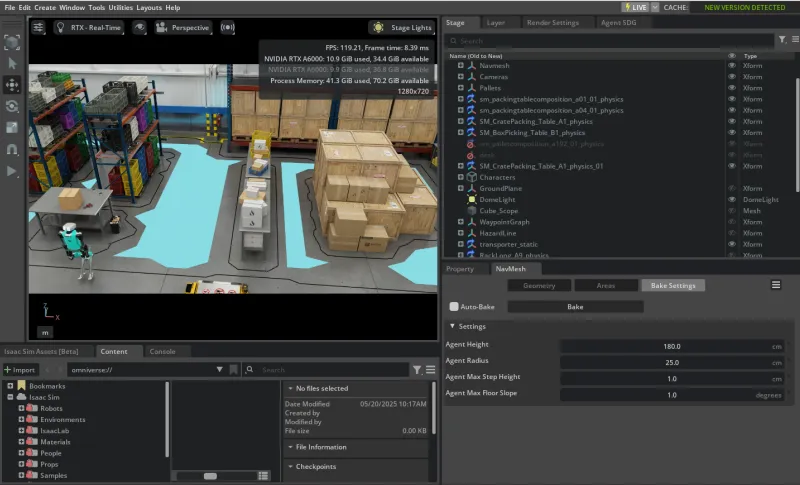
    • Click Bake button to build the NavMesh.

      Baked Scene

previous

Scene Customization

next

Camera Placement

NVIDIA NVIDIA
Privacy Policy | Your Privacy Choices | Terms of Service | Accessibility | Corporate Policies | Product Security | Contact

Copyright © 2026, NVIDIA Corporation.

Last updated on Jun 06, 2026.