Skip to navigation

Additional Configuration

View as Markdown

Reference for configurable values in deploy_nemoclaw.ipynb and deploy_vss_orchestrator.ipynb, and the optional notebook cells that go beyond the minimum nemoclaw-deploy-vss-and-skills path.

Brev hardware and CSP selection

The default Brev launchable is available for the notebook path. Before launching the instance, you can also edit the launchable to choose a different hardware profile, such as GPU or CPU shape, and cloud service provider (CSP).
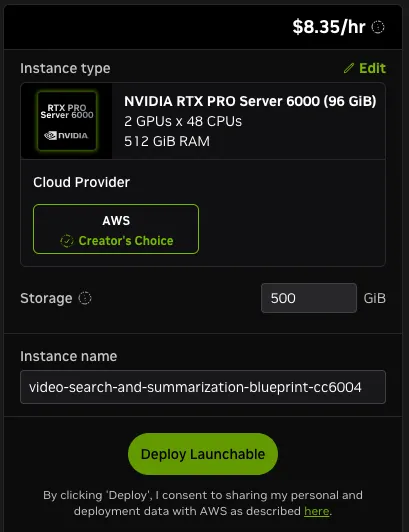
Brev launchable Edit action

Click Edit in the upper right corner of the Brev launchable before creating the instance.

In the Brev launchable editor, select the hardware profile and CSP that match your deployment target and available capacity, then launch the instance. Review Hardware Requirements and Development Profile GPU Requirements before selecting the hardware profile.
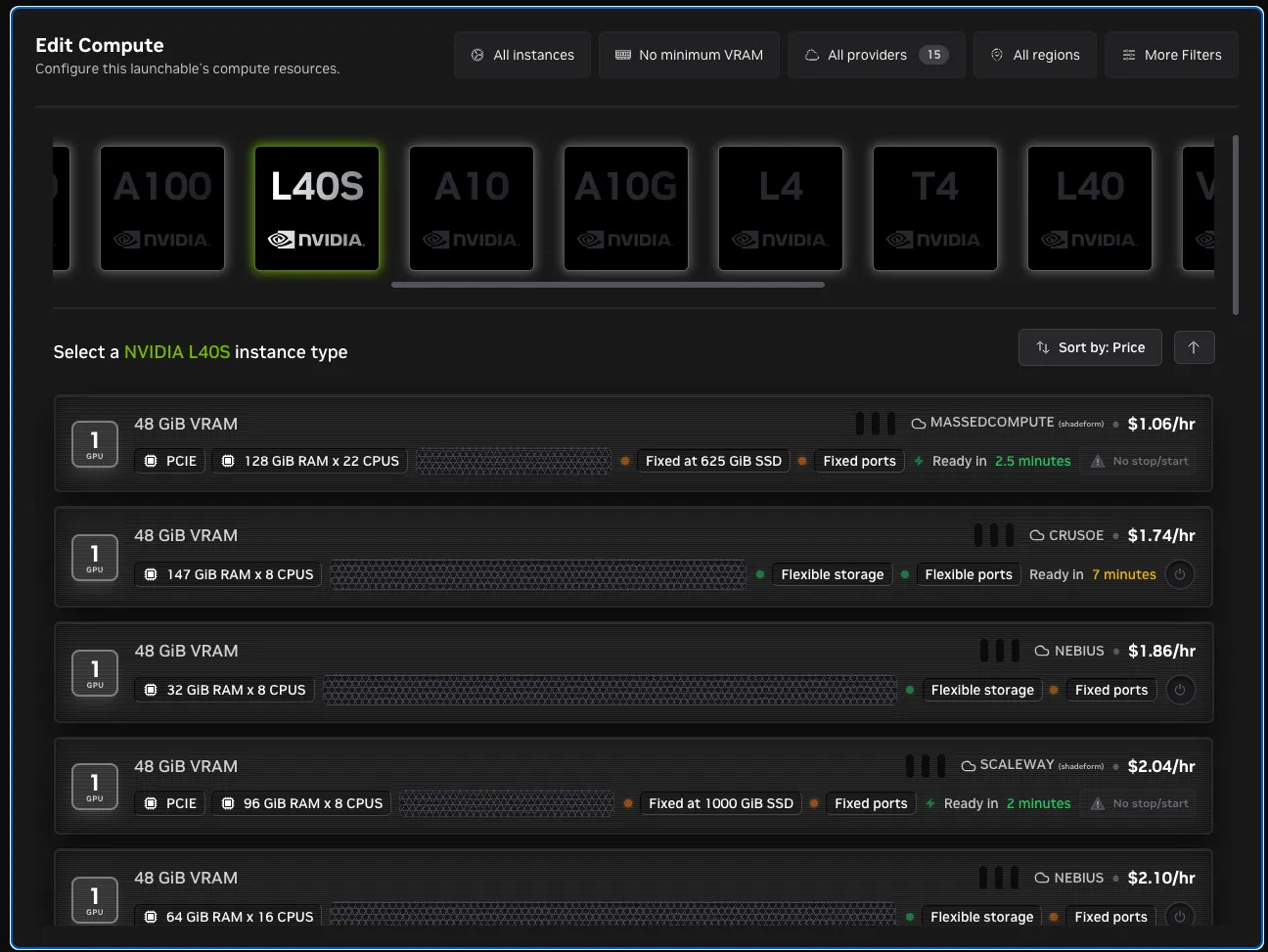
Brev hardware profile and CSP selection
Select the instance hardware profile and cloud service provider in Brev.

After the instance starts, keep the HARDWARE_PROFILE value in deploy_vss_orchestrator.ipynb aligned with the selected machine. Brev controls the cloud VM shape, while HARDWARE_PROFILE controls the VSS deployment assumptions used by the orchestrator.

Two notebooks

The setup path uses two notebooks that run in order on the VSS host:

  • deploy_nemoclaw.ipynb configures the agent model provider and installs and onboards the NemoClaw sandbox. Its variables cover:

    • The agent chat model and its credentials.
    • The NemoClaw installer pin and inference proxy.
    • The sandbox name and agent runtime.
    • The dashboard and webhook settings.
    • The host paths the notebook reads.
  • deploy_vss_orchestrator.ipynb prepares the host, starts the VSS Orchestrator MCP server, and deploys VSS from the Agent UI. Its variables cover:

    • The NVIDIA credentials.
    • The hardware profile.
    • The deployed VSS LLM and VLM endpoints, and the GPU device IDs.
    • The MCP server bind address.
    • The VSS UI and external-IP networking values.

deploy_nemoclaw.ipynb variables

The agent model provider is seeded in Section 1.1 and set by one of the provider cells in Section 1.2.

VariableDefaultDescription
NVIDIA_API_KEY(blank)Required for the build.nvidia.com agent provider (Section 1.2, option c).
NEMOCLAW_PROVIDERcustom for option a; selected provider for options b/cNemoClaw provider passed during onboarding. Supported notebook paths are custom, a NemoClaw-managed provider such as install-vllm, ollama, or nim-local, and build.
NEMOCLAW_ENDPOINT_URLhttps://inference-api.nvidia.com/v1 (option a; NVIDIA-internal)OpenAI-compatible base URL for a custom agent provider. External users must replace the prefilled internal endpoint with one they can access, or select another provider.
NEMOCLAW_MODELaws/anthropic/bedrock-claude-opus-5 (option a)Model or serving-catalog ID for the selected agent provider.
COMPATIBLE_API_KEY(blank)Bearer token for the custom OpenAI-compatible provider, issued by whoever runs the endpoint. A self-hosted endpoint that ignores authentication uses EMPTY.

Advanced values are set in Section 1.3 or derived from the environment.

VariableDefaultDescription
NEMOCLAW_INSTALL_REFv0.0.127NemoClaw installer pin. Section 3.1 reinstalls if the installed nemoclaw version does not match this semver tag.
NEMOCLAW_INFERENCE_PROXYTrueEnables SSRF detection and the bundled host proxy for non-public custom endpoints. Disable it for plain HTTP or non-443 endpoints.
INFERENCE_API_PROXY_PORT18080Host port for the inference proxy when NEMOCLAW_INFERENCE_PROXY is active.
NEMOCLAW_TOOL_DISCLOSURE(NemoClaw default; direct for Nemotron 3.5 Lightning)OpenClaw tool exposure mode: direct or progressive. Changing it requires a fresh onboard.
AGENT_RUNTIMEopenclawSandbox agent runtime. Supported values are openclaw and hermes.
AGENT_IMAGE_DOCKERFILE.openclaw/Dockerfile or .hermes/DockerfileHarness image passed to onboarding with --from. It contains the VSS skills, workspace docs, and vss CLI.
AGENT_HOOKS_ENABLEDTrueEnables agent webhooks and generates a random AGENT_HOOKS_TOKEN.
AGENT_HOOKS_PATH/hooksOpenClaw webhook path; ignored for Hermes.
AGENT_WEBHOOK_PORT8644Hermes webhook adapter port; ignored for OpenClaw.
AGENT_DASHBOARD_PORT18789Loopback-only agent dashboard forward. Override with NEMOCLAW_DASHBOARD_PORT.
AGENT_DASHBOARD_RELAY_PORT18790Relay used by off-loopback clients, including the VSS UI container and Brev secure link. Override with NEMOCLAW_DASHBOARD_RELAY_PORT.
VSS_AGENT_ADAPTER_ENABLEDFalseEnables the relay for a containerized VSS UI outside Brev; Brev starts the relay for its secure link regardless.
HITL_ENABLEDFalseDisables structured HITL dialogs in an external VSS UI connected to the harness. The agent still asks follow-up questions in chat, where you can reply inline.
NEMOCLAW_VLLM_PORT18000Host port for a NemoClaw-managed vLLM server.
NEMOCLAW_VLLM_GPU_DEVICE0GPU index or full GPU/MIG UUID passed to install-vllm; changing it requires a fresh onboard.
AGENT_PLUGIN_VARIANTnemoclawWorkspace variant overlay read into WORKSPACE_VARIANT.
NEMOCLAW_SANDBOX_NAMEvss-harness-sandboxSandbox name. The notebook replaces an existing sandbox of this name by default. Use the same value in deploy_vss_orchestrator.ipynb.
NEMOCLAW_RECREATE_SANDBOXTrueRecreates an existing sandbox during onboarding, discarding its agent sessions. Set false only for an intentional manual reuse. Build Vision AI always recreates the sandbox so provider and model settings are applied.
VSS_PUBLIC_URL(blank)Deployment origin recorded by vss configure. Blank selects this host’s Compose ingress; set a Kubernetes Ingress origin explicitly.
ORCHESTRATOR_ENABLE_HTTPSFalseThe default HTTP orchestrator requires no registration. Set true in both notebooks to register and serve an HTTPS MCP endpoint.
VSS_ORCHESTRATOR_MCP_PORT9988Orchestrator port. Section 3.3 uses it only when HTTPS registration is enabled.
VSS_REPO_DIR~/video-search-and-summarizationVSS checkout used by the notebook.
NEMOCLAW_REPO_DIR~/NemoClawFallback NemoClaw source checkout used only when the nemoclaw CLI is unavailable.
BREV_ENVIRONMENT_CONTEXT_PATH/etc/brev/environment-context.jsonBrev context JSON with secure-link FQDNs and environment ID.

deploy_vss_orchestrator.ipynb variables

Required values every VSS deployment needs are set in Section 1.1.

VariableDefaultDescription
NGC_CLI_API_KEY(blank)NGC Personal API Key. Required for docker login nvcr.io and for the model weights the containers download from NGC.
NVIDIA_API_KEY(blank)Required for NVIDIA-hosted VSS LLM/VLM endpoints and propagated to the MCP server.
HARDWARE_PROFILERTXPRO6000BWHardware profile applied by the orchestrator. Supported values are H100, GB300, L40S, RTXPRO4500BW, RTXPRO6000BW, DGX-SPARK, IGX-THOR, AGX-THOR, and OTHER. For GB300, the orchestrator applies VSS_CONTAINER_TAG_SUFFIX=-sbsa and RTVI_VLLM_ATTENTION_BACKEND=TRITON_ATTN. Edge profiles (DGX-SPARK, IGX-THOR, AGX-THOR) are valid only for base and alerts.
NEMOCLAW_SANDBOX_NAMEvss-harness-sandboxSandbox created in deploy_nemoclaw.ipynb; the Agent UI you deploy VSS from lives here.

Advanced values are set in Section 1.2 or derived from the environment.

VariableDefaultDescription
LLM_NAME, LLM_ENDPOINT_URL, LLM_MODEL_TYPE(blank)Remote LLM settings for the deployed VSS stack. Setting LLM_ENDPOINT_URL forces generated VSS env to remote LLM mode.
LLM_ENABLE_THINKING(blank)Optional deployed-VSS LLM thinking/behavior override.
OPENAI_API_KEY(blank)Key for deployed VSS remote LLM/VLM endpoints. Blank falls back to NVIDIA_API_KEY.
VLM_NAME, VLM_ENDPOINT_URL, VLM_MODEL_TYPE(blank)Remote VLM settings for the deployed VSS stack. Setting VLM_ENDPOINT_URL forces generated VSS env to remote VLM mode.
LLM_DEVICE_ID"0"GPU index for the local LLM NIM on non-edge hardware profiles.
VLM_DEVICE_ID"1"GPU index for the local VLM NIM on non-edge hardware profiles. Set to "0" on single-GPU edge systems such as DGX Spark.
EXTERNAL_IP(blank)External host IP used by generated VSS URLs. Blank resolves from hostname -I.
VSS_UI_PORT7777HAProxy / VSS UI secure-link port. Override via VSS_UI_PORT.
VSS_ORCHESTRATOR_MCP_HOST0.0.0.0Bind host used when Section 4 starts the MCP server.
VSS_ORCHESTRATOR_MCP_PORT9988Bind port used when Section 4 starts the MCP server.
NEMOCLAW_DASHBOARD_PORT18789Agent dashboard port used by the Section 5 and Section 6 checks. Read into DASHBOARD_PORT.
VSS_REPO_DIR~/video-search-and-summarizationVSS checkout used by the notebook.
BREV_ENVIRONMENT_CONTEXT_PATH/etc/brev/environment-context.jsonBrev context JSON with secure-link FQDNs and environment id. Override via that env var only if the context file lives elsewhere.

Agent model versus VSS models

The two notebooks configure two different model surfaces:

  • NEMOCLAW_* variables in deploy_nemoclaw.ipynb configure the agent chat model that operates VSS.
  • LLM_* and VLM_* variables in deploy_vss_orchestrator.ipynb configure the LLM/VLM endpoints used by the deployed VSS services when docker_generate creates profile artifacts.

MCP server environment

The orchestrator MCP server reads credentials, hardware profile, remote VSS model endpoints, and device IDs at startup. In deploy_vss_orchestrator.ipynb, Section 4 maps the notebook variables into the MCP server environment before launching uv run nat mcp serve.

docker_generate then merges those values with the selected profile .env and any per-call env_overrides. For the full resolution order and tool payloads, see VSS Orchestrator MCP.

VSS Orchestrator MCP config YAML

The MCP server loads deploy/docker/scripts/vss_orchestrator_mcp_config.yml. The defaults work for most deployments. Edit this file only when you need different host paths or hardware-specific env overrides, then restart the MCP server (deploy_vss_orchestrator.ipynb Section 4) so the changes take effect.

Path settings under function_groups.vss_orchestrator:

SettingDescription
mdx_data_dirWritable VSS data directory used for generated deployments. Overrides any VSS_DATA_DIR value in the selected profile .env. Default: ~/video-search-and-summarization/.mdx_data.
output_dirDirectory where docker_generate stores generated env and compose artifacts. Default: ~/video-search-and-summarization/.orchestrator-artifacts.
deployments_dirAbsolute path to deploy/docker.
source_compose_yamlAbsolute path to deploy/docker/compose.yml.
source_envAbsolute path template for profile .env files. Supports the {profile} placeholder.

Hardware overrides under model_resolution.hardware apply when HARDWARE_PROFILE matches. Edge profiles (DGX-SPARK, IGX-THOR, AGX-THOR) also use edge_device_ids and edge_allowed_profiles. Defaults you may adjust for edge systems:

ProfileSettingDefault and purpose
DGX-SPARKLLM_NAME / LLM_NAME_SLUGLocal Spark NIM FP8 variant when a local LLM is used.
DGX-SPARKPERCEPTION_TAGSBSA image tag for perception services.
DGX-SPARK / baseVLM_NIM_KVCACHE_PERCENT0.2. Local VLM KV-cache sizing for the base profile.
DGX-SPARK / alertsRTVI_VLLM_GPU_MEMORY_UTILIZATION0.35. GPU memory utilization for the local RTVI VLM on alerts.
IGX-THOR / AGX-THORVLM_NAME, RTVI_VLM_*, VLM_MODEL_TYPELocal Cosmos3 Nano Reasoner VLM settings for Thor edge systems.
IGX-THOR / AGX-THORRTVI_VLLM_GPU_MEMORY_UTILIZATION0.35. GPU memory utilization for the local RTVI VLM.

Leave these values alone unless you are tuning GPU memory, swapping a local model or image tag, or pointing the MCP server at a non-default checkout path.

Optional notebook cells

Pin Docker version (deploy_nemoclaw.ipynb Section 2.1)

Pins the tested Docker stack before Section 3 creates the sandbox:

  • Docker CE 29.4.3
  • buildx 0.33.0
  • Docker Compose 5.1.3
  • containerd 2.2.3

Run this before Section 3 creates the sandbox. A Docker downgrade restarts dockerd and would disrupt live sandbox containers if it ran later in the notebook. When the installed Docker Engine already falls in the tested range (28.3.3 through 29.5.0), the downgrade is skipped and the packages are held at their current versions with apt-mark hold so later package operations do not drift the instance.

Verify sandbox, policy, skills, and webhooks (deploy_nemoclaw.ipynb Section 3.6)

Runs additional checks against the live sandbox after Section 3:

  • Sandbox phase, namespace, and id.
  • Active policy metadata (status, version, hash).
  • Agent webhooks reachability when enabled.
  • openclaw plugins doctor output.
  • The registered vss_orchestrator MCP status.
  • Installed non-bundled skills from openclaw skills list --json.
  • Workspace .md files uploaded to the sandbox.

Verify host reachability from the sandbox (deploy_vss_orchestrator.ipynb Section 6)

Run only after VSS is deployed. The probe uses nemoclaw <sandbox> connect and validates host port reachability through host.openshell.internal. Do not replace this with docker exec because that can use a different path and produce misleading results.

The notebook reports one of the following results for each checked port:

  • REACHABLE - an HTTP service answered. 404 and non-policy 403 responses still count because they prove a service is listening, even if GET / is not a valid or authorized route.
  • NOT_REACHABLE - the port is blocked by policy, no service is listening, DNS failed, the connection failed, or the request timed out. Check the NOTE column for the reason.

Agent webhooks

When AGENT_HOOKS_ENABLED is true, deploy_nemoclaw.ipynb generates a random AGENT_HOOKS_TOKEN and configures agent webhooks at AGENT_HOOKS_PATH (Section 3.6). Section 3.8 sends a local authenticated POST to http://127.0.0.1:18789/hooks/agent to confirm acceptance.

Disable webhooks by setting:

Set in deploy_nemoclaw.ipynb
AGENT_HOOKS_ENABLED = False

Artifacts and logs

  • MCP server log: <VSS_REPO_DIR>/.orchestrator-artifacts/vss_orchestrator_mcp.log.
  • Generated env artifacts: <output_dir>/generated.<docker_compose_id>.dry-run.env.
  • Generated compose artifacts: <output_dir>/compose.resolved.<docker_compose_id>.dry-run.yml.
  • MCP config: deploy/docker/scripts/vss_orchestrator_mcp_config.yml.
  • The recorded MCP PID is kept in the notebook’s Python state as VSS_ORCHESTRATOR_MCP_PID and reused by Section 4 to stop a stale server before relaunching.