Model Plan Intuition
Overview
Graph Neural Networks (GNNs) can deliver state-of-the-art model performance when used correctly. However, GNN architecture must be customized to your dataset and problem: there is no single optimal configuration. For example, on a recent customer dataset, a well-tuned GNN had 70% better performance than a poorly-tuned one.
Picking the best GNN architecture for your problem is a difficult task. The landscape of GNN architectures is diverse, with many choices to evaluate. For example, if you are trying to generate product recommendations for customers, you likely want to use a combination of identity aware graph neural networks and neural graph collaborative filtering. This combination delivers the best model quality for recommendation tasks. However, for other types of predictive queries (such as LTV, customer churn, and demand forecasting), you need very different architectures. Unless you follow the latest research in deep learning, it can be hard to know which architecture is best for your specific problem.
To help you find the best GNN architecture for your dataset, Kumo provides two tools:
- AutoML: By default, Kumo’s AutoML algorithm analyzes your dataset and predictive query to construct a training plan and GNN architecture search space tailored to your dataset. This plan searches a variety of architectures known to work well for your problem space, incorporating the most recent techniques from GNN research.
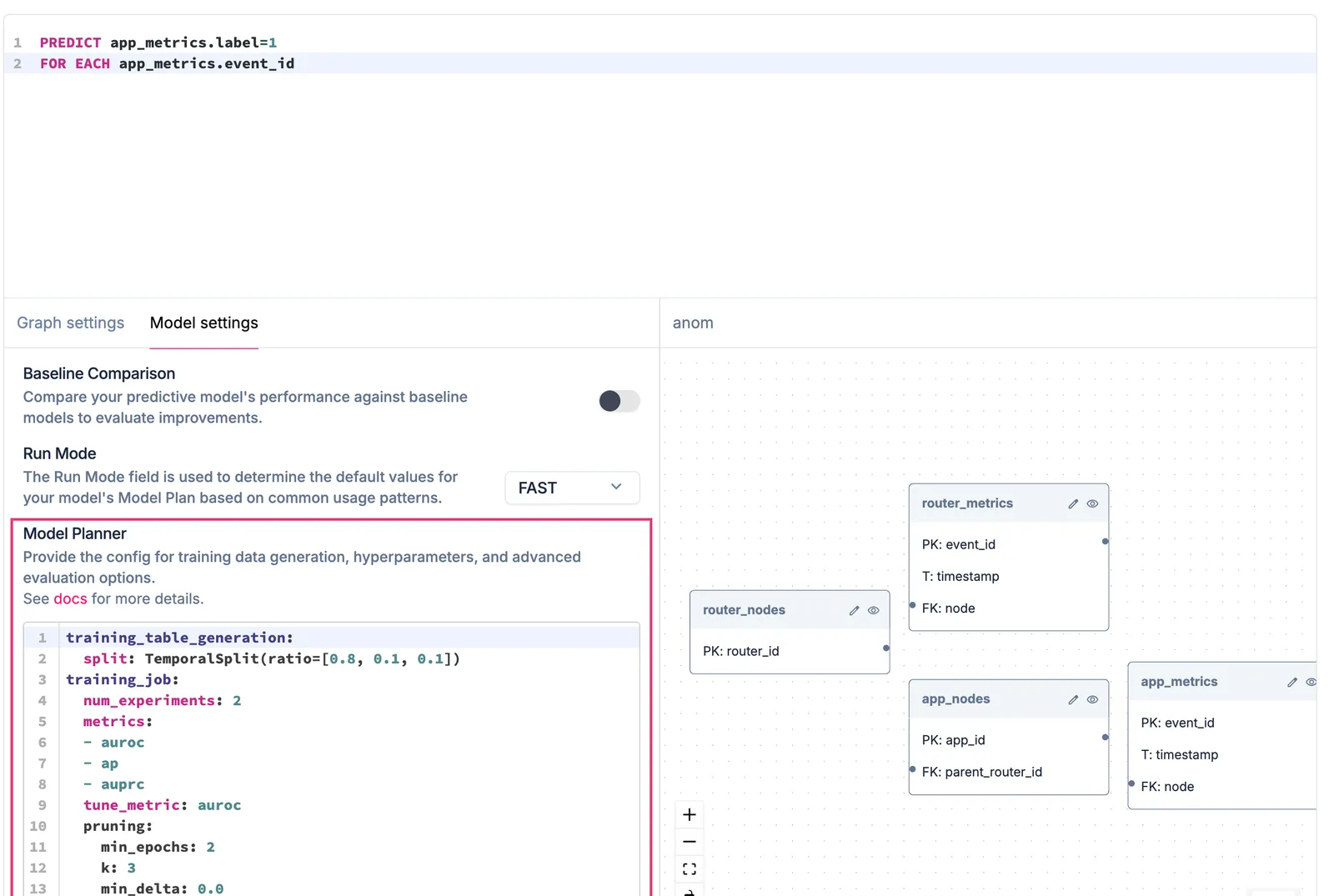
- Model Planner: When you need more control, Kumo exposes a model planner that gives you fine-grained control over the shape and structure of the GNN for your dataset. The model planner also controls column encoding, training table generation, and sampling. Using this model planner, experienced data scientists can squeeze out additional performance when it matters.
Kumo and AutoML
How It Works
Whenever you write a new predictive query, the Kumo AutoML system generates a modeling plan that covers three areas: column encoding, training table generation, and GNN architecture search.
Column Encoding
Though GNNs largely eliminate the need for manual feature engineering, column encoding still transforms your raw tabular data into the bits and bytes that get fed into the neural network.
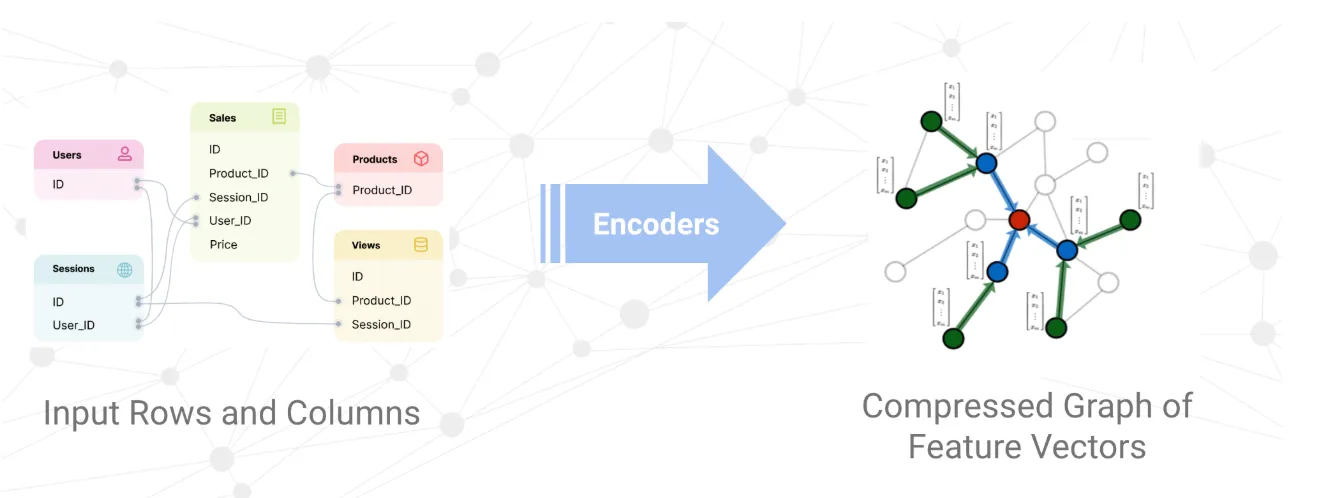
When building deep models by hand, a machine learning engineer must typically write code manually to generate features from raw data and encode them into the neural network.
Kumo fully automates this process using a set of well-tested rules and algorithms to determine the best encoding for each column in your dataset.
These algorithms analyze various aspects of your columns, including data types and column semantics. They also examine statistics about the data distribution, such as cardinality and kurtosis.
To illustrate the complexity of this task, consider the many ways an integer column may be encoded. Use the Hash encoder for high-cardinality identifiers such as product_code, Datetime for Unix timestamps, Numerical for quantities such as num_visits, and Index for boolean values.
The Kumo AutoML algorithm fully automates this process for all possible input data types, including text, numbers, categories, strings, and arrays.
Training Table Generation
When training a machine learning model, you generally need to create a training table with multiple data splits (such as train, validation, and holdout). These splits should be non-overlapping and properly ordered when dealing with temporal queries that make predictions about the future, or you risk data leakage and invalidating your results. Splits should also be well-balanced in terms of size.
Training table generation becomes more complex when predicting complex events, such as aggregations over time. For example, suppose you are trying to generate a training table for the following predictive task that predicts events over a 30-day window.

To generate each training example, you need to travel back in time and “replay” the behavior of each user at specific times in the past (sampled at the appropriate rate). This can produce a large number of combinations quickly.
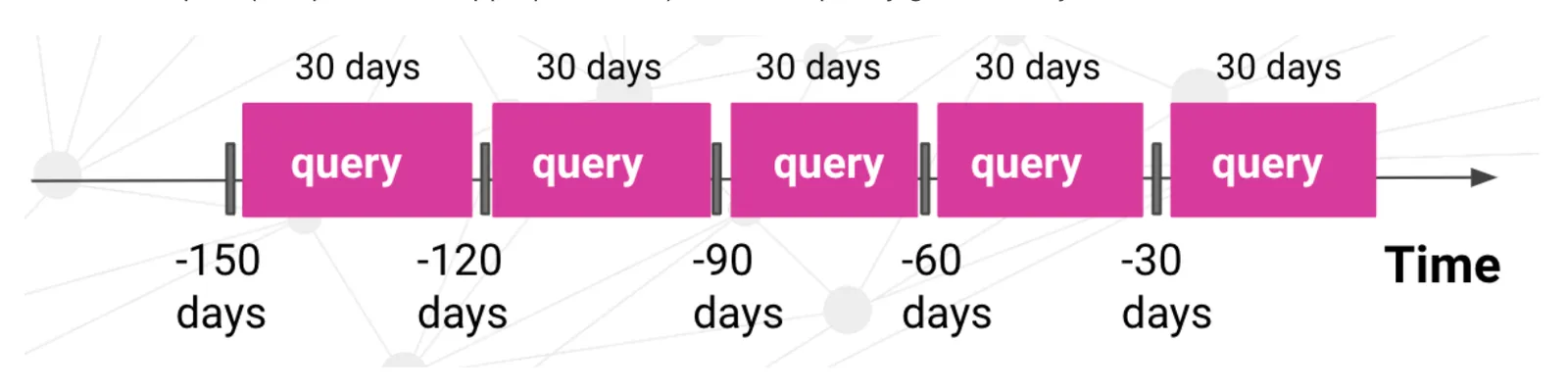
Kumo automatically generates the proper sampling and training split methodology, based on your dataset and predictive query. Internally, Kumo inspects your data to compute the optimal sample rates and splits for generating training examples. For temporal queries, Kumo ensures the holdout split is strictly later in time than the training split, and that training splits are well-balanced in size. This gives you good performance out of the box for any predictive query, without having to manually configure your training splits.
GNN Architecture and Hyper-parameter Search
Graph neural networks don’t refer to a single model architecture, but rather an entire family of architectures, each with their own trade-offs. Kumo fuses many state-of-the-art GNN architectures - such as GraphSAGE, GIN, ID-GNN, GCN, PNA, and GAT - into a flexible, in-house module that combines the strengths of these existing GNN models. Kumo AutoML automatically selects the best model hyper-parameters and training strategies for your specific predictive query and dataset. The hyper-parameters affect things such as the neighborhood sampling method, layer connectivity, embedding size, and aggregation methods.
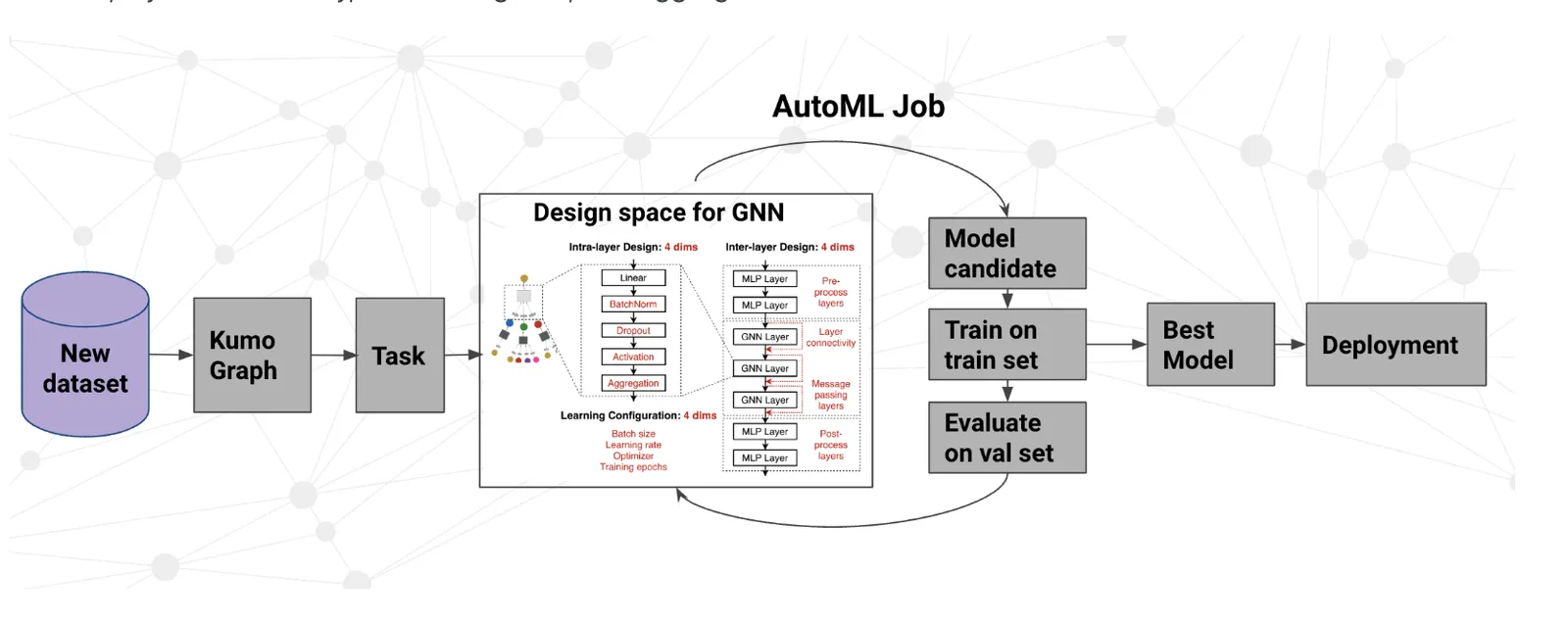
When you run a predictive query, the Kumo Model Planner generates an AutoML search space based on your predictive query and dataset. Kumo then runs between 2 and 8 experiments to find the hyper-parameters that deliver the best performance for your model. Experiments are sampled randomly from the AutoML search space without replacement (best effort), so larger experiment counts generally explore more unique configurations. Kumo displays the winning model architecture and hyper-parameter configuration in the UI, so you can view the exact architecture it used. You can directly edit the hyper-parameter configuration to get additional performance in certain scenarios.
Fine-Grained Control Using Kumo’s Model Planner
If you need fine-grained control over the encoders, training strategy, or AutoML search space, you can use Kumo’s model planner. Customizing the model planner settings is usually not necessary, but you might want to do this in a few scenarios:
- Control the Data Split Strategy: The most common reason to use the model planner is to control the data split strategy.
For example, using the
TimeRangeSplitmodule to specify the exact holdout dataset is common practice for comparing model performance against an existing model trained outside of Kumo. You can also enforce additional constraints required by your organization (such as ensuring a sufficiently large gap between the training dataset and the holdout dataset). - Make your Jobs Run Faster: If you already know what kind of model architecture you want (based on your experience writing similar predictive queries on your dataset), you can use the model planner to skip the full AutoML architecture search and focus on a narrow portion of the search space. For example, running one experiment instead of eight can make your job up to eight times faster.
- Maximize Performance: If an additional 1–5% of improved performance is critical, you can use the model planner to extract more performance, though this may come at the cost of increased job runtime or other trade-offs.
For example, the default model plan caps the number of channels at 256, since the performance benefit usually does not outweigh the cost beyond that point; however, you are free to increase this limit.
You can also use options like
refit, which trains over the entire dataset at the cost of losing evaluation metrics on the holdout dataset. - Control the Data Encoding: In certain situations, you may want to control exactly how your data is encoded before it gets passed into the GNN.
For example, for a particular numerical column, you may want missing values to be treated the same as
0, or enable a more expensive NLP encoding method for a text column that is particularly important. - Change the Optimization Method: Out of the box, Kumo optimizes metrics such as AUROC, Loss, and MAE.
You can use the
tune_metricoption to change this behavior. This is particularly useful for recommendation problems, where you can use themoduleoption to optimize the recommender for different goals (such as diversity vs. recall). - Export Embeddings: If you intend to export embeddings for use as features in a downstream model or as part of a KNN lookup in a recommender system, you can modify several options in the model planner to ensure the embeddings have the desired properties. For example, you can configure whether embeddings need to be stable across model retraining, or whether you plan to use cosine similarity to compare them. If you do not need embeddings, you can enable advanced GNN architectures (such as ID-GNN) to improve model accuracy.
The model planner is exposed as part of the predictive query creation process. The SDK reference details the available model plan options.