
Overview#
VSS Auto Calibration Microservice enables automatic calibration of multi-camera systems through a simple, web-based, step-by-step workflow.
It is powered by AutoMagicCalib (AMC), which estimates camera intrinsics and extrinsics to generate accurate projection matrices and lens distortion parameters for 3D and multi-view applications.
Unlike checkerboard-based methods, AMC uses naturally moving objects in the scene. With NVIDIA DeepStream detection and tracking, it follows objects (e.g., people) and derives camera parameters from normal operational footage—no setup, no downtime, and supports calibration from archived videos.
The service supports both a geometry-based approach (AMC) using object trajectories and geometric relationships, and a model-based approach (VGGT) that leverages learned models for higher accuracy and robustness.
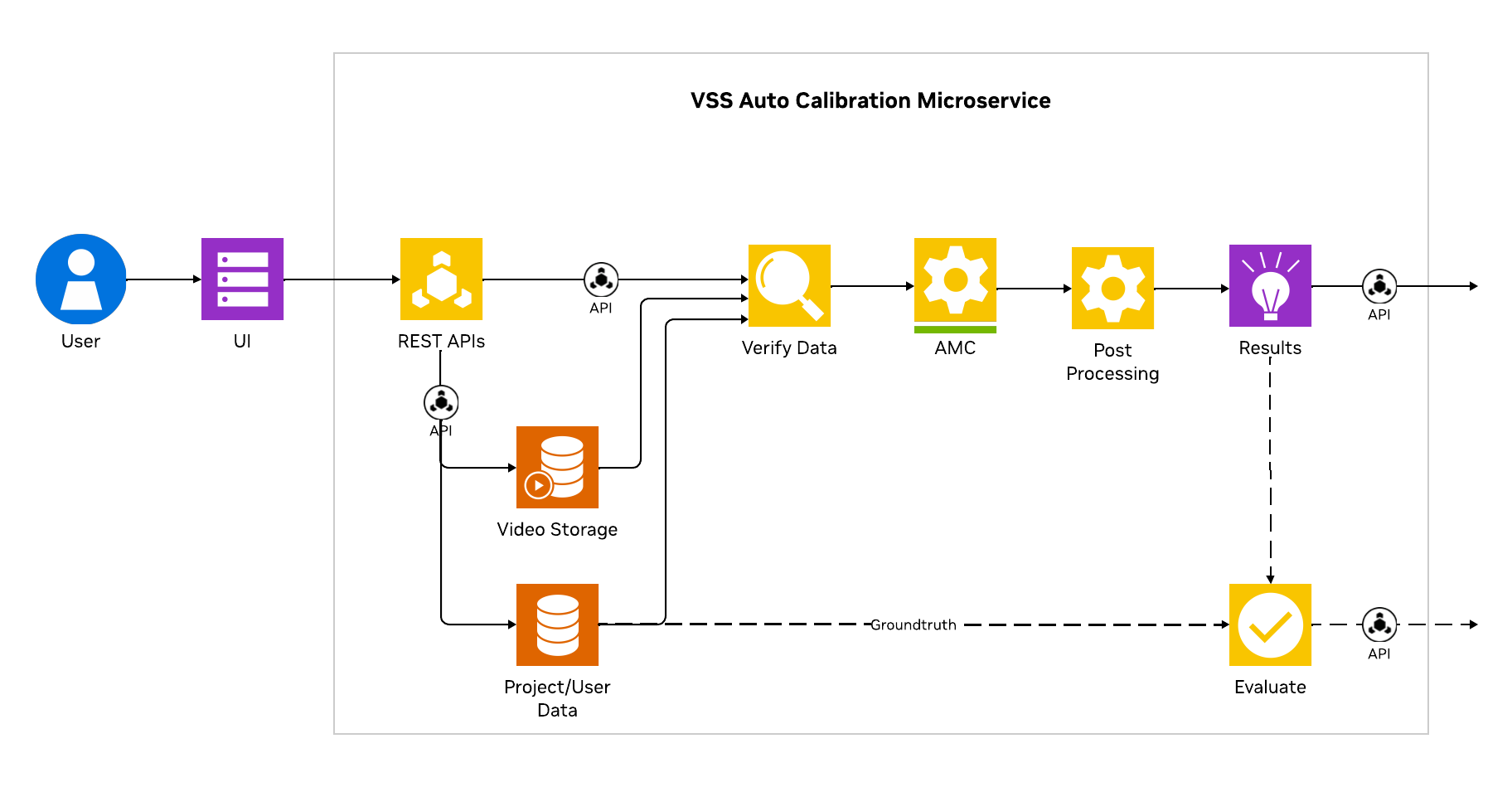
The overall microservice architecture is as shown below:
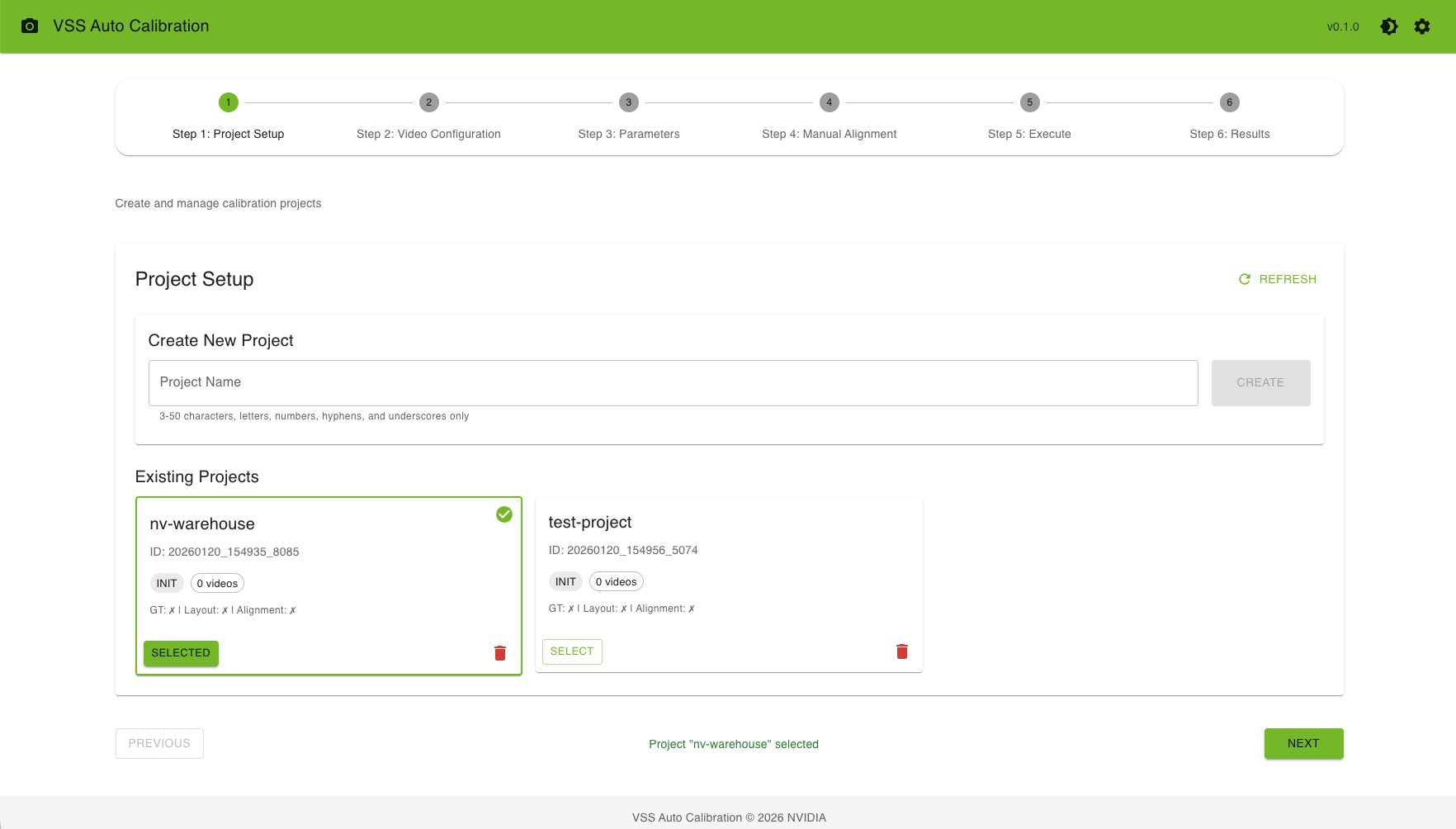
UI launch screen is as shown below:
Key Features#
Guided Workflow
6-Step Process: Intuitive step-by-step calibration workflow
Progress Tracking: Visual indicators for completion status
Validation: Real-time validation of inputs at each step
Project Management
Multiple Projects: Create and manage multiple calibration projects
Project States: Track project progress (INIT, READY, RUNNING, COMPLETED, ERROR)
Data Persistence: All project data is saved automatically
Interactive Tools
ROI Drawing: Draw regions of interest directly on video frames
Tripwire Configuration: Define tripwire lines and directions
Manual Alignment: Interactive point selection for camera-to-world alignment
Real-time Preview: See annotations and calibration results immediately
Dual Calibration Methods
AMC (Auto Magic Calibration): Primary calibration method
VGGT (Vision-Geometry Graph Transformer): Optional model-based method
Export Options
Multiple Formats: Export calibration data in various formats
MV3DT Compatible: Export data compatible with MV3DT verification tools
World Coordinates: Full calibration with ROI/tripwire world coordinates
Camera Parameters: Individual camera intrinsic and extrinsic parameters
Workflow Overview#
The calibration process follows a logical 6-step workflow:
Project Setup: Create or select a calibration project
Video Configuration: Upload camera videos, layout image, and optional files
Parameters: Draw ROIs, tripwires, and configure focal lengths, settings
Manual Alignment: Create alignment data by selecting corresponding points
Execute: Run the calibration pipeline with live monitoring
Results: View calibration results and export data
Each step validates inputs before allowing progression to the next step, ensuring a smooth calibration experience.
Next Steps#
Getting Started - Set up and access the UI
Workflow Steps - Detailed guide for each workflow step
Custom Dataset - Custom dataset preparation and calibration
Troubleshooting - Common issues and solutions