

NVStreamer#
Introduction#
NVStreamer is an NVIDIA developer software that enables storing and serving of video files that can then be streamed using the RTSP protocol. It is particularly useful for testing with VIOS, as it provides an alternative means to cameras for creating video sources as input to VIOS. Specifically, it provides a mechanism to test specific video files as VIOS inputs. VIOS can be configured to receive RTSP streams as if they were originating from an ONVIF-S camera.
NVStreamer provides an option to either upload the videos from webUI or read the videos from the local file system. The local video files can be mounted inside the NVStreamer container and it will start streaming the video files.
NVStreamer Dashboard#
Open a web browser (we suggest Chrome) and navigate to this address (on the same system or another one on the same network):
http://[NVStreamer-IP]:31000
Note
HTTP, (not HTTPS) where [NVStreamer-IP] is the host IP address on the local network (you can use ifconfig on the terminal to verify the IP).
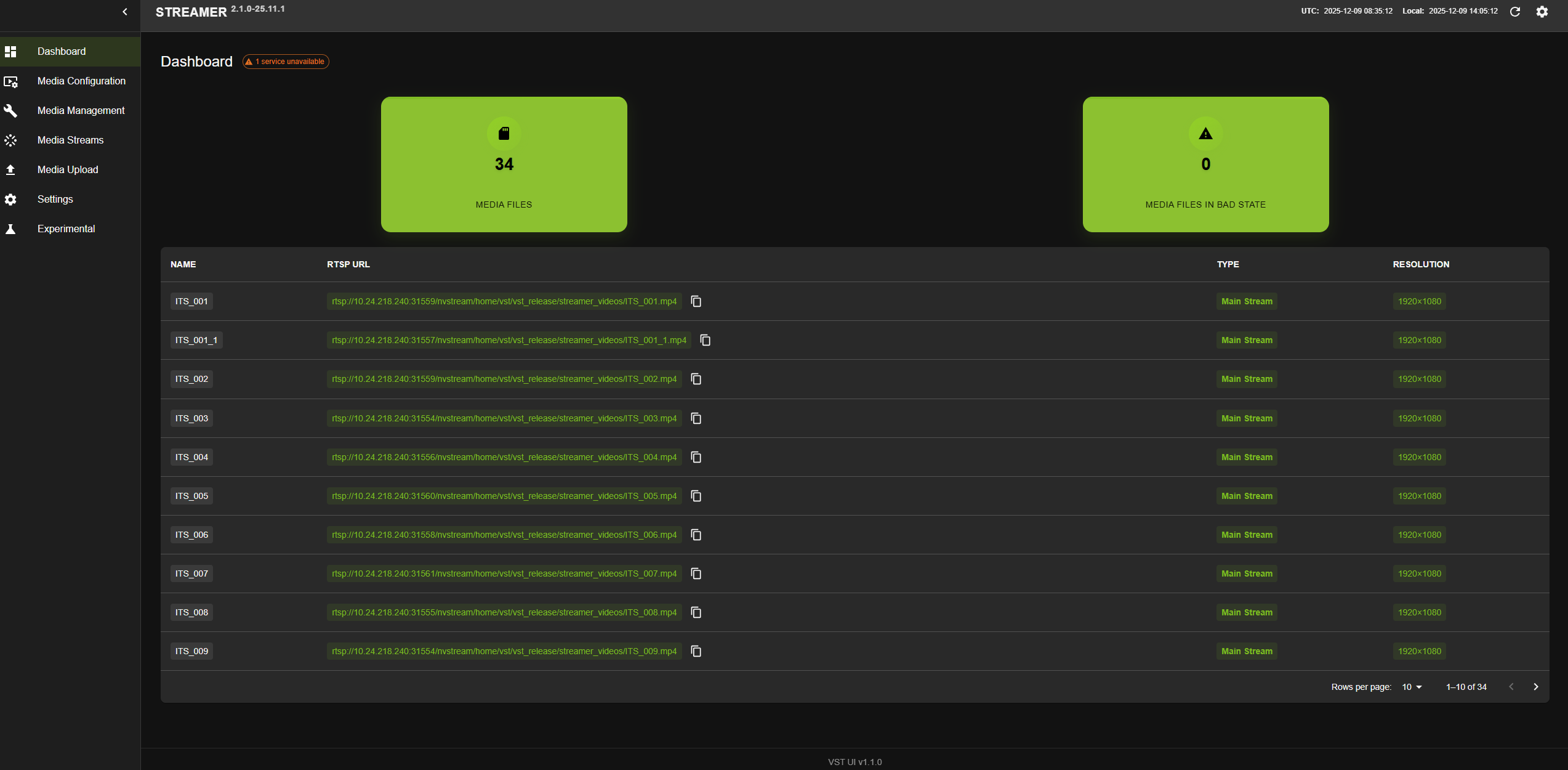
The following UX will open, you can see the all the available video streams and corresponding RTSP URLs like below.
Uploading Videos to NVStreamer#
To upload videos from the web UI:
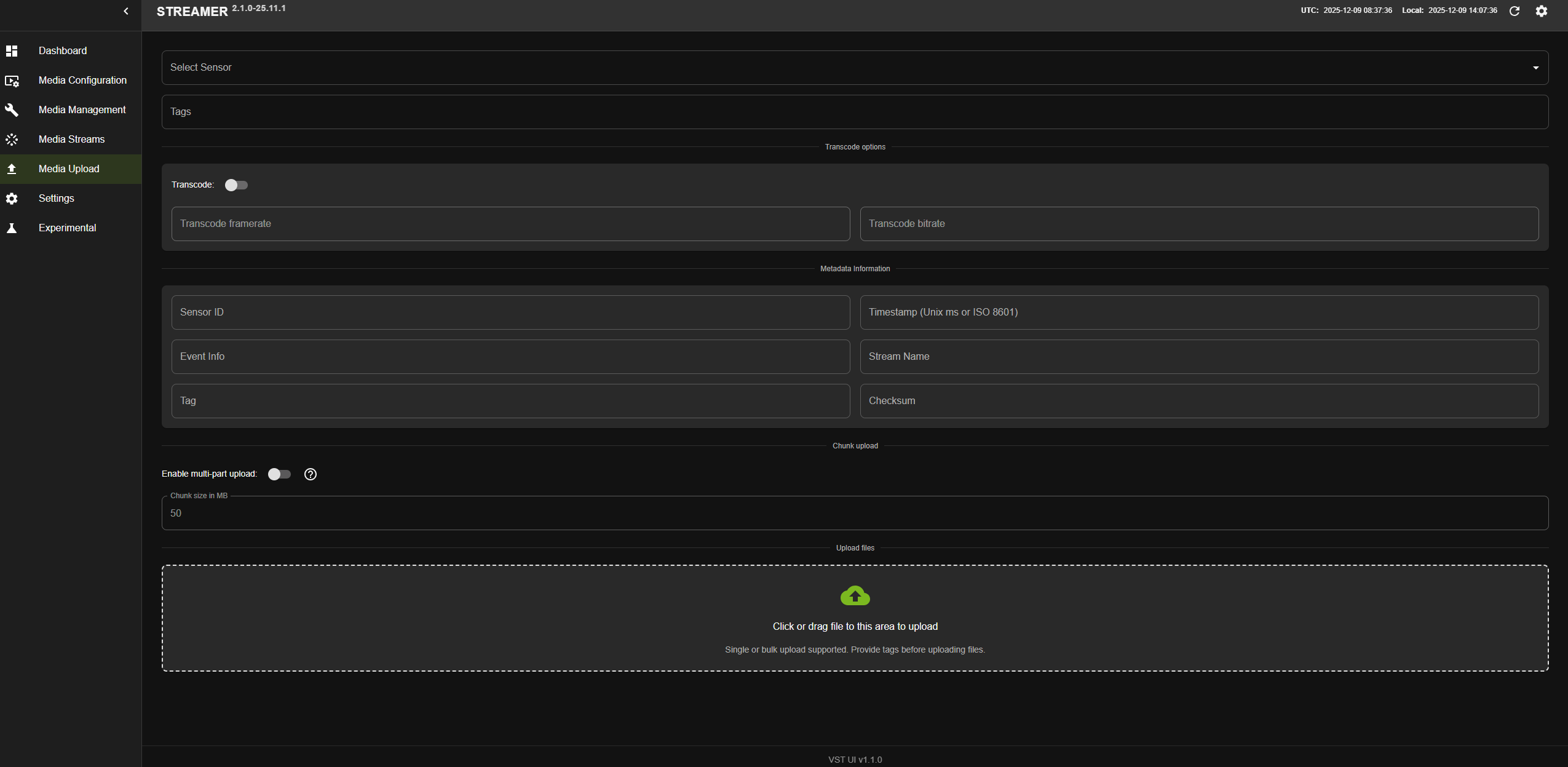
Click on the Media Upload tab on the left sidebar.
Drag and drop the videos to upload, or click to select videos from your file system.
Monitor the upload progress - a green progress line will appear at the bottom left.
Once complete, the file name will appear in gray.
An RTSP stream will be automatically created with the file name.
Check the NVStreamer Dashboard to see the new RTSP stream.
Streaming Videos from NVStreamer#
To stream videos using webRTC:
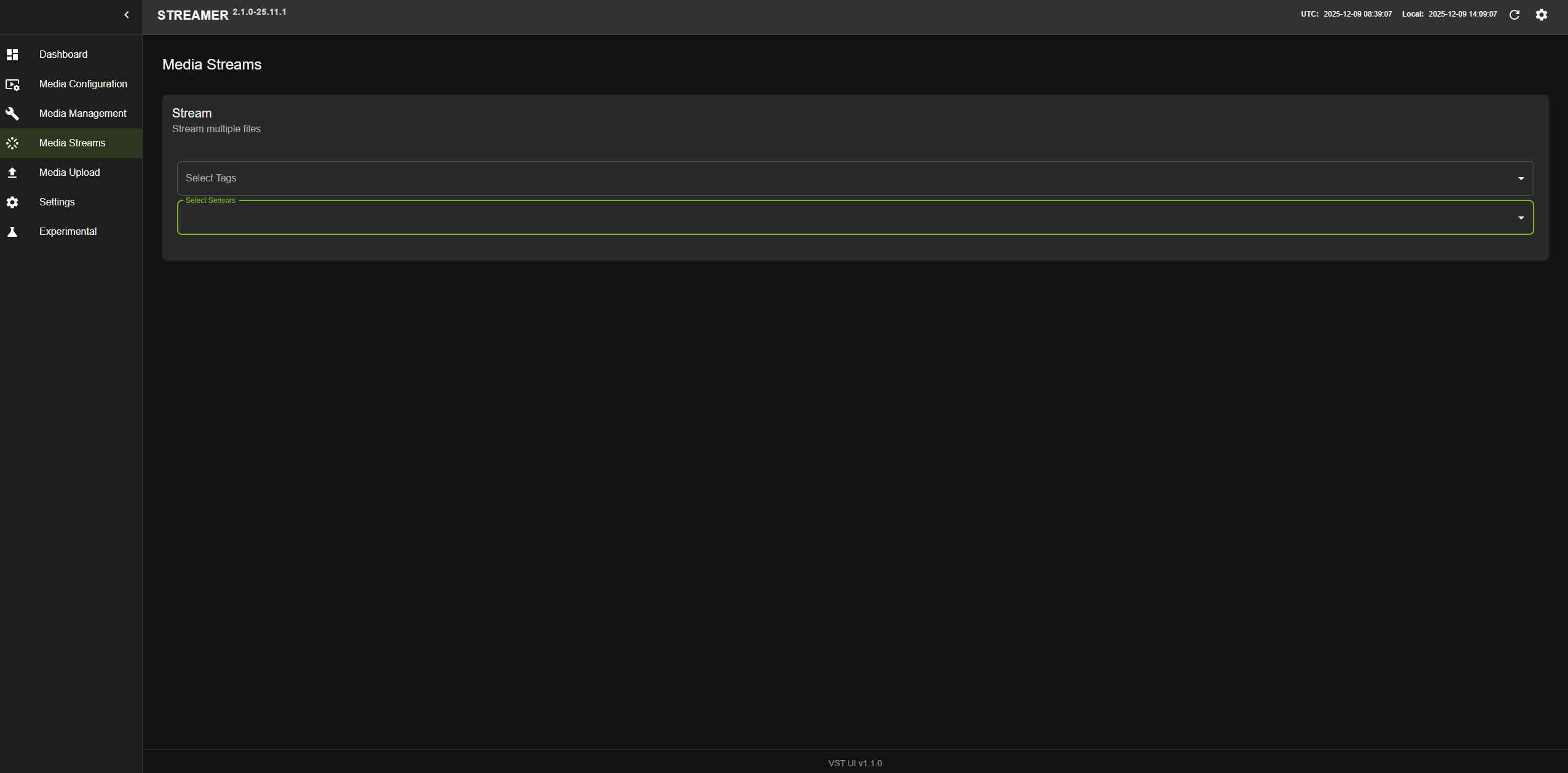
Navigate to the Streams tab on the left sidebar.
All uploaded videos will be listed in the NVStreamer Dashboard.
Select the video you want to stream.
The video will begin streaming via webRTC.
Remove Files#
To remove files from NVStreamer:
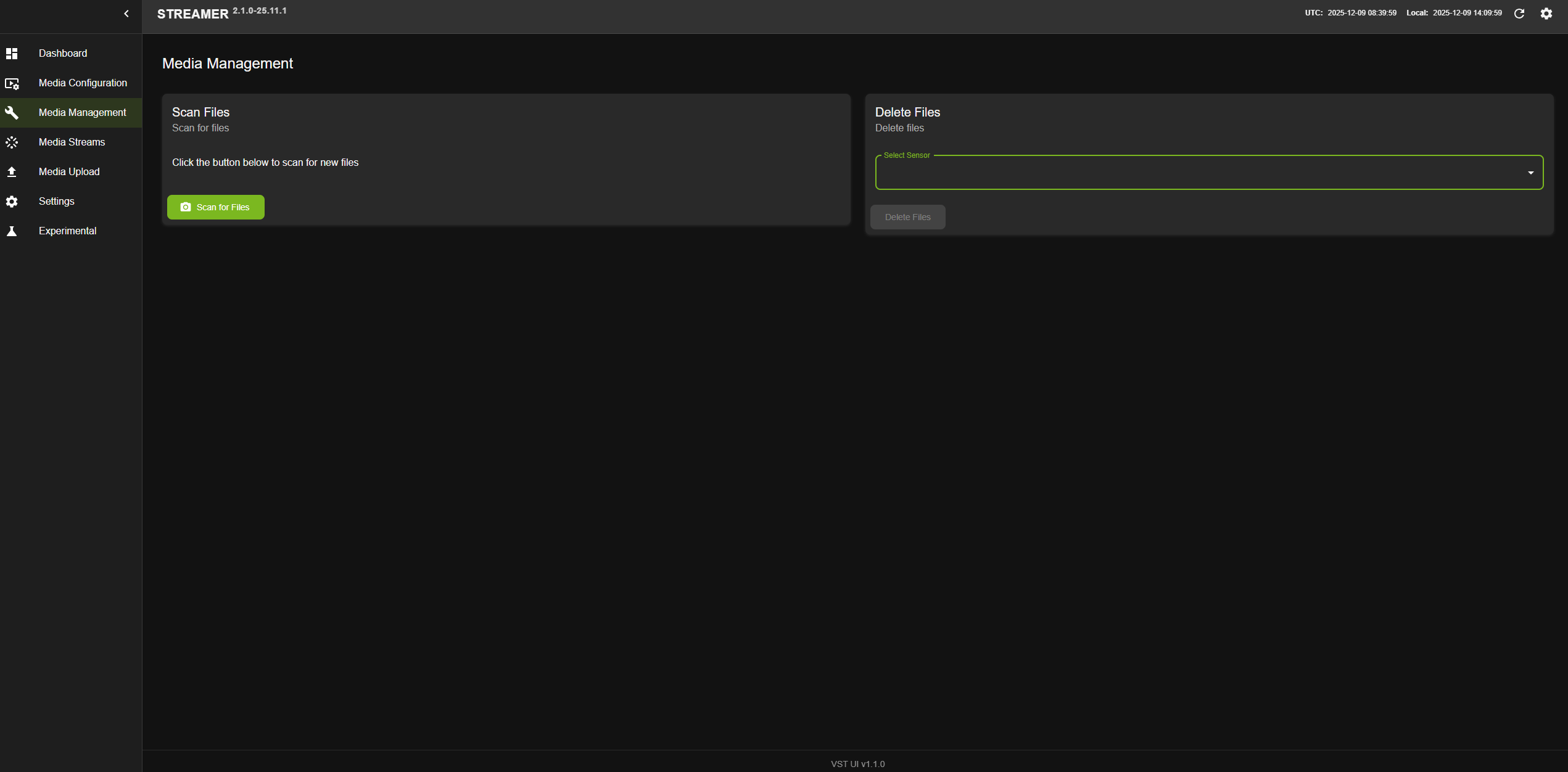
Go to the Management tab in the UI.
Select the Delete files option.
Select the file from the dropdown menu.
Click the Delete button.
NVStreamer Configuration#
Synchronize Streaming of Videos#
NVStreamer provides a mechanism to synchronize the streaming of videos. This is useful for testing with VIOS, as it provides an alternative means to cameras for creating video sources which are synchronized with each other with respect to time.
To enable synchronized streaming:
Set the config parameter
nv_streamer_sync_file_countto specify the number of files to sync with respect to each other.Ensure all files to be synced have the same encoding attributes (resolution, frame rate, bitrate, duration).
If files have different encoding attributes, use the following
ffmpegcommands to standardize them:Cut the video to make the duration the same:
ffmpeg -i input.mp4 -t 10 output.mp4
Remove bframes and modify key-intervals:
ffmpeg -i input.mp4 -vcodec libx264 -crf 25 -x264opts "bframes=0:keyint=30" output.mp4
Upload the standardized files to NVStreamer.
NVStreamer Config Parameters#
Following table describes the parameters in NVStreamer config file:
Key |
Description |
Typical Value |
|---|---|---|
network |
Section to define all Network related parameters |
|
“server_domain_name” |
Server domain name |
“vst-service” |
“stunurl_list” |
STUN server address |
[“stun.l.google.com:19302”] |
“static_turnurl_list” |
TURN server address |
[] |
“coturn_turnurl_list_with_secret” |
Coturn Turnurl list with secret |
[] |
“use_coturn_auth_secret” |
Enable/Disable Coturn Auth secret |
FALSE |
“use_twilio_stun_turn” |
Enable/Disable Twilio |
FALSE |
“twilio_account_sid” |
Twilio Account Sid |
“” |
“rx_socket_buffer_size” |
RX socket buffer size |
1000000 |
“tx_socket_buffer_size” |
TX socket buffer size |
1000000 |
“twilio_auth_token” |
Auth token for Twilio |
“” |
“ntp_servers” |
NTP server address |
[“time.google.com”] |
“use_sensor_ntp_time” |
If true then forward camera/nvstreamer ntp time in SR reports to the clients. Otherwise provide current ntp time in SR report. |
TRUE |
“max_webrtc_out_connections” |
Max number of webrtc output connections at a given time |
8 |
“max_webrtc_in_connections” |
Max number of webrtc input connections at a given time |
8 |
“webservice_access_control_list” |
An Access Control List allows restrictions to be put on the list of IP addresses which have access to the web server. The ACL is a comma separated list of IP subnets, where each subnet is pre-pended by either a - or a + sign. A plus sign means allow, where a minus sign means deny. If a subnet mask is omitted, such as -1.2.3.4, this means to deny only that single IP address. |
“+10.42.0.0/32” |
“use_reverse_proxy” |
Enable/Disable reverse proxy |
FALSE |
“reverse_proxy_server_address” |
Reverse proxy server address |
“REVERSE_PROXY_SERVER_ADDRESS:100” |
“rtsp_server_port” |
User given rtsp port number |
8554 |
“rtsp_server_instances_count” |
Number of RTSP server instances |
8 |
“rtsp_server_use_socket_poll” |
Enable/Disable socket poll for RTSP server |
TRUE |
“rtsp_preferred_network_iface” |
Preferred network interface for RTSP streaming |
“eth1” |
“rtcp_rtp_port_multiplex” |
Enable RTCP/RTP port multiplexing |
TRUE |
“rtsp_streaming_over_tcp” |
Enable / Disable RTSP Streaming over TCP |
FALSE |
“rtsp_server_reclamation_client_timeout_sec” |
Timeout for RTSP Server reclamation client |
10 |
“stream_monitor_interval_secs” |
Stream Monitor interval in seconds |
2 |
“rtp_udp_port_range” |
RTP UDP port range for streaming |
“31000-31200” |
“udp_latency_ms” |
UDP latency in milliseconds |
200 |
“udp_drop_on_latency” |
Enable/Disable dropping frames on high UDP latency |
FALSE |
“webrtc_latency_ms” |
Latency for webrtc in milliseconds |
500 |
“enable_frame_drop” |
Enable/Disable frame drop |
TRUE |
“webrtc_video_quality_tunning” |
webRTC video quality tunning |
{“resolution_2160”:{“bitrate_start”:20000,”bitrate_range”:[15000,25000],”qp_range_I”:[0,30],”qp_range_P”:[0,51]},”resolution_1440”:{“bitrate_start”:10000,”bitrate_range”:[8000,15000],”qp_range_I”:[10,30],”qp_range_P”:[10,30]},”resolution_1080”:{“bitrate_start”:5000,”bitrate_range”:[3000,8000],”qp_range_I”:[10,30],”qp_range_P”:[10,30]},”resolution_720”:{“bitrate_start”:3000,”bitrate_range”:[2000,5000],”qp_range_I”:[10,30],”qp_range_P”:[10,30]},”resolution_480”:{“bitrate_start”:1000,”bitrate_range”:[800,3000],”qp_range_I”:[10,30],”qp_range_P”:[10,30]}} |
“webrtc_peer_conn_timeout_sec” |
Timeout duration in seconds for peer connection establishment |
10 |
“enable_grpc” |
Enable/Disable gRPC server |
FALSE |
“grpc_server_port” |
gRPC server port number |
“50051” |
“webrtc_in_audio_sender_max_bitrate” |
Maximum bitrate for WebRTC input audio sender |
128000 |
“webrtc_in_video_degradation_preference” |
WebRTC input video degradation preference (resolution/framerate) |
“resolution” |
“webrtc_in_video_sender_max_framerate” |
Maximum framerate for WebRTC input video sender |
30 |
“remote_vst_address” |
Cloud VST Address |
13.0.0.1:30000 |
“webrtc_port_range” |
Min and Max Port Range for webRTC |
{“min”:30001,”max”:30100} |
“enable_websocket_pingpong” |
Enable/Disable websocket ping pong messages |
FALSE |
“websocket_keep_alive_ms” |
Timeout for websocket to keep alive |
5000 |
onvif |
Section to define all ONVIF related parameters |
|
“device_discovery_timeout_secs” |
Device discovery timeout to receive probe match message from device |
10 |
“onvif_request_timeout_secs” |
Timeout to receive ONVIF command response from device |
10 |
“device_discovery_freq_secs” |
Device discovery frequency in secs |
5 |
“device_discovery_interfaces” |
Network interface for device discovery e.g eth0, eth1 |
[] |
“max_devices_supported” |
Limiting maximum number of devices |
8 |
“default_bitrate_kbps” |
Value of bitrate setting on device |
8000 |
“default_framerate” |
Value of framerate setting on device |
30 |
“default_resolution” |
Value of resolution setting on device |
“1920x1080” |
“default_gov_length” |
Value of GOV length setting on device |
60 |
data |
Section to define all VST data related parameters |
|
“storage_config_file” |
Path to storage configuration JSON file |
./configs/vst_storage.json |
“storage_threshold_percentage” |
% value of storage occupancy when aging policy triggers |
95 |
“storage_monitoring_frequency_secs” |
Monitor storage usage with frequency in seconds |
2 |
“nv_streamer_directory_path” |
Directory to store files in nvstreamer |
“/home/vst/vst_release/vst_data/” |
“nv_streamer_loop_playback” |
Enable/Disable looping in nvstreamer |
FALSE |
“nv_streamer_seekable” |
Enable/Disable seeking in nvstreamer |
FALSE |
“nv_streamer_sync_playback” |
Enable/Disable synchronized playback in nvstreamer |
FALSE |
“nv_streamer_sync_file_count” |
Number of files to sync in nvstreamer |
4 |
“nv_streamer_max_upload_file_size_MB” |
Maximum file upload size in nvstreamer |
10000 |
“nv_streamer_media_container_supported” |
Media containers supported in nvstreamer |
[“mp4”,”mkv”] |
“nv_streamer_rtsp_server_output_buffer_size_kb” |
Buffer size for RTSP server output in KB |
800 |
“nv_streamer_metadata_container_supported” |
Metadata containers supported in nvstreamer |
[“json”] |
“supported_video_codecs” |
Video codec supported for video recording |
[“h264”,”h265”] |
“supported_audio_codecs” |
Audio codec supported for audio recording and decode |
[“pcmu”,”pcma”,”mpeg4-generic”] |
“enable_aging_policy” |
Enable/Disable aging policy of video files |
TRUE |
“max_video_download_size_MB” |
Limiting the maximum video download size |
1000 |
“always_recording” |
Enable/Disable always ON recording |
FALSE |
“event_recording” |
Enable/Disable event-based recording |
FALSE |
“event_record_length_secs” |
Event recording duration in seconds |
10 |
“record_buffer_length_secs” |
Recording buffer length in seconds |
2 |
“use_software_path” |
Enable allows processing on CPU otherwise on GPU |
FALSE |
“use_webrtc_inbuilt_encoder” |
WebRTC inbuilt encoder type (empty for default) |
“” |
“webrtc_in_fixed_resolution” |
Fixed resolution for WebRTC input |
“1280x720” |
“webrtc_in_max_framerate” |
Maximum framerate for WebRTC input |
30 |
“webrtc_in_video_bitrate_thresold_percentage” |
WebRTC input video bitrate threshold percentage |
50 |
“webrtc_in_passthrough” |
Enable/Disable WebRTC input passthrough mode |
FALSE |
“webrtc_sender_quality” |
webrtc input quality |
“pass_through” |
“enable_rtsp_server_sei_metadata” |
Enable SEI support for rtsp server |
TRUE |
“enable_proxy_server_sei_metadata” |
Enable SEI support for proxy server |
TRUE |
“gpu_indices” |
GPU indices |
[] |
“webrtc_out_enable_insert_sps_pps” |
webRTC Out Enable / Disable SPS PPS insertion |
TRUE |
“webrtc_out_set_iframe_interval” |
webRTC Out set I-Frame Interval |
30 |
“webrtc_out_set_idr_interval” |
webRTC Out set IDR Interval |
256 |
“webrtc_out_min_drc_interval” |
webRTC Out minimum interval between DRC requests |
5 |
“webrtc_out_encode_fallback_option” |
WebRTC output encoder fallback option (software/hardware) |
“software” |
“webrtc_out_default_resolution” |
Default resolution for WebRTC output |
“1920x1080” |
“webrtc_out_enc_quality_tuning” |
WebRTC output encoder quality tuning preset |
“ultra_low_latency” |
“webrtc_out_enc_preset” |
WebRTC output encoder preset |
“ultra_fast” |
“enable_drc” |
Enable/Disable Dynamic Rate Control for WebRTC |
TRUE |
“device_name” |
Device Name for edge VST |
“VST_EDGE” |
“device_location” |
Device Location for edge VST |
“6th_Floor” |
“enable_dec_low_latency_mode” |
Enable/Disable low latency in decoder |
FALSE |
“enable_avsync_udp_input” |
Enable/Disable AV sync for UDP input |
TRUE |
“use_standalone_udp_input” |
Enable/Disable standalone UDP input mode |
FALSE |
“enable_silent_audio_in_udp_input” |
Enable/Disable silent audio in UDP input |
FALSE |
“enable_udp_input_dump” |
Enable/Disable UDP input dump for debugging |
FALSE |
“use_webrtc_hw_dec” |
Enable/Disable WebRTC hardware decoder |
TRUE |
“recorder_enable_frame_drop” |
Enable/Disable frame drop in recorder |
TRUE |
“recorder_max_frame_queue_size_bytes” |
Maximum frame queue size for recorder in bytes |
16000000 |
“use_centralize_local_db” |
Enable/Disable Centralized local db |
TRUE |
“enable_mega_simulation” |
Enable/Disable Mega simulation |
FALSE |
“mega_simulation_delay_min_ms” |
Mega simulation delay min ms |
0 |
“mega_simulation_delay_max_ms” |
Mega simulation delay max ms |
0 |
“mega_simulation_base_time” |
Mega simulation base time |
2025-02-14T06:30:00.000000Z |
notifications |
Section to define all Notifications related parameters |
|
“enable_notification” |
Enable notification of device events on message broker |
FALSE |
“use_message_broker” |
Message Broker to use (Kafka/Redis) |
“kafka” |
“message_broker_topic” |
Topic/event used in message broker |
“vst.event” |
“enable_notification_consumer” |
Enable/Disable notification consumer |
TRUE |
“use_message_broker_consumer” |
Message Broker to use (Kafka/Redis) |
“kafka” |
“message_broker_topic_consumer” |
Topic/event used in message broker |
“mdx-bev” |
“message_broker_payload_key” |
Payload key used in message broker |
“sensor.id” |
“redis_server_env_var” |
Redis server address:port |
REDIS_SVC_SERVICE_HOST:6379 |
“kafka_server_address” |
Kafka server address and port |
“10.0.0.1:9092” |
debug |
Section to define all Debug related parameters |
|
“enable_perf_logging” |
Enable/Disable perf logging |
TRUE |
“enable_qos_monitoring” |
Enable/Disable QOS logging |
TRUE |
“qos_logfile_path” |
QOS log file path |
/root/vst_release/webroot/log/ |
“qos_data_capture_interval_sec” |
QOS log capture interval |
1 |
“qos_data_publish_interval_sec” |
QOS log publish interval |
5 |
“enable_gst_debug_probes” |
Enable/Disable gstreamer probes |
TRUE |
“enable_prometheus” |
Enable/Disable stats update on prometheus |
FALSE |
“prometheus_port” |
prometheus port number |
8080 |
“enable_highlighting_logs” |
Enable certain logs highlighting by special colors |
TRUE |
“enable_debug_apis” |
Enable/Disable Debug apis |
TRUE |
“dump_webrtc_input_stats” |
Enable/Disable webRTC IN stats |
FALSE |
“enable_frameid_in_webrtc_stream” |
Enable/Disable frameid in webRTC Stream |
FALSE |
“enable_network_bandwidth_notification” |
Enable/Disable network bandwidth notification |
FALSE |
“enable_latency_logging” |
Enable/Disable latency logging |
FALSE |
“update_record_details_in_sec” |
Update record details in seconds |
70 |
overlay |
Section to define all overlay related parameters |
|
“video_metadata_server” |
Server to fetch Metadata from |
“10.0.0.1:9200/mdx-raw*” |
“video_metadata_query_batch_size_num_frames” |
Size of metadata to fetch |
300 |
“use_video_metadata_protobuf” |
Use Protobuf spec for metadata parsing |
TRUE |
“enable_gem_drawing” |
Enable/Disable GEM drawing |
TRUE |
“calibration_file_path” |
Path to calibration file |
“/home/vst/vst_release/configs/calibration.json” |
“calibration_mode” |
Calibration mode |
“synthetic” |
“use_camera_groups” |
Enable/Disable camera groups |
TRUE |
“enable_recentering” |
Enable/Disable recentering |
FALSE |
“floor_map_file_path” |
Path to floor map file |
“/home/vst/vst_release/configs/Top.png” |
“3d_overlay_sensor_name” |
3D overlay sensor name |
“bev-sensor-1” |
“bbox_tolerance_ms” |
Bounding box tolerance in milliseconds |
0 |
“analytic_server_address” |
Analytic server address |
“” |
“overlay_color_code” |
Overlay color code |
|
“overlay_text_font_type” |
Font type for overlay text |
“DejaVuSansMono.ttf” |
security |
Section to define all security related parameters |
|
“use_https” |
Enable/Disable https |
TRUE |
“use_rtsp_authentication” |
Enable/Disable RTSP proxy stream authentication |
TRUE |
“use_http_digest_authentication” |
Enable/Disable HTTP user authentication |
TRUE |
“use_multi_user” |
Enable/Disable multi-user support |
FALSE |
“enable_user_cleanup” |
Enable/Disable automatic user cleanup |
FALSE |
“session_max_age_sec” |
Session maximum age in seconds |
2592000 |
“multi_user_extra_options” |
Extra options for multi-user cookies |
[“Secure”,”SameSite=none”] |
“nv_org_id” |
NGC ORG ID |
ngc_org_id |
“nv_ngc_key” |
NGC Key |
ngc_key |