

Real-Time Embedding Microservice#
Overview#
The Real-Time Embedding microservice is a FastAPI-based REST API service that provides video and text embedding generation capabilities. It supports video/image files, live RTSP streams, and text inputs, enabling real-time analysis and batch processing of visual media content.
Key Features#
Video Embeddings: Generate embeddings from video files with configurable chunk duration and overlap
Image Embeddings: Process single or multiple images for embedding generation
Live Stream Support: Real-time embedding generation from RTSP camera streams
Text Embeddings: Generate embeddings from text inputs
Streaming Responses: Server-Sent Events (SSE) for real-time streaming output
Kafka Integration: Kafka messages containing generated embeddings for video input
Redis Integration: Error messages on Redis channel
Batch Operations: Bulk upload and deletion of live streams
Health Monitoring: Comprehensive health check endpoints (liveness, readiness, startup)
Metrics: Prometheus-format metrics for monitoring and observability
OpenTelemetry Integration: Distributed tracing and metrics collection
Embedding Models#
To fine-tune Cosmos-Embed1 with NVIDIA TAO and integrate custom checkpoints, see Model customization overview and Cosmos-Embed1 (video embedding).
The microservice supports the Cosmos-Embed1 model, a joint video-text embedder. It supports both video and text input for embedding generation.
Following three model variants are supported:
Cosmos-Embed1-448p Cosmos-Embed1-448p: 448p resolution model (default)
Cosmos-Embed1-336p Cosmos-Embed1-336p: 336p resolution model
Cosmos-Embed1-224p Cosmos-Embed1-224p: 224p resolution model
Architecture#
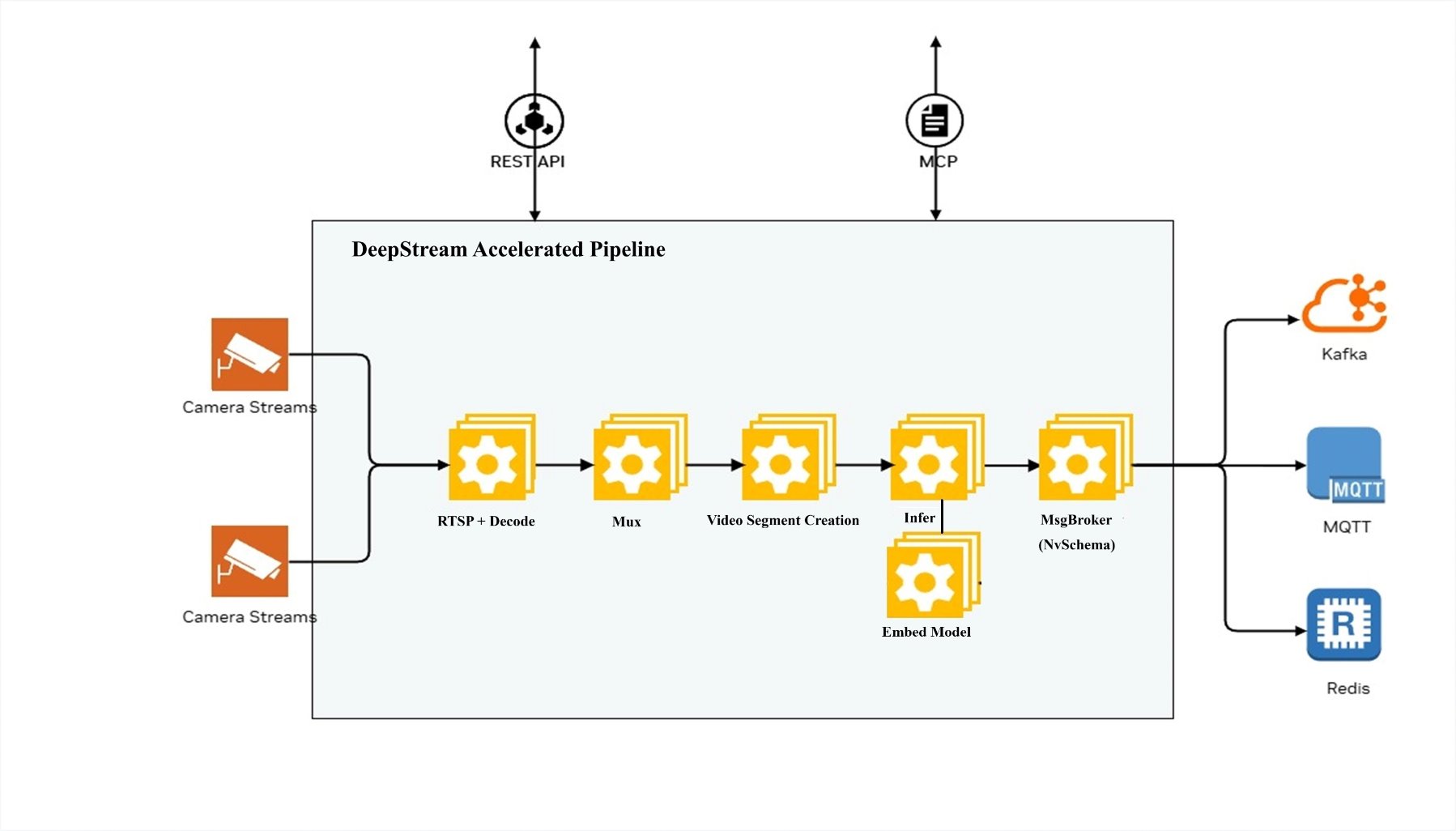
The diagram below shows the DeepStream Accelerated Pipeline architecture of the microservice.
DeepStream Pipeline#
The microservice uses the DeepStream SDK to process video and image files. For video input, the video is segmented into chunks as per requested chunk duration, overlap. For each video chunk,the microservice uniformly samples frames and generates embeddings for the sampled frames. The number of frames sampled is determined by the model configuration (8 in case of Cosmos-Embed1).
For image input, the microservice generates embeddings for the list of images provided in the request. For less than 8 images, the microservice pads the images to 8 images.
For text input, the text is tokenized and embeddings are generated for the tokenized text. The model pads or truncates the input text tokens to 128 tokens.
Getting Started#
Prerequisites#
Ubuntu 24.04/22.04 or compatible Linux distribution
Docker: Version 28.2+
Docker Compose: Version 2.36+
NVIDIA GPU(s) with appropriate drivers: version 580+
Standalone Deployment using Docker Compose#
The microservice can be deployed using Docker Compose.
The deployment is defined in the docker-compose.yml file.
Environment Variables#
Create a .env file with the following variables and update the values as per your requirements:
BACKEND_PORT=<port>                         # Host port on which the service will be available
RTVI_IMAGE=<container_image>                # Real-Time Embedding Microservice container image

# Storage
ASSET_STORAGE_DIR=/path/to/assets           # Host path for uploaded files (optional)
EXAMPLE_STREAMS_DIR=/path/to/sample-videos  # Host path for example streams (optional)

# GPU Configuration
NVIDIA_VISIBLE_DEVICES=0                    # Use specific GPUs (default: all)

# Logging
LOG_LEVEL=INFO                              # DEBUG, INFO, WARNING, ERROR

# Kafka server config
KAFKA_ENABLED=<true/false>                  # Enable Kafka messages containing generated embeddings
KAFKA_BOOTSTRAP_SERVERS=<ip_address:port>   # Kafka server
KAFKA_TOPIC=vision-embed-messages           # Kafka message topic
ERROR_MESSAGE_TOPIC=vision-embed-errors     # Kafka error topic (or Redis channel when Redis is enabled)
Sample docker-compose.yml file#
version: '3.8'
services:
  rtvi-server:
    image: ${RTVI_IMAGE:-nvcr.io/nvidia/vss-core/vss-rt-embed:3.1.0}
    shm_size: '16gb'
    runtime: nvidia
    user: "1001:1001"
    ports:
      - "${BACKEND_PORT?}:8000"
    volumes:
      - "${ASSET_STORAGE_DIR:-/dummy}${ASSET_STORAGE_DIR:+:/tmp/assets}"
      - "${MODEL_ROOT_DIR:-/dummy}${MODEL_ROOT_DIR:+:${MODEL_ROOT_DIR:-}}"
      - "${NGC_MODEL_CACHE:-rtvi-ngc-model-cache}:/opt/nvidia/rtvi/.rtvi/ngc_model_cache"
      - "${RTVI_LOG_DIR:-/dummy}${RTVI_LOG_DIR:+:/opt/nvidia/rtvi/log/rtvi/}"
      - rtvi-hf-cache:/tmp/huggingface
      - rtvi-triton-model-repo:/tmp/triton_model_repo

    environment:
      MODEL_PATH: "${MODEL_PATH:-git:https://huggingface.co/nvidia/Cosmos-Embed1-448p}"
      MODEL_IMPLEMENTATION_PATH: "${MODEL_IMPLEMENTATION_PATH:-/opt/nvidia/rtvi/rtvi/models/custom/samples/cosmos-embed1}"
      MODEL_REPOSITORY_SCRIPT_PATH: "${MODEL_REPOSITORY_SCRIPT_PATH:-/opt/nvidia/rtvi/rtvi/models/custom/samples/cosmos-embed1/create_triton_model_repo.py}"
      HF_TOKEN: "${HF_TOKEN:-}"
      NVIDIA_VISIBLE_DEVICES: "${NVIDIA_VISIBLE_DEVICES:-all}"
      VLM_BATCH_SIZE: "${VLM_BATCH_SIZE:-}"
      NUM_VLM_PROCS: "${NUM_VLM_PROCS:-}"
      NUM_GPUS: "${NUM_GPUS:-}"
      LOG_LEVEL: "${LOG_LEVEL:-INFO}"
      INSTALL_PROPRIETARY_CODECS: "${INSTALL_PROPRIETARY_CODECS:-false}"
      FORCE_SW_AV1_DECODER: "${FORCE_SW_AV1_DECODER:-}"
      RTVI_RTSP_LATENCY: "${RTVI_RTSP_LATENCY:-2000}"
      RTVI_RTSP_TIMEOUT: "${RTVI_RTSP_TIMEOUT:-2000}"
      RTVI_RTSP_RECONNECTION_INTERVAL: "${RTVI_RTSP_RECONNECTION_INTERVAL:-5}"
      RTVI_RTSP_RECONNECTION_WINDOW: "${RTVI_RTSP_RECONNECTION_WINDOW:-60}"
      RTVI_RTSP_RECONNECTION_MAX_ATTEMPTS: "${RTVI_RTSP_RECONNECTION_MAX_ATTEMPTS:-10}"
      VSS_NUM_GPUS_PER_VLM_PROC: "${VSS_NUM_GPUS_PER_VLM_PROC:-}"
      ENABLE_VIA_HEALTH_EVAL: "${ENABLE_VIA_HEALTH_EVAL:-false}"
      ENABLE_OTEL_MONITORING: "${ENABLE_OTEL_MONITORING:-false}"  # Set to 'true' to enable OpenTelemetry
      OTEL_RESOURCE_ATTRIBUTES: "${OTEL_RESOURCE_ATTRIBUTES:-}"
      OTEL_TRACES_EXPORTER: "${OTEL_TRACES_EXPORTER:-otlp}"
      OTEL_EXPORTER_OTLP_ENDPOINT: "${OTEL_EXPORTER_OTLP_ENDPOINT:-http://otel-collector:4318}"
      OTEL_METRIC_EXPORT_INTERVAL: "${OTEL_METRIC_EXPORT_INTERVAL:-60000}"  # Metrics export interval in milliseconds
      KAFKA_ENABLED: "${KAFKA_ENABLED:-false}"
      KAFKA_TOPIC: "${KAFKA_TOPIC:-vision-embed-messages}"
      ERROR_MESSAGE_TOPIC: "${ERROR_MESSAGE_TOPIC:-vision-embed-errors}"
      KAFKA_BOOTSTRAP_SERVERS: "${KAFKA_BOOTSTRAP_SERVERS:-kafka:9092}"
      ENABLE_REDIS_ERROR_MESSAGES: "${ENABLE_REDIS_ERROR_MESSAGES:-false}"
      REDIS_HOST: "${REDIS_HOST:-redis}"
      REDIS_PORT: "${REDIS_PORT:-6379}"
      REDIS_DB: "${REDIS_DB:-0}"
      REDIS_PASSWORD: "${REDIS_PASSWORD:-}"
      ASSET_DOWNLOAD_TOTAL_TIMEOUT: "${ASSET_DOWNLOAD_TOTAL_TIMEOUT:-300}"
      ASSET_DOWNLOAD_CONNECT_TIMEOUT: "${ASSET_DOWNLOAD_CONNECT_TIMEOUT:-10}"
      ENABLE_REQUEST_PROFILING: "${ENABLE_REQUEST_PROFILING:-false}"
    ulimits:
      memlock:
        soft: -1
        hard: -1
      stack: 67108864
    ipc: host
    stdin_open: true
    tty: true
    extra_hosts:
      host.docker.internal: host-gateway
    healthcheck:
      test: ["CMD", "curl", "-f", "http://localhost:8000/v1/ready"]
      interval: 30s
      timeout: 10s
      retries: 3
      start_period: 1200s

volumes:
  rtvi-hf-cache:
  rtvi-ngc-model-cache:
  rtvi-triton-model-repo:
Deployment Commands#
# Start the service
docker-compose up -d

# View logs
docker-compose logs -f rtvi-server

# Check service health
curl http://localhost:${BACKEND_PORT?}/v1/ready?detailed=false

# Stop the service
docker-compose down

# Stop and remove volumes
docker-compose down -v

# Remove all containers and volumes
docker-compose down -v --rmi all
Usage Examples#
List available models#
import requests
import json

BASE_URL = "http://localhost:8000/v1"

response = requests.get(f"{BASE_URL}/models")
models = response.json()
print(f"Available models: {models['data']}")
Video File Embeddings Example#
import requests
import json

BASE_URL = "http://localhost:8000/v1"

# Step 1: Upload a video file
with open("video.mp4", "rb") as f:
    response = requests.post(
        f"{BASE_URL}/files",
        files={"file": f},
        data={
            "purpose": "vision",
            "media_type": "video",
            "creation_time": "2024-06-09T18:32:11.123Z"
        }
    )
file_info = response.json()
file_id = file_info["id"]
print(f"Uploaded file: {file_id}")

# Step 2: Generate video embeddings
embedding_request = {
    "id": [file_id],
    "model": "cosmos-embed1-448p",
    "chunk_duration": 10,
    "chunk_overlap_duration": 0
}
response = requests.post(
    f"{BASE_URL}/generate_video_embeddings",
    json=embedding_request
)
embeddings = response.json()
print(f"Generated embeddings for {len(embeddings['chunk_responses'])} chunks")

# Step 3: Process results
for chunk in embeddings["chunk_responses"]:
    print(f"[{chunk['start_time']} - {chunk['end_time']}]: Embedding size: {len(chunk['embeddings'])}")

# Step 4: Clean up
requests.delete(f"{BASE_URL}/files/{file_id}")
print("File deleted")
Live Stream Example#
The following example demonstrates generating embeddings from a live RTSP stream:
import requests
import json
import sseclient

BASE_URL = "http://localhost:8000/v1"

# Step 1: Add live stream
stream_request = {
    "streams": [{
        "liveStreamUrl": "rtsp://example.com/stream",
        "description": "Main warehouse camera"
    }]
}
response = requests.post(
    f"{BASE_URL}/streams/add",
    json=stream_request
)
stream_info = response.json()
stream_id = stream_info["results"][0]["id"]
print(f"Added stream: {stream_id}")

# Step 2: Start embedding generation with streaming
embedding_request = {
    "id": [stream_id],
    "model": "cosmos-embed1-448p",
    "stream": True,
    "chunk_duration": 10,
    "chunk_overlap_duration": 0
}
response = requests.post(
    f"{BASE_URL}/generate_video_embeddings",
    json=embedding_request,
    stream=True
)

# Step 3: Process streaming responses
client = sseclient.SSEClient(response)
for event in client.events():
    if event.data == "[DONE]":
        break
    data = json.loads(event.data)
    if "chunk_responses" in data:
        for chunk in data["chunk_responses"]:
            print(f"[{chunk['start_time']}]: Embedding size: {len(chunk['embeddings'])}")

# Step 4: Stop processing and remove stream
requests.delete(f"{BASE_URL}/generate_video_embeddings/{stream_id}")
requests.delete(f"{BASE_URL}/streams/delete/{stream_id}")
print("Stream removed")
Text Embeddings Example#
The following example demonstrates generating embeddings from text input:
import requests
import json

BASE_URL = "http://localhost:8000/v1"

# Generate text embeddings
text_request = {
    "text_input": [
        "A person walking in a warehouse",
        "A forklift moving pallets"
    ],
    "model": "cosmos-embed1-448p"
}
response = requests.post(
    f"{BASE_URL}/generate_text_embeddings",
    json=text_request
)
result = response.json()

# Process results
print(f"Model: {result['model']}")
for item in result["data"]:
    print(f"Text: {item['text_input']}")
    print(f"Embedding size: {len(item['embeddings'])}")
    print(f"First 5 values: {item['embeddings'][:5]}")
Configuration#
Sample Environment Variable Configuration#
BACKEND_PORT=<port>                         # Host port on which the service will be available

# Storage
ASSET_STORAGE_DIR=/path/to/assets           # Host path for uploaded files (optional)
EXAMPLE_STREAMS_DIR=/path/to/sample-videos  # Host path for example streams (optional)

# GPU Configuration
NVIDIA_VISIBLE_DEVICES=0                    # Use specific GPUs (default: all)

# Logging
LOG_LEVEL=INFO                              # DEBUG, INFO, WARNING, ERROR

# Kafka server config
KAFKA_ENABLED=<true/false>                  # Enable Kafka messages containing generated embeddings
KAFKA_BOOTSTRAP_SERVERS=<ip_address:port>   # Kafka server
KAFKA_TOPIC=vision-embed-messages           # Kafka message topic
ERROR_MESSAGE_TOPIC=vision-embed-errors     # Kafka error topic (or Redis channel when Redis is enabled)
ENABLE_REDIS_ERROR_MESSAGES=<true/false>    # Enable Redis for error messages instead of Kafka
REDIS_HOST=<redis_host>                     # Redis server hostname
REDIS_PORT=<redis_port>                     # Redis server port
REDIS_DB=<redis_db>                         # Redis database number
REDIS_PASSWORD=<redis_password>             # Redis authentication password
API Reference#
For complete API documentation including all endpoints, request/response schemas, and interactive examples, see the Real-Time Embedding API Reference.
Monitoring#
When monitoring is enabled, the microservice exposes Prometheus-format metrics that can be scraped for monitoring and alerting. The metrics include:
Request latencies and throughput
Embedding generation performance
GPU utilization and memory usage
Error rates and types
Additionally, OpenTelemetry metrics can be collected for monitoring and alerting. Configure the OTEL_EXPORTER_OTLP_ENDPOINT environment variable to specify the endpoint where metrics and traces should be exported (default: http://otel-collector:4318).
Kafka and Redis Messaging#
The Real-Time Embedding Microservice sends Kafka messages containing generated embeddings for video input.
The messages are sent to the vision-embed-messages topic.
The microservice sends the Kafka messages as Protobuf messages with the nv.VisionLLM message type.
Please refer to the Protobuf Schema documentation for more details on the Kafka message schema.
Note: Kafka messages are not sent for the text embeddings.
Kafka Topics#
The microservice publishes to the following Kafka topic:
VisionLLM Messages (default:
vision-embed-messages): Contains VisionLLM protobuf messages with embedding results for video input
Configuration:
Kafka integration is controlled by the following environment variables:
KAFKA_ENABLED: Enable/disable Kafka integration (
true/false). Default:falseKAFKA_BOOTSTRAP_SERVERS: Comma-separated list of Kafka broker addresses (e.g.,
localhost:9092orkafka:9092for Docker)KAFKA_TOPIC: Topic for VisionLLM messages. Default:
vision-embed-messagesERROR_MESSAGE_TOPIC: Topic for error messages (or Redis channel when Redis is enabled). Default:
vision-embed-errors
Message Format#
VisionLLM Embedding Messages#
VisionLLM embedding messages contain video embedding results and are serialized as
Protocol Buffer messages using the VisionLLM message type.
Message Header:
message_type:
"vision_llm"key:
{request_id}:{chunk_idx}- Used for Kafka partitioning and ordering
Message Structure:
See the protobuf schema documentation for complete VisionLLM message
structure. Key fields include:
version: Model version identifier
timestamp: Start timestamp (protobuf Timestamp)
end: End timestamp (protobuf Timestamp)
startFrameId: Start frame identifier
endFrameId: End frame identifier
sensor: Sensor information including:
id: Sensor/stream identifiertype: “Camera” for live streams, “Video” for filesdescription: Asset descriptioninfo: Additional metadata (path, assetDir, url, videoFps)
frames: Array of Frame messages with frame-level information:
id: Frame identifiertimestamp: Frame timestampinfo: Frame metadata
llm: LLM information containing:
info: Model metadata (modelId, modelApiType, modelOwnedBy)queries: Array of query objects with:id: Query identifierparams: Query parameters (chunkIdx, streamId, requestId, startNtp, endNtp)prompts: Input prompts (if provided)response: Empty string for embedding-only requests
visionEmbeddings: Array of Embedding messages with:vector: Float array containing the embedding vector
info: Additional metadata map including:
requestId: Request IDchunkIdx: Chunk indexstreamId: Stream/asset identifierframeCount: Number of frames processedinputTokens: Number of input tokens (if available)outputTokens: Number of output tokens (if available)decodeLatencyMs: Video decode latency in millisecondsvlmLatencyMs: Inference latency in millisecondschunkLatencyMs: Total chunk processing latency in millisecondsqueueTimeS: Time spent in queue in secondsprocessingLatencyS: Total processing latency in seconds
Example Message Flow:
1. Video chunk is processed through the pipeline
2. Embeddings are generated by the Cosmos-Embed1 model
3. VisionLLM protobuf message is constructed with:
   - Chunk timing information (timestamp, end)
   - Frame metadata (frames, startFrameId, endFrameId)
   - Sensor information
   - Embedding vectors (in llm.visionEmbeddings)
   - Performance metrics (latencies, token counts)
4. Message is serialized to protobuf binary format
5. Message is sent to Kafka with:
   - Topic: vision-embed-messages
   - Key: {request_id}:{chunk_idx}
   - Header: message_type=vision_llm
   - Value: Serialized protobuf bytes
Redis Error Messages#
Error messages can be sent to Redis instead of Kafka. To use Redis for error
messages, set the following environment variables in your .env file:
ENABLE_REDIS_ERROR_MESSAGES=true         # Enable Redis for error messages instead of Kafka
REDIS_HOST=redis.example.com             # Redis server hostname
REDIS_PORT=6379                          # Redis server port
REDIS_DB=0                               # Redis database number
REDIS_PASSWORD=your_password             # Optional, only if Redis requires authentication
ERROR_MESSAGE_TOPIC=vision-embed-errors  # Redis channel name for error messages
Note: If Redis authentication is required, set the REDIS_PASSWORD environment variable.
Redis Error Message Format Details:
Each error message published to the Redis channel is a JSON object containing:
streamId: The unique identifier of the stream where the error occurred (string)timestamp: ISO 8601 formatted timestamp with milliseconds indicating when the error occurred (format:YYYY-MM-DDTHH:MM:SS.sssZ)type: The error severity level. Common values:"functional": Default error type for operational errors (default)"critical": Critical errors that prevent service initialization or operation
source: The hostname or service name of the pod/container that generated the error (e.g., the pod’s hostname or"rtvi-embed"if hostname is unavailable)event: A detailed description of the error event, including any relevant error messages or context (string)
Example Redis Error Messages:
Critical error during service initialization:
{
  "streamId": "",
  "timestamp": "2026-02-05T10:30:45.123Z",
  "type": "critical",
  "source": "rtvi-embed-pod-7f9c8b",
  "event": "Failed to initialize Inference pipeline: CUDA device not available"
}
Functional error during stream processing:
{
  "streamId": "stream-abc-12345",
  "timestamp": "2026-02-05T10:35:22.456Z",
  "type": "functional",
  "source": "rtvi-embed-pod-7f9c8b",
  "event": "Failed to decode frame: Invalid video format"
}
Subscribers to the Redis channel can consume these error messages in real-time for monitoring, logging, or alerting purposes.
Customizations#
Customizing the Model#
The Real-Time Embedding Microservice can be configured to run with different variants of the Cosmos-Embed1 model or custom models.
Model Variant Selection#
To use a different Cosmos-Embed1 model variant, set the MODEL_PATH environment variable to the appropriate Hugging Face repository URL.
Example:
MODEL_PATH=git:https://huggingface.co/nvidia/Cosmos-Embed1-224p
Supported Cosmos-Embed1 variants include:
git:https://huggingface.co/nvidia/Cosmos-Embed1-448p(default)git:https://huggingface.co/nvidia/Cosmos-Embed1-336pgit:https://huggingface.co/nvidia/Cosmos-Embed1-224p
Batch Size Configuration#
The inference batch size can be tuned for optimal performance using the VLM_BATCH_SIZE environment variable.
Example:
VLM_BATCH_SIZE=32
If not specified, the microservice automatically calculates an appropriate batch size based on available GPU memory.
Custom Model Implementation#
To use a custom model implementation, set the MODEL_PATH and MODEL_IMPLEMENTATION_PATH environment variables
to point to your custom model code directory and model repository.
Example:
MODEL_PATH=/path/to/custom/model/repository
MODEL_IMPLEMENTATION_PATH=/path/to/custom/model/implementation
Error Handling#
Error Response Format#
All errors return a consistent JSON format:
{
    "code": "ErrorCode",
    "message": "Human-readable error description"
}
Common Error Codes#
- 400 - Bad Request
InvalidParameters: Request parameters are invalidBadParameters: Parameter values are incorrectInvalidFile: File format or content is invalid
- 401 - Unauthorized
Authentication required
- 409 - Conflict
Resource is in use or conflict exists
- 422 - Unprocessable Entity
InvalidParameters: Request validation failed
- 429 - Rate Limit Exceeded
Too many requests
- 500 - Internal Server Error
InternalServerError: Unexpected server errorTextEmbeddingsError: Text embedding generation failed
- 503 - Service Unavailable
Service is not ready or unhealthy
Appendix#
Glossary#
- Asset
A file or live stream managed by the AssetManager
- Chunk
A segment of video/audio processed as a single unit
- Embedding
A vector representation of visual or textual content
- NTP Timestamp
Network Time Protocol timestamp in ISO8601 format
- PTS
Presentation Timestamp - time offset in nanoseconds from file start
- RTSP
Real-Time Streaming Protocol for live video streams
- SSE
Server-Sent Events - HTTP protocol for streaming data to clients
- UUID
Universally Unique Identifier (36 characters with hyphens)
Supported Media Formats#
Video Codecs: * H.264 (AVC) * H.265 (HEVC) * VP8 * VP9
Image Formats: * JPEG * PNG
Container Formats: * MP4 * MKV * MOV * WebM
RTSP Protocols: * RTSP over TCP * RTSP over UDP
Troubleshooting#
Common Issues#
- File Upload Fails
Check file size limits
Verify media type matches content
Ensure filename uses valid characters
- Embeddings Generation Timeout
Increase timeout settings
Reduce chunk duration
Check GPU availability
- Live Stream Connection Fails
Verify RTSP URL is accessible
Check authentication credentials
Confirm network connectivity
- Service Not Ready
Wait for startup completion
Check GPU availability
Review service logs
- Error: Hugging Face API rate limit exceeded
Check Hugging Face token configuration
Ensure token has READ permissions and is added to the environment variable
HF_TOKEN
Environment Variable Reference#
Core Configuration#
Variable |
Description |
Default |
Required |
|---|---|---|---|
|
Port for REST API server |
|
Yes |
|
Logging verbosity |
|
No |
Hugging Face Token Configuration#
Variable |
Description |
Default |
Required |
|---|---|---|---|
|
Hugging Face access token with READ permissions |
No |
Model Configuration#
Variable |
Description |
Default |
Required |
|---|---|---|---|
|
Inference batch size |
Auto-calculated |
No |
|
Number of inference processes |
|
No |
|
Number of GPUs to use |
Auto-detected |
No |
|
GPU device IDs |
|
No |
|
Set path of the model |
|
No |
|
Implementation code path for the model |
|
No |
Storage and Caching#
Variable |
Description |
Default |
Required |
|---|---|---|---|
|
Host path for uploaded files |
No |
|
|
Max storage size (GB) |
No |
|
|
Sample streams directory |
No |
|
|
Log output directory |
No |
|
|
Path for NGC/git model cache directory |
No |
Feature Toggles#
Variable |
Description |
Default |
Required |
|---|---|---|---|
|
Enable NSYS profiling |
|
No |
|
Install additional codecs |
|
No |
|
Force software AV1 decode |
|
No |
RTSP Streaming#
Variable |
Description |
Default |
Required |
|---|---|---|---|
|
RTSP latency (ms) |
|
No |
|
RTSP timeout (ms) |
|
No |
|
Time to detect stream interruption and wait for reconnection (seconds) |
|
No |
|
Duration to attempt reconnection after interruption before terminating the session (seconds) |
|
No |
|
Max attempts for reconnection after interruption before terminating the session (no.) |
|
No |
OpenTelemetry / Monitoring#
Variable |
Description |
Default |
Required |
|---|---|---|---|
|
Enable OpenTelemetry monitoring |
|
No |
|
Service name for traces |
|
No |
|
OTLP endpoint |
|
No |
|
Traces exporter type |
|
No |
|
Metrics export interval in milliseconds |
|
No |
Kafka Configuration#
Variable |
Description |
Default |
Required |
|---|---|---|---|
|
Enable Kafka integration |
|
No |
|
Kafka broker addresses |
|
No |
|
Kafka topic name for embedding messages |
|
No |
|
Kafka topic name for error messages (or Redis channel when Redis is enabled) |
|
No |
Redis Error Messages Configuration#
Variable |
Description |
Default |
Required |
|---|---|---|---|
|
Enable Redis for error messages instead of Kafka |
|
No |
|
Redis channel name for error messages |
|
No |
|
Redis server hostname |
|
No |
|
Redis server port |
|
No |
|
Redis database number |
|
No |
|
Redis authentication password |
No |
Advanced Performance#
Variable |
Description |
Default |
Required |
|---|---|---|---|
|
GPUs per Embedding process |
No |
|
|
Disable decoder reuse |
Auto |
No |
API Reference