

SDR#
Overview#
SDR is a Workload Distribution Management, Routing, Scaling and process collaboration enabler service mesh super-agent for stateful workloads handling streaming kind of data.
Key Parts |
Purpose |
|---|---|
SDR Agent |
Allocates workloads to pods and maintains routing table. |
SDR Controller |
Watches all Agents deployed. All agents register with the controller. UI to view all active SDR Agents. |
SDR Agent Operator (WIP) |
Auto deploy SDR agents based on annotations. |
Usage#
The component enables collaboration between agents/pods/processes in applications like VST, metropolis, MTMC, ITS, ACE, and Tokkio. It allows dynamic context-aware scaling of stateful workloads across multiple Kubernetes pods and Docker containers and can be extended to baremetal processes on a distributed network.
Architecture#
The SDR architecture consists of the SDR Controller, a fleet of SDR Agents deployed alongside stateful workloads, and an optional SDR Agent Operator for automated lifecycle management. Agents coordinate routing and capacity, while the Controller provides global visibility and orchestration across clusters and runtimes.
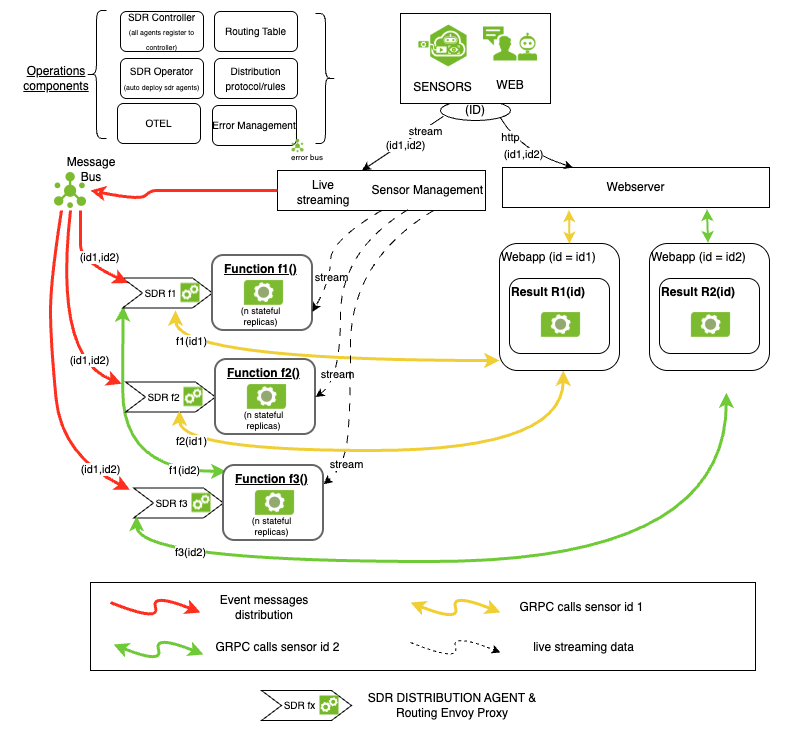
High-level SDR architecture.#
System Operating Modes (parameters)#
Controlled by environment variable - WDM_CLUSTER_TYPE
Mode |
|
|---|---|
K8s |
Discovers pods related to the statefulset defined by WDM_WL_OBJECT_NAME. Requires access to Kubernetes API server and supports future auto-scaling. |
K8s-headless |
In environments without Kubernetes API access, pod discovery is done via a DNS query on the Cluster IP linked to the statefulset named by the WDM_WL_OBJECT_NAME variable. Auto scaling isn’t possible because the Agent does not have access to the K8s API server. |
docker |
Docker container port addresses and names are defined in a config file and passed as startup parameters. The processes are fixed, with no scalability. |
Functional Operating Modes#
Mode |
|
|---|---|
Default |
When an Add Event occurs, a pod address with its capacity is identified and a routing table is created. All subsequent HTTP, GRPC, and WEBSOCKET requests are directed to this pod for the specified stream ID via Envoy. Upon a Delete Event, the deprovision endpoint is called, and the routing table is cleared. |
REGEX-Rule-engine |
The default behavior is followed unless WDM_ENABLE_REGEX_MAPPING is set to “true”. In this case, it will process the add event message after finding a pod that matches the regular expression in one of the event message fields. |
Configurable Parameters (Environment Variables)#
Parameter |
Default Value |
Description |
|---|---|---|
WDM_MSG_BUS |
kafka |
message bus type. |
WDM_MSG_KEY |
sensor |
message key for the streaming data. |
WDM_MSG_TOPIC |
notification |
message topic for the streaming data. |
WDM_CONSUMER_GRP_ID |
consumer group id for redis. |
|
WDM_KFK_ENABLE |
True |
enable kafka in wdm to receive events. This does not disable redis events |
WDM_KFK_BOOTSTRAP_URL |
“localhost:9092” |
bootstrap url for kafka. |
WDM_KFK_SESSION_TIME_OUT |
30000 |
Kafka session timeout in milliseconds. |
WDM_MAX_PER_POD |
0 |
Maximum number of streams/items allocated per pod. |
WDM_WL_OBJECT_NAME |
“python-testapp-testapp” |
Workload object name (e.g., StatefulSet name). |
WDM_WL_ID_FIELD |
“camera_id” |
Event field used as workload/stream identifier. |
WDM_EVENT_OBJECT_FIELD |
“event” |
Event payload field containing the object. |
WDM_WL_NAME_IGNORE_REGEX |
“” |
Regex to ignore names when matching (optional). |
WDM_WL_THRESHOLD |
8 |
Threshold value used for workload logic. |
WDM_CONFIG_URL |
“/config” |
Controller/agent configuration base URL path. |
WDM_CONFIG_PORT |
“9002” |
Controller/agent configuration service port. |
WDM_WL_ADD_URL |
“/api/v1/stream/add” |
Workload add/provision API endpoint path. |
WDM_WL_HEALTH_CHECK_URL |
“/api/v1/stream/add” |
Workload health-check endpoint path. |
WDM_WL_DELETE_URL |
“/api/v1/stream/remove” |
Workload remove/deprovision API endpoint path. |
WDM_WL_CONFIG_PORT |
“5000” |
Default workload service port. |
WDM_TARGET_PORT_MAPPING |
“{"default": 5000, "grpc": 50052}” |
Target port mapping per protocol (JSON). |
WDM_WL_KIND |
“StatefulSet” |
Workload kind (e.g., StatefulSet). |
WDM_TIMEOUT |
300 |
Default operation timeout in seconds. |
WDM_WL_PROXY_URL |
“/hello” |
Proxy URL prefix for routed requests. |
WDM_WL_ROUTER |
“nginx-dep” |
Router deployment name. |
WDM_WL_ROUTER_CONFIG_MAP |
“nginx-cfgmap-def” |
Router ConfigMap name. |
WDM_MIN_PODS |
0 |
Minimum number of pods to maintain. |
WDM_WL_REDIS_SERVER |
“localhost” |
Redis server hostname. |
WDM_WL_REDIS_PORT |
6379 |
Redis server port. |
WDM_WL_REDIS_MSG_FIELD |
“sensor.id” |
Event field used as Redis message key. |
ENVOYROUTEHEADER |
“id” |
Header key used by Envoy for routing. |
ENVOY_ROUTE_URL_PREFIX_REWRITE |
“/hello” |
Envoy route prefix rewrite. |
ENVOY_ROUTE_URL_PREFIX |
“/” |
Envoy route URL prefix. |
WDM_FORWARD_MSG_TYPE |
“event_message” |
Forwarded message type key. |
WDM_MAX_REPLICAS |
“4” |
Maximum replicas allowed for the workload. |
WDM_PRELOAD_WORKLOAD |
“/mnt/c/Users/hfarooq/OneDrive - NVIDIA Corporation/hfarooq-repos/wdm/tests/event_pre-roll.json” |
Preload file path for initial workload events. |
WDM_WL_CHANGE_FIELD |
“change” |
Event field representing change/action type. |
WDM_WL_CHANGE_ID_ADD |
“camera_streaming” |
Change type for add/provision. |
WDM_WL_CHANGE_ID_REPROVISION |
“reprovision” |
Change type for reprovision. |
WDM_WL_CHANGE_ID_DEL |
“camera_remove” |
Change type for delete/deprovision. |
WDM_WL_CHANGE_ID_POD_CONFIGURE |
“config” |
Change type for pod configuration. |
WDM_ERROR_EVENT_MSG_KEY |
“wdm_error_events” |
Event bus key for error messages. |
WDM_EVICT_QUEUE_ON_NO_CAPACITY |
“True” |
Evict queued events if capacity unavailable. |
WDM_INITIATOR_WLOBJ_NAME |
“vms-vms” |
Initiator workload object name. |
WDM_MAP_ADD_FIELD |
“” |
Mapping for add field names (JSON; optional). |
WDM_REMAP_EVENT_OBJECT |
“” |
Remap event object fields (JSON; optional). |
WDM_ENVOY_ADMIN_URL |
Envoy Admin API base URL. |
|
WDM_CHECK_STATUS |
False |
Enable periodic workload status checks. |
WDM_ERROR_BUS_MSG_VERSION |
“v2” |
Error event message schema/version. |
WDM_EXT_ERROR_MSG |
“please wait a few minutes and refresh the console” |
Generic external error message text. |
WDM_CLUSTER_TYPE |
“docker” |
Cluster mode: docker, k8s, or k8s-headless. |
WDM_CLUSTER_CONFIG_FILE |
“docker_cluster_config.json” |
Docker cluster config file path. |
WDM_CLUSTER_CONTAINER_NAMES |
“["sdr", "deepstream", "vst"]” |
Container names managed in docker mode (JSON array). |
WDM_DOCKER_CLUSTER_KEY_DOWN_NAMES |
“["deepstream"]” |
Container names to treat as key down (JSON array). |
WDM_DOCKER_CLUSTER_POD_DOWN_NAMES |
“["vst"]” |
Container names to treat as pod down (JSON array). |
VST_STREAMS_ENDPOINT |
VST live streams API endpoint. |
|
VST_STATUS_ENDPOINT |
VST sensor status API endpoint. |
|
WDM_CHECK_VST_STREAM_IS_ONLINE |
False |
Validate VST stream online status before add. |
WDM_INITIALIZE_FROM_VST |
True |
Initialize workload from VST on startup. |
WDM_CLEAR_DATA_WL |
False |
Clear workload data on startup. |
WDM_DS_SWAP_ID_NAME |
False |
Swap ID and name for DeepStream inputs. |
WDM_WL_SWAP_KEY_SECONDARY_FIELD |
“camera_name” |
Secondary field used when swapping ID/name. |
WDM_VALIDATE_BEFORE_ADD |
False |
Validate event fields before add. |
WDM_JSON_EXPECTED_KEYS |
“["camera_url", "camera_name", "camera_id"]” |
Expected JSON keys when validating adds. |
WDM_PRELOAD_DELAY_FOR_DS_API |
False |
Delay preload until DeepStream API ready. |
WDM_PRELOAD_DELAY_FOR_REDIS |
False |
Delay preload until Redis ready. |
WDM_API_WAIT_MAX_RETRIES_IN_SEC |
30 |
Max seconds to wait/retry for APIs to be ready. |
WDM_ADD_REMOVE_RETRY_ATTEMPTS |
2 |
Number of add/remove retry attempts. |
WDM_POD_WATCH_DOCKER_DELAY |
0.05 |
Docker mode pod watch poll delay (seconds). |
WDM_ADD_REMOVE_RETRY_DELAY |
0.5 |
Delay between add/remove retries (seconds). |
WDM_ADD_REMOVE_REQUEST_TIMEOUT |
2 |
Timeout for add/remove HTTP requests (seconds). |
WDM_DS_STATUS_CHECK |
False |
Enable DeepStream status check flow. |
WDM_DISABLE_WERKZEUG_LOGGING |
False |
Disable Werkzeug request logging. |
WDM_RESET_ON_WLOBJ_CRASH |
True |
Reset state on workload object crash. |
WDM_RESET_ON_INITIATOR_CRASH |
False |
Reset state on initiator process crash. |
WDM_AGENT_EVENT_BUS |
“sdr_agent_event” |
Event bus topic/key for agent events. |
WDM_RESET_PRELOAD_FILE |
False |
Remove preload file before initializing. |
WDM_CONTROLLER_SDR_AGENTS_PATH |
“/wdm/wdm-agents/agents-data.yaml” |
File path for controller-tracked SDR agents. |
WDM_SDR_AGENT_PORT |
“4000” |
SDR agent service port. |
CONTROLLER_SERVICE_URL |
“sdr-controller-service.default.svc.cluster.local:4001/report” |
Controller service report endpoint (host:port/path). |
WDM_K8S_HEADLESS_BASE_DOMAIN |
“python-testapp-testapp-testapp-svc” |
Base DNS name for k8s headless discovery. |
WDM_K8S_HEADLESS_DEFAULT_POD_PORT |
“8000” |
Default pod port for k8s headless mode. |
WDM_REAPPLY_ON_WL_RESTART |
False |
Reapply previous routes on workload restart. |
WDM_POD_ALLOCATION_HASH_NAME |
“regex-dns-pod-mapping” |
Redis hash name for regex-based pod allocation. |
WDM_POD_ALLOCATION_REGEX_DELIMITER |
“|” |
Delimiter for regex rules in allocation mapping. |
WDM_POD_ALLOCATION_ENCODED_NAME_KEY |
“name” |
Key name for encoded pod allocation entries. |
WDM_STREAM_ADD_REGEX_INFO_KEY |
“name” |
Event field used for regex-based routing info. |
WDM_ENABLE_REGEX_MAPPING |
False |
Enable regex-based mapping for stream allocation. |
ENVOY_REQUEST_TIMEOUT |
5 |
Envoy upstream request timeout (seconds). |
OTEL_SERVICE_NAME |
“sdr-agent” |
OpenTelemetry service name. |
WDM_CACHE_METHOD |
“redis” |
Cache implementation (“redis” or “file”). |
WDM_REDIS_CACHE_OBJECT |
“testapp-data” |
Redis cache object/key prefix. |
WDM_REDIS_LOCK_TIMEOUT |
10 |
Redis lock timeout (seconds). |
DELETE_API_METHOD |
“POST” |
HTTP method used for delete API calls. |
WDM_CALL_WL_WEBHOOK |
False |
Call workload webhook on add/remove actions. |
WDM_WL_WEBHOOK_ENDPOINT |
Workload webhook endpoint. |
|
WDM_STANDBY_POD_COUNT |
2 |
Number of standby pods to keep ready. |
WDM_CONTROLLER_REPROVISION |
False |
Allow controller-triggered reprovision on errors. |
WDM_ADD_CALL_DELAY |
0.1 |
Delay between successive add calls (seconds). |