

Blueprint Deep Dive#
Introduction#
Smart City Blueprint is an application of the VSS 3.0 framework to address video analytics for traffic analytics and smart city use cases at scale. It is designed to monitor traffic in a city and generate valuable real time insights to aid traffic engineering efforts. The blueprint consumes video input from multiple traffic cameras, detects vehicles and analyzes this metadata to produce alerts, metrics and reports that can be critical to traffic management in cities. The list of functionality supported include:
Live camera views from traffic cameras
- metrics:
Road segment speeds
Directional speeds
Flowrate
alerts detection including support for collisions, stalled vehicles and wrong way driving: specifically, the blueprint leverages two level architecture for alerts, whereby CV (computer vision) and behavior analytics is used in combination with vision language models to simultaneously support scale and accuracy.
alert report generated using agents
natural language based user interface driven using agents to query the system
Microservice Based architecture#
The Smart City Blueprint uses the canonical VSS 3.0 architecture based on microservices integrated using message bus in combination with agents to facilitate user requests and interaction. The high-level architecture is shown in the figure below.
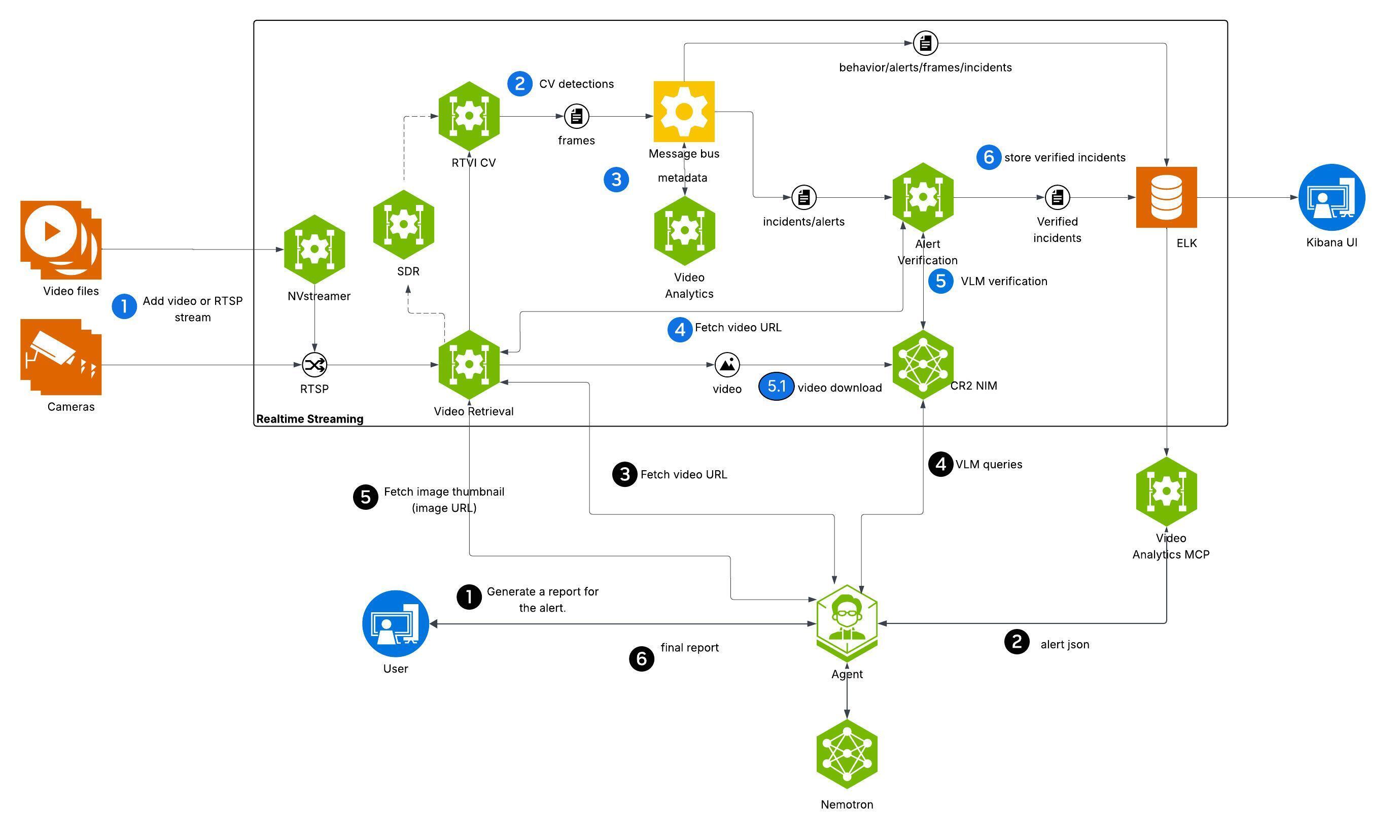
At a high level, the blueprint architecture can be divided into realtime streaming component and agentic component. The realtime streaming component is responsible for ingesting camera feeds and processing then through a combination of computer vision, streaming analytics and vision language models (VLMs) based techniques. The agentic component is responsible for interpreting and executing user requests exposed through a UI.
The microservices are deployed as containers using either Docker Compose. In line with the overall VSS design, the Smart City Blueprint provide a granular, flexible and scalable architecture using which various adaptations for bespoke traffic and smart city use cases through choice of relevant microservices, appropriate configuration, prompt tuning, model fine tuning and replacement.
The various microservices used are now reviewed along with the salient configuration details appropriate for the blueprint.
Realtime Video Intelligence (CV)#
This RTVI microservice takes streaming video inputs, performs inference & tracking, and sends metadata to the Behavior Analytics microservice (see below) using the nvschema-defined schema. More information about the RTVI microservice can be found on the Object Detection and Tracking page; it features the metropolis-perception-app, a DeepStream pipeline that leverages the built-in deepstream-test5 app in the DeepStream SDK. Specific configuration aspects of the pipeline are discussed that the developer may typically have to modify.
Model Used#
The RTVI microservice supports two models out of the box for object detection used in the smart city blueprint i.e. RT-DETR and Mask Grounding DINO:
RT-DETR is vision transformer based, and as part of the blueprint, a fine tuned checkpoint of the model for traffic use cases is being released. Further fine-tuning of the model can be performed using the recipe above.
Mask Grounding DINO (mG-DINO) is an open world detection model available through NVIDIA TAO, that can be further fine tuned based on the recipe above.
Note that RT-DETR has lower computational requirements than mG-DINO, and hence a larger stream count is supported. Refer to steps under Configure Environment Variables for details on how to switch models, and configure various parameters such as precision, frequency of running detection and prompting.
Tracking#
Tracking enables frame to frame association of detected objects. Smart City Blueprint uses by default the NvDCF Accuracy 2D multi object tracker provided with DeepStream. The DeepStream tracker documentation describes configuration parameters to tune tracker settings, such as for setting tradeoffs between accuracy and performance.
Refer to the “Customization of Microservice” section in the Object Detection and Tracking documentation for detailed configuration information.
Behavior Analytics#
Behavior Analytics microservice provides spatio-temporal analysis of object movement using metadata output from the RTVI microservice. Output of the microservice include alerts and metrics generated based on micro-batch processing of streaming metadata received over kafka.
Generated types of alerts include:
vehicle collision
vehicle stalling
wrong way driving
These are accessible over APIs (polling) or kafka.
Salient configuration parameters for behavior analytics include:
Alert thresholds for each alert type can be tuned in the behavior analytics configuration file. For speed violations, the mphThreshold parameter sets the speed limit (default 90 mph). For vehicle stalling, mphThreshold (default 5 mph) and timeIntervalSecThreshold (default 120 seconds) control how slow and for how long a vehicle must be stationary before triggering an alert.
Vehicle classes to monitor are specified via anomalyClasses parameter, which by default includes Car, Truck, Bus, Motorcycle, Bicycle, Scooter, and Emergency Vehicle.
Per-sensor overrides allow customizing thresholds for specific camera locations. For example, a highway camera may use a different speed limit than the default.
Road network configuration (roadNetwork.enable) is required for wrong-way driving detection, with osmQueryPlace specifying the geographic area for map-matching.
Alert Verification#
Alerts generated through behavior analytics are verified through VLMs based on their ability to identify anomalies of interest by analyzing a collection of frames from the video based on an alert specific prompt. Refer to the Alert Verification documentation for more information about the microservice.
Configuration of the microservice for Smart City Blueprint are listed below:
per alert prompt: alert verification prompt defined for collision alert using template prompting support in the alert verification MS to specify object ID of the colliding vehicles as captured in the overlay video. Modify this prompt as needed for specific verification model, and also use it as an example to similarly define for other alerts
vlm invocation parameters: FPS at which frames need to be selected for verification (set to 4), or alternatively the number of frames used for alert verification, resolution at which VLM inference is performed (760x430) are set by default based on the VLM fine tuned checkpoint included in the release; the user must verify and modify these as needed.
selection of video snippet from within the alert segment is made to correspond to the last 15 seconds; note that in combination with VLM invocation parameters settings, the number of visual tokens processed by the VLM for each invocation gets set. This needs to be modified based on any fine tuning performed on the provided VLM, or separate choice of VLM made
Video IO & Storage Microservice#
Video IO & Storage (VIOS) microservice available as part of VSS 3.0 enables camera discovery, video ingestion, streaming, storage and replay. The Smart City Blueprint uses VIOS for interfacing with city/traffic cameras at scale, thereby providing a dependable, standardized mechanism by which downstream microservices can consume the camera streams.
View the Video IO & Storage (VIOS) microservice docs page for more details. There are various configuration options available for the VIOS microservice, some of which have been tuned for the Smart City blueprint. Configurations you may want to modify are listed below:
In vst/smc/vst/configs/vst_config.json you can modify the always_recording value under data to enable/disable default recording state for all streams added. By default, this is enabled and will record all streams added.
In vst/smc/vst/configs/vst_storage.json you can modify the total_video_storage_size_MB value to adjust maximum space video recordings will take up. By default, this is set to 1TB. To estimate how much storage you can check the Storage Calculation section of the VIOS docs.
In vst/smc/vst/configs/rtsp_streams.json you can enable/disable automatically adding streams from NVStreamer. By default, this is enabled and will add the first 100 streams available in your NVStreamer instance.
In vst/smc/vst/.env you can modify ports of the various internal VIOS services if needed.
Agents#
The Smart City Blueprint incorporates an agentic AI system that provides natural language interaction capabilities for querying traffic data, generating incident reports, and retrieving visual information from sensors.
Agent Capabilities and Features#
The Agent provides the following key capabilities:
Supported Query Types
The agent supports natural language queries for traffic incident management and sensor operations:
Sensor Discovery: “What sensors are available?”
Incident Listing: “List last 5 incidents for <sensor>” or “Retrieve all incidents in the last 24 hours”
Location-Based Queries: “List incidents in city <city>” or “Show incidents at <intersection>”
Detailed Reports: “Generate a report for incident <id>” or “Report for last incident at <sensor>”
Sensor Snapshots: “Take a snapshot of sensor <sensor>”
Multi-Step Operations: “1. List last 5 incidents for <sensor>; 2. Generate report for the second one”
Pagination: “Show the next 20 incidents”
The agent automatically handles temporal expressions (e.g., “last 5 minutes”, “past 24 hours”), location type classification (sensor vs. intersection vs. city), and maintains context for follow-up queries.
Core Features
Natural Language Understanding: Interprets queries without structured syntax, intelligently routes to appropriate sub-agents, handles temporal expressions and location-based queries with automatic source type classification (sensor, intersection, city), maintains conversation context for follow-ups
Incident Reporting: Generates both multi-incident summaries and detailed single-incident reports with video analysis, snapshots, environmental conditions, and vehicle descriptions using configurable templates
Video Analytics Integration: Retrieves incident data via MCP service, leverages Vision Language Models (VLMs) to analyze road conditions, lighting, weather, and vehicle types from video segments
Video Storage Integration: Interfaces with VST MCP service for video/image URLs with configurable retry logic and automatic overlay configuration
Observability: Distributed tracing via Phoenix endpoint, project-based telemetry, and health check endpoints
Agent Configuration and Environment Variables#
The agent is configured through a YAML file that defines the general settings, function groups, individual functions, LLMs, and workflow behavior. The configuration file is organized into several key sections:
General: Frontend settings (FastAPI), object stores, telemetry, and health endpoints
Function Groups: MCP client connections to Video Analytics and Video Storage microservices
Functions: Individual tool definitions for video understanding, report generation, chart creation, sensor operations, and sub-agents
LLMs: Configuration for primary reasoning LLM (NVIDIA Nemotron Nano 9B v2 -
nvidia/nvidia-nemotron-nano-9b-v2) and VLM (NVIDIA Cosmos Reason2 8B -nvidia/cosmos-reason2-8b)Workflow: Top-level agent orchestration with routing logic, retry settings, and iteration limits
Models Used
Primary LLM: NVIDIA Nemotron Nano 9B v2 (
nvidia/nvidia-nemotron-nano-9b-v2) - Used for natural language understanding, query routing, and orchestrating sub-agentsVision Language Model (VLM): NVIDIA Cosmos Reason2 8B (
nvidia/cosmos-reason2-8b) - Used for video understanding and analyzing traffic incidents from video segments
The configuration file can be found under deployments/smartcities/vss-agent/configs/config.yml once you download the resource from NGC.
The configuration relies on several environment variables that must be set during deployment. For the complete explanation of the agent configuration YAML file and environment variables, please refer to: VSS Agent Configuration.
Customization and Extension#
The agent configuration is designed to be flexible and extensible. Key customization areas include:
Prompt Customization: Modify workflow system prompts to change query routing logic, add new patterns, or adjust response formatting
VLM Prompt Engineering: Tune video analysis prompts for different road scenarios, information extraction requirements, or report formats
Model Selection: Swap LLMs and VLMs via environment variables to use different base models or adjust model parameters
Tool Addition: Extend agent capabilities by adding new MCP clients, custom data processing functions, or external API integrations
For comprehensive customization guidance, refer to: VSS Agent Customization.