


TorchVision API Overview#
Starting from DALI 2.1 a TorchVision-compatible API is available under the experimental namespace. It provides GPU-accelerated drop-in replacements for torchvision.transforms.v2 operators, letting you keep existing TorchVision-style code while transparently offloading work to DALI pipelines.
Two complementary APIs are provided:
Style |
Import |
Usage |
|---|---|---|
Object-oriented |
|
Stateful operator objects chained via |
Functional |
|
Stateless functions, one call per operation |
Importing the TorchVision API#
Import both the object-oriented API (aliased dtv) and the functional API (aliased dtv_fn), alongside the standard TorchVision counterparts for comparison.
[1]:
import torch
import torchvision.transforms.v2 as tv
import torchvision.transforms.v2.functional as tv_fn
from PIL import Image
import numpy as np

# DALI TorchVision API — object-oriented
import nvidia.dali.experimental.torchvision as dtv

# DALI TorchVision API — functional
import nvidia.dali.experimental.torchvision.v2.functional as dtv_fn

print("DALI operators available:", dtv.__all__)
print("DALI functional ops available:", dtv_fn.__all__)
DALI operators available: ['CenterCrop', 'ColorJitter', 'Compose', 'GaussianBlur', 'Grayscale', 'InterpolationMode', 'Normalize', 'Pad', 'PILToTensor', 'RandomApply', 'RandomCrop', 'RandomGrayscale', 'RandomHorizontalFlip', 'RandomResizedCrop', 'RandomVerticalFlip', 'Resize', 'ToPILImage', 'ToPureTensor']
DALI functional ops available: ['center_crop', 'crop', 'gaussian_blur', 'get_dimensions', 'get_image_size', 'get_size', 'horizontal_flip', 'normalize', 'pad', 'pil_to_tensor', 'resize', 'resized_crop', 'rgb_to_grayscale', 'to_grayscale', 'to_pil_image', 'to_tensor', 'vertical_flip']
Available operators#
The DALI TorchVision-compatible API exports a curated subset of torchvision.transforms.v2, in both the object-oriented and the functional style. See the Object API and Functional API for the list of all currently available operators and their documentation, and Implementing custom operators to extend the API.
Supported data#
The TorchVision API currently accepts only PIL.Image and torch.Tensor as transformation input. The data type determines the layout: HWC for PIL.Image and NCHW for torch.Tensor.
Internally, DALI converts the input to DALI tensors, but the output has the same type as the input: a torch.Tensor input produces a torch.Tensor output, and a PIL.Image input produces a PIL.Image output.
The input data may reside in either CPU or GPU memory. It is copied to the device on which the transformation runs. For example, if the input data is on the CPU but the transformations were instantiated to run on the GPU, the data is copied to the GPU before processing:
[2]:
# A CHW tensor in CPU memory
input_cpu = torch.zeros((3, 64, 64), dtype=torch.uint8)

if torch.cuda.is_available():
    # The operation runs on the GPU, but the input tensor is in CPU memory,
    # so it is copied to the GPU first (a warning about the copy is emitted).
    out = dtv_fn.resize(input_cpu, size=[32, 32], device="gpu")
    print("Input device :", input_cpu.device)
    print("Output device:", out.device)
else:
    print("CUDA not available — skipping device copy example.")
WARNING:root:Input and operator devices do not match - copying! Input is cpu operator is gpu
Input device : cpu
Output device: cuda:0
Note
Copying data between devices introduces a performance penalty, so a warning is emitted whenever it happens. This warning is currently emitted only by the functional API. It is not yet emitted in the object-oriented mode and will be added in future versions.
For the best performance:
Use batched
torch.Tensorinput (NCHW, whereN > 1).Keep your data in device memory to avoid copies.
Consider which device will consume the processed data and align the pipeline device accordingly.
Visual Pipeline Example#
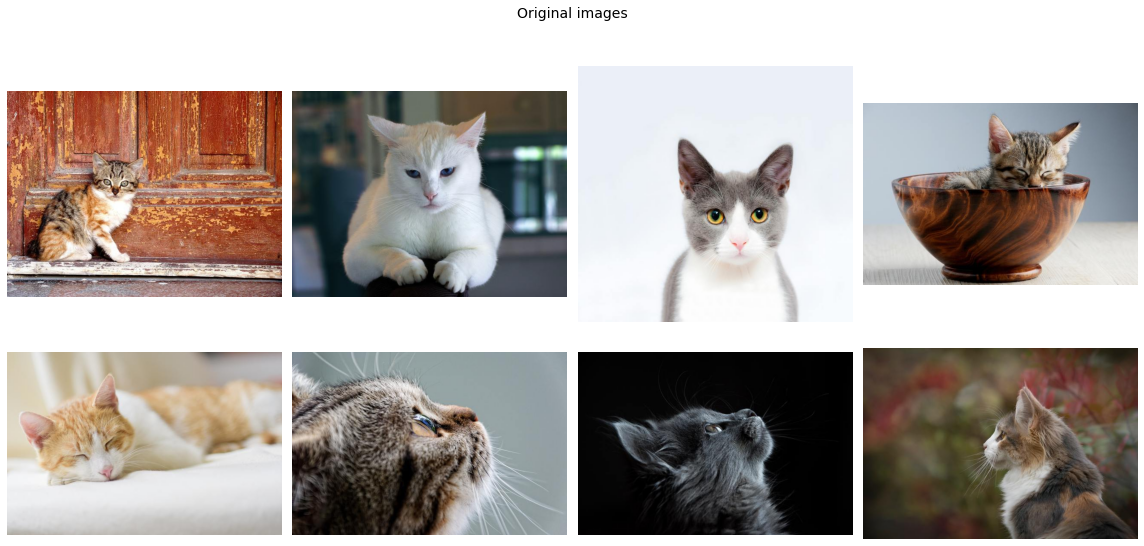
Loading real images from disk and applying a DALI TorchVision pipeline to visualise the transformations side-by-side.
[4]:
import os
import matplotlib.gridspec as gridspec
import matplotlib.pyplot as plt
from PIL import Image

%matplotlib inline

IMAGE_DIR = "../examples/data/images"


def collect_images(image_dir: str, n: int = 8):
    """Return up to *n* PIL images found recursively under *image_dir*."""
    paths = []
    for root, _, files in os.walk(image_dir):
        for fname in sorted(files):
            if fname.lower().endswith((".jpg", ".jpeg", ".png")):
                paths.append(os.path.join(root, fname))
    return [Image.open(p).convert("RGB") for p in paths[:n]]


def show_pil_images(images, title: str = "", columns: int = 4):
    """Display a list of PIL images in a grid."""
    n = len(images)
    rows = (n + columns - 1) // columns
    fig = plt.figure(figsize=(16, (16 // columns) * rows))
    if title:
        fig.suptitle(title, fontsize=14, y=1.02)
    gs = gridspec.GridSpec(rows, columns)
    for j in range(rows * columns):
        ax = plt.subplot(gs[j])
        ax.axis("off")
        if j < n:
            ax.imshow(images[j])
    plt.tight_layout()
    plt.show()


original_images = collect_images(IMAGE_DIR, n=8)
print(f"Loaded {len(original_images)} images")
print("Sizes:", [img.size for img in original_images])
Loaded 8 images
Sizes: [(640, 480), (640, 480), (640, 597), (640, 425), (640, 427), (640, 427), (640, 427), (640, 446)]
Original images#
[5]:
show_pil_images(original_images, title="Original images")
Augmentation pipeline#
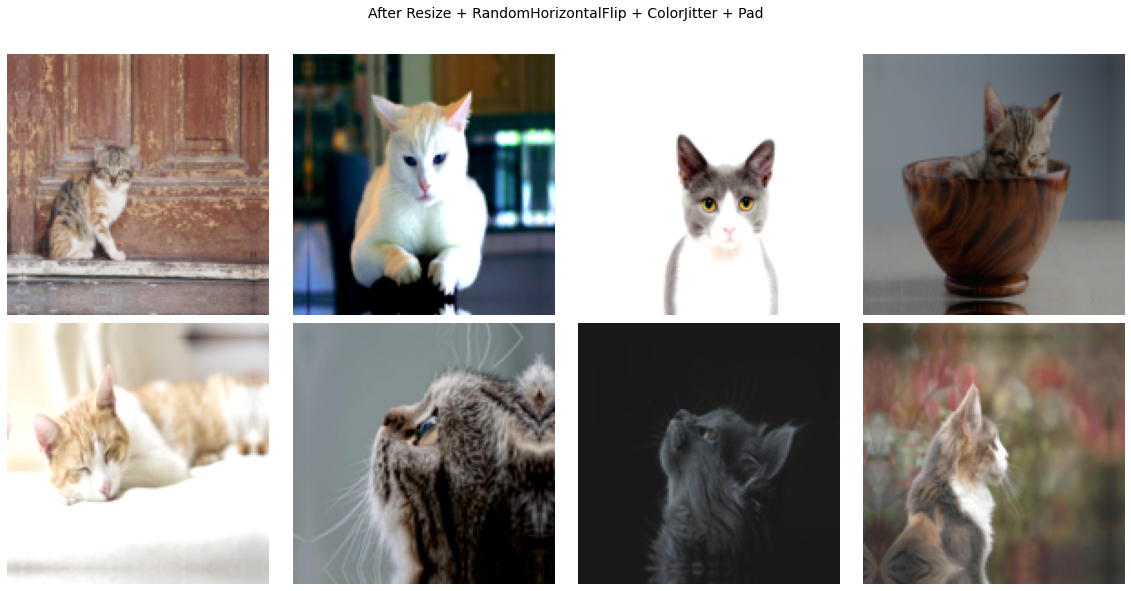
Apply a sequence of operators that resize, randomly flip, convert to grayscale, and add padding — the same operators you would use with torchvision.transforms.v2.Compose.
[6]:
augment = dtv.Compose(
    [
        dtv.Resize(size=(128, 128)),
        dtv.RandomHorizontalFlip(p=0.5),
        dtv.ColorJitter(brightness=0.4, contrast=0.4, saturation=0.4),
        dtv.Pad(padding=8, padding_mode="reflect"),
    ]
)

augmented_images = [augment(img) for img in original_images]
print(f"Augmented {len(augmented_images)} images")
print("Output sizes:", [img.size for img in augmented_images])
Augmented 8 images
Output sizes: [(144, 144), (144, 144), (144, 144), (144, 144), (144, 144), (144, 144), (144, 144), (144, 144)]
Augmented images#
[7]:
show_pil_images(
    augmented_images,
    title="After Resize + RandomHorizontalFlip + ColorJitter + Pad",
)
Object-oriented API#
The class-based API mirrors torchvision.transforms.v2: instantiate an operator and call it. Due to DALI’s pipeline design, operators must be wrapped inside ``dtv.Compose`` — the Compose object builds and owns the underlying DALI pipeline.
pipeline = dtv.Compose(
    [
        dtv.Resize(size=(128, 128)),
        dtv.RandomHorizontalFlip(p=0.5),
        ...
    ]
)
output = pipeline(img)
Compose detects the input type automatically:
PIL.Image→ uses an HWC pipeline, returnsPIL.Imagetorch.Tensor(CHW) → uses a CHW pipeline, returnstorch.Tensor
PIL Image input#
[8]:
# Build a DALI pipeline that resizes and pads
pipeline_pil = dtv.Compose(
    [
        dtv.Resize(size=(32, 32)),
        dtv.Pad(padding=4, padding_mode="reflect"),
    ]
)

out_dali = pipeline_pil(pil_img)
print("DALI output type:", type(out_dali), "size:", out_dali.size)

# Equivalent TorchVision pipeline for comparison
pipeline_tv = tv.Compose(
    [
        tv.Resize(size=(32, 32)),
        tv.Pad(padding=4, padding_mode="reflect"),
    ]
)

out_tv = pipeline_tv(pil_img)
print("TV   output type:", type(out_tv), "size:", out_tv.size)

# Verify pixel-level equality — cast to float since torch.allclose requires floating-point tensors
dali_t = tv_fn.pil_to_tensor(out_dali).float()
tv_t = tv_fn.pil_to_tensor(out_tv).float()
print("Outputs are equal:", torch.allclose(dali_t, tv_t, rtol=0, atol=1))
DALI output type: <class 'PIL.Image.Image'> size: (40, 40)
TV   output type: <class 'PIL.Image.Image'> size: (40, 40)
Outputs are equal: True
torch.Tensor input#
Pass a CHW torch.Tensor directly — Compose will use the CHW pipeline automatically and return a torch.Tensor of the same shape convention.
[9]:
pipeline_tensor = dtv.Compose(
    [
        dtv.CenterCrop(size=(48, 48)),
        dtv.Normalize(mean=[0.485, 0.456, 0.406], std=[0.229, 0.224, 0.225]),
    ]
)

# Normalize expects float input in [0, 1] range; scale from [0, 255]
tensor_img_01 = tensor_img / 255.0
out_dali_t = pipeline_tensor(tensor_img_01)
print("DALI output shape:", out_dali_t.shape, "dtype:", out_dali_t.dtype)

pipeline_tv_t = tv.Compose(
    [
        tv.CenterCrop(size=(48, 48)),
        tv.Normalize(mean=[0.485, 0.456, 0.406], std=[0.229, 0.224, 0.225]),
    ]
)

out_tv_t = pipeline_tv_t(tensor_img_01)
print("TV   output shape:", out_tv_t.shape, "dtype:", out_tv_t.dtype)
print("Max absolute diff:", (out_dali_t - out_tv_t).abs().max().item())
DALI output shape: torch.Size([3, 48, 48]) dtype: torch.float32
TV   output shape: torch.Size([3, 48, 48]) dtype: torch.float32
Max absolute diff: 1.1920928955078125e-07
Functional API#
The functional API (dtv_fn) exposes stateless functions — the same operations without needing operator objects or a Compose wrapper. The call signature intentionally mirrors torchvision.transforms.v2.functional.
import nvidia.dali.experimental.torchvision.v2.functional as dtv_fn

output = dtv_fn.resize(img, size=(224, 224))
Both PIL.Image and torch.Tensor (CHW) inputs are supported for most functions.
[10]:
# Functional API on a PIL Image
resized_pil = dtv_fn.resize(pil_img, size=[32, 32])
flipped_pil = dtv_fn.horizontal_flip(pil_img)
gray_pil = dtv_fn.to_grayscale(pil_img)
padded_pil = dtv_fn.pad(pil_img, padding=8, padding_mode="edge")
cropped_pil = dtv_fn.center_crop(pil_img, output_size=(48, 48))

print("resize       :", resized_pil.size)
print("hflip        :", flipped_pil.size)
print("grayscale    :", gray_pil.size, gray_pil.mode)
print("pad (edge, 8):", padded_pil.size)
print("center_crop  :", cropped_pil.size)
resize       : (32, 32)
hflip        : (64, 64)
grayscale    : (64, 64) L
pad (edge, 8): (80, 80)
center_crop  : (48, 48)
[11]:
# Functional API on a torch.Tensor (CHW, float32)
# Scale tensor_img to [0, 1] dynamic range before processing
scaled_tensor_img = tensor_img / tensor_img.max()

resized_t = dtv_fn.resize(scaled_tensor_img, size=[32, 32])
flipped_t = dtv_fn.horizontal_flip(scaled_tensor_img)
norm_t = dtv_fn.normalize(
    scaled_tensor_img, mean=[0.485, 0.456, 0.406], std=[0.229, 0.224, 0.225]
)
blurred_t = dtv_fn.gaussian_blur(scaled_tensor_img, kernel_size=5, sigma=1.0)

print("resize       :", resized_t.shape)
print("hflip        :", flipped_t.shape)
print("normalize    :", norm_t.shape, "mean:", norm_t.mean().item())
print("gaussian_blur:", blurred_t.shape)
resize       : torch.Size([3, 32, 32])
hflip        : torch.Size([3, 64, 64])
normalize    : torch.Size([3, 64, 64]) mean: 0.22406327724456787
gaussian_blur: torch.Size([3, 64, 64])
DALI Extensions#
The DALI implementation extends the original TorchVision API with two additional parameters that provide fine-grained control over pipeline execution:
Parameter |
Scope |
Default |
Description |
|---|---|---|---|
|
Each operator |
|
Target execution device: |
|
|
|
Maximum number of samples processed per pipeline call |
Note
Mixing device types across operators inside a single Compose is not currently supported. All operators must target the same device.
Note
When batch_size > 1, the input to Compose must be a torch.Tensor with a leading batch dimension (N, C, H, W).
GPU pipeline#
Pass device="gpu" to each operator to run the pipeline on the GPU. The output tensor resides on the GPU; call .cpu() to move it back if needed. It is important to align input data location and operator execution device — if they differ, an automatic copy is performed with a warning.
[12]:
if torch.cuda.is_available():
    pipeline_gpu = dtv.Compose(
        [
            dtv.Resize(size=(32, 32), device="gpu"),
            dtv.Pad(padding=4, padding_mode="reflect", device="gpu"),
        ]
    )

    # Input tensor on GPU
    tensor_gpu = tensor_img.cuda()
    out_gpu = pipeline_gpu(tensor_gpu)

    print("Output device:", out_gpu.device)
    print("Output shape :", out_gpu.shape)

    # Compare to CPU reference
    pipeline_cpu = dtv.Compose(
        [
            dtv.Resize(size=(32, 32), device="cpu"),
            dtv.Pad(padding=4, padding_mode="reflect", device="cpu"),
        ]
    )
    out_cpu = pipeline_cpu(tensor_img)
    print(
        "Max absolute diff (cpu vs gpu):",
        (out_cpu - out_gpu.cpu()).abs().max().item(),
    )
else:
    print("CUDA not available — skipping GPU example.")
Output device: cuda:0
Output shape : torch.Size([3, 40, 40])
Max absolute diff (cpu vs gpu): 0.0
GPU functional API#
The functional API also accepts a device parameter.
[13]:
if torch.cuda.is_available():
    tensor_gpu = tensor_img.cuda()

    resized_gpu = dtv_fn.resize(tensor_gpu, size=[32, 32], device="gpu")
    flipped_gpu = dtv_fn.horizontal_flip(tensor_gpu, device="gpu")

    print("resize  (gpu):", resized_gpu.shape, resized_gpu.device)
    print("hflip   (gpu):", flipped_gpu.shape, flipped_gpu.device)
else:
    print("CUDA not available — skipping GPU functional example.")
resize  (gpu): torch.Size([3, 32, 32]) cuda:0
hflip   (gpu): torch.Size([3, 64, 64]) cuda:0
Batch processing#
Set batch_size on Compose to process multiple samples in a single pipeline run. The input must be a 4-D torch.Tensor of shape (N, C, H, W) where N ≤ batch_size.
[14]:
BATCH = 4

# Create a batch of N=4 images (NCHW)
batch = tensor_img.unsqueeze(0).repeat(BATCH, 1, 1, 1)  # (4, 3, 64, 64)
print("Input batch shape:", batch.shape)

pipeline_batch = dtv.Compose(
    [
        dtv.Resize(size=(32, 32)),
        dtv.RandomHorizontalFlip(p=0.5),
    ],
    batch_size=BATCH,
)

out_batch = pipeline_batch(batch)
print("Output batch shape:", out_batch.shape)  # (4, 3, 32, 32)
Input batch shape: torch.Size([4, 3, 64, 64])
Output batch shape: torch.Size([4, 3, 32, 32])
Complete pipeline example#
A pre-processing pipeline using the DALI API, following the standard ResNet pre-processing steps — structurally identical to the TorchVision version but executed by DALI.
[15]:
IMAGENET_MEAN = [0.485, 0.456, 0.406]
IMAGENET_STD = [0.229, 0.224, 0.225]

# --- DALI pipeline ---
dali_preprocess = dtv.Compose(
    [
        dtv.Resize(size=256),
        dtv.CenterCrop(size=(224, 224)),
        dtv.Normalize(mean=IMAGENET_MEAN, std=IMAGENET_STD),
    ]
)

# --- Equivalent TorchVision pipeline ---
tv_preprocess = tv.Compose(
    [
        tv.Resize(size=256),
        tv.CenterCrop(size=(224, 224)),
        tv.Normalize(mean=IMAGENET_MEAN, std=IMAGENET_STD),
    ]
)

# Use a larger synthetic image to make the resize step meaningful.
# Scale to [0, 1] — ImageNet mean/std constants assume this range.
large_arr = np.random.randint(0, 256, (3, 480, 640), dtype=np.uint8)
large_tensor = (
    torch.from_numpy(large_arr).float() / 255.0
)  # (3, 480, 640), values in [0, 1]

out_dali = dali_preprocess(large_tensor)
out_tv = tv_preprocess(large_tensor)

print("DALI output shape:", out_dali.shape)
print("TV   output shape:", out_tv.shape)
print("Max absolute diff:", (out_dali - out_tv).abs().max().item())
DALI output shape: torch.Size([3, 224, 224])
TV   output shape: torch.Size([3, 224, 224])
Max absolute diff: 4.270789213478565e-05