

DeepStream 3D Action Recognition App
The deepstream-3d-action-recognition sample application is provided at app/sample_apps/deepstream-3d-action-recognition for your reference. This example demonstrates a sequence batching based 3D or 2D model inference pipeline for action recognition. The image below shows the architecture of this reference app.
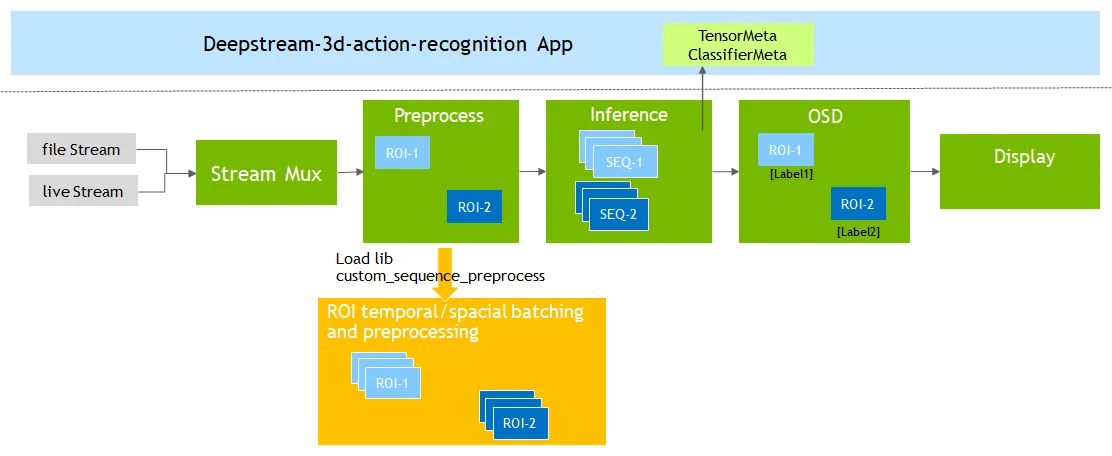
This 3D/2D model is pretrained by NVIDIA TAO toolkit. The 3D model has NCDHW (NCSHW) input and the 2D model has NSHW shapes.
N: Max batch size of total number of ROIs in all streams, value > 0. C: Channel numbers, must be 3. D/S: sequence length of consecutive frames, value > 1 H: height, value > 0 W: width, value > 0 2D S: channels x sequence_length, reshaped from [C, D]
A custom sequence preprocessing lib: libnvds_custom_sequence_preprocess.so is also provided at sources/apps/sample_apps/deepstream-3d-action-recognition/custom_sequence_preprocess to demonstrate how to implement a sequence batching and preprocessing methods with Gst-nvdspreprocess plugin. This custom lib normalizes each incoming ROI cropped image and accumulates the data into buffer sequence for temporal batching. When temporal batching is ready, it continues to do spatial batching on multi-ROIs and multi-streams. Finally it returns the temporal and spatial batched buffer(tensor) to Gst-nvdspreprocess plugin which would attach the buffer as preprocess input metadata and deliver to downstream Gst-nvinfer plugin to do inference.
Getting Started
Prerequisites
-
Go to the folder
sources/apps/sample_apps/deepstream-3d-action-recognition. -
Search and Download 3D and 2D RGB based
tao_iva_action_recognition_pretrainedmodels from NGC https://ngc.nvidia.com/catalog/models/nvidia:tao:actionrecognitionnet (Version 5):resnet18_3d_rgb_hmdb5_32resnet18_2d_rgb_hmdb5_32
-
These Models support following classes :
push;fall_floor;walk;run;ride_bike. -
Update source streams
uri-listin action recognition config file:deepstream_action_recognition_config.txt.
- Export DISPLAY environment to correct display. e.g.
export DISPLAY=:0.0.
Run 3D Action Recognition Examples
- Make sure 3D preprocess config and 3D inference config are enabled in
deepstream_action_recognition_config.txt.
- Run the following command:
- Run with DS-Triton, update application config file
deepstream_triton_action_recognition_config.txt.
-
Run 3D test with DS-Triton:
Check
sources/TritonOnnxYolo/READMEfor more details how to switch action recognition DS-Triton tests between CAPI and gRPC.
Run 2D Action Recognition Examples
-
Make sure 2D preprocess config and 2D inference config are enabled in
deepstream_action_recognition_config.txt. -
Run the following command:
-
Run with DS-Triton, update application config file
deepstream_triton_action_recognition_config.txt. -
Run 2D test with DS-Triton:
Check
sources/TritonOnnxYolo/READMEfor more details how to switch action recognition DS-Triton tests between CAPI and gRPC.
DeepStream 3D Action Recognition App Configuration Specifications
deepstream-3d-action-recognition [action-recognition] group settings
deepstream-3d-action-recognition [action-recognition] group settings
The table below demonstrates the group settings for deepstream_action_recognition_config.txt as an example.
3D action recognition Supported Settings
Custom sequence preprocess lib user settings [user-configs] for gst-nvdspreprocess
Custom sequence preprocess lib user settings [user-configs] for gst-nvdspreprocess
The table below demonstrates the config_preprocess_3d_custom.txt setting of libnvds_custom_sequence_preprocess.so as an example.
user-configs properties for custom sequence preprocess
Custom lib and gst-nvdspreprocess Settings for Action Recognition
- You’ll need to set input order as CUSTOM
network-input-order=2for this custom sequence preprocess lib. - 3D models NCDHW(NCSHW) require network-input-shape with 5-dimension shape. For example:
- 2D models NSHW require network-input-shape with 4-dimension shape. For example:
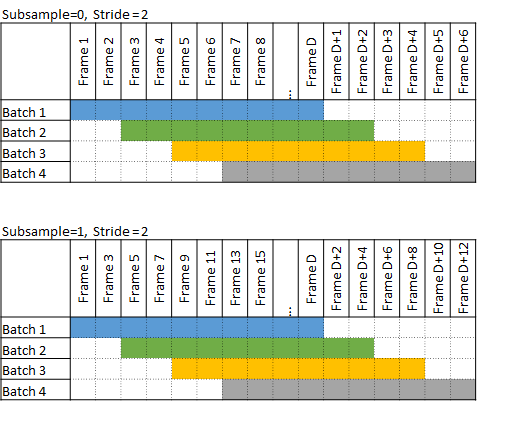
- Assume incoming frame numbers are 1, 2, 3, 4, 5, 6, 7, 8, 9, 10, 11, 12, 13, 14, 15… When
subsample=1, the preprocessing custom lib will pick up frame numbers: 1,3,5,7,9… to preprocess sequentially and pass it onto inference as a next-step. - Assuming same incoming frame numbers above, For example, when
subsample=0, stride=1, the 2 consecutive sliding sequences are:
When subsample=0, stride=2, the 2 consecutive sliding sequences are:
When subsample=1, stride=2, the subsample is performed first, and sliding sequences are on top of subsample results. The processing frame numbers after subsample are: 1,3,5,7,9,11,13,15,17,19… The consecutive sliding sequences on top of them are:
The image below shows the frame batches with different subsample and stride settings.
Build Custom sequence preprocess lib and application From Source
- Go to the folder
sources/apps/sample_apps/deepstream-3d-action-recognition. - Run the following commands:
- Check the source code and comments to learn about implementation of other order formats, for example, NSCHW (NDCHW).