

Docker Containers
DeepStream 9.2 provides Docker containers for dGPU on x86 and ARM platforms (like SBSA, GH200, GB200, DGX Spark etc.,) and Jetson platforms. These containers provide a convenient, out-of-the-box way to deploy DeepStream applications by packaging all associated dependencies within the container. The associated Docker images are distributed through ghcr.io/nvidia/deepstream. They use the nvidia-docker package, which enables access to the required GPU resources from containers. This section describes the features supported by the DeepStream Docker container for dGPU on both x86 and ARM and Jetson platforms.
The DeepStream 9.2 containers for dGPU on x86, ARM SBSA/DGX Spark and Jetson are distinct, so you must get the right image for your platform.
With DS 9.2, DeepStream docker containers do not package libraries necessary for certain multimedia operations like audio data parsing, CPU decode, and CPU encode.
This change could affect processing certain video streams/files like mp4 that include audio track.
Run the below script inside the docker images to install additional packages (e.g. gstreamer1.0-libav, gstreamer1.0-plugins-good, gstreamer1.0-plugins-bad, gstreamer1.0-plugins-ugly as required) that might be necessary to use all of the DeepStreamSDK features:
/opt/nvidia/deepstream/deepstream/user_additional_install.sh
- The script
prepare_classification_test_video.shpresent at/opt/nvidia/deepstream/deepstream/samplesrequiresffmpegto be installed. Some of the low level codec libraries need to be re-installed along with ffmpeg. - Use the following command to install/re-install ffmpeg:
apt-get install --reinstall libflac8 libmp3lame0 libxvidcore4 ffmpeg
Prerequisites
-
Install
docker-ceby following the official instructions.Once you have installed
docker-ce, follow the post-installation steps to ensure that the docker can be run withoutsudo. -
Install
nvidia-container-toolkitby following the install-guide. -
Use the DeepStream image namespace
ghcr.io/nvidia/deepstream. Select the platform-specific tag from the tables below.
Sample commands to run a docker container:
A Docker Container for dGPU
Current DeepStream container images are distributed through ghcr.io/nvidia/deepstream. Both the dGPU and Jetson containers use the same ghcr.io/nvidia/deepstream image namespace.
Unlike the container in DeepStream 3.0, the dGPU DeepStream 9.2 container supports DeepStream application development within the container. It contains the same build tools and development libraries as the DeepStream 9.2 SDK.
In a typical scenario, you build, execute and debug a DeepStream application within the DeepStream container. Once your application is ready, you can use the DeepStream 9.2 container as a base image to create your own Docker container holding your application files (binaries, libraries, models, configuration file, etc.,). Here is an example snippet of Dockerfile for creating your own Docker container:
This Dockerfile copies your application (from directory myapp) into the container path /root/apps/myapp. Ensure that the DeepStream 9.2 image name, platform suffix, and tag are accurate.
Table below lists the docker containers for dGPU released with DeepStream 9.2:
Docker Containers for dGPU
See the DeepStream 9.2 Release Notes for current container registry information.
See ghcr.io/nvidia/deepstream for the current dGPU container images.
A Docker Container for Jetson
As of JetPack release 4.2.1, NVIDIA Container Runtime for Jetson has been added, enabling you to run GPU-enabled containers on Jetson devices. Using this capability, DeepStream 9.2 can be run inside containers on Jetson devices using Docker images from ghcr.io/nvidia/deepstream.
Pull and run the appropriate container image from ghcr.io/nvidia/deepstream.
The DeepStream container no longer expects CUDA, TensorRT to be installed on the Jetson device, because it is included within the container image.
Make sure that the BSP is installed using JetPack and nvidia-container tools installed from Jetpack or apt server (See instructions below) on your Jetson prior to launching the DeepStream container.
The Jetson Docker containers are for deployment only. They do not support DeepStream software development within a container. You can build applications natively on the Jetson target and create containers for them by adding binaries to your docker images. Alternatively, you can generate Jetson containers from your workstation using instructions in the Building Jetson Containers on an x86 Workstation section in the NVIDIA Container Runtime for Jetson documentation.
The table below lists the docker containers for Jetson released with DeepStream 9.2:
Docker Containers for Jetson
For the Jetson Triton Container an error message is printed “Failed to detect NVIDIA driver version” when running the docker. No impact on functionality is observed currently.
See the DeepStream 9.2 Release Notes for current container registry information.
See ghcr.io/nvidia/deepstream for the current Jetson container images.
A Docker Container for dGPU on ARM (GH200, GB200, SBSA)
Current DeepStream container images are distributed through ghcr.io/nvidia/deepstream. The dGPU on ARM image is ghcr.io/nvidia/deepstream:<version>-triton-sbsa-dgx-spark; Jetson images use the same ghcr.io/nvidia/deepstream namespace with their corresponding tags.
Unlike the container in DeepStream 3.0, the dGPU DeepStream 9.2 container supports DeepStream application development within the container. It contains the same build tools and development libraries as the DeepStream 9.2 SDK.
In a typical scenario, you build, execute and debug a DeepStream application within the DeepStream container. Once your application is ready, you can use the DeepStream 9.2 container as a base image to create your own Docker container holding your application files (binaries, libraries, models, configuration file, etc.,). Here is an example snippet of Dockerfile for creating your own Docker container:
This Dockerfile copies your application (from directory myapp) into the container path /root/apps/myapp. Ensure that the DeepStream 9.2 image name, platform suffix, and tag are accurate.
Table below lists the docker containers for dGPU on ARM released with DeepStream 9.2:
Docker Containers for dGPU on ARM
See the DeepStream 9.2 Release Notes for current container registry information.
See ghcr.io/nvidia/deepstream for the current dGPU on ARM (SBSA) container images.
A Docker Container for DGX Spark
NVIDIA DGX Spark is an aarch64-based desktop AI system running Ubuntu, powered by an integrated NVIDIA GPU.
DeepStream 9.2 on DGX Spark is delivered through a dedicated SBSA-class Triton
container image distributed through ghcr.io/nvidia/deepstream. Like other dGPU DeepStream containers, it supports
full application development (build tools and development libraries are included),
so you can build, run, and debug DeepStream applications directly inside the container.
Prepare the host with a supported NVIDIA driver, docker-ce, and
nvidia-container-toolkit as described under Prerequisites and in
Installation. CUDA and TensorRT are packaged inside the
container; host-side installation is not required.
In a typical scenario, you build, execute, and debug a DeepStream application within
the container. Once ready, use the DGX Spark container as a base image to create your
own Docker container with your application files (binaries, libraries, models,
configuration files, etc.). Here is an example snippet of Dockerfile for creating
your own Docker container:
Sample commands to pull and run the DGX Spark container:
--privileged is omitted above; add it only if the container needs access to all host devices or low-level driver operations. It grants near-root host access, so on shared or production systems prefer --device / --cap-add instead.
Table below lists the docker containers for DGX Spark released with DeepStream 9.2:
Docker Containers for DGX Spark
See the DeepStream 9.2 Release Notes for current container registry information,
DGX Spark-specific limitations, and known issues.
Native DeepStream SDK installation on DGX Spark is not supported; use this container (or a derived image). See ghcr.io/nvidia/deepstream for the current image tags.
Creating custom DeepStream dockers for dGPU or Jetson using DeepStreamSDK package
See the DeepStream Dockerfile Guide on GitHub for more details.
Usage of heavy TRT base dockers since DS 6.1.1
Since Jetpack 5.0.2, NVIDIA Container Runtime no longer mounts user level libraries like CUDA, cuDNN and TensorRT from the host. These will instead be installed inside the containers.
What does this mean for DS users?
-
New DS Dockers thus take up double the space compared to previous Jetson dockers.
-
DS 6.3 dockers will run on Jetpack 5.1.2 only.
-
Older DS dockers are not compatible with Jetpack 5.1.2.
Recommended Minimal L4T Setup necessary to run the new docker images on Jetson
Users are encouraged to install the L4T BSP alone from Jetpack and later use command line to install NVIDIA Container runtime from Debian repo to save space on the Jetson device.
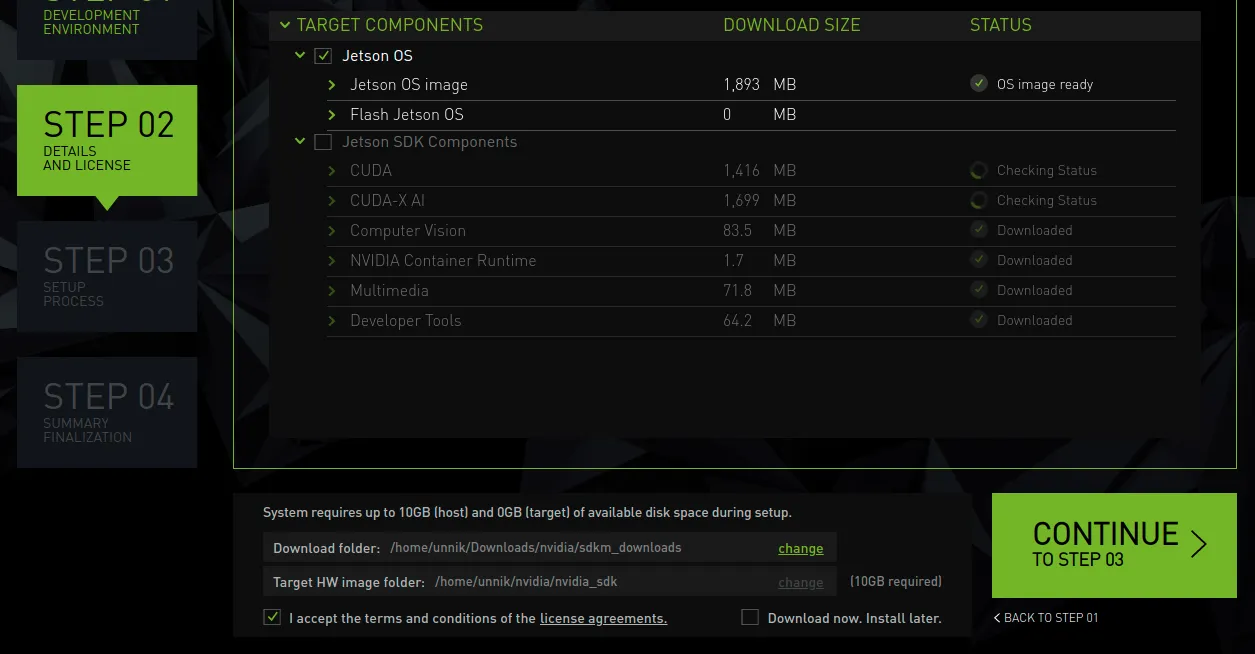
- In Step 02 of
sdkmanagerJetpack setup, select “Jetson OS” and de-select “Jetson SDK Components” to flash just the BSP. Refer to the screenshot below for reference.
- Instructions for installing nvidia-container from command line: