

Gst-nvinferserver
The Gst-nvinferserver plugin performs inferencing on input data using NVIDIA® Triton Inference Server (previously called TensorRT Inference Server).
The plugin supports the following Triton server versions:
- x86 platforms: Release 2.67.0, NGC Container 26.03 reference https://github.com/triton-inference-server/server/blob/r26.03/README.md
- Jetson platforms: Release 2.68.0, NGC Container 26.04 reference https://github.com/triton-inference-server/server/blob/r26.04/README.md
The plugin accepts batched NV12/RGBA buffers from upstream. The NvDsBatchMeta structure must already be attached to the Gst Buffers.
The low-level library (libnvds_infer_server) operates on any of NV12 or RGBA buffers. The Gst-nvinferserver plugin passes the input batched buffers to the low-level library and waits for the results to be available. Meanwhile, it keeps queuing input buffers to the low-level library as they are received. Once the results are available from the low-level library, the plugin translates and attaches the results back in to Gst-buffer for downstream plugins.
The low-level library preprocesses the transformed frames (performs color conversion and scaling, normalization and mean subtraction) and produces final FP32/FP16/INT8/UINT8/INT16/UINT16/INT32/UINT32 RGB/BGR/GRAY planar/ packed data which is passed to the Triton for inferencing. The output type generated by the low-level library depends on the network type.
The pre-processing function is:
y = netscalefactor * (x - mean)
Where:
-
xis the input pixel value. It is an uint8 with range [0,255]. -
meanis the corresponding mean value, read either from the mean file or as offsets[c], where c is the channel to which the input pixel belongs, and offsets is the array specified in the configuration file. It is a float. -
netscalefactoris the pixel scaling factor specified in the configuration file. It is a float. -
yis the corresponding output pixel value. It can be of typefloat / half / int8 / uint8 / int16 / uint16 / int32 / uint32.Take specific example for uint8 to int8 conversion. set
netscalefactor = 1.0andmean = [128, 128, 128]. Then the function looks like:y = (1.0) * (x - 128)
Gst-nvinferserver currently works on the following type of networks:
- Multi-class object detection
- Multi-label classification
- Segmentation
The Gst-nvinferserver plugin can work in three process modes:
-
Primary mode: Operates on full frames.
-
Secondary mode: Operates on objects added in the metadata by upstream components.
When the plugin is operating as a secondary classifier in
asyncmode along with the tracker, it tries to improve performance by avoiding re-inferencing on the same objects in every frame. It does this by caching the classification output in a map with the object’s unique ID as the key. The object is inferred upon only when it is first seen in a frame (based on its object ID) or when the size (bounding box area) of the object increases by 20% or more. This optimization is possible only when the tracker is added as an upstream element. -
Preprocessed Tensor Input mode: Operates on tensors attached by upstream components.
When operating in preprocessed tensor input mode, the pre-processing inside Gst-nvinferserver is completely skipped. The plugin looks for
GstNvDsPreProcessBatchMetaattached to the input buffer and passes the tensor as is to the Triton Inference Server without any modifications. This mode currently supports processing on full-frame and ROI. The GstNvDsPreProcessBatchMeta is attached by the Gst-nvdspreprocess plugin. This mode is enabled by adding the input_tensor_from_meta configuration message in the InferenceConfig message.
Detailed documentation of the Triton Inference Server is available at: https://github.com/triton-inference-server/server/blob/r26.03/README.md (x86) and https://github.com/triton-inference-server/server/blob/r26.04/README.md (Jetson)
The plugin supports Triton features along with multiple deep-learning frameworks such as TensorRT, TensorFlow (GraphDef / SavedModel), ONNX and PyTorch on Tesla platforms. On Jetson, it also supports TensorRT and TensorFlow (GraphDef / SavedModel). TensorFlow and ONNX can be configured with TensorRT acceleration. For details, see Framework-Specific Optimization.
The plugin requires a configurable model repository root directory path where all the models need to reside. All the plugin instances in a single process must share the same model root. For details, see Model Repository. Each model also needs a specific config.pbtxt file in its subdirectory. For details, see Model Configuration.
The plugin supports Triton ensemble mode to enable users to perform preprocessing or postprocessing with Triton custom backend.
The plugin also supports the interface for custom functions for parsing outputs of object detectors, classifiers, and initialization of non-image input layers in cases where there is more than one input layer.
Refer to sources/includes/nvdsinfer_custom_impl.h for the custom method implementations for custom models.
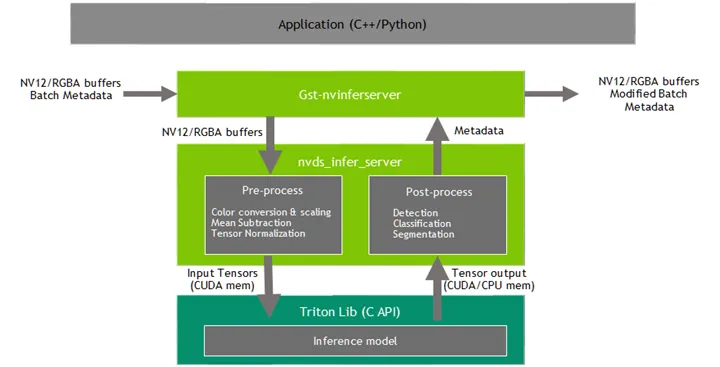
Downstream components receive a Gst Buffer with unmodified contents plus the metadata created from the inference output of the Gst-nvinferserver plugin. The plugin can be used for cascaded inferencing. That is, it can perform primary inferencing directly on input data, then perform secondary inferencing on the results of primary inferencing, and so on. This is similar with Gst-nvinfer, see more details in Gst-nvinfer.
Inputs and Outputs
This section summarizes the inputs, outputs, and communication facilities of the Gst-nvinferserver plugin.
-
Inputs
- Gst Buffer
- NvDsBatchMeta (attaching NvDsFrameMeta)
- Model repository directory path (model_repo.root)
- gRPC endpoint URL (grpc.url)
- Runtime model file with config.pbtxt file in model repository
-
Control parameters
-
Gst-nvinferserver gets control parameters from a configuration file. You can specify this by setting the property config-file-path. For details, see Gst-nvinferserver Configuration File Specifications. Other control parameters that can be set through GObject properties are:
- Batch size
- Process mode
- Unique id
- Inference on GIE id and operate on class ids [secondary mode only]
- Inference interval
- Raw output generated callback function
-
The parameters set through the GObject properties override the parameters in the Gst-nvinferserver configuration file.
-
-
Outputs
-
Gst Buffer
-
Depending on network type and configured parameters, one or more of:
- NvDsObjectMeta
- NvDsClassifierMeta
- NvDsInferSegmentationMeta
- NvDsInferTensorMeta
-
Gst-nvinferserver Configuration File Specifications
The Gst-nvinferserver configuration file uses prototxt format described in https://developers.google.com/protocol-buffers.
The protobuf message structures of this configuration file are defined by nvdsinferserver_plugin.proto and nvdsinferserver_config.proto. All the basic data-type values are set to 0 or false from protobuf’s guide. Map, arrays and oneof are set to empty by default. See more details for each message definition.
- The message PluginControl in
nvdsinferserver_plugin.protois the entry point for this config-file. - The message InferenceConfig configures the low-level settings for
libnvds_infer_server. - The message PluginControl::InputControl configures the input buffers, objects filtering policy for model inference.
- The message PluginControl::OutputControl configures inference output policy for detections and raw tensor metadata.
- The message BackendParams configures backend input/output layers and Triton settings in InferenceConfig.
- The message PreProcessParams configures network preprocessing information in InferenceConfig.
- The message InputTensorFromMeta enables the preprocessed tensor input mode and configures the input tensor information in InferenceConfig.
- The message PostProcessParams configures the output tensor parsing methods such as detection, classification, semantic segmentation and others in InferenceConfig.
- There are also other messages (e.g. CustomLib, ExtraControl) and enum types (e.g. MediaFormat, TensorOrder, …) defined in the proto file for miscellaneous settings for InferenceConfig and PluginControl.
Features
The following table summarizes the features of the plugin.
Gst-nvinferserver plugin features
Gst-nvinferserver plugin features message PluginControl definition details
Gst-nvinferserver plugin message PluginControl-InputControl definition details
Gst-nvinferserver plugin message PluginControl-OutputControl definition details
Gst-nvinferserver plugin message PluginControl-InputObjectControl definition details
Gst-nvinferserver plugin message PluginControl-BBoxFilter definition details for Input and Output controls
Gst-nvinferserver plugin message PluginControl-OutputDetectionControl definition details
Gst-nvinferserver plugin message PluginControl-DetectClassFilter definition details
Gst-nvinferserver plugin message PluginControl-Color definition details
Low Level libnvds_infer_server.so Configuration File Specifications
Low Level libnvds_infer_server.so Configuration File Specifications
The message InferenceConfig defines all the low-level structure fields in nvdsinferserver_config.proto. It has major settings for inference backend, network preprocessing and postprocessing.
Gst-nvinferserver message InputLayer definition details
Gst-nvinferserver message OutputLayer definition details
Gst-nvinferserver message TritonParams definition details
Gst-nvinferserver message PreProcessParams-ScaleNormalize definition details
Gst-nvinferserver message InputTensorFromMeta definition details
Gst-nvinferserver message PostProcessParams definition details
Gst-nvinferserver message DetectionParams definition details
Gst-nvinferserver message DetectionParams-PerClassParams definition details
Gst-nvinferserver message DetectionParams-DbScan definition details
Gst-nvinferserver message DetectionParams-GroupRectangle definition details
Gst-nvinferserver message DetectionParams-SimpleCluster definition details
Gst-nvinferserver message ClassificationParams definition details
Gst-nvinferserver message SegmentationParams definition details
Gst-nvinferserver message OtherNetworkParams definition details
Gst-nvinferserver message TritonClassifyParams definition details
Gst-nvinferserver message CustomLib definition details
Gst-nvinferserver message ExtraControl definition details
LstmParams structures may be changed in future versions
- Input and output tensors must have same datatype/dimensions, FP16 is not supported
LstmParams::LstmLoopstructures might be changed in future versions
Gst Properties
The values set through Gst properties override the values of properties in the configuration file. The application does this for certain properties that it needs to set programmatically. If user set property though plugin, these values would replace the original value in config files. The following table describes the Gst-nvinferserver plugin’s Gst properties.
Gst-nvinferserver plugin Gst properties
DeepStream Triton samples
DeepStream Triton samples are located in the folder samples/configs/deepstream-app-triton. In terms of Triton model specification, all related models and Triton config files(config.pbtxt) must be gathered into same root directory which
is samples/triton_model_repo. Follow the instructions in samples/configs/deepstream-app-triton/README to run the samples.
DeepStream Triton gRPC support
In addition to native Triton server, gst-nvinferserver supports the Triton Inference Server running as independent process. Communication to the server happens through gRPC.
Config files to run the application in gRPC mode are located at samples/config/deepstream-app-triton-grpc. Follow the instructions in samples/configs/deepstream-app-triton-grpc/README to run the samples.
Triton Ensemble Models
The Gst-nvinferserver plugin can support Triton ensemble models for further custom preprocessing, backend and postprocessing through Triton custom-backends.
Triton ensemble model represents a pipeline of one or more models and the connection of input and output tensors between those models, such as “data preprocessing -> inference -> data postprocessing”. See more details
https://github.com/triton-inference-server/server/blob/main/docs/user_guide/architecture.md#ensemble-models.
To manage memory efficiency and keep clean interface, The Gst-nvinferserver Plugin’s default preprocessing cannot be disabled. Color conversion, datatype conversion, input scaling and object cropping are continue working in nvds_infer_server natively. For example, in the case native normalization is not needed, update scale_factor to 1.0:
The low level nvds_infer_server library could deliver specified media-format (RGB/BGR/Gray) in any kind of tensor orders and datatypes as a CUDA GPU buffer input to Triton backend. User’s custom-backend must support GPU memory on this input. Triton custom-backend sample identity can work with Gst-nvinferserver plugin.
Custom backend API must have same Triton codebase version (26.04 for Jetson, 26.03 for x86). Read more details from Triton server releases: x86 release and Jetson release.
To learn details how to implement Triton custom-backend, refer to Triton custom-backend.
For Triton model’s output, TRTSERVER_MEMORY_GPU and TRTSERVER_MEMORY_CPU buffer allocation are supported in nvds_infer_server according to Triton output request. This also works for ensemble model’s final output tensors.
Finally, inference data can be parsed by default for detection, classification, or semantic segmentation. Alternatively, user can implement custom-backend for postprocessing, then deliver the final output to Gst-nvinferserver plugin to do further processing. Besides that, User can also optionally attach raw tensor output data into metadata for downstream or application to parse.
Custom Process interface IInferCustomProcessor for Extra Input, LSTM Loop, Output Tensor Postprocess
Gst-nvinferserver plugin supports extra(multiple) input tensors custom preprocessing, input / output tensor custom loop processing (LSTM-based) with multiple streams, output tensor data custom parsing and attaching into NvDsBatchMeta. This custom function is loaded though gst-nvinferserver’s config file:
The interface IInferCustomProcessor is defined in sources/includes/nvdsinferserver/infer_custom_process.h.
Users need derive from IInferCustomProcessor to implement their own extra preprocessing through extraInputProcess and fully postprocessing through inferenceDone. the param structured in IOptions carry all information from GstBuffer and NvDsBatchMeta. Users can query them through IOptions for each frame and batch.
see more examples in /opt/nvidia/deepstream/deepstream/sources/TritonOnnxYolo/nvdsinferserver_custom_impl_yolo/nvdsinferserver_custom_process_yolo.cpp
Take a example for a simple postprocessing to add output tensors.
-
For extra input tensors preprocess: If the model requires multiple tensor inputs more than the primary image input, Users can derive from this interface
IInferCustomProcessorand implementextraInputProcess()to process extra inputs tensors. This function is for extra input process only. the parameterIOptions* optionswould carry all the information from GstBuffer, NvDsBatchMeta, NvDsFrameMeta, NvDsObjectMeta and so on. User can leverage all of the information fromoptionsto fill the extra input tensors. All of the input tensor memory is allocated by nvdsinferserver low-level lib. -
For output tensor postprocess(parsing and metadata attaching): If user want to do custom parsing on output tensors into user metadata and attach them into GstBuffer, NvDsBatchMeta, NvDsFrameMeta or NvDsObjectMeta. User can implement ‘inferenceDone(outputs, inOptions)’ to parse all output tensors in
outputs, and get above GstBuffer, NvDsBatchMeta and other DeepStream information frominOptions. Then attach the parsed user metadata into NvDs metadata. This function supports multiple-streams parsing and attaching. See examples in/opt/nvidia/deepstream/deepstream/sources/TritonOnnxYolo/nvdsinferserver_custom_impl_yolo/nvdsinferserver_custom_process_yolo.cpp: NvInferServerCustomProcess::inferenceDone()how to parse and attach output metadata.
If user need specific memory type(e.g. CPU) for output tensors in inferenceDone(). Update config file.
text infer_config { backend { output_mem_type: MEMORY_TYPE_CPU } }
- For multi-stream custom loop process: If the model is LSTM based, and next frame’s inputs are generated by previous frame’s output data. User can derive interface
IInferCustomProcessor, then implementextraInputProcess()andinferenceDone()for loop process.extraInputProcess()could initialize first input tensor states. Then'inferenceDone()'can get the output data and do post processing and store the result into the context. When next'extraInputProcess()'is coming, it can check the stored results and feedback into tensor states. When user overridebool requireInferLoop() const { return true; }. The nvdsinferver low-level lib shall keep theextraInputProcessandinferenceDonerunning in sequence along with its nvds_stream_ids which could be get fromoptions->getValueArray(OPTION_NVDS_SREAM_IDS, streamIds). see examples and details in/opt/nvidia/deepstream/deepstream/sources/TritonOnnxYolo/nvdsinferserver_custom_impl_yolo/nvdsinferserver_custom_process_yolo.cpp. Inside this example, see functionNvInferServerCustomProcess::feedbackStreamInputhow to feedback output into next input loop.
Tensor Metadata Output for Downstream Plugins
The Gst-nvinferserver plugin can attach raw output tensor data generated by the inference backend as metadata. It is added as an NvDsInferTensorMeta in the frame_user_meta_list member of NvDsFrameMeta for primary (full frame) mode, or in the obj_user_meta_list member of NvDsObjectMeta for secondary (object) mode. It uses same metadata structure with Gst-nvinferserver plugin.
Gst-nvinferserver plugin does not attach device buffer pointer NvDsInferTensorMeta::attach out_buf_ptrs_dev at this moment.
To read or parse inference raw tensor data of output layers
-
Enable the following fields in the configuration file for the Gst-nvinferserver plugin:
If native postprocessing need be disabled, update:
-
When operating as primary GIE,
NvDsInferTensorMetais attached to each frame’s (each NvDsFrameMeta object’s)frame_user_meta_list. When operating as secondary GIE, NvDsInferTensorMeta is attached to each NvDsObjectMeta object’sobj_user_meta_list.Metadata attached by Gst-nvinferserver can be accessed in a GStreamer pad probe attached downstream from the Gst-nvinferserver instance.
-
The
NvDsInferTensorMetaobject’s metadata type is set to NVDSINFER_TENSOR_OUTPUT_META. To get this metadata you must iterate over the NvDsUserMeta user metadata objects in the list referenced byframe_user_meta_listor obj_user_meta_list.
For more information about Gst-infer tensor metadata usage, see the source code in sources/apps/sample_apps/deepstream_infer_tensor_meta-test.cpp, provided in the DeepStream SDK samples.
Segmentation Metadata
The Gst-nvinferserver plugin attaches the output of the semantic segmentation model as user metadata in an instance of NvDsInferSegmentationMeta with meta_type set to NVDSINFER_SEGMENTATION_META. The user metadata is added to the frame_user_meta_list member of NvDsFrameMeta for primary (full frame) mode, or the obj_user_meta_list member of NvDsObjectMeta for secondary (object) mode. For guidance on how to access user metadata, see User/Custom Metadata Addition Inside NvDsMatchMeta and Tensor Metadata, above.