Skip to navigation

Gst-nvstreammux

View as Markdown

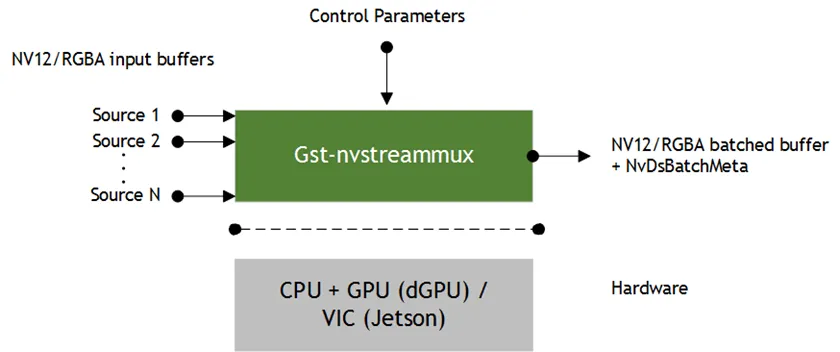
The Gst-nvstreammux plugin forms a batch of frames from multiple input sources. When connecting a source to nvstreammux (the muxer), a new pad must be requested from the muxer using gst_element_get_request_pad() and the pad template sink_%u. For more information, see link_element_to_streammux_sink_pad() in the DeepStream app source code. The muxer forms a batched buffer of batch-size frames. (batch-size is specified using the gst object property.) If the muxer’s output format and input format are the same, the muxer forwards the frames from that source as a part of the muxer’s output batched buffer. The frames are returned to the source when muxer gets back its output buffer. If the resolution is not the same, the muxer scales frames from the input into the batched buffer and then returns the input buffers to the upstream component. The muxer pushes the batch downstream when the batch is filled, or the batch formation timeout batched-push-timeout is reached. The timeout starts running when the first buffer for a new batch is collected. The muxer uses a round-robin algorithm to collect frames from the sources. It tries to collect an average of (batch-size/num-source) frames per batch from each source (if all sources are live and their frame rates are all the same). The number varies for each source, though, depending on the sources’ frame rates. The muxer outputs a single resolution (i.e. all frames in the batch have the same resolution). This resolution can be specified using the width and height properties. The muxer scales all input frames to this resolution. The enable-padding property can be set to true to preserve the input aspect ratio while scaling by padding with black bands. For DGPU platforms, the GPU to use for scaling and memory allocations can be specified with the gpu-id property. For each source that needs scaling to the muxer’s output resolution, the muxer creates a buffer pool and allocates four buffers each of size:

output width*output height*f

Where f is 1.5 for NV12 format, or 4.0 for RGBA. The memory type is determined by the nvbuf-memory-type property. Set the live-source property to true to inform the muxer that the sources are live. In this case the muxer attaches the PTS of the last copied input buffer to the batched Gst Buffer’s PTS. If the property is set to false, the muxer calculates timestamps based on the frame rate of the source which first negotiates capabilities with the muxer. The muxer attaches an NvDsBatchMeta metadata structure to the output batched buffer. This meta contains information about the frames copied into the batch (e.g. source ID of the frame, original resolutions of the input frames, original buffer PTS of the input frames). The source connected to the Sink_N pad will have pad_index N in NvDsBatchMeta. The muxer supports addition and deletion of sources at run time. When the muxer receives a buffer from a new source, it sends a GST_NVEVENT_PAD_ADDED event. When a muxer sink pad is removed, the muxer sends a GST_NVEVENT_PAD_DELETED event. Both events contain the source ID of the source being added or removed (see sources/includes/gst-nvevent.h). Downstream elements can reconfigure when they receive these events. Additionally, the muxer also sends a GST_NVEVENT_STREAM_EOS to indicate EOS from the source. The muxer supports calculation of NTP timestamps for source frames. It supports two modes. In the system timestamp mode, the muxer attaches the current system time as NTP timestamp. In the RTCP timestamp mode, the muxer uses RTCP Sender Report to calculate NTP timestamp of the frame when the frame was generated at source. The NTP timestamp is set in ntp_timestamp field of NvDsFrameMeta. The mode can be toggled by setting the attach-sys-ts property. For more details, refer to section NTP Timestamp in DeepStream.
Gst-nvstreammux

Inputs and Outputs

  • Inputs

    • NV12/RGBA buffers from an arbitrary number of sources
  • Control Parameters

    • batch-size
    • batched-push-timeout
    • width
    • height
    • enable-padding
    • gpu-id (dGPU only)
    • live-source
    • nvbuf-memory-type
    • num-surfaces-per-frame
    • buffer-pool-size
    • attach-sys-ts
    • frame-duration
    • align-first-buffer
    • extract-sei-sim-time
    • cache-buffer
    • cache-buffer-timeout
    • sort-batch
    • sync-inputs-ntp
  • Output

    • NV12/RGBA batched buffer
    • GstNvBatchMeta (meta containing information about individual frames in the batched buffer)

Features

The following table summarizes the features of the plugin.

Gst-nvstreammux plugin features

FeatureDescriptionRelease
Configurable batch size—DS 2.0
Configurable batching timeout—DS 2.0
Allows multiple input streams with different resolutions—DS 2.0
Allows multiple input streams with different frame rates—DS 2.0
Scales to user-determined resolution in muxer—DS 2.0
Scales while maintaining aspect ratio with padding—DS 2.0
Multi-GPU support—DS 2.0
Input stream DRC support—DS 3.0
User-configurable CUDA memory type (Pinned/Device/Unified) for output buffers—DS 3.0
Custom message to inform application of EOS from individual sources—DS 3.0
Supports adding and deleting run time sinkpads (input sources) and sending custom events to notify downstream components—DS 3.0
Supports RGBA data handling at output—DS 3.0

Gst Properties

The following table describes the Gst-nvstreammux plugin’s Gst properties.

Gst-nvstreammux gst-properties

PropertyMeaningType and RangeExample Notes
batch-sizeMaximum number of frames in a batch.Integer,
0 to 4,294,967,295
batch-size=30
batched-push-timeoutTimeout in microseconds to wait after the first buffer is available to push the batch even if a complete batch is not formed.Signed integer,
-1 to 2,147,483,647
batched-push-timeout= 40000
40 msec
widthIf non-zero, muxer scales input frames to this width.Integer,
0 to 4,294,967,295
width=1280
heightIf non-zero, muxer scales input frames to this height.Integer,
0 to 4,294,967,295
height=720
enable-paddingMaintains aspect ratio by padding with black borders when scaling input frames.Booleanenable-padding=1
gpu-idID of the GPU on which to allocate device or unified memory to be used for copying or scaling buffers. (dGPU only.)Integer,
0 to 4,294,967,295
gpu-id=1
live-sourceIndicates to muxer that sources are live, e.g. live feeds like an RTSP or USB camera.Booleanlive-source=1
nvbuf-memory-typeType of memory to be allocated.
For dGPU:
0 (nvbuf-mem-default): Default memory, cuda-device
1 (nvbuf-mem-cuda-pinned): Pinned/Host CUDA memory
2 (nvbuf-mem-cuda-device) Device CUDA memory
3 (nvbuf-mem-cuda-unified): Unified CUDA memory
For Jetson:
0 (nvbuf-mem-default): Default memory, surface array
4 (nvbuf-mem-surface-array): Surface array memory
Integer, 0-4nvbuf-memory-type=1
num-surfaces-per-frameMaximum number of surfaces per frameInteger, 1-4num-surfaces-per-frame=4
buffer-pool-sizeNumber of buffers in output buffer poolInteger<=1024buffer-pool-size=4
attach-sys-tsAttach system timestamp as ntp timestamp, otherwise ntp timestamp calculated from RTCP sender reportsbooleanattach-sys-ts=TRUE
compute-hwCompute engine to use for scaling.
0 - Default
1 - GPU
2 - VIC (Jetson only)
Integer, 0-2compute-hw=1
interpolation-methodSet interpolation methodsInteger, refer to enum NvBufSurfTransform_Inter in nvbufsurftransform.h for valid valuesinterpolation-method=1
sync-inputsBoolean property to synchronization of input frames using PTSBooleansync-inputs=1
frame-durationDuration of input frames in milliseconds for use in NTP timestamp correction based on frame rate.
If set to 0, frame duration is inferred automatically from PTS values seen at RTP jitter buffer.
When there is change in frame duration between the RTP jitter buffer and the nvstreammux,
this property can be used to indicate the correct frame rate to the nvstreammux,
for e.g. when there is an audiobuffersplit GstElement before nvstreammux in the pipeline.
If set to -1 (GST_CLOCK_TIME_NONE), disables frame rate based NTP timestamp correction. (default)
Unsigned Integer64, 0 to 18446744073709551615frame-duration=10
drop-pipeline-eosBoolean property to control EOS propagation downstream from nvstreammux when all the sink pads are at EOS. (Experimental)Booleandrop-pipeline-eos=0(default) for dGPU/Jetson
align-first-bufferAlign only the first buffer of all sources within frame rate rangeBooleanalign-first-buffer=false
extract-sei-sim-timeSet to extract and attach simulation time on output bufferBooleanextract-sei-sim-time=false
cache-bufferRender previous frame in case new frame is delayedBooleancache-buffer=false
cache-buffer-timeoutTimeout in microseconds to reuse previous rendered buffer. Post timeout and when no initial buffer available, grey image to be rendered. Set to -1 to wait infinitelyInteger, -1 to 2,147,483,647cache-buffer-timeout=-1
sort-batchSort Batch Buffer in ascending order of pad-idsBooleansort-batch=false
sync-inputs-ntpTime in nanoseconds to synchronize incoming inputs based on ntpInteger, 0 to 2,147,483,647sync-inputs-ntp=0
align-inputsForces timestamp alignment of input framesBooleanalign-inputs=0
drop-backward-seiDrops incoming buffers whose SEI timestamp is behind the previous buffer’s SEI timestamp (per sink pad)Booleandrop-backward-sei=0
failsafe-flush-countMaximum iterations before forcing a batch push to prevent buffer leaks (failsafe mechanism); should be less than buffer-pool-size (capped at buffer-pool-size - 1 if set higher)Integer,
1 to buffer-pool-size
failsafe-flush-count=10
max-latencyAdditional latency in live mode, in nanoseconds, to allow upstream to take longer to produce buffers for the current positionInteger,
0 to 4,294,967,295
max-latency=0
frame-num-reset-on-eosResets frame numbers to 0 for a source from which EOS is received (for debugging purposes only)Booleanframe-num-reset-on-eos=0
frame-num-reset-on-stream-resetResets frame numbers to 0 for a source which needs to be reset (for debugging purposes only); must be paired with tracking-id-reset-mode=1 in the tracker configBooleanframe-num-reset-on-stream-reset=0
async-processEnables or disables asynchronous processing of input frames for performanceBooleanasync-process=1
extract-sei-type5-dataExtracts and attaches SEI type5 unregistered data on the output buffer, for debugging purposesBooleanextract-sei-type5-data=0

Known Issues with Solutions and FAQ

1. gst-inspect is not updated properly when switching between legacy and new streammux

Delete gstreamer cache present by default in home directory (rm ~/.cache/gstreamer-1.0/registry.x86_64.bin) and rerun gst-inspect on the streammux plugin