Skip to navigation

Gst-nvmultiurisrcbin

View as Markdown

The DeepStream 6.2 onwards support nvmultiurisrcbin with REST API support for dynamic sensor add/remove capability.

This bin integrates three major DeepStream components viz. nvds_rest_server, nvurisrcbin, and nvstreammux (Gst-nvstreammux) into a single GstBin. For more details on nvurisrcbin, please run gst-inspect-1.0 nvurisrcbin on a machine/docker container with DeepStream installed.

The bin allows users to create simple gstreamer pipelines for AI multimedia analytics. Users can add or remove sensors over REST API calls made to a HTTP endpoint. A sensor is defined as a streaming entity with a valid unique Sensor ID, and URI.

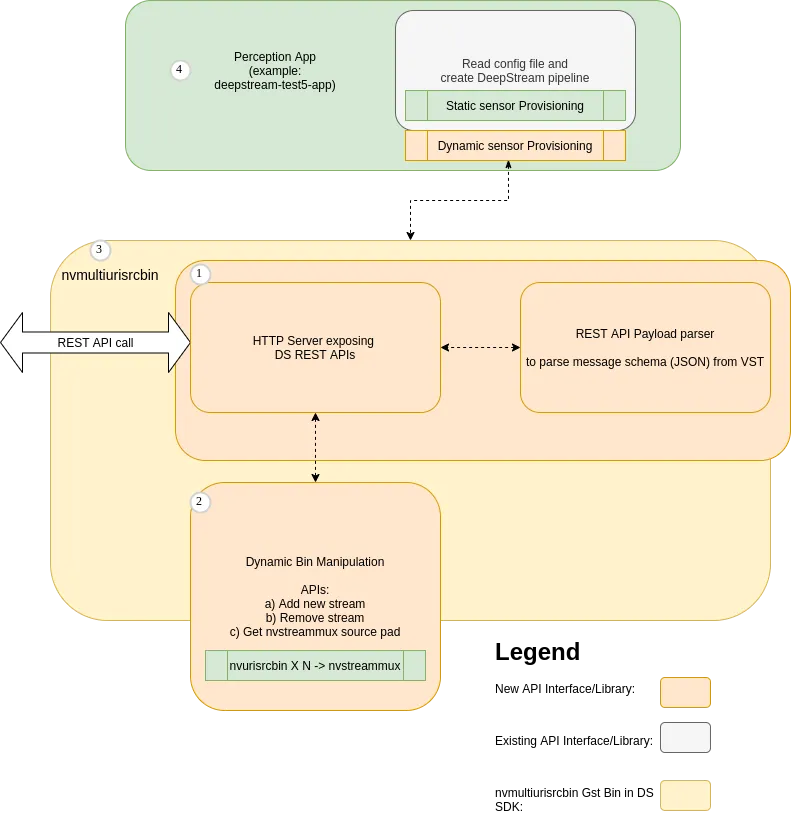
The below High Level Overview diagram and table illustrate how nvmultiurisrcbin integrates nvds_rest_server, nvurisrcbin, and nvstreammux.

Gst-nvmultiurisrcbin High Level Overview

Gst-nvmultiurisrcbin High Level Overview of integrated components

Component NameSource path in DeepStreamSDK Package for more info
(1) REST API Server; nvds_rest_server/opt/nvidia/deepstream/deepstream/sources/libs/nvds_rest_server/
(2) Bin Manipulation API Library/opt/nvidia/deepstream/deepstream/sources/libs/gstnvdscustomhelper/
(3) nvmultiurisrcbin/opt/nvidia/deepstream/deepstream/sources/gst-plugins/gst-nvmultiurisrcbin/
(4) deepstream-test5-app Demonstrating usage of nvmultiurisrcbin with nvmsgconv and nvmsgbroker/opt/nvidia/deepstream/deepstream/sources/apps/sample_apps/deepstream-test5/
(5) nvurisrcbin/opt/nvidia/deepstream/deepstream/sources/gst-plugins/gst-nvurisrcbin/
(6) nvstreammuxSource not available. For more info please run gst-inspect-1.0 nvstreammux

1. Introduction

This GstBin is a GStreamer source bin. The bin exposes only one source pad that provide batched buffers from an nvstreammux instance.

Users can add/remove streams to the bin for batching over the REST APIs defined in the Section REST API Payload definitions.

Users can also provide a static list of streams and their sensor IDs to start the pipeline with. This can be done using the Gst properties uri-list and sensor-id-list described below.

The nvmultiurisrcbin component output batched buffers from an nvstreammux instance.

2. Features

The following table summarizes the features of the bin.

Gst-nvmultiurisrcbin features

FeatureDescriptionRelease
nvmultiurisrcbin integrating REST API Server, nvurisrcbin, and nvstreammuxIntroducing nvmultiurisrcbinDS 6.2
REST API to add and remove sensors runtimeDynamically add/remove sensorsDS 6.2
Stream specificStream addition and removalDS 6.2
nvdspreprocessUpdate ROI for preprocessDS 6.4
nvv4l2decoderdrop-frame-interval” and “skip-frame” property updateDS 6.4
nvdsinferinterval” property updateDS 6.4
nvdsinferserverinterval” property updateDS 6.4
nvv4l2encoderforce-idr”, “force-intra”, “iframeinterval” and “bitrate” property updateDS 6.4
nvstreammuxbatched-push-timeout” property updateDS 6.4
nvvideoconvertsrc-crop”, “dest-crop”, “flip-method” and “interpolation-method” property updateDS 6.4
nvdsosdprocess-mode” property updateDS 6.4
Application specificApplication quitDS 6.4
GET requestsGet the stream-infoDS 7.0
GET requestsGet the DeepStream readiness infoDS 8.0
nvdsanalyticsconfig-file” Reload config fileDS 8.0
nvdstrackerconfig-file” Update configurable parameters of tracker using config fileDS 8.0

3. How to use nvmultiurisrcbin in a pipeline

Below pipeline is a sample gstreamer pipeline which is configured to accept upto 10 input sources and the pipeline starts up with two sources:

gst-launch-1.0 nvmultiurisrcbin \
port=9000 ip-address=localhost \
batched-push-timeout=33333 max-batch-size=10 \
drop-pipeline-eos=1 live-source=1 \
uri-list=file:///opt/nvidia/deepstream/deepstream/samples/streams/sample_1080p_h264.mp4,file:///opt/nvidia/deepstream/deepstream/samples/streams/sample_1080p_h264.mp4 width=1920 height=1080 \
! nvmultistreamtiler ! nveglglessink

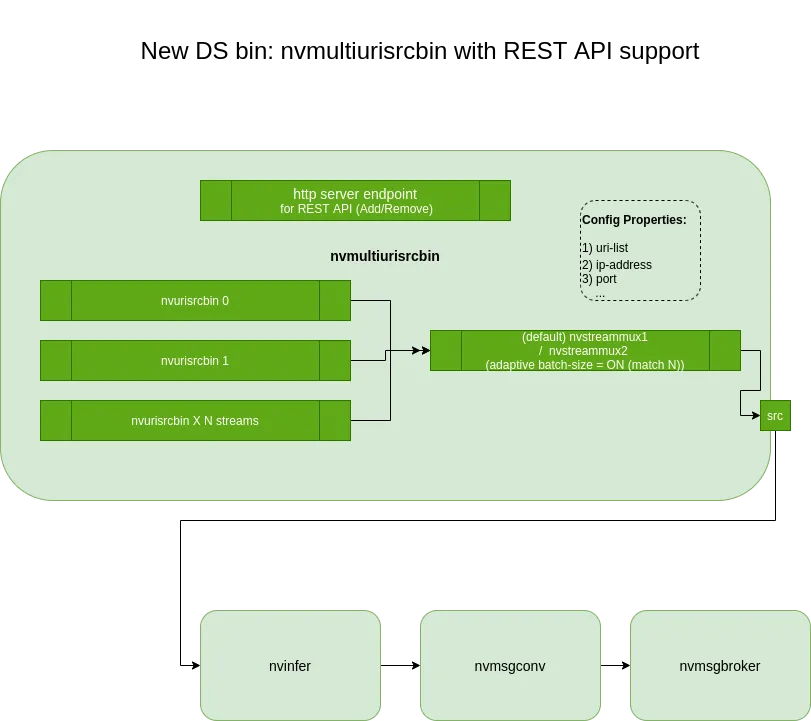
Below diagram illustrates a similar pipeline (with different plugins like nvinfer, nvmsgconv, and nvmsgbroker downstream).

Gst-nvmultiurisrcbin sample video pipeline

REST API payload definitions and sample curl commands for reference

Note:

Currently only few fields from the JSON schema described below are used/mandatory. The remaining fields are optional and ignored.

List of mandatory (and used) fields are:

  • value/camera_id

  • value/camera_url

  • value/change

ADD a new stream to a DeepStream pipeline

DS-7.1 onwards supports REST API version /api/v1. Refer below schema details.

Payload definition and the sample curl command:

1.curl -XPOST 'http://localhost:9000/api/v1/stream/add' -d '{
"key": "sensor",
"value": {
"camera_id": "uniqueSensorID1",
"camera_name": "front_door",
"camera_url": "file:///opt/nvidia/deepstream/deepstream/samples/streams/sample_1080p_h264.mp4",
"change": "camera_add",
"metadata": {
"resolution": "1920 x1080",
"codec": "h264",
"framerate": 30
}
},
"headers": {
"source": "vst",
"created_at": "2021-06-01T14:34:13.417Z"
}
}'
2.curl -XPOST 'http://localhost:9000/api/v1/stream/add' -d '{
"key": "sensor",
"event": {
"camera_id": "uniqueSensorID1",
"camera_name": "front_door",
"camera_url": "rtsp://xyz.mp4",
"change": "camera_streaming",
"metadata": {
"resolution": "1920 x1080",
"codec": "h264",
"framerate": 30
}
},
"headers": {
"source": "vst",
"created_at": "2021-06-01T14:34:13.417Z"
}
}'

REMOVE a new stream to a DeepStream pipeline

Payload definition and the sample curl command:

curl -XPOST 'http://localhost:9000/api/v1/stream/remove' -d '{
"key": "sensor",
"value": {
"camera_id": "uniqueSensorID1",
"camera_name": "front_door",
"camera_url": "file:///opt/nvidia/deepstream/deepstream/samples/streams/sample_1080p_h264.mp4",
"change": "camera_remove",
"metadata": {
"resolution": "1920 x1080",
"codec": "h264",
"framerate": 30
}
},
"headers": {
"source": "vst",
"created_at": "2021-06-01T14:34:13.417Z"
}
}'

4. Gst Properties

Gst Properties directly configuring nvmultiurisrcbin

Gst-nvmultiurisrcbin gstreamer properties directly configuring the bin

PropertyMeaningType and RangeExample Notes
uri-listcomma separated URI list of sources; URI of the file or rtsp sourcestringuri-list=file:///opt/file.mp4,file:///opt/file.mp4
sensor-id-listcomma separated list of unique source sensor IDs; this vector is one to one mapped with the uri-liststringsensor-id-list=uniqueSensorID1,uniqueSensorID2
sensor-name-listOPTIONAL comma separated list of source sensor names; this vector is one to one mapped with the uri-liststringsensor-name-list=SensorName1,SensorName2
modeVideo-only or Audio-only modes available0: for video-only
1: for audio-only
mode=0 (default)
ip-addressSet REST API HTTP IP Addressstringip-address=localhost (default)
portSet REST API HTTP Port number; Note: User may pass 0 to disable REST API Serverstringport=9000 (default)
max-batch-sizeSet the maximum batch size to be used for nvstreammux; Maximum number of sources to be supported with this instance of nvmultiurisrcbinInteger,
1 to 4,294,967,295
max-batch-size=30 (default)
http-download-timeoutMaximum time in seconds for the whole HTTP(S) file download (curl CURLOPT_TIMEOUT); 0 means no limitInteger,
0 to 4,294,967,295
http-download-timeout=0
http-connect-timeoutMaximum time in seconds for the HTTP(S) connect phase (curl CURLOPT_CONNECTTIMEOUT); 0 means no limitInteger,
0 to 4,294,967,295
http-connect-timeout=0
http-max-concurrent-downloadsMaximum number of HTTP(S) source-file downloads that may run at once across concurrent stream/add requests; 0 uses max-batch-size, any other value is clamped to max-batch-sizeInteger,
0 to 4,294,967,295
http-max-concurrent-downloads=0
ipc-frame-copyPublishes each source’s decoded frames over IPC (per-source nvunixfdsink, tapped right after the decoder). Socket: /tmp/nvds_ipc_<sensorId|source-id>.sockBooleanipc-frame-copy=0
drop-pipeline-eos(Forwarded to the internal nvstreammux) EOS is not propagated downstream when all source pads are at EOS when setBooleandrop-pipeline-eos=0

Gst Properties to configure each instance of nvurisrcbin created inside this bin

Gst-nvmultiurisrcbin nvurisrcbin specific properties

PropertyMeaningType and RangeExample Notes
num-extra-surfacesSet extra decoder surfaces; Number of surfaces in addition to minimum decode surfaces given by the decoderInteger,
1 to 4,294,967,295
num-extra-surfaces=1 (default)
gpu-idSet GPU Device ID used by nvurisrcbin components like decoder (nvv4l2decoder) and nvvideoconvertInteger,
1 to 4,294,967,295
gpu-id=0 (default)
cudadec-memtypeMemory type for cuda decoder buffers,
Memory type for CUDA decoder buffers. Represented internally by enum CudaDecMemType.
0 (memtype_device): Device
1 (memtype_pinned): Host Pinned
2 (memtype_unified): Unified
Integer,
0, 1, or 2
cudadec-memtype=0 (default)
drop-frame-intervalInterval to drop the frames, e.g. a value of 5 means the decoder outputs every fifth frame, and others are dropped.Integer,
1 to 30
Default: 0, dGPU / Jetson
dec-skip-framesType of frames to skip during decoding. Represented internally by enum SkipFrame. 0 (decode_all): decode all frames
1 (decode_non_ref): skips non-ref frames (Applicable only on Jetson platform)
2 (decode_key): decode key frames
Integer,
0, 1, or 2
skip-frames=0 Default: 0 ,dGPU / Jetson
select-rtp-protocolTransport Protocol to use for RTPEnum RtpProtocol Default: 0, rtp-multi
(0): rtp-multi - UDP + UDP Multicast + TCP
(4): rtp-tcp - TCP Only
select-rtp-protocol=0 (default)
file-loopLoop file sources after EOS. Src type must be source-type-uri and uri starting with ‘file:/‘booleanfile-loop=false (default)
rtsp-reconnect-intervalTimeout in seconds to wait since last data was received from an RTSP source before forcing a reconnection. 0=disable timeoutInteger,
0 to 4,294,967,295
rtsp-reconnect-interval=10
init-rtsp-reconnect-intervalTimeout in seconds to wait before forcing a reconnection when error received from rtsp source. 0=disable timeoutInteger,
0 to 4,294,967,295
init-rtsp-reconnect-interval=5
rtsp-reconnect-attemptsMaximum number of times a reconnection is attempted. Setting it to -1 means reconnection will be attempted infinitely. Valid when type of source is 4 and rtsp-reconnect-interval-sec is a non-zero positive value.Integer, >=-1rtsp-reconnect-attempts=4
latencyJitterbuffer size in milliseconds; applicable only for RTSP streams.Integer,
1 to 4,294,967,295
latency=100 (default)
udp-buffer-sizeUDP Buffer Size in bytes; applicable only for RTSP streams.Integer,
1 to 4,294,967,295
udp-buffer-size=524288 (default)
smart-recordEnable Smart Record and choose the type of events to respond to. Sources must be of type source-type-rtsp(0):smart-rec-disable - Disable Smart Record
(1):smart-rec-cloud  - Trigger Smart Record through cloud messages only
(2):smart-rec-multi  - Trigger Smart Record through cloud and local events
smart-record=0 (default)
smart-rec-dir-pathPath of directory to save the recorded file.stringAbsolute or relative path
smart-rec-file-prefixBy default, Smart_Record is the prefix. For unique file names every source must be provided with a unique prefixstringAbsolute or relative path
smart-rec-video-cacheSize of video cache in seconds. DEPRECATED: Use ‘smart-rec-cache’ insteadInteger,
1 to 4,294,967,295
smart-rec-video-cache=0 (default)
smart-rec-cacheSize of cache in seconds, applies to both audio and video cacheInteger,
1 to 4,294,967,295
smart-rec-cache=0 (default)
smart-rec-containerContainer format of recorded video. MP4 and MKV containers are supported. Sources must be of type source-type-rtsp(0): smart-rec-mp4 - MP4 container
(1): smart-rec-mkv - MKV container
smart-rec-container=0 (default)
smart-rec-modeSmart record mode(0):smart-rec-mode-av - Record audio and video if available
(1):smart-rec-mode-video - Record video only if available
(2):smart-rec-mode-audio - Record audio only if available
smart-rec-mode=0 (default)
smart-rec-default-durationIn case a Stop event is not generated. This parameter will ensure the recording is stopped after a predefined default duration.Integer,
1 to 4,294,967,295
smart-rec-default-duration=20 (default)
disable-passthroughTo disable the passhthrough mode of nvvideoconvert used inside the nvurisrcbinbooleandisable-passthrough=false(default)
drop-on-latencyTells the jitterbuffer to never exceed the given latency in size; applicable only for RTSP streamsbooleandrop-on-latency=false(default)
async-handlingBoolean property so that will handle Asynchronous state changesbooleanasync-handling=true(default)
disable-audioDisable audio path mode at init timebooleandisable-audio=true(default)
ipc-buffer-timestamp-copyCopy buffer timestamp for nvunixfdsrc pluginbooleanipc-buffer-timestamp-copy=false(default)
ipc-connection-attemptsMax number of attempts for connection (-1 = unlimited)Integer. Range: -1 - 2147483647 Default: -1ipc-connection-attempts=-1(default)
ipc-connection-intervalconnection interval between connection attempts in micro secondsUnsigned Integer64. Range: 0 - 18446744073709551615ipc-connection-interval=1000000(default)
ipc-socket-pathThe path to the control socket used to control the shared memory transport. This may be modified during the NULL->READY transitionStringipc-socket-path=null(default)
low-latency-modeSet low latency mode for bitstreams having I and IPPP frames on decoderbooleanlow-latency-mode=false(default)
message-forwardForwards all children messagesbooleanmessage-forward=false(default)
uriURI of the file or RTSP sourceStringuri=file:///opt/nvidia/deepstream/deepstream/samples/streams/sample_1080p_h264.mp4
typeType of source. Use type=2 (rtsp) to enable smart record featuresEnum,
0 (auto): select source type based on URI scheme
1 (uri): any URI supported by GStreamer
2 (rtsp): RTSP, supports smart recording
type=2
buffer-modeControls the buffering algorithm in useEnum,
0 (unknown): only use RTP timestamps
1 (slave): slave receiver to sender clock
2 (buffer): low/high watermark buffering
3 (auto): choose mode depending on whether the stream is live
4 (synced): synchronized sender and receiver clocks
buffer-mode=0
leakyWhere the internal queue leaks, if at allEnum,
0 (no-leak)
1 (upstream-leak)
2 (downstream-leak)
leaky=0
max-size-buffersMaximum number of buffers in the internal queueInteger,
0 to 4,294,967,295
max-size-buffers=0
smart-rec-status (read-only)Boolean indicating whether Smart Record is currently activeBoolean
source-idUnique ID for the input sourceInteger,
-1 to 2,147,483,647
source-id=0
extract-sei-type5-dataExtracts and attaches SEI type5 unregistered data on the output buffer when setBooleanextract-sei-type5-data=0
sei-uuidSets the SEI UUID on the decoderString
simulate-fps-interval-msFrame interval in milliseconds used to simulate FPS (e.g., 33 for 30 FPS); 0 disables simulationInteger,
0 to 1000
simulate-fps-interval-ms=0
ipc-frame-copyPublishes this source’s decoded frames over IPC (nvunixfdsink), tapped right after the decoder. Socket: /tmp/nvds_ipc_<source-id>.sockBooleanipc-frame-copy=0

Gst Properties to configure the instance of nvstreammux created inside this bin

All properties except “batch-size” can be configured using the same property names as defined for nvstreammux here.

5. Important Notes

nvmultiurisrcbin config recommendations and notes on expected behavior

Gst-nvmultiurisrcbin recommendations

SLExpected Behavior and Recommendation
1nvstreammux, live-source property.
live-source=1
live-source need to be turned ON to allow batching of available buffers when number of sources is < max-batch-size configuration.
2REST API stream/add or stream/remove payload value of the change key must contain substring add or remove respectively.
Expected Behavior: If ‘add’ is in the change field value, the sensorId and uri will be used to create a new stream.
If ‘remove’ is in the change field value, the sensorId and uri will be used to find and remove the matching running stream.
3Boolean property to inform muxer to skip sending EOS downstream is recommended to be set to 1.
When using nvmultiurisrcbin drop-pipeline-eos=1 is preferred default to allow pipeline to stay alive for new sensor add requests after the last added sensor EOS.
drop-pipeline-eos=1
4nvstreammux, max-batch-size property.
The value set signgifies the maximum number of streams that can be added at a given instance.
Once the streams are removed or EOS is reached, the pad id would be reused

6. Limitations

Gst-nvmultiurisrcbin known issues

SLLimitations
1Usage of new nvstreammux for video and audio usecases are not supported at this time and might not work.