

Gst-nvstreammux New
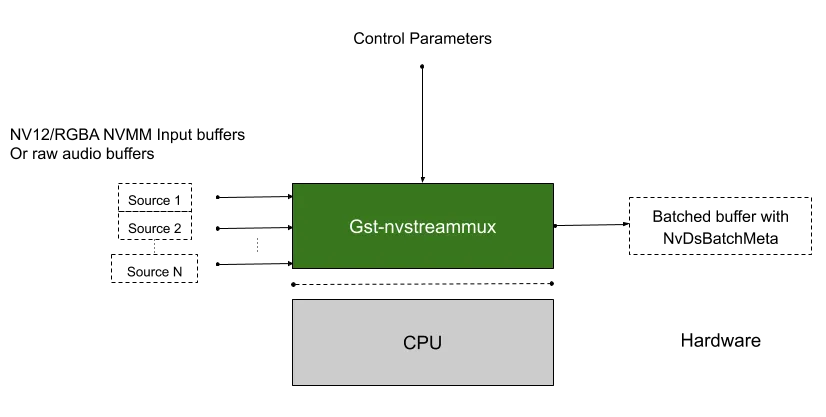
The Gst-nvstreammux plugin forms a batch of frames from multiple input sources. When connecting a source to nvstreammux (the muxer), a new pad must be requested from the muxer using gst_element_get_request_pad() and the pad template sink_%u. For more information, see link_element_to_streammux_sink_pad() in the DeepStream app source code. The muxer forms a batched buffer of batch-size frames. (batch-size is specified using the gst object property.) The muxer forwards the frames from that source as a part of the muxer’s output batched buffer. The frames are returned to the source when muxer gets back its output buffer.
The muxer pushes the batch downstream when the batch is filled or the batch formation timeout calculated from the overall and stream specific “fps” control configuration keys in provided streammux config file is reached. The timeout starts running when the first buffer for a new batch is collected. The default overall max and min fps for batch generation are 120 and 5 respectively.
The muxer’s default batching uses a round-robin algorithm to collect frames from the sources. It tries to collect an average of ( batch-size/num-source ) frames per batch from each source (if all sources are live and their frame rates are all the same). The number varies for each source, though, depending on the sources’ frame rates.
The muxer attaches an NvDsBatchMeta metadata structure to the output batched buffer. This meta contains information about the frames copied into the batch (e.g. source ID of the frame, original resolutions of the input frames, original buffer PTS of the input frames). The source connected to the Sink_N pad will have pad_index N in NvDsBatchMeta.
The muxer supports addition and deletion of sources at run time. When the muxer receives a buffer from a new source, it sends a GST_NVEVENT_PAD_ADDED event. When a muxer sink pad is removed, the muxer sends a GST_NVEVENT_PAD_DELETED event. Both events contain the source ID of the source being added or removed (see sources/includes/gst-nvevent.h). Downstream elements can reconfigure when they receive these events. Additionally, the muxer also sends a GST_NVEVENT_STREAM_EOS to indicate EOS from the source.
The muxer supports calculation of NTP timestamps for source frames. It supports two modes. In the system timestamp mode, the muxer attaches the current system time as NTP timestamp. In the RTCP timestamp mode, the muxer uses RTCP Sender Report to calculate NTP timestamp of the frame when the frame was generated at source. The NTP timestamp is set in ntp_timestamp field of NvDsFrameMeta. The mode can be toggled by setting the attach-sys-ts property. For more details, refer to NTP Timestamp in DeepStream.
The current nvsteammux shall be employed by default. Users will be able to use the new nvstreammux by setting the environment variable export USE_NEW_NVSTREAMMUX=yes. New nvstreammux is no longer a beta feature.
In upcoming DeepStream releases, usage of this environment variable and current nvstreammux will be deprecated to load new nvstreammux by default.
Inputs and Outputs
-
Inputs
- NV12/RGBA buffers from an arbitrary number of sources
- mono S16LE/F32LE audio buffers from an arbitrary number of sources
-
Control Parameters
- batch-size
- config-file-path [config-keys detailed below]
- num-surfaces-per-frame
- attach-sys-ts
- frame-duration
-
Output
- NV12/RGBA batched video buffer
NvBufSurfaceor batch audio bufferNvBufAudio - GstNvBatchMeta (meta containing information about individual frames in the batched buffer)
- NV12/RGBA batched video buffer
Features
The following table summarizes the features of the plugin.
Gst-nvstreammux plugin features
New nvstreammux do not scale batched buffers to a single resolution. A batch can have buffers from different streams of different resolutions. So with new mux, a single resolution for the batched buffer is invalid and the muxer’s source-pad-caps is not valid either.
Gst Properties
The following table describes the Gst-nvstreammux plugin’s Gst properties.
Gst-nvstreammux gst-properties
Differences between default and new streammux with respect to the GStreamer plugin properties are discussed in the table below:
Gst-nvstreammux differences from default nvstreammux
Mux Config Properties
Details on Streammux config-file groups and keys are summarized the following table.
Gst-nvstreammux config-file properties
NvStreamMux Tuning Solutions for specific use cases
Aim
- nvstreammux provide many knobs to tune the way batching algorithm works. This is essential to support a wide range of applications/use-cases the muxer supports. More documentation is available at Mux Config Properties .
- Tuning nvstreammux for specific use cases that we work with customers are good learning exercises.
- Details discussed here include observations, the configs, pipeline changes, etc that worked well for specific use-cases.
- Users/Contributors - Please feel free to create a New forum Topic with the contribution here.
Important Tuning parameters
To ensure smooth streaming experience, configure/tune the below parameters properly.
Video and Audio muxing Use cases
When nvstreammux is fed streams with different frame-rates, tuning is necessary to ensure standard muxer behavior. A sample pipeline diagram below illustrates the use of common components like nvstreammux, nvstreamdemux, flv or qtmux, etc., in a video and audio muxing use case for reference.
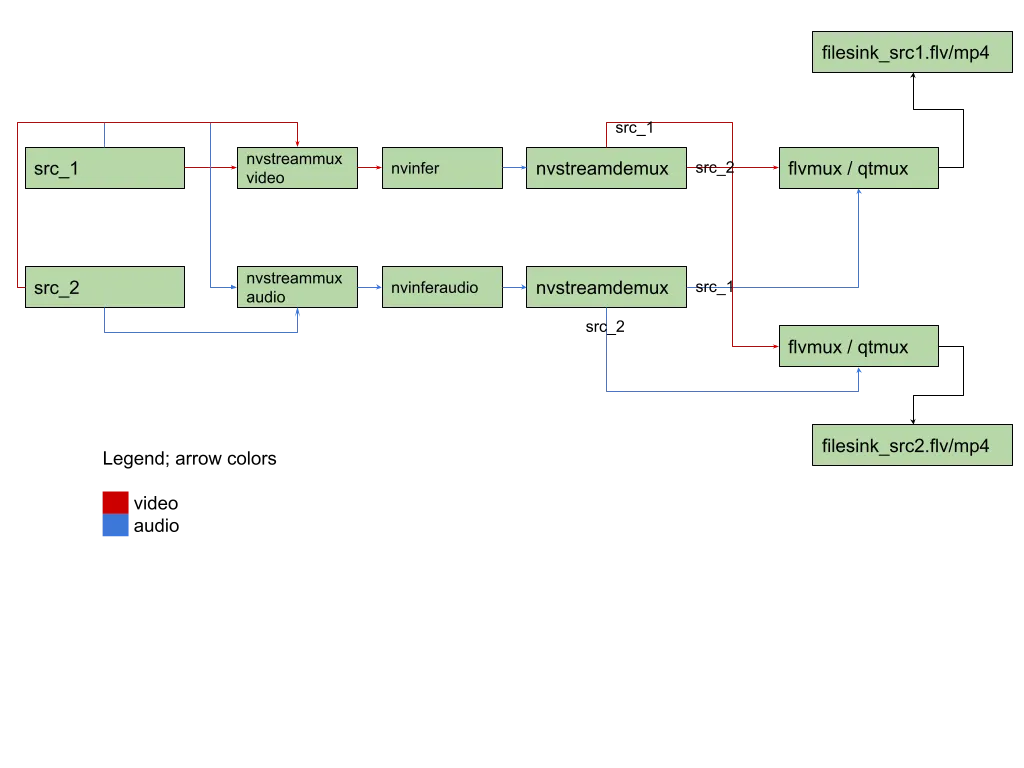
Video and Audio muxing - file sources of different fps
In a single pipeline, we could have file sources with different video framerate, but same audio framerate (typical for most camera footages with reduced video framerate to save bandwidth while keeping the less heavy audio sampling rate intact).
- In this scenario, video buffers might get mux’d slower than audio buffers. When this happens GstAggregator based flvmux or qtmux could block the pipeline when the difference between video and audio buffer-timestamps are higher than the set “latency” parameter.
- When dealing with file sources/ live sources of different framerates, we need nvstreammux tuned for min-overall-fps. Without this, the muxing always happens at the slowest stream’s framerate adding latency to the video buffers.
- When dealing with file sources of different frame rates and RTMP sources of different framerates, we recommend users to turn on sync-inputs=1 on nvstreammux and tune proper max-latency to ensure video and audio buffers from a single source are regulated and are flowing together in the pipeline after streammux. This is essential for the proper working of GstAggregator based muxers like flvmux, qtmux. etc.
- To ensure smooth streaming experience, configure/tune the parameters discussed in Section Important Tuning parameters properly.
Video and Audio muxing - RTMP/RTSP sources
When using live sources:
- make sure that
nvstreammux/sync-inputsis set to1 - When using RTMP sources, in-built upstream latency query does not work. So you’ll need to provide/tune a non-zero nvstreammux/max-latency setting.
- Tune for nvstreammux/max-latency and other parameters as discussed in Section Important Tuning parameters.
Troubleshooting
GstAggregator plugin -> filesink does not write data into the file
To troubleshoot this issue, try increasing the GstAggregator based flvumx/qtmux “latency” setting.
Try latency=18446744073709551614 - the max value to see if it works and then you could tune for an optimal latency according to the type of media source in use.
Also, set environment variable export GST_DEBUG=3 for WARNING logs. Also see, nvstreammux WARNING “Lot of buffers are being dropped”.
nvstreammux WARNING “Lot of buffers are being dropped”
To troubleshoot this issue, try increasing the max-latency setting to allow late buffers.
Also ensure to set min-overall-fps and max-overall-fps with the nvstreammux config file.
Metadata propagation through nvstreammux and nvstreamdemux
For NvDsMeta propagation through nvstreammux and sample code, please refer to the deepstream reference application supplied at: /opt/nvidia/deepstream/deepstream/sources/apps/sample_apps/deepstream-gst-metadata-test/
Illustration of GstMeta at Input and Output of nvstreammux:
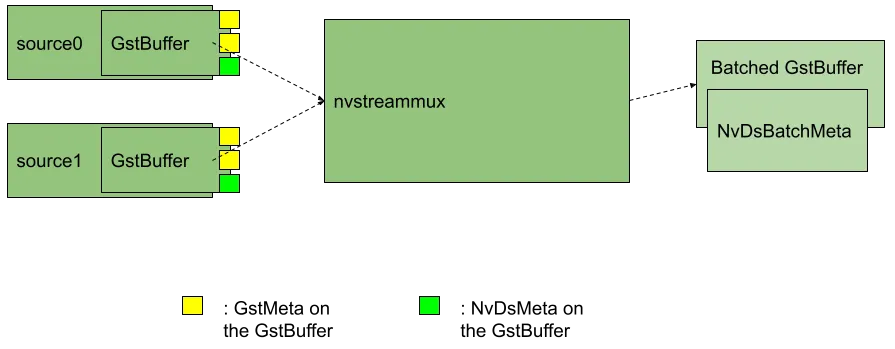
Illustration of how GstMeta and NvDsMeta are copied as NvDsUserMeta on the batched buffer’s NvDsBatchMeta after nvstreammux.
The same illustration holds good for the NvDsBatchMeta available on the demuxed GstBuffer after nvstreamdemux. Only difference is that the GstMeta won’t be available as NvDsUserMeta anymore - and will be directly copied on to the demuxed GstBuffer.
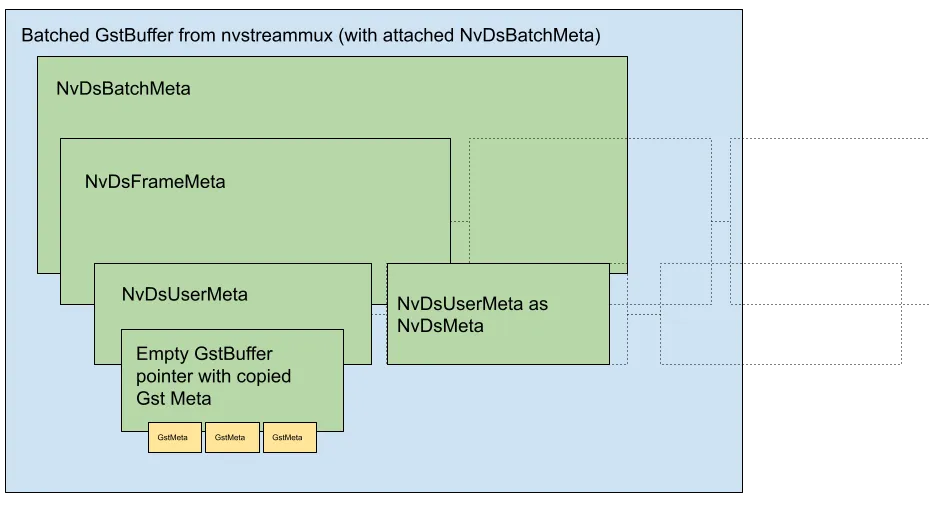
Illustration of GstMeta at Input and Output of nvstreammux:
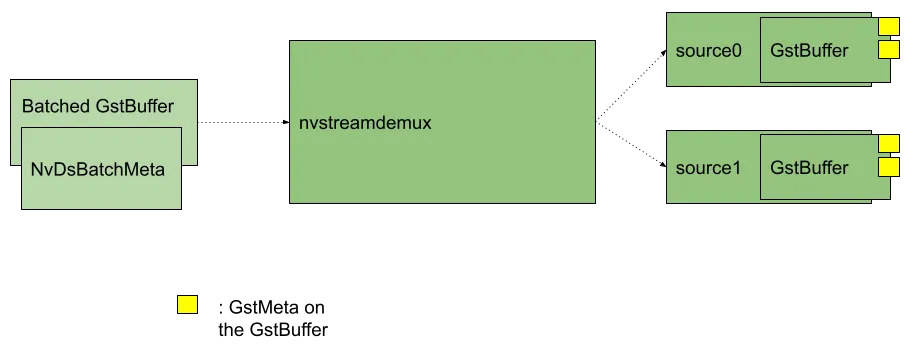
Adding GstMeta to buffers before nvstreammux
Users may add probes on nvstreammux sink pads and attach GstMeta to the GstBuffers flowing into nvstreammux. GstMeta attached on the GstBuffer pushed into nvstreammux sink pads will be copied and available:
- After nvstreamdemux as GstMeta on the demuxed output GstBuffer.
- After nvstreammux as NvDsUserMeta on the batched GstBuffer’s NvDsBatchMeta->NvDsFrameMeta->user_meta_list.
Accessing GstMeta post nvstreammux.
The GstMeta on input GstBuffers at nvstreammux will be copied into output batch buffer’s NvDsBatchMeta.
Reference code to dereference the NvDsBatchMeta on nvstreammux source pad with an attached GStreamer probe function or downstream plugin is available below:
Adding GstMeta post nvstreammux
The user could add GstMeta to each source’s batched frame into the NvDsFrameMeta->user_meta_list corresponding to the source’s frame.
Copy all GstMeta into a newly created empty GstBuffer and leverage the API’s available at
/opt/nvidia/deepstream/deepstream/sources/includes/gstnvdsmeta.h (/opt/nvidia/deepstream/deepstream/lib/libnvdsgst_meta.so) :
- For video:
nvds_copy_gst_meta_to_frame_meta() - For audio:
nvds_copy_gst_meta_to_audio_frame_meta()
To access NvDsMeta after nvstreamdemux.src_pad
Reference code to access NvDsMeta after nvstreamdemux.src_pad with an attached GStreamer probe function or downstream plugin is available below:
Cascaded Muxing
New streammux supports batching of batched buffers or cascaded muxers and appropriate debatching by demuxers for audio/video.
Sample Pipelines:
Following table summarizes important notes for expected nvstreammux configuration for cascaded usecase:
Gst-nvstreammux cascaded expected configuration
Special nvmessage/EOS Handling Requirement in the application.
Only the last nvstreammux instance in the pipeline will send GST_EVENT_EOS. GST_EVENT_EOS from upstream nvstreammux instances will be handled in the downstream nvstreammux instance and will not be forwarded.
However, if the application utilize nvmessage EOS from nvstreammux, the application will have to make sure it received this message from all nvstreammux instances before tearing down the pipeline. The nvmessage discussed here is the GST_MESSAGE_ELEMENT event application receive on the bus callback ( API used to parse this message is: gst_nvmessage_is_stream_eos() and gst_nvmessage_parse_stream_eos()).
Known Issues with Solutions and FAQ
Observing video and/or audio stutter (low framerate)
Solution:
You’ll need to configure max-latency parameter on nvstreammux when stutters are observed or when pipeline latency is known to be “non-real-time”.
Sink plugin shall not move asynchronously to PAUSED
Solution:
When using new nvstreammux in a GStreamer pipeline, it is recommended that the sink elements shall be configured to set the plugin property async to false.
Based on how Application is designed async=1 can cause a hang. Below is the way in which users may use async=1
Sample pipeline diagram (for n sources):
BIN_BEFORE_MUX X n -> nvstreammux -> nvstreamdemux -> BIN_AFTER_DEMUX X n
- BIN_BEFORE_MUX is [audiosource]
- BIN_AFTER_MUX is [fakesink]
However this was needed because of the way app is designed. Sample pipeline/app Design recommended:
-
Add stream and remove stream operations shall be mutually exclusive.
-
Add stream algorithm/steps:
a. create bin_before_muxer and bin_after_demuxer b. add it to pipeline c. move it to PLAYING. d. WAIT for the state change to happen
-
Remove stream algorithm/steps:
a. move bins before mux and after demux to STATE_NULL. b. WAIT for state change to happen c. remove bin_before_muxer and bin_after_demuxer from pipeline.
sink plugin async=1 cause the step (1).(d) to block if app is not supplying buffers needed by sink element to PREROLL. To fix this, async=0 on sink plugin is required.
Users may set async=1 with the app design being able to supply buffers between (1).(c) and (1).(d).
Heterogeneous batching
New nvstreammux does not transform/scale batched buffers to a single color-format/resolution unlike the default nvstreammux. A batch can have buffers from different streams of different resolutions and formats. So with new mux, a single resolution for this heterogeneous batched buffer is invalid.
When we have plugins that could transform the input buffers (example: change resolution or color format of video buffers in the batch) between nvstreammux and nvstreamdemux, we need to add support for heterogeneous query handling in this transform plugin for proper stream-wise resolution flow in CAPS. Below is sample implementation for reference:
Work Around:
Without query implementation, it is necessary to add nvvideoconvert + capsfiler before each nvstreammux sink pad (enforcing same resolution and format of all sources connecting to new nvstreammux). This ensure that the heterogeneous nvstreammux batch output have buffers of same caps (resolution and format).
Example; video use-case:
Where the fixed caps: “1920 X 1080; NV12” ensure every buffer in the batch is transformed to this same caps.
Example; audio use-case:
Where the fixed caps: “48kHz; mono S16LE interleaved” ensure every buffer in the batch is transformed to this same caps.
Adaptive Batching
Does nvstreammux support dynamic batching? This is in the context of use-cases where we don’t know the exact number of inputs initially. Once the pipeline starts, inputs may get connected / disconnected.
Solution:
Yes, nvstreammux support dynamic batch-size when adaptive-batching=1,[property] group in the mux config-file. When adaptive-batching is enabled, batch-size is equal to the number of source pads on the muxer. By default this is enabled.
Refer to Mux Config Properties for more information.
Optimizing nvstreammux config for low-latency vs Compute
You may want to design for use-cases where compute resource (GPU) utilization is more important than throughput.
On the other hand, there could be use cases where minimum pipeline latency is of utmost importance.
The following guidance is intended to help in tuning nvstreammux configuration parameters (passed with config-file-path property on nvstreammux) for optimal resource (compute) utilization and low-pipeline-latency.
Recommended Config params are shared in the table below.
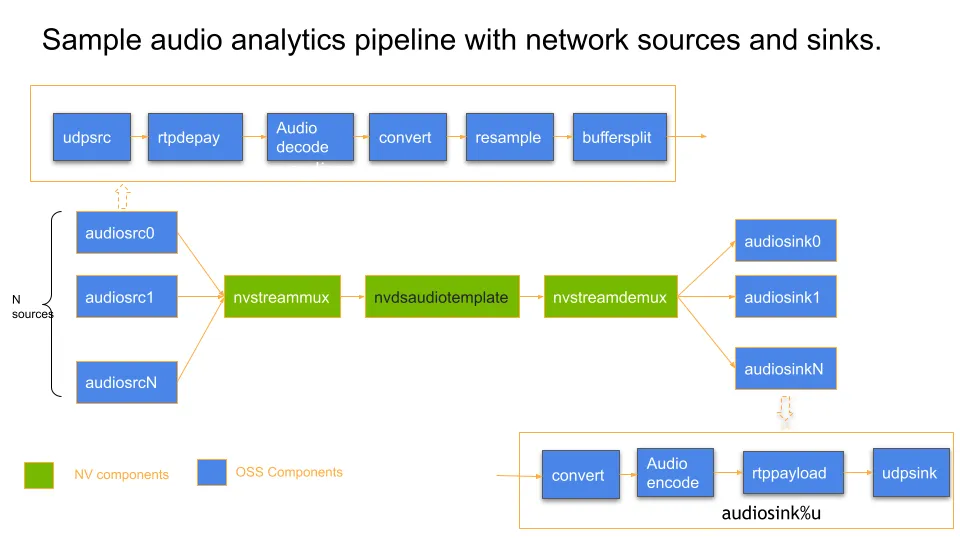
A sample pipeline diagram below illustrates the use of common OSS components in an audio pipeline use case for reference, like:
- udpsrc
- audiodecoder
- audiobuffersplit
- udpsink
- And NVIDIA components like nvstreammux, nvdsaudiotemplate.
Latency Measurement API Usage guide for audio
For latency measurement of video buffers, please refer to the usage of latency_measurement_buf_prob() probe function in the deepstream reference application implementation at /opt/nvidia/deepstream/deepstream/sources/apps/sample_apps/deepstream-app/deepstream_app.c.
Assume an audio pipeline viz:
You may want to measure latency of each buffer from the moment its decoded until the time it reaches final sink plugin in the pipeline. In this example, the latency from opusdecode source pad (output) to fakesink sink pad (input).
To do this,
-
Add a GStreamer buffer probe programmatically on opusdecode source pad following documentation here .
-
Inside the probe, call DeepStream API
nvds_add_reference_timestamp_meta()at/opt/nvidia/deepstream/deepstream/sources/includes/nvds_latency_meta.hPseudocode reference:
-
Next, add a probe on the sink pad of fakesink following documentation here .
Inside this probe, use API nvds_measure_buffer_latency().
Pseudocode reference:
Latency Measurement relies on NvDsUserMeta that is added to NvDsBatchMeta for every batched buffer post nvstreammux. This metadata and hence latency measurement support is available after an nvstreammux instance until nvstreamdemux instance in the GStreamer pipeline.
gst-inspect is not updated properly when switching between legacy and new streammux
Delete gstreamer cache present by default in home directory (rm ~/.cache/gstreamer-1.0/registry.x86_64.bin) and rerun gst-inspect on the streammux plugin.