

What is a DeepStream Service Maker Plugin
A plugin encapsulates a specialized factory, enabling the creation of user-implemented custom objects through a standardized factory API. Users have the flexibility to define a factory in a plugin with descriptive metadata, including name, version, descriptions, and more, for their custom objects. By loading the plugin, any application gains the ability to create instances of the custom object through the common factory API and facilitates the seamless reuse of user-defined custom objects (e.g., object counter, latency measurement, etc) across multiple applications.
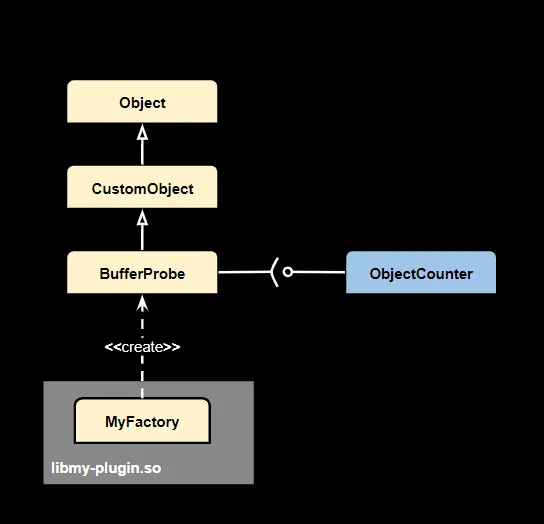
Getting Started with Your Factory and Plugin
Prior to encapsulating a factory, it is essential to come up with a custom object that the factory will create. As an illustrative example, let’s consider a simple latency measurement probe. By implementing the IBufferObserver interface for a BufferProbe, we tailor it to serve as a latency measurement tool for video frames:
Next, you need to encapsulate a factory for this latency measurement probe within a plugin. To achieve this, we can employ macros in the plugin.h file to define both the factory and the plugin, respectively:
To build the plugin, you need to create a straightforward CMakeLists.txt file with the following content:
Upon successful completion of the plugin build process, you can seamlessly utilize our latency measurement-customized BufferProbe in any application:
Incorporating properties to a plugin
To further increase the versatility of factory reuse, we can introduce property specification for the objects from the factory. Macros for adding property specification to the factory can be utilized as follows:
Within the latency measurement implementation, the calculation of frame latency can be confined to a specified stream:
In the application, you would have the option to specify the precise source ID for latency measurement:
Sample Plugins
Sample plugins can be found from the Deepstream installation directory /opt/nvidia/deepstream/deepstream/service-maker/sources/modules, and with the following commands user can build them:
Message Metadata Generator
The Message Metadata Generator is a sample plugin that creates a buffer probe to generate event message metadata. This metadata can be utilized by downstream nvmsgconv to create JSON payloads for transmission to message brokers like Kafka.
Registered name of the plugin is “add_message_meta_probe”.
KITTI Dump Plugin
The KITTI Dump Plugin is a sample plugin that creates a buffer probe to dump the object metadata there into a txt file in kitti format. The registered name of the plugin is “kitti_dump_probe”.
Following parameters are supported:
- kitti-dir: the path for saving kitti files (default: /tmp/kitti).
Framerate Measurement Plugin
The Framerate Measurement Plugin is a sample plugin that creates a framerate measurement probe which measures and prints the current frame rate. The registered name of the plugin is “measure_fps_probe”.
Latency Measurement Plugin
The Latency Measurement Plugin is a sample plugin that creates a latency measurement probe which measures and prints the current frame latency. The registered name of the plugin is “measure_latency_probe”.
Sample Video Probe Plugin
This plugin creates a sample video probe which constructs the display metadata for downstream osd plugin to show the object counter. The registered name of the plugin is “sample_video_probe”. The following parameters are supported for customizing the created buffer probe object:
- font-size: an integer to specify the size of the font.
Sample Signal Handler Plugin
This plugin creates a sample signal handlers that responds on the “model-updated” signal from nvinfer plugin. As a sample it prints out the message whenever the model is updated. The registered name of the plugin is “sample_signal_handler”.
Sample Video Feeder Plugin
This plugin creates a sample video feeder can be attached to an “appsrc”, thus injects raw video data to the pipeline from a file. The registered name of the plugin is “sample_video_feeder”. The following parameters are supported for customizing the created buffer probe object:
- location: a string to specifies the file as the source of video data
- frame-width: width of the video frame
- frame-height: height of the video frame
- format: format of the video frame, which can be one among RGBA, I420 and NV12
- use-gpu-memory: True for copying data into a GPU memory
- use-external-memory: True for allocating the memory outside the pipeline.
Sample Video Receiver Plugin
This plugin creates a sample video receiver to demonstrate how to retrieve the buffer data from an “appsink”. The registered name of the plugin is “sample_video_receiver”.
Smart Recording Action Plugin
This plugin creates a signal emitter object which can attach to “nvurisrcbin” to trigger smart record and pause it. As a sample plugin it interacts with a remote Kafka server and controls the smart recording based on the messages received from the Kafka server.
The registered name of the plugin is “smart_recording_action”. The following parameters are supported for customizing the created buffer probe object:
- proto-lib: the path to the shared library that implements the device/cloud communication protocol
- conn-str: string for the connection in the format of ‘ip;port’
- proto-config-file: path to the config file of the communication protocol
- msgconv-config-file: message converter config file path
- topic-list: list of topics to subscribe
Smart Recording Signal Plugin
This plugin creates a sample smart recording signal handler which responds on “sr-done” signal from “nvurisrcbin” with a brief print. The registered name of the plugin is “smart_recording_signal”.
Ensemble Render Plugin
This is a sample data receiver plugin for rendering pipeline results. The registered name of the plugin is “ensemble_render”. The following parameters are supported for customizing the created data receiver object:
- config-path: file path for the data; the file contains the data for feeding the appsrc.
LiDAR Feeder Plugin
This is a sample LiDAR data feeder plugin. The registered name of the plugin is “lidar_feeder”. The following parameters are supported for customizing the created data feeder object:
- config-path: file path for lidar data; the file contains the data for feeding the appsrc.
ResNet Tensor Parser Plugin
This is a custom tensor parser probe for ResNet object detectors, for use when “nvinfer” is configured with output-tensor-meta=1. It parses raw ResNet detector output tensors and populates NvDsObjectMeta in the pipeline. The registered name of the plugin is “resnet_tensor_parser”. The following parameters are supported for customizing the created buffer probe object:
- network-width: width of the neural network (default: 960).
- network-height: height of the neural network (default: 544).
- stream-width: width of the streammux output (default: 960).
- stream-height: height of the streammux output (default: 544).
- num-classes: number of detected classes (default: 4).
Python Probe Modules
In addition to the C++ plugin mechanism described above, pyservicemaker supports authoring reusable probe modules directly in Python using the @probe decorator. A module decorated with @probe registers itself in the same CommonFactory used by the C++ plugin mechanism, so once imported, a Python probe is indistinguishable from a compiled C++ probe plugin — it can be declared in a YAML pipeline config or attached directly through the pipeline API.
Authoring a Python probe module
Decorate a class that implements BatchMetadataOperator with @probe(name=..., params={...}). The params dictionary maps each parameter name to a (type, default, description) tuple:
Importing the module registers it under the given name in CommonFactory:
Once registered, the probe can be declared as a pipeline node in a YAML config using the python.<name> type:
or attached directly through the pipeline API:
For a complete working example, see /opt/nvidia/deepstream/deepstream/service-maker/sources/apps/python/pipeline_api/deepstream_python_probe_app/.
Sample Python probe modules
Ready-to-use Python probe modules are shipped under /opt/nvidia/deepstream/deepstream/service-maker/sources/modules/probe/python/. Add this directory to sys.path and import the module by name to register it, as shown above.
add_message_meta_probe, measure_fps_probe, and kitti_dump_probe are Python implementations of the same-named C++ sample plugins described above, with matching registered names and parameters.
measure_latency_probe (Python)
Measures and prints end-to-end pipeline latency per frame to stdout. Attach point: any pipeline element, typically the sink-side element. Takes no parameters.
sample_video_probe (Python)
Counts vehicles and persons detected per frame and overlays the result as text on the OSD display. Attach point: nvinfer (or any element after object detection). Supports the same font-size parameter (integer, default 12) as its C++ counterpart.
resnet_tensor_parser (Python)
Parses raw ResNet detector output tensors and populates NvDsObjectMeta in the pipeline. Use this when nvinfer is configured with output-tensor-meta=1 and you want custom post-processing in Python instead of a C++ parser. Attach point: nvinfer (output-tensor-meta mode). Parameters: network-width (integer, default 960, model input width), network-height (integer, default 544, model input height), stream-width (integer, default 1280, source stream width), stream-height (integer, default 720, source stream height), num-classes (integer, default 4, number of detection classes).
Plugin Search Path
By default the plugins will be searched from the installation path /opt/nvidia/deepstream/deepstream/service-maker/sources/modules. However, users can specify their path by defining them in the NVDS_MODULE_PATH environment variable, and multiple paths can be separated by ”:”.