

Gst-nvinfer
The Gst-nvinfer plugin does inferencing on input data using NVIDIA ® TensorRT™.
The plugin accepts batched NV12/RGBA buffers from upstream. The NvDsBatchMeta structure must already be attached to the Gst Buffers.
The low-level library (libnvds_infer) operates on any of INT8 RGB, BGR, or GRAY data with dimension of Network Height and Network Width.
The Gst-nvinfer plugin performs transforms (format conversion and scaling), on the input frame based on network requirements, and passes the transformed data to the low-level library.
The low-level library preprocesses the transformed frames (performs normalization and mean subtraction) and produces final float RGB/BGR/GRAY planar data which is passed to the TensorRT engine for inferencing. The output type generated by the low-level library depends on the network type.
The pre-processing function is:
y = net scale factor*(x-mean)
Where:
- x is the input pixel value. It is an int8 with range [0,255].
- mean is the corresponding mean value, read either from the mean file or as offsets[c], where c is the channel to which the input pixel belongs, and offsets is the array specified in the configuration file. It is a float.
- net-scale-factor is the pixel scaling factor specified in the configuration file. It is a float.
- y is the corresponding output pixel value. It is a float.
Gst-nvinfer currently works on the following type of networks:
- Multi-class object detection
- Multi-label classification
- Segmentation (semantic)
- Instance Segmentation
The Gst-nvinfer plugin can work in three modes:
- Primary mode: Operates on full frames
- Secondary mode: Operates on objects added in the meta by upstream components
- Preprocessed Tensor Input mode: Operates on tensors attached by upstream components
When operating in preprocessed tensor input mode, the pre-processing inside Gst-nvinfer is completely
skipped. The plugin looks for GstNvDsPreProcessBatchMeta attached to the input
buffer and passes the tensor as is to TensorRT inference function without any
modifications. This mode currently supports processing on full-frame and ROI. The
GstNvDsPreProcessBatchMeta is attached by the Gst-nvdspreprocess plugin.
When the plugin is operating as a secondary classifier along with the tracker, it tries to improve performance by avoiding re-inferencing on the same objects in every frame. It does this by caching the classification output in a map with the object’s unique ID as the key. The object is inferred upon only when it is first seen in a frame (based on its object ID) or when the size (bounding box area) of the object increases by 20% or more. This optimization is possible only when the tracker is added as an upstream element. Detailed documentation of the TensorRT interface is available at: https://docs.nvidia.com/deeplearning/sdk/tensorrt-developer-guide/index.html The plugin supports the IPlugin interface for custom layers. Refer to section IPlugin Interface for details. The plugin also supports the interface for custom functions for parsing outputs of object detectors and initialization of non-image input layers in cases where there is more than one input layer. Refer to sources/includes/nvdsinfer_custom_impl.h for the custom method implementations for custom models.
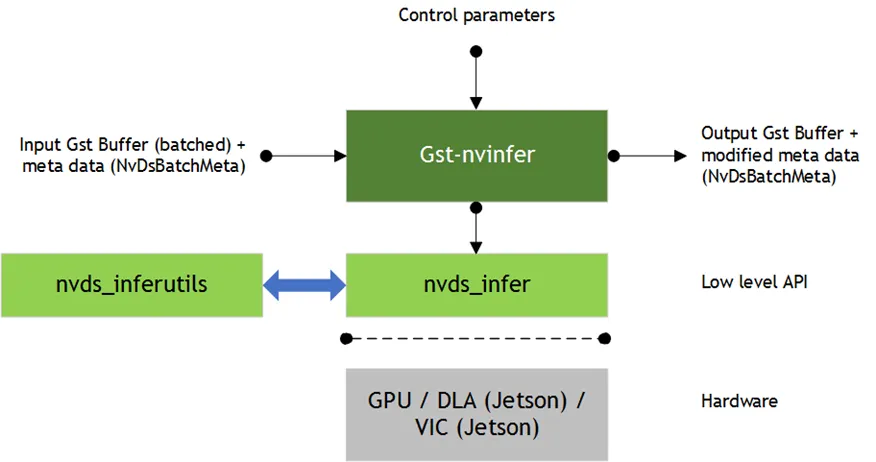
Inputs and Outputs
This section summarizes the inputs, outputs, and communication facilities of the Gst-nvinfer plugin.
-
Inputs
- Gst Buffer
- NvDsBatchMeta (attaching NvDsFrameMeta)
- ONNX
- TAO Encoded Model and Key
- Offline: Supports engine files generated by TAO Toolkit SDK Model converters
- Layers: Supports all layers supported by TensorRT, see: https://docs.nvidia.com/deeplearning/sdk/tensorrt-developer-guide/index.html.
-
Control parameters
Gst-nvinfer gets control parameters from a configuration file. You can specify this by setting the property config-file-path. For details, see Gst-nvinfer File Configuration Specifications. Other control parameters that can be set through GObject properties are:
-
Batch size
-
Inference interval
-
Attach inference tensor outputs as buffer metadata
-
Attach instance mask output as in object metadata
-
The parameters set through the GObject properties override the parameters in the Gst-nvinfer configuration file.
-
Outputs
- Gst Buffer
- Depending on network type and configured parameters, one or more of:
- NvDsObjectMeta
- NvDsClassifierMeta
- NvDsInferSegmentationMeta
- NvDsInferTensorMeta
Features
The following table summarizes the features of the plugin.
Gst-nvinfer plugin features
Gst-nvinfer File Configuration Specifications
The Gst-nvinfer configuration file uses a “Key File” format described in https://specifications.freedesktop.org/desktop-entry-spec/latest.
The [property] group configures the general behavior of the plugin. It is the only mandatory group.
The [class-attrs-all] group configures detection parameters for all classes.
The [class-attrs-<class-id>] group configures detection parameters for a class specified by <class-id>. For example, the [class-attrs-23] group configures detection parameters for class ID 23. This type of group has the same keys as [class-attrs-all].
The following two tables respectively describe the keys supported for [property] groups and [class-attrs-…] groups.
Gst-nvinfer Property Group Supported Keys
Gst-nvinfer Class-attributes Group Supported Keys
UFF model support is removed from TRT 10.3.
Gst Properties
The values set through Gst properties override the values of properties in the configuration file. The application does this for certain properties that it needs to set programmatically. The following table describes the Gst-nvinfer plugin’s Gst properties.
Gst-nvinfer Gst Properties
Clustering algorithms supported by nvinfer
cluster-mode = 0 | GroupRectangles
GroupRectangles is a clustering algorithm from OpenCV library which clusters rectangles of similar size and location using the rectangle equivalence criteria. Link to API documentation - https://docs.opencv.org/3.4/d5/d54/group__objdetect.html#ga3dba897ade8aa8227edda66508e16ab9
cluster-mode = 1 | DBSCAN
Density-based spatial clustering of applications with noise or DBSCAN is a clustering algorithm which which identifies clusters by checking if a specific rectangle has a minimum number of neighbors in its vicinity defined by the eps value. The algorithm further normalizes each valid cluster to a single rectangle which is outputted as valid bounding box if it has a confidence greater than that of the threshold.
cluster-mode = 2 | NMS
Non maximum suppression or NMS is a clustering algorithm which filters overlapping rectangles based on a degree of overlap(IOU) which is used as threshold. Rectangles with the highest confidence score is first preserved while the rectangles which overlap greater than the threshold are removed iteratively.
cluster-mode = 3 | Hybrid
Hybrid clustering algorithm is a method which uses both DBSCAN and NMS algorithms in a two step process. DBSCAN is first applied to form unnormalized clusters in proposals whilst removing the outliers. NMS is later applied on these clusters to select the final rectangles for output.
cluster-mode=4 | No clustering
No clustering is applied and all the bounding box rectangle proposals are returned as it is.
Tensor Metadata
The Gst-nvinfer plugin can attach raw output tensor data generated by a TensorRT inference engine as metadata. It is added as an NvDsInferTensorMeta in the frame_user_meta_list member of NvDsFrameMeta for primary (full frame) mode, or in the obj_user_meta_list member of NvDsObjectMeta for secondary (object) mode.
To read or parse inference raw tensor data of output layers
- Enable property
output-tensor-metaor enable the same-named attribute in the configuration file for the Gst-nvinfer plugin. - When operating as primary GIE,
NvDsInferTensorMetais attached to each frame’s (eachNvDsFrameMetaobject’s)frame_user_meta_list. When operating as secondary GIE,NvDsInferTensorMetais attached to eachNvDsObjectMetaobject’sobj_user_meta_list. When operating in preprocessed tensor input mode (using nvdspreprocess plugin), the tensor metadata is accessible throughNvDsPreProcessorBatchMeta- first look forGstNvDsPreProcessBatchMetainbatch_meta->batch_user_meta_list, then access theroi_vectorwhich containsNvDsRoiMetaobjects.
Metadata attached by Gst-nvinfer can be accessed in a GStreamer pad probe attached downstream from the Gst-nvinfer instance.
- The
NvDsInferTensorMetaobject’s metadata type is set toNVDSINFER_TENSOR_OUTPUT_META. To get this metadata you must iterate over theNvDsUserMetauser metadata objects in the list referenced byframe_user_meta_listorobj_user_meta_list. However, for preprocessed tensor input mode, you must first find theGstNvDsPreProcessBatchMetainbatch_meta->batch_user_meta_list, then access theroi_vectorwhich containsNvDsRoiMetaobjects, and iterate over each ROI meta’sroi_user_meta_listto findNVDSINFER_TENSOR_OUTPUT_META. EachNvDsRoiMetacontainsframe_metaandobject_metareferences to identify the source object, and look forNVDSINFER_TENSOR_OUTPUT_METAwithin each ROI meta’sroi_user_meta_list.
For more information about Gst-infer tensor metadata usage, see the source code in sources/apps/sample_apps/deepstream_infer_tensor_meta-test.cpp, provided in the DeepStream SDK samples.
Segmentation Metadata
The Gst-nvinfer plugin attaches the output of the segmentation model as user meta in an instance of NvDsInferSegmentationMeta with meta_type set to NVDSINFER_SEGMENTATION_META. The user meta is added to the frame_user_meta_list member of NvDsFrameMeta for primary (full frame) mode, or the obj_user_meta_list member of NvDsObjectMeta for secondary (object) mode.
For guidance on how to access user metadata, see User/Custom Metadata Addition inside NvDsBatchMeta and Tensor Metadata sections.