

DeepStream-3D Custom Apps and Libs Tutorials
ds3d framework, interfaces and custom-libs are designed for DeepStream-3D processing. ds3d is agnostic from Gstreamer/Glib frameworks. These interfaces are capable of different types of data fusion. Developers can implement different types of custom libraries for dataloader, datafilter and datarender. The interface has ABI compatible layers and modern C++ interface. Developers only need to focus on the modern C++ interface for application or custom lib development.
DS3D dataloader is loaded by GstAppSrc, enabling its utilization for depth cameras like stereo cameras and Time-of-Flight cameras to capture image/depth data or load data from the file system. Additionally, it can be employed for capturing lidar data from sensors or lidar data files.
datafilter is loaded by the nvds3dfilter Gst-plugin. It could be used for 2D depth data processing , 3D point-cloud data extraction from depth, other 2D-depth or 3D-points data filters and lidar or 3D data inference.
datarender is loaded by GstAppSink. It could be used for 2D depth rendering and 3D point-cloud and lidar data rendering. It also could be used for file dump.
DS3D Application Examples
-
DeepStream-3D Multi-Modal Lidar and Camera Sensor Fusion App sample application showcases a multi-modal sensor fusion pipeline for LiDAR and camera data using the DS3D framework. There are 2 examples of multi-modal sensor fusion pipelines inside the samples. The sample app is located at
/opt/nvidia/deepstream/deepstream/sources/apps/sample_apps/deepstream-3d-lidar-sensor-fusion.-
Refer to DeepStream 3D Multi-Modal Lidar and Camera Sensor Fusion App to see more details of
deepstream-3d-lidar-sensor-fusion -
DS3D BEVFusion pipeline shows the overview of 6-camera plus 1-LiDAR data fusion inference and rendering pipeline through
deepstream-3d-lidar-sensor-fusion.
-
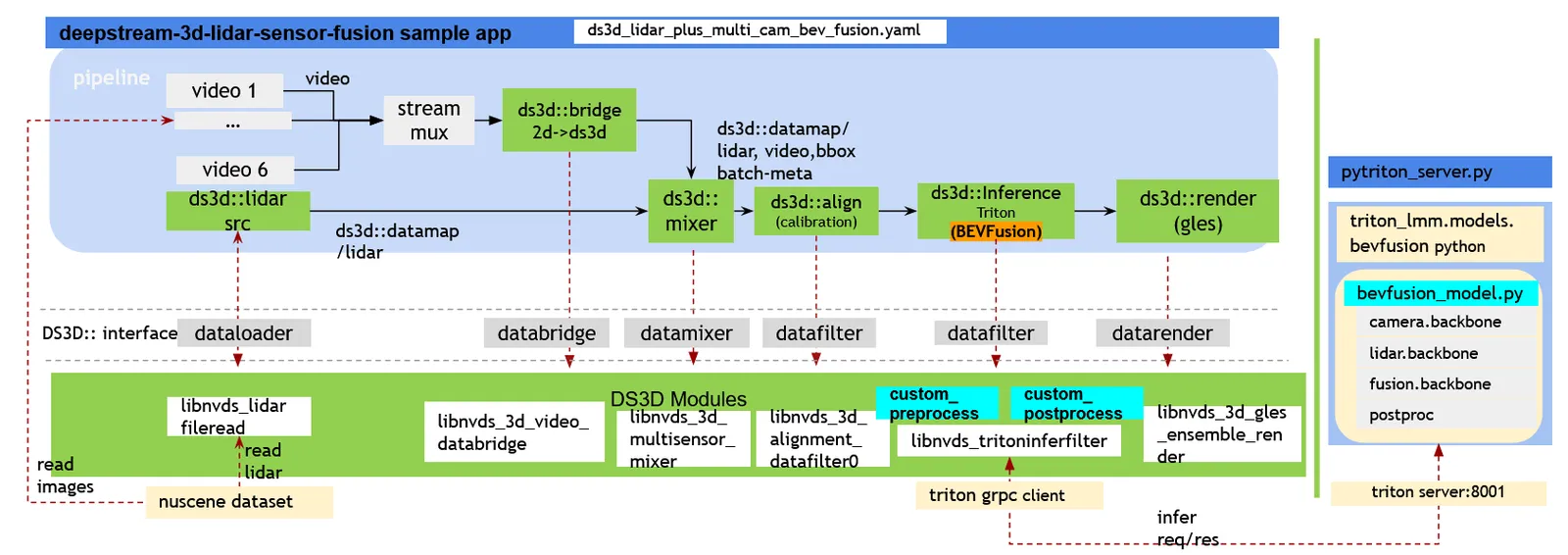
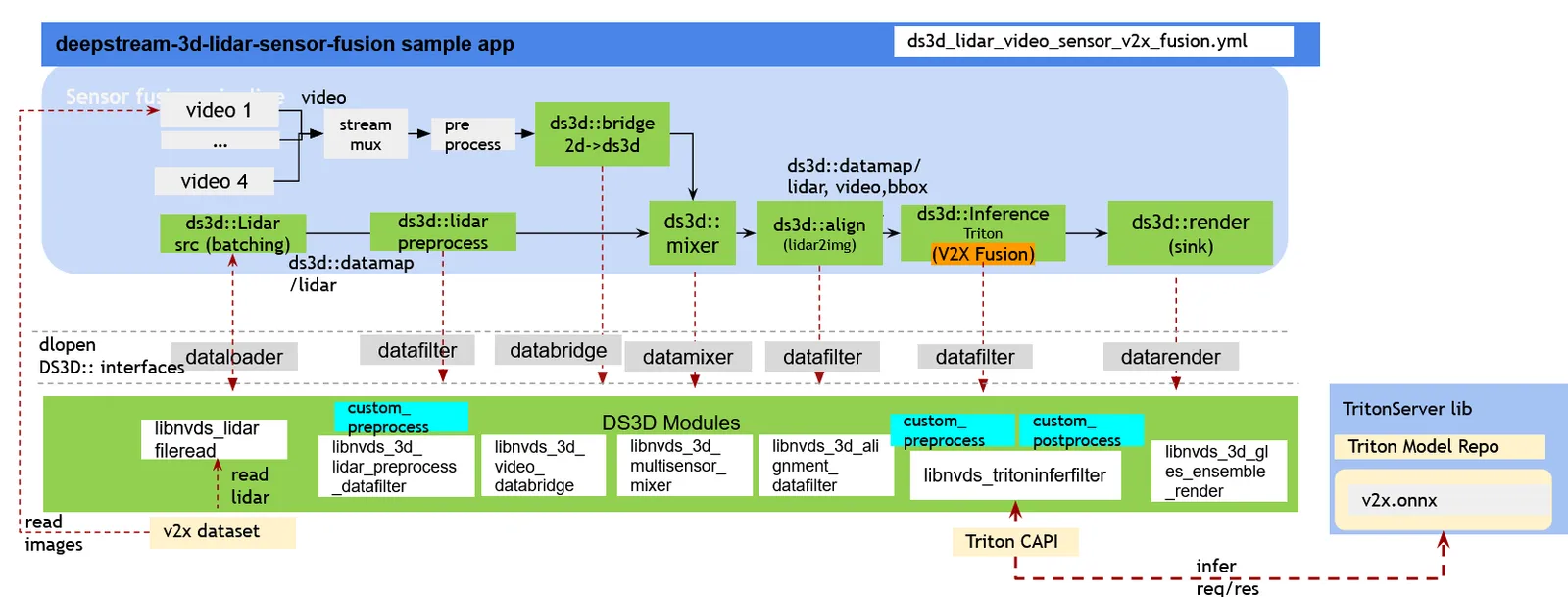
The image below shows the overview of lidar 3D data inference and rendering pipeline in deepstream-lidar-inference.
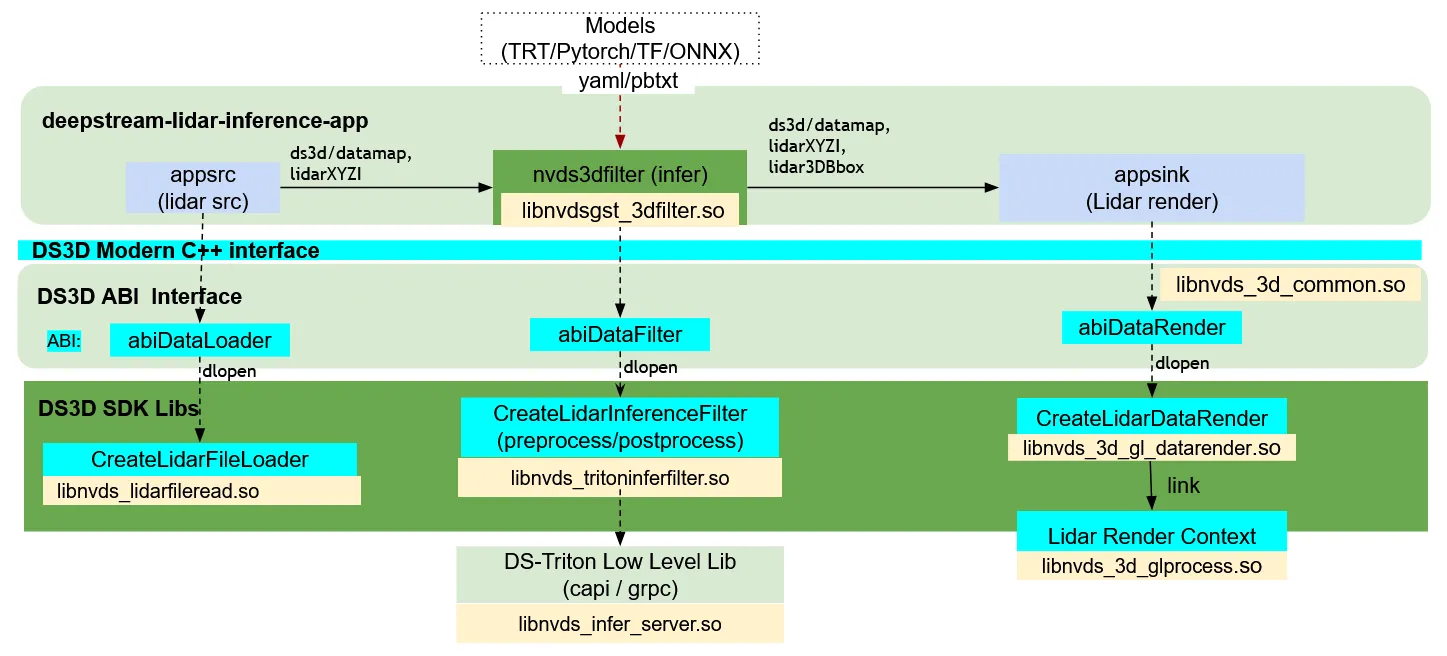
- deepstream-3d-depth-camera is another example for ds3d pipeline.
The image below shows the overview of depth to 3D point processing pipeline in deepstream-3d-depth-camera.
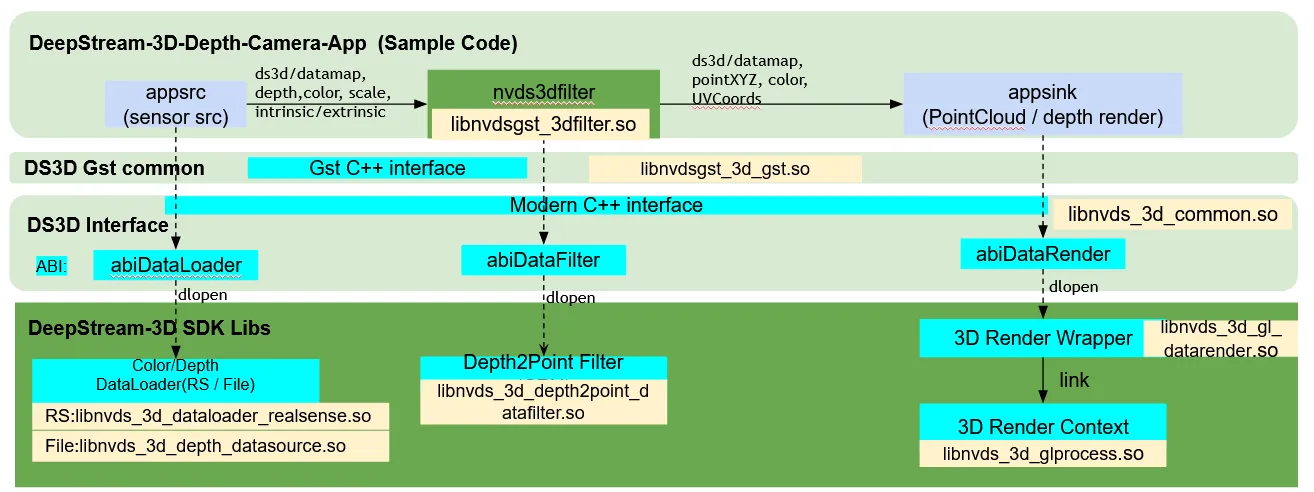
All the components are configured in YAML format. They are loaded by Gst-plugins.There are 3 major components, they may all be loaded into the deepstream pipeline.
DS3D data format ds3d/datamap
DS3D data format ds3d/datamap
ds3d/datamap recognizes the data format used in DS3D framework. Data buffers flowing between GStreamer plugins will be of this data-type.
ds3d/datamap are key-value pairs where key is a string and value, a pointer, structure or tensor frame to data.
All of the operations on the buffer is managed by GuardDataMap.
Examples:
-
Create GuardDataMap
datamapand set scaler key-values. -
User-defined structure added into ds3d
datamap.ds3d datamap requires each data type having a
typeid: uint64_tbefore adding the data into datamap. This could prevent any wrong datatype casting in runtime. To achieve that, there are 2 ways to enable a typeid for a structure.Example 1, use
REGISTER_TYPE_IDdirectly in custom data structure definition. this is mostly used when users define a new structure.Example 2, Instantiate template
struct TpId<> { static constexpr TIdType __typeid(); }, this is helpful when adding a 3rdparty data structure into datamap and not able to modify the 3rd-party existing DataStructure. -
Create LiDAR tensor frame and add into GuardDataMap
datamap. -
Create 2D-Image tensor frame and add into GuardDataMap
datamap. -
Create custom shaped tensor frame and add into GuardDataMap
datamap. -
Query data values from GuardDataMap
datamapGuardDataMap::getGuardData, return a safe reference counted guard data GuardDataT<DataStructure>e.g. Frame2DGuard, FrameGuard, GuardDataT<TimeStamp>GuardDataMap::getPtrData, return a reference counted std::shared_ptr<DataStructure>e.g. std::shared_ptr<TimeStamp>GuardDataMap::getData, return a copy of the DataStructure. e.g. TimeStamp
DS3D DataMap interoperate with GstBuffer
DS3D DataMap has ABI-compatible class ds3d::abiRefDataMap. With that, NvDs3DBuffer is defined for storing DS3D datamap along with GstBuffer. Header file is ds3d/gst/nvds3d_meta.h.
Do not use the datamap directly. The easy and safe way to access that is through GuardDataMap. see examples below
- Example to get datamap from
GstBuffer
-
Example to create a
ds3d::datamapinto a newGstBufferOnce
datamapis ready, you can create a new GstBuffer with DS3D datamap. -
Example to update an existing
DS3DGstBufferwith a newds3ddatamap.
ds3d::dataloader - Load Custom Lib for Data Capture
ds3d::dataloader - Load Custom Lib for Data Capture
Load and Manage DS3D Dataloader
Examples:
A custom dataloader must have type: ds3d::dataloader. It is created by explicit call of NvDs3D_CreateDataLoaderSrc(srcConfig, loaderSrc, start) with the full component YAML content. During this call, the custom_lib_path is loaded and a specific data loader is created via custom_create_function. A GstAppsrc object is also created into loaderSrc.gstElement.
GstAppsrc manages the ds3d::dataloader dataflows. This ds3d::dataloader component could be started automatically by gst-pipeline or manually by the application call.
To stop the dataloader, user can set GstAppsrc states to GST_STATE_READY or stop it manually.
DS3D Dataloader in DeepStream User Application
DS3D Custom Dataloaders are agnostic from Gstreamer/Glib Framework. But it could be working with Gstramer as well. The ds3d::dataloader could interactively work with GstAppSrc together. They could be created by NvDs3D_CreateDataLoaderSrc.
Examples:
GuardDataLoader provides safe access to abiDataLoader. Once it’s created, it will maintain the reference pointer to the dataloader.
Implement a DS3D Custom Dataloader
Examples:
A shown in the example above, You’ll need to derive dataloader from the ds3d::impl::SyncImplDataLoader class, and implement interfaces for the following:
ds3d::databridge - Loads Custom Lib for data conversion to and from DS3D.
ds3d::databridge - Loads Custom Lib for data conversion to and from DS3D.
This plugin and custom lib helps convert data type to and from ds3d/datamap
More details: Gst-nvds3dbridge.
ds3d::datafilter- DS3D Custom DataFilter
ds3d::datafilter- DS3D Custom DataFilter
DS3D DataFilter is processing inputs from ds3d::datamap and producing outputs input new ds3d::datamap. Users can implement custom datafilter lib for their own use case.
Create And Manage DS3D Datafilter in DeepStream App
Examples:
A custom datafilter must have type: ds3d::datafilter. It is loaded through the nvds3dfilter Gst-plugin. It is started by gst_element_set_state(GST_STATE_READY). During this call, the custom_lib_path is loaded and a specific data filter is created by custom_create_function. nvds3dfilter Gst-plugin has config-content and config-file properties. One of them must be set to create a datafilter object.
Implement a Custom DS3D Datafilter
Examples:
As shown in the example above, you’ll need to derive the datafilter from the ds3d::impl::BaseImplDataFilter class, and implement interfaces for the following:
To load this custom lib through nvds3dfilter Gst-plugin, you’ll also need to export a specific symbol createTestFakeDatafilter.
ds3d::datarender - Loads DS3D Custom DataRender
ds3d::datarender - Loads DS3D Custom DataRender
DS3D Custom DataRenders are agnostic from Gstreamer/Glib Framework. But it could be working with Gstramer as well. The ds3d::datarender could interactively work with GstAppSink together. They could be created by NvDs3D_CreateDataRenderSink.
Examples:
Load And Manage DS3D Datarender
Examples:
name: lidar_render type: ds3d::datarender in_caps: ds3d/datamap custom_lib_path: libnvds_3d_gl_datarender.so custom_create_function: createLidarDataRender gst_properties: sync: True async: False drop: False config_body: title: ds3d-lidar-render streams: [lidardata] width: 1280 height: 720 block: True view_position: [0, 0, 60] view_target: [0, 0, 0] view_up: [0, 1, 0] near: 0.3 far: 100 fov: 50 lidar_color: [0, 255, 0] lidar_data_key: DS3D::LidarXYZI element_size: 4 lidar_bbox_key: DS3D::Lidar3DBboxRawData enable_label: True )”;
ErrCode c = ErrCode::kGood; ComponentConfig config; c = parseComponentConfig(yamlStr.c_str(), ”./config_lidar_loader.yaml”, config); DS_ASSERT(config.type == ComponentType::kDataRender); DS_ASSERT(config.customLibPath == “libnvds_3d_gl_datarender.so”); DS_ASSERT(config.customCreateFunction == “createLidarDataRender”);
gst::DataRenderSink appRender; c = NvDs3D_CreateDataRenderSink(config, appRender, true); // get DS3D custom datarender. GuardDataRender datarender = appRender.customProcessor; // get GstAppSink from this appRender; GstElement* appsink = appRender.gstElement.get();
// gstreamer pipeline setup and running. // during each render_data from GstAppSink callback. it would simultaneously reading data from datarender // datarender.render(datamap, consumed_callback);
// DS3D datarender would stop qutomatically when Gstpipeline is stopped. // But in the case if user want to stop it early or manually. // Obtain DS3D custom datarender and stop manually. c = datarender.stop();
A custom datarender must have type: ds3d::datarender. It is created by explicit call of NvDs3D_CreateDataRenderSink(sinkConfig, renderSink, start) with the full component YAML content. During this call, the custom_lib_path is loaded and a specific data loader is created via custom_create_function. A GstAppsink object is also created into renderSink.gstElement.
GstAppsink manages the ds3d::datarender dataflows. This ds3d::datarender component could be automatically started by the gst-pipeline, or manually by the application call.
To stop the datarender, you can set GstAppsink states to GST_STATE_READY, or stop manually.
GuardDataRender provides safe access to abidatarender. Once it’s created, it will maintain the reference pointer to datarender. preroll is called only once to initialize some resources.
Implement a DS3D Custom Datarender
Examples:
As shown in the example above, you’ll need to derive datarender from the ds3d::impl::BaseImplDataRender class, and implement interfaces for the following:
To load this custom lib through NvDs3D_CreateDataRenderSink, you’ll also need to export a specific symbol createTestFakedatarender.
Custom Libs Configuration Specifications
Components Common Configuration Specifications
ds3d common configuration specifications
These custom libs are part of DeepStream release package.
Supported DS3D Custom Process libraries
libnvds_tritoninferfilter Configuration Specifications
Multi-modal tensors Triton inference with key-value pairs in ds3d::datamap, Supports user defined custom preprocess and postprocess.
-
Configuration for multi-modal triton inference Header:
-
Config body specifications
libnvds_tritoninferfilter config_body fields
model_inputs has all input layers information. If there is custom preprocess function/lib specified inside config body. The lib would search from keyname of the input ds3d::datamap, and forward the frame/tensor data into Triton server’s input tensors. The from keyname must be a frame, 2D-frame or tensor inside the ds3d::datamap
- Configuration Specifications of the
model_inputs
- Custom preprocess before triton inference
If custom_preprocess_lib_path and custom_preprocess_func_name are specified, Custom processing will be loaded and parse the config body and get all common and user defined information. then process each input ds3d::datamap and generate batchArray for triton inference inputs.
Users can derive interface IInferCustomPreprocessor from sources/includes/ds3d/common/hpp/lidar_custom_process.hpp
See examples in sources/libs/ds3d/inference_custom_lib/ds3d_v2x_infer_custom_preprocess/nvinferserver_custom_preprocess.cpp
- Custom postprocess after triton inference
Postprocessing is quite specific for each model. You’ll need to implement your own postprocessing functions based on inference output tensors results.
Custom postprocess libs and functions are specified from nvdsinferserver’s config. for example in apps/sample_apps/deepstream-3d-lidar-sensor-fusion/model_config_files/config_triton_bev_fusion_infer_grpc.pbtxt
An example of custom postprocess implementation is provided here: sources/libs/ds3d/inference_custom_lib/ds3d_lidar_detection_postprocess/ds3d_infer_postprocess_lidar_detection.cpp
Custom Datafilter libnvds_3d_alignment_datafilter Specifications
Data alignment for lidar and video data can be done using a custom library provided with DeepStreamSDK.
More details on this is here: Custom ds3d::datafilter library: libnvds_3d_alignment_datafilter.so.
Custom Datafilter libnvds_3d_lidar_preprocess_datafilter Specifications
LiDAR data preprocess into voxel data format before V2X model sensor fusion inference.
Source files located at /opt/nvidia/deepstream/deepstream/sources/libs/ds3d/datafilter/lidar_preprocess
-
Configuration for Lidar data preprocess
ds3d::datafilterHeader: -
Config Body Specifications
For example:
Custom Dataloader libnvds_lidarfileread Configuration Specifications
The lib reads lidar data file frame by frame, it creates a new ds3d::datamap per frame and deliver to next component.
Source files located at /opt/nvidia/deepstream/deepstream/sources/libs/ds3d/dataloader/lidarsource
-
Configuration for Lidar file reader
ds3d::dataloaderHeader: -
Config Body Specifications
For example:
- lidar data config file
The lib reads frames from data_config_file which is a separate file containers multiple lidar files. each lidar file is a single lidar frame file which are listed inside of source-list. Each item’s keyname is the timestamp(millisecond) of the lidar frame.
An example of data_config_file.
Custom Dataloader libnvds_3d_dataloader_realsense Configuration Specifications
Configuration for Realsense Dataloader Header:
libnvds_3d_dataloader_realsense.so requires you to install librealsense2 SDK. For x86, follow the instructions from https://github.com/IntelRealSense/librealsense/blob/master/doc/distribution_linux.md.
For Jetson platform, follow the instructions from https://github.com/IntelRealSense/librealsense/blob/master/doc/installation_jetson.md.
libnvds_3d_dataloader_realsense config_body fields
Custom datafilter libnvds_3d_depth2point_datafilter Configuration Specifications
Convert 2D depth data into 3D point-cloud(XYZ) data into ds3d::datamap
- Configuration for Depth to Points Header:
libnvds_3d_depth2point_datafilter config_body fields
Custom datarender libnvds_3d_gles_ensemble_render Configuration Specifications
Renders 3D scene using OpenGL ES (GLES) with various elements (textures, LiDAR points, bounding boxes) within a single window, allowing for flexible layout customization. Users can split the windows into multiple views, and project each tensor data or frame from ds3d::datamap into a separate view or into multiple views at the same time.
It could also support overlay if multi frames rendered into a single view position overlap, it depends on the render graph order.
- Configuration Header
- Configuration Body
An example of a multi-view config with render_graph. There are 2 views rendered with different frames inside the same ds3d::datamap. The 2D color image is rendered by texture3d_render into view area [0, 0, 640, 360]; The Lidar data is rendered by lidar3d_render into view area [640, 0, 1280, 360].
libnvds_3d_gles_ensemble_render config_body fields
- Render graph
render_graph
It supports 2 different modes of views
-
texture3d_render, it renders 2D image data into a specified view area. -
lidar3d_render, it renders lidar data and 3D bbox data into a specified view area.
Each mode could be configured multiple times in the same render_graph. Multiple camera data inside a single ds3d::datamap could be configured into different view area. Similarly, multiple lidar data insdie the same ds3d::datamap could also be configured at different viewpoint(topview, front-view, side-view) into different view area.
- Configuration Specifications of
texture3d_render
libnvds_3d_gles_ensemble_render texture3d_render fields
- Configuration Specifications of
lidar3d_render
libnvds_3d_gles_ensemble_render lidar3d_render fields
Custom datarender libnvds_3d_gl_datarender Configuration Specifications
Configuration Common header for libnvds_3d_gl_datarender:
Configuration Body for Common Part:
libnvds_3d_gl_datarender config_body common fields
- Configuration Header for Point Cloud Render:
- Configuration Header for Lidar data Render:
- Configuration Body for 3D Point Cloud and Lidar Render Part:
For more details on 3D coordinate system, refer to https://learnopengl.com/Getting-started/Coordinate-Systems.
To know the value meanings for view_position, view_target and view_up,refer to the gluLookAt here: https://registry.khronos.org/OpenGL-Refpages/gl2.1/xhtml/gluLookAt.xml.
To know the value meanings for near, far and fov, refer to the gluPerspective here: https://registry.khronos.org/OpenGL-Refpages/gl2.1/xhtml/gluPerspective.xml.
libnvds_3d_gl_datarender Point Cloud Render config_body Fields
- Configuration Body for Lidar Render Specific Part:
libnvds_3d_gl_datarender Lidar Render extra config_body Fields
- Configuration Header for Depth and Color 2D Render:
- Configuration Body for Depth and Color 2D Specific Part:
libnvds_3d_gl_datarender 2D Depth Render config_body Fields
libnvds_3d_depth_datasource Depth file source Specific Configuration Specifications
Configuration header:
Configuration body:
libnvds_3d_depth_datasource Depth file source config_body Fields
Configuration Body for Intrinsic Parameters :
libnvds_3d_depth_datasource Intrinsic Parameters in Depth file source config_body Fields
Configuration Body for Extrinsic Parameters:
libnvds_3d_depth_datasource Extrinsic Parameters in Depth file source config_body Fields