Gst-nvdsxfer
The Gst-nvdsxfer plugin performs data transfer between discrete GPUs. Currently it is supported on x86 platform only.
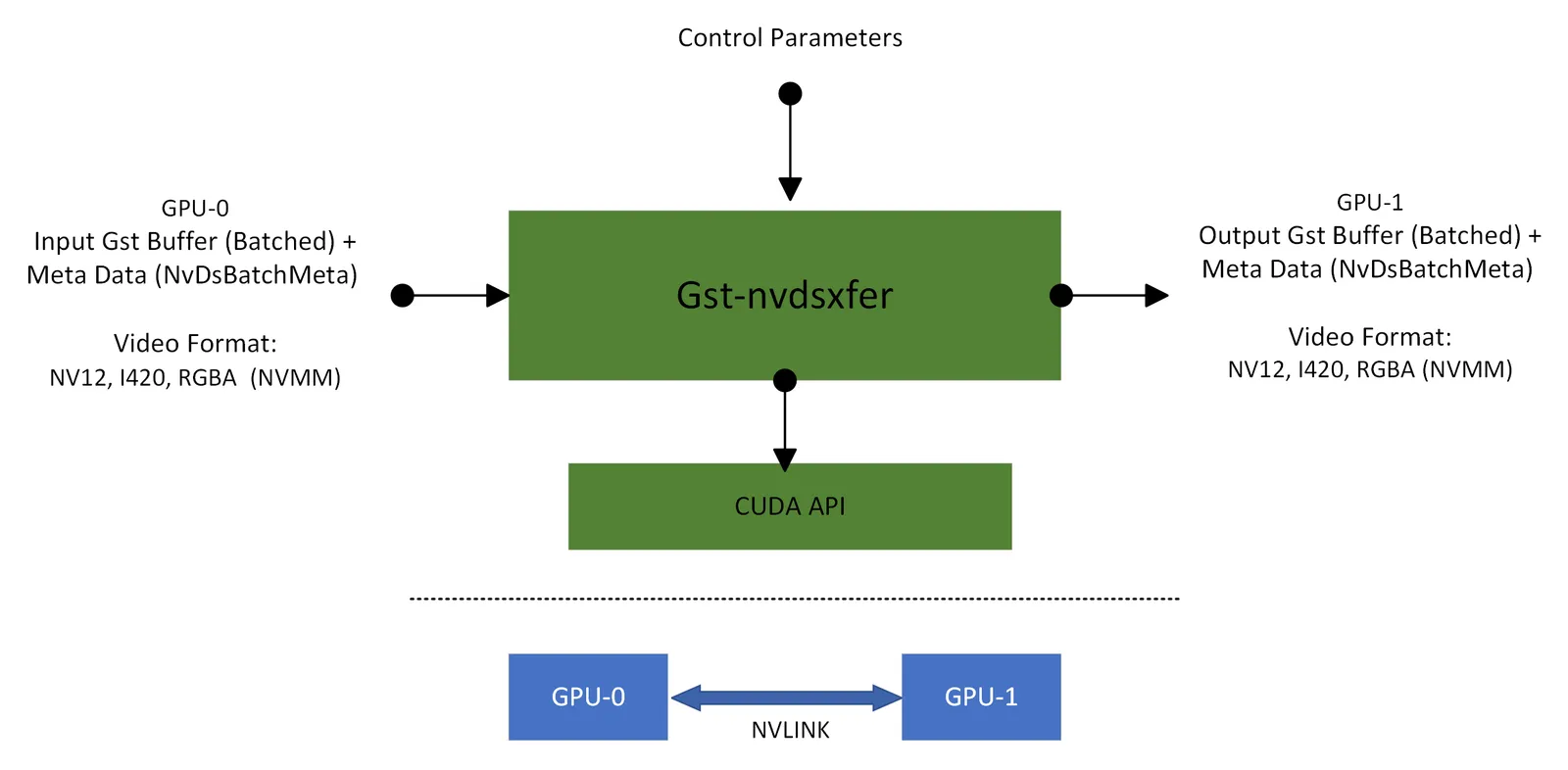
It uses CUDA APIs to utilize NVIDIA NVLINK technology for high-speed, direct GPU-to-GPU interconnect for optimized data transfer between discrete GPUs.
The plugin accepts CUDA memory based (NvBufSurface allocated) video Gst Buffers from upstream component. It transfer the input data to CUDA memory based (NvBufSurface allocated) video output Gst Buffer using the optimized NVLINK based data copy.
The Gst-nvdsxfer plugin is currently supports Single Node, Single Application with Multi-dGPU setup based use case pipelines. Video format conversion or scaling is not supported while doing data copy between two discrete GPUs. Multi-dGPUs are connected using NVLINK Bridge Connector. Users must confirm the NVLINK state (active/inactive - Use command “nvidia-smi nvlink -s” to check) between two discrete GPUs before using the nvdsxfer plugin in the gst-pipeline.
As shown in the diagram below input video data is copied to output over a NVLINK connected discrete GPUs.
Inputs and Outputs
This section summarizes the inputs, outputs of the Gst-nvdsxfer plugin.
-
Inputs
- Gst Buffer batched buffer
- NvDsBatchMeta
- Raw Video Format: NV12, I420, RGBA (NVMM)
-
Control parameters
- gpu-id
- p2p-gpu-id
- batch-size
- buffer-pool-size
- nvbuf-memory-type
-
Output
- Gst Buffer batched buffer
- NvDsBatchMeta
- Raw Video Format: NV12, I420, RGBA (NVMM)
Gst Properties
The following tables describes the Gst properties of the Gst-nvdsxfer plugin.
nvdsxfer plugin properties
How to test
a) nvdsxfer is currently supported for X86 only. support with “Jetson + dGPU” is not yet enabled.
b) Multi-dGPUs are connected using NVLINK Bridge Connector.
Use below command to confirm the NVLINK state (active/inactive) if ready to use.
c) nvdsxfer plugin currently verified using 2 separate dGPU (discrete GPUs) only.Below listed gst-launch-1.0 pipelines simulates some of the reference use cases pipelines using 2 separate dGPU (discrete GPUs).
d) Set property p2p_gpu_id=0 if Peer to Peer (P2P) access between discrete GPUs permitted.
e) If P2P access is not possible then pipeline will fail, remove p2p_gpu_id=0 property
to make it run without P2P access.
f) Below mentioned reference gst-launch-1.0 pipelines use legacy streammux by default.
New nvstreammux can also be used by enabling USE_NEW_NVSTREAMMUX=yes environment variable with appropriate properties set for new streammux plugin
gst-launch-1.0 pipelines mentioned in the Use cases section, are not optimal pipelines though can demonstrate nvdsxfer plugin usage for various use cases to achieve better performance and GPU utilization.
deepstream-multigpu-nvlink-test sample application can demonstrate nvdsxfer plugin based gstreamer pipeline.
Refer /opt/nvidia/deepstream/deepstream/sources/apps/sample_apps/deepstream-multigpu-nvlink-test/README for usage and application supported feature.
Use cases
Below reference gst-launch-1.0 commands uses h265 elementary stream as input. In order to use DeepStream SDK provided sample mp4 stream, use following command to convert from mp4 container file to h265 elementary stream.
Single Stream + Multi-dGPUs Setup
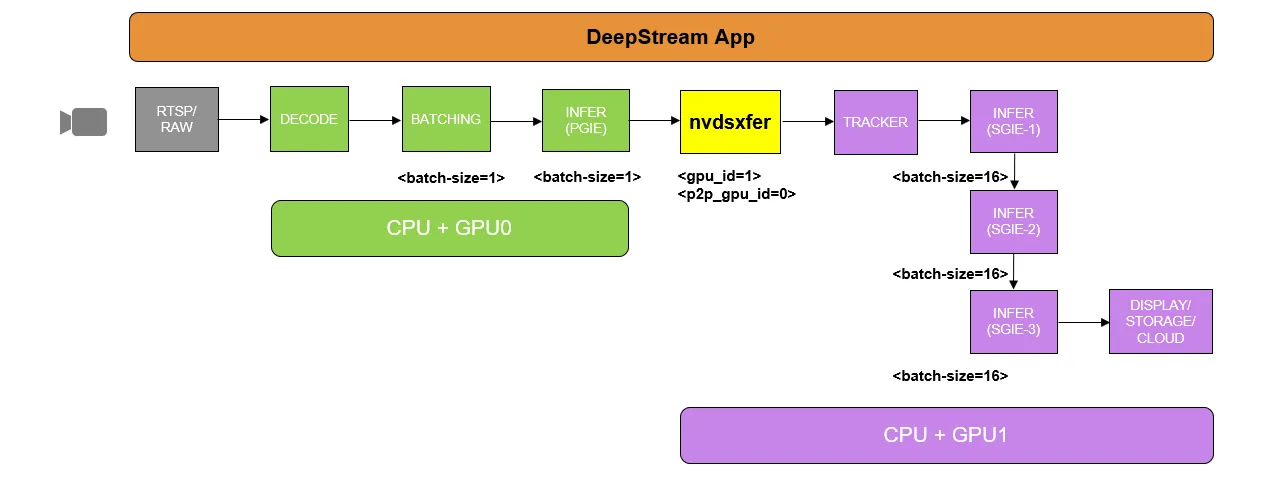
A) Running “Decode + StreamMux + PGIE” and “Tracker + SGIE (Multiple)” on separate dGPUs
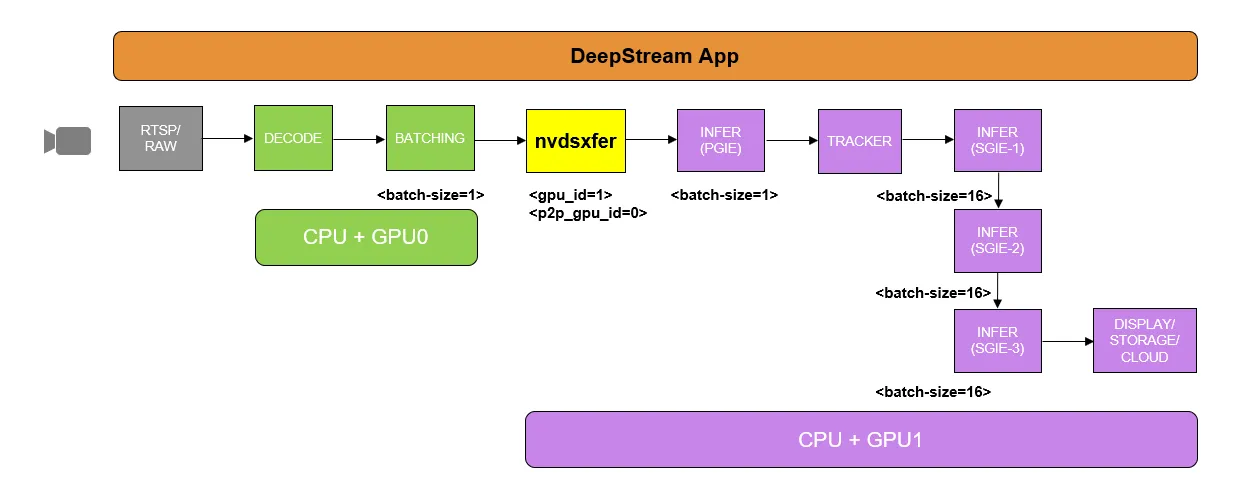
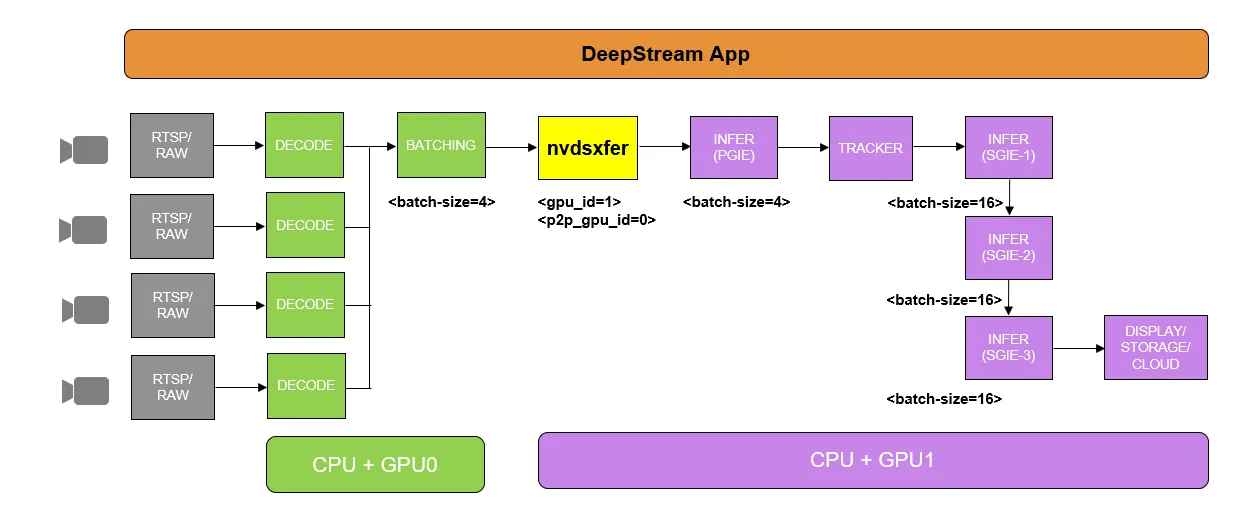
B) Running “Decode + StreamMux” and “PGIE + Tracker + SGIE (Multiple)” on separate dGPUs
Multiple Streams + Multi-dGPU Setup
A) Running “Multi-instance(4) decode + Streammux + PGIE” on single dGPU and ” tracker + SGIE - multiple models” on separate dGPU
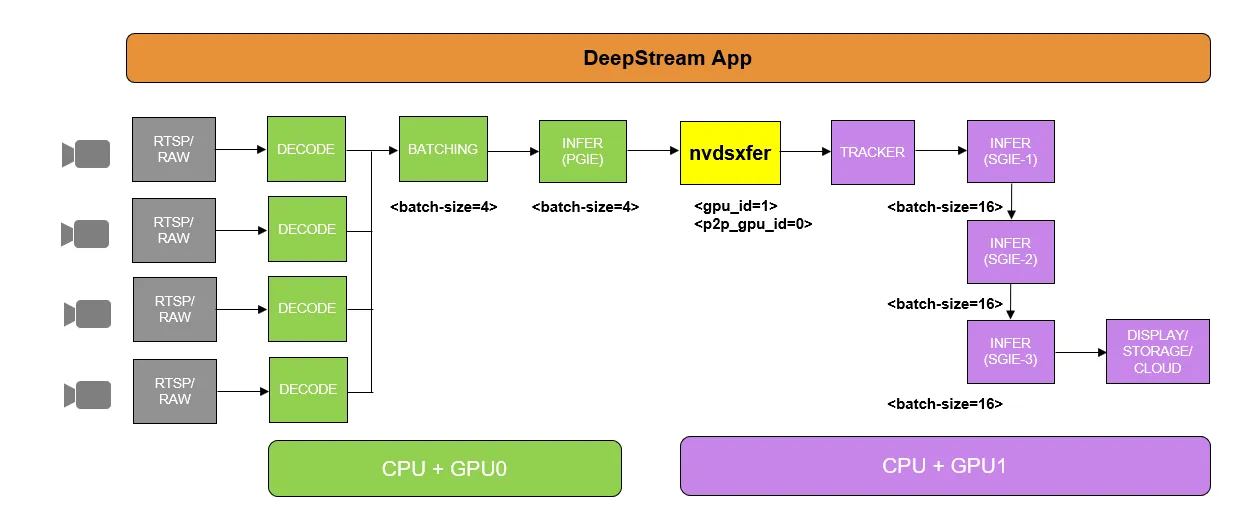
B) Running “Multi-instance(4) decode + StreamMux” on single-dGPU and “PGIE + Tracker + SGIE(Multiple)” on separate dGPU
C) Running “Multi-instance(8) decode” on multi-dGPU and “StreamMux + PGIE + Tracker + SGIE(Multiple)” on any one of the dGPU
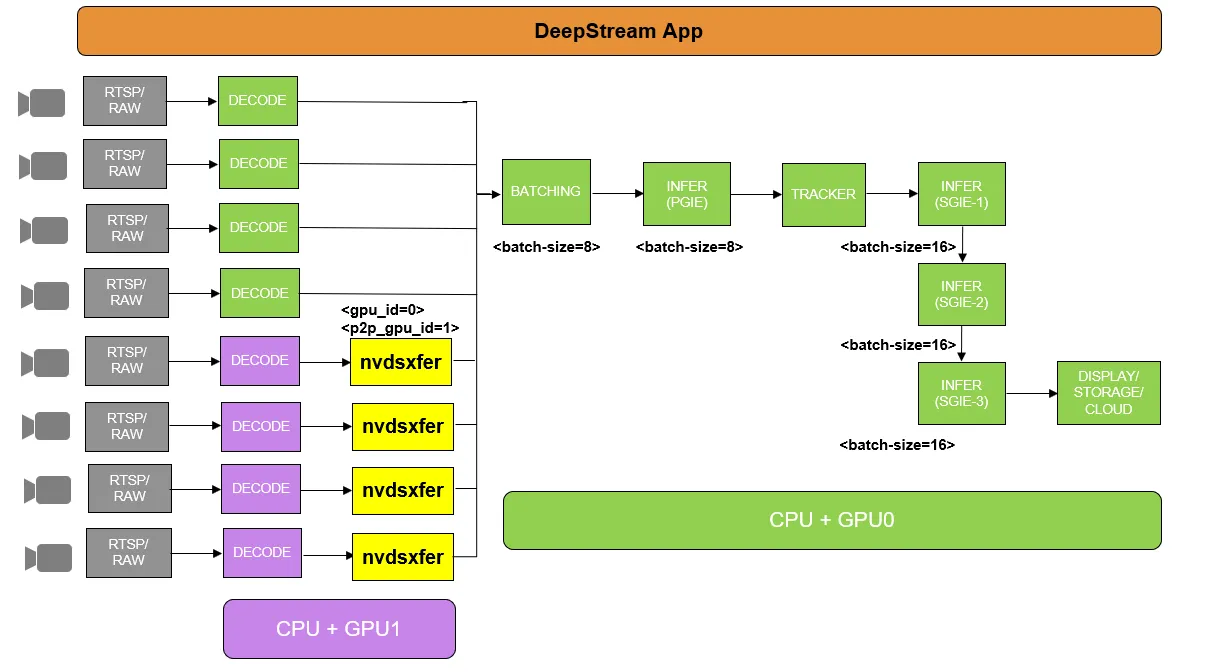
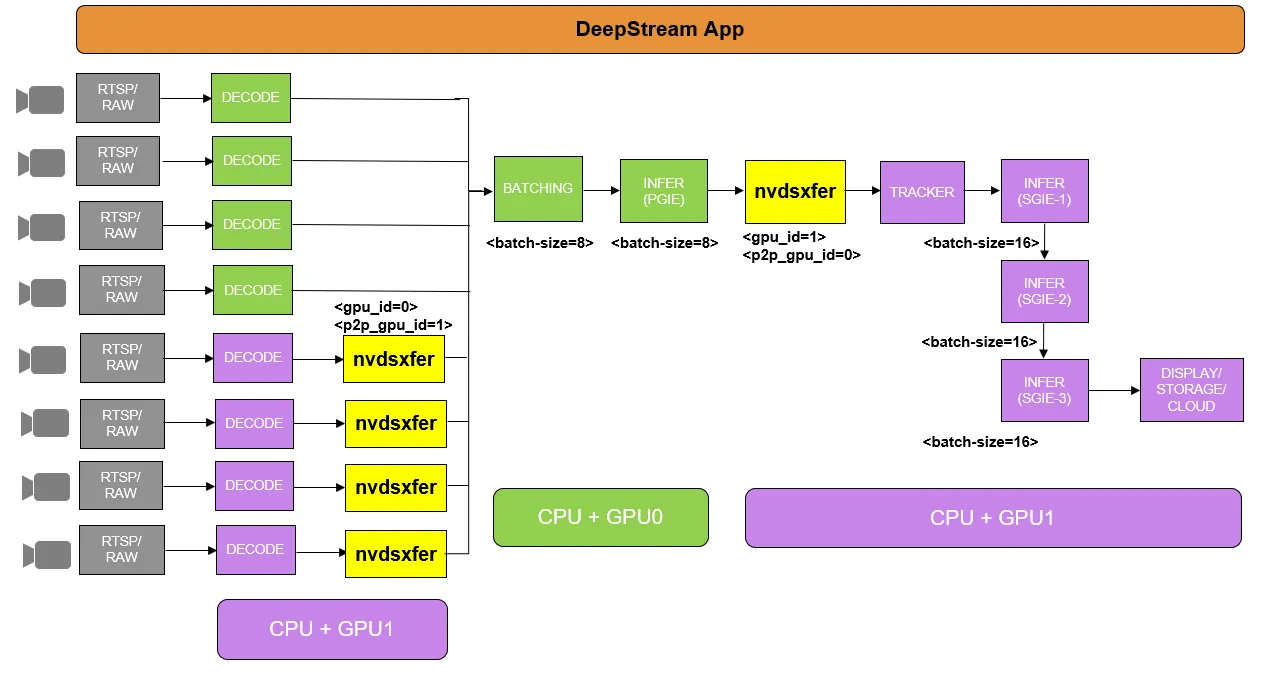
D) Running “Multi-instance(8) decode” on multi-dGPU, “StreamMux + PGIE” and “Tracker + SGIE(Multiple)” on separate dGPU