Skip to navigation

Gst-nvsegvisual

View as Markdown

The Gst-nvsegvisual plugin visualizes segmentation results. Segmentation is based on image recognition, except that the classifications occur at the pixel level as opposed to the image level as with image recognition. The segmentation output size is generally same as the input size. For more information, see the segmentation training reference at: https://github.com/qubvel/segmentation_models
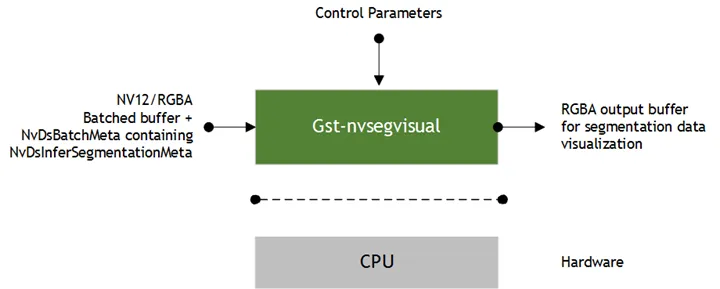
Gst-nvsegvisual

Inputs and Outputs

  • Inputs

    • GStreamer buffer containing NV12/RGBA frame(s)
    • NvDsInferSegmentationMeta containing class numbers, pixel class map, width, height, etc. generated by Gst-nvinfer.
    • gpu-id: selects the GPU ID
    • width, set according the segmentation output size
    • height, set according the segmentation output size
  • Output

This plugin allocates different colors for different classes. For example, the industrial model’s output has only one representing defective areas. Thus, defective areas and background have different colors. The semantic model outputs four classes with four different colors: car, pedestrian, bicycle, and background. This plugin shows the segmentation overlay on video output.

Features

The following table summarizes the features of the plugin.

Gst-nvsegvisual plugin features

FeatureDescriptionRelease
Configure GPU selectionSets the GPU ID to be used for segmentation visualization operations (valid only for dGPU platforms)DS 4.0
Configure widthSets width according to the segmentation output sizeDS 4.0
Configure heightSets height according to the segmentation output sizeDS 4.0

Gst Properties

The following table describes the Gst properties of the Gst-nvsegvisual plugin.

Gst-nvsegvisual plugin gst properties

PropertyMeaningType and RangeExample and Notes
gpu-idDevice ID of the GPU to be used for decodingInteger,
0 to 4,294,967,295
gpu-id=0
widthSegmentation output widthInteger,
0 to 4,294,967,295
width=512
heightSegmentation output heightInteger,
0 to 4,294,967,295
height=512
unique-idUnique ID for the element; can be used to identify the output of the elementInteger,
0 to 4,294,967,295
unique-id=15
batch-sizeMaximum batch size for inferenceInteger,
1 to 4,294,967,295
batch-size=4
operate-on-seg-meta-idVisualize segmentation on the seg-metadata with this unique ID; set to -1 to visualize on all metadataInteger,
-1 to 2,147,483,647
operate-on-seg-meta-id=-1
original-backgroundShows the original background instead of the masked background when setBooleanoriginal-background=0
class-idClass ID of the background; should be set if original-background is TRUEInteger,
0 to 4,294,967,295
class-id=0
alphaAlpha value for per-pixel blendingFloat,
0.0 to 1.0
alpha=1.0
gpu-onSwitches between device and host memoryBooleangpu-on=1