Skip to navigation

DeepStream Reference Application - deepstream-app

View as Markdown

Application Architecture

The image below shows the architecture of the NVIDIA® DeepStream reference application.
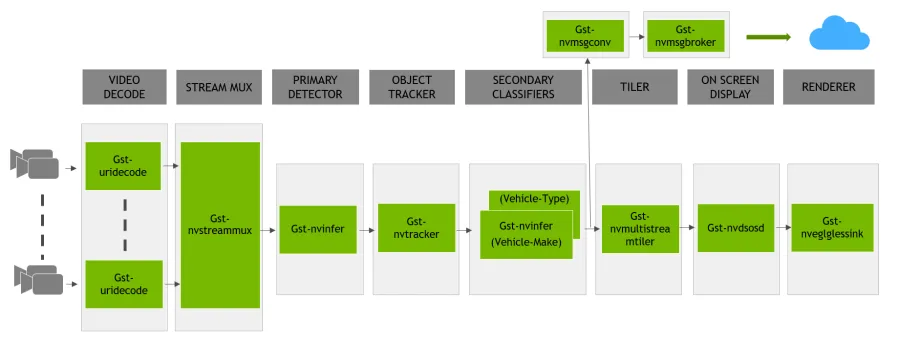
DeepStream Reference Application Architecture

  • The Stream Muxer plugin (Gst-nvstreammux) to form a batch of buffers from multiple input sources.
  • The Preprocess plugin (Gst-nvdspreprocess) for preprocessing on the pre-defined ROIs for primary inferencing.
  • The NVIDIA TensorRT™ based plugin (Gst-nvinfer) for primary and secondary (attribute classification of primary objects) detection and classification respectively.
  • The Multi-Object Tracker plugin (Gst-nvtracker) for object tracking with unique ID.
  • The Multi Stream Tiler plugin (Gst-nvmultistreamtiler) for forming 2D array of frames.
  • The Onscreen Display (OSD) plugin (Gst-nvdsosd) to draw shaded boxes, rectangles and text on the composited frame using the generated metadata.
  • The Message Converter (Gst-nvmsgconv) and Message Broker (Gst-nvmsgbroker) plugins in combination to send analytics data to a server in the Cloud.

Reference Application Configuration

The NVIDIA DeepStream SDK reference application uses one of the sample configuration files from the samples/configs/deepstream-app directory in the DeepStream package to:

  • Enable or disable components
  • Change the properties or behavior of components
  • Customize other application configuration settings that are unrelated to the pipeline and its components

The configuration file uses a key file format, based on the freedesktop specifications at: https://specifications.freedesktop.org/desktop-entry-spec/latest

Expected Output for the DeepStream Reference Application (deepstream-app)

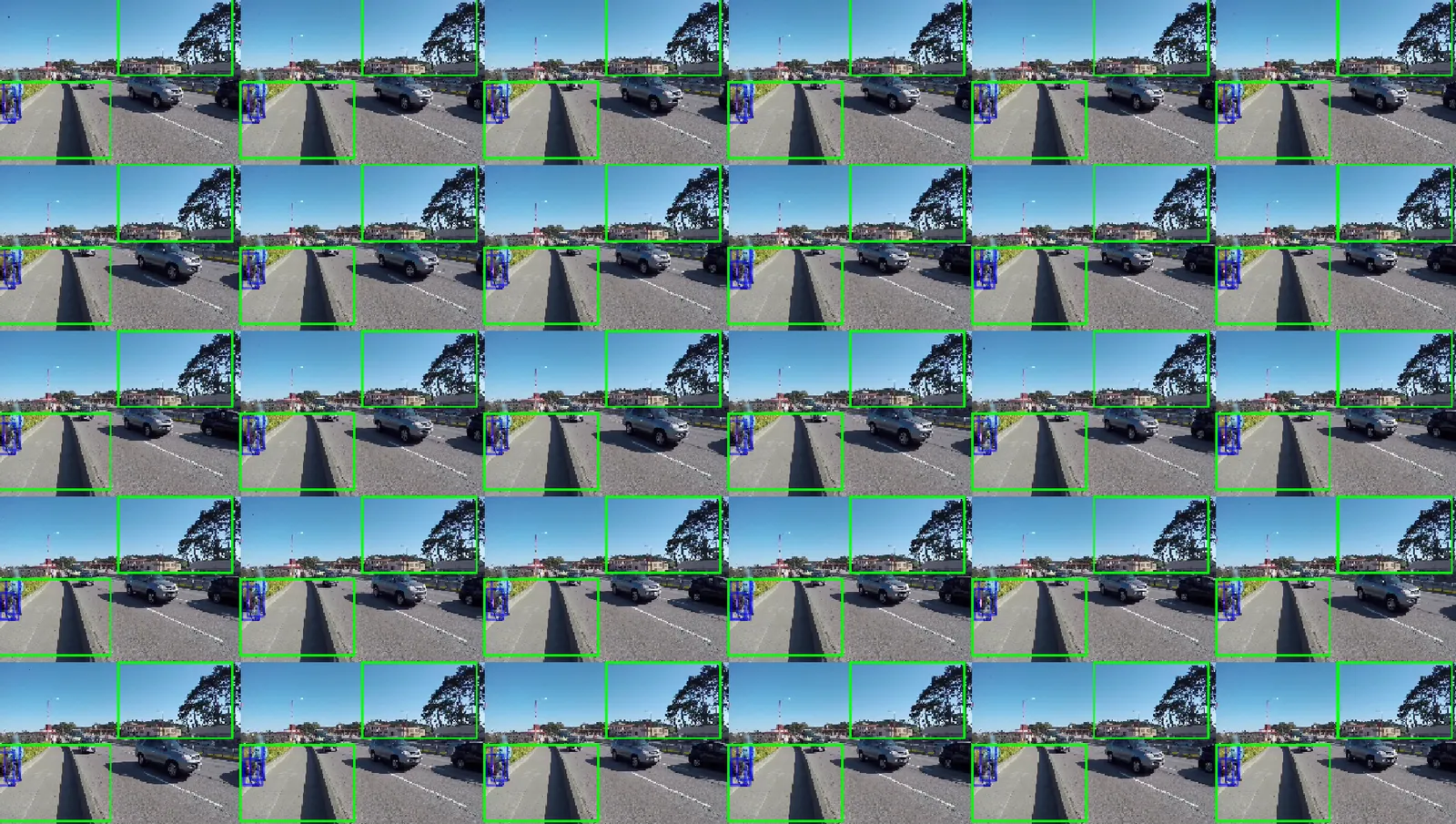
The image below shows the expected output with preprocess plugin disabled:
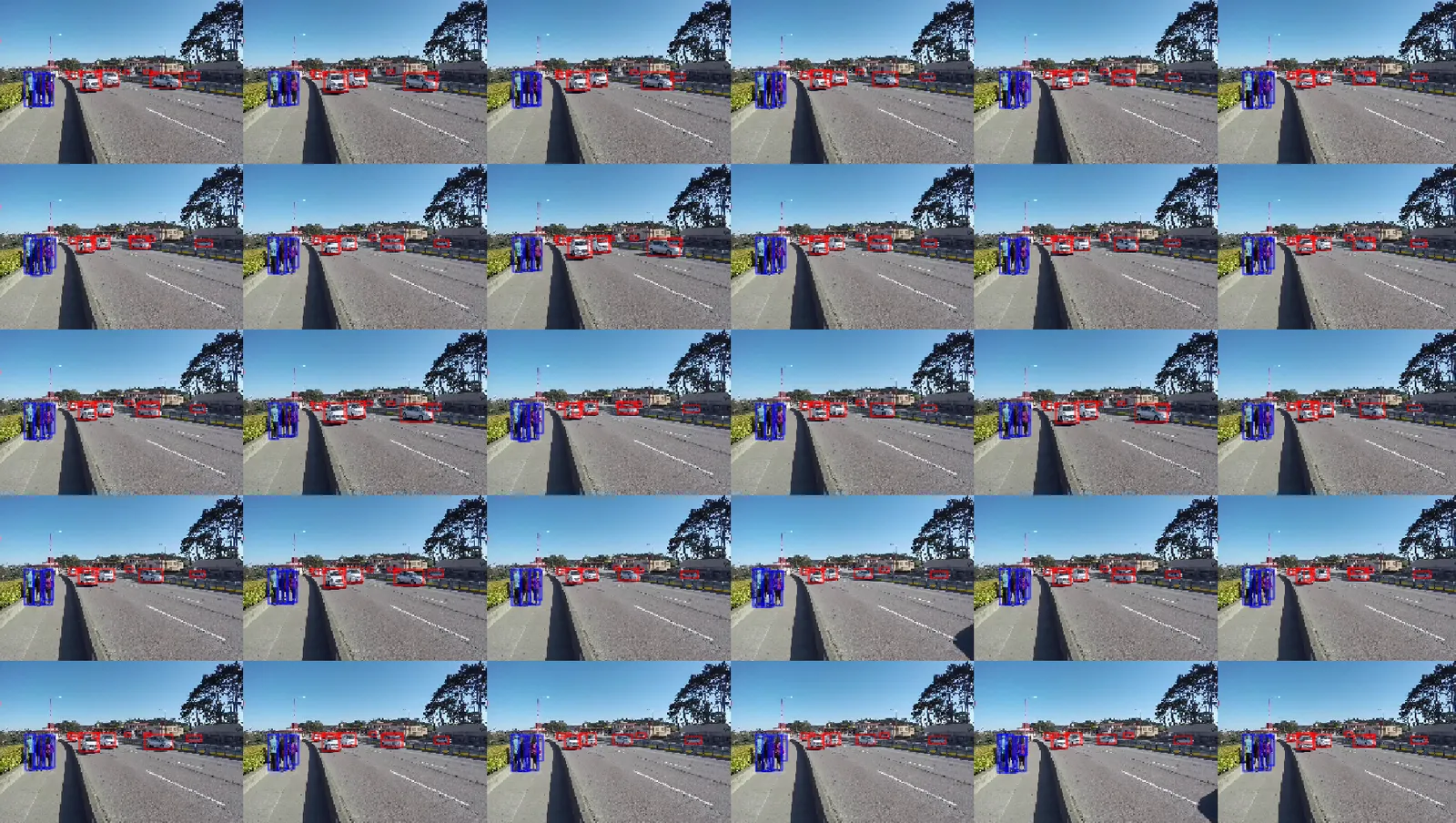
DeepStream Reference Application Architecture

DeepStream Reference Application Architecture with preprocess

Configuration Groups

The application configuration is divided into groups of configurations for each component and application-specific component. The configuration groups are:

Configuration Groups - deepstream app

GroupConfiguration Group
Application GroupApplication configurations that are not related to a specific component.
Tiled-display GroupTiled display in the application.
Source GroupSource properties. There can be multiple sources. The groups must be named as: [source0], [source1] …
Source-list and source-attr-all GroupsSource URI provided as a list. There can be multiple sources. The groups must be named as: [source-list] and [source-attr-all]
Streammux GroupSpecify properties and modify behavior of the streammux component.
Preprocess GroupSpecify properties and modify behavior of the preprocess component.
Primary GIE and Secondary GIE GroupSpecify properties and modify behavior of the primary GIE.
Specify properties and modify behavior of the secondary GIE. The groups must be named as: [secondary-gie0], [secondary-gie1] …
Tracker GroupSpecify properties and modify behavior of the object tracker.
Message Converter GroupSpecify properties and modify behavior of the message converter component.
Message Consumer GroupSpecify properties and modify behavior of message consumer components. The pipeline can contain multiple message consumer components. Groups must be named as [message-consumer0], [message-consumer1] …
OSD GroupSpecify properties and modify the on-screen display (OSD) component that overlays text and rectangles on the frame.
Sink GroupSpecify properties and modify behavior of sink components that represent outputs such as displays and files for rendering, encoding, and file saving. The pipeline can contain multiple sinks. Groups must be named as: [sink0], [sink1] …
Tests GroupDiagnostics and debugging. This group is experimental.
NvDs-analytics GroupSpecify nvdsanalytics plugin configuration file, and to add the plugin in the application

Application Group

The application group properties are:

Application group

KeyMeaningType and ValueExamplePlatforms
enable-perf-measurementIndicates whether the application performance measurement is enabled.Booleanenable-perf-measurement=1dGPU, Jetson
perf-measurement-interval-secThe interval, in seconds, at which the performance metrics are sampled and printed.Integer, >0perf-measurement-interval-sec=10dGPU, Jetson
gie-kitti-output-dirPathname of an existing directory where the application stores primary detector output in a modified KITTI metadata format.Stringgie-kitti-output-dir=/home/ubuntu/kitti_data/dGPU, Jetson
kitti-track-output-dirPathname of an existing directory where the application stores tracker output in a modified KITTI metadata format.Stringkitti-track-output-dir=/home/ubuntu/kitti_data_tracker/dGPU, Jetson
reid-track-output-dirPathname of an existing directory where the application stores tracker’s Re-ID feature output. Each line’s first integer is object idand the remaining floats are its feature vector.Stringreid-track-output-dir=/home/ubuntu/reid_data_tracker/, dGPU, Jetson
terminated-track-output-dirPathname of an existing directory where the application stores terminated tracker output in a modified KITTI metadata format.Stringkitti-track-output-dir=/home/ubuntu/terminated_data_tracker/dGPU, Jetson
shadow-track-output-dirPathname of an existing directory where the application stores shadow track state output in a modified KITTI metadata format.Stringshadow-track-output-dir=/home/ubuntu/shadow_data_tracker/dGPU, Jetson
global-gpu-idSet Global GPU ID for all the components at once if neededIntegerglobal-gpu-id=1dGPU, Jetson

Tiled-display Group

The tiled-display group properties are:

Tiled display group

KeyMeaningType and ValueExamplePlatforms
enableIndicates whether tiled display is enabled.
When user sets enable=2, first [sink] group with the key: link-to-demux=1 shall be linked to demuxer’s src_[source_id] pad where source_id is the key set in the corresponding [sink] group.
Integer,
0 = disabled,
1 = tiler-enabled
2 = tiler-and-parallel-demux-to-sink-enabled
enable=1dGPU, Jetson
rowsNumber of rows in the tiled 2D array.Integer, >0rows=5dGPU, Jetson
columnsNumber of columns in the tiled 2D array.Integer, >0columns=6dGPU, Jetson
widthWidth of the tiled 2D array, in pixels.Integer, >0width=1280dGPU, Jetson
heightHeight of the tiled 2D array, in pixels.Integer, >0height=720dGPU, Jetson
gpu-idGPU to be used by the element in case of multiple GPUs.Integer, ≥0gpu-id=0dGPU
nvbuf-memory-typeType of memory the element is to allocate for output buffers.
0 (nvbuf-mem-default): a platform-specific default type
1 (nvbuf-mem-cuda-pinned): pinned/host CUDA memory
2 (nvbuf-mem-cuda-device): device CUDA memory
3 (nvbuf-mem-cuda-unified): unified CUDA memory
For dGPU: All values are valid.
For Jetson: Only 0 (zero) is valid.
Integer, 0, 1, 2, or 3nvbuf-memory-type=3dGPU, Jetson
compute-hwCompute Scaling HW to use. Applicable only for Jetson. dGPU systems uses GPU by default.
0 (Default): Default, GPU for Tesla, VIC for Jetson
1 (GPU): GPU
2 (VIC): VIC
Integer: 0-2compute-hw=1Jetson
square-seq-gridEnable automatic square tiling according to number of sources. The tiles are placed sequentially on the grid with empty tiles at the endBooleansquare-seq-grid=1dGPU, Jetson

Source Group

The source group specifies the source properties. The DeepStream application supports multiple simultaneous sources. For each source, a separate group with the group names such as source%d must be added to the configuration file. For example:

[source0]
key1=value1
key2=value2
...
[source1]
key1=value1
key2=value2
...

The source group properties are:

Source group

KeyMeaningType and ValueExamplePlatforms
enableEnables or disables the source.Booleanenable=1dGPU, Jetson
typeType of source; other properties of the source depend on this type.
1: Camera (V4L2)
2: URI
3: MultiURI
4: RTSP
5: Camera (CSI) (Jetson only)
Integer,
1, 2, 3, 4, or 5
type=1dGPU, Jetson
uriURI to the encoded stream. The URI can be a file, an HTTP URI, or an RTSP live source. Valid when type=2 or 3. With MultiURI, the %d format specifier can also be used to specify multiple sources. The application iterates from 0 to num-sources−1 to generate the actual URIs.Stringuri=file:///home/ubuntu/source.mp4
uri=http://127.0.0.1/source.mp4
uri=rtsp://127.0.0.1/source1
uri=file:///home/ubuntu/source_%d.mp4
dGPU, Jetson
num-sourcesNumber of sources. Valid only when type=3.Integer, ≥0num-sources=2dGPU, Jetson
intra-decode-enableEnables or disables intra-only decode.Booleanintra-decode-enable=1dGPU, Jetson
num-extra-surfacesNumber of surfaces in addition to minimum decode surfaces given by the decoder. Can be used to manage the number of decoder output buffers in the pipeline.Integer,
≥0 and ≤24
num-extra-surfaces=5dGPU, Jetson
gpu-idGPU to be used by the element in case of multiple GPUs.Integer, ≥0gpu-id=1dGPU
camera-idUnique ID for the input source to be added to metadata. (Optional)Integer, ≥0camera-id=2dGPU, Jetson
camera-widthWidth of frames to be requested from the camera, in pixels. Valid when type=1 or 5.Integer, >0camera-width=1920dGPU, Jetson
camera-heightHeight of frames to be requested from the camera, in pixels. Valid when type=1 or 5.Integer, >0camera-height=1080dGPU, Jetson
camera-fps-nNumerator part of a fraction specifying the frame rate requested by the camera, in frames/sec. Valid when type=1 or 5.Integer, >0camera-fps-n=30dGPU, Jetson
camera-fps-dDenominator part of a fraction specifying the frame rate requested from the camera, in frames/sec. Valid when type=1 or 5.Integer, >0camera-fps-d=1dGPU, Jetson
camera-v4l2-dev-nodeNumber of the V4L2 device node. For example, /dev/video<num> for the open source V4L2 camera capture path. Valid when the type setting (type of source) is 1.Integer, >0camera-v4l2-dev-node=1dGPU, Jetson
latencyJitterbuffer size in milliseconds; applicable only for RTSP streams.Integer, ≥0latency=200dGPU, Jetson
camera-csi-sensor-idSensor ID of the camera module. Valid when the type (type of source) is 5.Integer, ≥0camera-csi-sensor-id=1Jetson
drop-frame-intervalInterval to drop frames. For example, 5 means decoder outputs every fifth frame; 0 means no frames are dropped.Integer,drop-frame-interval=5dGPU, Jetson
cudadec-memtypeType of CUDA memory element used to allocate for output buffers for source of type 2,3 or 4. Not applicable for CSI or USB camera source
0 (memtype_device): Device memory allocated with cudaMalloc().
1 (memtype_pinned): host/pinned memory allocated with cudaMallocHost().
2 (memtype_unified): Unified memory allocated with cudaMallocManaged().
Integer,
0, 1, or 2
cudadec-memtype=1dGPU
nvbuf-memory-typeType of CUDA memory the element is to allocate for output buffers of nvvideoconvert, useful for source of type 1.
0 (nvbuf-mem-default, a platform-specific default
1 (nvbuf-mem-cuda-pinned): pinned/host CUDA memory.
2 (nvbuf-mem-cuda-device): Device CUDA memory.
3 (nvbuf-mem-cuda-unified): Unified CUDA memory.
For dGPU: All values are valid.
For Jetson: Only 0 (zero) is valid.
Integer,
0, 1, 2, or 3
nvbuf-memory-type=3dGPU,Jetson
select-rtp-protocolTransport Protocol to use for RTP. Valid when type (type of source) is 4.
0: UDP + UDP Multicast + TCP
4: TCP only
Integer,
0 or 4
select-rtp-protocol=4dGPU, Jetson
rtsp-reconnect-interval-secTimeout in seconds to wait since last data was received from an RTSP source before forcing a reconnection. Setting it to 0 will disable the reconnection. Valid when type (type of source) is 4.Integer, ≥0rtsp-reconnect-interval-sec=60dGPU, Jetson
rtsp-reconnect-attemptsMaximum number of times a reconnection is attempted. Setting it to -1 means reconnection will be attempted infinitely. Valid when type of source is 4 and rtsp-reconnect-interval-sec is a non-zero positive value.Integer, ≥-1rtsp-reconnect-attempts=2
smart-recordWays to trigger the smart record.
0: Disable
1: Only through cloud messages
2: Cloud message + Local events
Integer,
0, 1 or 2
smart-record=1dGPU, Jetson
smart-rec-dir-pathPath of directory to save the recorded file. By default, the current directory is used.Stringsmart-rec-dir-path=/home/nvidia/dGPU, Jetson
smart-rec-file-prefixPrefix of file name for recorded video. By default, Smart_Record is the prefix. For unique file names every source must be provided with a unique prefix.Stringsmart-rec-file-prefix=Cam1dGPU, Jetson
smart-rec-cacheSize of smart record cache in seconds.Integer, ≥0smart-rec-cache=20dGPU, Jetson
smart-rec-containerContainer format of recorded video. MP4 and MKV containers are supported.Integer,
0 or 1
smart-rec-container=0dGPU, Jetson
smart-rec-start-timeNumber of seconds earlier from now to start the recording.
E.g. if t0 is the current time and N is the start time in seconds that means recording will start from t0 – N. Obviously for it to work the video cache size must be greater than the N.
Integer, ≥0smart-rec-start-time=5dGPU, Jetson
smart-rec-default-durationIn case a Stop event is not generated. This parameter will ensure the recording is stopped after a predefined default duration.Integer, ≥0smart-rec-default-duration=20dGPU, Jetson
smart-rec-durationDuration of recording in seconds.Integer, ≥0smart-rec-duration=15dGPU, Jetson
smart-rec-intervalThis is the time interval in seconds for SR start / stop events generation.Integer, ≥0smart-rec-interval=10dGPU, Jetson
udp-buffer-sizeUDP buffer size in bytes for RTSP sources.Integer, ≥0udp-buffer-size=2000000dGPU, Jetson
video-formatOutput video format for the source. This value is set as the output format of the nvvideoconvert element for the source.String: NV12, I420, P010_10LE, BGRx, RGBAvideo-format=RGBAdGPU, Jetson

Source-list and source-attr-all Groups

The source-list group allows users to provide an initial list of source URI to start streaming with. This group along with [source-attr-all] can replace the need for separate [source] groups for each stream.

Also, DeepStream support (Alpha feature) dynamic sensor provisioning via REST API. For more details on this feature, please refer to the sample configuration file and deepstream reference application run command here.

For example:

[source-list]
num-source-bins=2
list=file:///opt/nvidia/deepstream/deepstream/samples/streams/sample_1080p_h264.mp4;file:///opt/nvidia/deepstream/deepstream/samples/streams/sample_1080p_h265.mp4
sgie-batch-size=8
...
[source-attr-all]
enable=1
type=3
num-sources=1
gpu-id=0
cudadec-memtype=0
latency=100
rtsp-reconnect-interval-sec=0
...

Note: [source-list] now support REST Server with use-nvmultiurisrcbin=1

For example:

[source-list]
num-source-bins=2
list=file:///opt/nvidia/deepstream/deepstream/samples/streams/sample_1080p_h264.mp4;file:///opt/nvidia/deepstream/deepstream/samples/streams/sample_1080p_h265.mp4
use-nvmultiurisrcbin=1
#sensor-id-list vector is one to one mapped with the uri-list
#identifies each sensor by a unique ID
sensor-id-list=UniqueSensorId1;UniqueSensorId2
#Optional sensor-name-list vector is one to one mapped with the uri-list
sensor-name-list=UniqueSensorName1;UniqueSensorName2
max-batch-size=10
http-ip=localhost
http-port=9000
#sgie batch size is number of sources * fair fraction of number of objects detected per frame per source
#the fair fraction of number of object detected is assumed to be 4
sgie-batch-size=40
[source-attr-all]
enable=1
type=3
num-sources=1
gpu-id=0
cudadec-memtype=0
latency=100
rtsp-reconnect-interval-sec=0

The [source-list] group properties are:

Source List group

KeyMeaningType and ValueExamplePlatforms
enableEnables or disables the source.Booleanenable=1dGPU, Jetson
num-source-binsThe total number of source URI’s provided with the key listIntegernum-source-bins=2dGPU, Jetson
sgie-batch-sizesgie batch size is number of sources * fair fraction of number of objects detected per frame per source
the fair fraction of number of object detected is assumed to be 4
Integersgie-batch-size=8dGPU, Jetson
listThe list of URI’s separated by semi-colon ’;‘Stringlist=rtsp://ip-address:port/stream1;rtsp://ip-address:port/stream2dGPU, Jetson
sensor-id-list(Alpha Feature) Applicable only when use-nvmultiurisrcbin=1. The list of unique Identifiers identifying each stream separated by semi-colon ’;‘Stringsensor-id-list=UniqueSensorId1;UniqueSensorId2dGPU
sensor-name-list(Alpha Feature) Applicable only when use-nvmultiurisrcbin=1. The Optional list of sensor names identifying each stream separated by semi-colon ’;‘Stringsensor-name-list=SensorName1;SensorName2dGPU
use-nvmultiurisrcbin(Alpha Feature) Boolean if set enable the use of nvmultiurisrcbin with REST API support for dynamic sensor provisioningBooleanuse-nvmultiurisrcbin=0(default)dGPU
max-batch-size(Alpha Feature) Applicable only when use-nvmultiurisrcbin=1. Sets the maximum number of sensors that can be streamed using this instance of DeepStreamIntegermax-batch-size=10dGPU
http-ip(Alpha Feature) Applicable only when use-nvmultiurisrcbin=1. The HTTP Endpoint IP address to useStringhttp-ip=localhost (default)dGPU
http-port(Alpha Feature) Applicable only when use-nvmultiurisrcbin=1. The HTTP Endpoint port number to use. Note: User may pass empty string to disable REST API serverStringhttp-ip=9001 (default)dGPU

The [source-attr-all] group support all properties except uri from the Source Group. A sample config file can be found at /opt/nvidia/deepstream/deepstream/sources/apps/sample_apps/deepstream-test5/configs/test5_config_file_nvmultiurisrcbin_src_list_attr_all.txt.

Streammux Group

The [streammux] group specifies and modifies properties of the Gst-nvstreammux plugin.

Streammux group

KeyMeaningType and ValueExamplePlatforms
gpu-idGPU element is to use in case of multiple GPUs.Integer, ≥0gpu-id=1dGPU
live-sourceInforms the muxer that sources are live.Booleanlive-source=0dGPU, Jetson
buffer-pool-sizeNumber of buffers in Muxer output buffer pool.Integer, >0buffer-pool-size=4dGPU, Jetson
batch-sizeMuxer batch size.Integer, >0batch-size=4dGPU, Jetson
batched-push-timeoutTimeout in microseconds after to push the batch after the first buffer is available, even if the complete batch is not formed.Integer, ≥−1batched-push-timeout=40000dGPU, Jetson
widthMuxer output width in pixels.Integer, >0width=1280dGPU, Jetson
heightMuxer output height in pixels.Integer, >0height=720dGPU, Jetson
enable-paddingIndicates whether to maintain source aspect ratio when scaling by adding black bands.Booleanenable-padding=0dGPU, Jetson
nvbuf-memory-typeType of CUDA memory the element is to allocate for output buffers.
0 (nvbuf-mem-default, a platform-specific default
1 (nvbuf-mem-cuda-pinned): pinned/host CUDA memory.
2 (nvbuf-mem-cuda-device): Device CUDA memory.
3 (nvbuf-mem-cuda-unified): Unified CUDA memory.
For dGPU: All values are valid.
For Jetson: Only 0 (zero) is valid.
Integer,
0, 1, 2, or 3
nvbuf-memory-type=3dGPU
attach-sys-ts-as-ntpFor live sources, the muxed buffer shall have associated NvDsFrameMeta->ntp_timestamp set to system time or the server’s NTP time when streaming RTSP.
If set to 1, system timestamp will be attached as ntp timestamp.
If set to 0, ntp timestamp from rtspsrc, if available, will be attached.
Booleanattach-sys-ts-as-ntp=0dGPU, Jetson
config-file-pathThis key is valid only for the new streammux. Please refer the plugin manual section “New Gst-nvstreammux” for more information.
Absolute or relative (to DS config-file location) path of mux configuration file.
Stringconfig-file-path=config_mux_source30.txtdGPU, Jetson
sync-inputsTime synchronize input frames before batching them.Booleansync-inputs=0 (default)dGPU, Jetson
max-latencyAdditional latency in live mode to allow upstream to take longer to produce buffers for the current position (in nanoseconds).Integer, ≥0max-latency=0 (default)dGPU, Jetson
drop-pipeline-eosBoolean property to control EOS propagation downstream from nvstreammux when all the sink pads are at EOS. (Experimental)Booleandrop-pipeline-eos=0(default)dGPU/Jetson

Preprocess Group

The [pre-process] group is for adding nvdspreprocess plugin in the pipeline. Supports preprocessing for only Primary GIE.

Preprocess group

KeyMeaningType and ValueExamplePlatforms
enableEnables or disables the plugin.Booleanenable=1dGPU, Jetson
config-fileConfiguration file path for nvdspreprocess pluginStringconfig-file=config_preprocess.txtdGPU, Jetson

Primary GIE and Secondary GIE Group

The DeepStream application supports multiple secondary GIEs. For each secondary GIE, a separate group with the name secondary-gie%d must be added to the configuration file. For example:

[primary-gie]
key1=value1
key2=value2
...
[secondary-gie1]
key1=value1
key2=value2
...

The primary and secondary GIE configurations are as follows. For each configuration, the Valid for column indicates whether the configuration property is valid for the primary or secondary TensorRT model, or for both models.

Primary and Secondary GIE group*

KeyMeaningType and ValueExamplePlatforms/ GIEs*
enableIndicates whether the primary GIE must be enabled.Booleanenable=1dGPU, Jetson
Both GIEs
gie-unique-idUnique component ID to be assigned to the nvinfer instance. Used to identify metadata generated by the instance.Integer, >0gie-unique-id=2Both
gpu-idGPU to be used by the element in case of multiple GPUs.Integer, ≥0gpu-id=1dGPU, Both GIEs
model-engine-fileAbsolute pathname of the pre-generated serialized engine file for the mode.Stringmodel-engine-file=../../models/Primary_Detector/resnet18_trafficcamnet_pruned.onnx_b4_gpu0.engineBoth GIEs
nvbuf-memory-typeType of CUDA memory element is to allocate for output buffers.
0 (nvbuf-mem-default): a platform-specific default
1 (nvbuf-mem-cuda-pinned): pinned/host CUDA memory
2 (nvbuf-mem-cuda-device): Device CUDA memory
3 (nvbuf-mem-cuda-unified): Unified CUDA memory
For dGPU: All values are valid.
For Jetson: Only 0 (zero) is valid.
Integer,
0, 1, 2, or 3
nvbuf-memory-type=3dGPU, Jetson
Primary GIE
config-filePathname of a configuration file which specifies properties for the Gst-nvinfer plugin. It may contain any of the properties described in this table except config-file itself. Properties must be defined in a group named [property].
For more details about parameters see “Gst-nvinfer File Configuration Specifications” in the DeepStream 4.0 Plugin Manual.
Stringconfig-file=¬/home/-ubuntu/-config_infer_resnet.txt
For complete examples, see the sample file samples/¬configs/-deepstream-app/-config_infer_resnet.txt or the deepstream-test2 sample application.
dGPU, Jetson
Both GIEs
batch-sizeThe number of frames(P.GIE)/objects(S.GIE) to be inferred together in a batch.Integer, >0 Integer, >0batch-size=2dGPU, Jetson
Both GIEs
intervalNumber of consecutive batches to skip for inference.Integer, >0 Integer, >0interval=2dGPU, Jetson
Primary GIE
bbox-border-colorThe color of the borders for the objects of a specific class ID, specified in RGBA format. The key must be of format bbox-border-color<class-id>. This property can be identified multiple times for multiple class IDs. If this property is not identified for the class ID, the borders are not drawn for objects of that class-id.R:G:B:A Float,
0≤R,G,B,A≤1
bbox-border-color2=
1;0;0;1
(Red for class-id 2)
dGPU, Jetson
Both GIEs
bbox-bg-colorThe color of the boxes drawn over objects of a specific class ID, in RGBA format. The key must be of format bbox-bg-color<class-id>. This property can be used multiple times for multiple class IDs. If it is not used for a class ID, the boxes are not drawn for objects of that class ID.R:G:B:A Float,
0≤R,G,B,A≤1
bbox-bg-color3=-0;1;0;0.3
(Semi-transparent green for class-id 3)
dGPU, Jetson
Both GIEs
operate-on-gie-idA unique ID of the GIE, on whose metadata (NvDsFrameMeta) this GIE is to operate.Integer, >0operate-on-gie-id=1dGPU, Jetson Secondary GIE
operate-on-class-idsClass IDs of the parent GIE on which this GIE must operate. The parent GIE is specified using operate-on-gie-id.Semicolon separated integer arrayoperate-on-class-ids=1;2
(operate on objects with class IDs 1, 2 generated by parent GIE)
dGPU, Jetson
Secondary GIE
infer-raw-output-dirPathname of an existing directory in which to dump the raw inference buffer contents in a file.Stringinfer-raw-output-dir=/home/ubuntu/infer_raw_outdGPU, Jetson
Both GIEs
labelfile-pathPathname of the labelfile.Stringlabelfile-path=../../models/Primary_Detector/labels.txtdGPU, Jetson
Both GIEs
plugin-typePlugin to use for inference.
0: nvinfer (TensorRT)
1: nvinferserver (Triton inference server)
Integer,
0 or 1
plugin-type=1dGPU, Jetson
Both GIEs
input-tensor-metaUse preprocessed input tensors attached as metadata by nvdspreprocess plugin instead of preprocessing inside the nvinfer.Integer, 0 or 1input-tensor-meta=1dGPU, Jetson, Primary GIE

* The GIEs are the GPU Inference Engines.

Tracker Group

The tracker group properties include the following, and more details can be found in Gst Properties:

Tracker group

KeyMeaningType and ValueExamplePlatforms
enableEnables or disables the tracker.Booleanenable=1dGPU, Jetson
tracker-widthFrame width at which the tracker will operate, in pixels. (To be a multiple of 32 when tracker config visualTrackerType: 1 or reidType is non-zero with useVPICropScaler: 0)Integer, ≥0tracker-width=960dGPU, Jetson
tracker-heightFrame height at which the tracker will operate, in pixels. (To be a multiple of 32 when tracker config visualTrackerType: 1 or reidType is non-zero with useVPICropScaler: 0)Integer, ≥0tracker-height=544dGPU, Jetson
gpu-idGPU to be used by the element in case of multiple GPUs.Integer, ≥0gpu-id=1dGPU
ll-config-fileConfiguration file for the low-level library if needed.
A list of configuration files can be specified when the property sub-batches is configured.
Stringll-config-file=iou_config.txtdGPU, Jetson
ll-lib-filePathname for the low-level tracker implementation library.Stringll-lib-file=/usr/-local/deepstream/libnvds_mot_iou.sodGPU, Jetson
tracking-surface-typeSet surface stream type for tracking. (default value is 0)Integer, ≥0tracking-surface-type=0dGPU, Jetson
display-tracking-idEnables tracking id display.Booleandisplay-tracking-id=1dGPU, Jetson
tracking-id-reset-modeAllow force-reset of tracking ID based on pipeline event. Once tracking ID reset is enabled and such event happens, the lower 32-bit of the tracking ID will be reset to 0
0: Not reset tracking ID when stream reset or EOS event happens
1: Terminate all existing trackers and assign new IDs for a stream when the stream reset happens (i.e., GST_NVEVENT_STREAM_RESET)
2: Let tracking ID start from 0 after receiving EOS event (i.e., GST_NVEVENT_STREAM_EOS) (Note: Only the lower 32-bit of tracking ID to start from 0)
3: Enable both option 1 and 2
Integer, 0 to 3tracking-id-reset-mode=0dGPU, Jetson
input-tensor-metaUse the tensor-meta from Gst-nvdspreprocess if available for tensor-meta-gie-idBooleaninput-tensor-meta=1dGPU, Jetson
tensor-meta-gie-idTensor Meta GIE ID to be used, property valid only if input-tensor-meta is TRUEUnsigned Integer, ≥0tensor-meta-gie-id=5dGPU, Jetson
sub-batches (Alpha feature)Configures splitting of a batch of frames in sub-batchesSemicolon delimited integer array.
Must include all values from 0 to (batch-size -1) where batch-size is configured in [streammux].
sub-batches=0,1;2,3
In this example, a batch size of 4 is split into two sub-batches where the first sub-batch consists of source ids 0 & 1 and second sub-batch consists of source ids 2 & 3
dGPU, Jetson
sub-batch-err-recovery-trial-cnt (Alpha feature)Configure the number of times the plugin can try to recover when the low level tracker in a sub-batch returns with a fatal error.
To recover from the error, the plugin reinitializes the low level tracker library.
Integer,≥-1 where,
-1 corresponds to infinite trials
sub-batch-err-recovery-trial-cnt=3dGPU, Jetson
user-meta-pool-sizeThe size of tracker miscellaneous data buffer poolUnsigned Integer, >0user-meta-pool-size=32dGPU, Jetson

Message Converter Group

Message converter group properties are:

Message converter group

KeyMeaningType and ValueExamplePlatforms
enableEnables or disables the message converter.Booleanenable=1dGPU, Jetson
msg-conv-configPathname of the configuration file for the Gst-nvmsgconv element.Stringmsg-conv-config=dstest5_msgconv_sample_config.txtdGPU, Jetson
msg-conv-payload-typeType of payload.
0, PAYLOAD_DEEPSTREAM: Deepstream schema payload.
1, PAYLOAD_DEEPSTREAM_MINIMAL: Deepstream schema payload minimal.
256, PAYLOAD_RESERVED: Reserved type.
257, PAYLOAD_CUSTOM: Custom schema payload.
Integer
0, 1, 256, or 257
msg-conv-payload-type=0dGPU, Jetson
msg-conv-msg2p-libAbsolute pathname of an optional custom payload generation library. This library implements the API defined by sources/libs/nvmsgconv/nvmsgconv.h.Stringmsg-conv-msg2p-lib=/opt/nvidia/deepstream/deepstream-4.0/lib/libnvds_msgconv.sodGPU, Jetson
msg-conv-comp-idcomp-id Gst property of the gst-nvmsgconv element.
This is the Id of the component that attaches the NvDsEventMsgMeta which must be processed by gst-nvmsgconv element.
Integer, >=0msg-conv-comp-id=1dGPU, Jetson
debug-payload-dirDirectory to dump payloadStringdebug-payload-dir=<absolute path> Default is NULLdGPU Jetson
multiple-payloadsGenerate multiple message payloadsBooleanmultiple-payloads=1 Default is 0dGPU Jetson
msg-conv-msg2p-new-apiGenerate payloads using Gst buffer frame/object metadataBooleanmsg-conv-msg2p-new-api=1 Default is 0dGPU Jetson
msg-conv-frame-intervalFrame interval at which payload is generatedInteger, 1 to 4,294,967,295msg-conv-frame-interval=25 Default is 30dGPU Jetson
msg-conv-dummy-payloadBy default payload is generated if NVDS_EVENT_MSG_META is attached to buffer. With this dummy payload can be generated if there is no NVDS_EVENT_MSG_META attached to bufferbooleanmsg-conv-dummy-payload=true Default is falsedGPU Jetson

Message Consumer Group

Message consumer group properties are:

Message consumer group

KeyMeaningType and ValueExamplePlatforms
enableEnables or disables the message consumer.Booleanenable=1dGPU, Jetson
proto-libPath to the library having protocol adapter implementation.Stringproto-lib=/opt/nvidia/deepstream/deepstream-4.0/lib/libnvds_kafka_proto.sodGPU, Jetson
conn-strConnection string of the server.Stringconn-str=foo.bar.com;80dGPU, Jetson
config-filePath to the file having additional configurations for protocol adapter,Stringconfig-file=../cfg_kafka.txtdGPU, Jetson
subscribe-topic-listList of topics to subscribe.Stringsubscribe-topic-list=toipc1;topic2;topic3dGPU, Jetson
sensor-list-fileFile having mappings from sensor index to sensor name.Stringsensor-list-file=dstest5_msgconv_sample_config.txtdGPU, Jetson

OSD Group

The OSD group specifies the properties and modifies the behavior of the OSD component, which overlays text and rectangles on the video frame.

OSD group

KeyMeaningType and ValueExamplePlatforms
enableEnables or disables the On-Screen Display (OSD).Booleanenable=1dGPU, Jetson
gpu-idGPU to be used by the element in case of multiple GPUs.Integer, ≥0gpu-id=1dGPU
border-widthBorder width of the bounding boxes drawn for objects, in pixels.Integer, ≥0border-width=10dGPU, Jetson
border-colorBorder color of the bounding boxes drawn for objects.R;G;B;A Float,
0≤R,G,B,A≤1
border-color=0;0;0.7;1 #Dark BluedGPU, Jetson
text-sizeSize of the text that describes the objects, in points.Integer, ≥0text-size=16dGPU, Jetson
text-colorThe color of the text that describes the objects, in RGBA format.R;G;B;A Float,
0≤R,G,B,A≤1
text-color=0;0;0.7;1 #Dark BluedGPU, Jetson
text-bg-colorThe background color of the text that describes the objects, in RGBA format.R;G;B;A Float,
0≤R,G,B,A≤1
text-bg-color=0;0;0;0.5 #Semi-transparent blackdGPU, Jetson
clock-text-sizeThe size of the clock time text, in points.Integer, >0clock-text-size=16dGPU, Jetson
clock-x-offsetThe horizontal offset of the clock time text, in pixels.Integer, >0clock-x-offset=100dGPU, Jetson
clock-y-offsetThe vertical offset of the clock time text, in pixels.Integer, >0clock-y-offset=100dGPU, Jetson
fontName of the font for text that describes the objects.Stringfont=PurisadGPU, Jetson
Enter the shell command fc-list to display the names of available fonts.
clock-colorColor of the clock time text, in RGBA format.R;G;B;A Float,
0≤R,G,B,A≤1
clock-color=1;0;0;1 #ReddGPU, Jetson
nvbuf-memory-typeType of CUDA memory the element is to allocate for output buffers.
0 (nvbuf-mem-default): a platform-specific default
1 (nvbuf-mem-cuda-pinned): pinned/host CUDA memory
2 (nvbuf-mem-cuda-device): Device CUDA memory
3 (nvbuf-mem-cuda-unified): Unified CUDA memory
For dGPU: All values are valid.
For Jetson: Only 0 (zero) is valid.
Integer,
0, 1, 2, or 3
nvbuf-memory-type=3dGPU
process-modeNvOSD processing mode.
0: CPU
1: GPU
Integer,
0, 1, or 2
process-mode=1dGPU, Jetson
display-textIndicate whether to display textBooleandisplay-text=1dGPU, Jetson
display-bboxIndicate whether to bounding boxBooleandisplay-bbox=1dGPU, Jetson
display-maskIndicate whether to display instance maskBooleandisplay-mask=1dGPU, Jetson

Sink Group

The sink group specifies the properties and modifies the behavior of the sink components for rendering, encoding, and file saving.

Sink group

KeyMeaningType and ValueExamplePlatforms
enableEnables or disables the sink.Booleanenable=1dGPU, Jetson
typeType of sink, to use.
1: Fakesink
2: EGL based windowed nveglglessink for dGPU and nv3dsink for Jetson
3: Encode + File Save (encoder + muxer + filesink)
4: Encode + RTSP streaming; Note: sync=1 for this type is not applicable;
5: nvdrmvideosink (Jetson only)
6: Message converter + Message broker
Integer, 1, 2, 3, 4, 5 or 6type=2dGPU, Jetson
syncIndicates how fast the stream is to be rendered.
0: As fast as possible
1: Synchronously
Integer,
0 or 1
sync=1dGPU, Jetson
qosIndicates whether the sink is to generate Quality-of-Service events, which can lead to the pipeline dropping frames when pipeline FPS cannot keep up with the stream frame rate.Booleanqos=0dGPU, Jetson
source-idThe ID of the source whose buffers this sink must use. The source ID is contained in the source group name. For example, for group [source1] source-id=1.Integer, ≥0source-id=1dGPU, Jetson
gpu-idGPU to be used by the element in case of multiple GPUs.Integer, ≥0gpu-id=1dGPU
containerContainer to use for the file save. Only valid for type=3.
1: MP4
2: MKV
Integer,
1 or 2
container=1dGPU, Jetson
codecThe encoder to be used to save the file.
1: H.264 (hardware)
2: H.265 (hardware)
Integer,
1 or 2
codec=1dGPU, Jetson
bitrateBitrate to use for encoding, in bits per second. Valid for type=3 and 4.Integer, >0bitrate=4000000dGPU, Jetson
iframeintervalEncoding intra-frame occurrence frequency.Integer,
0≤iv≤MAX_INT
iframeinterval=30dGPU, Jetson
output-filePathname of the output encoded file. Only valid for type=3.Stringoutput-file=/home/ubuntu/output.mp4dGPU, Jetson
nvbuf-memory-typeType of CUDA memory the plugin is to allocate for output buffers.
0 (nvbuf-mem-default): a platform-specific default
1 (nvbuf-mem-cuda-pinned): pinned/host CUDA memory
2 (nvbuf-mem-cuda-device): Device CUDA memory
3 (nvbuf-mem-cuda-unified): Unified CUDA memory
For dGPU: All values are valid.
For Jetson: Only 0 (zero) Is valid.
Integer,
0, 1, 2, or 3
nvbuf-memory-type=3dGPU, Jetson
rtsp-portPort for the RTSP streaming server; a valid unused port number. Valid for type=4.Integerrtsp-port=8554dGPU, Jetson
udp-portPort used internally by the streaming implementation - a valid unused port number. Valid for type=4.Integerudp-port=5400dGPU, Jetson
conn-idConnection index. Valid for nvdrmvideosink(type=5).Integer, >=1conn-id=0Jetson
widthWidth of the renderer in pixels.Integer, >=1width=1920dGPU, Jetson
heightHeight of the renderer in pixels.Integer, >=1height=1920dGPU, Jetson
offset-xHorizontal offset of the renderer window, in pixels.Integer, >=1offset-x=100dGPU, Jetson
offset-yVertical offset of the renderer window, in pixels.Integer, >=1offset-y=100dGPU, Jetson
plane-idPlane on which video should be rendered. Valid for nvdrmvideosink(type=5).Integer, ≥0plane-id=0Jetson
msg-conv-configPathname of the configuration file for the Gst-nvmsgconv element (type=6).Stringmsg-conv-config=dstest5_msgconv_sample_config.txtdGPU, Jetson
msg-broker-proto-libPath to the protocol adapter implementation used Gst-nvmsgbroker (type=6).Stringmsg-broker-proto-lib= /opt/nvidia/deepstream/deepstream-5.0/lib/libnvds_amqp_proto.sodGPU, Jetson
msg-broker-conn-strConnection string of the backend server (type=6).Stringmsg-broker-conn-str=foo.bar.com;80;dsappdGPU, Jetson
topicName of the message topic (type=6).Stringtopic=test-ds4dGPU, Jetson
msg-conv-payload-typeType of payload.
0, PAYLOAD_DEEPSTREAM: DeepStream schema payload.
1, PAYLOAD_DEEPSTREAM_-MINIMAL: DeepStream schema payload minimal.
256, PAYLOAD_RESERVED: Reserved type.
257, PAYLOAD_CUSTOM: Custom schema payload (type=6).
Integer 0, 1, 256, or 257msg-conv-payload-type=0dGPU, Jetson
msg-broker-configPathname of an optional configuration file for the Gst-nvmsgbroker element (type=6).Stringmsg-broker-config=/home/ubuntu/cfg_amqp.txtdGPU, Jetson
sleep-timeSleep time between consecutive do_work calls in millisecondsInteger >= 0.
For Azure, use value >= 10 depending on IoT Hub service tier message rate limit.
Warning: failure is likely with unreasonably high sleep times, e.g. 10000000 ms
sleep-time=10dGPU
Jetson
new-apiuse protocol adapter library api’s directly or use new msgbroker library wrapper api’s (type=6)Integer
0 : Use adapter api’s directly
1 : msgbroker lib wrapper api’s
new-api = 0dGPU, Jetson
msg-conv-msg2p-libAbsolute pathname of an optional custom payload generation library. This library implements the API defined by sources/libs/nvmsgconv/nvmsgconv.h.
Applicable only when msg-conv-payload-type=257, PAYLOAD_CUSTOM. (type=6)
Stringmsg-conv-msg2p-lib= /opt/nvidia/deepstream/deepstream-4.0/lib/libnvds_msgconv.sodGPU, Jetson
msg-conv-comp-idcomp-id Gst property of the nvmsgconv element; ID (gie-unique-id) of the primary/secondary-gie component from which metadata is to be processed. (type=6)Integer, >=0msg-conv-comp-id=1dGPU, Jetson
msg-broker-comp-idcomp-id Gst property of the nvmsgbroker element; ID (gie-unique-id) of the primary/secondary gie component from which metadata is to be processed. (type=6)Integer, >=0msg-broker-comp-id=1dGPU, Jetson
debug-payload-dirDirectory to dump payload (type=6)Stringdebug-payload-dir=<absolute path> Default is NULLdGPU Jetson
multiple-payloadsGenerate multiple message payloads (type=6)Booleanmultiple-payloads=1 Default is 0dGPU Jetson
msg-conv-msg2p-new-apiGenerate payloads using Gst buffer frame/object metadata (type=6)Booleanmsg-conv-msg2p-new-api=1 Default is 0dGPU Jetson
msg-conv-frame-intervalFrame interval at which payload is generated (type=6)Integer, 1 to 4,294,967,295msg-conv-frame-interval=25 Default is 30dGPU Jetson
disable-msgconvOnly add a message broker component instead of a message converter + message broker. (type=6)Integer,disable-msgconv = 1dGPU, Jetson
enc-typeEngine to use for encoder
0: NVENC hardware engine
1: CPU software encoder
Integer,
0 or 1
enc-type=0dGPU, Jetson
profile (HW)Encoder profile for the codec
V4L2 H264 encoder(HW):
0: Baseline
2: Main
4: High
V4L2 H265 encoder(HW):
0: Main
1: Main10
Integer,
valid values from the column beside
profile=2dGPU, Jetson
udp-buffer-sizeUDP kernel buffer size (in bytes) for internal RTSP output pipeline.Integer, >=0udp-buffer-size=100000dGPU, Jetson
link-to-demuxA boolean which enables or disables streaming a particular “source-id” alone to this sink. Please check the tiled-display group enable key for more information.Booleanlink-to-demux=0dGPU, Jetson

Tests Group

The tests group is for diagnostics and debugging.

Tests group

KeyMeaningType and ValueExamplePlatforms
file-loopIndicates whether input files should be looped infinitely.Booleanfile-loop=1dGPU, Jetson

NvDs-analytics Group

The [nvds-analytics] group is for adding nvds-analytics plugin in the pipeline.

NvDs-analytics group

KeyMeaningType and ValueExamplePlatforms
enableEnables or disables the plugin.Booleanenable=1dGPU, Jetson
config-fileConfiguration file path for nvdsanalytics pluginStringconfig-file=config_nvdsanalytics.txtdGPU, Jetson

See the DeepStream Plugin Guide for plugin-specific configuration file specifications (for the Gst-nvdspreprocess, Gst-nvinfer, Gst-nvtracker, Gst-nvdewarper, Gst-nvmsgconv, Gst-nvmsgbroker and Gst-nvdsanalytics plugins).

Application Tuning for DeepStream SDK

This section provides application tuning tips for the DeepStream SDK using the following parameters in the configuration file.

Performance Optimization

This section covers various performance optimization steps that you can try for maximum performance.

DeepStream best practices

Here are few best practices to optimize DeepStream application to remove bottlenecks in your application:

  1. Set the batch size of streammux and primary detector to equal the number of input sources. These settings are under [streammux] and [primary-gie] group of the config file. This keeps the pipeline running at full capacity. Higher or lower batch size than number of input sources can sometimes add latency in the pipeline.

  2. Set the height and width of streammux to the input resolution. This is set under [streammux] group of the config file. This ensures that stream doesn’t go through any unwanted image scaling.

  3. If you are streaming from live sources such as RTSP or from USB camera, set live-source=1 in [streammux] group of config file. This enables proper timestamping for live sources creating smoother playback

  4. Tiling and visual output can take up GPU resource. There are 3 things that you can disable to maximize throughput when you do not need to render the output on your screen. As an example, rendering is not required when you want to run inference on the edge and transmit just the metadata to the cloud for further processing.

  5. Disable OSD or on-screen display. OSD plugin is used for drawing bounding boxes and other artifacts and adding labels in the output frame. To disable OSD set enable=0 in the [osd] group of the config file.

  6. The tiler creates an NxM grid for displaying the output streams. To disable the tiled output, set enable=0 in the [tiled-display] group of the config file.

  7. Disable the output sink for rendering: choose fakesink, that is, type=1 in the [sink] group of the config file. All the performance benchmark in Performance section are ran with tiling, OSD and output sink disabled.

  8. If CPU/GPU utilization is low, then one of the possibilities is that the elements in the pipeline are getting starved for buffers. Then try increasing the number of buffers allocated by the decoder by setting the num-extra-surfaces property of the [source#] group in the application or the num-extra-surfaces property of Gst-nvv4l2decoder element.

  9. If you are running the application inside docker console and it delivers low FPS, set qos=0 in the configuration file’s [sink0] group. The issue is caused by initial load. When qos set to 1, as the property’s default value in the [sink0] group, decodebin starts dropping frames.

  10. If you want to optimize processing pipelines end to end latency you can use latency measurement method in DeepStream.

• To enable frame latency measurement, run this command on the console:

$ export NVDS_ENABLE_LATENCY_MEASUREMENT=1

• To enable latency for all plugins, run this command on the console:

$ export NVDS_ENABLE_COMPONENT_LATENCY_MEASUREMENT=1

When measuring frame latency using DeepStream latency APIs if large frame latency numbers in the order of 10^12 or 1e12 are observed, modify the latency measurement code (call to nvds_measure_buffer_latency API) to

...
guint num_sources_in_batch = nvds_measure_buffer_latency(buf, latency_info);
if (num_sources_in_batch > 0 && latency_info[0].latency > 1e6) {
NvDsBatchMeta *batch_meta = gst_buffer_get_nvds_batch_meta (buf);
batch_meta->batch_user_meta_list = g_list_reverse (batch_meta->batch_user_meta_list);
num_sources_in_batch = nvds_measure_buffer_latency(buf, latency_info);
}
...

Jetson optimization

  1. Ensure that Jetson clocks are set high. Run these commands to set Jetson clocks high.
$ sudo nvpmodel -m 0
$ sudo jetson_clocks

For Jetson Orin Nano modules, use sudo nvpmodel -m 2 to enable MAXN SUPER mode. For all other Jetson Orin modules (including Orin NX), use -m 0.

  1. On Jetson, use Gst-nvdrmvideosink instead of Gst-nv3dsink as nv3dsink requires GPU utilization.

Triton

  1. If you are using Triton with DeepStream, tune tf_gpu_memory_fraction values for TensorFlow GPU memory usage per process - suggested range [0.2, 0.6]. Too large value can cause Out-of-memory and too small may cause low perf.
  2. Enable TensorRT optimization when using TensorFlow or ONNX with Triton. Update Triton config file to enable TensorFlow/ONNX TensorRT online optimization. This will take several minutes during initialization each time. Alternatively, you can generate TF-TRT graphdef/savedmodel models offline.

Inference Throughput

Here are a few steps to help you increase channel density for your application:

  1. With DeepStream, users can infer every other frame or every third frame and use a tracker to predict the location in the object. This can be done with a simple config file change. Users can use one of the 3 available trackers to track the object in the frame. In the inference config file, change the interval parameter under [property]. This is a skip interval, number of frames to skip between inference. Interval of 0 means infer every frames and interval of 1 means skip 1 frame and infer every other frame. This can effectively double your overall channel throughput by going from interval of 0 to 1.
  2. Choose lower precision such as FP16 or INT8 for inference. If you want to use FP16, no new model is required. This is a simple change in the DS. To change, update the network-mode option in the inference config file. If you want to run INT8, an INT8 calibration cache is required which contains the FP32 to INT8 quantization table.
  3. DeepStream app can also be configured to have cascaded neural network. First network does the detection followed by second network with does some classification on the detection. To enable secondary inference, enable the secondary-gie from the config file. Set the appropriate batch sizes. Batch size will depend on number of objects that are typically sent to the secondary inference from primary inference. You’ll have to experiment to see what the appropriate batch size for their use case is. To reduce the number of inferences of the secondary classifier, the objects to infer on can be filtered by setting input-object-min-width, input-object-min-height, input-object-max-width, input-object-max-height, operate-on-gie-id, operate-on-class-ids appropriately.

Reducing Spurious Detections

Reducing spurious detections

Configuration ParameterDescriptionUse Case
thresholdPer-class-threshold of primary detector.
Increasing the threshold restricts output to objects with higher detection confidence.
—
roi-top-offset
roi-bottom-offset
Per-class top/bottom region of interest (roi) offset.
Restricts output to objects in a specified region of the frame.
To reduce spurious detections seen on the dashboard of dashcams
detected-min-w
detected-min-h
detected-max-w
detected-max-h
Per-class min/max object width/height for primary-detector
Restricts output to objects of specified size.
To reduce false detections, for example, a tree being detected as a person