

DeepStream 3D Depth Camera App
The deepstream-3d-depth-camera sample application is provided at app/sample_apps/deepstream-3d-depth-camera for your reference. This example demonstrates two different pipelines which bring depth camera from 2D into 3D world.
The depth and color data capture component is produced by Intel ® RealSense ™ Depth Camera D435 series. For more details, see https://www.realsenseai.com/products/stereo-depth-camera-d435/.
Prerequisites
You must have the following development packages installed:
- GStreamer-1.0
- GStreamer-1.0 Base Plugins
- GStreamer-1.0 gstrtspserver
- X11 client-side library
- libyaml-cpp-dev
- RealSense SDK
- To install these packages, execute the following command:
- Follow the RealSense SDK documentation to add RealSense public key and list of repositories. For x86, refer to https://github.com/IntelRealSense/librealsense/blob/master/doc/distribution_linux.md. For Jetson platforms, refer to https://github.com/IntelRealSense/librealsense/blob/master/doc/installation_jetson.md. You may use Ubuntu 20.04 source path into apt-repository to install dependencies.
- Then install
librealsense2package to build and test.
-
Plugin in Intel RealSense Depth D400 series USB camera. To verify the camera and upgrade firmware, run
realsense-viewerand update from the UI. Navigate to the foldersources/apps/sample_apps/deepstream-3d-depth-camera. -
If you are running these commands inside deepstream container, make sure camera devices are mounted in the
docker runcommand. For example: -
Export
DISPLAYenvironment to the correct display. for example,export DISPLAY=:0.0.
Depth Color Capture to 2D Rendering Pipeline Overview
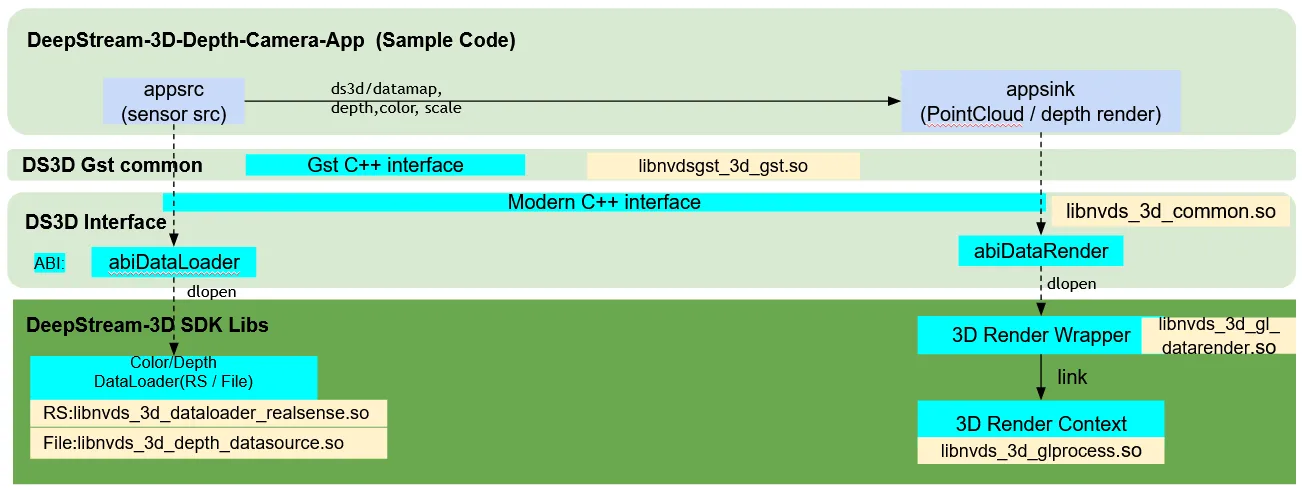
This is the first pipeline from the depth capture to 2D based depthmap to direct rendering with linear colors configured by the user.
-
ds3d::dataloaderloads custom liblibnvds_3d_dataloader_realsense.soand creates a RealSensedataloaderthrough thecreateRealsenseDataloaderfunction. This specific loader is configured for output streams of[color, depth].Gst-appsrcconnects thedataloaderinto the deepstream pipeline. -
ds3d::datarenderloads custom liblibnvds_3d_gl_datarender.soand create aGLESrender through thecreateDepthStreamDataRenderfunction. This specific loader is configured for 2D depth and color images.Gst-appsinkconnects thedatarenderinto the deepstream pipeline.
realsense_dataloadercaptures color and depth streams inds3d/datamap, then delivers the data tods3d::datarendercomponentdepth-render.
Depth Color Capture to 3D Point Cloud Processing and Rendering
The 2nd pipeline is from depth capture, 3D point cloud processing and alignment, to the 3D point cloud rendering with colors.
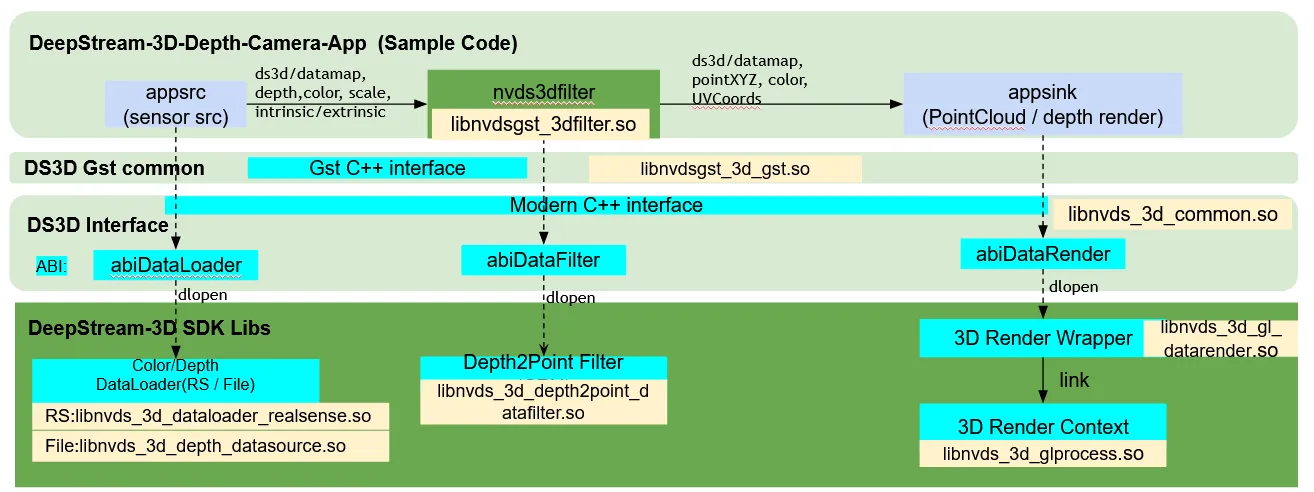
ds3d::dataloaderis the same as the 1st pipeline for depth and color capture. It also outputs the intrinsic parameters of the color/depth sensors, and extrinsic parameters from depth to color sensor module.
ds3d::datafilterloads custom liblibnvds_3d_depth2point_datafilter.soand creates a depth-to-3D-point processing filter through thecreateDepth2PointFilterfunction. This specific filter generates the 3D point-cloud dataset from depth, and calculates a UV-coordinate map for correspondence between points and color position. It requires sensors’ intrinsic and extrinsic data fromdataloaderto make the alignment.
ds3d::datafilter is loaded by the nvds3dfilter Gst-plugin which accepts in_caps as sink_caps and out_caps as src_caps. It creates a custom ds3d::datafilter instance and processes data as ds3d/datamap.
ds3d::datarenderloads custom liblibnvds_3d_gl_datarender.soand create aGLESrender through thecreatePointCloudDataRenderfunction . This specific loader is configured for 3D points and colors rendering. It also supports 3D scene rotation based on mouse-drag.
realsense_dataloadercaptures color and depth streams along with the intrinsic and extrinsic parameters of the sensor inds3d/datamap. It then delivers the data to the next componentpoint2cloud_datafilter. This component generates 3D point-cloud data and UV coordination map into new output datads3d/datamap. Finally, the data is delivered tods3d::datarendercomponentpoint-renderfor 3D rendering.
Inside the configuration files, in_caps and out_caps correspond to Gstreamer’s sink_caps and src_caps.
Getting Started
Run RealSense Camera for Depth Capture and 2D Rendering Examples
- Run the depth capture 2D render pipeline:
- This sets up a
realsensedataloader.
- It then streams
ds3d/datamapto final the rendering component:depth-render.
- The
depth-rendercustom lib shall display the depth data and color data together in same window. Updatemin_depth/max_depthto remove foreground and background objects in the depth rendering. From RealSense specification,D435Camera depth range is between0.3and3meters.
- Update
min_depth_color/min_depth_color[R, G, B] values to visualize color map of depth.
The other colors are linearly interpolated between min_depth_color and max_depth_color
Run 3D Depth Capture, Point Cloud filter, and 3D Points Rendering Examples
- Run the depth capture and 3D processing pipeline:
-
This sets up a realsense
dataloader(same as 2D depth). It then streamsds3d/datamapto the downstreamdatafiltercomponentpoint2cloud_datafilter. -
It streams
ds3d/datamapto thenvds3dfilterGst-pluginwhich loadspoint2cloud_datafilterto convert 2D depth into 3D points. For more details onnvds3dfilterGst-plugin, See Gst-nvds3dfilter. -
Finally the data stream as
ds3d/datamapis delivered to the render componentpoint-render.
-
Fields of
view_*are the eyes of the view position, similar to theOpenGLgluLookAt(). -
Fields of
near/far/fovare the perspective range of the eye, similar to theOpenGLgluPerspective().
DeepStream 3D Depth Camera App Configuration Specifications
deepstream-3d-depth-camera [ds3d::userapp] group settings
deepstream-3d-depth-camera [ds3d::userapp] group settings
The table below demonstrates the group settings for ds_3d_realsense_depth_to_point_cloud.yaml as an example.
3D depth camera app user debug supported settings
DS3D Custom Components Configuration Specifications
See more details in the DS_3D supported custom components specifications section in the DeepStream-3D Custom Apps and Libs Tutorials.
Build application From Source
-
Go to the folder
sources/apps/sample_apps/deepstream-3d-depth-camera. -
Run the following commands:
Check the source code for more details on how to load dataloader/datarender through Gst-appsrc and Gst-appsink. datafilter is loaded by the nvds3dfilter Gst-plugin.