Skip to navigation

Gst-nvvideoconvert

View as Markdown

This plugin performs video color format conversion. It accepts NVMM memory as well as RAW (memory allocated using calloc() or malloc() ), and provides NVMM or RAW memory at the output.
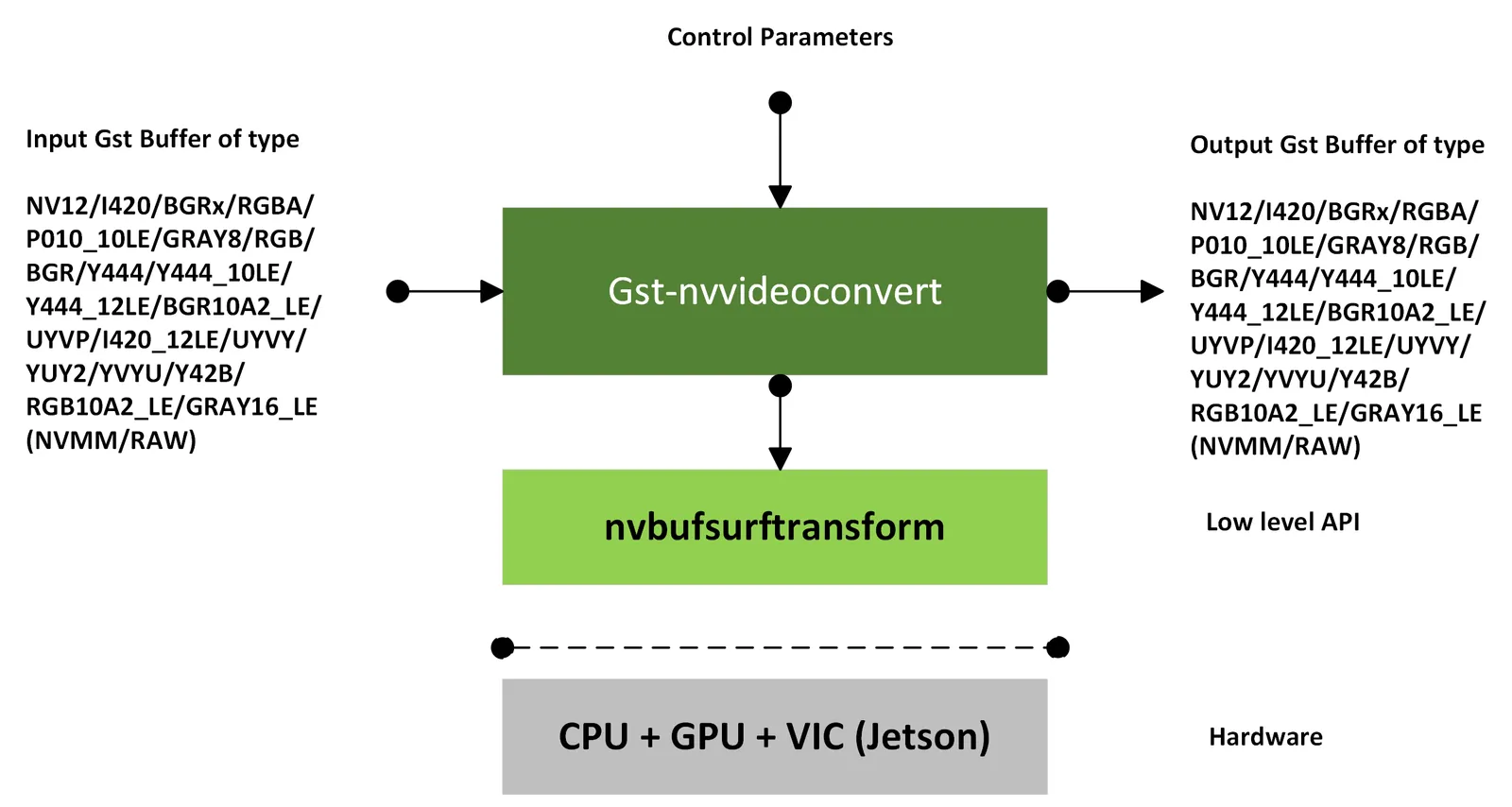
Gst-nvvideoconvert

Inputs and Outputs

  • Inputs

    • Gst Buffer batched buffer

    • NvDsBatchMeta

    • Format: (NVMM/RAW)

    • dGPU - NV12, I420, P010_10LE, BGRx, RGBA, GRAY8, RGB, BGR, Y444, Y444_10LE, Y444_12LE, BGR10A2_LE, UYVP, I420_12LE, RGB10A2_LE, GRAY16_LE, BGRA64_LE

    • Jetson - NV12, I420, P010_10LE, BGRx, RGBA, GRAY8, RGB, BGR, BGR10A2_LE, UYVP, UYVY, YUY2, YVYU, Y42B, I420_12LE, GRAY16_LE, BGRA64_LE

  • Output

    • Gst Buffer

    • NvDsBatchMeta

    • Format: (NVMM/RAW)

    • dGPU - NV12, I420, P010_10LE, BGRx, RGBA, GRAY8, RGB, BGR, Y444, Y444_10LE, Y444_12LE, BGR10A2_LE, UYVP, I420_12LE, RGB10A2_LE, GRAY16_LE, BGRA64_LE

    • Jetson - NV12, I420, P010_10LE, BGRx, RGBA, GRAY8, RGB, BGR, BGR10A2_LE, UYVP, UYVY, YUY2, YVYU, Y42B, I420_12LE, GRAY16_LE, BGRA64_LE

  • For 12bit NV12 format, the input/output caps shows I420_12LE. But the data is handled as semiplanar 12 bit data. This is a workaround since gstreamer v1.16 does not have the particular caps for 12 bit NV12. Downstream component should process it considering as 12bit NV12 only.
  • Only NVMM memory support is added for I420_12LE, Y444_10LE and Y444_12LE formats.
  • For BGRA64_LE format, only conversions from or to UYVP/BGRA64_LE are supported.
  • Not all formats mentioned in the caps are directly supported on Jetson platforms. For example, conversions involving GRAY16_LE, BGR10A2_LE, RGB10A2_LE, BGRA64_LE, RGB, BGR, UYVP, I420_12_LE, YUV444, YUV444_10LE, YUV444_12LE etc. require ‘compute-hw=GPU’, ‘copy-hw=GPU’ and ‘nvbuf-memory-type=nvbuf-mem-cuda-device’ to be set as properties, because the default conversion engine VIC, in jetson, does not support these formats.

Features

This plugin supports scaling and conversion for NVMM to NVMM, RAW to NVMM, and NVMM to RAW and RAW to RAW buffer type conversion. The plugin supports cropping of the input and output frames.

Gst Properties

The following table describes the Gst properties of the Gst-nvvideoconvert plugin.

Gst-nvvideoconvert gst properties

PropertyMeaningType and RangeExample Notes
nvbuf-memory-typeType of memory to be allocated.
For dGPU:
0 (nvbuf-mem-default): Default memory, cuda-device
1 (nvbuf-mem-cuda-pinned): Pinned/Host CUDA memory
2 (nvbuf-mem-cuda-device) Device CUDA memory
3 (nvbuf-mem-cuda-unified): Unified CUDA memory
For Jetson:
0 (nvbuf-mem-default): Default memory, surface array
4 (nvbuf-mem-surface-array): Surface array memory
enum GstNvVidConvBufMemoryType
src-cropPixel location: left🔝width:height of the input image which will be cropped and transformed into the output buffer. If the crop location is out of bound the values will be clamped to image boundaries of the input image. This property will be applied to all the input images in the batchStringsrc-crop=“20:40:150:100
dest-cropPixel location: left🔝width:height is the location in the output image where the input image will be transformed to. If the crop location is out of bound the values will be clamped to image boundaries of the output image. This property will be applied to all the output images in the batchStringdest-crop=“20:40:150:100
interpolation-methodInterpolation method:
0: Nearest
1: Bilinear
2: Algo-1 (GPU—Cubic, VIC—5 Tap)
3: Algo-2 (GPU—Super, VIC—10 Tap)
4: Algo-3 (GPU—LanzoS, VIC—Smart)
5: Algo-4 (GPU—Ignored, VIC—Nicest)
6: Default (GPU—Nearest, VIC—Nearest)
enum GstInterpolationMethodinterpolation-method=1
Default value is 6.
compute-hwType of computing hardware:
0: Default (GPU for gDPU, VIC for Jetson)
1: GPU
2: VIC
enum GstComputeHWcompute-hw=0
Default value is 0.
gpu-idDevice ID of GPU to use for format conversionInteger,
0 to 4,294,967,295
gpu-id=0
output-buffersNumber of Output Buffers for the buffer poolUnsigned integer,
1 to 4,294,967,295
output-buffers=4
bl-outputFlag applicable only for Jetson to output Block linear NVMM buffer for NV12 format. This is ignored for dGPU, Software memory (output buffer) and formats other than NV12Boolean.
Default: false
bl-output=1
flip-methodType of rotation method. This flag is applicable for Jetson and GPU.
Flip method:
0: Identity (no rotation)
1: Rotate counter-clockwise 90 degrees
2: Rotate 180 degrees
3: Rotate clockwise 90 degrees
4: Rotate horizontally
5: Rotate across upper right/lower left diagonal
6: Rotate vertically
7: Rotate across upper left/lower right diagonal
enum GstNvDsVideoFlipMethodflip-method=1
Default value is 0.
allow-odd-cropFlag to allow the odd dimensions for source and destination crop rectangleBooleanallow-odd-crop=1 Default value is 1.
contiguous-buffersEnable contiguous output buffersBooleancontiguous-buffers=1 Default value is 0.
disable-passthroughDisable passthrough mode at init timeBooleandisable-passthrough=1 Default value is 0.
copy-hwSelect hardware used for surface copies:
1: GPU
2: VIC
flags: readable, writable, controllable
enum GstNvCopyHWTypecopy-hw=2 Default value is 1.
silentSuppresses verbose console output when setBooleansilent=1