

DeepStream 3D Lidar Inference App
The deepstream-lidar-inference-app sample application is provided at app/sample_apps/deepstream-lidar-inference-app/ for your reference. The deepstream_lidar_inference_app provides an end-to-end inference sample for lidar pointcloud data.
The sample application reads the point cloud data from dataset files and send the data to Triton Inferencing filter with PointPillarNet model, the inferencing result is the group of 3D bounding boxes of the objects. The sample application loads different pipelines based on different application config files.
There are 2 pipelines configured in the sample app.
- Lidar Triton inference for 3D objects detection and file dump.
- Lidar Triton inference and 3D objects detection and GLES 3D rendering.
Inside these sample configurations, the inference model is a 3D TAO model based on PointPillar. For more details about PointPillar, see https://arxiv.org/abs/1812.05784.
TensorRT 8.5 has a bug for FP16 mode when converting this specific TAO model to TensorRT engine file. DeepStream fallback to FP32 mode for this release.
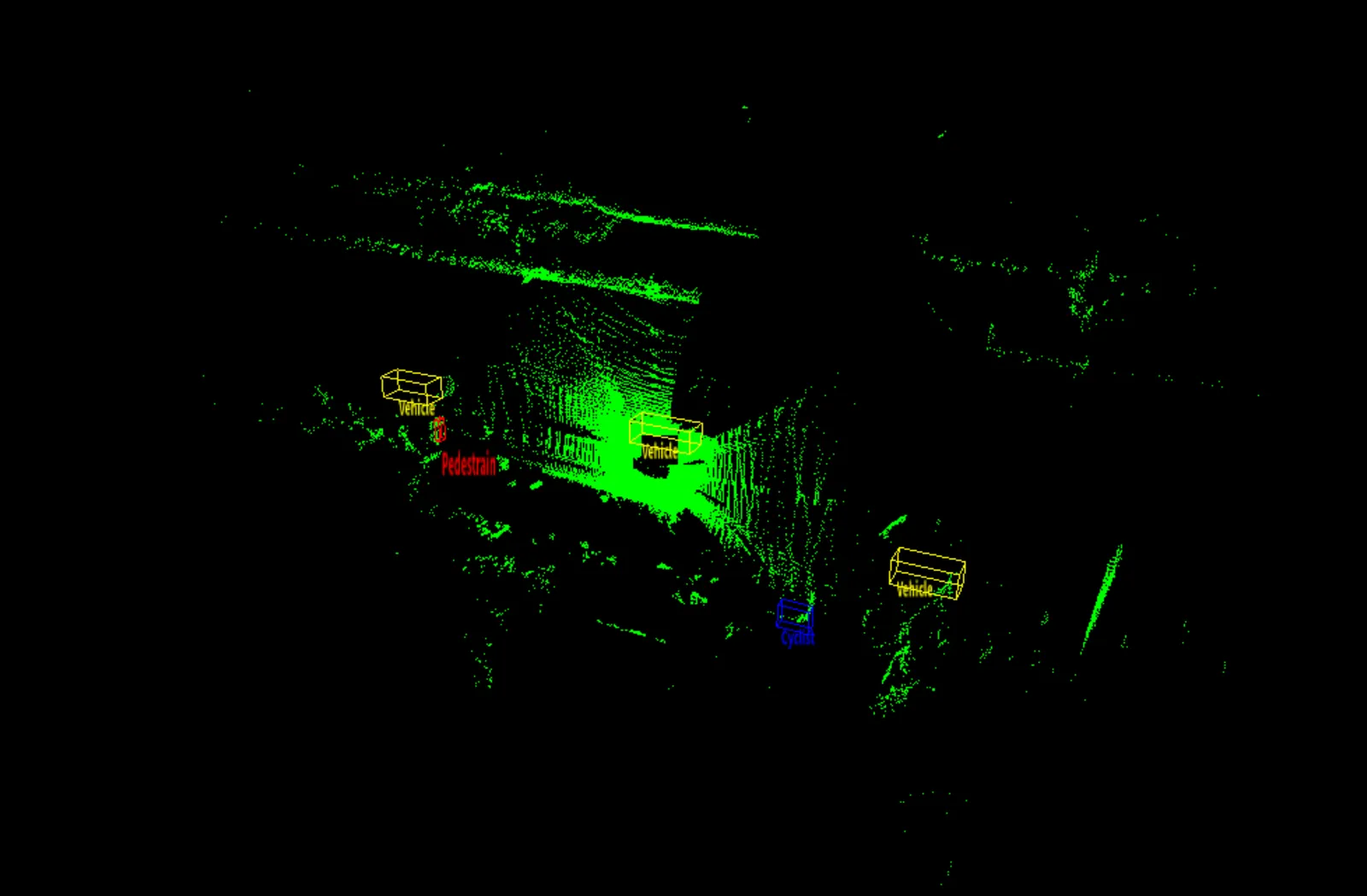
This is a snapshot for deepstream-lidar-inference-app running with lidar data inference objects detection and GLES 3D rendering with 3D bounding box display on screen.
Prerequisites
You must have the following development packages installed:
- GStreamer-1.0
- GStreamer-1.0 Base Plugins
- X11 client-side library
- libyaml-cpp-dev
To install these packages, execute the following command:
Lidar Point Cloud to 3D Point Cloud Processing and Rendering
The application can be configured as different pipelines according to the application configuration file.
- Lidar data inference and 3D bounding box dump pipeline:
This pipeline is from lidar point cloud, 3D point cloud inferencing, to the 3D objects data dump.
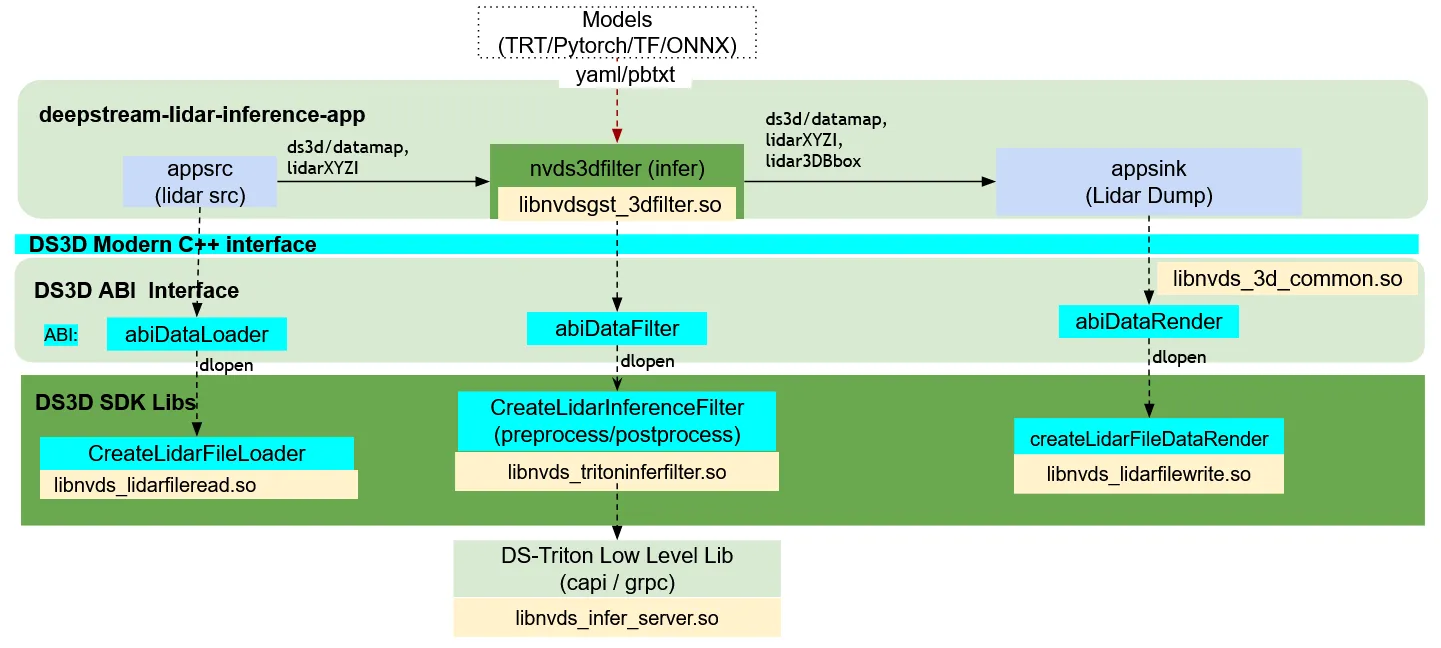
ds3d::dataloaderloads custom liblibnvds_lidarfileread.soand creates adataloaderthrough thecreateLidarFileLoaderfunction. This specific loader is configured by lidar dataset file listdata_config_file.Gst-appsrcconnects thedataloaderinto the deepstream pipeline.
ds3d::datafilterloads custom liblibnvds_tritoninferfilter.soand creates a lidar point cloud Triton inferencing filter through thecreateLidarInferenceFilterfunction. For this specific configuration, The Lidar Triton filter inferences the point cloud data with TAO model PointPillarNet model and return the 3D bounding boxes around each object.
ds3d::datafilter is loaded by the nvds3dfilter Gst-plugin which accepts in_caps as sink_caps and out_caps as src_caps. It creates a custom ds3d::datafilter instance and processes data as ds3d/datamap.
ds3d::datarenderloads custom liblibnvds_lidarfilewrite.soto dump the detected 3D bounding boxes to a file.
- Lidar data inference and Lidar data rendering with 3D bounding box display pipeline:
This pipeline is from lidar point cloud data file, 3D point cloud inferencing, to the 3D point cloud rendering with colors.
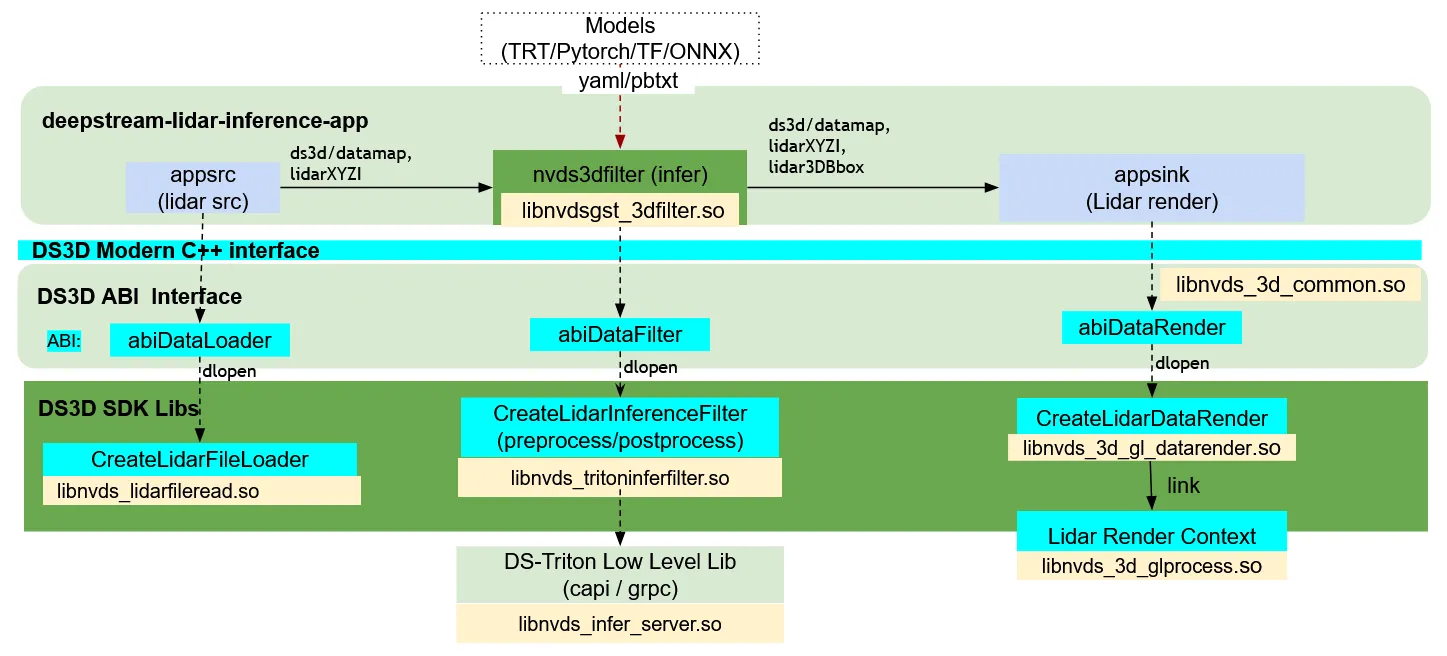
ds3d::dataloaderloads custom liblibnvds_lidarfileread.soand creates adataloaderthrough thecreateLidarFileLoaderfunction. This specific loader is configured by lidar dataset file listdata_config_file.Gst-appsrcconnects thedataloaderinto the deepstream pipeline.
ds3d::datafilterloads custom liblibnvds_tritoninferfilter.soand creates a lidar point cloud Triton inferencing filter through thecreateLidarInferenceFilterfunction. For this specific configuration, The Lidar Triton filter inferences the point cloud data with TAO model PointPillarNet model and return the 3D bounding boxes around each object.
ds3d::datafilter is loaded by the nvds3dfilter Gst-plugin which accepts in_caps as sink_caps and out_caps as src_caps. It creates a custom ds3d::datafilter instance and processes data as ds3d/datamap.
ds3d::datarenderloads custom liblibnvds_3d_gl_datarender.soand creates GLES Lidar point cloud rendering context to display XYZI or XYZ lidar data and 3D bounding boxes withcustom_create_function: createLidarDataRender.
Getting Started
Run Lidar Point Cloud Data File reader, Point Cloud Inferencing filter, and Point Cloud 3D rendering and data dump Examples
-
Prepare PointPillarNet model and Triton environment, this app will use Triton to do inference, for more details of Triton Inferencing Server, refer to Gst-nvinferserver.
Follow instructions in deepstream-lidar-inference-app/README to prepare testing resources and Triton CAPI and gRPC environments.
-
Run the lidar point cloud data inference pipeline in 2 modes.
a. Run lidar data reader, point cloud 3D objects detection inference and 3D data GLES rendering pipeline:
b. Run lidar data reader, point cloud 3D objects inference and 3D objects file dump pipeline:
- This part sets up a lidar point cloud loader
dataloader. It then streamsds3d/datamapto the downstreamdatafiltercomponentlidarfilter.
- It streams
ds3d/datamapto thenvds3dfilterGst-pluginwhich loadslidarfilterto do Triton inferencing on point cloud. For more details onnvds3dfilterGst-plugin, See Gst-nvds3dfilter.
-
Field of
model_inputsis the description of the model input layers. Includes layer name, layer data type and layer dimensions. -
Field of
model_outputsis the description of the model output layers. Includes layer name, layer data type and layer dimensions. -
Field of
labelsis the label list of the point cloud inferencing model.
-
Finally the data stream as
ds3d/datamapis delivered to the render component.a. 3D detection file dump component
lidarfiledump.b. GLES lidar data rendering component
lidardatarender.
Check the /opt/nvidia/deepstream/deepstream/sources/apps/sample_apps/deepstream-lidar-inference-app/README file for more details.
DeepStream Lidar Inference App Configuration Specifications
deepstream-lidar-inference-app [ds3d::userapp] group settings
deepstream-lidar-inference-app [ds3d::userapp] group settings
The table below demonstrates the group settings for config_lidar_triton_infer.yaml and config_lidar_source_triton_render.yaml as the examples.
point cloud inferencing app user debug supported settings
DS3D Custom Components Configuration Specifications
See more details in the DS_3D supported custom components specifications section in the DeepStream-3D Custom Apps and Libs Tutorials.
Build application From Source
-
Go to the folder
sources/apps/sample_apps/deepstream-lidar-inference-app. -
Run the following commands:
Check the source code for more details on how to load dataloader/datarender through Gst-appsrc and Gst-appsink. datafilter is loaded by the nvds3dfilter Gst-plugin.