

Gst-nvdsudpsink
The Gst-nvdsudpsink plugin is a sink type component which can be used to transmit the RTP packets over IP network. Internally, the plugin uses Rivermax SDK APIs for network communications. NVIDIA Rivermax ® offers a unique IP-based solution for any media and data streaming use case. For more details see the Rivermax Product Page.
nvdsudpsink can operate in three different modes based on the input type and properties set to the component. Mode 3 has an additional sub-variant for SMPTE ST 2110-40 ancillary data (RFC 8331) — see the Gst-nvdsudpsink section below.
Mode 1: RTP packets with Rivermax Generic API This is default mode. In this mode nvdsudpsink will receive RTP packets and transmit it to network using Rivermax generic APIs. nvdsudpsink doesn’t require any information about the content of RTP packets.
Mode 2: RTP packets with Rivermax Media API This mode is for specific use case of SMPTE 2110-20, 30 streams. In this mode, nvdsudpsink supports SMPTE 2110-20 and SMPTE 2110-30 streams with traffic shaping. nvdsudpsink expects RTP packets having either uncompressed audio or video as payload and It will transmit those packets to network using Rivermax media APIs.
Since Rivermax media APIs need to know the information about the data being transmitted for it to handle the traffic shaping, nvdsudpsink needs that information for Rivermax initialization in the form of SDP file.
- This mode can be enabled by setting
sdp-fileproperty of the component. In this mode, for uncompressed video streams,packets-per-lineandpayload-sizeproperties along withsdp-filemust be set. Similarly, value ofmtuproperty of payloader component must be same aspayload-sizeofnvdsudpsink. - For uncompressed audio streams in this mode,
max-ptimeandptime-multipleproperties of payloader component must be set. Also it is mandatory to seta=ptime:attribute in the SDP file with an appropriate value which denotes packet time in milliseconds.
Mode 3: Uncompressed data with Rivermax media API In this mode, nvdsudpsink expects uncompressed audio or video frames directly instead of RTP packets. The component will convert those frames to RTP packets and then transmit over network using Rivermax media API.
- This mode will be enabled if
sdp-fileis set and the incoming data is uncompressed video or audio frames instead of RTP packets. - For uncompressed video streams,
packets-per-lineandpayload-sizeproperties along withsdp-filemust be set. - For uncompressed audio streams,
payload-sizeandsdp-filemust be set. It is also mandatory to seta=ptime:attribute in the SDP file with an appropriate value which denotes packet time in milliseconds. - If
render-thread-coreproperty is set, a separate thread will be created to packetize the frame and transmit the packets. That thread will also be bound to the CPU core(s) provided as the value of the property.
In this mode as uncompressed video input, only YUV 4:2:2 and RGB with 8 or 10 bit depth is supported.
SMPTE ST 2110-40 ancillary data support (RFC 8331)
nvdsudpsink supports transmission of SMPTE 291M ancillary (ANC) data — for example, closed captions encoded as CEA-608/708 — over ST 2110 networks as per SMPTE ST 2110-40 / RFC 8331. This can be considered as a sub-variant of Mode 3 (uncompressed data with Rivermax media API) for SMPTE 291M ancillary metadata rather than uncompressed video/audio essence. The plugin accepts ST2038 wire-format buffers as input (no upstream payloader), packetizes them into RFC 8331 RTP payloads (with bit-packing, 32-bit alignment, and ANC count header), and transmits using the Rivermax media API.
- This mode is activated by setting
meta/x-st-2038caps on the sink pad. The typical upstream is the GStreamer elementcctost2038anc(provided bygst-plugins-rsvialibgstrsrtp.so— see the prerequisites section below), which converts closed-caption data to ST2038 ANC buffers. - The
sdp-fileproperty is mandatory in this mode. The SDP file must usesmpte291/90000as thertpmapand include anexactframerate(matching the upstream framerate) andSSN=ST2110-40:2021in thefmtpattribute. TheDID_SDIDfmtpparameter identifies the ancillary data type being transported (e.g.{0x61,0x01}for CEA-608 closed captions per SMPTE 334-1, or{0x61,0x02}for CEA-708 closed captions per SMPTE 334-2). The example pipelines below carry CEA-608, so the sample SDP files use{0x61,0x01}. - Unlike SMPTE 2110-20/30 modes,
payload-sizeandpackets-per-lineneed not be set — ANC packet sizes are determined dynamically by the input ST2038 data, and the Rivermax media API integration handles variable-length payloads. - The
pass-rtp-timestampproperty is supported and is recommended when an upstream component (for example aclockselect-driven pipeline) supplies the reference timestamp. - GPU Direct is not applicable for ancillary streams. If
gpu-idis set on the plugin, it is automatically disabled with a warning whenmeta/x-st-2038caps are negotiated. - SMPTE 2022-7 redundant transmission is supported for ANC streams via a
DUPSDP file describing the two streams (see below).
Prerequisites: gst-plugins-rs elements for ST 2110-40 example pipelines
The ST 2110-40 sender pipelines below use the following upstream elements from gst-plugins-rs to convert closed-caption text into ST2038-formatted ANC buffers:
tttocea608andccconverter— provided by theclosedcaptionplugin (libgstrsclosedcaption.so).cctost2038anc— provided by thertpplugin (libgstrsrtp.so). This element was added ingst-plugins-rs0.13, which is aligned with GStreamer 1.26.
DeepStream 9.2 is based on Ubuntu 24.04 with GStreamer 1.24.2, so cctost2038anc is not available in the bundled GStreamer stack and must be built from gst-plugins-rs source. The closedcaption plugin is rebuilt from the same source tree to keep tttocea608 / ccconverter versions consistent with the rtp plugin.
Run the following commands once, either on the bare-metal DeepStream host or inside the running DeepStream container (e.g. after docker exec -it <container> bash). The commands install the Rust toolchain, fetch the matching gst-plugins-rs source, build the two required plugins, and install them next to the system GStreamer plugins:
Verify the new elements are visible to GStreamer:
- Inside the DeepStream container the default user is
root, sosudois a no-op and can be omitted; on a bare-metal host it is required. - If you are running these steps inside the container, the installed plugins live only in that container’s writable layer and will be lost when the container is removed. Either commit the container to a new image (
docker commit) or re-run these steps each time a fresh container is started. - Build the two plugins from the same
gst-plugins-rstag (gstreamer-1.26.11shown above). Mixing versions may produce element re-registration warnings against the GStreamer 1.24.2 runtime. - This is a temporary prerequisite specific to DeepStream 9.2 on Ubuntu 24.04. Once the bundled GStreamer stack is upgraded to 1.26 (or
gst-plugins-rs0.13+ is packaged for Ubuntu 24.04), this manual build step will no longer be required.
Sample SDP file for a single ST 2110-40 ancillary stream:
Sample SDP file for an ST 2110-40 ancillary stream with SMPTE 2022-7 redundancy:
SMPTE 2022-7 feature support
The plugin supports SMPTE 2022-7 standard. Its main purpose is to ensure uninterrupted transport of media streams, by providing redundancy for RTP packets to safeguard against packet loss or network/interface failures.
To enable SMPTE 2022-7 feature, corresponding sdp-file should be provided. It should have a DUP string as well as details of two streams.
Sample sdp-file provided below:
SMPTE 2022-7 is supported in Mode 2, Mode 3, and the SMPTE ST 2110-40 ancillary data mode.
-
Example pipeline that uses SMPTE 2022-7 feature to send two identical streams over separate network paths:
GPU Direct for SMPTE 2110-20 stream
GPU Direct feature is only supported for SMPTE 2110-20 stream and only in Mode 3. To enable this feature, provide video/x-raw(memory:NVMM) as input for nvdsudpsink and also set gpu-id property for the plugin.
-
Example pipeline that uses GPU-direct feature while sending SMPTE ST2110-20 stream (requires ConnectX-6 or above cards)
If enabled, Rivermax media API’s will allocate GPU memory to receive the SMPTE 2110-20 stream and this memory is directly accessible by NICThis feature is only available for ConnectX-6 or above cards.
Timestamps in RTP packet headers
-
By default, nvdsudpsink ignores timestamps from upstream components (buffer pts/dts) and generates RTP header timestamp based on system clock.
If
ptp-srcproperty is set, the plugin will use time from the Rivermax hardware clock provider instead of system clock.The timestamp generated is in TAI time (International Atomic Time) which is 37 seconds (called as leap seconds) ahead of UTC time.
The above timestamp generation logic is applicable only in Mode 2 and 3.
-
If user want to generate RTP header timestamp based on upstream time (e.g. buffer pts or meta), set
pass-rtp-timestampproperty. It will ignore the timestamp generation logic discussed above. It has two ways to set RTP timestamp for outgoing buffers:-
Use the buffer PTS it received from upstream component for calculating RTP timestamp for outgoing buffers:
-
If metadata
GstRTPTimestampMetais attached along with the upstream buffer, the timestamp from that metadata will be used directly and take precedence over the RTP timestamp calculated using buffer PTS.
pass-rtp-timestampis only valid if no payloader is used before nvdsudpsink, that is, in Mode 3 and the SMPTE ST 2110-40 ancillary data sub-variant. -
-
Receiver (nvdsudpsrc) has to do leap second adjustment if they receive timestamp in TAI time and wants to use UTC time. Whenever sender (nvdsudpsink) does packetization, by default it uses TAI time. So leap-second adjustment will be required in most scenarios except when
pass-rtp-timestampis set and the upstream component does not provide timestamps in TAI time. It is the user’s responsibility to identify if TAI time based timestamps are expected in such cases.
-
Example pipeline that uses “pass-rtp-timestamp” property to pass the timestamp it received from upstream nvdsudpsrc component.
Payload size and packets per line for some of common formats
To calculate the payload size and packets per line, use the following steps:
- Calculate line stride as follows:
-
Divide this stride into number of packets having equal bytes. This will be value of packet-per-line.
-
Add 20 bytes to size of each packet calculated in step 2 for RTP + Payload header. This will be value for payload-size.
It is assumed that there is only single Sample Row Data per RTP packet and line stride is equally divisible.
Following are values for some of the common formats:
Refer to the SMPTE ST 2110-20:2017 for more information.
System can also have Gstreamer provided OSS implementation of udp sink (udpsink) component. In that case system would have two implementations for udp sink - udpsink and nvdsudpsink.
nvdsudpsink component can only be used with NVIDIA ConnectX-5 and above cards after having installed Rivermax SDK and its license.
-
Download and setup the
Rivermax1.70.x SDK here: https://developer.nvidia.com/networking/rivermax-getting-started. -
Follow the instruction on the SDK page to obtain development license for Rivermax.
-
To select
nvdsudpsinkout of two installations, use eitherLOCAL_IFACE_IPenvironment variable orlocal-iface-ipproperty. Use the command below to export the environment variable:
nvdsudpsinkcomponent also requiresCAP_NET_RAWcapability. Either run the application that usesnvdsudpsinkcomponent with superuser privilege or set theCAP_NET_RAWcapabilities using the following command.
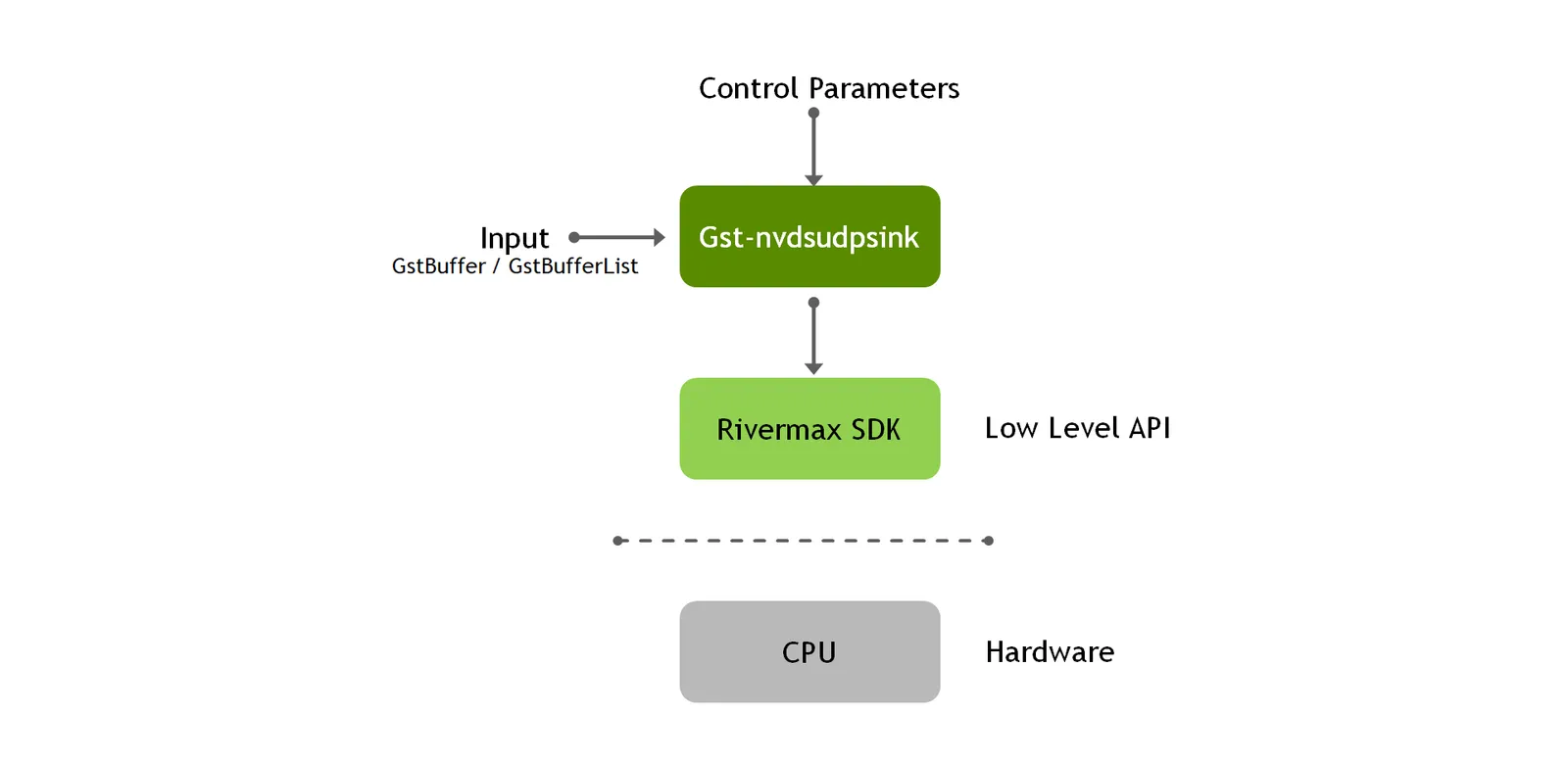
Inputs and Outputs
-
Inputs
- GstBufferList having RTP packets as buffer content.
- GstBuffer having uncompressed audio or video frame.
-
Control parameters
- LOCAL_IFACE_IP ENV flag or local-iface-ip property
-
Output
- None
Features
The following table summarizes the features of the plugin.
Gst-nvdsudpsink plugin features
Gst Properties
The following table describes the Gst-nvdsudpsink plugin’s Gst properties.
Gst-nvdsudpsink plugin gst properties
Example pipelines
Mode 1: RTP packets with Rivermax Generic API
In Mode 1 (the default), a payloader creates RTP packets and nvdsudpsink transmits them using Rivermax generic APIs. No sdp-file is required.
-
Video — transmit H.264 RTP stream:
-
Audio — transmit Opus encoded 2 channel 48k audio RTP stream:
Mode 2: RTP packets with Rivermax Media API
In Mode 2, a payloader creates RTP packets and nvdsudpsink transmits them using Rivermax media APIs with traffic shaping. Requires sdp-file to be set. For video, payload-size and packets-per-line must also be set. For audio, the payloader’s max-ptime and ptime-multiple must be set along with a=ptime: in the SDP file.
-
Video — transmit 10 bit YUV 4:2:2 1080p30 stream with payloader:
-
Audio — transmit 24 bit 2 channel 48k audio stream with payloader:
Mode 3: Uncompressed data with Rivermax Media API
In Mode 3, uncompressed audio or video frames are sent directly to nvdsudpsink without a payloader. The plugin handles RTP packetization and transmits using Rivermax media APIs. Requires sdp-file to be set. For video, payload-size and packets-per-line must also be set.
-
Video — transmit 10 bit YUV 4:2:2 1080p60 stream without payloader:
-
Audio — transmit 24 bit 2 channel 48k audio stream without payloader:
-
Video with PTP hardware clock from NIC:
-
Video with separate render thread bound to CPU core(s):
SMPTE ST 2110-40 ancillary data (RFC 8331)
In this mode, nvdsudpsink accepts ST2038 wire-format ANC buffers and packetizes them as RFC 8331 RTP payloads. The sdp-file property is required and the SDP file must use smpte291/90000 with SSN=ST2110-40:2021 in the fmtp line. Refer to the SMPTE ST 2110-40 ancillary data support (RFC 8331) section above for SDP file details.
-
Transmit closed captions (CEA-608) extracted from an SRT subtitle file as a SMPTE ST 2110-40 ancillary stream. The
clockselectelement (clock-id=2) is used to drive the pipeline with a realtime clock so that RTP timestamps can be reconstructed at the receiver:Sample
example.srtcontent used by the pipeline above: -
Transmit the same ANC stream redundantly over two paths using SMPTE 2022-7. The redundant
DUPSDP file (withm=sections for both destinations) must be supplied viasdp-file: