

Alerts Microservice
The Alerts Microservice is a modular, agent-native, configuration-driven service for alert-related workflows, including:
-
Alert verification, contextualization, and classification: Process curated (short) clips from the VSS video pipeline (for example, RTVI CV and video analytics) through a VLM to confirm, enrich, or classify upstream alerts.
-
Real-time alerts: Register video streams for continuous alert generation via periodic VLM inference through the RTVI VLM microservice.
-
Alert-on-demand: Process short clips on demand through a VLM using preconfigured alert settings.
Key Features
-
Event-Driven Processing: Consumes alerts from Kafka in
nv.Incidentandnv.Behaviormessage formats in both Protobuf and JSON -
HTTP API Support: RESTful endpoints for various functionalities (
POST /api/v1/realtime,POST /api/v1/verification/config,POST /api/v1/verification/ondemand,POST /api/v1/incidents,POST /api/v1/alerts). -
Agent Skills: VSS Agent skills for full alert lifecycle management, including microservice deployment, alert creation, retrieval, and configuration.
-
Diverse VLM Sources: RTVI VLM microservice (default), NVIDIA VLM NIM (for example, Cosmos Reason, Qwen VL), remote model endpoints (for example, GPT from OpenAI).
-
Automatic Video Resolution: Retrieves video segments from VIOS based on alert timestamps and sensor information.
-
Configurable Prompts: Alert-type-specific prompts with template placeholders for dynamic content injection from alert payloads.
-
Configurable VLM Parameters: Tune video preprocessing and inference settings to match deployment requirements and VLM backend capabilities.
-
VLM Warmup: Automatically sends multiple warmup inferences (default 3) to the VLM backend at startup, reducing initial request latency. Warmup polls the VLM NIM health endpoint until ready, then sends configurable rounds of test video inference before alert processing begins. Controlled via the
VLM_WARMUP_ENABLEDenvironment variable (enabled by default). -
Structured VLM Responses: Standardized response format with verdict (confirmed/rejected/unverified), reasoning trace, and HTTP-like status codes.
-
Custom VLM Response Processing: User-defined hooks for bespoke VLM response parsing.
-
Flexible Output Options: Persist results to Elasticsearch for analytics, with optional Kafka publishing.
-
Custom Category Names: Configure user-friendly display names for alert categories in output (for example,
"collision"displays as"Vehicle Collision"in Elasticsearch and UI). -
Alert Enrichment: Optionally generate detailed event descriptions after successful verification, providing additional context such as objects involved, sequence of events, and environmental factors.
Alert Verification
Alert verification uses a VLM to confirm, enrich, and classify alerts generated upstream in the VSS pipeline. Each alert type is handled through a designated VLM prompt. The service supports alerts in NvSchema format (nv.Incident and nv.Behavior) via Kafka or HTTP API. Upon receiving an alert, it identifies the alert or incident type from the category attribute, retrieves the video URL for the alert time window from VIOS based on sensor ID and timestamps, and passes that URL to a VLM-based verification backend (RTVI VLM by default; NVIDIA Cosmos Reason NIM is also supported) through an OpenAI-compatible API. The VLM downloads the video and analyzes it against configurable prompts. Upstream alerts are typically generated by video analytics based on events detected within a camera’s field of view.
The alert verification workflow uses a 6-step process:
-
Alert Config Creation: Alert rules are defined using the
POST /api/v1/verification/configAPI call, which specifies the alert category, VLM prompt, and VLM invocation parameters. Alternatively, rules can be defined in a config file at deployment time. -
Alert Ingestion: Alerts are received via HTTP API or Kafka topics. The system validates the message schema, applies normalization, and queues alerts for processing.
-
Video URL Retrieval: The service extracts sensor ID, start time, and end time from the alert, then retrieves the corresponding video URL from VIOS via the REST API.
-
VLM Analysis: The video URL and a dynamically constructed prompt (based on alert type and context) are sent to the VLM backend. The VLM downloads the video, analyzes it, and returns a verdict with reasoning.
-
Result Publishing: Verified alerts are persisted to Elasticsearch and optionally published to Kafka (enabled via configuration). Results include the original alert fields plus verification metadata.
-
Alert Retrieval: Verified alerts are retrieved using the video analytics microservice API call to
GET /alerts/.
For a complete description of APIs, see the API Reference.
Real-Time Alerts
The Alerts Microservice enables users to create real-time alert rules, which are registered with the RTVI VLM microservice for continuous processing of input streams using designated prompts. Users configure the prompt along with invocation parameters such as chunk duration, frame resolution, and frame rate. Generated alerts are published to a configurable Kafka topic and follow the nv.Incident structure defined in NvSchema.
Real-time alerts follow the process below:
-
Alert Config Creation: Alert rules are defined using the
POST /api/v1/realtimeAPI. -
Alert Publish and Subscribe: Generated alerts are published to a configurable Kafka topic that downstream consumers can subscribe to.
-
Alert Storage: The system can be configured to persist alerts from Kafka to a database such as Elasticsearch. Refer to the alerts developer profile for an example.
-
Alert Retrieval: Stored incidents are queried with
GET /api/v1/realtime/incidents. Because RT-VLM can emit one incident per video chunk while a single event stays visible, the same endpoint can group consecutive confirmed chunks into one event on request withconsolidate=true. This is an API-only option; see Realtime incident consolidation.
Always-on alerts are a refinement of the real-time alerts capability: users define VLM prompts and configuration in a file, and the rule is applied automatically to every newly added stream. This saves users from invoking the alert config creation API explicitly.
Alert-on-Demand
Third-party CV applications that generate alerts for verification can use the alert-on-demand feature to run VLM verification on an associated video snippet stored in object storage.
Alert-on-demand uses the process below:
-
Alert creation and media storage: The CV application identifies an alert condition and creates a corresponding video snippet, which it stores in object storage (such as MinIO).
-
Alert delivery: The application delivers the alert to the Alerts Microservice through the
POST /api/v1/verification/ondemandAPI; the alert is captured using the NvSchemanv.Incidentpayload schema. -
Alert processing and storage: The Alerts Microservice downloads the video (which may be remote), encodes it in base64 format, and submits it to the underlying VLM along with the prompt and VLM invocation parameters; the returned VLM response is stored in Elasticsearch for retrieval through APIs.
Setup
The Alerts Microservice supports the following deployment options:
- Docker Compose deployment
- Kubernetes deployment
For detailed deployment instructions, refer to the Docker Compose Deployment and Kubernetes Deployment sections.
Prerequisites
Before deploying the Alerts Microservice, ensure the following requirements are met:
- A valid NGC API key is required for accessing NVIDIA services.
- A VLM backend (e.g., NVIDIA Cosmos3 Nano Reasoner NIM) must be deployed and accessible.
- VIOS service must be available for video retrieval.
- Kafka is required if using event-driven ingestion.
- Elasticsearch (optional) for result persistence and analytics.
Configuring Prompts
Prompts control how the VLM analyzes video content for each alert type. They are seeded from a JSON file (alert_type_config.json) at startup into the alert-config store, which is backed by Elasticsearch. Each verification reads the store, so a record changed there takes effect on the next alert.
Editing alert_type_config.json requires a container restart, because the file is only read at startup. Changing a prompt without a restart is done through PUT /api/v1/verification/config/{alert_type}, which writes to the store the pipeline reads.
Prompt Structure
Each alert type requires a configuration with the following components:
- user (mandatory): The primary instruction describing how to analyze the video and what decision to make.
- system (optional): Contextual setup that shapes the VLM’s behavior, tone, and domain knowledge. When an alert type has none, the service default (
prompt.default_system_prompt) is used for the VLM call. - enrichment (optional): A prompt to generate detailed event descriptions after successful verification. When defined, a second VLM call provides additional context such as objects involved, sequence of events, and environmental factors.
- output_category (optional): A user-friendly display name for the alert category in output. When specified, this name appears in Elasticsearch and downstream systems instead of the internal
alert_typevalue (e.g.,"collision"displays as"Vehicle Collision"). - vlm_params (optional): Per-alert-type VLM parameter overrides (for example
model,max_tokens,temperature,num_frames). Specified fields override the globalvlmconfig; unspecified fields fall back to the global defaults. Unknown fields raise a startup validation error so configuration typos fail fast.
Records are keyed by alert type and selected on that key during processing.
Prompts and vlm_params may both be updated at runtime via PUT /api/v1/verification/config/{alert_type} (see the Alert Verification API) without restarting the container. At request time the service merges all sources with the following precedence:
- Runtime overrides set via the API and persisted in the alert-config store as
alert_config:{alert_type}— applied without restart. - Static
vlm_paramsfromalert_type_config.json— requires container restart to take effect. - Global
vlmconfig inconfig.yaml— requires container restart to take effect.
Prompt Templating
Prompts support dynamic placeholders that are substituted with values from the alert payload at runtime:
- Placeholders use
{field.path}syntax with dot notation for nested fields. - Examples:
{info.primaryObjectId},{place.name},{objectIds} - Missing fields render as
<missing:field.path>for debugging. - Array values are automatically joined as comma-separated strings.
Alert Type Matching
The category field in the incoming alert is matched against the alert_type in the prompt configuration. When a match is found, the corresponding prompts are selected and rendered with alert context.
VLM Response Format
The VLM must respond using the following format for proper parsing:
The answer section should contain a clear verdict that the system can map to confirmed/rejected status.
Example Configuration
Below is an example prompt configuration from alert_type_config.json:
In this example:
- The
collisionalert type usesoutput_categoryto display as"Vehicle Collision"in output, and includes anenrichmentprompt for detailed event descriptions. - The
Stop Anomaly Moduleusesoutput_categorybut no enrichment prompt (enrichment is optional per alert type). vlm_paramscan be added to any alert type to override the global VLM defaults;collisionshows it as an illustration, but each alert type may define its own subset of overrides independently.
For prompts that ask for alert enhancement, such as an enrichment prompt or structured output read by a pluggable response parser, set vlm_params.max_tokens large enough for the expected length of the VLM response. A response that reaches the limit is cut off and may fail parsing.
Pluggable Response Parser
By default, the Alerts Microservice extracts a binary YES/NO verdict from the VLM response, which is appropriate for alert verification but limiting for other use cases such as classification, analytics, enrichment, or counting. A pluggable response parser lets you replace the built-in verification parsing with a custom class that returns arbitrary structured data.
When to Use
- Binary verification (confirm/reject an alert): use the built-in parser. No configuration needed.
- Classification (PPE violation type, hazard category, etc.): use a pluggable parser.
- Analytics (object counts, zone occupancy, etc.): use a pluggable parser.
- Enrichment (scene description, recommended action, etc.): use a pluggable parser.
Parser Contract
A parser is any Python class that exposes a parse(self, raw_response: str) -> dict method. No imports from Alert Bridge are required.
Requirements:
- The class must be instantiable with no arguments (
def __init__(self) -> None). Classes with required__init__parameters or abstract base classes fail startup validation. - Implementations must be thread-safe: the parser instance is shared across all worker threads (up to
alert_agent.num_workers) and the async dispatcher. Do not mutate instance state insideparse(); treat any attribute set in__init__as read-only. Read-only caches (compiled regexes, LRU caches on pure functions) are fine. - Return a flat dictionary. Values may be primitives (string, int, bool, float) or stringified JSON for nested structures. The merge helper coerces non-string values to strings on the wire.
Configuration
Set vlm.response_parser in config.yml to the dotted Python path of the parser class:
Alert Bridge imports the module and instantiates the class at startup. Validation errors (missing module, missing class, no parse method, required __init__ parameters) abort startup with a descriptive error message.
Example Parser
A PPE violation classifier that strips markdown code fences before parsing JSON:
Output Schema
Parser output is JSON-serialized into info["vlm_response"]. The outer info shape (transport metadata such as videoSource, verificationResponseCode, sensorId) is identical to verification mode, so existing Elasticsearch mappings, Kibana dashboards, and downstream consumers require no changes — only an additive vlm_response field in the mdx-vlm-incidents index.
Successful pluggable-parser response:
The verification path (info["reasoning"]) and the pluggable-parser path (info["vlm_response"]) are disjoint — a given message contains exactly one of the two body fields, never both.
Error Handling
If the parser raises an exception or returns a non-dict value, Alert Bridge emits a distinct error event:
The "Pluggable parser failed: ..." status prefix lets operators distinguish parser crashes from upstream VLM service failures ("VLM service internal error", "VLM response validation failed"). Parser-error events are routed through the error publish path; they never land on the success topic.
Integration Steps (End-to-End)
The following walkthrough takes a PPE-violation classifier from zero to a working pipeline. Adapt the field names to your own use case.
Step 1 — Design the VLM output JSON shape
Decide what fields you want the VLM to produce. For a PPE classifier:
Step 2 — Update alert_type_config.json with a prompt that produces that shape
The prompt MUST instruct the VLM to return JSON with the exact field names your parser will read. Co-design the prompt and parser together.
When using a pluggable parser, the prompt no longer needs the <think>...</think><answer>...</answer> Cosmos Reason format — that format is for the built-in verification parser. Tell the VLM to return plain JSON instead. VLMs commonly wrap JSON in markdown code fences (\`\`\`json ... \`\`\); the parser must strip them.
Step 3 — Write the parser class (parsers/ppe_classifier.py)
The output keys (classification, severity, confidence, reasoning) are what end up serialized inside info["vlm_response"] — you can rename them freely; consumers only see the parser’s output. Step 4 — Mount the parser directory into the container Place an empty __init__.py and your parser file under a host directory and mount it to /app/parsers/ (see Deployment below for the full layout).
Step 5 — Set vlm.response_parser in config.yml
The path is the dotted module name relative to /app/ — parsers.ppe_classifier resolves to /app/parsers/ppe_classifier.py and PPEClassifier is the class inside that file.
Step 6 — Recreate the container
Run the docker compose ... up --detach --pull always --force-recreate --build command from the
Alert Verification deployment workflow
again. Docker Compose recreates Alert Bridge to apply the new volume mount; a
docker compose restart does not apply Compose configuration changes.
On startup, look for the log line Pluggable response parser active: 'parsers.ppe_classifier.PPEClassifier'. A startup error here means the dotted path or class signature is wrong; the container will exit instead of running with a broken parser.
Step 7 — Verify with a test alert
Submit a test alert via the HTTP API with category matching your alert_type:
Then inspect the mdx-vlm-incidents Elasticsearch index — see Consuming the Output Downstream below.
Consuming the Output Downstream
Pluggable parser output lands in info["vlm_response"] as a JSON-encoded string (per the NvSchema map<string,string> contract). Downstream consumers must deserialize it before reading individual fields.
Reading from Elasticsearch
The mdx-vlm-incidents index stores each verified alert as a document. Query by category and decode info.vlm_response client-side:
Each info.vlm_response value comes back as a JSON-encoded string; deserialize once to access the parser’s structured fields.
Reading from Kafka
When event_bridge.sinkType: "kafka" is enabled, verified alerts are published to mdx-vlm-incidents. A minimal Python consumer:
The double-decode (Kafka payload → outer message → inner vlm_response string) is intentional: the inner JSON is opaque to the alert pipeline, which lets parser authors evolve fields without breaking the schema.
Viewing in Kibana
The vlm_response field appears as a single string column by default. To filter or chart on individual parser fields, define a Kibana scripted field (or use a runtime field on Elasticsearch 7.11+) that parses the JSON:
Repeat for each field you want to chart. For richer use cases, run a small ingest pipeline that pre-extracts parser fields into top-level Elasticsearch fields; that approach is out of scope here but follows standard ES ingest-node patterns.
Deployment
Custom parser modules are not included in the Alert Bridge image or mounted by the shipped Compose configuration. Create a host directory for them, for example:
In deploy/docker/services/alert/compose.yml, add that directory to the
alert-bridge service as a read-only volume:
To add or change parsers, place a .py file in the mounted host directory,
update vlm.response_parser in config.yml, and recreate the container. No
image rebuild is required.
When migrating from the legacy vlm.custom_parser_module registry mechanism, vlm.response_parser takes precedence on the default VLM path. Configuring both keys produces a startup WARN. Prefer vlm.response_parser for new integrations and remove vlm.custom_parser_module once migrated.
Alert Messages and Schema Format
The Alerts Microservice supports NvSchema message formats for both alerts and incidents:
nv.Incident: For incident-type events requiring verification.nv.Behavior: For behavior/alert-type events requiring verification.
Both Protobuf and JSON formats are supported for message serialization.
For the complete schema definitions of nv.Incident and nv.Behavior messages, refer to the Protobuf Schema documentation.
Alert Ingestion Endpoints
HTTP API
POST /api/v1/alerts: Submit alerts innv.Behaviorformat (JSON or Protobuf).POST /api/v1/incidents: Submit incidents innv.Incidentformat (JSON or Protobuf).
Responses: 202 Accepted (queued), 422 (validation error), 415 (unsupported media type), 500 (internal error).
Kafka Topics (configurable)
- Input:
mdx-incidents(nv.Incident),mdx-alerts(nv.Behavior) - Output:
mdx-vlm-incidents,mdx-vlm-alerts(when Kafka sink enabled)
Key Fields
The following table describes key fields in alert messages:
Verification Response
Verified alerts include the original fields plus an extended info section containing:
Example Request
Example Response
Scaling and Performance Tuning
One setting scales the Alerts Microservice: alert_agent.processes, the number of pipeline processes one instance runs. Each process uses about one CPU core and holds its own Kafka consumers, event loop, and clients. The concurrency caps toward the VLM and VIOS backends are profile defaults sized to those backends and are described under Profile defaults. This section covers when more processes help, how to configure them, what startup validates, and how to read the metrics that show which stage is limiting throughput.
Pipeline Modes
alert_agent.pipeline_mode selects how each message is dispatched inside a process. The shipped profile uses event_loop, and multi-process scaling requires it.
An invalid value fails startup. When the key is unset, the mode is derived from the deprecated alert_agent.async_io.enabled flag; set pipeline_mode explicitly instead. alert_agent.chunk_size is retired and ignored with a startup warning, as are the per-service switches async_io.vst_enabled, async_io.elastic_enabled, async_io.dedup_enabled, and async_io.redis_enabled.
Scaling Across Processes
The pipeline runs inside one Python process, and the interpreter lock allows one thread to execute Python code at a time. A single process therefore uses about one CPU core regardless of the thread count or the host size. alert_agent.processes runs the consume and dispatch stack in that many independent operating system processes, each with its own Kafka consumers, event loop, clients, and interpreter lock.
When more processes help
Additional processes add CPU capacity only. They help when a single process is consistently near one CPU core and the processed rate stays below the input rate, as described under Monitoring throughput. A process below one core is limited by offered traffic or by a downstream service, and more processes add memory and consumer-group members without adding capacity.
Configuration
For the Alerts developer profile, edit the following file and redeploy:
The process count is startup topology. It is not resized while the service runs, and the developer profile does not expose it through user-overrides.env.
A four-process configuration that keeps the profile’s instance-wide load on the VLM and VIOS backends unchanged:
Every per-process cap is multiplied by the process count. The one-process profile sets these caps to 16, 4, and 8; dividing them by four keeps processes × cap equal to the shipped values, so the backends see the same load after enabling processes. When the VLM is the limiting service, capacity comes from the VLM side, for example more replicas behind the same endpoint.
Rules
-
processesabove1requirespipeline_mode: event_loop. The other modes hold their concurrency in threads, with no per-process cap on the load offered to the backends. -
processesabove1requires shared alert-configuration storage:persistence.enabled: truewith Elasticsearch reachable. -
Every input topic must have at least as many partitions as consumer-group members, counted per topic and not summed. The members are the pipeline processes of every Alerts Microservice instance that shares the consumer group, so with
replicasinstances:The developer profile creates eight partitions on each topic. One instance can run four processes without changing the Kafka layout; two instances with four processes each use all eight assignments.
-
Work is spread across processes by Kafka key. The shipped Behavior Analytics pipeline keys
mdx-incidentsbysensorId, so every message of one stream lands on one partition and one process, and every process receives work only when there are at least as many active streams as processes. Alerts submitted through the HTTP API are keyed by event id and spread across partitions regardless of stream. -
Allocate about one CPU core per pipeline process, plus capacity for the parent and API processes. Each process holds its own Kafka consumers, HTTP connection pools to the VLM and VIOS backends, Elasticsearch clients, and memory, so connection, file-descriptor, and memory use grow with the process count.
-
Redeploy after changing the process count.
Startup validates the count against the mode, the persistence setting, and the live partition count of every input topic. A combination the deployment cannot honor fails startup with a message that names the topic and its partition count. The service never runs fewer processes than configured. Startup also logs the resolved instance-wide caps, processes × cap for each backend.
Startup, readiness, and shutdown
startup_timeout_secondscovers topic metadata, prompt seeding, VLM warmup, and every process joining its consumer group. The default is 60 seconds and the minimum is 30. With one process, the startup watchdog stops the instance when the budget runs out. With more than one process, it stops the instance 5 seconds after the budget, so size a startup probe against 65 seconds at the default./healthand/readyreturn HTTP 503 until every configured process holds a decided Kafka assignment, and again during a rebalance until the assignment is decided. Do not point a liveness probe at them.- The shipped Docker and Helm definitions allow 60 seconds for shutdown. Keep that grace period so in-flight work can drain.
- A pipeline process that exits takes the instance down, and the orchestrator restarts it. Processes are not respawned individually.
Rollback
Set processes: 1 and redeploy without overlapping the old and new instances. No data migration is needed.
Scaling Across Instances
Multiple Alerts Microservice instances share event_bridge.kafka_source.group_id, and the broker distributes partitions across them. Consumer-group members are instances and processes together, so the partition rule above applies to the product replicas × processes. Instances share no state. In-process deduplication relies on every message of one sensor reaching the same member, which holds when the producer keys by sensorId, as the shipped Behavior Analytics pipeline does. Confirmed-verdict protection is stored in Elasticsearch and holds across members.
Monitoring throughput
The service keeps up when the processed rate matches the input rate. Compare the two over the same window:
When processed stays below input, alert_bridge_kafka_lag_duration_seconds grows, because the in-flight bound applies backpressure to the Kafka consumer and unread messages wait in the topic. The stage that is limiting shows as growing wait time:
With processes above 1, also watch the following series:
Metric names, labels, and scrape configuration are described under Metrics.
Profile defaults
The following caps are set in the shipped profile to match the backends it deploys with. They are per process, so the instance-wide value is processes × cap, and they are divided by the process count when processes is raised, as in the example above. They are not tuned to raise throughput: a cap above what the backend serves concurrently queues requests inside the backend and raises per-call latency without adding throughput.
alert_agent.num_workers applies to sync mode only and is kept for the rollback path. The shipped event_loop mode does not use it.
Metrics
Prometheus is a common open-source monitoring stack: a Prometheus server scrapes HTTP metrics endpoints on a schedule, stores the samples as labeled time series, and exposes the PromQL query language for charts and alerts. See the Prometheus documentation for terminology and query examples.
With metrics enabled, the Alerts Microservice serves Prometheus text format on /metrics; the port and enable flag are in the Configuration subsection.
Metrics record pipeline latency and event throughput at the moment of processing. Series are held in memory as Prometheus histograms and counters; the /metrics endpoint returns cumulative bucket counts, sums, and counts from which Prometheus computes rates and approximate quantiles at query time. No per-event raw samples are stored.
Configure Prometheus to scrape that URL, then use the Prometheus or Grafana UI to run PromQL. Deployments that include the blueprint observability bundle can follow Observability for UI URLs.
Configuration
Prometheus exposure is controlled by environment variables:
Metric shape and coverage are affected by these config.yml keys:
Dedup and filter tuning moved from event_bridge.redis_source to alert_agent.event_filters when Redis was removed. The old section is still read when the new one is absent, and the service logs a warning naming it, so an existing config keeps working — but new deployments should use alert_agent.event_filters.
When per-sensor labels are enabled, missing, non-string, empty, or over-128-character sensor IDs are folded into sensorId="unknown". Valid string IDs, including IDs with punctuation such as /, :, ?, or ., pass through unchanged after trimming whitespace. The recorder caps distinct sensorId label values at 128 per process; any additional unseen ID is recorded as sensorId="unknown_overflow".
Pipeline histograms
These histograms expose _bucket, _sum, and _count series.
Event counters
Drop reasons (alert_bridge_events_dropped_total): end_time_delta, dedup, rate_limit. Unexpected call-site values are defensively folded into unknown.
Verdicts (alert_bridge_events_total): confirmed, rejected, verification-failed, unknown.
Verification failure reasons (for breakdowns and operations that label by failure): vst_timeout, vst_overloaded, vst_not_found, vst_unavailable, vst_client_error, vst_server_error, vst_unknown, url_validation, vlm_parse_failure, vlm_timeout, vlm_connection_error, vlm_server_error, vlm_invalid_payload, no_prompt, redis_unavailable, unknown. redis_unavailable is a legacy label name, kept so existing dashboards and alerting rules keep matching. It is emitted only when the pre-pipeline confirmed-verdict check raises a Redis-named exception, which the Elasticsearch-backed verdict store does not do — expect it to stay at zero. Watch alert_bridge_verdict_fail_open_total for verdict-store trouble instead.
Per-sensor variants
When alert_agent.metrics.per_sensor_labels is true, the service also emits the per-sensor series below. Histogram names use _by_sensor_seconds; counters use _by_sensor_total.
Additional metrics
Async I/O and sink
Known mode values are sync, async, sync_fallback, and async_submit. Known result values are success, error, timeout, and cancelled. Known fallback reason values are timeout, error, submit_error, and executor_unavailable.
Confirmed-verdict protection (active when alert_agent.event_filters.protect_confirmed_verdicts.enabled is true)
The check is deliberately fail-open: an unreachable store re-verifies an event rather than blocking it, so the store’s health shows up here and not as a verification failure. Known reason values are es_down (client unavailable, including while disabled by backoff), error (the read raised), and write_error (the marker write failed) — these three are the outage signal — plus expired and malformed, which describe the marker that was found rather than a store problem.
Realtime and API (where enabled in the deployment)
Known realtime failure stage values are validation, es_persist, start_stream, missing_stream_id, generate_captions, es_update, caption_task_http, and caption_task_crash. Known RTVI method values are start_stream, generate_captions, stop_stream, and stop_captions. Replay short-circuits such as persistence-disabled or replay-already-in-flight do not increment alert_bridge_replay_invocations_total.
Realtime incident consolidation metrics
These metrics are emitted only when GET /api/v1/realtime/incidents is called with consolidate=true. They describe the read-time grouping of confirmed RT-VLM chunks into events and are separate from the ingestion-time deduplication metrics above (alert_bridge_events_after_dedup_total and alert_bridge_events_dropped_total{reason="dedup"}), which count events entering alert verification. See Realtime incident consolidation for the API contract.
Known split reason values are gap (the inter-alert gap was exceeded) and outer (the maximum event duration was exceeded). A third value, malformed, is defined for a chunk whose timestamp or end cannot be parsed, but chunks without a parseable timestamp are dropped before grouping and a missing end falls back to timestamp, so it is not expected to occur in practice. The ratio of alert_bridge_dedup_chunks_in_total to alert_bridge_dedup_events_out_total shows how many chunks each event absorbs on average. The metrics carry no per-sensor labels.
Sample PromQL queries
The examples use sum by (le) (...) so quantiles aggregate correctly across multiple scrape targets or multiprocess workers. When alert_agent.metrics.per_sensor_labels is true, add sensorId to the grouping (for example sum by (sensorId, le) (...)) for per-camera views.
Quickly confirm that alert_bridge series are present (default port shown; use your PROMETHEUS_PORT):
End-to-end latency (P50 / P90 / P99):
VLM stage: quantiles and average latency over a range:
Kafka consumer lag (P90):
Worker throughput (events completed per second, all outcomes):
Drop rate by reason:
Events per second by verdict:
OpenTelemetry Tracing
With tracing enabled, the Alerts Microservice starts one OpenTelemetry trace per alert and exports the sampled ones over OTLP/HTTP to the configured endpoint; it does not open a port or store spans itself. The shipped sampling ratio is 0.1, so about one alert in ten is exported. Where the metrics above aggregate across events, a trace covers a single alert. Tracing is off by default and is enabled independently of Prometheus metrics. Turning it off, or leaving it off, does not change alert processing or the alert_bridge_* Prometheus metrics.
Spans need a collector and a backend to reach. The Docker Compose deployment ships an OpenTelemetry Collector and a Jaeger instance behind their own Compose profiles, neither of which is in a shipped profile list. The microservice sends OTLP/HTTP to the collector on port 4318. The collector forwards traces to both backends:
- Jaeger, with its UI at
http://<HOST_IP>:16686when thejaegerprofile is enabled. - Phoenix, through the trace ingestion and UI service already deployed with the alert profiles.
The collector’s published ports are bound to 127.0.0.1 on the host; services reach the collector over the Compose network.
The OTLP receivers on ports 4317 and 4318 are unauthenticated. Any client that can reach them can inject forged telemetry into Jaeger and Phoenix. Keep them on the loopback binding unless the host is on a trusted network, or the ports are protected by a firewall, an ACL, or an authenticated gateway. OTEL_COLLECTOR_GRPC_HOST_PORT and OTEL_COLLECTOR_HTTP_HOST_PORT change these bindings.
The Prometheus scrape port 8889 is read-only and is also bound to 127.0.0.1. Set OTEL_COLLECTOR_METRICS_HOST_PORT to 0.0.0.0:8889 when a Prometheus server outside the host needs to scrape it. Workflow endpoints are listed in Alert Verification and Real-Time Alerts.
Enabling tracing
In deploy/docker/developer-profiles/dev-profile-alerts/user-overrides.env, the file the workflow pages create from the overrides.env template:
- Set
ALERT_ENABLE_OTEL_MONITORING=true. - Append
otel-collector,jaegerto bothCOMPOSE_PROFILES_CVandCOMPOSE_PROFILES_VLM. - Run the
docker compose ... up --detach --pull always --force-recreate --buildcommand from the workflow page again.
Add the two profiles to the list definitions rather than to COMPOSE_PROFILES, which is derived from them. Then open the Jaeger UI and select the vss-alert-ms service.
Span hierarchy
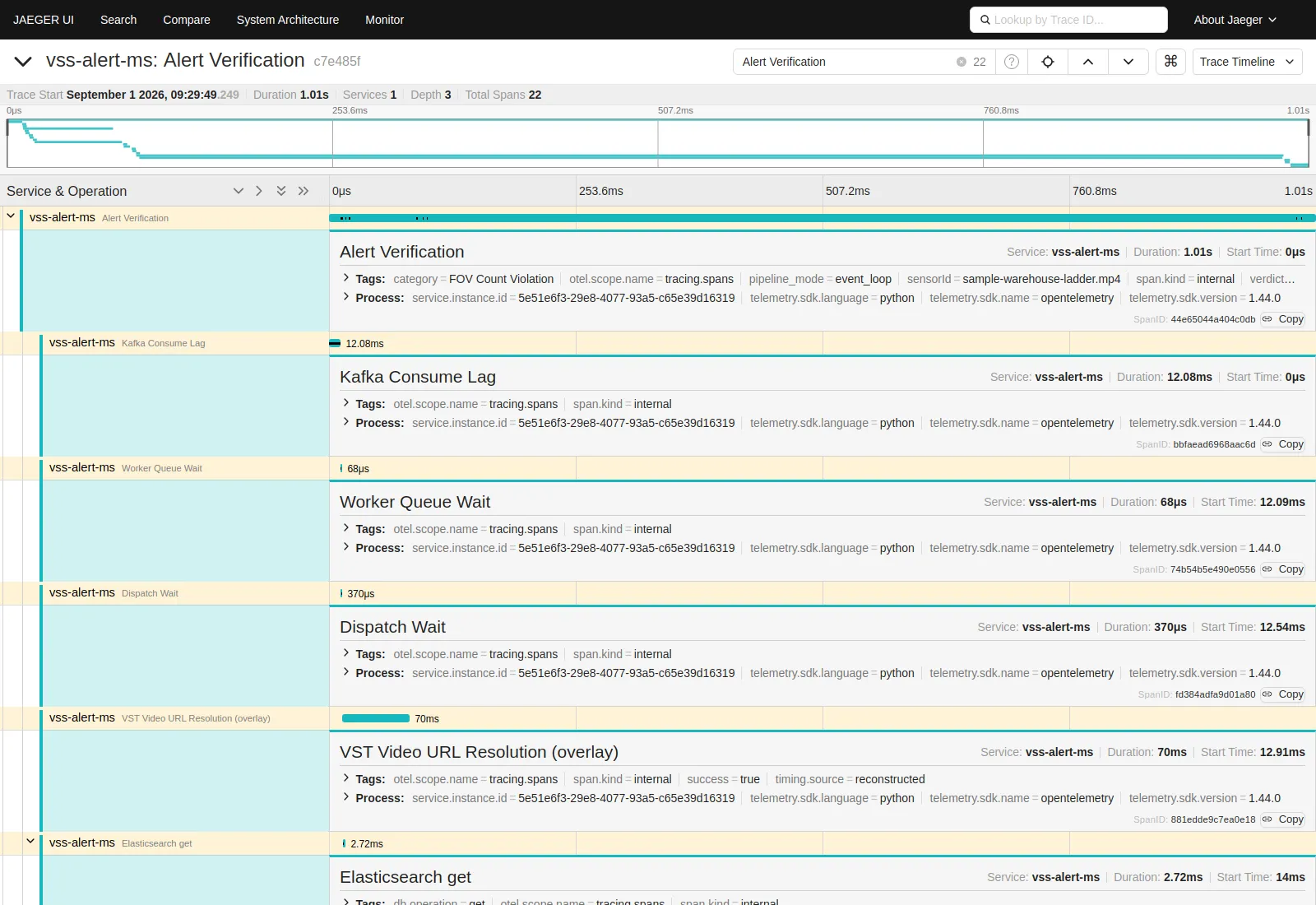
Each alert produces one root span, Alert Verification, covering the event from ingestion to sink completion. Child spans divide that interval.
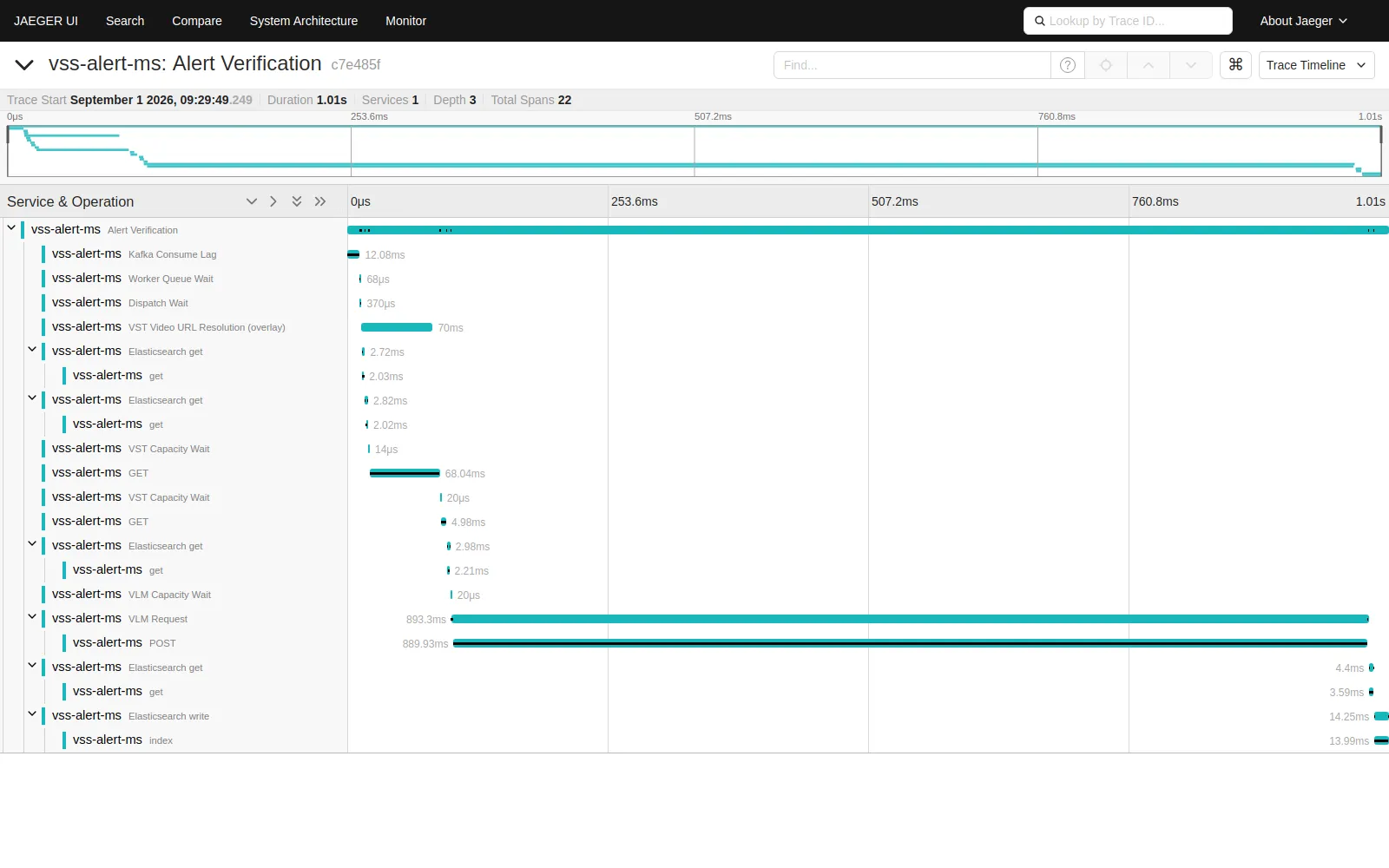
Dispatch Wait, the two Capacity Wait spans, and VLM Request are emitted by the event_loop pipeline, which is the shipped default. The synchronous path does not emit them.
Requests to the REST API produce their own server spans through FastAPI instrumentation, and outbound HTTP calls to VIOS (VST) and the VLM backend add client spans beneath whichever span is active.
Each span carries its attributes, such as category, sensorId, pipeline_mode, and verdict on the root span. Spans rebuilt from recorded timestamps carry timing.source=reconstructed.
Trace context
Trace context is read from Kafka records. When an upstream producer stamps a W3C traceparent header, the root span for that record continues the caller’s trace. One trace then spans the producer and the Alerts Microservice. Records without the header start their own trace. Each record uses its own header, so a batch carrying several callers is not collapsed onto one of them. REST requests carrying a traceparent header are joined the same way.
The same mechanism can join the Alerts Microservice with the Real-Time VLM microservice, which also exports OpenTelemetry traces. Neither path is wired today: the records it produces carry no traceparent header, and its HTTP server does not read the header that the Alerts Microservice sends on REST calls. Until one of them is added, the two services appear as separate traces in the same backend.
The current propagation boundaries are:
- Inbound: Kafka record headers and REST request headers.
- Outbound: HTTP calls to VIOS (VST) and the VLM backend carry the active trace context. The consolidation Kafka sink stamps
traceparenton the records it produces; other produce sites do not. - Not included:
vss_agentsdoes not stamptraceparenton the records it produces, and Elasticsearch requests do not carry trace context.
OpenTelemetry metrics
With tracing enabled, the microservice also exports three OpenTelemetry metrics on the same OTLP/HTTP connection. The collector exposes them in Prometheus format on port 8889, bound to 127.0.0.1 by default. No shipped profile scrapes the collector; the dev-profile-alerts profile does not deploy Prometheus. The alert_bridge_* metrics and the /metrics endpoint described above are unchanged. A Prometheus server you deploy can scrape the collector, the /metrics endpoint, or both.
Log correlation
Log lines written while a trace is active end with trace_id=<id> span_id=<id>. Use the trace_id with the Jaeger lookup by trace ID to open the trace for that log line. The IDs are appended for every alert, but the trace is present in Jaeger only when it was sampled. Log lines written outside a trace are unchanged.
Configuration
Tracing is switched on with an environment variable. The values below are the ones the Docker Compose deployment sets. A container run outside it keeps the service name vss-alert-ms and falls back to the OpenTelemetry SDK default endpoint on localhost:
In the Docker Compose deployment, each option is set through the matching ALERT_-prefixed variable in user-overrides.env. ALERT_ENABLE_OTEL_MONITORING sets ENABLE_OTEL_MONITORING, ALERT_OTEL_EXPORTER_OTLP_ENDPOINT sets OTEL_EXPORTER_OTLP_ENDPOINT, and so on. The container receives the unprefixed name.
Tracing behavior is tuned with these config.yml keys:
include_content records prompts, VLM responses, and video URLs in spans. Alert data may contain personally identifiable information, and video URLs may carry presigned access tokens. Do not enable it where the tracing backend is not equally protected.
Performance
In a recorded test, the microservice processed 39.24 events/s with tracing disabled and 35.31 events/s with tracing enabled at the shipped sampling_ratio of 0.1, about 10% lower. The test ran one pipeline process against the simulator rig under services/alert/test/functional/capability/, with no GPU, a simulated VLM, an offered rate of 120 events/s, and three 45-second repeats per arm. It measured the cost of producing telemetry; the exporters were set to none, so network and collector cost were not included. Results on other hardware and workloads will differ. Choose the sampling ratio by the trace volume and backend storage you need. To remove the overhead, disable tracing.
Configuration
The Alerts Microservice is configured via a YAML-based configuration file. The following tables describe key configuration parameters organized by category.
VIOS Configuration
Kafka Configuration
Event Bridge Configuration
VLM Configuration
For detailed VLM API documentation, refer to the Cosmos3 Nano Reasoner NIM.
The min_pixels and max_pixels parameters must be set in accordance with the VLM’s maximum context window.
VLM warmup runs automatically at startup by default and sends 3 inference rounds to prime the GPU model cache. To disable warmup entirely, set the environment variable VLM_WARMUP_ENABLED=false. To adjust the number of rounds, set vlm.warmup.num_requests in the config. The vlm.warmup.* parameters are optional; defaults work for most deployments.
Alerts Microservice Configuration
When always-on alerts are enabled, ALWAYS_ON_RULES_CONFIG must point to a
valid YAML file containing always_on_rules. There is no implicit file lookup
or fallback. A missing or invalid file fails service startup; a configuration
error encountered by the endpoint returns HTTP 503 with reason
CONFIG_ERROR.
Docker Compose handles the container path: it mounts the host file selected by
VLM_AS_VERIFIER_CONFIG_FILE_REALTIME, performs environment substitution into
/app/runtime/realtime-config.yml, and sets
ALWAYS_ON_RULES_CONFIG=/app/runtime/realtime-config.yml. Set
VLM_AS_VERIFIER_CONFIG_FILE_REALTIME in the profile override file when you
need a different rules source; do not set the container-internal path on the
host.
Event filter settings
The Alerts developer profile ships the following
alert_agent.event_filters values for the upstream alert-verification pipeline.
Durations are in seconds unless noted otherwise.
These are service-level verification filters, not tuning fields for
POST /api/v1/realtime. Real-time VLM rules tune their prompt and chunk cadence
in the request payload. Edit the profile config.yml and restart Alert Bridge
after changing event filters.
Elasticsearch Configuration
Prompt Configuration
The shipped default_system_prompt only guarantees that a system role is
present — it carries no verification framing of its own (no yes/no contract, no
domain guidance). Deployments that rely on it for more than one alert type
should override it with something verifier-oriented, or set system per alert
type. Note also that the opt-out is global: with a default configured, an
individual alert type cannot ask for no system message; clearing its
system_prompt puts it back on the default.
Logging Configuration
Upgrading from 3.2.x
Redis is no longer part of the service. Only the first row below has to be done before you upgrade — it is the one that stops the service from starting. The rest is cleanup you can do whenever.
A vss_params.vlm_params block in a request payload is a separate thing and is still honoured, so older clients keep working. New clients should send vlm_params at the top level.