

Video Analytics API
The Video Analytics API microservice is built using Node.js with Express.js as the web application framework. The service exposes multiple REST API endpoints.
These endpoints enable you to:
- Retrieve events and alerts
- Calculate metrics
- Access tracked objects across camera feeds
- Obtain behavior clusters
- Check the timestamp of the most recent data transmission
Additionally, the API supports configuration management through endpoints for inserting and retrieving configuration data.
Overview
The architecture of the API can be explained using the following block diagram.
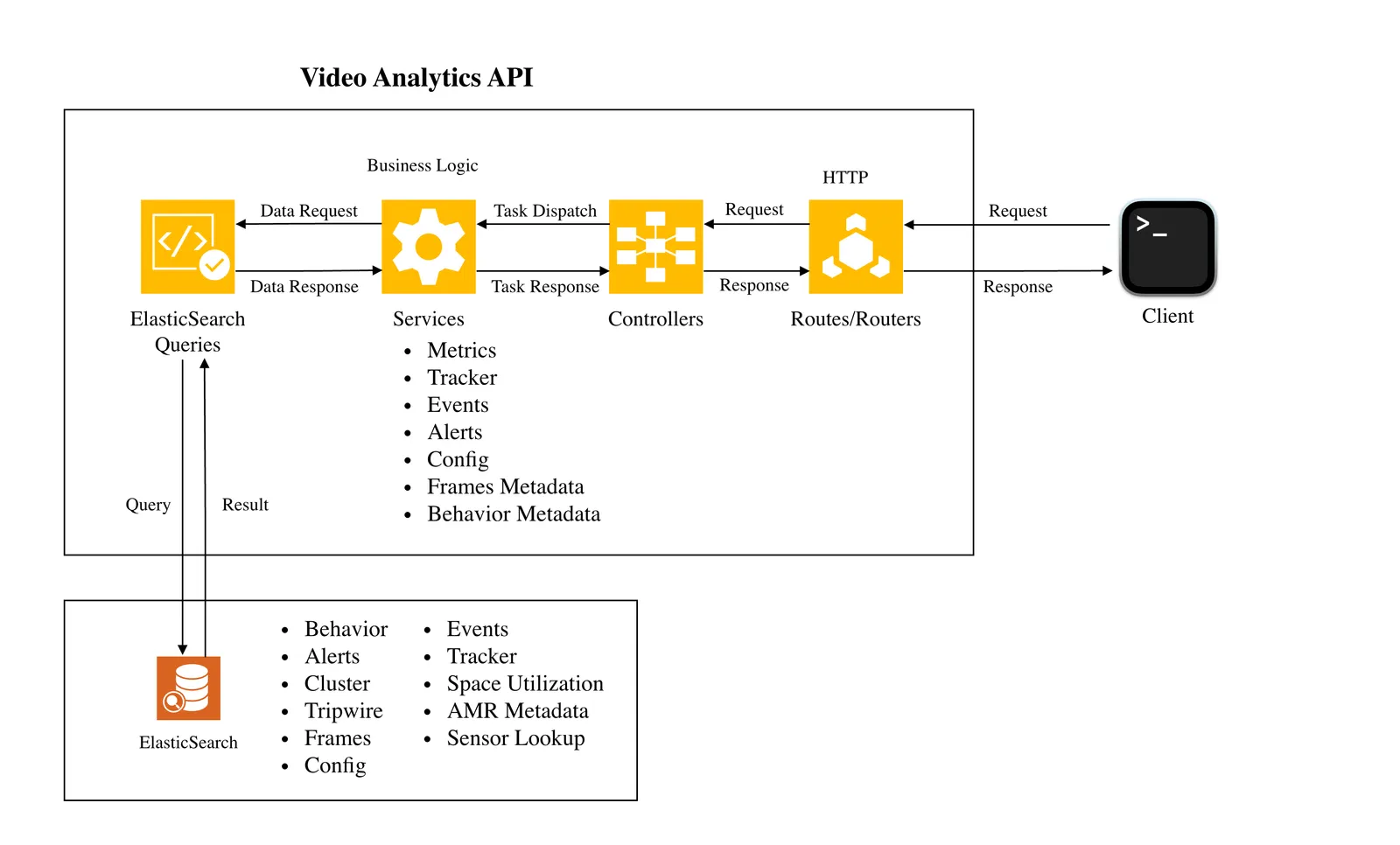
The data sent by sensor processing module is processed in streaming pipelines to create behavior, track objects across cameras and detect event/anomalies. The processed data is inserted into Elasticsearch. Video Analytics API comprises of REST API endpoints which queries Elasticsearch to obtain relevant data based on the input of client requests. To obtain real time data, certain endpoints use Kafka as their data source. Kafka is also used to handle notification related messages.
The response is aggregated (if required) and formatted appropriately before responding to clients.
Kafka is optional. If Kafka is not configured ("brokers": null) and a request is made to an API endpoint which uses it, an appropriate error message is returned in the response.
Base URL
For a Docker Compose deployment that includes the Video Analytics API, call it through either of these self-hosted base URLs at the default host ports:
- Direct service port:
http://<HOST_IP>:8081 - VSS ingress:
http://<HOST_IP>:7777/video-analytics-api
Append the endpoint paths in the API reference directly to either base URL. For
example, /alerts becomes
http://<HOST_IP>:7777/video-analytics-api/alerts through the ingress. HAProxy
removes the /video-analytics-api prefix before forwarding the request to the
service.
If you override VIDEO_ANALYTICS_API_HOST_PORT or HAPROXY_HOST_PORT, replace
the corresponding default port above with the configured value.
Configurations
API Bootstrap Config
The Utils.Config class of the web-api-core library initializes the default bootstrap config. You can override this config by passing either the entire config or a minimal config. The API reads the config while starting the server. It remains constant as long as the server runs. If anything needs to be modified then the server must be restarted.
The bootstrap config’s attributes are as follows:
When using Redis as the message broker instead of Kafka, set "brokers": null.
Calibration Config
Calibration file is generated either by the Calibration Toolkit or by Omniverse’s Calibration tool. See Calibration for more details.
Library
Overview
The web-api-core library consists of four namespaces.
- Metrics
- Errors
- Services
- Utils
Each namespace consists of classes which helps to either compute metrics, get records from database or provide utilities with helper functions.
Metrics
The Metrics namespace consists of following classes:
Behavior: Used to compute metrics related to behavior.TripwireEvent: Used to find the total number of events (eg: effective and actual tripwire crossing events) that have occurred. It is also used to compute Tripwire Histogram.LastProcessedTimestamp: Used to find the timestamp of last processed object.Occupancy: Used to find current occupancy of a place based on tripwire events. It also enables to reset occupancy. It helps in computing the average occupancy/histogram for objects in FOV and ROI.SpaceUtilization: Used to compute space utilization metrics like histogram.
Errors
The Errors namespace consists of following classes:
BadRequestError: Error to be used when the request sent by client is a Bad Request.IndexNotFoundError: Error to be used when Elasticsearch index is not found.InternalServerError: Error to be used when there is a server side error.InvalidInputError: Error to be used when the input is not valid.ResourceNotFoundError: Error to be used when a resource is not found.ServiceUnavailableError: Error to be used when a service is not available.
Services
The Services namespace consists of following classes:
Alerts: Used to fetch alerts and indicate if a place or a sensor has severe alerts. Also supports fetching VLM-verified alerts and severe alerts detection.Behavior: Used to fetch behavior, a behavior’s timestamp or to calculate a behavior’s start and end pts.Calibration: Used to upload/insert, update or delete sensors in calibration. It is also used to produce/consumer Kafka messages. It can also be used to upload/retrieve calibration related images.Clustering: Used to obtain behavior cluster. It is also used to add cluster labels.ConfigManager: Used to update the configs of other microservices. It is also used to obtain the current config of a microservice.Events: Used to fetch events data (eg: tripwire).Frames: Used to fetch clusters of objects which are in proximity of each other. Also used to fetch raw, enhanced and bev frames. It is also used to fetch frame based alerts. It is used to calculate pts and also fetch object with max confidence.Incidents: Used to fetch incidents and indicate if a place or a sensor has severe incidents. Also supports fetching VLM-verified incidents and severe incidents detection.MTMC: Used to obtain unique object and unique object counts. It can also be used for Query-by-Example (QBE) and to obtain locations of matched behaviors.NotificationManager: Used to produce and consume notification messages.Place: Used to build aggregation queries for places, including sensor ID aggregation for leaf places and place successor aggregation for non-leaf places.RoadNetwork: Used to upload and retrieve road network config.Sensor: Used to lookup which sensors are overlooking a coordinate of a place.UsdAssets: Used to upload and retrieve USD assets config.
Utils
The Utils namespace consists of following classes:
Config: Provides the utility which initializes server config with default values. It also reads the bootstrap config provided by user which is used to override config values.Database: Wrapper class for various databases.Elasticsearch: Utilities related to Elasticsearch are provided in this class.FileUploadHandler: Provides helper functions related to file uploads.Histogram: Provides helper functions related to histogram.Kafka: Utilities related to Kafka are provided in this class.MessageBroker: Wrapper class for various message brokers.Utils: Provides helper functions used by Video Analytics API.Validator: Utilities which help to validate inputs are provided in this class.
API
Documentation
Refer to the Video Analytics API Reference.
The following sections describe the various API endpoints along with their respective sequence diagrams.
Frame Based Alerts
Library Usage
The web-api-core package has function which helps to retrieve frame based alerts.
For example:
In the above example, getAlerts is an async function which returns confined area, restricted area and proximity alerts.
The confined area alert occurs when one of the confined object types moves out of the ROI. Similarly, the restricted area alert occurs when one of the restricted object types enters the ROI. The proximity alert occurs when one object of type ‘x’ is closer to another object of type ‘y’ than the defined proximity threshold config.
REST API
Sequence Diagram
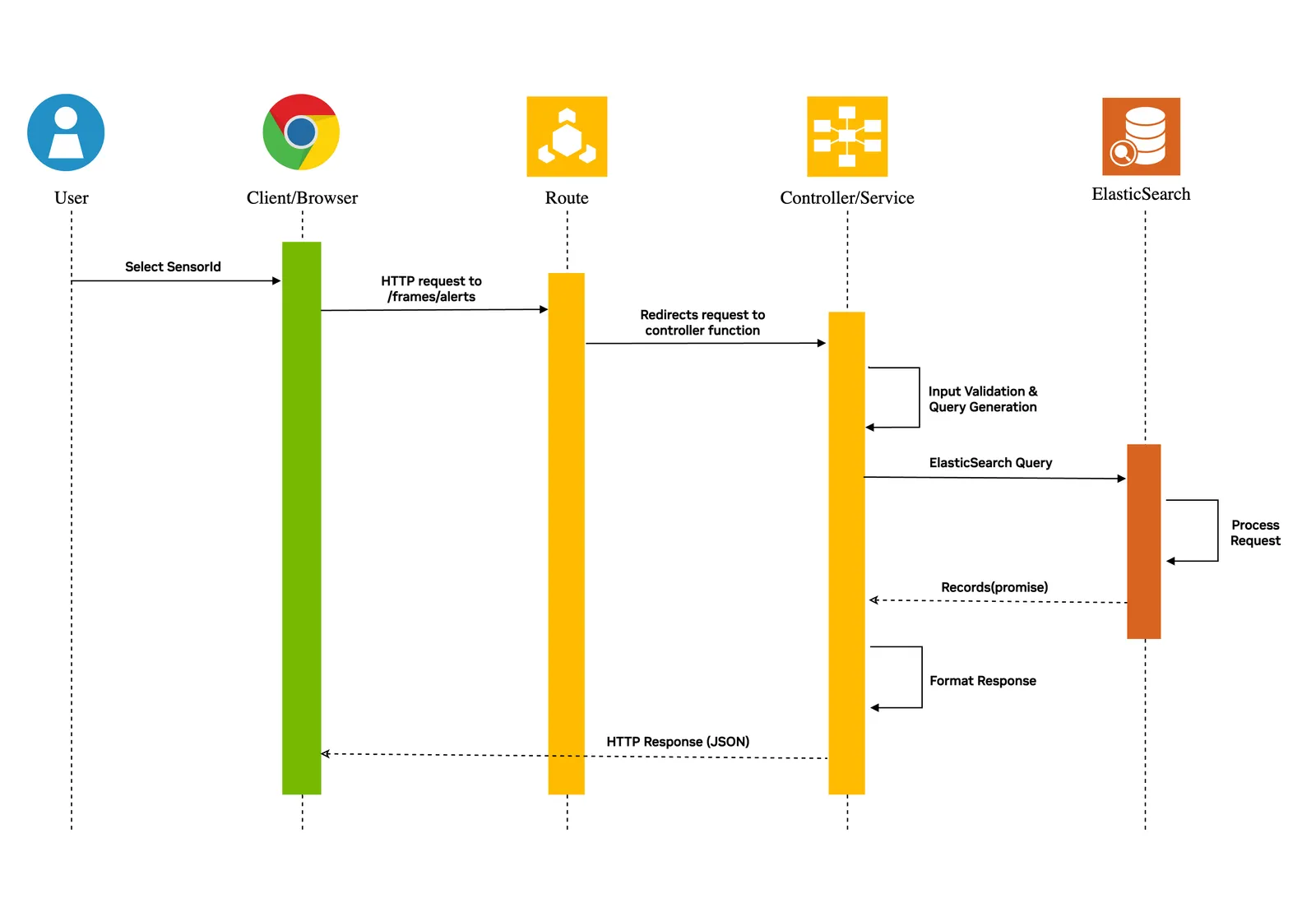
The http request sent to the /frames/alerts route is redirected to the controller function where the query input is validated and an Elasticsearch query object is generated. The Elasticsearch is queried as a promise (async call) which then responds with results. The results are formatted appropriately and sent back to the client.
Multi Camera Tracking: Unique Objects
Library Usage
The web-api-core package has function which helps to retrieve unique objects tracked across sensors.
For example:
In the above example, getUniqueObjects is an async function which returns unique objects which were identified by MTMC microservice.
REST API
Sequence Diagram
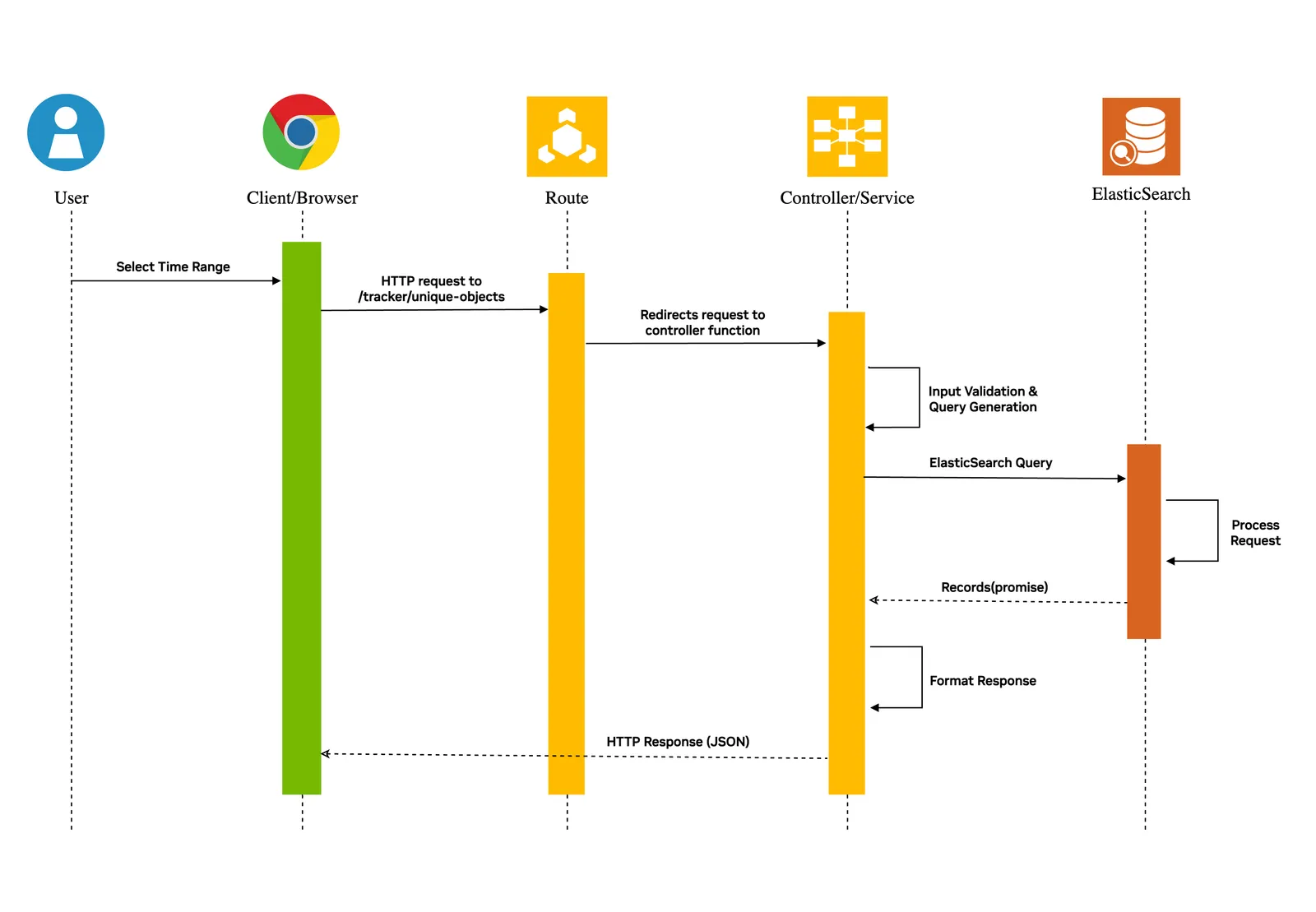
The http request sent to the /tracker/unique-objects route is redirected to the controller function where the query input is validated and an Elasticsearch query object is generated. The Elasticsearch is queried as a promise (async call) which then responds with results. The results are formatted appropriately and sent back to the client.
The query parameter ‘place’ sent as part of request is a hierarchy of places. For example, a room of a building located in a particular city will be in the following format: city=abc/building=pqr/room=xyz.
Tripwire Events
Library Usage
The web-api-core package enables the user to retrieve tripwire events. For example:
In the above example getTripwireEvents is an async function which returns tripwire events.
REST API
Sequence Diagram
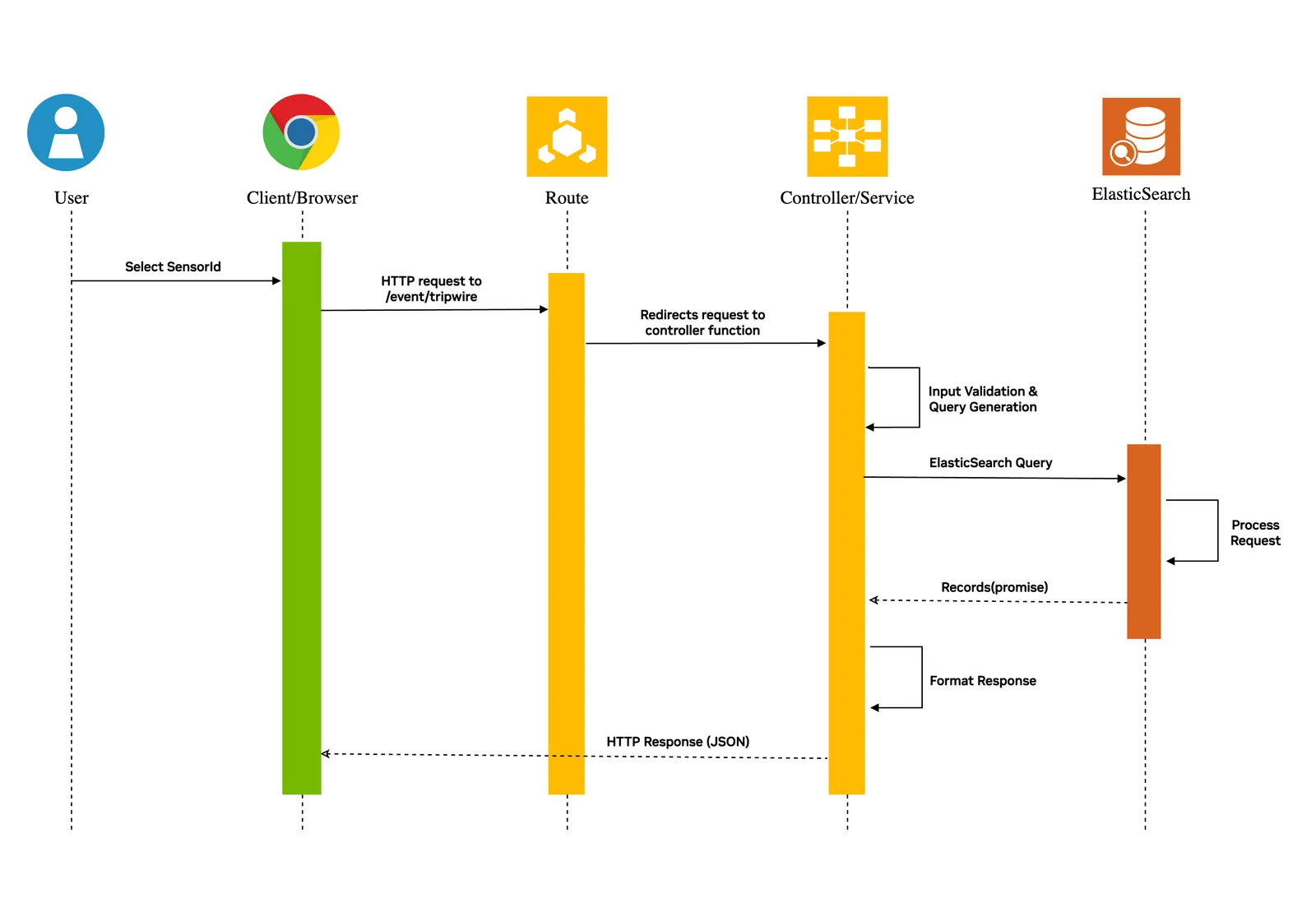
The http request sent to the /events/tripwire route is redirected to the controller function where the query input is validated and an Elasticsearch query object is generated. The Elasticsearch is queried as a promise (async call) which then responds with results. The results are formatted appropriately and sent back to the client.
The query parameter ‘place’ sent as part of request is a hierarchy of places. For example, a room of a building located in a particular city will be in the following format: city=abc/building=pqr/room=xyz.
Metrics: Tripwire Counts
Library Usage
The web-api-core package has helpful functions which can be used to calculate Tripwire related metrics.
For example:
In the above example, getTripwireCounts is being used to get tripwire counts for each tripwire of sensor abc. It is also used to get effective tripwire counts for each tripwire of sensor abc.
Effective counts are used to count only the effective event generated by an object. An effective tripwire event can be defined with the following example: Suppose an object generates tripwire events in the following sequence: IN --> OUT --> IN, then the effective count in this case considers only the final IN event. This is helpful to handle loitering behavior of an object.
REST API
- The http request sent to the /metrics/tripwire/counts route is redirected to the controller function where the query input is validated and an Elasticsearch query object is generated.
- The Elasticsearch is queried as a promise (async call) to calculate detailed count and effective count for each tripwire of the sensor.
- The API receives the result for both the queries which is formatted appropriately before sending the response to the client.
Example:
A client sends a request to obtain tripwire counts of sensorId abc which has 2 tripwires.
Let’s assume the query was sent for the time period t1 - t2 when tripwire-id-1 had IN, OUT and IN events produced by the same object and tripwire-id-2 had a single IN event.
Then the response in this scenario should look as follows:
The count attribute in the above response is the effective count of events.
The query parameter ‘place’ sent as part of request is a hierarchy of places. For example, a room of a building located in a particular city will be in the following format: city=abc/building=pqr/room=xyz.
Other API Endpoints
The following grid groups the REST endpoints by controller area. Endpoints that have detailed sections above are included for completeness. For full request and response schemas, see the Open API specification.
Skill
The vss-setup-video-analytics-api Agent Skill deploys the Video Analytics API
microservice standalone - without the perception layer, Behavior Analytics,
agent, or UI - by editing the existing
<repo>/deploy/docker/services/analytics/video-analytics-api/compose.yml and
bringing up only the vss-video-analytics-api container. Use it when you want to run the REST API
against an existing Elasticsearch cluster, point it at a different Kafka broker,
switch to a custom bootstrap config, or expose the API layer without redeploying
the full warehouse blueprint stack.
The Skill is published in the skills/deployment/vss-setup-video-analytics-api folder of the VSS Blueprint repository.
Install it the same way as any other VSS Agent Skill - see
Installing Skills for the catalog-wide install flow.
When to invoke
Ask your coding agent (Claude Code or Codex) for any of the following:
- “Deploy video analytics api” or “run video-analytics-api standalone”
- “I just want to run the REST APIs of video-analytics-api, not the full stack”
- “Use my own video-analytics-api config”
- “Point the Video Analytics API at a different Elasticsearch / Kafka”
- “Start the Video Analytics API without Kafka” or “run the Video Analytics API broker-less”
- “Check what REST endpoints are available in the Video Analytics API”
What the Skill walks through
The Skill drives the operator through four decisions, then deploys:
- Config (required) - choose the image-baked default, the
service-shipped config, or a custom JSON file. The config is passed to the
Node.js server with
--configand controlsserver,elasticsearch, andkafkabootstrap settings.
-
Data log volume (optional) - keep or remove the
$VSS_DATA_DIR/data_log/vss_video_analytics_api:/web-api-app/filesmount. It is needed for file-upload endpoints such as calibration images and sensor assets. Without the mount, uploads write to the container’s ephemeral filesystem. -
Infrastructure dependencies - Elasticsearch is required because the server pings
elasticsearch.nodeduring startup and exits if it cannot connect. Kafka is optional; setkafka.brokerstonullor[]to run without a broker. -
Deploy and verify - export
VSS_APPS_DIRfrom<repo>/deploy/docker, startvss-video-analytics-apiwith Docker Compose, inspect the logs for the server listening message, and verifyGET /livezon the configured port.
Kafka-dependent runtime features
When the API is running and a Kafka broker is reachable, the Skill can also
walk through the runtime features that depend on mdx-notification:
- Dynamic config - API
/configrequests publishupsertmessages with Kafka keybehavior-analytics-config. The Behavior Analytics service ACKs the update, and the API exposes status through its config-update status endpoint. - Dynamic calibration - calibration upload/update/delete requests publish
calibrationnotifications supportingupsert-all,upsert, anddeleteactions for downstream analytics consumers. - RTLS / AMR - the API consumes real-time location and AMR messages from Kafka and serves them through the tracker-related REST endpoints.
Example
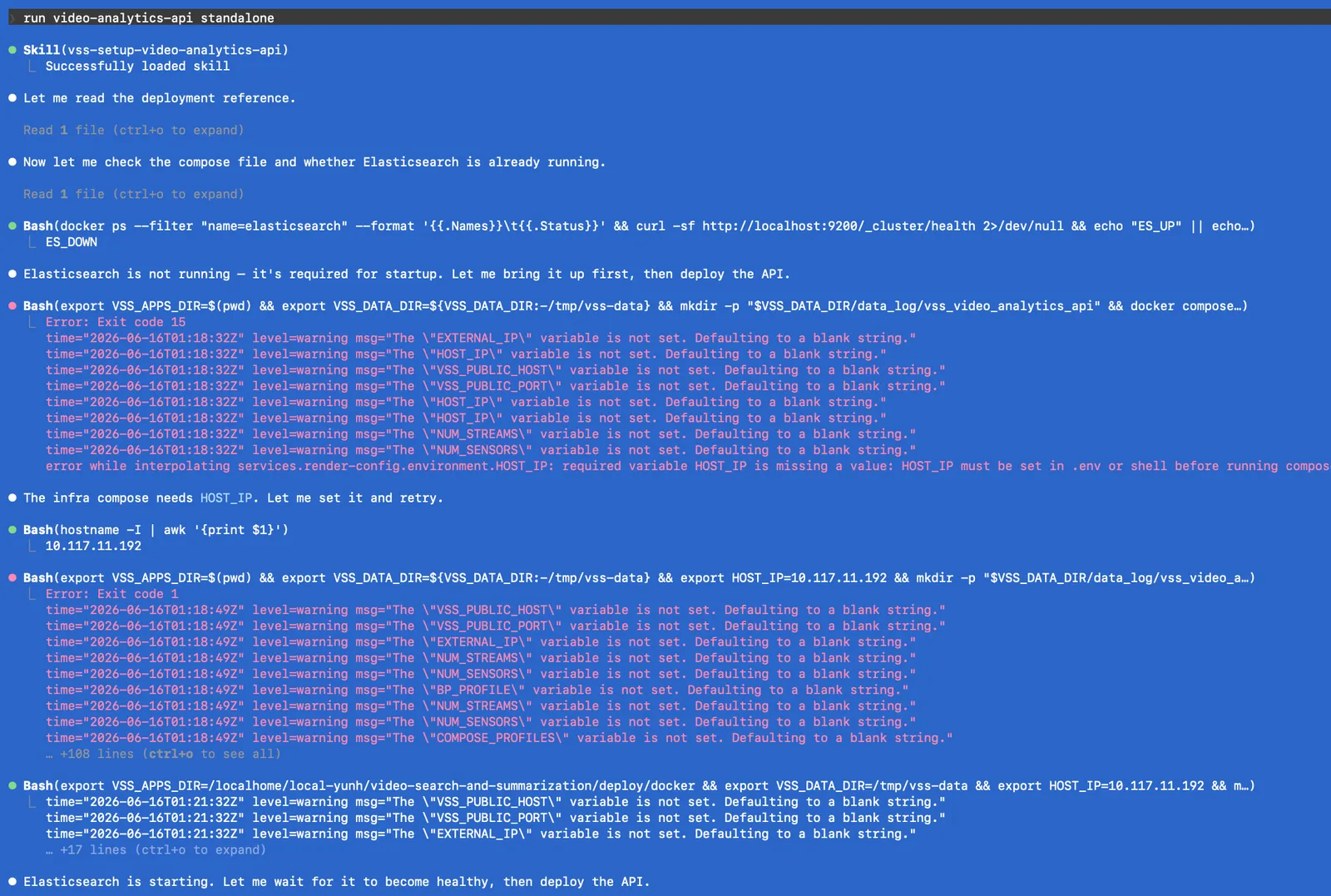
After installing the vss-setup-video-analytics-api skill, drive it from
your coding agent.
After you satisfy the prerequisites, a run video-analytics-api standalone
prompt tells the coding agent to follow the Skill workflow:
- Choose the deployment settings. Select
STREAM_TYPE, a bootstrap config, and whether to keep the data-log volume. - Confirm the prerequisites. Elasticsearch and the
insertion-timestamp-pipelinemust be ready. WhenSTREAM_TYPE=kafkaandkafka.brokersis non-empty, the configured brokers and the required Kafka topics must also be ready. - Prepare the Compose environment. Set
VSS_APPS_DIRto<repo>/deploy/docker, setVSS_DATA_DIRto a writable host directory, and create$VSS_DATA_DIR/data_log/vss_video_analytics_apiwhen retaining the default data-log mount. - Deploy the API. Bring up only the
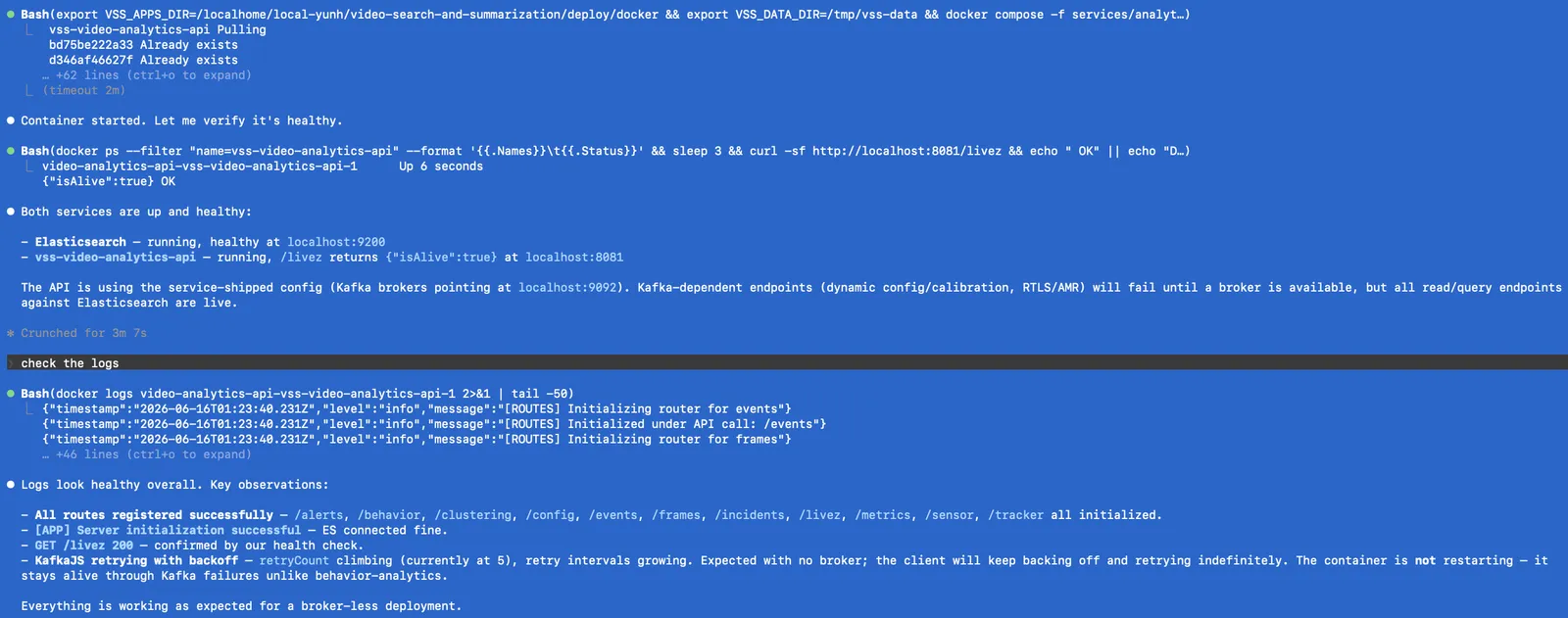
vss-video-analytics-apicontainer from<repo>/deploy/docker/services/analytics/video-analytics-api/compose.yml. - Verify.
GET /livezreturns{"isAlive": true}and the server log shows[APP] Server initialization successfulwith every router (/alerts,/behavior,/clustering,/config,/events,/frames,/incidents,/livez,/metrics,/sensor,/tracker) initialized.
With the service-shipped config, kafka.brokers is ["kafka:29092"]. When
STREAM_TYPE=kafka and brokers are configured, the server waits for the
broker and the required Kafka topics before it registers routes and binds port
8081. If Kafka is unreachable or a required topic is missing, /livez and
all other API endpoints remain unavailable, although the container can remain
running while it waits. For a broker-less deployment, select
STREAM_TYPE=redis or set kafka.brokers to null or [] in a custom
config.
For the standalone-service walkthrough, configuration field guide, deploy and
verify commands, endpoint summary, and troubleshooting guidance, refer to the
Skill’s bundled references under
skills/deployment/vss-setup-video-analytics-api/references/ in the VSS Blueprint
repository.