

Video Summarization
Overview
Video Summarization is a microservice that uses Vision-Language Models (VLMs) and Large Language Models (LLMs) to extract insights from uploaded videos and live streams. The system provides REST API and Model Context Protocol (MCP) interfaces for video processing and summarization.
The Video Summarization microservice segments long-form media, generates VLM captions or structured events, stores the results, and produces concise summaries that preserve timestamped evidence.
Key Features
The Video Summarization microservice operates by analyzing media and generating structured, machine-readable output. The primary output includes timestamped events and a high-level summary, allowing users to identify when specific actions, object appearances, or scene changes occurred.
High Customizability and Model Flexibility
A defining feature of the Video Summarization microservice is its high degree of customization, particularly regarding the underlying language and vision models it employs.
- OpenAI Compatibility: The service is designed for maximum interoperability, allowing users to select and integrate any OpenAI compatible Vision-Language Model (VLM) or Large Language Model (LLM). This flexibility ensures that users can leverage the latest and most suitable models for their specific summarization needs and quality requirements.
- RTVI-VLM video inferencing: Per-chunk and live-stream video inferencing is delegated to the Real-Time VLM (RTVI-VLM) microservice. RTVI-VLM supports Cosmos Reason3, Nemotron Nano Omni, and Qwen 3.5 base models through its proxy and openai-compat modes, so operators can pick the best-fit VLM without rebuilding the Video Summarization microservice.
- Nemotron Nano Omni model support in RTVI-VLM and the Video Summarization microservice is limited to integration testing and sanity coverage in this release. It has not undergone full production-level validation. Operators should evaluate model quality on their own workloads before deploying to production.
- For the full list of supported VLM checkpoints, precision options, and configuration details, see Models Supported in the Real-Time VLM documentation.
Data Persistence and Management
The integrity and accessibility of the processed data are managed through a configurable database layer.
- Configurable Database: Processed summaries, extracted events, captions, and associated metadata are stored in a dedicated database. Four backends are selectable — Elasticsearch (the default), Milvus, ArangoDB, and Neo4j. Only Elasticsearch is provisioned inside the compose stack; the others are selected by pointing the microservice at an instance you run. See Database Backends for the selectors and connection variables.
Access and Integration Methods
To ensure broad applicability and seamless integration into diverse workflows, the Video Summarization microservice exposes multiple methods for access and interaction.
- REST API: The service provides a standard RESTful Application Programming Interface (API). This allows users to connect to the Video Summarization microservice using programmatic scripts and traditional software integrations, making it ideal for back-end systems and custom applications.
- Model Context Protocol (MCP): In addition to the REST API, the Video Summarization microservice exposes an MCP interface for AI agents and orchestration systems.
Architecture
The Video Summarization microservice supports two deployment profiles: Summarization Base Profile and Summarization with Streaming and Message Bus. The base profile handles file summarization in-process; the streaming profile adds a Kafka message queue and a Logstash consumer service to decouple raw VLM events from the orchestrator and enables RTSP live-stream summarization.
Summarization Base Profile
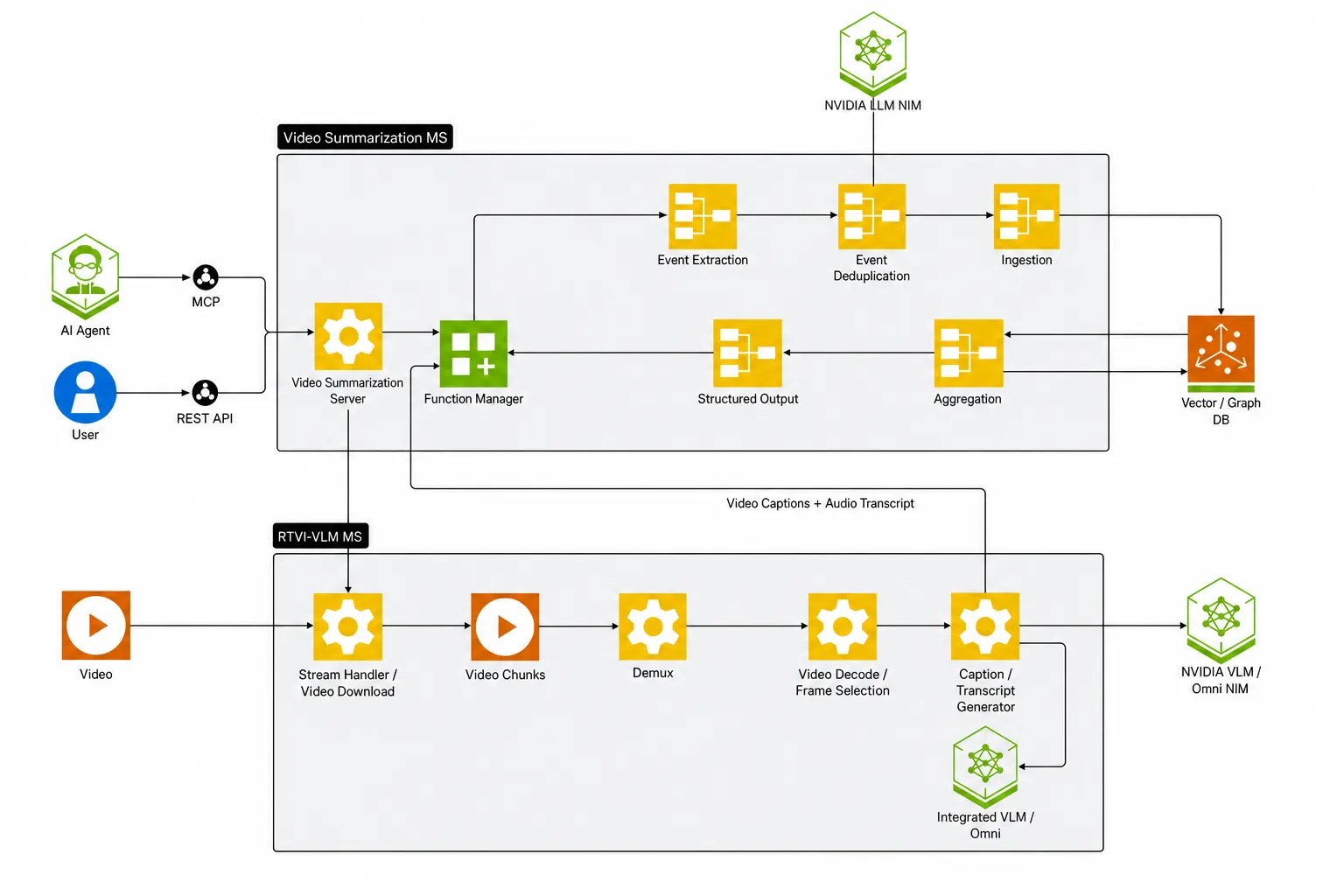
Scenario 1 — File summarization, base profile. The client uploads a video file via REST or MCP. The Video Summarization microservice segments the video into chunks and forwards each chunk to the RTVI-VLM service for inference. RTVI-VLM returns per-chunk events synchronously over Server-Sent Events (SSE); the Video Summarization microservice calls the CA-RAG pipeline in-process to write events to Elasticsearch and aggregate them with the summarization LLM. The structured summary and timestamped events are returned in the HTTP response. The Kafka message queue is disabled in this profile (KAFKA_ENABLED=false).
Summarization with Streaming and Message Bus
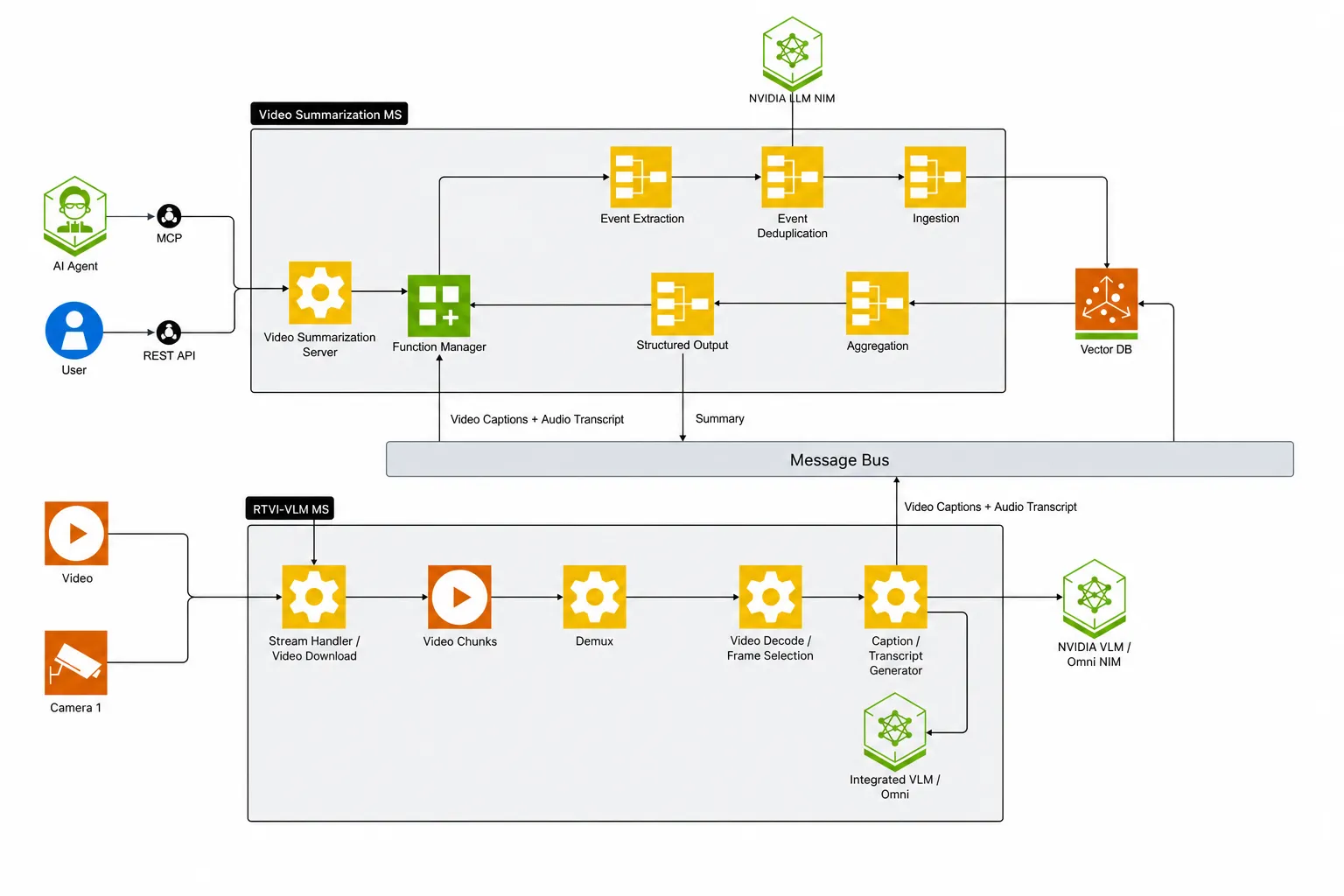
In this profile a Kafka message queue carries raw VLM events and aggregated summaries between RTVI-VLM, the Video Summarization microservice, and Elasticsearch. A Logstash consumer service subscribes to the Kafka topics, decodes the protobuf payloads, normalizes their fields, and indexes the documents into Elasticsearch (default_<asset_id>). RTSP live-stream summarization is supported only in this profile.
Scenario 2 — File summarization with streaming and message bus. The client request is identical to Scenario 1, but RTVI-VLM publishes per-chunk raw events to the Kafka topic mdx-vlm-captions instead of returning them in-process. The Logstash consumer service indexes the events into Elasticsearch. The LVS_CAPTION_SOURCE environment variable controls where the Video Summarization microservice reads captions for aggregation: sse (default) uses the captions received in-process via the RTVI SSE response, while db retrieves captions from the Elasticsearch index populated by the Kafka → Logstash → ES pipeline. In both modes, after the RTVI-VLM SSE stream completes, the Video Summarization microservice waits kafka_consumer_settle_secs (default 5 seconds) so Logstash can flush the last chunk, then aggregates through CA-RAG and publishes the structured events and aggregated summary to the mdx-structured-events-summary topic for Logstash to index.
Scenario 3 — RTSP live-stream summarization with streaming and message bus. Live-stream summarization uses two dedicated APIs instead of the file-only POST /v1/summarize endpoint. The client first calls POST /v1/stream/add on RTVI-VLM with the RTSP URL (no inference yet). In phase 1, the client issues POST /v1/generate_captions on the Video Summarization microservice with the stream ID, model, and prompt parameters (scenario, events, objects_of_interest). The Video Summarization microservice builds the VLM prompt, calls RTVI-VLM to start captioning, and returns immediately with {status: "accepted"}. RTVI-VLM begins captioning frames continuously and publishes raw events to the Kafka message queue, which the Logstash consumer service indexes into Elasticsearch. In phase 2, the client calls POST /v1/stream_summarize with the stream ID and an optional start_time/end_time window. The Video Summarization microservice reads the captions from Elasticsearch, aggregates them via CA-RAG, publishes the structured events and aggregated summary to the mdx-structured-events-summary Kafka topic, and returns the summary synchronously.
Core Components
The Video Summarization microservice consists of the following core components:
- Video Summarization REST Server: FastAPI-based REST API server.
- Video Summarization MCP Server: Model Context Protocol server for AI agent integration.
- RTVI-VLM: Real-Time VLM service used for per-chunk and live-stream video inferencing.
- CA-RAG Pipeline: Context-aware retrieval and generation system that orchestrates event aggregation and summarization.
- LLM NIM: NVIDIA Inference Microservice for the summarization LLM.
- Data Store: Elasticsearch by default for storing extracted events, captions, and aggregated summaries, with Milvus, ArangoDB, and Neo4j available as alternative backends.
- Kafka Message Queue (Summarization with Streaming and Message Bus profile only): Carries raw VLM events on the
mdx-vlm-captionstopic and aggregated summaries on themdx-structured-events-summarytopic. - Logstash Consumer Service (Summarization with Streaming and Message Bus profile only): Subscribes to the Kafka topics, decodes the
nv.VisionLLMprotobuf payloads, normalizes field types, and indexes the documents into Elasticsearch.
Getting Started
Prerequisites
- Docker and Docker Compose
- NVIDIA GPU(s) with appropriate drivers
- NGC API Key (for NVIDIA NIMs)
Migrating from 3.2.x to 3.3.0
Review the following changes before you reuse a 3.2.x deployment configuration with Video Summarization 3.3.0.
Update Required
- Replace
KAFKA_TOPICwithMESSAGE_BUS_TOPICin your.envfile when you use the streaming profile. The default topic remainsmdx-vlm-captions.MESSAGE_BUS_TOPICconfigures the Logstash and RTVI-VLM services; the Video Summarization server does not read either variable. - Update
LVS_LLM_MODEL_NAMEfrom the removedopenai/gpt-oss-20bmodel tonvidia/nemotron-3.5-lightning-30b-a3b, or to another LLM that your deployment provides. The 3.3.0 deployment rejects the removed model name. - If you use
services/video-summarization/docker/deploy/compose.yamlwith thertviprofile, setVLM_MODEL_TO_USEexplicitly. For a local model, also setMODEL_PATH. For an OpenAI-compatible endpoint, setVIA_VLM_ENDPOINTand its required API key. This standalone service Compose profile now rejects missing RTVI-VLM configuration at startup. The top-level blueprint profile underdeploy/dockerretains itsopenai-compatdefault. - Replace
LVS_ENABLE_LLM_MERGEwithLVS_ENABLE_LLM_MERGING. The former name appeared in earlier documentation but is not read by the service.
New Environment Variables
LVS_AGGREGATION_EMPTY_RETRIESsets the number of additional CA-RAG aggregation attempts when a response contains neither events nor a video summary. The default is2. Set it to0to retain the 3.2.x single-attempt behavior.MESSAGE_BUSselects the RTVI-VLM message bus, andERROR_BUSselects its error bus. Both default tokafkain the streaming profile.MESSAGE_BUS_TOPICreplacesKAFKA_TOPICfor the raw VLM event topic and defaults tomdx-vlm-captions.
The in-stack RTVI-VLM profile also forwards the new Adaptive EVS settings
VIA_EVS_SESSION, VLM_VIDEO_PRUNING_RATE,
VLLM_EVS_SIMILARITY_THRESHOLD, VIA_EVS_TOKEN_BUDGET, and
VIA_EVS_MAX_SESSIONS. For supported models, defaults, and behavior, refer to
Efficient Video Sampling (EVS and Adaptive EVS) in the
Real-Time VLM
documentation.
Removed Environment Variables
KAFKA_TOPICis no longer read by the 3.3.0 stack. UseMESSAGE_BUS_TOPIC.VSS_DISABLE_DECODER_REUSEis no longer read by the Video Summarization service. Remove it from carried-over configurations.
API Changes
POST /v1/chat/completionsadds question answering for assets that were summarized withenable_qa=true.DELETE /assets/{asset_id}/indexadds an idempotent way to reclaim a retained per-asset Elasticsearch index. For automatic and manual cleanup behavior, refer to the Asset Management API.POST /summarizeandPOST /v1/summarizenow return HTTP 422 whenmedia_info.start_offsetis greater than or equal tomedia_info.end_offset, or whenmin_tokensis greater thanmax_tokens. In 3.2.x, these requests could return HTTP 200 with an empty result.- The development-only
GET /filesendpoint now returns HTTP 422 for an unsupportedpurposevalue instead of HTTP 200 with an empty list. - Responses omit
media_info.start_offsetandmedia_info.end_offsetwhen either value is unavailable, nonnumeric, or not a strictly increasing range. Update clients that assume both keys are always present. POST /summarizeandPOST /v1/stream_summarizeaccept an inboundtraceparentheader and link the request to the caller’s distributed trace.
Functionality Changes
- Video Summarization now uses CA-RAG 3.1.0 instead of CA-RAG 3.0.1.
- Aggregation retries only when CA-RAG returns neither events nor a video summary. A response that has no events but has a summary is not retried.
- The service always forwards
scenarioandeventsto CA-RAG, including whenenable_vlm_structured_outputis enabled. - The 3.3.0 RTVI-VLM profile supports optional Adaptive EVS video token pruning to reduce redundant visual input and per-chunk inference time.
- The Elasticsearch index retention default is unchanged. The Compose
configuration retains per-asset indices by default, and the service drops
them after file summarization when
LVS_DISABLE_DB_RESET_ON_REQUEST_DONE=false. The new asset-management API provides explicit cleanup for retained indices. - The RTVI-VLM client closes the caption-stream HTTP response after processing to prevent a long-running file descriptor and memory leak.
Deployment
Clone the Repository
Build the Container Image
The Video Summarization compose stack uses a locally built image
(via-engine-<username>). Build the image before bringing up the stack.
Use the ARM_PLATFORM variable to select the ARM64 build variant.
x86 (amd64) build:
The following command is for x86 (amd64) architecture only:
DGX Spark / SBSA / Grace (server-class ARM64) build:
Set ARM_PLATFORM=sbsa to build the SBSA image variant. This is the variant
required on DGX Spark (GB10):
Jetson / IGX-AGX Thor / Tegra (ARM64 iGPU) build:
Set ARM_PLATFORM=igpu to build the integrated-GPU ARM64 image variant:
The container image tag must match the host CPU platform. Pre-built images
are published as nvcr.io/nvidia/vss-core/vss-video-summarization:3.3.0
for x86 and Jetson Thor, and
nvcr.io/nvidia/vss-core/vss-video-summarization:3.3.0-sbsa for DGX Spark
/ SBSA / Grace. When building from source, select the matching
ARM_PLATFORM value: sbsa for DGX Spark / Grace, igpu for Jetson /
Thor.
For the full developer workflow, deploy the Video Summarization profile as described in Video Summarization agent workflow.
Video Summarization microservice is deployed via the docker-compose stack at docker/deploy/compose.yaml. Two deployment profiles are supported:
- Summarization Base Profile — file summarization without a Kafka message queue.
- Summarization with Streaming and Message Bus — file and RTSP live-stream summarization with a Kafka message queue and Logstash consumer service.
Use standalone deployment when you need to run only the Video Summarization server against existing Elasticsearch, LLM, and VLM services. A slimmer single-container option is documented under Standalone Container (Advanced) for operators who already run RTVI-VLM, the LLM NIM, and Elasticsearch externally.
Build the container image as described in the Build the Container Image section above before bringing up the stack. The RTVI-VLM image is pulled from NGC automatically.
Summarization Base Profile
This profile deploys Video Summarization microservice, RTVI-VLM, and Elasticsearch with the Kafka message queue disabled. Use it for file summarization workloads.
Prerequisites
- Docker Engine 28.3.3+ and Docker Compose v2.39.1+
- NVIDIA Container Toolkit
- NVIDIA GPU(s) with appropriate drivers
- External LLM NIM service (for summarization) — configured via
LVS_LLM_HOSTandLVS_LLM_PORT
Environment Setup
Create a .env file from the variables below. The standalone Compose stack does not ship a committed .env. For an integrated VSS deployment, use the lvs developer profile and the native Docker Compose procedure in Long Video Summarization.
Edit .env and set the following key variables:
Bring Up the Stack
Before starting the Video Summarization MS, query the external LLM NIM and
copy its exact model ID into LVS_LLM_MODEL_NAME in .env. Replace the URL
placeholders with the LVS_LLM_HOST and LVS_LLM_PORT values configured above:
The Compose --env-file option does not export variables into your shell.
Restart the Video Summarization MS after changing its configured model ID.
Verify Service Health
Before submitting a request, retrieve the deployed RTVI-VLM model ID for the
request’s model field. Replace the port placeholder with the RTVI_VLM_PORT
value configured in .env (8420 in this example):
Test the API
Submit a sample file summarization request:
Replace <video-server-ip> and <port> with your video server address.
Tear Down the Stack
Summarization with Streaming and Message Bus
This profile adds a Kafka message queue and a Logstash consumer service to the base profile. It is required for RTSP live-stream summarization, and is also recommended for file summarization when end-to-end Kafka publish-back is desired (for example, to feed downstream consumers off the mdx-structured-events-summary topic).
Prerequisites
- Same as the base profile, plus the host ports for the in-stack Kafka broker (
KAFKA_PORTandKAFKA_EXTERNAL_PORT) must be free.
Environment Setup
Source the values from .env for this profile. The diff from the base profile is:
The checked-in services/video-summarization/config/config.yaml already reads
KAFKA_ENABLED from the environment and sets
kafka_consumer_settle_secs: 5.0. Compose mounts that file at
/opt/nvidia/via/config/default_config.yaml in the container, so the .env
settings above are sufficient for the standard Kafka profile. Edit the YAML
only when you need advanced tuning; for example, the relevant defaults are:
Bring Up the Stack
Live-Stream Operator Workflow
- Register an RTSP stream on RTVI-VLM (no inference yet):
- Start VLM captioning on the stream (fire-and-forget). This is where prompt-related parameters such as
scenario,events, andobjects_of_interestare passed:
- Summarize the stream over a time window. No prompt-related parameters are needed — the Video Summarization microservice reads the captions already stored by the captioning phase:
- Repeat the
/v1/stream_summarizecall as needed with progressively larger or narrower time windows to get the latest aggregated events and summary.
Tear Down the Stack
This preserves existing named cache and plugin volumes. The standalone Compose
stack does not configure persistent data volumes for Elasticsearch or Kafka;
removing their containers can lose their data even without -v. Configure
persistent storage and back up any required data before teardown.
Add -v only as an optional destructive cleanup step: it also removes the
Compose-managed named volumes and attached anonymous volumes. Anonymous volumes
are not automatically reattached when the stack is brought up again.
Standalone Container (Advanced)
This deployment runs the Video Summarization MS server as a single Docker container, assuming external services (RTVI-VLM, Elasticsearch, LLM NIM) are already running. The compose-based profiles above are recommended for most operators; use this only when you already run all dependencies separately.
Prerequisites
- Copy the example environment file to
.env:
- Edit
.envand fill in your configuration values:
Run Script
Create a file named run-video-summarization-server.sh with the following content:
Running the Container
- Make the script executable:
- Run the script:
- Check the container status:
- Verify service health:
Testing the API
Test video summarization with a sample request:
Note: Replace <video-server-ip> and <port> with your actual video server address and port.
Stopping the Container
Configuration Updates
To update environment variables:
- Stop and remove the container:
-
Edit your
.envfile with the new values -
Restart the container:
Network Configuration
The script runs the container on Docker’s default bridge network and publishes
the REST API and MCP ports. Compose service names such as elasticsearch and
rtvi-vlm do not resolve from this container, so set ES_HOST, RTVI_VLM_URL,
and LVS_LLM_BASE_URL in .env to addresses it can reach: a routable host or
IP, or host.docker.internal for services published on this host. To use
service names instead, attach the container to the dependencies’ Docker network.
Troubleshooting
- Container fails to start: Check
docker logs video-summarization-serverfor error messages - Cannot connect to external services: Verify
RTVI_VLM_URL,ES_HOST/ES_PORT, andLVS_LLM_BASE_URLin your.envfile and confirm network connectivity - Port conflicts: Change port numbers in
.envfile
Configuration
Video Summarization uses YAML configuration files to customize behavior. The main configuration file is mounted in the Video Summarization container and referenced by CA_RAG_CONFIG.
Configuration Structure
The configuration file (services/video-summarization/config/config.yaml,
mounted at /opt/nvidia/via/config/default_config.yaml) defines:
1. Tools - External service connections:
2. Functions - Processing pipelines:
3. Context Manager - Active functions:
Key Configuration Options
Database
type:elasticsearch(default),milvus,arango, orneo4j— see Database Backendsparams.host,params.port: Connection parametersparams.username,params.password: Credentials, for thearangoandneo4jtypestools.embedding: Embedding model to use (reference to tool)
Summarization LLM
type:llm(default)params.model: LLM model name (e.g., from${LVS_LLM_MODEL_NAME})params.base_url: API endpoint (e.g., from${LVS_LLM_BASE_URL})params.max_tokens: Maximum output tokens (default: 10240)params.temperature: Sampling temperature (default: 0.2)params.top_p: Top-p sampling (default: 0.7)params.api_key: Authentication key
Nvidia Embedding
type:embedding(default)params.enable: Enable/disable embedding serviceparams.model: Embedding model nameparams.base_url: Embedding service endpointparams.api_key: NVIDIA API key
VLM Structured Summarization
Used by the file summarization path (POST /v1/summarize). Configured as the summarization function in the context manager.
type: Function type (vlm_structured_summarization(default))params.time_overlap_threshold: Threshold for overlapping time events (default: 0.1)params.max_events_per_batch: Maximum events per batch (default: 50)params.kafka_enabled: Whentrue, the file path reads raw events from Elasticsearch (populated by the Kafka → Logstash pipeline) instead of using the in-process accumulation flow. Must be paired withKAFKA_ENABLED=trueon the Video Summarization MS server. Default:false(reads from${KAFKA_ENABLED})tools.db: Reference to database backend (from${LVS_DATABASE_BACKEND:elasticsearch_db})tools.llm: Reference to LLM tool
VLM Structured Summarization Online
Used by the live-stream summarization path (POST /v1/stream_summarize). Configured as the summarization_online function in the context manager and must be registered alongside summarization for live-stream workflows to dispatch correctly.
type: Function type (vlm_structured_summarization_online)params.time_overlap_threshold: Threshold for overlapping time events (default: 0.1)params.max_events_per_batch: Maximum events per batch (default: 50)params.kafka_enabled: Whentrue, the aggregator reads raw events back from Elasticsearch (populated by the Logstash consumer) rather than expecting in-process accumulation. Required for the live-stream path. Must be paired withKAFKA_ENABLED=trueon the Video Summarization MS server. Default:false(reads from${KAFKA_ENABLED})tools.db: Reference to database backend (from${LVS_DATABASE_BACKEND:elasticsearch_db})tools.llm: Reference to LLM tool
Example: Event Detection
The default configuration is optimized for event detection in videos:
This extracts structured events with timestamps. You can customize this for specific use cases:
Event Merging
When the same real-world event spans multiple video chunks, it can appear as several adjacent entries of the same type with overlapping or contiguous timestamps. The LVS_ENABLE_LLM_MERGING flag controls how these are combined.
Without LLM merge (default)
Adjacent events of the same type are concatenated with a | separator. Each chunk’s description is preserved verbatim:
With LLM merge (LVS_ENABLE_LLM_MERGING=true)
The LLM reads all adjacent descriptions and produces a single, coherent natural-language summary:
Use LLM merge when clean, human-readable event descriptions are more important than preserving the raw per-chunk output. Note that it adds one LLM inference call per merged group, which slightly increases end-to-end latency.
Database Backends
The configuration defines four database tools. Any of them can be selected as the store for captions, events, and aggregated summaries.
Two independent selectors choose between them:
LVS_DATABASE_BACKEND(defaultelasticsearch_db) selects the store used by thesummarizationandsummarization_onlinefunctions — the file and live-stream summarization paths.LVS_QA_DATABASE_BACKEND(defaultgraph_db) selects the store used byingestion_functionfor the question-answering path, together withLVS_INGESTION_FUNCTION(defaultgraph_ingestion) andLVS_RETRIEVER_FUNCTION.
Only Elasticsearch is provisioned inside the compose stack. Milvus, ArangoDB,
and Neo4j are selected by pointing the microservice at an instance you deploy
and operate yourself, so set the matching connection variables before switching
LVS_DATABASE_BACKEND or LVS_QA_DATABASE_BACKEND away from their defaults.
Every database tool references the nvidia_embedding tool, which is disabled by
default (LVS_EMB_ENABLE=false). The Milvus, ArangoDB, and Neo4j backends
depend on embeddings, so enable LVS_EMB_ENABLE and set LVS_EMB_MODEL_NAME
and LVS_EMB_BASE_URL when you select one of them.
Environment Variables
Configuration supports environment variable substitution using !ENV ${VAR_NAME}.
For the complete list, see the
Environment Variables Reference
in the appendix.
Kafka Integration
When deployed under the Summarization with Streaming and Message Bus profile, the Video Summarization microservice publishes aggregated summarization results to a Kafka message queue and reads per-chunk raw VLM events that RTVI-VLM publishes to the same broker. A Logstash consumer service decodes the protobuf payloads from Kafka and indexes them into Elasticsearch (default_<asset_id>). This enables decoupling of the summarization pipeline from downstream consumers, analytics dashboards, and real-time alerting systems.
Kafka Topics
The streaming and message bus profile uses two Kafka topics:
- Raw VLM Events (default:
mdx-vlm-captions): Containsnv.VisionLLMprotobuf messages produced by RTVI-VLM. Each message carries one chunk’s caption result with frame metadata, sensor info, and theinfo["doc_type"]="raw_events"marker. After the Logstash consumer service decodes and indexes these messages into Elasticsearch, thedoc_typevalue is stored atmetadata.content_metadata.doc_typein the ES document. - Structured Summary (default:
mdx-structured-events-summary): Containsnv.VisionLLMprotobuf messages produced by the Video Summarization microservice. Each call toPOST /v1/summarize(file path) orPOST /v1/stream_summarize(live-stream path) publishes oneinfo["doc_type"]="structured_events"message per batch (up tomax_events_per_batchevents) plus oneinfo["doc_type"]="aggregated_summary"message carrying the narrative summary. In Elasticsearch, the Logstash-mapped field path ismetadata.content_metadata.doc_type.
Configuration:
Kafka integration is controlled by the following environment variables across the Video Summarization stack:
- KAFKA_ENABLED: Enable or disable Kafka integration (
true/false). Default:false - KAFKA_BOOTSTRAP_SERVERS: Comma-separated list of Kafka broker addresses (e.g.,
localhost:9092orkafka:9092for the in-stack broker) - MESSAGE_BUS_TOPIC: Topic for raw VLM events produced by RTVI-VLM and consumed by Logstash. Default:
mdx-vlm-captions - KAFKA_STRUCTURED_SUMMARY_TOPIC: Topic for structured events and aggregated summaries. Default:
mdx-structured-events-summary - KAFKA_PORT: Host port mapping for the in-stack Kafka broker’s internal listener. Default:
9092 - KAFKA_EXTERNAL_PORT: Host port mapping for the broker’s external listener; also embedded in
KAFKA_ADVERTISED_LISTENERS. Default:9094 - KAFKA_ADVERTISED_HOST: Hostname or IP that host-side or cross-host clients use to reconnect. Default:
localhost
RTVI-VLM uses MESSAGE_BUS, not KAFKA_ENABLED, to select its generated-message
output bus. Set MESSAGE_BUS=kafka and KAFKA_BOOTSTRAP_SERVERS on the
RTVI-VLM service so it publishes raw events to the same broker. In the packaged
VSS Compose deployment, set RTVI_VLM_MESSAGE_BUS=kafka; keep
RTVI_VLM_KAFKA_ENABLED=true only as the legacy compatibility field while
Compose still forwards it. See RTVI-VLM Kafka Integration for the producer-side configuration.
MESSAGE_BUS_TOPIC configures RTVI-VLM and the Logstash consumer service.
KAFKA_STRUCTURED_SUMMARY_TOPIC configures the Video Summarization MS and
Logstash. Override both variables in .env when the default topic names
conflict with an existing Kafka deployment.
ctx-rag function configuration:
The standard Compose workflow mounts
services/video-summarization/config/config.yaml at
/opt/nvidia/via/config/default_config.yaml. That configuration already reads
KAFKA_ENABLED for both summarization functions, so prefer the .env setting
above. The following YAML is shown only for advanced tuning:
How Summaries Are Sent to Kafka
Summarization responses do not report Kafka delivery or Elasticsearch indexing status. HTTP 200 indicates successful summary generation, not confirmation that Kafka accepted the messages or that Logstash indexed them. Kafka producer initialization failures can disable publishing, and send or delivery failures can be logged without failing the summarization request. A successful SSE response likewise does not confirm downstream delivery.
Inspect the Video Summarization MS producer logs, verify the expected messages in Kafka, and check Logstash errors and indexed Elasticsearch documents before treating the archive workflow as complete.
Under the streaming and message bus profile, the publishing flow depends on the API path:
- File path (
POST /v1/summarize): RTVI-VLM publishes per-chunk raw events toMESSAGE_BUS_TOPICas it processes the file. TheLVS_CAPTION_SOURCEenvironment variable controls where the Video Summarization microservice reads captions for aggregation:sse(default) uses captions received in-process via the RTVI SSE response, whiledbretrieves them from the Elasticsearch index populated by the Kafka → Logstash → ES pipeline. Indbmode, the Video Summarization microservice waitskafka_consumer_settle_secs(default 5 seconds) so the Logstash consumer service can flush the last chunk. In both modes, the Video Summarization microservice aggregates captions via CA-RAG and publishes the structured events and aggregated summary toKAFKA_STRUCTURED_SUMMARY_TOPIC. - Live-stream path (
POST /v1/generate_captions+POST /v1/stream_summarize): The client first calls/v1/generate_captionsto start VLM captioning (fire-and-forget). RTVI-VLM publishes raw events to the Kafka topic, and Logstash indexes them into Elasticsearch. The client then calls/v1/stream_summarizewith an optional[start_time, end_time]window. The Video Summarization microservice reads captions from Elasticsearch, aggregates them via CA-RAG, and publishes the structured events and summary toKAFKA_STRUCTURED_SUMMARY_TOPICwith a per-call upsert ID so repeated calls overwrite the latest result for that stream. - Message keys: All messages are published with the key
{request_id}:{chunk_idx|batch_i|doc_i}(UTF-8 encoded) for partitioning and ordering. - Requirement: Set
KAFKA_ENABLED=trueon the Video Summarization MS. On RTVI-VLM, setMESSAGE_BUS=kafka; for the packaged VSS Compose deployment, the corresponding variable isRTVI_VLM_MESSAGE_BUS=kafkaalongside the legacyRTVI_VLM_KAFKA_ENABLED=truecompatibility field. ConfigureKAFKA_BOOTSTRAP_SERVERSfor both services. Without the Video Summarization setting or RT-VLM message-bus publishing,/v1/summarizesilently falls back to the legacy in-process aggregation flow.POST /v1/summarizenow rejectssource_type=streamwith HTTP 422, directing clients to use the dedicated live-stream APIs instead.
Video Summarization MS to RTVI Sticky Routing (x-stream-id)
Video Summarization MS to RTVI Sticky Routing (x-stream-id)
The Video Summarization microservice attaches an x-stream-id HTTP header on every outbound request to RTVI-VLM. The header value is the asset or stream ID for the request (for example, the UUID returned by POST /v1/stream/add). Load balancers or service meshes sitting in front of RTVI-VLM can use this header to route all requests that belong to the same stream to the same RTVI-VLM instance, preventing split-brain state in multi-instance deployments.
The header is sent on the following Video Summarization MS to RTVI call paths:
start_captions—POST /v1/generate_captions(live-stream captioning trigger)generate_captions_stream—POST /v1/generate_captionswithstream=True(file-path captioning)
Message Formats
Both topics carry nv.VisionLLM protobuf messages. The info map (map<string, string>) is used to distinguish doc types and carry per-stream metadata for the Logstash consumer service.
Raw VLM Events
Raw events are produced by RTVI-VLM, one per video chunk. See RTVI-VLM VisionLLM Messages for the complete VisionLLM protobuf schema. Video Summarization MS-relevant info fields injected by RTVI-VLM include:
- doc_type:
"raw_events" - collection_name: Target Elasticsearch index (
default_<asset_id>) - uuid / streamId: Asset identifier for the source video or live stream
- chunkIdx: Zero-indexed chunk number within the request
- start_pts / end_pts: Chunk start and end timestamps in milliseconds
- start_ntp / end_ntp: Chunk start and end NTP timestamps (ISO 8601)
- is_first / is_last: Boolean markers for chunk boundary in the SSE stream
Structured Events and Aggregated Summary
Structured-summary messages are produced by the Video Summarization microservice after CA-RAG aggregation. The same nv.VisionLLM protobuf carries two distinct doc_type values:
- doc_type=structured_events: One message per batch of up to
max_events_per_batchaggregated events. Thellm.queries[0].responsefield carries a JSON-encoded array of event objects (id,start_time,end_time,type,description). - doc_type=aggregated_summary: A single message per summarization call (
/v1/summarizefor files,/v1/stream_summarizefor live streams) carrying the narrativevideo_summarytext inllm.queries[0].response.
Video Summarization MS-injected info fields on every published message:
- doc_type:
"structured_events"or"aggregated_summary" - collection_name:
default_<sanitized stream_id>— drives the Elasticsearch_indexLogstash writes to - uuid: Source asset or stream identifier
- camera_id: When set on the live stream, copied from the operator’s
/v1/stream/addpayload - batch_i: Zero-indexed batch number for
structured_eventsmessages * event_count / total_events: Per-batch and per-call event counts ID for upsert: Logstash builds the Elasticsearch document_iddeterministically as<collection>:<uuid>:<doc_type>:<chunkIdx|batch_i|doc_i>. Repeated/v1/summarizecalls on the same stream therefore overwrite the same two ES documents (onestructured_eventsper batch, oneaggregated_summary) — this is intentional for at-least-once Kafka redelivery safety.
MCP Server Integration
Video Summarization includes a Model Context Protocol (MCP) server that exposes the same functionality as the REST API in a format consumable by AI agents and tools like Claude Desktop, Cursor, and other MCP-compatible clients.
Overview
The MCP server (lvs_mcp.py) provides:
- Stdio Transport: Default mode for direct integration with MCP clients
- SSE Transport: HTTP-based Server-Sent Events transport for network access
- Tool-based Interface: All REST endpoints exposed as MCP tools
Configuration
The MCP server can be enabled/disabled and configured via environment variables:
LVS_ENABLE_MCP: Enable/disable MCP server (default:true)LVS_MCP_PORT: Port for SSE transport (if not set, uses stdio)
Example: Enable SSE transport on port 38112:
Available MCP Tools
The MCP server exposes the following tools:
Health & Status
health_ready: Check server readinesshealth_live: Check server livenessget_metrics: Get Prometheus metrics
File Management
add_file: Upload media filelist_files: List uploaded filesget_file_info: Get file metadatadelete_file: Delete a file
Video Processing
list_models: List available VLM modelssummarize_video: Generate video file summarygenerate_captions: Start VLM captioning on a live stream (fire-and-forget)stream_summarize: Summarize a live stream over a time windowgenerate_vlm_captions: Generate timestamped VLM captionsget_recommended_config: Get recommended configuration
Using with MCP Clients
Claude Desktop Configuration
Add to your Claude Desktop configuration:
Direct SSE Connection
When running with LVS_MCP_PORT set, connect to:
- SSE Endpoint:
http://<host>:38112/sse - Messages Endpoint:
http://<host>:38112/messages
Example Tool Call:
Best Practices
Performance Optimization
- Chunk Duration: Use 30-60 second chunks for optimal GPU utilization
- RTVI-VLM Tuning: Configure batch size, frame counts, and per-process GPU allocation on the RTVI-VLM service. See Real-Time VLM for guidance.
- Live-Stream Sessions: Set
LVS_DISABLE_DB_RESET_ON_REQUEST_DONE=trueto keep context-manager state intact across consecutive/v1/stream_summarizecalls on the same stream. - Logstash Settle Window: Tune
tools.elasticsearch_db.params.kafka_consumer_settle_secs(default 5 seconds) to balance ingest latency against the file-path summarize wall time when using the streaming profile. - Video Token Pruning: Enable Adaptive EVS on the RTVI-VLM service to prune redundant video tokens and reduce per-chunk inference time on long videos. See Efficient Video Sampling (EVS and Adaptive EVS) in the Real-Time VLM documentation.
Error Handling
- Enable
stream: truefor long videos to receive progressive updates - Set appropriate
max_tokensto avoid truncation - Use
chunk_overlap_durationto avoid missing events at boundaries
Troubleshooting
Common Issues
API Returns 503 Service Unavailable
- Another video is being processed (the Video Summarization microservice processes one video or live-stream request at a time)
- Wait for current processing to complete
Out of Memory Errors
- Tune RTVI-VLM batch size and frame inputs (see Real-Time VLM)
- Decrease
chunk_duration - Switch to a smaller VLM model on RTVI-VLM
Slow Processing
- Add GPUs to the RTVI-VLM service
- Use a smaller or faster VLM model on RTVI-VLM
- Reduce
num_frames_per_chunkon RTVI-VLM - When using the streaming profile, lower
kafka_consumer_settle_secsif the Kafka and Logstash pipeline is keeping up
VLM Returns Incomplete or Invalid JSON Events (Missing or Empty Fields)
- The VLM may sometimes produce events that are missing required fields (like
type,description) or contain fields that are present but empty (e.g.,"type": ""). This will lead to warnings such as:
-
Cause: The VLM may not always strictly follow the JSON output schema. This can result in missing fields, or required fields present with empty values (such as an empty string for
type), especially in difficult scenes or with certain models. When this happens, those events fail validation and are skipped. -
Impact: Some chunks may report zero extracted events, and the final summary may be incomplete for those time ranges.
-
Workarounds:
- Simplify the event list to reduce ambiguity for the model
- Use
override_vlm_promptwith a more explicit prompt that reinforces the required output fields (start_time,end_time,description,type), and clarifies that fields must not be empty - Increase the number of frames per chunk on RTVI-VLM to give the model more visual context
- Retry the summarization request — VLM outputs can vary between runs
MCP Server Not Connecting
- Check
LVS_ENABLE_MCP=true - Verify
LVS_MCP_PORTis accessible - Check container logs:
docker logs video-summarization-server
Logs and Debugging
API Error Codes
- 400 Bad Request: Invalid input syntax
- 401 Unauthorized: Missing or invalid authentication token
- 409 Conflict: File is in use and cannot be deleted
- 422 Unprocessable Entity: Failed to process request (validation error).
POST /v1/summarizereturns this status when called withsource_type=stream— usePOST /v1/generate_captionsandPOST /v1/stream_summarizefor live-stream workflows instead. It also returns 422 when the media offsets are reversed (startlater thanend) or whenmin_tokensis greater thanmax_tokens. - 429 Rate Limit Exceeded: Too many requests
- 500 Internal Server Error: Server-side error
- 503 Service Unavailable: Server is busy or a dependency failure is detected, such as RTVI-VLM being unavailable. Not all dependency failures produce this status; Kafka delivery failures can be logged while the request succeeds.
/v1/ready checks RTVI-VLM health and returns 503 if the stream handler is
not initialized or RTVI-VLM is unavailable. It does not check the summarization
LLM or run inference. The standalone Compose health check uses /v1/live,
which returns 200 without checking dependencies. Run a summarization request
to verify end-to-end inference; a healthy container alone does not verify it.
Appendix
Environment Variables Reference
Complete list of available environment variables:
API Configuration
LVS_BACKEND_PORT: Host REST API port for the standalone Compose stack (default: 38111); maps to fixed container port 38111.BACKEND_PORT: REST API container port for the standalonedocker runscript (default: 38111). The standalone Compose stack fixes this value at 38111.BACKEND_HOST_PORT: Host REST API port for the standalonedocker runscript (defaults toBACKEND_PORT). Not read by the standalone Compose stack.LVS_MCP_PORT: MCP container port for the standalonedocker runscript (default: 38112). The standalone Compose stack fixes this value at 38112.LVS_MCP_HOST_PORT: Host MCP port for the standalonedocker runscript (defaults toLVS_MCP_PORT). Not read by the standalone Compose stack, which publishes MCP on fixed host port 38112.VSS_API_ENABLE_VERSIONING: Enable /v1 prefix
Client CLI
Read by the via_client_cli.py client rather than by the server.
VIA_BACKEND: Default server address for the client’s--backendoption (default:http://localhost:8000)
API Keys
NGC_API_KEY: NVIDIA NGC API keyNVIDIA_API_KEY: NVIDIA AI API keyOPENAI_API_KEY: OpenAI API key
S3 Configuration
Media download runs inside RTVI-VLM, so set these on the RTVI-VLM container
rather than on the Video Summarization MS container. They are read by the AWS
SDK when a request supplies an s3:// URL.
AWS_ACCESS_KEY_ID: AWS access key ID (required for S3 URL support)AWS_SECRET_ACCESS_KEY: AWS secret access key (required for S3 URL support)AWS_ENDPOINT_URL_S3: AWS S3 endpoint URL (required for S3 URL support)AZURE_OPENAI_API_KEY: Azure OpenAI API key, used by the RTVI-VLMopenai-compatbackend
VLM Configuration
VLM_MODEL_TO_USE: VLM backend selector — set toopenai-compatwhen delegating inference to RTVI-VLM in proxy modeVLM_SYSTEM_PROMPT: Default VLM system prompt applied when a request does not supply one (default: empty)
RTVI-VLM Configuration
RTVI_VLM_URL: URL of the RTVI-VLM service (e.g.,http://rtvi-vlm:8000for the in-stack container, or an external host)RTVI_VLM_IMAGE: Container image for the in-stack RTVI-VLM serviceRTVI_VLM_PORT: Host port for the in-stack RTVI-VLM service (default: 8420; the container always listens on 8000)RTVI_VLM_GPU: GPU device ID assigned to the RTVI-VLM container. The Video Summarization service itself does not request a GPU.RTVI_VLM_URL_PASSTHROUGH: Route VLM calls through RTVI-VLM when set totrueRTVI_HEALTH_RETRIES: Attempts to make while waiting for RTVI-VLM to report healthy at startup (default: 30)RTVI_HEALTH_RETRY_INTERVAL: Seconds between those attempts (default: 5)
Adaptive EVS video token pruning is a feature of RTVI-VLM, so it is configured on that
service rather than on the Video Summarization MS server. Compose passes
VIA_EVS_SESSION, VLM_VIDEO_PRUNING_RATE, VLLM_EVS_SIMILARITY_THRESHOLD,
VIA_EVS_TOKEN_BUDGET, and VIA_EVS_MAX_SESSIONS from your .env file through
to the in-stack rtvi-vlm service. For descriptions, defaults, and supported
models, see Efficient Video Sampling (EVS and Adaptive EVS) in the
Real-Time VLM
documentation.
Kafka Configuration
KAFKA_ENABLED:trueenables the streaming profile end to end on the Video Summarization MS server;falsefor the base profile (default:false)KAFKA_BOOTSTRAP_SERVERS: Kafka broker bootstrap address used by the Video Summarization MS and RTVI-VLM (default:kafka:9092inside the docker network)MESSAGE_BUS: Message bus used by RTVI-VLM for raw VLM events (default:kafka)MESSAGE_BUS_TOPIC: Topic for raw VLM events produced by RTVI-VLM and consumed by Logstash (default:mdx-vlm-captions)ERROR_BUS: Message bus used by RTVI-VLM for error events (default:kafka)KAFKA_STRUCTURED_SUMMARY_TOPIC: Kafka topic for structured events and aggregated summaries (default:mdx-structured-events-summary)KAFKA_PORT: Host port mapping for the in-stack Kafka broker’s internal listener (default:9092)KAFKA_EXTERNAL_PORT: Host port mapping for the broker’s external listener; also embedded inKAFKA_ADVERTISED_LISTENERS(default:9094)KAFKA_ADVERTISED_HOST: Hostname or IP that host-side or cross-host clients use to reconnect (default:localhost)LVS_CAPTION_SOURCE: Controls where file-path Kafka aggregation reads captions:sse(default) uses captions received in-process via the RTVI SSE response,dbretrieves captions from Elasticsearch populated by the Kafka → Logstash → ES pipelineLVS_KAFKA_CONSUMER_SETTLE_SECS: Seconds to wait after the RTVI-VLM SSE stream completes so Logstash can flush the final chunk, used when the YAML key is absent (default:5.0)
Database Configuration
Backend selection is covered in Database Backends.
LVS_DATABASE_BACKEND: Store used by the summarization functions —elasticsearch_db(default),vector_db,graph_db_arango, orgraph_dbLVS_QA_DATABASE_BACKEND: Store used by the question-answering ingestion function (default:graph_db)LVS_INGESTION_FUNCTION: Ingestion function type (default:graph_ingestion)LVS_RETRIEVER_FUNCTION: Retriever function typeLVS_DISABLE_DB_RESET_ON_REQUEST_DONE:truepreserves request data and the per-asset Elasticsearch index after processing;falseresets request data and automatically drops the index after file summarization completes. The Compose configuration defaults totrue, while the service code defaults tofalsewhen the variable is unset. Live-stream summarization retains its index with either value because consecutive/v1/stream_summarizecalls reuse the same asset ID.ES_HOST,ES_PORT: Elasticsearch connectionES_TRANSPORT_PORT: Elasticsearch transport port (default: 9302)ES_MAX_SHARDS_PER_NODE: Maximum number of shards allowed per Elasticsearch node (default:2000). EachPOST /v1/summarizecreates onedefault_<asset_id>index with one shard; raise this cap for long-retention or high-volume deployments, or reclaim indices withDELETE /assets/{asset_id}/index.ES_JAVA_OPTS: JVM heap flags for the in-stack Elasticsearch container (default:-Xms4g -Xmx4g). Elasticsearch recommends no more than 20 active shards per GB of heap — the 4 GB default supports roughly 80 active shards in steady state. TuneES_MAX_SHARDS_PER_NODEandES_JAVA_OPTStogether when increasing retention.MILVUS_DB_HOST,MILVUS_DB_GRPC_PORT: Milvus connection, used whenvector_dbis selectedARANGO_DB_HOST,ARANGO_DB_PORT,ARANGO_DB_USERNAME,ARANGO_DB_PASSWORD: ArangoDB connection, used whengraph_db_arangois selectedGRAPH_DB_HOST,GRAPH_DB_BOLT_PORT,GRAPH_DB_USERNAME,GRAPH_DB_PASSWORD: Neo4j connection, used whengraph_dbis selected
LLM and Embedding Configuration
LVS_LLM_HOST,LVS_LLM_PORT: LLM NIM host and portLVS_LLM_MODEL_NAME: LLM model name (e.g.,nvidia/nemotron-3.5-lightning-30b-a3b)LVS_LLM_BASE_URL: LLM API base URLLVS_ENABLE_LLM_MERGING: Use the LLM to merge adjacent duplicate events into natural text (default: false). See Event Merging for details and examples.LVS_EMB_ENABLE: Enable the embedding tool (default:false). Required by the Milvus, ArangoDB, and Neo4j backends.LVS_EMB_MODEL_NAME: Embedding model nameLVS_EMB_BASE_URL: Embedding service endpoint
Prompt Overrides
These replace individual sections of the generated VLM prompt. Each is empty by default, which keeps the built-in text.
LVS_PROMPT_VLM_ROLE: Override the AI role and persona descriptionLVS_PROMPT_VLM_INSTRUCTION: Override the instruction sectionLVS_PROMPT_VLM_CONSTRAINTS: Append additional constraintsLVS_PROMPT_VLM_STRUCTURED_OUTPUT: Override the output format and JSON template
The CA-RAG summarization function additionally accepts aggregation_prompt and
description_merge_prompt as configuration keys rather than environment
variables. description_merge_prompt applies only when LVS_ENABLE_LLM_MERGING
is enabled.
Feature Flags
LVS_ENABLE_MCP: Enable MCP server (default: true)ENABLE_VIA_HEALTH_EVAL: Enable health evaluation (default: false)ENABLE_DENSE_CAPTION: Request dense captions in addition to structured events (default: false)LVS_DROP_EMPTY_EVENT_FIELDS: Empty event fields are dropped from responses by default; set tofalseto keep themLVS_AGGREGATION_EMPTY_RETRIES: Retry budget for aggregation calls that return no events and no summary (default: 2;0disables retrying)VSS_POST_PROCESS_ON_EACH_DOC_ADD: Run post-processing after each document is added rather than at the end of the request (default: false)LVS_CHUNK_DEBUG: Debugging aid — whentrue, chunks are processed but summarization is skipped (default: false)
Logging and Monitoring
VSS_LOG_LEVEL: Log level (DEBUG,INFO,WARNING,ERROR)VIA_LOG_DIR: Directory for VIA logsVIA_ENABLE_OTEL: Enable OpenTelemetryVIA_OTEL_ENDPOINT: OpenTelemetry endpoint (e.g.,http://localhost:4318)VIA_OTEL_EXPORTER: OpenTelemetry exporter type (e.g.,console)VIA_CTX_RAG_ENABLE_OTEL: Enable OpenTelemetry for context RAGVIA_CTX_RAG_EXPORTER: Context RAG exporter typeVIA_CTX_RAG_OTEL_ENDPOINT: Context RAG OpenTelemetry endpoint (e.g.,http://localhost:4318)
Performance
Published E2E latency and sizing guidance are in Video Summarization Performance.
Glossary
- CA-RAG: Caption-Augmented Retrieval-Augmented Generation
- VLM: Vision-Language Model
- NIM: NVIDIA Inference Microservice
- RTVI-VLM: Real-Time Vision-Language Model microservice — see Real-Time VLM
- RTSP: Real-Time Streaming Protocol, the network protocol used for live camera streams
- MCP: Model Context Protocol
- RAG: Retrieval-Augmented Generation
- CV: Computer Vision
- PPE: Personal Protective Equipment