

SDR Controller
Overview
SDRC is a coordinator and routing layer that manages which backend worker handles each live stream, and keeps that routing stable, scalable, and recoverable.
- Distribute streams across multiple workers (e.g. pods or containers)
- Track active stream assignments in Redis
- Call worker APIs like
/add,/delete, and optionally/config - Probe worker HTTP health before placement (default
GET /healthz) - Support Kafka or Redis as the message bus for event notification
- Optionally accept add, delete, and reprovision over HTTP using a stream-ID header
- Autonomously restore stream sessions if a worker fails
- Expose APIs for discovery and management
- Integrate with Envoy so traffic for a given stream goes to the right pod (REST xDS, with optional gRPC ADS)
Usage
The component enables collaboration between agents/pods/processes in applications like VST, metropolis, MTMC, ITS, ACE, and Tokkio. It allows dynamic context-aware scaling of stateful workloads across multiple Kubernetes pods and Docker containers and can be extended to baremetal processes on a distributed network.
Architecture
A distributed stream orchestration and routing layer that assigns stream sessions to worker pods, tracks stream-to-pod state, and uses Envoy plus Redis/Kafka-backed coordination to route, scale, and recover workloads reliably.
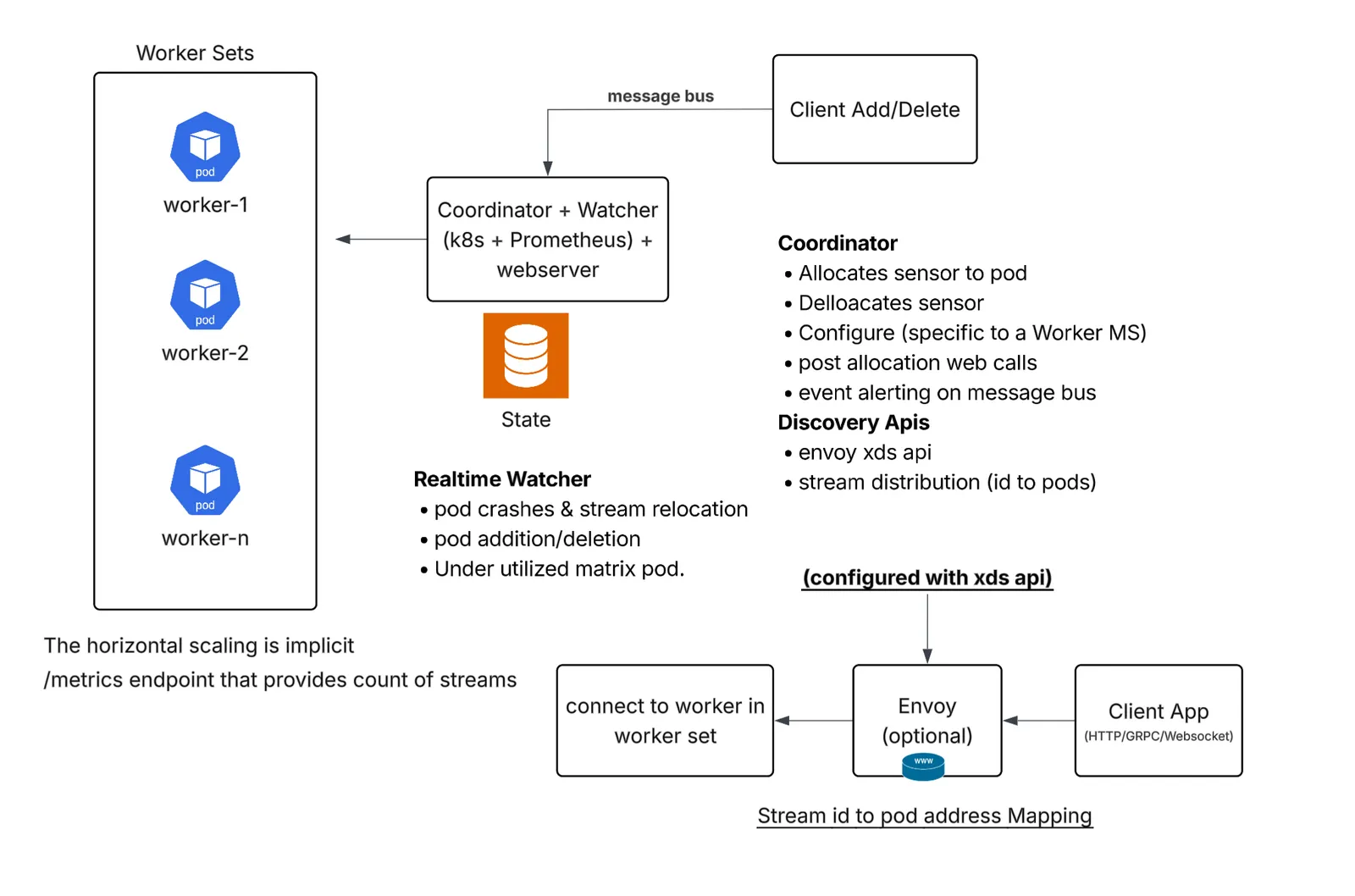
SDRC Usage Modes (WDM_CLUSTER_TYPE)
Docker/Docker compose mode
In Docker/Docker compose mode, SDRC runs with a fixed, statically defined set of worker containers described in a JSON configuration file and monitored through Docker-native mechanisms. It is simpler to stand up and is useful for controlled environments where the worker inventory is known in advance, but it does not support autoscaling, dynamic worker discovery, or automatic expansion and contraction of capacity. Operationally, scaling requires updating configuration and restarting components, so Docker mode is best suited for development, testing, or smaller deployments where flexibility and elasticity are less important than simplicity.
How to set up statically defined worker containers
Use a two-stack layout: run worker containers first, then run the SDRC controller with config.yml, one or more docker_cluster_config*.json files, and the Docker socket mounted (the Docker SDK uses it for inventory). When WDM_WL_HEALTH_CHECK_WAIT_ENABLED is true (the default), placement and failure detection prefer HTTP health probes to http://<provisioning_address><WDM_WL_HEALTH_CHECK_URL> instead of Docker container-status checks. The reference Compose tree in the WDM repository (compose/) demonstrates two Docker workloads (docker-workload-a and docker-workload-b), each with two static workers.
-
Start the worker containers.
Define one Compose service per worker. Each service must set
container_nameto a unique value and listen on a unique port (for example5000,5001on workload A).Example worker services:
wdm-python-testapp-a-1(port5000),wdm-python-testapp-a-2(port5001), and matching names for workload B. -
Create
docker_cluster_config.json(one file per workload if needed).List every worker as a top-level JSON key (the Docker container name). Each value defines how SDRC provisions and routes to that worker:
provisioning_addressis where SDRC calls worker lifecycle APIs (/add,/delete, and so on).routing_addressis where Envoy or clients send stream traffic; it can differ fromprovisioning_addresswhen HTTP and routing ports are split. Setprocess_typetodocker.
-
Configure the workload in
config.yml.For each enabled workload block, set Docker mode and point at the cluster file:
Replace
<host-ip>with the host address where Redis and Kafka listen (reachable from SDRC; withnetwork_mode: host, this is typically the machine running Compose). Assign a uniqueWDM_MS_LISTENER_PORTper enabled workload block (for example9000fordocker-workload-aand9001fordocker-workload-b); SDRC generates a dedicated Envoy listener for eachwl_obj_namefrom these values (see Stream routing with built-in Envoy).WDM_TARGET_PORT_MAPPINGkeys must match container names. Port values must matchprovisioning_addressand the ports your worker containers listen on. -
Start SDRC with mounts and Docker socket access.
Mount
config.yml, eachdocker_cluster_config*.json, and/var/run/docker.sock(required for Docker-mode inventory). With HTTP health enabled,PodErrorWatcherfollows probe results rather than Docker inspectRunningstate. The reference stack runswdm-env-from-configandwait-for-docker-workloadsso SDRC starts only after Redis is reachable and every name inWDM_CLUSTER_CONTAINER_NAMESis running.Minimal SDRC service example. Mount paths are illustrative; use the conventions from your deployment profile.
Start the stack (including optional wait/init services in a full deployment):
SDRC loads workloads from the path configured in
WDM_WORKLOADS_CONFIG(network_mode: hostin the reference stack).
Provisioning event payload format
After workers and SDRC are running, stream assignment is driven by provisioning event payloads published on the message bus (Redis or Kafka) or sent with POST /apply_metadata_payload. This is separate from docker_cluster_config.json, which only defines static worker addresses.
SDRC expects a JSON envelope with metadata plus an inner object (by default the key event via WDM_EVENT_OBJECT_FIELD). The change field inside that object must match the change types configured in config.yml (for example WDM_WL_CHANGE_ID_ADD: camera_add in the reference compose/config.yml).
Change types (must match config.yml):
Payload application and worker selection
How payloads are applied
When an add event arrives (from Redis, Kafka, POST /apply_metadata_payload, or HTTP-header lifecycle), SDRC runs a provisioning pipeline:
-
Parse and classify the message. Read the inner object (
WDM_EVENT_OBJECT_FIELD, defaultevent) and comparechangetoWDM_WL_CHANGE_ID_ADD(for examplecamera_addin the reference Composeconfig.yml; the source default iscamera_streaming). -
Build the candidate worker list from
docker_cluster_config.json(Docker) or the Kubernetes API (k8s). Each worker has a name, host, port, and readiness state. -
Filter by HTTP health when
WDM_WL_HEALTH_CHECK_WAIT_ENABLEDistrue(default): prefer workers whose latestGET <WDM_WL_HEALTH_CHECK_URL>probe returned HTTP 200. If no worker is healthy yet but capacity remains, SDRC still selects one and waits inadd()up toWDM_ADD_HEALTH_CHECK_TIMEOUT(default 60s;-1waits forever). On timeout it defers the event (bus retry / HTTP 503) instead of blocking the consumer. When health wait is disabled, Docker mode falls back to containerRunningstate. -
Select a worker that is eligible and under
WDM_WL_THRESHOLDusingWDM_WL_ASSIGNING_METHOD(sequentialby default: first eligible from discovery order;lru_round_robin: fewest streams, then name/ordinal tie-break). -
Apply the payload by POSTing the envelope JSON to
http://<provisioning_address><WDM_WL_ADD_URL>. Source default add path is/api/v1/stream/add; many examples and testapps override this to/add. -
On HTTP 200, update Redis:
HSET {wl_obj_name} {camera_id} → {container_name}for Envoy stream routingHSET {wl_obj_name}-pod {container_name} → {host}for upstream lookup- Workload spec cache (
WDM_REDIS_CACHE_OBJECT) records which streams each worker owns
-
Publish an agent event on the configured bus and optionally call post-allocation webhooks.
Delete events (WDM_WL_CHANGE_ID_DEL, source default camera_remove) reverse the flow: locate the assigned worker, call WDM_WL_DELETE_URL (source default /api/v1/stream/remove; examples often use /delete), remove Redis mappings, and drop the stream from the workload spec.
Temporary failures (unhealthy workers, Redis/Kubernetes client blips, capacity that may free up) are retryable: Redis and Kafka consumers do not commit the event until it succeeds or WDM_EVENT_RETRY_LIMIT (default 20) is exhausted. Terminal failures are logged and committed so the bus is not blocked.
Worker pool vs per-worker stream limit
Two configuration files work together:
SDRC tracks how many streams each worker already owns in the Redis workload spec (WDM_REDIS_CACHE_OBJECT, for example wdm-python-testapp-a-data). getSpecCount(container_name) returns that count before each add.
How an eligible worker is selected
For each add event, SDRC builds the candidate list then applies WDM_WL_ASSIGNING_METHOD:
- Healthy / running — With HTTP health enabled, prefer workers whose latest
WDM_WL_HEALTH_CHECK_URLprobe passed. Down or failing workers are skipped when another healthy worker has capacity. If all workers are down or still starting, the add is deferred. - Under capacity —
spec_count < WDM_WL_THRESHOLD. Workers at the threshold are skipped (saturated). - Assignment order —
sequential(default) picks the first eligible worker in discovery order.lru_round_robinpicks the eligible worker with the fewest streams. If the stream already has a workload spec entry on a worker, SDRC can add to that same worker when it still has capacity.
The chosen worker’s provisioning_address (host and port from the cluster JSON, or the Kubernetes pod address) is used for the add call. Ports must stay aligned with WDM_TARGET_PORT_MAPPING and the ports your worker containers listen on.
Example (reference Compose, WDM_WL_THRESHOLD: 3, two workers in docker_cluster_config-a.json):
- Workers
wdm-python-testapp-a-1andwdm-python-testapp-a-2each accept up to 3 streams. - Streams 1–3 fill
a-1first (listed first in JSON); stream 4 goes toa-2ifa-1is saturated. - A 7th stream fails with
add_stream_failed(no autoscale).
When no worker is available
If every worker is saturated or down, SDRC logs Max streams reached and does not provision. Increase WDM_WL_THRESHOLD, add workers to the cluster JSON, add more worker containers in Compose, and restart SDRC.
Envoy continues to route client traffic using the Redis mapping written after a successful add. The routing_address in cluster JSON is used for xDS/upstream discovery; it may differ from provisioning_address when routing and lifecycle APIs use different ports.
To add another worker, create the worker service in Compose, add a JSON entry with matching provisioning_address / routing_address, extend WDM_CLUSTER_CONTAINER_NAMES and WDM_TARGET_PORT_MAPPING, then recreate the SDRC stack. Docker mode does not autoscale; changes require config updates and restart.
Kubernetes mode
In Kubernetes mode, SDRC is designed for dynamic, production-style deployments in which workers run as a StatefulSet with stable DNS identities and optional Horizontal Pod Autoscaler (HPA) support. This mode enables automatic worker discovery, stable addressing, better stream-to-worker tracking, and reaction to scale-up, scale-down, and failure events. Compared with Docker mode, Kubernetes mode provides stronger resilience and automation, allowing SDRC to assign workloads across changing worker capacity, maintain routing consistency, and integrate more naturally with autoscaling and recovery workflows.
How to set up defined worker containers
Workers are StatefulSet pods (for example python-testapp-testapp-0, python-testapp-testapp-1). SDRC discovers them through the Kubernetes API using a ServiceAccount token mounted into the coordinator pod. You do not use docker_cluster_config.json.
The manifests below are self-contained. You do not need a separate kubernetes/ source tree or any other repository layout—save each block to a file in your working directory and apply with kubectl.
Before you start
-
A worker StatefulSet is already running (or you deploy one using your own manifests). For this example:
- StatefulSet name:
python-testapp-testapp(must matchwl_obj_namein the ConfigMap below) - Headless Service for stable pod DNS (
clusterIP: None) - Per-pod ports aligned with
WDM_TARGET_PORT_MAPPING: HTTP5000, gRPC50051, WebSocket5050 - NVCR pull secret named
nvcr-io-registry-secretin the same namespace (create with your NGC API key if images are private)
- StatefulSet name:
-
Redis and Kafka are reachable from the SDRC pod at the hostnames you set in the ConfigMap.
-
Create RBAC for in-cluster SDRC (
sdrc-rbac.yaml).Grants list/watch on pods and StatefulSets and permission to patch StatefulSet scale when workers are saturated.
-
Create the workload ConfigMap (
sdrc-configmap.yaml).Set
wl_obj_nameto your worker StatefulSet name if it differs frompython-testapp-testapp. Assign a uniqueWDM_MS_LISTENER_PORTper enabled workload block (9000in this single-workload example; use9001,9002, and so on when you add morewl_obj_nameentries). SDRC generates Envoy listeners from these values at startup (see Stream routing with built-in Envoy). Adjust the Redis and Kafka sample values to match your cluster (in-cluster Service DNS names are shown below). -
Deploy the SDRC coordinator (
sdrc-deployment.yaml).Runs the SDRC controller with the in-cluster API token, mounts
sdrc-config, and exposes the controller on port5002. -
Expose SDRC inside the cluster (
sdrc-service.yaml). -
Apply and verify.
To run SDRC outside the cluster instead, use the same
config.ymlbody from the ConfigMap, mount it into the SDRC controller container, and supplyKUBERNETES_HOST,KUBERNETES_PORT,KUBERNETES_JWT_TOKEN, and cluster CA paths yourself. -
Send provisioning events.
Use the same payload format as Docker mode (see Provisioning event payload format and Payload application and worker selection), or HTTP-header lifecycle if
WDM_LIFECYCLE_INGRESS_MODEishttp. SDRC assigns each stream to a pod wherespec_count < WDM_WL_THRESHOLD, preferring HTTP-healthy pods when health checks are enabled.
To add worker capacity, increase replicas on your worker StatefulSet and redeploy, or configure HPA.
Stream id routing with built-in Envoy
SDRC includes an Envoy proxy that forwards client traffic to the worker currently assigned to each stream. After a successful add event, SDRC writes the stream-to-worker mapping in Redis (see Payload application and worker selection). Clients do not call worker addresses directly for routed traffic—they connect to the Envoy listener port for the target wl_obj_name and identify the stream in request headers.
Envoy listener generation
SDRC does not use a single shared ingress port. When the Envoy routing layer starts:
- Reads
config.ymland generates one Envoy listener per workload block that defines bothWDM_MS_LISTENER_PORTandport. - Configures per-listener stream lookup with that block’s
wl_obj_nameas the defaultX-WL-OBJECT-NAME, so each workload gets its own dedicated listener port (for example:9000for one workload,:9001for another). - Starts Envoy with that generated configuration.
- Publishes xDS cluster definitions so Envoy knows how to reach each worker per
WDM_TARGET_PORT_MAPPING. REST CDS on the controller port (default5002) is the source default. VSS compose and Helm profiles setWDM_XDS_GRPC_ADS_ENABLED: true(withGRPC_XDS_PORT, default4001) to enable gRPC ADS for dynamic CDS cluster updates instead of REST CDS polling. Generated route configuration remains static and must be regenerated when routes change. - Exposes a separate direct listener (default
8010, overridable withWDM_SDRC_DIRECT_LISTENER_PORT) that forwards/sdrcpaths to the SDRC controller without stream routing. - When
WDM_LIFECYCLE_INGRESS_MODEishttp/http-header, also generates lifecycle routes on the per-workload listener. Those paths (add, delete, reprovision) rewrite to/sdrc/<wl_obj_name>/...and go to the controller instead of Redis stream routing.
Request routing
Clients send HTTP requests to the listener port for their workerset (WDM_MS_LISTENER_PORT for that wl_obj_name). Envoy routes each request to the correct worker in that set using an HTTP header:
ENVOY_ROUTE_HEADER: per-workload header name carrying the stream ID. Generated Envoy defaults this header name tox-stream-idwhen the workload block does not set it. VSS profile configs setENVOY_ROUTE_HEADER: streamid.
On each request, the routing layer reads the stream ID header, looks up HGET {wl_obj_name} {stream_id} in Redis, and forwards the request to the assigned worker (container or pod). If the stream is not provisioned or the header is missing, routing fails.
Replace <sdrc-host> with the host where Envoy listens. Replace <listener-port> with WDM_MS_LISTENER_PORT for the target wl_obj_name. Replace <route-header> with the workload block’s ENVOY_ROUTE_HEADER value, or x-stream-id when it is omitted. Replace <stream-id> with a provisioned camera_id.
Test HTTP routing with curl
After you provision a stream, send HTTP through Envoy:
In VSS profiles, VIOS stream processing uses streamid as the route header. After SDRC provisions a stream, clients can route through the SDRC Envoy listener by sending that header:
This pattern gives clients a stable listener endpoint. Clients do not need to discover the worker pod or container that currently owns the stream; SDRC keeps the stream-to-worker mapping in Redis and Envoy uses the route header to forward each request to the right worker, even after scaling or recovery.
Use <listener-port> = WDM_MS_LISTENER_PORT for the wl_obj_name you provisioned (for example 9000 for k8s-workerset1 when that block sets WDM_MS_LISTENER_PORT: 9000). The path /hello matches the reference testapp; your worker may expose a different path.
Optional flags: curl -v for verbose output, curl -i to include response headers.
Common issues
- 503 / no upstream: Stream ID not provisioned, missing route header, wrong listener port for the
wl_obj_name, or Redis mapping missing.
HTTP-header stream lifecycle
By default SDRC consumes add/delete events from Redis or Kafka (WDM_LIFECYCLE_INGRESS_MODE: message-bus). Set WDM_LIFECYCLE_INGRESS_MODE to http (aliases: http-header, http_header) to drive the same provision / deprovision / reprovision pipeline from HTTP on the per-workload Envoy listener.
In HTTP-header mode:
- Redis and Kafka lifecycle listeners for that workload stay disabled.
- Clients send the stream ID in
WDM_HTTP_HEADER_LIFECYCLE_STREAM_ID_HEADER(falls back toENVOY_ROUTE_HEADER, thenENVOYROUTEHEADER, thenid). - Envoy matches configured lifecycle method+path pairs and rewrites them to the workload coordinator (
/sdrc/<wl_obj_name>/...) without Redis stream routing. - Add with a JSON body provisions (or uses the body as the event envelope). Reprovision with no body reuses the cached stream record for that header value. Delete deprovisions.
- Add and reprovision may share the same method+path; SDRC treats a non-empty JSON body as add and an empty body as reprovision. Delete must use a distinct binding.
- Successful responses are
{"status": "ok", "mode": "http-header", "action": "...", "stream_id": "..."}. If workers are not ready yet, SDRC can returnstatus: deferredwith HTTP 503 so the client can retry.
Source defaults (override these in config.yml):
The in-repo demo under services/sdrc/demo/http-header-lifecycle/ uses RTVI-CV-compatible paths on listener port 10001:
That demo sets WDM_HTTP_HEADER_LIFECYCLE_ADD_PATH / DELETE_PATH / REPROVISION_PATH to /api/v1/stream/add and /api/v1/stream/remove (delete method POST) so the listener URLs match the worker APIs. See services/sdrc/demo/http-header-lifecycle/README.md for Docker Compose and Helm runbooks.
Config event handling
In addition to add/remove, SDRC can apply configuration events to an already allocated worker by POSTing to WDM_CONFIG_URL on WDM_CONFIG_PORT (defaults /config and 9002). The event change value must match WDM_WL_CHANGE_ID_POD_CONFIGURE (default config).
Config handling is opt-in per workload (WDM_HANDLE_CONFIG_EVENTS, default false) so a shared Redis or Kafka bus does not force every consumer to call /config.
Leave this unset or false on workloads without a /config endpoint (stream processing, warehouse 2D). Set true only where /config is required (for example warehouse 3D rtvi-cv).
When accepted, SDRC validates the payload (including the encoded worker name key WDM_POD_ALLOCATION_ENCODED_NAME_KEY), POSTs to the worker, and retries transport errors only using WDM_CONFIG_RETRY_ATTEMPTS / WDM_CONFIG_RETRY_DELAY (not the add/remove retry knobs). HTTP 4xx/5xx from the worker are not retried as transport errors. State is persisted only after HTTP 200.
Bus commit policy (Redis and Kafka):
On Kafka retryable failures, SDRC seeks back to the failed offset so a later commit cannot skip it. Set WDM_CONFIG_DEFER_ON_FAILURE: true only when you want configure events redelivered until /config succeeds.
SDRC APIs
This section summarizes the HTTP and routing APIs exposed by an SDRC deployment. SDRC provides a controller/router API, per-workload coordinator APIs, generated stream-routing listeners, and operational endpoints.
Use the controller/router API for management, discovery, dashboard, and proxy access to workload coordinators. Use per-workload listener ports for stream-routed application traffic.
Start here
New developers should think of SDRC as three API layers:
- Controller/router APIs answer questions about the whole SDRC deployment. Use them to find workloads, inspect health, view the dashboard, fetch OpenAPI docs, and proxy into a specific workload coordinator.
- Workload coordinator APIs answer questions about one workload set. Use them to inspect assigned streams, pod/container state, replica status, Redis mappings, and stream lifecycle actions for a single
wl_obj_name. - Per-workload Envoy listeners route application traffic. Use them only after a stream has been provisioned and the client can send the configured stream ID header.
Common first calls
Placeholder guide
URL patterns
Use these patterns to choose the correct entry point:
Request body quick reference
Most read-only endpoints use GET and do not require a request body. Mutating and discovery endpoints use POST. Set Content-Type: application/json for JSON bodies.
Status code guide
Runtime API surfaces
Controller and router APIs
The controller/router APIs are served on the controller port. They are also reachable through the direct Envoy listener. The generated Swagger UI for this surface is available at /api/docs/ and the machine-readable OpenAPI document is available at /openapi.json.
Workload coordinator APIs
Each enabled workload has an internal coordinator. The coordinator listens on the workload block’s port value and is usually accessed through the router path /sdrc/<wl_obj_name>/<endpoint>. On a per-workload Envoy listener, the shorter form /sdrc/<endpoint> is rewritten to that workload’s router path.
The generated Swagger UI for a workload coordinator is available at /sdrc/<wl_obj_name>/api/docs/ through the controller/router, and the workload’s OpenAPI document is available at /sdrc/<wl_obj_name>/openapi.json.
GET /reset has destructive side effects even though it is exposed as a GET endpoint. Do not link to it from pages, crawlers, health checks, browser previews, or prefetching clients.
Stream-routing API behavior
Per-workload Envoy listeners are application traffic entry points, not only management APIs. Configured HTTP-header lifecycle routes and /sdrc paths go to the coordinator. For other paths, the listener expects the configured route header to contain a provisioned stream ID. The SDRC routing layer looks up the stream-to-worker assignment in Redis and forwards the request to the assigned worker.
Use these rules when calling through a per-workload listener:
/sdrc/<endpoint>reaches the workload coordinator API for that listener’swl_obj_name.- Configured HTTP-header lifecycle method+path pairs also reach the coordinator (rewritten to
/sdrc/<wl_obj_name>/...) and do not require Redis stream routing. - Any other path, such as
/helloor a workload-specific inference path, is routed to a worker only when the stream ID resolves to an assigned worker. - Send the stream ID in the configured route header. If the header is absent, the listener can also read the stream ID from a query parameter with the same name, for example
?streamid=<stream-id>when the route header isstreamid. - If
NOHEADERTARGETROUTEistruefor the workload, headerless non-/sdrcrequests route to that workload’s configuredHEADERLESS_SERVICE_ENDPOINTScluster. - gRPC and WebSocket requests use the same stream-to-worker lookup, with Envoy selecting protocol-specific clusters from
WDM_TARGET_PORT_MAPPINGwhen those mappings are configured. - Routed listener responses include cross-origin headers for browser and dashboard clients.
Operational and security notes
- The current SDRC Flask APIs do not implement application-level authentication or rate limiting. Expose them only on trusted networks or behind an authenticated gateway.
- Treat
/reset,/apply_metadata_payload,/remove_stream,/cache_metadata_update,/dashboard/global_add, and HTTP-header lifecycle add/delete/reprovision as administrative mutation APIs. /dashboard/config_ymlreturns the mounted workload configuration. Do not expose it where configuration values, hostnames, or operational topology should remain private./streamis an unbounded streaming response; use it for diagnostics rather than high-frequency polling.- Envoy admin should stay private to operators. It can expose runtime configuration and diagnostics.
/static/*.jsonmay serve older bundled Swagger JSON files, but/openapi.jsonis the generated API description for the running deployment.
Using SDRC in VSS Profiles
SDRC solves the stateful stream placement and routing problem in VSS profiles. A VSS stream should have a stable logical controller and, when routing is enabled, a stable Envoy listener even if the backend worker container or pod changes because of scaling, restart, or recovery. SDRC consumes stream events, selects a worker with available capacity, calls that worker’s add/delete APIs, stores the stream-to-worker assignment in Redis, and lets Envoy route stream traffic by stream ID.
The two primary VSS workload object types managed through SDRC are:
vss-vios-streamprocessing: manages VIOS stream processing and proxy-stream workflows. VSS profiles commonly route this workload through Envoy usingstreamidas the route header.vss-rtvi-cv: manages realtime CV/perception workers. SDRC is used for worker discovery, capacity-aware stream placement, stream add/delete lifecycle, and recovery. Profiles that expose rtvi-cv traffic through Envoy also define listener and target-port mapping for this workload.
Docker Compose profiles
-
For Docker paths in this section,
$VSS_APPS_DIRmeansvideo-search-and-summarization/deploy/docker. -
VSS includes the SDRC Docker service from
$VSS_APPS_DIR/services/infra/sdrc/docker-compose.yaml. The service starts with the SDRC workload config rendered from the active VSS profile. -
Profile-local SDRC configs live under paths such as
$VSS_APPS_DIR/developer-profiles/dev-profile-lvs/sdrc/and$VSS_APPS_DIR/industry-profiles/warehouse-operations/warehouse-2d-app/sdrc/. -
Start with the active profile’s
sdrc/configs/config.yml.tmpl. That file tells you which workload blocks are enabled and which worker objects SDRC manages. -
For
vss-vios-streamprocessing, check the block in small groups:- Identity:
wl_obj_nameidentifies the streamprocessing workload. - Docker worker inventory:
WDM_CLUSTER_CONFIG_FILEpoints to the worker inventory file, andWDM_CLUSTER_CONTAINER_NAMESnames the worker containers SDRC watches. - Stream lifecycle:
WDM_WL_ADD_URLandWDM_WL_DELETE_URLdefine how SDRC adds/removes streams;WDM_WL_THRESHOLDdefines per-worker capacity. - Event mapping:
WDM_EVENT_OBJECT_FIELD,WDM_WL_ID_FIELD, andWDM_WL_REDIS_MSG_FIELDtell SDRC where to find the stream ID in incoming events. - Routing:
portandWDM_MS_LISTENER_PORTcreate the generated Envoy listener;ENVOY_ROUTE_HEADERis usuallystreamid;WDM_TARGET_PORT_MAPPINGmaps Envoy traffic to the worker port. - Headerless fallback:
NOHEADERTARGETROUTEandHEADERLESS_SERVICE_ENDPOINTScontrol where requests go when they arrive without the route header.
- Identity:
-
For
vss-rtvi-cv, check the block in small groups:- Identity:
wl_obj_nameidentifies the rtvi-cv workload. - Docker worker inventory:
WDM_CLUSTER_CONFIG_FILEandWDM_CLUSTER_CONTAINER_NAMESshould point to the rtvi-cv worker set. - Stream lifecycle and capacity: confirm whether the profile overrides or relies on defaults for
WDM_WL_ADD_URLandWDM_WL_DELETE_URL; setWDM_WL_THRESHOLDfor the intended worker capacity. - Event and bus settings: validate Redis/message-bus keys and fields such as
WDM_REDIS_MSG_KEY,WDM_WL_REDIS_MSG_FIELD, andWDM_CONSUMER_GRP_ID. - Routing, if enabled: check
port,WDM_MS_LISTENER_PORT, andWDM_TARGET_PORT_MAPPING. Profiles that use rtvi-cv only for placement/lifecycle may not expose it as a routed client-facing listener.
- Identity:
-
The Docker service exposes fixed runtime ports for the controller, direct
/sdrclistener, and Envoy admin. Per-workload listener ports are generated from the active SDRC config only for workload blocks that define bothportandWDM_MS_LISTENER_PORT. -
VSS compose and Helm SDRC wiring sets
WDM_XDS_GRPC_ADS_ENABLED: true. ADS is pod-wide. Resolution is environment →defaults:inconfig.yml→ per-workload entries. An explicit env ordefaults:value is used as-is and stops further lookup, so a workload-leveltruecannot enable ADS whendefaults:isfalse, and a workload-levelfalsecannot disable ADS whendefaults:istrue. Workload-level true-wins (any enabled workload withtrue) applies only when neither env nordefaults:sets the flag. Set ADS in env ordefaults:so Envoy and the controller stay on the same path; otherwise the pod can keep REST xDS. -
For HTTP-header lifecycle examples that are not part of a warehouse blueprint, use
services/sdrc/demo/http-header-lifecycle/. -
For less common tuning knobs, see Advanced customization parameters.
Helm profiles
-
In Helm, the VSS profile selects an SDRC config file such as
configs/sdrc/config-verification.ymland renders it into an SDRC ConfigMap. -
The infra SDRC chart owns the controller pod, RBAC, and Services. The profile-owned config still controls which workloads are managed and how Envoy listeners are generated.
-
When VIOS sensor is configured to use SDRC as its stream processor, its stream processor endpoint resolves to the SDRC controller service on port
5003. -
For
vss-vios-streamprocessing, check the block in small groups:- Identity:
wl_obj_nameshould match the Kubernetes streamprocessing workload. - Kubernetes worker discovery:
WDM_CLUSTER_TYPEselects Kubernetes mode, and the workload identity must match the worker object SDRC discovers. - Stream lifecycle:
WDM_WL_ADD_URLandWDM_WL_DELETE_URLdefine how SDRC adds/removes streams;WDM_WL_THRESHOLDdefines per-worker capacity. - Event mapping:
WDM_EVENT_OBJECT_FIELD,WDM_WL_ID_FIELD, andWDM_WL_REDIS_MSG_FIELDtell SDRC where to find the stream ID in incoming events. - Routing:
portandWDM_MS_LISTENER_PORTcreate the generated Envoy listener;ENVOY_ROUTE_HEADERis usuallystreamid;WDM_TARGET_PORT_MAPPINGmaps Envoy traffic to the worker port. - Headerless fallback:
NOHEADERTARGETROUTEandHEADERLESS_SERVICE_ENDPOINTScontrol where requests go when they arrive without the route header.
- Identity:
-
For
vss-rtvi-cv, check the block in small groups:- Identity:
wl_obj_nameshould identify the rtvi-cv worker object. - Kubernetes worker discovery: confirm the worker object exists and matches the SDRC workload identity.
- Capacity and lifecycle: validate
WDM_WL_THRESHOLDand any add/delete behavior the profile sets or inherits. - Event and bus settings: validate Redis/message-bus keys and fields such as
WDM_REDIS_MSG_KEY,WDM_WL_REDIS_MSG_FIELD, andWDM_CONSUMER_GRP_ID. - Routing, if included: check
port,WDM_MS_LISTENER_PORT,WDM_TARGET_PORT_MAPPING, andNOHEADERTARGETROUTE. Alert verification profiles include an rtvi-cv workload block; realtime-only profiles may only include streamprocessing.
- Identity:
-
For less common tuning knobs, see Advanced customization parameters.
The SDRC chart’s service.yaml creates Services only for the controller, the direct /sdrc listener, and Envoy admin:
Workload listener ports are not declared in the Helm chart’s service.yaml. They come from the mounted SDRC config: each enabled workload block that defines both port and WDM_MS_LISTENER_PORT produces a generated Envoy listener inside the SDRC pod. Add a Service or Ingress for those generated listener ports only when another component must reach them through Kubernetes service discovery.
Autonomous stream session restoration on worker failure
SDRC runs a background pod/container watcher that monitors worker health. When WDM_WL_HEALTH_CHECK_WAIT_ENABLED is true (default), that watcher follows HTTP probe transitions from WDM_WL_HEALTH_CHECK_URL (Docker and Kubernetes). When health wait is disabled, Docker mode uses container state via the Docker socket and Kubernetes mode uses pod phase via the API. When a worker in a set stops or becomes unavailable, SDRC performs autonomous stream session restoration: it moves the affected stream sessions onto another healthy worker in the same workerset without client intervention.
Failure detection
When the watcher reports that a worker is down:
- SDRC publishes a critical event on the configured message bus (Redis or Kafka) for the affected
wl_obj_nameand worker name. - SDRC reads the workload spec cache (
WDM_REDIS_CACHE_OBJECT) for that worker and collects the stream payloads it was running. - If
WDM_CONTROLLER_REPROVISIONistrue(default), SDRC initiates autonomous stream session restoration for each affected stream so placement runs again.
In Docker mode, restoration triggers when HTTP health reports the worker down (health mode) or when the down container matches names in WDM_DOCKER_CLUSTER_POD_DOWN_NAMES or WDM_DOCKER_CLUSTER_KEY_DOWN_NAMES (legacy socket mode). In Kubernetes mode, restoration triggers when HTTP health fails or a StatefulSet pod enters a failed or terminated state.
Restoration sequence
For each stream session on the failed worker, SDRC runs the same placement logic as an add event:
- Deprovision the stream on the failed worker (
WDM_WL_DELETE_URL) and remove its Redis routing entries. - Select a new worker in the set that is running and under
WDM_WL_THRESHOLD. - Provision the stream on the new worker (
WDM_WL_ADD_URL) with the stored event payload. - Update Redis so Envoy routes the stream header to the new worker.
Clients keep sending requests to the same listener port and route header; after restoration completes, Envoy forwards traffic to the replacement worker without client changes.
SDRC Parameters
The following parameters are set in the SDRC workload configuration unless noted as deployment-level. Start with the minimum tables, then use the advanced groups only when a profile needs more control.
Minimum required parameters
Set these explicitly for each new SDRC workload. Source defaults exist for some of them, but many defaults are demo-oriented and should not be treated as deployment recommendations. Start with deployment mode and workload discovery because those settings determine how SDRC finds workers in Docker Compose or Helm/Kubernetes profiles.
An optional top-level defaults: block in config.yml sets pod-wide values shared across workloads (for example WDM_XDS_GRPC_ADS_ENABLED). For ADS, environment and defaults: take precedence over per-workload entries: each of those layers is pod-wide, and the first explicit value wins. Per-workload true-wins is used only when ADS is unset in both env and defaults:. Do not expect a workload-level true or false to override an explicit defaults: or environment value.
Deployment mode and workload discovery
Use this set to tell SDRC where its workload config is mounted, which workload block it is managing, and how workers are discovered in Docker Compose or Helm/Kubernetes profiles.
Stream management
Use this set when SDRC needs to consume stream events, choose a worker, call add/delete APIs, and maintain stream-to-worker state.
Envoy routing
Add these only when clients will send workload traffic through SDRC’s generated Envoy listener instead of calling workers directly.
Advanced customization parameters
The values below show WDM container default values unless a value is explicitly deployment-specific. Treat these defaults as starting points, not always as deployment recommendations.