

Additional Configuration
Reference for configurable values in deploy_nemoclaw.ipynb and deploy_vss_orchestrator.ipynb, and the optional notebook cells that go beyond the minimum nemoclaw-deploy-vss-and-skills path.
Brev hardware and CSP selection
The default Brev launchable is available for the notebook path. Before launching the instance, you can also edit the launchable to choose a different hardware profile, such as GPU or CPU shape, and cloud service provider (CSP).
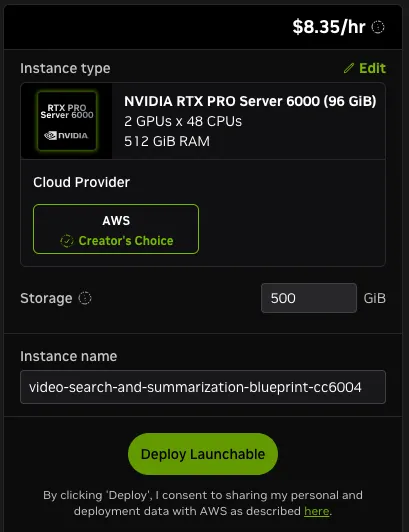
Click Edit in the upper right corner of the Brev launchable before creating the instance.
In the Brev launchable editor, select the hardware profile and CSP that match your deployment target and available capacity, then launch the instance. Review Hardware Requirements and Development Profile GPU Requirements before selecting the hardware profile.
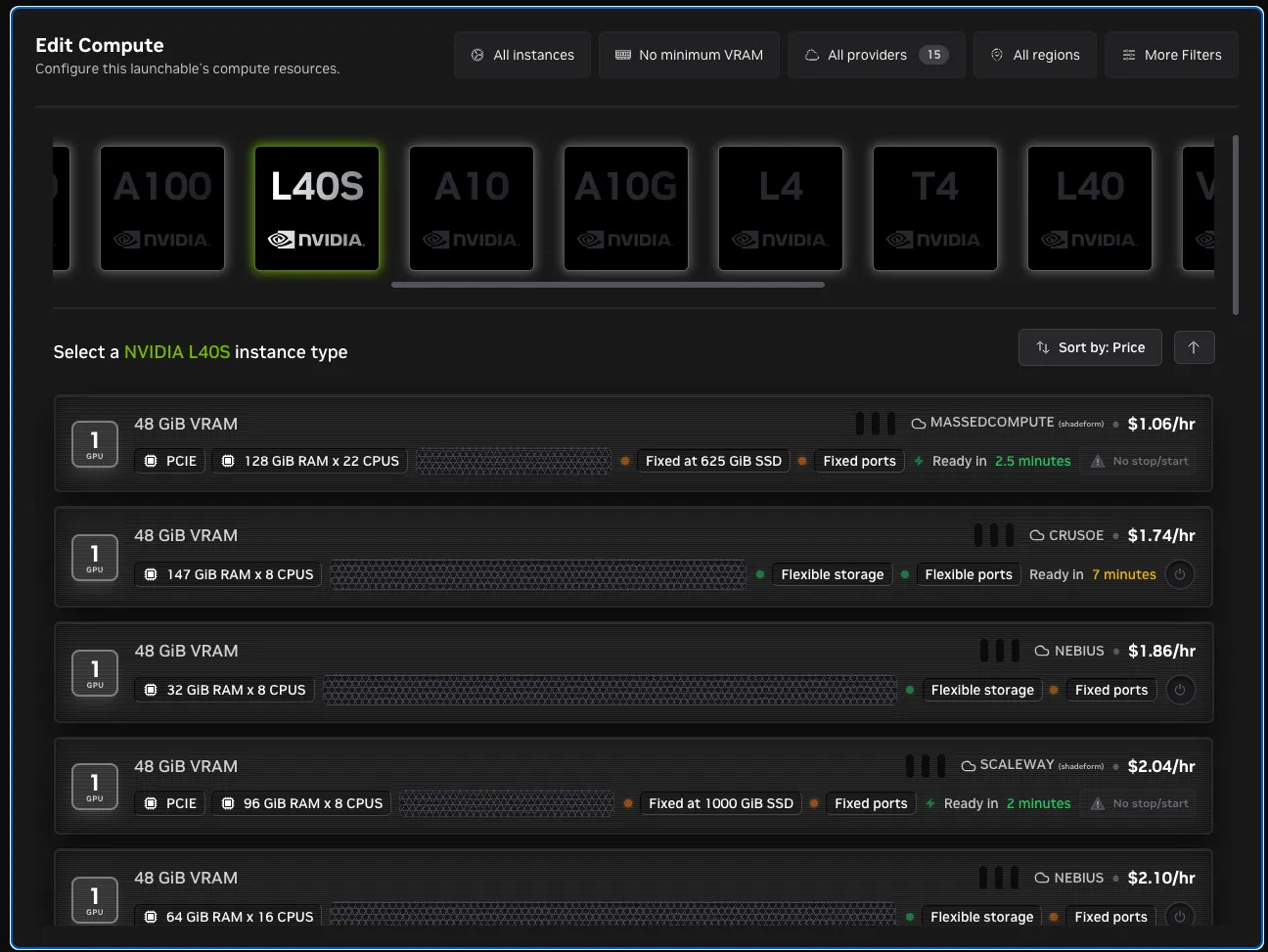
After the instance starts, keep the HARDWARE_PROFILE value in deploy_vss_orchestrator.ipynb aligned with the selected machine. Brev controls the cloud VM shape, while HARDWARE_PROFILE controls the VSS deployment assumptions used by the orchestrator.
Two notebooks
The setup path uses two notebooks that run in order on the VSS host:
-
deploy_nemoclaw.ipynbconfigures the agent model provider and installs and onboards the NemoClaw sandbox. Its variables cover:- The agent chat model and its credentials.
- The NemoClaw installer pin and inference proxy.
- The sandbox name and agent runtime.
- The dashboard and webhook settings.
- The host paths the notebook reads.
-
deploy_vss_orchestrator.ipynbprepares the host, starts the VSS Orchestrator MCP server, and deploys VSS from the Agent UI. Its variables cover:- The NVIDIA credentials.
- The hardware profile.
- The deployed VSS LLM and VLM endpoints, and the GPU device IDs.
- The MCP server bind address.
- The VSS UI and external-IP networking values.
deploy_nemoclaw.ipynb variables
The agent model provider is seeded in Section 1.1 and set by one of the provider cells in Section 1.2.
Advanced values are set in Section 1.3 or derived from the environment.
deploy_vss_orchestrator.ipynb variables
Required values every VSS deployment needs are set in Section 1.1.
Advanced values are set in Section 1.2 or derived from the environment.
Agent model versus VSS models
The two notebooks configure two different model surfaces:
NEMOCLAW_*variables indeploy_nemoclaw.ipynbconfigure the agent chat model that operates VSS.LLM_*andVLM_*variables indeploy_vss_orchestrator.ipynbconfigure the LLM/VLM endpoints used by the deployed VSS services whendocker_generatecreates profile artifacts.
MCP server environment
The orchestrator MCP server reads credentials, hardware profile, remote VSS model endpoints, and device IDs at startup. In deploy_vss_orchestrator.ipynb, Section 4 maps the notebook variables into the MCP server environment before launching uv run nat mcp serve.
docker_generate then merges those values with the selected profile .env and any per-call env_overrides. For the full resolution order and tool payloads, see VSS Orchestrator MCP.
VSS Orchestrator MCP config YAML
The MCP server loads deploy/docker/scripts/vss_orchestrator_mcp_config.yml. The defaults work for most deployments. Edit this file only when you need different host paths or hardware-specific env overrides, then restart the MCP server (deploy_vss_orchestrator.ipynb Section 4) so the changes take effect.
Path settings under function_groups.vss_orchestrator:
Hardware overrides under model_resolution.hardware apply when HARDWARE_PROFILE matches. Edge profiles (DGX-SPARK, IGX-THOR, AGX-THOR) also use edge_device_ids and edge_allowed_profiles. Defaults you may adjust for edge systems:
Leave these values alone unless you are tuning GPU memory, swapping a local model or image tag, or pointing the MCP server at a non-default checkout path.
Optional notebook cells
Pin Docker version (deploy_nemoclaw.ipynb Section 2.1)
Pins the tested Docker stack before Section 3 creates the sandbox:
- Docker CE
29.4.3 - buildx
0.33.0 - Docker Compose
5.1.3 - containerd
2.2.3
Run this before Section 3 creates the sandbox. A Docker downgrade restarts dockerd and would disrupt live sandbox containers if it ran later in the notebook. When the installed Docker Engine already falls in the tested range (28.3.3 through 29.5.0), the downgrade is skipped and the packages are held at their current versions with apt-mark hold so later package operations do not drift the instance.
Verify sandbox, policy, skills, and webhooks (deploy_nemoclaw.ipynb Section 3.6)
Runs additional checks against the live sandbox after Section 3:
- Sandbox phase, namespace, and id.
- Active policy metadata (status, version, hash).
- Agent webhooks reachability when enabled.
openclaw plugins doctoroutput.- The registered
vss_orchestratorMCP status. - Installed non-bundled skills from
openclaw skills list --json. - Workspace
.mdfiles uploaded to the sandbox.
Verify host reachability from the sandbox (deploy_vss_orchestrator.ipynb Section 6)
Run only after VSS is deployed. The probe uses nemoclaw <sandbox> connect and validates host port reachability through host.openshell.internal. Do not replace this with docker exec because that can use a different path and produce misleading results.
The notebook reports one of the following results for each checked port:
REACHABLE- an HTTP service answered.404and non-policy403responses still count because they prove a service is listening, even ifGET /is not a valid or authorized route.NOT_REACHABLE- the port is blocked by policy, no service is listening, DNS failed, the connection failed, or the request timed out. Check theNOTEcolumn for the reason.
Agent webhooks
When AGENT_HOOKS_ENABLED is true, deploy_nemoclaw.ipynb generates a random AGENT_HOOKS_TOKEN and configures agent webhooks at AGENT_HOOKS_PATH (Section 3.6). Section 3.8 sends a local authenticated POST to http://127.0.0.1:18789/hooks/agent to confirm acceptance.
Disable webhooks by setting:
Artifacts and logs
- MCP server log:
<VSS_REPO_DIR>/.orchestrator-artifacts/vss_orchestrator_mcp.log. - Generated env artifacts:
<output_dir>/generated.<docker_compose_id>.dry-run.env. - Generated compose artifacts:
<output_dir>/compose.resolved.<docker_compose_id>.dry-run.yml. - MCP config:
deploy/docker/scripts/vss_orchestrator_mcp_config.yml. - The recorded MCP PID is kept in the notebook’s Python state as
VSS_ORCHESTRATOR_MCP_PIDand reused by Section 4 to stop a stale server before relaunching.