

Real-Time VLM
Overview
The Real-Time VLM Server is a FastAPI-based REST API service that provides real-time video understanding capabilities using Vision Language Models (VLM). It enables users to generate captions, process live video streams, and manage live streams through a comprehensive set of REST endpoints.
Use the RTVI-VLM image from NVIDIA NGC:
nvcr.io/nvidia/vss-core/vss-rt-vlm:3.3.0.
For image channels and availability, see
Container Image Availability.
The server translates between HTTP requests/responses and the underlying Real-Time VLM Microservice components, providing a clean API interface for live stream processing operations.
Key Features
- VLM Caption Generation: Generate captions and alerts using Vision Language Models for live streams
- Live Stream Support: Process RTSP live streams for real-time caption generation and alert detection — see Supported Inputs
- Streaming Responses: Server-Sent Events (SSE) for streaming output or Kafka messages
- Asset Management: Comprehensive stream lifecycle management
- Shared RTSP Decode: Multiple caption requests can subscribe to one RTSP decode pipeline when their decode settings match
- Sampling Rate Management: Manage the image frames sampling for VLM inference of the live stream
- Health Monitoring: Health check endpoints for service monitoring
- Metrics: Prometheus metrics endpoint for observability
Architecture
The following diagram illustrates the DeepStream Accelerated Pipeline architecture for the Real-Time VLM Microservice:
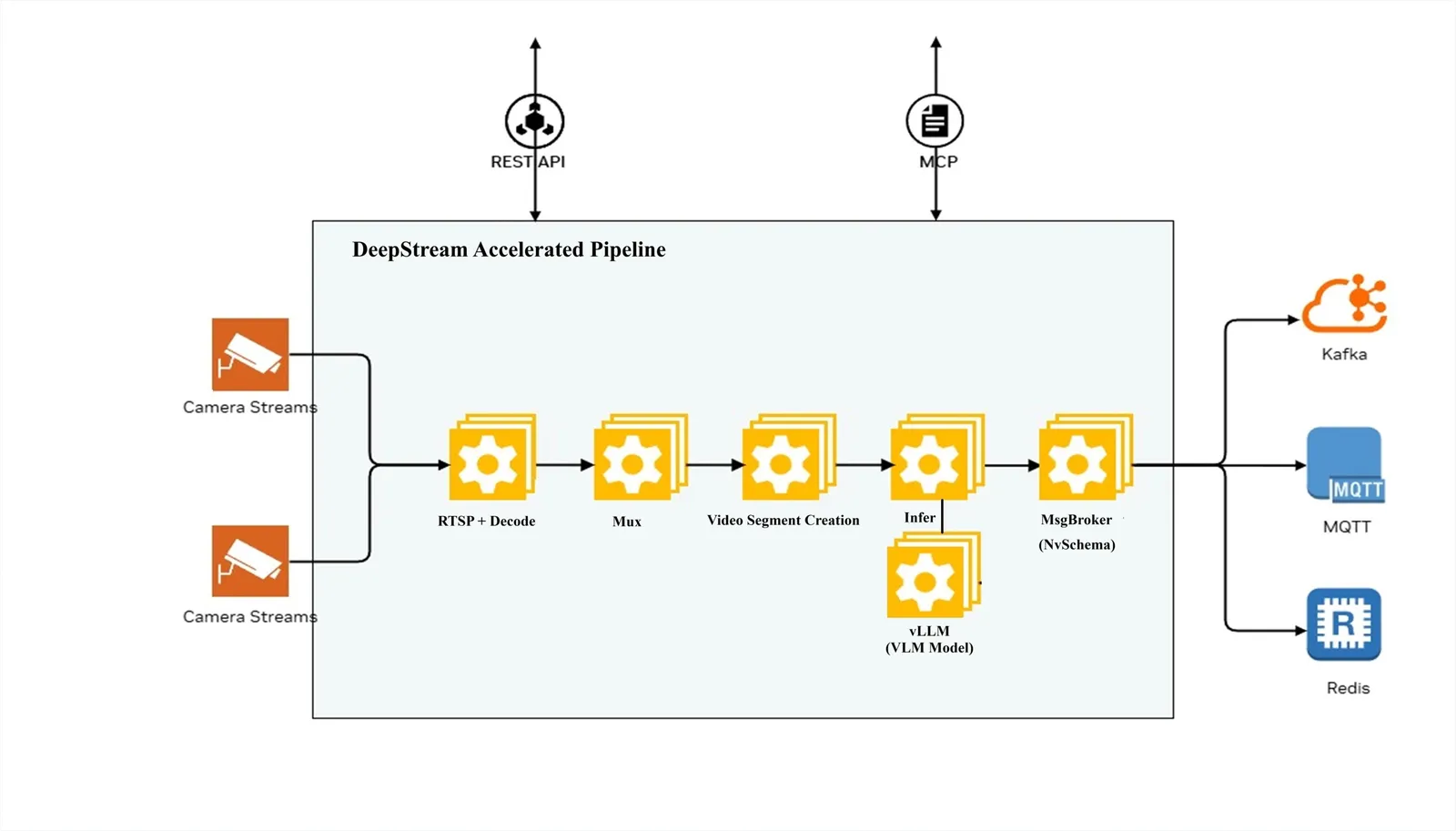
The pipeline processes camera streams through the following stages:
- RTSP + Decode: Receives and decodes camera streams. Matching caption requests for the same RTSP stream share one live decode pipeline.
- Video Segment Creation: Creates video segments for processing
- Infer: Performs inference using VLM models (with vLLM inference engine)
- MsgBroker (NvSchema): Publishes messages to Kafka
The system can be configured and controlled via:
- REST API: HTTP-based API for configuration and control
Supported Models
The Real-Time VLM Microservice supports local vLLM-compatible checkpoints, NGC
model artifacts, and remote OpenAI-compatible endpoints. Use
MODEL_PATH=git:<Hugging Face URL> for Hugging Face checkpoints,
MODEL_PATH=ngc:<org>/<team>/<model>:<version> for NGC model artifacts,
or VLM_MODEL_TO_USE=openai-compat with VIA_VLM_ENDPOINT for a remote
endpoint.
The following model families are supported.
Notes:
Cosmos3 Nano Reasoner (bf16)is the default model.- Do not use
Cosmos Reason2 8B (0303-fp4-dynamic-kv8)on GB200. Cosmos3 Nano Reasoner (bf16)is the tested variant; hallucinations may occur withmodelopt-fp8andmodelopt-nvfp4variants.- On NVIDIA Jetson Orin NX (16 GB), only the
Cosmos3 Edgevariant is supported. Cosmos3 Nano Reasoner (modelopt-fp8)is not supported on NVIDIA A100 GPUs.- GB300 is supported as a deployment platform for the listed local VLM models; select the container image variant that matches the host architecture.
- Nemotron Omni models require
VLM_TRUST_REMOTE_CODE=true; setVLM_MODEL_SUPPORTS_AUDIO=truefor native audio support.
RTVI-VLM supports video and text prompts for caption generation. Remote VLM
model endpoints are tested with NVIDIA NIM or OpenAI-compatible
chat/completions endpoints.
Supported Inputs
RTVI-VLM accepts live streams and file-based media through the following input types.
Streaming protocols
- RTSP — live camera streams managed via
POST /v1/streams/addand processed viaPOST /v1/generate_captionswith aliveStreamUrl.
URL schemes for file-based processing
POST /v1/generate_captions and POST /v1/files accept a url field
supporting the following schemes:
http://andhttps://— publicly accessible or auth-protected URLss3://— Amazon S3 object pathsfile://— local filesystem paths (requiresFILE_URL_ALLOWED_DIRS)
See URL-Based Processing for API details and security constraints.
Media types
- Video — pass
media_type: "video"(default) - Images — pass
media_type: "image"
Video Codecs:
- H.264 (AVC)
- H.265 (HEVC)
- AV1 (hardware decode by default; set
FORCE_SW_AV1_DECODER=trueon platforms without hardware AV1 support) - VP8
- VP9
Image Formats:
- JPEG
- PNG
Audio
Native audio decoding is available when using Omni models with
VLM_MODEL_SUPPORTS_AUDIO=true. Set INSTALL_PROPRIETARY_CODECS=true
when inputs may contain proprietary audio codecs. See
Omni Native Audio Support for configuration
details.
API Reference
For the endpoint catalog, including methods and summaries, see the Real-Time VLM API Reference.
The API is organized into the following categories:
- Captions: Generate VLM captions and alerts for videos and live streams
- Files: Upload and manage video/image files
- Live Stream: Add, list, and manage RTSP live streams
- Stream: CV-compatible stream add, remove, and list APIs
- Config: Update generated-message and error-message output routing
- Models: List available VLM models
- Health Check: Service health and readiness probes
- Metrics: Prometheus metrics endpoint
- Metadata: Service metadata and version information
- NIM Compatible: OpenAI-compatible endpoints for interoperability
All endpoints are prefixed with /v1. In a VSS developer profile, the API is
available at http://<host>:${RTVI_VLM_PORT:-8018}; Compose maps this host port
to port 8000 in the RTVI-VLM container. For the standalone deployment below,
set the required BACKEND_PORT variable and use
http://<host>:${BACKEND_PORT} instead; the example sets it to 8000.
For VIOS integrations, RTVI-VLM also exposes hidden compatibility aliases:
POST /api/v1/config, POST /api/v1/camera/add,
PUT /api/v1/camera/streaming, and POST or DELETE /api/v1/camera/remove. These aliases are intentionally omitted from the
OpenAPI schema. The compatibility API is evolving; its request and response
schema can change between releases.
Deployment
Prerequisites
Validated GPUs:
The Real-Time VLM Microservice has been validated and tested on the following NVIDIA GPUs:
- NVIDIA H100
- NVIDIA GB300
- NVIDIA RTX PRO 6000 Blackwell
- NVIDIA L40S
- NVIDIA DGX SPARK
- NVIDIA IGX Thor
- NVIDIA AGX Thor
Software:
- OS: Ubuntu 24.04 (x86); DGX OS 7.6.0 (DGX Station GB300); DGX OS 7.5.0 (DGX Spark); IGX-SW 2.0 Production/LTS (IGX Thor); JetPack 7.2 (Jetson Linux/L4T r39.2) for Jetson AGX Thor and AGX Orin
- Docker: Version 28.3.3+ and earlier than 29.5.0
- Docker Compose: Version 2.39.1+
- NVIDIA Driver: 595.58.03 (x86 and DGX Station GB300); 580.173.02 (DGX Spark); 580.00, bundled with IGX-SW 2.0 (IGX Thor); 595.78 (Jetson AGX Thor and AGX Orin)
- NVIDIA Container Toolkit: Latest version
- Git LFS: For large file handling
NVIDIA MIG reference configuration
RTVI-VLM supports deployment on an NVIDIA MIG slice when the host GPU, driver, and container runtime or Kubernetes device plugin are configured for MIG. NVIDIA defines the supported platforms, profile geometries, and valid instance placements in its Supported MIG Profiles guide. Use that guide for the exact GPU model rather than assuming profiles are portable between platforms.
RTVI-VLM is validated on the 96 GB NVIDIA RTX PRO 6000 Blackwell Server
Edition using two MIG 2g.48gb instances on one physical GPU.
Quick Start
Clone the blueprint repository:
Then follow the Docker Compose or Helm Chart section below. These instructions
use the 3.3.0 image from
nvcr.io/nvidia/vss-core/vss-rt-vlm.
Docker Compose Deployment
-
Change into the service Docker directory:
-
Create a
.envfile for the NGC image, then replace the NGC API key: -
Start the service:
The standalone Compose stack starts RTVI-VLM, Kafka, and Redis. To use a
different Kafka server, set KAFKA_BOOTSTRAP_SERVERS. To expose Kafka on
a custom host port, set KAFKA_PORT. To use a different Redis server,
set REDIS_HOST and REDIS_PORT. To expose Redis on a custom host
port, set REDIS_HOST_PORT.
If the launch fails due to Out of Memory error, see Troubleshooting (adjust VLLM_GPU_MEMORY_UTILIZATION,
reduce VLM_MAX_MODEL_LEN, or set NVIDIA_VISIBLE_DEVICES=<gpuid>).
The APIs are available at http://<HOST_IP>:<BACKEND_PORT>/docs.
Helm Chart
Use the standalone Helm chart when running only RTVI-VLM on Kubernetes. The chart
is in deploy/helm/services/rtvi/charts/rtvi-vlm in the
video-search-and-summarization repository.
-
Change into the chart directory:
-
Create the namespace and secrets:
-
Install the chart with the standalone override:
When using the
hf-token-secretsecret, sethfTokenSecret.name=hf-token-secretandhfTokenSecret.key=HF_TOKENin your values file or with--set. -
Expose the API for local testing:
The API is available at http://localhost:8000/docs.
Source Code Updates and Custom Container Build
Use this workflow only when you have changed RTVI-VLM source files under
services/rtvi/rt-vlm/src and need those changes inside the runtime
container. Custom container testing is supported with the standalone Docker
Compose deployment.
-
Build the custom image from the RTVI-VLM service directory:
-
Test the image with Docker Compose by setting
RTVI_IMAGEindocker/.env:Then restart the service:
For DGX Spark/SBSA Docker Compose testing, build an ARM64/SBSA image from the
rt-vlm/ directory and load it into the local Docker image store. Pass
ARM_PLATFORM=sbsa so the Dockerfile selects the SBSA DeepStream source and
runtime configuration:
For Jetson AGX Thor / IGX Thor (ARM64 but not SBSA), keep the default
ARM_PLATFORM=igpu. The Dockerfile selects the Thor-compatible ARM64
dependencies automatically:
Usage Examples
Required Packages
The Python examples require the following packages. Install with:
- requests – HTTP client for all examples
- sseclient-py – Server-Sent Events client (required only for streaming examples)
The RTVI CLI client uses additional packages (tabulate, tqdm, pyyaml) for
enhanced output formatting; the examples below are self-contained and need only
requests and sseclient-py.
Discovering the loaded model ID: The examples below use nim_nvidia_cosmos3-nano-reasoner_bf16-final as the
model field. When running a locally deployed model, the service loads it under its
full NGC artifact ID (e.g., nim_nvidia_cosmos3-nano-reasoner_bf16-final).
Use GET /v1/models to retrieve the exact ID before making inference requests:
Replace nim_nvidia_cosmos3-nano-reasoner_bf16-final in the examples below with the returned id.
Dense Captioning Example
The following example demonstrates dense captioning for a stored video file.
A video is uploaded, split into temporal chunks based on chunk_duration
and chunk_overlap_duration, and each chunk is processed by the VLM.
Workflow: For a video of duration D seconds with chunk_duration=60
and chunk_overlap_duration=10, the video is chunked into overlapping
segments (e.g., a 120-second video yields approximately 2 chunks). Each chunk
is decoded, frames are sampled, and the VLM generates a caption. With
stream=False (default), all chunks are processed and returned together
in a single JSON response.
Dense Captioning (Streaming) Example
The following example demonstrates dense captioning for a live RTSP stream with streaming output. As the stream is decoded in real time, it is split into chunks (e.g., 60-second segments with 10-second overlap). Each chunk is processed by the VLM as it becomes available.
Workflow: With stream=True, chunks are returned incrementally via
Server-Sent Events (SSE). Each SSE event contains chunk_responses for
chunks that have completed VLM inference. The client receives captions
as they are generated instead of waiting for the entire stream to finish.
The stream terminates with a [DONE] message.
Concurrent RTSP caption requests: each /v1/generate_captions request
for an RTSP stream ID gets its own request ID, prompt, SSE response stream,
and VLM generation path. Requests for the same RTSP stream share one live
decode pipeline when these decode settings match: chunk_duration, frame
sampling mode/value, vlm_input_width, vlm_input_height, and
enable_audio. A request with different decode settings for an already
active stream is rejected with HTTP 400; stop the active request or stream
before changing those settings. To stop one caption subscriber while keeping
others active, call DELETE /v1/generate_captions/{stream_id}?request_id=<request_id>.
Calling DELETE /v1/generate_captions/{stream_id} without request_id
stops the single active caption request for that stream, and returns HTTP 409
when multiple caption requests are active.
Deleting Streams and Resource-In-Use Responses
Stop active caption generation before deleting a live stream. If a stream or
file asset is still being used by an active request or in-flight cleanup, delete
APIs can report ResourceInUse with status code 409.
DELETE /v1/streams/delete/{stream_id} and POST /v1/stream/remove return
a top-level HTTP 409 when the matched stream asset is still in use.
POST /v1/stream/remove uses camera_id to find the stream; VIOS-style
remove requests for an unknown camera are idempotent and return asset_id=""
instead of 404.
DELETE /v1/streams/delete-batch returns HTTP 200 with a mixed
deleted/errors response. If one stream cannot be removed because it is
in use, that stream appears in errors with status_code set to 409
and error_code set to ResourceInUse; other streams in the batch can
still be deleted.
For teardown workflows, first stop the caption request with
DELETE /v1/generate_captions/{stream_id} and then delete the stream. For
batch cleanup, use blocking=true to wait for live-stream pipeline drain up
to drain_timeout_seconds or RTVI_STREAM_DELETE_BLOCKING_TIMEOUT_SEC. If
a ResourceInUse error remains, retry after the active request or cleanup
drain completes.
Listing Live Streams
Use GET /v1/streams/get-stream-info to list all currently registered live streams.
This is useful for verifying that a stream was added successfully or for retrieving
the stream ID of an existing stream.
The returned id is an opaque string of at most 256 characters. Streams added
through /v1/streams/add normally use a generated UUID, while streams registered
through the CV-/VIOS-compatible API retain their caller-supplied camera_id, such
as camera-entrance-east-01.
CV- and VIOS-Compatible Stream API
In addition to the /v1/streams/* endpoints, RTVI-VLM exposes a
CV-/VIOS-compatible stream API for cross-service interoperability with other
VSS services: POST /v1/stream/add, POST /v1/stream/remove, and
GET /v1/stream/get-stream-info.
These endpoints accept two payload shapes:
- Direct CV-compatible payload:
{key, value, headers}, wherevaluecontainscamera_id,camera_url,change, and optional metadata. Use this when an application calls RTVI-VLM directly. - VIOS event payload:
{alert_type, created_at, source, event}, whereeventcarries the camera fields. Use this when forwarding VIOS camera-status events.
For existing VIOS camera flows, the hidden aliases
POST /api/v1/camera/add and PUT /api/v1/camera/streaming use the same add
handler. POST /api/v1/camera/remove and DELETE /api/v1/camera/remove use
the same remove handler. Prefer the documented /v1/stream/* endpoints for new
integrations; the compatibility API is evolving and its request and response
schema can change between releases.
For both payload shapes, metadata.prompt starts VLM inference automatically
after the stream is added. Omit metadata or omit metadata.prompt to add
the stream without starting inference. camera_url accepts RTSP URLs,
file:// URLs, HTTP(S) URLs, and, for VIOS file sensors, absolute file
paths. File URLs and paths must be allowed by FILE_URL_ALLOWED_DIRS.
Direct CV-compatible add/remove example:
VIOS event add/remove example:
For VIOS POST /v1/stream/add requests, change can be
camera_streaming or camera_add. A VIOS camera_add event with
camera_url set to an empty string is accepted as registration-only and
returns status="added" with inference=false. For
POST /v1/stream/remove, change can be camera_remove or remove;
VIOS remove requests for an unknown camera return asset_id="" instead of
a 404 response.
VLM Alert Example
The following example demonstrates alert/anomaly detection using the VLM. Use a prompt that expects a structured Yes/No response for anomaly detection. When anomalies are detected, incidents can be published to the Kafka incident topic (see Kafka Integration). The Incident message payload is defined in Incident Messages.
Alert Categorization
For direct API calls, set alert_category on POST /v1/generate_captions
to control the incident.category field in Kafka incident messages. If the
field is omitted, the service uses vlm-alert.
Chat Completions API Example
The OpenAI-compatible /v1/chat/completions endpoint supports text-only
chat plus three input modes for video/image: pre-uploaded file ID, HTTP/HTTPS
URL, and base64 data URL.
Text-only chat
Omit the id field and do not include video_url or image_url in the
messages. Multi-turn conversations using system, user, and
assistant roles are supported, including token-level SSE streaming.
1. Using pre-uploaded file ID (id field):
2. Using HTTP URL (image_url or video_url in message content):
3. Using base64 data URL (inline media in message content):
URL-Based Processing
POST /v1/generate_captions and POST /v1/files accept a url
field for direct server-side ingestion without a prior upload step.
Supported schemes: http://, https://, s3://, and file://.
New request fields on /v1/generate_captions:
url— media URL (any supported scheme).media_type—"video"(default) or"image".creation_time— UTC ISO 8601 timestamp used as the frame-time offset baseline (useful for live-correlated archive playback). Both whole-second (2025-01-15T10:00:00Z) and millisecond (2025-01-15T10:00:00.123Z) precision are accepted.url_headers— per-request authorization headers (dict). HTTPS only; cross-domain redirects strip these headers.
New response field: each chunk in chunk_responses includes a
zero-based chunk_id for ordering.
Security:
file://URLs are rejected unlessFILE_URL_ALLOWED_DIRSis set (comma-separated absolute directories). Paths are resolved viarealpathto prevent traversal escapes.- HTTP/HTTPS URLs are validated against SSRF rules. Per-domain SSL skip
is opt-in via
ASSET_DOWNLOAD_SSL_SKIP_VERIFY_DOMAINS. Redirect hops are disabled by default; raise the cap viaASSET_DOWNLOAD_MAX_REDIRECTS(max 10). Server-level auth tokens can be set per domain viaASSET_DOWNLOAD_AUTH_TOKENS(format:domain1=Bearer token1;domain2=Basic xyz).
Remote Asset Download Metrics
When OpenTelemetry metrics are enabled, RTVI-VLM records remote HTTP, HTTPS, and S3 asset downloads with the following instruments:
asset_download_duration_seconds: download latency histogram.asset_download_bytes_total: total downloaded bytes.asset_download_requests_total: number of download attempts.
Each metric is labeled with the download source and final status. These
metrics are emitted through the configured OpenTelemetry exporter; configure
ENABLE_OTEL_MONITORING and the OTEL_* variables in the configuration
table.
Implementation Details
Server Class
The RTVI-VLM Server implements the FastAPI application and manages all API endpoints.
Timestamp Handling
The server handles timestamps differently based on media type, for live stream uses NTP timestamps (ISO 8601 format).
Streaming Implementation
For streaming responses, the server uses Server-Sent Events (SSE):
- Events are sent as JSON objects
- Each event contains chunk responses as they become available
- Final event contains usage statistics (if requested)
- Stream terminates with
[DONE]message - Multiple clients can caption the same RTSP stream concurrently. Each
/v1/generate_captionscall gets its own request ID, prompt, SSE response stream, and VLM generation path. Matching requests share one live RTSP decoder; mismatched decode settings are rejected until the active request or stream is stopped.
Kafka Integration
The Real-Time VLM Microservice can publish messages to Kafka topics for downstream processing. This enables integration with other microservices, analytics pipelines, and real-time alerting systems.
Kafka Topics
The server publishes to the following Kafka topics:
- VisionLLM Messages (default:
mdx-vlm-captions): Contains VisionLLM protobuf messages with VLM caption results. - Incidents (default:
mdx-vlm-incidents): Contains Incident protobuf messages when anomalies or incidents are detected. - Errors (default:
mdx-vlm-errors): Contains error event messages when stream processing failures occur.
Configuration:
Generated-message output is controlled by the following environment variables:
The standalone RT-VLM Compose file uses the names below directly. In the
repository’s developer-profile Compose deployment, set their prefixed aliases:
RTVI_VLM_MESSAGE_BUS, RTVI_VLM_MESSAGE_BUS_TOPIC,
RTVI_VLM_KAFKA_INCIDENT_TOPIC, RTVI_VLM_ERROR_BUS, and
RTVI_VLM_ERROR_MESSAGE_TOPIC.
- MESSAGE_BUS: Generated-message output bus. Set to
kafka,redis, or empty to disable generated-message output in the service runtime. The standard Docker Compose deployment defaults this value tokafka. - MESSAGE_BUS_TOPIC: Topic or Redis stream for VisionLLM messages. Default:
mdx-vlm-captions. This is the primary per-chunk output stream and replaces the legacyKAFKA_TOPICsetting. - KAFKA_BOOTSTRAP_SERVERS: Comma-separated list of Kafka broker
addresses (e.g.,
localhost:9092orkafka:9092for Docker). Required whenMESSAGE_BUS=kafkaorERROR_BUS=kafka. - KAFKA_INCIDENT_TOPIC: Kafka-only topic for Incident messages. Default:
mdx-vlm-incidents. Incident messages are published only when an anomaly is detected. This topic is independent ofMESSAGE_BUS_TOPIC. - ERROR_BUS: Error-message output bus. Set to
kafka(default),redis, or empty to disable error-message output. - ERROR_MESSAGE_TOPIC: Topic/channel for error messages. The default is
mdx-vlm-errors.
Generated-Message Bus Startup Selection
In 26.08.2, MESSAGE_BUS is the startup source of truth for generated-message
output. KAFKA_ENABLED is removed from the active RTVI-VLM startup path, and
KAFKA_TOPIC is replaced by MESSAGE_BUS_TOPIC.
To enable Kafka generated-message output:
To enable Redis generated-message output:
To disable generated-message bus output in the service runtime, leave
MESSAGE_BUS unset or set it to empty. In the packaged Docker Compose
deployment, MESSAGE_BUS defaults to kafka; leaving it unset or empty in
.env still expands to kafka. Use a Compose override or update the
service environment to set MESSAGE_BUS: "" when generated-message output
must be disabled. The performance Compose deployment sets MESSAGE_BUS empty
by default.
Runtime Config API
Use POST /v1/config to update generated-message routing at runtime from a
VSS-style config event. Kafka and Redis connection details are still configured
at startup; the runtime API switches the active generated-message bus/topic and,
optionally, the active error-message bus/topic.
The config payload fields map to runtime routing as follows:
alert_typemust beconfigandevent.changemust beconfig.event.metadata.messagingbusis required and must bekafkaorredis. It selects the active generated-message output bus.event.metadata.topic-prefixis required. RTVI-VLM uses it as the actual Kafka topic or Redis Stream name for VisionLLM messages.event.metadata.errorbusis optional. When present, it selects the active error-message output bus.event.metadata.error-topic-prefixis optional. When present witherrorbus, it sets the Kafka topic or Redis channel for error messages.event.metadata.create-topicandevent.metadata.topic-partitionare best-effort Kafka topic creation controls. They are ignored for Redis.
The endpoint changes only message routing. Kafka bootstrap servers, Redis
host/port/database, credentials, the active model, prompts, and
KAFKA_INCIDENT_TOPIC remain startup configuration. The runtime Config API is
not the startup disable path; use MESSAGE_BUS at startup to enable or
disable generated-message bus output. If routing is changed while caption
requests are active, messages already queued can still publish to the previous
route, while subsequent chunk messages use the updated route.
How Alerts and Incidents Are Sent to Kafka
When generate_captions processes video chunks, the server publishes
messages to Kafka as each chunk completes VLM inference:
-
VisionLLM messages are sent to
MESSAGE_BUS_TOPICwhenMESSAGE_BUS=kafka. Each message contains the VLM caption, frame metadata, sensor info, and anincidentDetectedflag in theinfomap ("true"or"false"). When reasoning is enabled and parsed from the VLM output, the reasoning is also added to theinfomap as bothreasoningandreasoningDescription. -
Incident messages are sent to
KAFKA_INCIDENT_TOPIConly when an anomaly is detected. The server detects incidents by checking the VLM response for trigger phrases such as"yes"or"true"(case-insensitive). Use prompts that expect structured Yes/No answers (see Enabling Incidents). For the full Incident message payload (protobuf schema and example), see Incident Messages. When reasoning is available, it is also added toIncident.infoas bothreasoningandreasoningDescription. -
Publishing flow (per chunk):
- After VLM inference completes, the server builds a VisionLLM protobuf and optionally an Incident protobuf if the response triggers an alert.
- Each message is sent asynchronously with a key
{request_id}:{chunk_idx}for partitioning and ordering. - A
message_typeheader ("vision_llm"or"incident") identifies the payload type for consumers. - VisionLLM and Incident messages are published independently; an incident is sent only when the VLM output indicates an anomaly.
-
Requirement: Set
MESSAGE_BUS=kafkaand configureKAFKA_BOOTSTRAP_SERVERSfor Kafka publishing to occur.
Message Formats
Incident Messages
Incident messages are serialized as Protocol Buffer (protobuf) messages
using the Incident message type from the protobuf schema.
Message Header:
- message_type:
"incident"
Message Structure:
Key Fields:
- sensorId: Identifier of the sensor/stream
- timestamp: Start timestamp of the incident
- end: End timestamp of the incident
- objectIds: Array of object IDs involved in the incident
- category: Category of the incident (e.g.,
"safety_non_compliance") - isAnomaly: Boolean indicating if the incident is an anomaly
- llm: LLM query and response information
- info: Additional metadata map containing fields like:
request_id: Request ID associated with the incidentchunk_idx: Chunk index where the incident was detectedincident_detected: Alert flagreasoning: Parsed VLM reasoning, when availablereasoningDescription: Parsed VLM reasoning, when availablepriority: Priority level (e.g.,"high")
Example Incident JSON (for reference):
VisionLLM Messages
VisionLLM messages contain VLM caption results and are serialized as
Protocol Buffer messages using the VisionLLM message type.
Message Header:
- message_type:
"vision_llm"(default, if not specified)
Message Structure:
See the protobuf schema documentation for complete VisionLLM message
structure. Key fields include:
- version: Message version
- timestamp: Start timestamp
- end: End timestamp
- startFrameId: Start frame identifier
- endFrameId: End frame identifier
- sensor: Sensor information
- llm: LLM queries, responses, and embeddings
- info: Additional metadata map. When reasoning is enabled and parsed from
the VLM output, this map includes both
reasoningandreasoningDescription.
Redis Error Messages
By default, error messages are sent to Kafka through ERROR_BUS=kafka.
To use Redis for error messages, set the following environment variables in
your .env file:
Error messages will be published to the Redis channel specified in
ERROR_MESSAGE_TOPIC. The message format remains JSON with the following
fields: streamId, timestamp, type, source, event.
ENABLE_REDIS_ERROR_MESSAGES=true is still accepted as a legacy alias for
ERROR_BUS=redis when ERROR_BUS is unset.
Configuration
The shared list below covers variables common to the standalone Docker Compose stack and standalone Helm override.
Docker Compose and Helm Variables
The table lists variables in standalone Docker Compose stack and the standalone Helm override.
Recommended GPU Memory Utilization
VLLM_GPU_MEMORY_UTILIZATION is the fraction of total GPU memory that vLLM
reserves for RTVI-VLM. For example, 0.7 reserves 70 percent. The standalone
service uses 0.7 when the variable is unset.
For VSS deployments, use these starting values for the default Cosmos3 Nano Reasoner model and service placement:
The VSS deployment scripts expose this setting as
RTVI_VLLM_GPU_MEMORY_UTILIZATION and pass it to the RTVI-VLM container as
VLLM_GPU_MEMORY_UTILIZATION. Treat the table as deployment starting points:
lower the value if model startup reports insufficient free memory or other
services need more headroom. Changing this value requires restarting RTVI-VLM
because vLLM reserves memory during engine initialization.
GB300 Standalone Deployment
For standalone RT-VLM deployment on GB300, set the following environment
variables on the rtvi-server container through a Docker Compose override:
Tune GPU memory utilization and the batched-token budget to the memory available to RT-VLM. VSS profiles that share the GPU with other services may require different values; use the profile-specific memory utilization starting points above.
Additional Helm Chart Values
The chart injects KAFKA_BOOTSTRAP_SERVERS, REDIS_HOST,
REDIS_PORT, REDIS_DB, MODEL_PATH, NGC_API_KEY, and
VIA_VLM_API_KEY from chart values or Kubernetes secrets. When
useSharedNim=true, it also injects VIA_VLM_ENDPOINT and
VIA_VLM_OPENAI_MODEL_DEPLOYMENT_NAME.
Top-level Helm values
enabled: Enable the chart. Default:false; standalone override:true.image.repository,image.tag, andimage.pullPolicy: Image settings. The repository, tag, and pull policy defaults arenvcr.io/nvidia/vss-core/vss-rt-vlm,3.3.0, andIfNotPresent. The image tag supports the supported x86 and ARM64 platforms.replicas: Number of replicas. Default:1.useSharedNim: Use a shared OpenAI-compatible NIM instead of loading a model in this pod. Default:false.modelPath: Model path whenuseSharedNim=false. The 26.08.2 standalone default isngc:nim/nvidia/cosmos3-nano-reasoner:bf16-final.sharedNimService,sharedNimPort,vlmBaseUrl,vlmName,viaVlmOpenAiModelDeploymentName, andnims.enabled: Shared or remote NIM routing values.ngcApiSecret.name,ngcApiSecret.key,hfTokenSecret.name, andhfTokenSecret.key: Secret references for NGC and Hugging Face tokens. The standalone override useshfTokenSecret.name=hf-token-secret.global.imagePullSecrets,global.ngcApiSecret.name,global.ngcApiSecret.key, andglobal.useReleaseNamePrefix: Umbrella chart global values. Configure an image pull secret when registry authentication is required for the NGC image.kafkaBootstrapServers,waitForKafka.enabled,waitForKafka.image.repository,waitForKafka.image.tag,waitForKafka.imagePullPolicy,waitForKafka.timeoutSeconds, andwaitForKafka.topics: Kafka connection and startup ordering values.redisHost,redisPort,redisDb, andredisPassword: Redis connection values.service.portandservice.type: Kubernetes service settings. Defaults:8000andClusterIP.securityContext.runAsUser,securityContext.runAsGroup,shmSize,resources.requests.nvidia.com/gpu, andresources.limits.nvidia.com/gpu: Pod security, shared memory, and GPU settings.env: List of RTVI-VLM environment variables.nodeSelectorandtolerations: Scheduling controls.
Using Remote Endpoints
The Real-Time VLM Microservice supports using remote endpoints with NVIDIA NIM or OpenAI-compatible models:
NVIDIA NIM:
For local deployments, update VIA_VLM_ENDPOINT to point to your local
deployment.
When using openai-compat with a remote NIM endpoint,
REMOTE_VIDEO_INPUT defaults to true and sends multi-frame chunks as a
single MP4 video payload instead of individual JPEG images. This avoids remote
NIM image-count limits. Set REMOTE_VIDEO_INPUT=false to restore
image-per-frame payloads. If MP4 encoding fails, the service falls back to up
to 10 uniformly sampled base64 JPEG images and logs a warning.
GPT-4o:
Hugging Face Models Locally
For models downloaded from Hugging Face and served locally via vLLM:
Qwen3-VL:
If HF_TOKEN is already set:
If HF_TOKEN is not set, embed the token directly in the URL:
Qwen3.5 / Qwen 3.5 MoE:
The service detects the Qwen3.5 architecture from the model config and
selects the bundled vLLM runtime automatically. No extra configuration is
required beyond MODEL_PATH.
Cosmos Reason 3 Reasoner:
Cosmos Reason 3 Reasoner is served by setting
VLM_MODEL_TO_USE=cosmos-reason3 and pointing MODEL_PATH at the
NGC model artifact with the ngc: prefix or the Hugging Face Diffuser
checkpoint with the git: prefix. Nano and Super checkpoint repositories are
supported:
Super models will not work on low-memory devices such as NVIDIA L40S and RTX 4500 GPUs.
The Cosmos Reason 3 BF16 Super and Nano models show lower binary and BERT scores compared to quantized variants. Consider this trade-off when selecting a model for quality-sensitive deployments.
Omni Native Audio Support
Omni models, including Nemotron Nano Omni, provide native single-model video +
audio understanding. When VLM_MODEL_SUPPORTS_AUDIO=true is set, audio is
decoded and consumed natively by the model alongside video frames.
Required environment:
Set INSTALL_PROPRIETARY_CODECS=true when audio inputs may contain
proprietary audio codecs. Without it, the service falls back to the
default codec set and may fail to decode the audio track of such
inputs. Enabling the flag downloads and extracts the codec overlay during
service startup, verifies that the GStreamer avdec_aac decoder is available,
and can therefore increase the first startup time. Enable it only when the
deployment requires those codecs; request-level enable_audio remains the
separate control for passing decoded audio to an Omni model.
Request side: pass enable_audio: true on POST /v1/generate_captions
to use native audio. For reasoning checkpoints, set
enable_reasoning: true; the response includes a reasoning_description
field in each chunk.
Response side: each chunk in chunk_responses includes an
audio_transcript field (when enable_audio is set). Native audio
understanding is available only on Omni models; other VLM models support
video and text input only.
For Video Summarization MS integration, see Optional: Use Nemotron-3-Nano-Omni (audio-aware VLM).
Efficient Video Sampling (EVS and Adaptive EVS)
EVS is a vLLM-engine feature that prunes redundant video tokens before inference to reduce per-chunk compute. RTVI-VLM supports two startup modes:
- Fixed-rate EVS prunes the same fraction of video tokens from every chunk, regardless of content.
- Adaptive EVS decides per token, based on content. Video tokens that barely change from the preceding frame are pruned, and tokens that carry motion or new content are kept. A static scene is pruned heavily and a busy scene is pruned lightly. Adaptive EVS also keeps a video session per stream, so pruning carries across chunk boundaries instead of restarting on every chunk.
EVS settings are read at service startup, so restart the RTVI-VLM service after changing them. They are not changed by the runtime Config API.
Fixed-Rate EVS
Set VLM_VIDEO_PRUNING_RATE to a finite value greater than 0 and less than
1. For example, 0.5 prunes about half of the redundant video tokens. Leave
it unset or empty to disable EVS. Boundary, out-of-range, non-numeric, NaN, and
infinite values cause RTVI-VLM startup to fail instead of silently disabling
EVS.
Fixed-rate EVS is available on vLLM-compatible local models that use the patched video-pruning paths, including Nemotron Nano VL, Qwen 2.5-VL, and Qwen3-VL/Cosmos3-style models.
Adaptive EVS
Set both VIA_EVS_SESSION=true and VLM_VIDEO_PRUNING_RATE=0.5.
VIA_EVS_SESSION routes requests through the vLLM video-session path, and
VLM_VIDEO_PRUNING_RATE turns on pruning in the engine at startup.
VLLM_EVS_SIMILARITY_THRESHOLD is optional and defaults to 0.4.
Set VLM_VIDEO_PRUNING_RATE whenever VIA_EVS_SESSION=true. Without it,
RTVI-VLM still creates video sessions but the engine never prunes, so requests
pay the session overhead with no token reduction.
Adaptive EVS is supported only for local, vLLM-compatible models based on the
Qwen3-VL architecture. It is not applicable to openai-compat remote endpoints.
It is not supported for Omni models: RTVI-VLM fails startup when
VIA_EVS_SESSION=true is set with NemotronH_Nano_Omni_Reasoning_V3.
Tuning:
VLLM_EVS_SIMILARITY_THRESHOLDcontrols how aggressively similar content is pruned. Each video token is compared with the token at the same position in the preceding frame, and it is pruned when their cosine dissimilarity is below the threshold. Raise the value to prune more and run faster; lower it to keep more detail. The valid range is0to2.VIA_EVS_TOKEN_BUDGETsets how many visual tokens a session accumulates before it generates. The default,1, generates a caption for every clip, so caption counts match a deployment without Adaptive EVS. Larger values pack several clips into one generation, which reduces the number of model calls and captions.VIA_EVS_MAX_SESSIONScaps the number of concurrent video sessions. The default is256.
Behavior changes when enabled:
- Every request goes through the video-session path, for uploaded files as well as live streams.
- RTVI-VLM encodes absolute frame timestamps in the video metadata. Unless you
configure an
RTVI_TIMESTAMP_PROMPT_*template, RTVI-VLM appends an instruction to the prompt telling the model that the clip’s frames span their absolute timestamps in the source video, so returned timestamps are relative to the start of the video rather than the start of the chunk.
Frame Selection Modes
RTVI-VLM supports two frame selection modes for sampling frames from video chunks:
FPS-based Selection:
- Enable
--use-fps-for-chunkingflag - Set
--num-frames-per-second-or-fixed-frames-chunkto the desired frames per second (e.g.,0.05for 0.05 FPS) - The system will sample frames at the specified rate based on chunk duration
Fixed Frame Selection (default):
- Do not set
--use-fps-for-chunkingflag (disabled by default) - Set
--num-frames-per-second-or-fixed-frames-chunkto the desired number of frames per chunk (e.g.,8for 8 frames) - The system will sample a fixed number of equally-spaced frames from each chunk
media_io_kwargs can also control frame sampling on
/v1/generate_captions and /v1/chat/completions. Positive
media_io_kwargs.video.fps or media_io_kwargs.video.num_frames values
override num_frames_per_second_or_fixed_frames_chunk and
use_fps_for_chunking. Use num_frames=-1 to select all decoded frames
in a chunk. fps and num_frames are mutually exclusive.
Enabling Incidents
To enable incident detection, set appropriate --prompt or --system-prompt
with clear Yes or No expectation. Incidents will be pushed to the incident Kafka
topic.
Example prompt:
Troubleshooting
Common Issues
Container fails to start
- Check
docker logs <container_name>for error messages - Verify GPU access: Ensure NVIDIA Container Toolkit is installed and
nvidia-smiworks
Low throughput or high latency
For single-GPU RT-VLM deployments, keep decoded frames on the GPU and use
torch_shm tensor transport to reduce CPU transfers between decoding and
inference. Set these variables on the rtvi-server container through a
Docker Compose override, then recreate the service:
Tune concurrency and memory settings to the GPU memory available to the deployment. For tensor-parallel deployments across multiple GPUs, retain the default tensor transport.
Out of Memory error
For example, larger models such as
Nemotron-3-Nano-Omni-30B-A3B-Reasoning-BF16 may need these
settings on NVIDIA RTX 4500, L40S, or Thor systems.
- Set
NVIDIA_VISIBLE_DEVICES=<gpuid>to a free GPU - Reduce batch size: Try
VLM_BATCH_SIZE=32Default is auto-calculated - Tune GPU memory utilization: Lower
VLLM_GPU_MEMORY_UTILIZATIONwhen model startup OOMs. Increase it only when KV-cache capacity is too low and free GPU memory remains. - Reduce max sequences: Lower
VLLM_MAX_NUM_SEQS - Reduce concurrent processes: Lower
NUM_VLM_PROCS - Reduce max model length on lower-memory GPUs: Reduce
VLM_MAX_MODEL_LEN - Cap generation length: Lower
VLM_MAX_GENERATION_TOKENS(default16384) to bound peak per-request memory. - On Jetson Thor or DGX systems, ensure that the cache cleaner script is running.
If the issue persists, reduce the image preprocessor max_pixels value for
the affected model. Replace <model-cache-directory> with the directory
name for the model in the RTVI NGC model cache:
Thor workaround for huge-model OOM
When running huge models such as
Nemotron-3-Nano-Omni-30B-A3B-Reasoning-BF16 on AGX Thor or
IGX Thor, allocate host swap before starting the RTVI-VLM service:
Use conservative vLLM memory settings in Docker Compose .env or Helm
env values:
Also ensure that the cache cleaner script is running on Thor.
System memory grows over time
For long-running workloads with many distinct videos or streams, keep the multimodal preprocessor cache disabled.
Docker Compose .env:
Helm chart env values:
Restart the service after changing these values. Re-enable the multimodal preprocessor cache only after validating memory behavior for your workload.
Port conflicts
- Change
BACKEND_PORTif port 8000 is already in use
Kafka Connection Issues
- Use
kafka:9092as bootstrap server when connecting from within Docker network - Verify Kafka is running:
docker ps | grep kafka
Health Check Failures
- Check logs with
docker compose logs rtvi-vlm
Known Issues
High concurrency with 8K vision tokens on Jetson Thor / DGX Spark
When running more than 2 concurrent live streams with a high vision-token budget (~8K vision tokens, i.e., 448×448 at 80 frames with Cosmos Reason3), the device may reboot or the microservice may crash due to memory pressure on resource-constrained edge platforms.
- Recommendation: Limit concurrent live streams to 2 or fewer when using 8K vision tokens on Jetson Thor or DGX Spark.
- Alternatively, reduce the vision-token budget by lowering the input
resolution from 448×448 to 372×372 at 30 frames (~2K vision tokens) using
VLM_INPUT_WIDTH=372,VLM_INPUT_HEIGHT=372,VLM_DEFAULT_NUM_FRAMES_PER_SECOND_OR_FIXED_FRAMES_CHUNK=30to support higher concurrency.
Stream deletion latency and ResourceInUse responses under high concurrent load
When multiple live streams are being processed concurrently and the VLM
inference latency exceeds the chunk duration (e.g., processing takes longer
than the configured chunk_duration), deleting a stream via
DELETE /v1/streams/delete/{stream_id},
DELETE /v1/streams/delete-batch, or POST /v1/stream/remove may take
longer than expected or report ResourceInUse with status code 409.
- This is expected behavior: the server avoids tearing down resources that are still held by active caption generation or cleanup.
- For single-stream delete and CV-/VIOS-compatible remove,
ResourceInUseis returned as a top-level HTTP 409. For batch delete, it is returned per stream in the responseerrorslist. - Stop active caption requests first, then retry after the drain completes. For
batch cleanup, set
blocking=truewhen the caller should wait for pipeline drain before the response is returned. - The delay is proportional to the VLM inference time at the current load.
Reducing concurrency or increasing
chunk_durationwill reduce delete latency.
Duplicate live-stream / camera IDs rejected with HTTP 409
In 3.2.0, adding a stream with a camera_id (CV API) or streamId
that is already registered returns HTTP 409 (DuplicateCameraId /
DuplicateStreamId). In 3.1.0 the existing registration was silently
overwritten. Update client code to either remove the prior stream first
or surface the 409 to the caller.
Version Information
The API version is v1. Check the service version using the health
check endpoints or by examining the OpenAPI schema at /docs.