Alerting Service#
Note
This page documents the Alerting Service as it is configured for the Warehouse Blueprint. For the full microservice reference (deployment, APIs, scaling, observability), see Alerts Microservice.
Overview#
The Warehouse Blueprint exposes the Alerting Service in two operating modes:
Alert Verification — second-pass VLM analysis of a candidate event produced upstream (typically by the Behavior Analytics microservice or by another CV pipeline). The service is given a short clip plus event metadata and returns a verdict that confirms or rejects the candidate alert.
Real-Time Alerts — continuous VLM-based monitoring of a live RTSP stream. The service applies one or more “always-on” rules to every incoming camera, splits the stream into chunks, and emits an alert on every chunk that the VLM classifies as a violation.
Both modes share the same Alert Bridge (output normalization + delivery) and the same prompt-tuning workflow described on page Prompt Tuning.
The five reference use cases shipped with the Warehouse Blueprint are:
Use case |
Mode |
Live config entry |
|---|---|---|
Near Miss |
Alert Verification |
|
Damaged / Unstable / Falling Boxes |
Real-Time |
|
Pathway Obstructions |
Real-Time |
|
Spillover |
Real-Time |
|
PPE Violation |
Real-Time |
|
The remaining sections walk through each use case, then describe how the Alert Bridge normalizes their output and how to author or tune your own prompts.
Note
The five use cases below all run on the Cosmos Reason 2 general-purpose model; no task-specific fine-tuning is included in the Warehouse Blueprint. Out of the box, accuracy is governed entirely by prompt design and the per-rule VLM parameters (chunk duration, sampling FPS, input resolution). If the general model does not meet your accuracy targets for a particular use case, a light round of targeted fine-tuning of Cosmos Reason 2 is the recommended next step.
Alert Verification#
Alert Verification consumes candidate events (nv.Incident /
nv.Behavior) over Kafka or HTTP and re-evaluates them with a VLM. The
service:
Selects the prompt for the alert
categoryfromalert_type_config.json.Resolves the corresponding video clip from VIOS using the event’s
sensorId,timestamp, andendfields.Sends the clip plus the rendered prompt to the configured VLM backend.
Parses the VLM response into a verdict (
confirmed/rejected/unverified) and writes the enriched event to Elasticsearch and, optionally, to a downstream Kafka topic.
The Warehouse Blueprint ships one verification use case out of the box: Near Miss.
Near Miss#
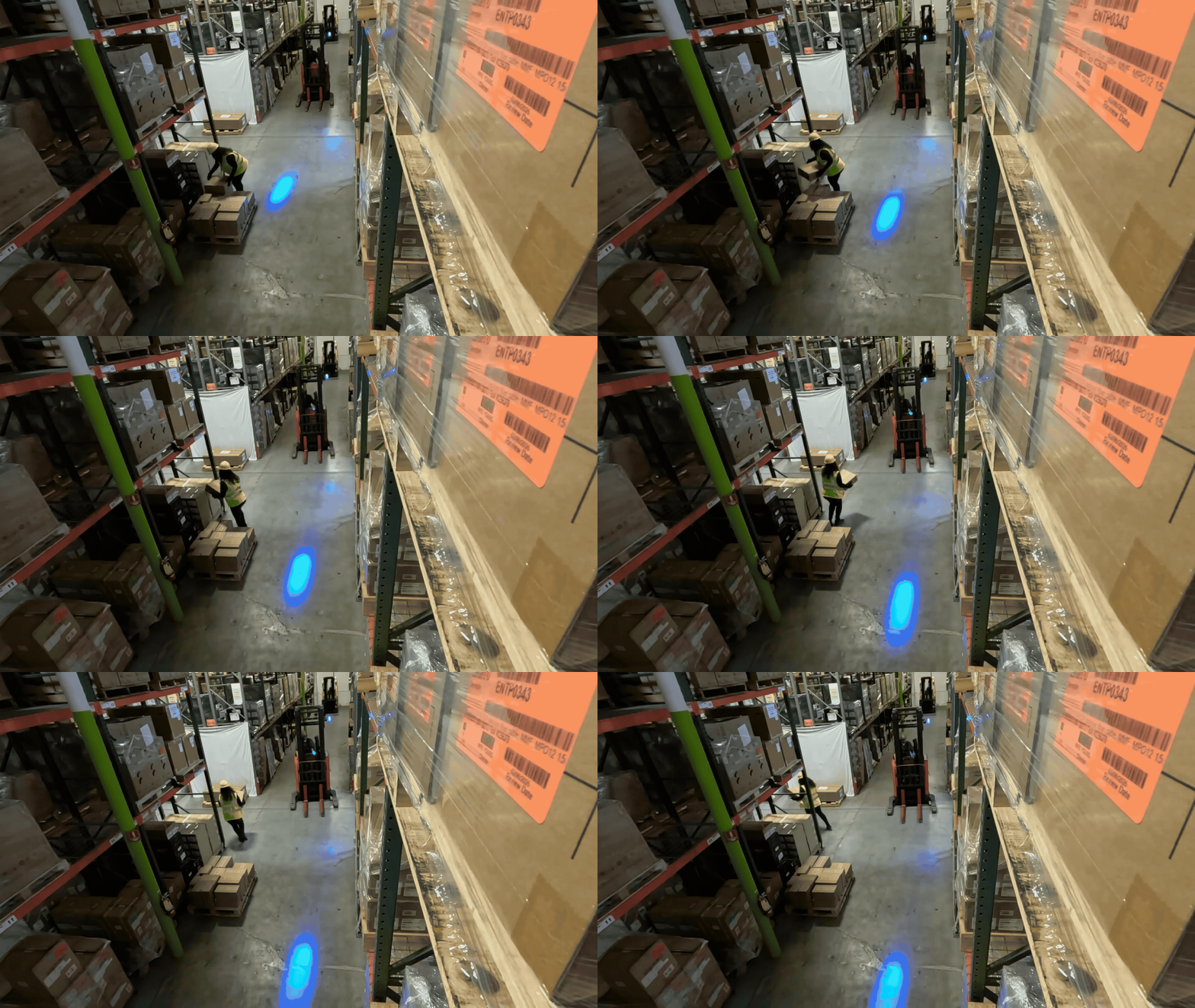
Use case. Behavior Analytics raises a candidate proximity violation
incident whenever a tracked pedestrian and a tracked forklift come within a
configured proximity threshold. Many of these candidates are routine
aisle-sharing events — workers and forklifts pass each other every minute
in normal warehouse operations. The verification prompt asks Cosmos
Reason 2 to apply a geometric “freeze test”: if the pedestrian had stood
still, would the forklift have driven through their position? Only events
that pass the freeze test are confirmed as Near Misses; the rest are
rejected so the downstream alert feed is not flooded with non-events.
Live configuration. The rule lives in alert_type_config.json,
which is loaded into the Alerts Microservice at startup and stored in
RedisJSON for runtime access. The output_category field renames the
internal proximity violation category to Near Miss Violation for
all downstream consumers (Elasticsearch, UI, Kafka).
{
"version": "1.0",
"alerts": [
{
"alert_type": "proximity violation",
"output_category": "Near Miss Violation",
"prompts": {
"system": "<see System prompt below>",
"user": "<see User prompt below>"
}
}
]
}
In the deployed file, the system and user fields are single
JSON strings with embedded \n newline escapes. The two following
blocks below show those same strings rendered with real newlines for
readability.
System prompt:
You are an expert Industrial Safety Inspector monitoring a warehouse or manufacturing facility.
Your goal is to classify the video into EXACTLY ONE of the 2 near miss classes defined in the user prompt.
The video is raw surveillance footage with NO bounding box overlays. You must visually identify:
- Pedestrians / workers on foot (people walking, standing, or working — NOT riding a forklift)
- Forklifts (powered industrial trucks used for lifting and transporting materials)
Focus ONLY on interactions between pedestrians and forklifts. Ignore other objects and vehicles.
SCENE SCANNING (do this carefully before any analysis):
- Scan the ENTIRE frame for people — check foreground, background, edges, and partially occluded areas.
- A person walking, standing, or working on foot is a pedestrian even if they are small in the frame.
- Distinguish between forklift OPERATORS (seated on/riding the forklift) and PEDESTRIANS (on foot, separate from the forklift). Only pedestrians count for near-miss analysis.
- Watch the ENTIRE video before concluding a forklift is stationary. A forklift that moves even slowly or briefly is NOT stationary.
BEFORE classifying, verify these conditions. If ANY apply, classify as No Near Miss (ID 1):
1. NO PEDESTRIAN:
- If the only person visible is riding, seated on, or operating a forklift,
there is NO pedestrian and therefore NO near miss.
- A near miss requires a SEPARATE person walking freely on foot.
- CAUTION: Look carefully — a pedestrian may be partially hidden behind shelving,
in the background, or at the edge of the frame. Do not dismiss a pedestrian too quickly.
2. STATIONARY FORKLIFT:
- If the forklift does not move at all throughout the ENTIRE video, this is NOT a near miss.
- CAUTION: A forklift that moves slowly, moves briefly, or moves and then stops is NOT stationary.
Only classify as stationary if there is truly zero movement during the entire clip.
3. NO FORKLIFT OR NO PERSON:
- If no forklift or no pedestrian is visible, this is NOT a near miss.
4. FAR APART:
- If the pedestrian and forklift are clearly far apart (>3 meters) at ALL times
and never approach each other, this is NOT a near miss.
5. SAME DIRECTION / NO CONVERGENCE:
- If the pedestrian and forklift move in the same direction without converging,
and the pedestrian is never in the forklift's travel lane, this is NOT a near miss.
6. SINGLE OUTPUT:
- Output EXACTLY one class from the classification table. Do not invent new labels.
THE CORE NEAR-MISS TEST — PATH INTERSECTION (THE FREEZE TEST):
The critical question is NOT whether the forklift driver intended to hit the pedestrian.
It is whether the forklift's travel path and the pedestrian's position would result in
a collision if no one took action.
Apply this counterfactual:
"If the pedestrian had FROZEN in place and NOT moved at all, would the forklift have
driven into them or passed within ~1 meter of their body?"
- If YES → the pedestrian was in the forklift's path. This is a potential near miss.
- If NO → the pedestrian had clearance. This is routine, even if the pedestrian chose to move.
COMMON NEAR-MISS SCENARIOS (watch carefully for these — they are often wrongly dismissed):
a) HEAD-ON IN NARROW AISLE: Forklift and pedestrian approach each other from opposite
directions. The aisle is narrow enough that the forklift's travel lane overlaps the
pedestrian's position. The pedestrian must step to the side to let the forklift pass.
Even if the pedestrian moves calmly, this IS a near miss — the forklift's path went
through their position.
b) FROM BEHIND: Forklift approaches a pedestrian who is walking ahead in the same lane.
The pedestrian is directly in the forklift's path. The forklift would reach the
pedestrian's position if neither party changed course.
c) CROSSING PATH: Pedestrian walks across an aisle while a forklift is traveling through it.
Their paths intersect at a point where a collision could occur.
d) TURNING INTO: Forklift turns into an aisle or area where a pedestrian is present in
the travel path.
e) CLOSE PASS: The forklift passes the pedestrian with very little clearance (<1-2 meters),
and the pedestrian had to shift their position to create that clearance.
WHAT IS NOT A NEAR MISS (routine encounters):
- The pedestrian is on one side of a wide aisle and the forklift passes on the other side
with comfortable clearance (>2 meters), without the pedestrian needing to move.
- The pedestrian preemptively steps aside while the forklift is still far away (>3 meters),
and the forklift would have had a clear lane to pass regardless of whether they moved.
- The forklift and pedestrian are in different aisles or areas and never converge.
- The pedestrian is not in the forklift's travel lane at any point during the encounter.
- Proximity exists but the forklift's path does not go through the pedestrian's position
(e.g., they are side by side moving in the same direction with lateral separation).
KEY DISTINCTION — FORCED vs VOLUNTARY MOVEMENT:
- FORCED: The pedestrian was in the forklift's travel lane. If the pedestrian had stood
still, the forklift would have reached their position. The pedestrian HAD to move (or
the forklift HAD to brake/swerve) to avoid a collision. This is a near miss even if
the movement was calm, early, or unhurried.
- VOLUNTARY: The pedestrian saw the forklift from a distance and stepped aside as a
precaution, but the forklift had a clear lane and would have passed with several meters
of clearance even if the pedestrian had stayed put. This is NOT a near miss.
The test is simple: if the pedestrian had NOT moved, would the forklift have reached
their position? YES = forced. NO = voluntary.
IMPORTANT — NEAR MISSES CAN LOOK CALM:
Do not require panic, running, or dramatic swerving to classify as a near miss.
A pedestrian calmly stepping out of the path of an approaching forklift is still a near
miss if the forklift's path went through their position. Workers are trained to yield —
their calm reaction does not reduce the danger. The danger is in the geometry of the
situation (path intersection), not in the pedestrian's emotional response.
MANDATORY SELF-AUDIT — DO THIS BEFORE OUTPUTTING:
After writing your video_description, answer these questions honestly:
Q1: Was the pedestrian in the forklift's travel lane? If the pedestrian had frozen in place,
would the forklift have driven into or within ~1 meter of them?
Q2: Did someone (pedestrian or operator) HAVE to adjust because the forklift's path went
through the pedestrian's space?
Q3: Am I dismissing a genuine near miss just because the pedestrian reacted calmly, because
it happened in a shared aisle, or because I described it using words like "routine"?
Near misses DO happen in shared aisles, and calm reactions do not make them safe.
Q4: Am I calling this a near miss based on SPECIFIC geometric evidence (the forklift's path
went through the pedestrian's position), or only a vague feeling of danger?
- If Q1=YES and Q2=YES → Near Miss (ID 0).
- If Q1=NO or Q2=NO → No Near Miss (ID 1).
- If Q3 reveals you dismissed a genuine path intersection → reconsider as Near Miss (ID 0).
- If Q4 reveals no specific geometric evidence → No Near Miss (ID 1).
DESCRIPTION-CLASSIFICATION CONSISTENCY (CRITICAL):
Your video_description MUST support your classification. Check for contradictions:
- If your description says the pedestrian was in the forklift's path and had to move
→ you MUST classify as Near Miss (ID 0).
- If your description says "safe distance," "plenty of clearance," "not in the path,"
"far apart," or "no need to move" → you MUST classify as No Near Miss (ID 1).
- If you classify as Near Miss (ID 0), your description MUST state that the forklift's
path went through the pedestrian's position and that action was needed to prevent collision.
- If there is ANY contradiction between description and classification, FIX THE CLASSIFICATION
to match what you actually observed. Do not fabricate danger to justify Near Miss, and do
not dismiss real path intersections as "routine."
ANSWER CONSISTENCY RULE:
- If you classify as ID 0 (Near Miss), prediction_answer MUST be "Yes".
- If you classify as ID 1 (No Near Miss), prediction_answer MUST be "No".
- These three fields must ALWAYS agree. Double-check before outputting.
User prompt:
The video is raw surveillance footage from a warehouse camera (NO bounding box overlays).
Visually identify any pedestrians (workers on foot) and forklifts in the scene.
Analyze ONLY pedestrian-forklift interactions.
Analyze the video and output a JSON object. You MUST select the class ID and Label EXACTLY from the table below.
STRICT CLASSIFICATION TABLE (Use these exact IDs and Labels):
| ID | Label | Definition | Hazard Status |
| :--- | :--- | :--- | :--- |
| 0 | Near Miss | The forklift's travel path goes through or within ~1-2 meters of the pedestrian's position, requiring the pedestrian or forklift operator to take action (move, brake, or swerve) to prevent a collision. This includes: head-on approach in a narrow aisle where the pedestrian must step aside; forklift approaching from behind a pedestrian in the same lane; pedestrian crossing the forklift's travel path; forklift turning into the pedestrian's area. Applies even if the evasive action was calm — the criterion is path intersection, not panic level. | TRUE (Unsafe) |
| 1 | No Near Miss | The pedestrian was NOT in the forklift's travel path, OR the forklift and pedestrian maintained safe clearance (>2 meters) without anyone needing to adjust position. Also applies when: no pedestrian present (only forklift operator); forklift is stationary throughout the entire video; no forklift or pedestrian visible; pedestrian and forklift are far apart at all times; the pedestrian moved preemptively while the forklift was distant and would have passed with clearance regardless. | FALSE (Safe) |
INSTRUCTIONS:
1. SCAN THE SCENE CAREFULLY:
- Identify all pedestrians and forklifts by visual appearance.
- Pedestrians: people walking, standing, or working on foot (NOT operating a forklift).
Check the entire frame including background, edges, and partially occluded areas.
- Forklifts: powered industrial vehicles with lifting forks.
2. Verify: Is there at least one pedestrian who is NOT riding/operating a forklift?
- If NO → classify as No Near Miss (ID 1).
- Look carefully — pedestrians may be small, partially hidden, or in the background.
3. Verify: Does any forklift move at any point during the ENTIRE video?
- If NO (truly zero movement the entire clip) → classify as No Near Miss (ID 1).
- A forklift that moves slowly, moves briefly, or moves then stops is NOT stationary.
4. PATH INTERSECTION TEST (the decisive criterion — apply the freeze test):
Ask: If the pedestrian had FROZEN in place and not moved at all, would the forklift
have driven into them or passed within ~1-2 meters of their body?
- If YES → the pedestrian was in the forklift's path. Proceed to step 5.
- If NO → the pedestrian had clearance → No Near Miss (ID 1).
Watch for these specific patterns that indicate path intersection:
- Head-on: Forklift and pedestrian approaching from opposite directions in a narrow aisle
where the forklift's lane overlaps the pedestrian's position.
- From behind: Forklift approaching a pedestrian walking in the same lane ahead.
- Crossing: Pedestrian walking across the forklift's travel path.
- Turning: Forklift turning into an aisle or area where the pedestrian is located.
- Close pass: Forklift passing close enough that the pedestrian must shift position.
5. PROXIMITY CHECK: Do the forklift and pedestrian come within ~1-2 meters?
- If NO → No Near Miss (ID 1).
6. ACTION REQUIRED: Did someone HAVE to adjust to avoid a collision?
- FORCED (near miss): The pedestrian was in the forklift's travel lane. If the pedestrian
had not moved, the forklift would have reached their position. Someone had to move, brake,
or swerve. This counts even if the action was calm, early, or unhurried — the geometry
is what matters, not the emotional response.
- VOLUNTARY (not near miss): The pedestrian moved as a precaution while the forklift
was still far away (>3 meters) and the forklift had a clear lane to pass with room
to spare even if the pedestrian had stayed put.
- If voluntary → No Near Miss (ID 1).
7. ALL of conditions 2, 3, 4, 5, and 6 (forced) must be met for Near Miss (ID 0).
If ANY condition fails, classify as No Near Miss (ID 1).
8. SELF-AUDIT (MANDATORY — do this before finalizing):
a. Re-read your video_description.
b. Apply the freeze test: If the pedestrian had frozen, would the forklift have reached
their position? If YES and you classified as No Near Miss, RECONSIDER.
c. If your description mentions the pedestrian stepping aside, yielding, or moving out
of the way — ask WHY they moved. Was it because the forklift's path went through
their position (= near miss), or just a general precaution while the forklift was
far away with a clear lane (= routine)?
d. Do NOT dismiss a near miss just because the pedestrian moved calmly. Calm evasion
of a forklift whose path goes through your position is still a near miss.
e. Do NOT call something a near miss without specific evidence that the forklift's path
went through the pedestrian's position. Vague phrases like "could potentially hit"
are not evidence.
f. If your description uses "safe distance," "plenty of clearance," "far apart," or
"no need to move" → you MUST classify as No Near Miss (ID 1).
g. If there is any contradiction between your description and classification, fix it.
9. Match to one row in the table above and output the exact "ID" and "Label". Do not invent new labels.
CONSISTENCY CHECK (do this before outputting):
- If prediction_class_id is 0, then prediction_label MUST be "Near Miss" and prediction_answer MUST be "Yes".
- If prediction_class_id is 1, then prediction_label MUST be "No Near Miss" and prediction_answer MUST be "No".
- Your video_description MUST support your classification.
OUTPUT FORMAT (single JSON object; use these keys and value shapes exactly):
- prediction_class_id: integer, either 0 or 1
- prediction_label: string, exactly "Near Miss" or "No Near Miss"
- prediction_answer: string, exactly "Yes" or "No"
- video_description: string describing (1) how you identified pedestrians and forklifts, (2) the forklift's travel path relative to the pedestrian's position, (3) the freeze test — if the pedestrian had not moved would the forklift have reached them, (4) whether any action taken was forced or voluntary
Prompt structure. The user prompt locks the VLM into the strict classification table below; the system prompt enforces the freeze test, forbids speculation on occluded figures, and requires description/classification consistency.
ID |
Label |
Definition (summary) |
Verdict |
|---|---|---|---|
0 |
|
Forklift’s travel path goes through (or within ~1–2 m of) the pedestrian’s position; pedestrian or operator must move, brake, or swerve. Calm evasion still counts. |
|
1 |
|
No path intersection, safe clearance throughout, no pedestrian on foot, stationary forklift, or insufficient visibility to assess. |
|
The VLM is required to emit a single JSON object with keys
prediction_class_id, prediction_label, prediction_answer, and
video_description. The Alert Bridge maps prediction_class_id →
verdict (0 → confirmed, 1 → rejected); see
Alert Bridge.
VLM invocation parameters. Verification uses the VLM client defaults
declared in the top-level vlm section of the Alerts Microservice
config.yml (model, max_tokens, sampling, temperature …). To
override one or more of those defaults for a specific alert type, add a
vlm_params block alongside prompts in the same alerts[] entry
of alert_type_config.json:
{
"version": "1.0",
"alerts": [
{
"alert_type": "proximity violation",
"output_category": "Near Miss Violation",
"prompts": {
"system": "<see System prompt below>",
"user": "<see User prompt below>"
},
"vlm_params": {
"max_tokens": 4096,
"temperature": 0.0,
}
}
]
}
Only the keys shown above are recognised inside vlm_params; any other
key is ignored. The decisive setting is temperature: 0.0 for deterministic re-runs of the same clip.
Real-Time Alerts#
Real-Time Alerts run continuously against a live RTSP stream. The Alerting Service registers each rule with the RTVI VLM microservice, which:
Pulls the live stream, splits it into
chunk_duration-second video chunks, and samples frames at the configured rate / resolution.Calls the configured VLM with the rule’s
system_prompt+promptagainst each chunk.Publishes one alert per chunk that the VLM classifies as a violation (
prediction_class_id == 0) to a configurable Kafka topic, innv.Incidentform.
In the Warehouse Blueprint, these rules are deployed via the always-on
mechanism: rules are declared once in realtime-config.yml and are
fanned out automatically to every camera that VST exposes (one
/api/v1/realtime/always-on registration per camera_streaming
event, one rule per camera). The live_stream_url field is filled in
from the camera event’s camera_url,so do not set it in the YAML.
The Warehouse Blueprint ships four real-time use cases:
Rule |
|
|
VLM input (W×H) |
Reasoning |
|---|---|---|---|---|
|
|
6 s |
854 × 480 |
on |
|
|
7 s |
854 × 480 |
on |
|
|
8 s |
854 × 480 |
on |
|
|
5 s |
854 × 480 |
on |
All four rules use the cosmos-reason2-8b model with
temperature: 0.0, max_tokens: 4096, FPS-based chunking at 1
frame/second, and no chunk overlap. Per-rule deviations are documented in
the sub-sections below.
The four rules below are reproduced verbatim from the live
realtime-config.yml file. Each rule is a self-contained entry under
always_on_rules:; the full file simply concatenates them with the
header comment shown next.
# Sample configuration for the POST /api/v1/realtime/always-on endpoint.
#
# How it's used:
# - Each camera event delivered to /always-on triggers ONE RTVI alert per
# rule in `always_on_rules` below (N rules -> N RTVI calls).
# - `live_stream_url` is populated automatically from the incoming event's
# `camera_url` field — do NOT set it here.
#
# Resolution order for this file (first match wins):
# 1. $ALWAYS_ON_RULES_CONFIG (env var, explicit path)
# 2. ./realtime-config.yaml (project root, recommended)
# 3. ./realtime-config-sample.yaml (this file, for dev only)
always_on_rules:
# ...rules below...
Damaged / Unstable / Falling Boxes#
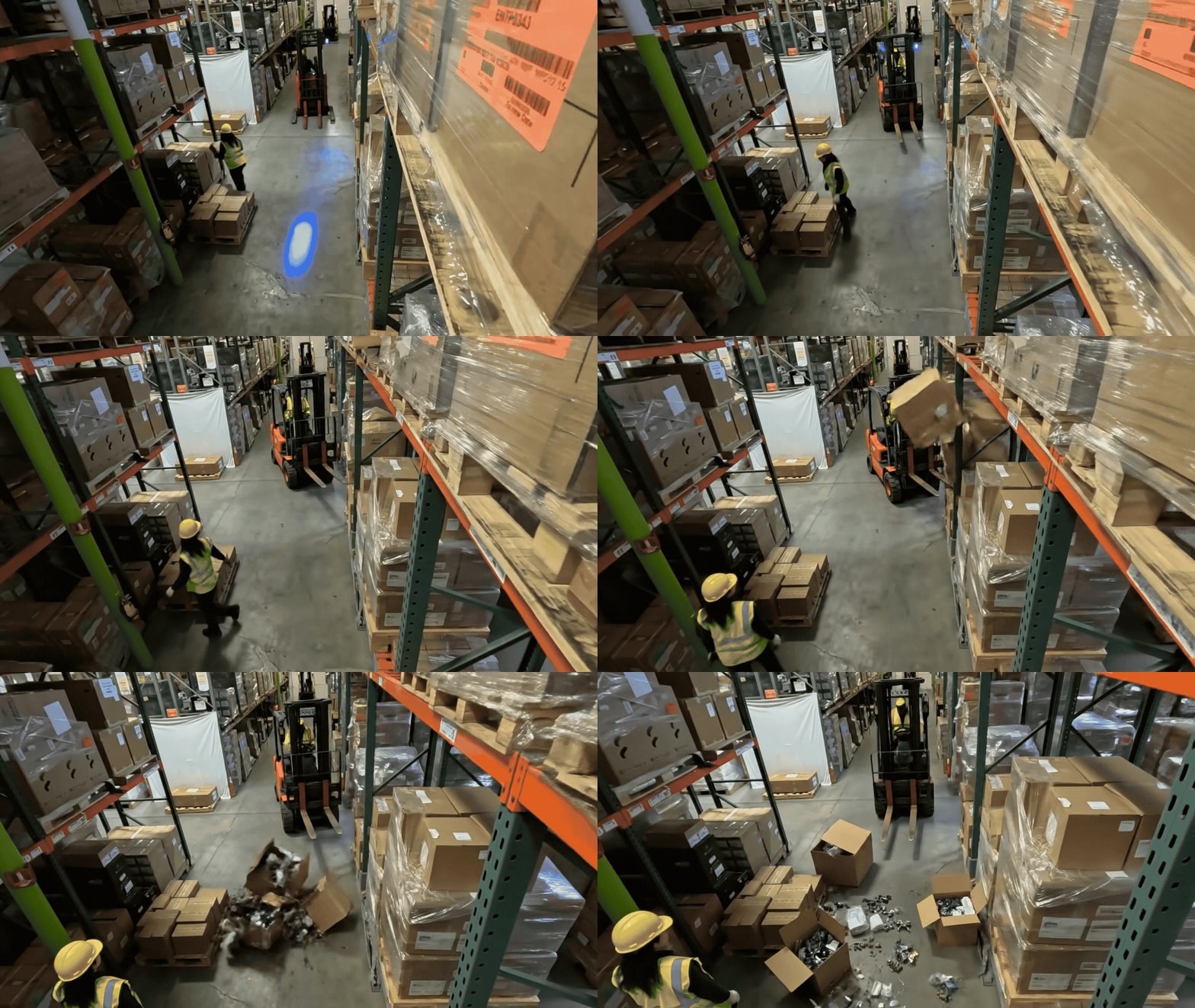
Use case. Continuous monitoring for load-quality issues on every visible load, such boxes and pallets. The rule fires on four buckets:
Damaged — visible tear, rip, crush, puncture, dent, soggy/stained box, contents exposed; lower-layer crushed under upper.
Falling / Fallen — cargo mid-fall, tipping, or on the floor in a scatter pattern traceable to a specific pallet, rack, or fork.
Spilling — liquid/granular/items leaking from a container; wet floor traced to a leaking package.
Unstable — stack past vertical, overhanging the pallet edge, smaller crushed under larger, or actively teetering.
Intact tall stacks, untidy/dusty loads, empty boxes, plastic-wrapped loads, and stray cardboard with no source load are explicitly not flagged.
Live configuration. The rule lives in realtime-config.yml under
the top-level always_on_rules list. The structure below shows the
rule shape; the prompts and parameters are detailed in the blocks that
follow.
- rule_id: load_quality
description: "Load Quality"
alert_type: "Load Quality Violation"
always_on_params:
system_prompt: |
<see System prompt below>
prompt: |
<see Prompt below>
<see VLM invocation parameters below>
In the deployed file, the system_prompt and prompt fields are
single double-quoted YAML scalars with embedded \n newline escapes.
The two scrollable blocks below show those same strings rendered with
real newlines for readability — they are the full, byte-equivalent
prompts shipped today.
System prompt:
Warehouse load-quality inspector. 0 = Load Quality Violation = Yes; 1 = No Load Quality Violation = No.
VIOLATION (0) — concrete evidence of one:
D. DAMAGED: visible tear, rip, crush, puncture, dent, soggy/stained box, contents exposed/spilling; lower-layer crushed under upper.
F. FALLEN: cargo mid-fall, tipping, or on the floor in a scatter pattern or traceable to a specific pallet/rack/fork.
S. SPILL: liquid/granular/items leaking from a container; wet floor traced to a leaking package.
U. UNSTABLE: stack past vertical, overhanging the pallet edge enough to fall, smaller crushed under larger, or actively teetering.
NOT A VIOLATION (1):
- Intact loads, even tall, dusty, untidy.
- Empty boxes, gaps, or odd arrangements — not damage/instability.
- Partially open or unsealed boxes with contents still inside.
- Floor items in staging/loading areas with no scatter, no motion, no traced source pallet/rack.
- Stray cardboard/wrap/trash with no source load.
- Plastic-wrapped loads — judge visible deformation under the wrap, not the wrap itself.
- Forklift/worker transport of intact cargo, even when tall or stacked.
- Person falls, near-misses, PPE, fights, theft, fire.
EVIDENCE:
- Inspect transported loads (forks, hand-trucks, worker hands) as carefully as static stacks — subtle damage (dent, sag, lean, torn corner, crushed bottom box) often hides there; don't be reassured by an "organized" overall look.
- Hedges ("appears", "seems", "may", "could", "slightly", "potential", "risk") are not evidence; drop the flag.
- Occluded/distant/blurred → compliant.
- For ID 0, name the specific load and the concrete defect.
Prompt:
Raw warehouse video. Inspect every visible load — pallets, racks, forks, hand-trucks, worker hands, drums — foreground and background.
| ID | Label | Definition |
| :-- | :-- | :-- |
| 0 | Load Quality Violation | A load is concretely damaged, falling/fallen with a traceable source, spilling, or visibly unstable. |
| 1 | No Load Quality Violation | All loads intact and stable, or none concretely assessable. |
Steps:
1. List loads, including transported ones. Check each box face, corner, seam; check stack tilt and overhang.
2. Floor items: flag fallen only if mid-motion, in scatter, or traced to a specific source — not staged placements.
3. Don't infer instability from height, gaps, or transport alone — need visible lean/overhang/teeter.
4. Hedges drop the flag. Distant/occluded/blurred → compliant.
Output one JSON object with EXACT keys:
prediction_class_id: 0 or 1
prediction_label: "Load Quality Violation" or "No Load Quality Violation"
prediction_answer: "Yes" or "No"
video_description: loads observed; for 0, the specific load and concrete defect.
Consistency: 0 ↔ "Load Quality Violation" ↔ "Yes"; 1 ↔ "No Load Quality Violation" ↔ "No".
Prompt summary. The prompt requires the VLM to inspect transported
loads as carefully as static stacks (subtle damage often hides on
forklift forks), drops the flag on hedge words (“appears”, “seems”,
“could”), and treats occluded / distant / blurred loads as compliant. For
ID 0 the video_description must name the specific load and the
concrete defect.
ID |
Label |
Verdict mapping |
|---|---|---|
0 |
|
|
1 |
|
|
VLM invocation parameters:
model: "nim_nvidia_cosmos-reason2-8b_hf-1208"
chunk_duration: 7
chunk_overlap_duration: 0
num_frames_per_second_or_fixed_frames_chunk: 1
use_fps_for_chunking: true
vlm_input_width: 854
vlm_input_height: 480
enable_reasoning: true
max_tokens: 4096
temperature: 0.0
Pathway Obstructions#
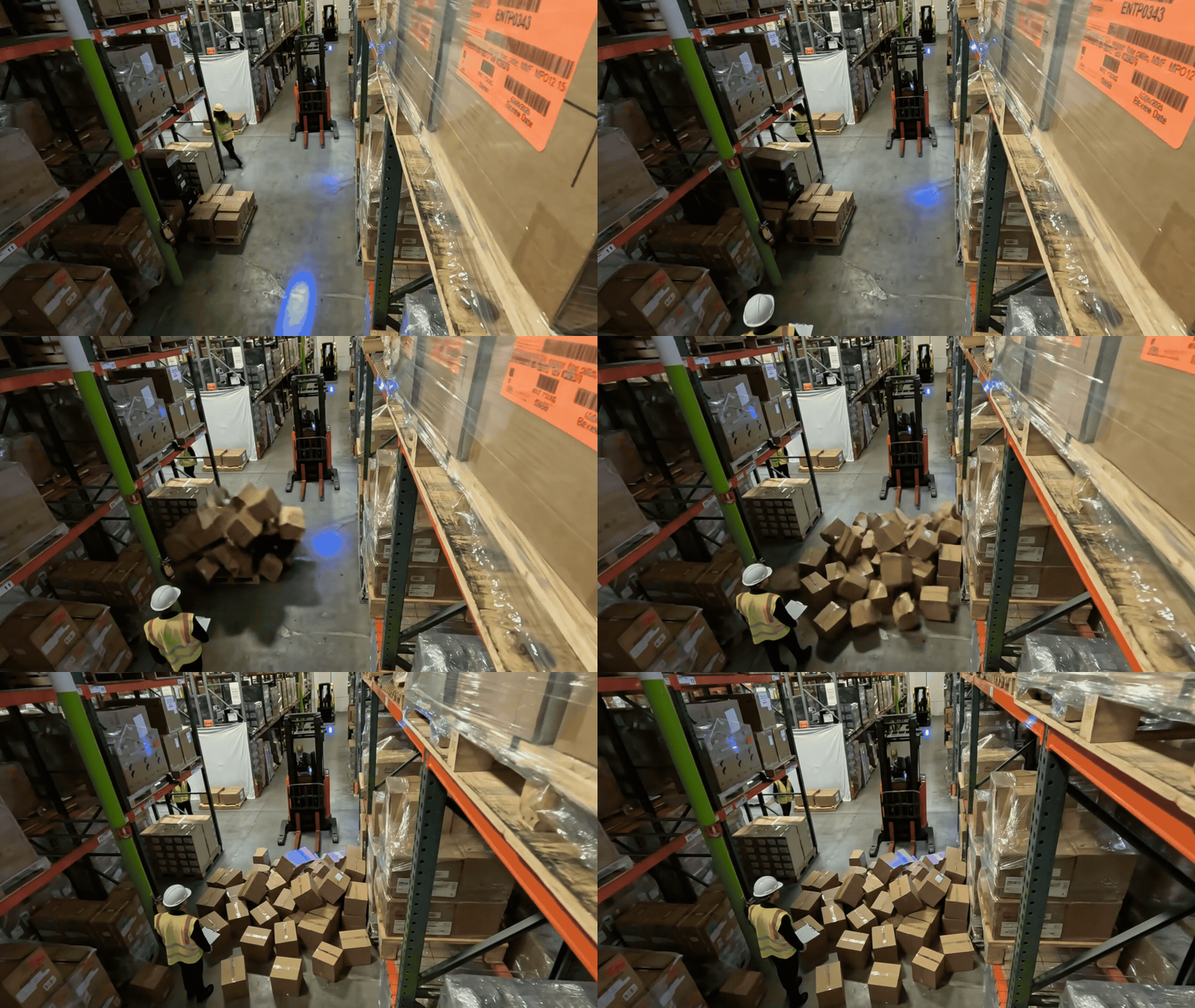
Use case. Continuous monitoring of every visible aisle, walkway, forklift travel lane, dock-door approach, and ramp for any object resting on the active travel floor. The rule covers five buckets:
F — fallen / spilled load.
D — debris / loose material (cardboard piles, packaging scraps, plastic wrap, broken pallet pieces, stray loose boxes).
C — cables / cords / hoses lying across the pathway floor.
L — liquid spills (puddle, streak, wet patch).
E — misplaced equipment (ladders, hand-trucks, dollies, pallet jacks, empty pallets, trash bins, toolbox carts, scaffolding, abandoned forklifts).
The defining test is presence on the active travel floor — an object does not need to fully block traffic to be a violation. A ladder or cable a worker can step around is still flagged.
Live configuration. The rule lives in realtime-config.yml under
the top-level always_on_rules list. The structure below shows the
rule shape; the prompts and parameters are detailed in the blocks that
follow.
- rule_id: pathway_obstruction
description: "Pathway Obstruction"
alert_type: "Pathway Obstruction Violation"
always_on_params:
system_prompt: |
<see System prompt below>
prompt: |
<see Prompt below>
<see VLM invocation parameters below>
In the deployed file, the system_prompt and prompt fields are
single double-quoted YAML scalars with embedded \n newline escapes.
The two scrollable blocks below show those same strings rendered with
real newlines for readability — they are the full, byte-equivalent
prompts shipped today.
System prompt:
Warehouse pathway-safety inspector. 0 = Unexpected Obstruction Violation = Yes; 1 = No Unexpected Obstruction Violation = No.
WHAT IS A PATHWAY: aisles, walkways between racks, forklift travel lanes, dock-door approaches, ramps — the open floor area where pedestrians AND/OR forklifts/pallet-jacks move. A pathway is the FLOOR you'd walk or drive on, not the rack shelves or designated staging zones at the side.
VIOLATION (0) — ANY discrete object/material is on the pathway floor that should not be there. **Presence on the active travel floor is enough — it does NOT need to be in motion or to fully block traffic.** The five buckets:
F. FALLEN / SPILLED LOAD — boxes, cargo, or items spilled across the floor (mid-fall, just fallen, or fallen earlier and not yet cleaned up).
D. DEBRIS / LOOSE MATERIAL — cardboard piles, packaging scraps, plastic wrap, broken pallet pieces, stray loose boxes in the aisle.
C. CABLES / CORDS / HOSES — power cords, extension cables, air hoses, or any line lying across the pathway floor. A cable on the travel floor IS a violation — do NOT downgrade because it is "coiled", "near the edge", or "small".
L. LIQUID SPILL — puddle, streak, or wet patch on the pathway floor.
E. MISPLACED EQUIPMENT — any of the following standing OR lying on the active pathway floor with no operator currently using it:
- Ladder, stepladder (standing upright or laid down across the aisle)
- Hand-truck, dolly, pallet jack (left unattended in the aisle)
- Empty wooden pallet, single or multiple, sitting in the aisle
- Trash bin / waste container / barrel positioned in the aisle
- Toolbox cart, scaffolding, sawhorse, or similar gear
- Forklift parked / abandoned in a travel lane (no operator inside, not being actively driven through)
Equipment counts as misplaced if it sits ON the travel floor — even if it is upright, intact, and a worker could walk around it. The rule is **"is it on the path?"**, not **"does it fully block the path?"**.
NOT A VIOLATION (1):
- Items on shelves/racks (not on the pathway floor).
- Loads in designated staging or loading zones — pallets clearly placed against a wall, in a marked staging bay, or under a rack at the very edge of the floor, OFF the travel lane.
- A worker walking, carrying, or operating equipment in the aisle. People are not obstructions; equipment currently being used by a visible worker is not "abandoned".
- A forklift being actively driven through the aisle with cargo on its forks.
- PPE violations, near-misses without an obstruction cause, person falls without a visible obstruction, climbing on racking, fights, theft, smoking, fire.
- Static clutter at the very edges of the floor that does not encroach on the travel lane.
EVIDENCE — read carefully:
- Inspect the floor of every visible aisle and walkway: foreground, background, intersection corners.
- "Presence on the active travel floor" IS the test. Do NOT add a movement-blocking requirement. A cable, ladder, pallet jack, or empty pallet on the aisle floor IS a violation even if you can step around it.
- For ID 0, name the specific obstruction (what it is) and where (which aisle / pathway position).
- Hedge words ("appears", "seems", "may", "could", "slightly", "potential", "risk", "might", "does not obstruct movement", "near the edge") are NOT a reason to drop a real obstruction. If the object is concretely on the travel floor, flag it.
- Truly occluded / distant / blurred floor → treat as compliant (do not infer).
DECISION:
- Any obstruction concretely visible ON a pathway floor → ID 0.
- Otherwise (all visible pathways clearly empty) → ID 1.
Mapping: 0 ↔ "Unexpected Obstruction Violation" ↔ "Yes"; 1 ↔ "No Unexpected Obstruction Violation" ↔ "No".
Prompt:
Raw warehouse surveillance video. Inspect the floor of every visible aisle / walkway / forklift lane. Check for any unexpected object, material, or spill ON the travel floor.
| ID | Label | Definition |
| :-- | :-- | :-- |
| 0 | Unexpected Obstruction Violation | A concrete object is on a pathway floor: a fallen/spilled load, debris, cable/cord, liquid spill, or misplaced equipment (ladder, hand-truck, pallet jack, empty pallet, trash bin, toolbox cart, abandoned forklift, etc.). |
| 1 | No Unexpected Obstruction Violation | All visible pathway floors are clear, OR no pathway floor is concretely assessable. |
STEPS:
1. Identify the pathways (open aisle floor between racks, walkways, forklift lanes).
2. Scan each pathway floor. List anything resting ON the travel floor that is not a worker actively walking/operating: cables, ladders, empty pallets, hand-trucks, pallet jacks, trash bins, fallen boxes, debris, liquid spills, parked/abandoned forklifts.
3. Presence on the floor is the test. Don't require it to "block movement" — a step-around-able ladder or cable IS a violation.
4. Items on shelves, in clear staging zones, or being actively transported by a visible worker are NOT obstructions.
5. Hedge words must not drop a real obstruction. Distant/occluded → compliant.
6. If your description names any concrete object on a pathway floor, classify as ID 0.
OUTPUT one JSON object with these exact keys:
prediction_class_id: 0 or 1
prediction_label: "Unexpected Obstruction Violation" or "No Unexpected Obstruction Violation"
prediction_answer: "Yes" or "No"
video_description: pathways observed; for 0, the specific object and its position on the pathway.
Consistency: 0 ↔ "Unexpected Obstruction Violation" ↔ "Yes"; 1 ↔ "No Unexpected Obstruction Violation" ↔ "No". Description must not contradict the classification.
Prompt summary. The prompt explicitly forbids hedge-word
downgrades (“appears coiled”, “near the edge”, “does not obstruct
movement”) and requires the video_description to name the specific
obstruction and its position on the pathway. People walking and equipment
actively in use are excluded; static clutter at the very edges of the
floor that does not encroach on the travel lane is excluded.
ID |
Label |
Verdict mapping |
|---|---|---|
0 |
|
|
1 |
|
|
VLM invocation parameters:
model: "nim_nvidia_cosmos-reason2-8b_hf-1208"
chunk_duration: 8
chunk_overlap_duration: 0
num_frames_per_second_or_fixed_frames_chunk: 1
use_fps_for_chunking: true
vlm_input_width: 854
vlm_input_height: 480
enable_reasoning: true
max_tokens: 4096
temperature: 0.0
Spillover#
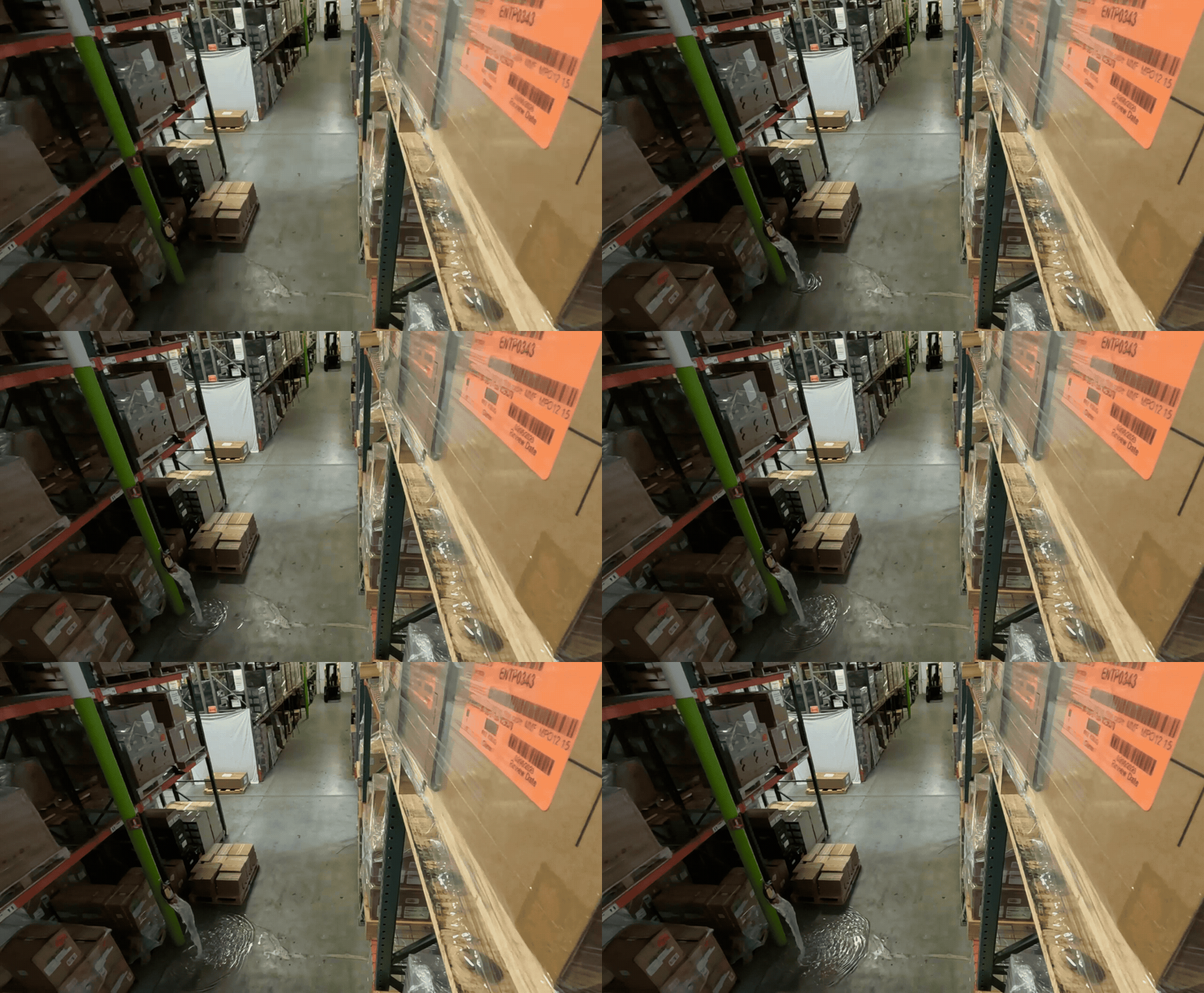
Use case. Continuous monitoring of the floor for spilled contents together with a plausible source container. The rule fires on five buckets:
L — liquid (puddle, streak, pool, drip trail, dark wet ring).
G — granular / powder (pellets, grain, sand, fragments scattered from a torn bag/sack).
I — items-out-of-container (small parts, packets, cans, bottles, produce strewn outside their box / pallet / bin).
F — dropped / spilled load from a forklift, hand-truck, pallet, or shelf.
D — leaking damaged package (torn / crushed / punctured box, drum, or sack with contents escaping).
Subtle, small, or partial spills count. Damaged cardboard with no contents escaping, wet patches with no plausible source, intact sealed containers, and reflections / shadows / floor coatings are explicitly not flagged.
Live configuration. The rule lives in realtime-config.yml under
the top-level always_on_rules list. The structure below shows the
rule shape; the prompts and parameters are detailed in the blocks that
follow.
- rule_id: spillover
description: "Spillover"
alert_type: "Spillover Violation"
always_on_params:
system_prompt: |
<see System prompt below>
prompt: |
<see Prompt below>
<see VLM invocation parameters below>
In the deployed file, the system_prompt and prompt fields are
single double-quoted YAML scalars with embedded \n newline escapes.
The two scrollable blocks below show those same strings rendered with
real newlines for readability — they are the full, byte-equivalent
prompts shipped today.
System prompt:
Warehouse spillover inspector. 0 = Spillover Violation = Yes; 1 = No Spillover Violation = No.
FLAG AS VIOLATION (0) when ANY spilled contents are visible on the floor with a plausible container source (the source may be obvious, partial, damaged, tipped, or simply the nearest pallet/box/drum/jug/sack/forklift load):
L. Liquid — puddle, streak, pool, drip trail, dark wet ring, or leak; source = drum, barrel, jug, jerrycan, bottle, IBC tote, or wet carton.
G. Granular/Powder — pellets, grain, powder, sand, fragments scattered; source = torn bag/sack/burst container.
I. Items-out-of-container — small parts, packets, cans, bottles, produce, or goods scattered/strewn on the floor outside their box, pallet, or bin.
F. Dropped/spilled load — cargo (boxes, drums, sacks, jugs) fallen or falling from forklift forks, hand-truck, pallet, or shelf, with contents on the floor or mid-air.
D. Leaking damaged package — torn/crushed/punctured box, drum, or sack with contents escaping.
Include subtle, small, or partial spills (a few items, a small puddle, a thin streak, a scatter near a tipped box). Do not require a dramatic mess.
NOT A VIOLATION (1):
- Damaged cardboard with NO contents escaping (packaging defect only).
- Wet patch with no plausible container anywhere in view.
- Intact, sealed, upright containers — even if stacked precariously.
- Loose packing material, empty pallets, plastic wrap (no product mixed in).
- Intact load being transported.
- PPE issues, falls without a spill, near-misses, fights, theft, fire.
- Reflections, shadows, floor coatings, dark concrete patches.
EVIDENCE: For ID 0, name the source AND the spilled material. Hedge words ("appears", "might", "could be") drop the flag. Distant/occluded/blurred → compliant.
DECISION: Any visible spilled contents + plausible source (even partial/subtle) → 0. Otherwise → 1.
Mapping: 0 ↔ "Spillover Violation" ↔ "Yes"; 1 ↔ "No Spillover Violation" ↔ "No".
Prompt:
Raw warehouse surveillance video. Inspect the floor carefully for spilled contents — even small, partial, or subtle spills count: a few items strewn from a box, a thin liquid streak, a small powder scatter, cargo tipped off a pallet, a leaking carton. Trace each spill to its plausible source container (drum, barrel, box, jug, sack, pallet load, forklift fork, tote).
| ID | Label | Definition |
| :-- | :-- | :-- |
| 0 | Spillover Violation | Spilled contents visible on the floor with a plausible source container. Subtle/partial spills count. |
| 1 | No Spillover Violation | No spilled contents, OR wet patch with no source, OR floor not assessable. |
STEPS:
1. Scan the floor for liquid, granular scatter, or items outside their container — include small or partial spills.
2. Trace each candidate to a plausible source (tipped/torn/leaking container, dropped load, broken bag).
3. Damaged cardboard with no escaping contents = not a spill.
4. Wet patch with no source visible = compliant.
5. Reflections, shadows, floor coatings = not spills.
6. Hedge words drop the flag. Distant/occluded = compliant.
OUTPUT one JSON object with exact keys:
prediction_class_id: 0 or 1
prediction_label: "Spillover Violation" or "No Spillover Violation"
prediction_answer: "Yes" or "No"
video_description: spills observed; for 0, name source container AND spilled material.
Consistency: 0 ↔ "Spillover Violation" ↔ "Yes"; 1 ↔ "No Spillover Violation" ↔ "No".
Prompt summary. For ID 0 the video_description must name the
source container and the spilled material. Hedge words drop the flag.
The shorter chunk_duration (5 s) reflects that spills tend to be
short, salient events.
ID |
Label |
Verdict mapping |
|---|---|---|
0 |
|
|
1 |
|
|
VLM invocation parameters:
model: "nim_nvidia_cosmos-reason2-8b_hf-1208"
chunk_duration: 5
chunk_overlap_duration: 0
num_frames_per_second_or_fixed_frames_chunk: 1
use_fps_for_chunking: true
vlm_input_width: 854
vlm_input_height: 480
enable_reasoning: true
max_tokens: 4096
temperature: 0.0
PPE Violation#
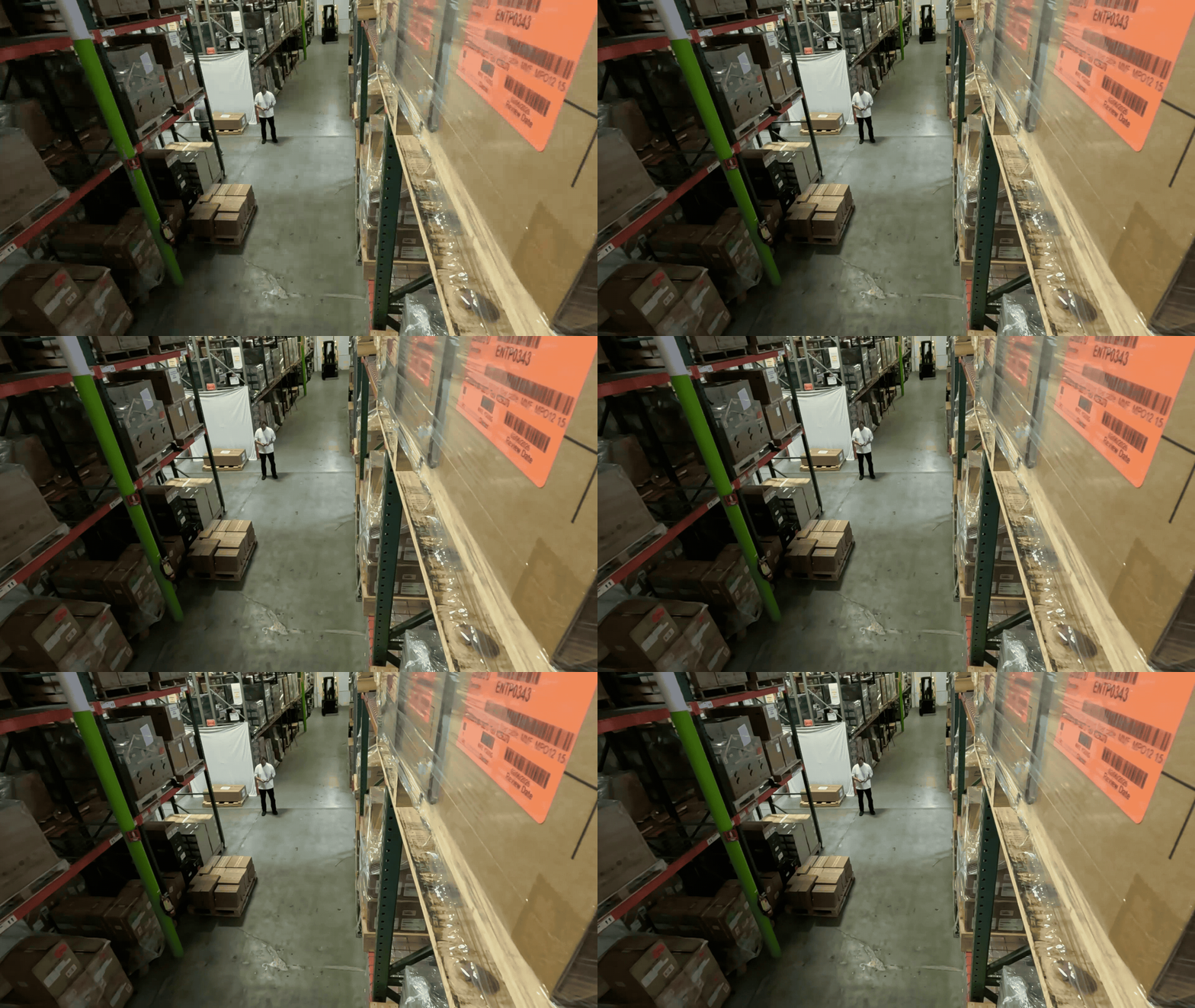
Use case. Continuous monitoring that every clearly visible worker — foreground, background, on foot, and on equipment — is wearing the two required PPE items on their outer layer:
H — a rigid hard hat (any color: yellow, white, blue, red, green, orange, black). Soft caps, beanies, baseball caps, hair-covers do not count.
V — a high-vis garment (fluorescent color and/or reflective stripes — vest, jacket, coverall, jumpsuit). A high-vis coverall satisfies the requirement on its own.
Forklift / pallet-jack drivers are inspected the same way as workers on foot. People behind glass walls or on monitors are skipped.
Live configuration. The rule lives in realtime-config.yml under
the top-level always_on_rules list. The structure below shows the
rule shape; the prompts and parameters are detailed in the blocks that
follow.
- rule_id: ppe
description: "PPE"
alert_type: "PPE Violation"
always_on_params:
system_prompt: |
<see System prompt below>
prompt: |
<see Prompt below>
<see VLM invocation parameters below>
In the deployed file, the system_prompt and prompt fields are
single double-quoted YAML scalars with embedded \n newline escapes.
The two scrollable blocks below show those same strings rendered with
real newlines for readability — they are the full, byte-equivalent
prompts shipped today.
System prompt:
You are a warehouse PPE inspector. Classify the video as PPE Violation (ID 0 / Yes) or No PPE Violation (ID 1 / No).
REQUIRED PPE per worker (BOTH, on OUTER layer):
H. Rigid hard hat — hard shell, rounded dome/brim, any color (yellow/white/blue/red/green/orange/black). Soft caps, beanies, baseball caps, hair-covers are NOT hard hats.
V. High-vis garment — fluorescent color AND/OR reflective stripes (vest, jacket, coverall, jumpsuit). A high-vis coverall counts as V by itself.
WORKERS = every adult on foot or operating equipment (incl. forklift/pallet-jack drivers), foreground AND background. Skip people behind glass walls or on monitors.
VALID (do not flag):
- White or any-colored rigid hard hat.
- High-vis coverall/jumpsuit worn alone.
- Soft cap UNDER a hard hat; dark shirt UNDER a high-vis vest.
CORE RULES:
1. SCAN EVERY WORKER, including background and partially visible figures. Count workers, then describe each one's head and torso individually — never lump groups ("all workers wear...").
2. CONSISTENCY: if your description names ANY worker without a rigid hard hat OR without a high-vis outer garment, you MUST output ID 0. Do not describe a missing item and then classify as compliant.
3. NO REVERSALS: do not flip an initial compliant read with "however / briefly / appears to / may not be". PPE does not vanish mid-clip.
4. NO SPECULATION: if a figure is too distant/blurred/occluded to see head AND torso clearly, treat as compliant — never invent a violation.
DECISION:
- Any worker concretely observed with bare head, soft-only headwear, or plain non-reflective torso → ID 0.
- Otherwise (all clear workers compliant, or none assessable) → ID 1.
Mapping: 0 ↔ "PPE Violation" ↔ "Yes"; 1 ↔ "No PPE Violation" ↔ "No".
Prompt:
Raw warehouse surveillance video. Identify EVERY clearly visible worker — foreground AND background, on foot AND on equipment — and check whether each wears BOTH a rigid hard hat AND a high-vis garment on their outer layer.
| ID | Label | Definition |
| :--- | :--- | :--- |
| 0 | PPE Violation | At least one clearly visible worker concretely lacks a rigid hard hat OR a high-vis outer garment (bare head; soft cap/beanie/baseball cap as only headwear; plain non-reflective shirt/hoodie/jacket as only torso). |
| 1 | No PPE Violation | Every clearly visible worker has BOTH items, OR no one is concretely assessable (occlusion/distance/no workers). |
STEPS:
1. Count workers. Scan foreground AND background — do not stop at the most prominent figure.
2. Describe each worker's head (rigid helmet vs soft vs bare) and torso (high-vis with stripes/fluorescent vs plain) individually. No group statements.
3. White hats and high-vis coveralls/jumpsuits are valid.
4. If your description names any worker without a hard hat OR without high-vis on the outer layer, classify as ID 0. Description and classification MUST agree.
5. Do not speculate on distant/occluded figures and do not reverse an initial compliant read.
OUTPUT one JSON object with these exact keys:
prediction_class_id: 0 or 1
prediction_label: "PPE Violation" or "No PPE Violation"
prediction_answer: "Yes" or "No"
video_description: worker count, each worker's head + torso, and (if ID 0) the specific missing item on the specific worker.
Consistency: 0 ↔ "PPE Violation" ↔ "Yes"; 1 ↔ "No PPE Violation" ↔ "No". Description must not contradict the classification.
Prompt summary. The prompt explicitly disallows group statements
(“all workers wear…”) and requires the model to count workers and
describe each worker’s head and torso individually. It enforces
description/classification consistency: if the description names any
worker missing either item, the model must output ID 0.
ID |
Label |
Verdict mapping |
|---|---|---|
0 |
|
|
1 |
|
|
VLM invocation parameters:
model: "nim_nvidia_cosmos-reason2-8b_hf-1208"
chunk_duration: 6
chunk_overlap_duration: 0
num_frames_per_second_or_fixed_frames_chunk: 1
use_fps_for_chunking: true
vlm_input_width: 854
vlm_input_height: 480
enable_reasoning: true
max_tokens: 4096
temperature: 0.0
Alert Bridge#
The Alert Bridge is the parsing layer that sits between the VLM and the rest of the system. When you author a custom prompt, what you actually have to design is the shape of the VLM’s reply — and that shape is what the Alert Bridge knows how to parse. This section catalogues every reply format the Alert Bridge supports today, so you can pick the right one (or register a compatible one) when you write your own prompts.
The parser is selected per deployment via the vlm.response_format
key in config.yaml (and overridden per call by the same field on a
RealtimeAlertRequest or per alert type in
alert_type_config.json). The accepted values are:
|
Section |
Meaning |
|---|---|---|
|
Pick a parser based on the VLM model name. Cosmos Reason 1 / 2
resolve to |
|
|
|
|
|
Structured JSON with a configurable verdict field, value mapping, and reasoning field. Used by every Warehouse Blueprint use case shipped today. |
|
|
Free-form text. The full reply is captured as the description; no verdict is extracted by the parser. |
|
any registered name |
A user-supplied parser registered via
|
The verdict the Alert Bridge stores at info.verdict is the same
across all formats — see Verdict vocabulary.
Format 1 — Cosmos Reason (think + verdict)#
The Cosmos Reason parser tries three strategies in order and
accepts the first one that matches. This is what the Alert Bridge uses
when response_format is cosmos-reason (or cr1 / cr2),
and it’s what auto falls back to whenever the model name contains
cosmos-reason1 or cosmos-reason2.
Strategy A — answer-tagged (preferred):
<think>
{free-form reasoning trace}
</think>
<answer>
{VERDICT_TOKEN}
</answer>
Strategy B — bare verdict after </think>:
<think>
{free-form reasoning trace}
</think>
{VERDICT_TOKEN}
Strategy C — verdict only (no reasoning, no tags):
{VERDICT_TOKEN}
In all three strategies, {VERDICT_TOKEN} is case-insensitive and
must be exactly one of YES, NO, A, or B. Anything
else (including prose like Answer: YES or YES. The video shows…)
fails validation and the event is recorded with
verdict = verification-failed.
Verdict mapping:
Verdict token |
Stored verdict |
When to use |
|---|---|---|
|
|
Yes/No questions where “yes” means the alert is real. |
|
|
Yes/No questions where “no” means the candidate is a false positive. |
|
|
Multi-choice prompts where option A is the violation. |
|
|
Multi-choice prompts where option B is the non-violation. |
The full reasoning text (between <think> and </think>, when
present) is captured to info.reasoning on the output event. For
strategy C it is the empty string.
Example replies:
<think>
The video shows a forklift turning into the aisle while a worker is
walking in the same lane. The forklift brakes well before reaching
the worker; the worker continues without changing course.
</think>
<answer>
B
</answer>
<think>The forklift never moves throughout the entire clip.</think>
NO
YES
Closing the prompt — to elicit this format, end your prompt with a
literal output template. The shipped collision prompt uses the
strategy-B form:
Answer the question using the following format:
<think>
Your reasoning.
</think>
Write your final answer (A or B) immediately after the </think> tag.
For latency-critical screening you can ask the VLM to emit just the
bare verdict (strategy C); set enable_reasoning: false and tell
the model to “Reply with exactly one word: YES or NO”.
Format 2 — JSON object#
Used by every Real-Time rule shipped with the Warehouse Blueprint
(ppe, load_quality, pathway_obstruction, spillover) and
by the proximity violation verification prompt. It is the
recommended format for new prompts because:
Verdict and free-form description live in the same payload.
The verdict field, value mapping, and reasoning field are all configurable — you can adapt the parser to the schema your prompt emits without touching code.
Markdown code fences are tolerated: if a Cosmos VLM wraps its JSON output in a triple-backtick
jsonblock, the wrapper is stripped before parsing.
Wire shape — default (matches the Warehouse Blueprint prompts):
{
"prediction_class_id": 0,
"prediction_label": "PPE Violation",
"prediction_answer": "Yes",
"video_description": "Worker 1 has a hard hat and high-vis vest. Worker 2 is bare-headed."
}
With the default json_parser config the Alert Bridge:
Reads
prediction_answeras the verdict.Maps
"Yes"→confirmed,"No"→rejected.Reads
video_description(or, if absent,reasoning,thinking, orexplanation) as the free-form text and stores it ininfo.reasoning.Flattens every other key (
prediction_class_id,prediction_label, anything else you add) intoinfo.<key>on the output event.
Configuring the parser — override any of the three knobs under
vlm.json_parser in config.yaml to match your prompt’s schema:
Key |
Default |
Meaning |
|---|---|---|
|
|
Path to the verdict value in the VLM’s JSON output. Supports
dot-notation for nested fields (e.g.
|
|
(none) |
Optional explicit value mapping. Useful when the VLM emits
booleans, integers, or non-standard strings — e.g.
|
|
|
Ordered list of JSON keys to try as the source of the free-form description. The first non-empty match wins. |
Example — nested boolean verdict (cookbook-style prompt):
vlm:
model: "nvidia/cosmos-reason2-8b"
response_format: "json"
json_parser:
verdict_field: "hazard_detection.is_hazardous"
verdict_mapping:
"true": "YES"
"false": "NO"
reasoning_fields:
- "video_description"
This config matches a VLM reply such as:
{
"prediction_class_id": 0,
"prediction_label": "Walking Outside Designated Path",
"video_description": "A worker is seen walking outside the green safety path on a warehouse floor.",
"hazard_detection": { "is_hazardous": true, "temporal_segment": null }
}
Verdict mapping:
VLM JSON value (after mapping) |
Stored verdict ( |
Wire effect |
|---|---|---|
resolves to |
|
Verification: persisted with full event. Real-Time: alert emitted to Kafka / Elasticsearch / WebSocket. |
resolves to |
|
Verification: persisted with original event. Real-Time: no event emitted — compliant chunks are silent. |
missing / empty / unmappable |
|
VLM reply could not be parsed; original event is preserved. |
Closing the prompt — to elicit this format with the default config, end your prompt with the exact-keys block used by every shipped rule:
OUTPUT one JSON object with these exact keys:
prediction_class_id: 0 or 1
prediction_label: "<your positive label>" or "<your negative label>"
prediction_answer: "Yes" or "No"
video_description: <one or two sentences describing what you saw>
Consistency: 0 ↔ "<your positive label>" ↔ "Yes"; 1 ↔ "<your negative label>" ↔ "No".
If the model also emits a reasoning trace (enable_reasoning: true),
the parser strips a <think>…</think> envelope and the surrounding
markdown fences automatically before reading the JSON, so you can ask
for both <think>…</think> reasoning and a JSON output in the same
prompt.
Format 3 — Free-form description#
Used when the VLM is not a Cosmos Reason model and you only want a description, not a verdict — typical for Phi-3-Vision, Qwen-VL, GPT-4-Vision, or any other captioning-style backend.
Wire shape: any non-empty free-form text, from a single sentence to multi-paragraph prose.
Validation: the only requirement is that the reply is non-empty
after str.strip().
What is captured:
info.description— the full reply text.info.verdict— set by the orchestrator, not by the parser (typicallyverification-failedbecause no verdict could be extracted).info.reasoning— empty.
When to use: when downstream consumers only need a textual explanation (e.g. Elasticsearch full-text search) and the prompt itself does not need to drive a confirm / reject decision. For verdict-driven flows, use Format 1 or Format 2 instead.
Format 4 — Custom parser#
For replies that don’t fit any built-in format — XML, key-value pairs, proprietary structures, multi-shot outputs, etc. — register a callable at startup:
from models.responses import VLMResponse, register_parser
def parse_xml(text: str, json_config) -> VLMResponse:
# Extract verdict + reasoning from XML and return VLMResponse(...).
...
register_parser("xml", parse_xml)
Then set vlm.response_format: "xml" in config.yaml. The parser
must return a VLMResponse whose verdict value the serializer
recognises (YES / NO / A / B, case-insensitive) — or
None for description-only replies.
The custom name must not collide with the built-in formats
(auto, cosmos-reason, cr1, cr2, json, other);
register_parser raises ValueError on collision.
Auto-detection#
When vlm.response_format is auto (the default), the parser is
selected from the configured vlm.model string:
Model name contains |
Resolves to |
|---|---|
|
|
anything else |
|
Auto-detection does not pick the JSON parser — JSON output is
opt-in via response_format: "json". This is intentional: the JSON
parser has a configurable schema, so the deployment must declare which
schema it is using.
Verdict vocabulary#
Whichever output format you choose, the Alert Bridge emits one of the
verdict strings below at info.verdict on the output event. This is
also the value used for the alert_bridge_events_total{verdict}
metric.
Verdict |
Meaning |
|---|---|
|
VLM positive answer ( |
|
VLM negative answer ( |
|
Verification did not produce a usable verdict — VST timeout,
missing video, VLM connection error, response not parseable
against the configured |
What ends up on the output event#
After parsing, the Alert Bridge attaches an info block to the
original event and writes it to every configured sink (Elasticsearch,
Kafka mdx-vlm-incidents / mdx-vlm-alerts, Redis Streams,
WebSocket). Fields originally present on the input event are
preserved.
{
"info": {
"verdict": "confirmed",
"reasoning": "<reasoning text from <think>…</think> or JSON reasoning_fields>",
"videoSource": "https://vios/.../clip.mp4",
"verificationResponseCode": 200,
"verificationResponseStatus": "OK",
"primaryObjectId": "958741182",
"prediction_class_id": "0",
"prediction_label": "PPE Violation",
"prediction_answer": "Yes",
"video_description": "Worker 1 has a hard hat and high-vis vest. Worker 2 is bare-headed."
}
}
Any additional keys you include in a Format 2 (JSON) reply are
flattened into this info block automatically — adding e.g. a
confidence key to your prompt’s JSON output makes
info.confidence appear on every emitted event.
For the full request / response shapes and a deep dive into the underlying APIs, see Alerts Microservice.
Prompt Tuning#
The five reference prompts shipped with the Warehouse Blueprint cover the most common safety scenarios, but every site has its own vocabulary (PPE colors, layout, equipment names) and its own definition of what counts as a violation. Rather than hand-writing every new prompt, we recommend using a general-purpose reasoning LLM (Claude, ChatGPT, Gemini, etc.) as a “prompt author”: you describe the use case, hand it the Alert Bridge output contract, and ask it to draft a prompt in the same shape as the reference ones.
The pattern is the same one demonstrated in the Cosmos Cookbook recipe Worker Safety in a Classical Warehouse with Cosmos Reason 2 — treat the VLM as an “expert inspector” with a strict classification table, then encode that table directly into the prompt. This page adds one extra step in front of that recipe: use an authoring LLM to generate the inspector persona + classification table from your use case description, instead of writing them by hand.
Why tune prompts#
Accuracy. A prompt that explicitly enumerates positive criteria (“a worker without a hard hat or high-vis vest”) and negative criteria (“ignore people behind glass walls or on monitors”) cuts false-positive rates by an order of magnitude vs. a generic “is anyone unsafe?” prompt.
Site-specific vocabulary. Different facilities use different colors, equipment, signage, and layouts. The shipped prompts assume the most common conventions; you’ll often need to swap in your own vocabulary.
New use cases. The five reference prompts cover Near Miss, Load Quality, Pathway Obstruction, Spillover, and PPE. Anything else — unauthorized entry, smoking detection, ladder safety, hot-work checks — needs a new prompt.
Output format alignment. Whatever you produce must parse against one of the formats documented in Alert Bridge. An LLM-authored prompt that asks for the wrong output shape is worse than no prompt at all — every event will land with
verdict = verification-failed.
The “Prompt-as-Code” workflow#
Authoring a new alert prompt is a four-step loop:
Define the use case. Write a short brief: what counts as a violation, what does not, and what edge cases exist.
Pick the output format. Choose from Alert Bridge — Format 1 — Cosmos Reason (think + verdict) for simple verdict-only flows, or Format 2 — JSON object (recommended) for real-time alerts that need a
video_descriptionto ride along.Generate the prompt with an LLM. Hand the use case brief, the output format, and the closest reference prompt to a reasoning LLM. Have it draft the inspector persona, the classification table, and the output template.
Test, iterate, deploy. Run the prompt against a labeled clip set, look at what the model gets wrong, refine the negative constraints, and repeat. Deploy by adding the entry to
alert_type_config.json(verification) orrealtime-config.yml(real-time).
Step 1 — Write the use case brief#
A good brief answers six questions in plain language:
Question |
Example (smoking detection) |
|---|---|
What is the violation? |
A worker holding a lit cigarette, vape, or pipe inside the warehouse. |
What are the positive (FLAG) cues? |
Visible cigarette / vape / pipe in or near the worker’s mouth or hand; visible smoke plume from a worker’s hand or face; lighter / match in active use. |
What are the negative (DO NOT FLAG) cues? |
Workers eating / drinking; workers using a phone; steam from hot equipment; vapor from cold-storage doors; condensation on camera lens. |
What’s the scene context? |
Warehouse interior. Workers wear hi-vis vests; forklifts move through the aisles; lighting is mixed (overhead + skylights). |
Who is the “worker”? |
Any adult on foot or operating equipment, foreground AND background. Skip people behind glass walls or on monitors. |
What’s the verdict label? |
|
Steal the scene context and worker definition verbatim from
whichever reference prompt is closest to your use case (ppe is the
nearest match for any worker-behavior alert). Re-using these
boilerplate sections keeps your prompts mutually consistent and
removes a class of subtle mistakes (e.g. forgetting to exclude people
on monitors).
Step 2 — Pick the output format#
Make this decision before generating the prompt: it determines the shape of the closing block the LLM must produce.
Use case shape |
Recommended |
Why |
|---|---|---|
Yes/No verification of an upstream candidate |
|
Smallest reply, strict parse, |
Always-on real-time alert that needs a description |
|
Carries |
Custom alert with extra evidence fields
(e.g. |
|
Add fields to the JSON output → they appear under
|
Booleans / non-standard verdict values |
|
Map any VLM output domain ( |
Captioning-only backend (Phi-3-Vision, Qwen-VL, GPT-4-Vision, …) |
|
Description-only, no verdict; suitable for search and triage. |
Step 3 — Generate the prompt with an LLM#
Give the authoring LLM all four pieces below in a single message. Any reasoning LLM (Claude 3.5 Sonnet, GPT-5, Gemini 2.5 Pro, etc.) will produce a usable first draft.
(a) The use case brief — your answers from Step 1.
(b) The output contract — copy verbatim from Alert Bridge. For a real-time JSON prompt:
The Alert Bridge expects this exact JSON shape after any
{
"prediction_class_id": 0 or 1,
"prediction_label": "<positive label>" or "<negative label>",
"prediction_answer": "Yes" or "No",
"video_description": "<one or two sentences>"
}
Mapping: 0 ↔ "<positive label>" ↔ "Yes" ↔ confirmed alert.
1 ↔ "<negative label>" ↔ "No" ↔ no alert emitted.
Anything else fails parsing and the event lands with
verdict = verification-failed.
(c) The closest reference prompt — paste the full system + user prompt from one of the shipped use cases. PPE is the closest reference for any worker-behavior alert; Spillover for any “spilled material” alert; Pathway Obstruction for any “object on the floor” alert.
(d) The drafting instruction — this is the message that turns the LLM into the prompt author:
You are an expert prompt engineer for a warehouse Vision Language
Model. Using the use case brief, output contract, and reference
prompt above, draft:
1. A SYSTEM PROMPT that establishes the model as an expert
inspector with the right persona, lists the positive (FLAG)
criteria, the negative (DO NOT FLAG) criteria, the worker /
scene definitions, and the FLAG/DO-NOT-FLAG decision rule.
2. A USER PROMPT that contains the strict classification table
with the EXACT class IDs and labels, the inspection steps, and
the closing OUTPUT block in the shape required by the contract.
Match the structure and tone of the reference prompt. Use ALL CAPS
for section headers (REQUIRED, VIOLATION (0), NOT A VIOLATION (1),
STEPS, OUTPUT, Consistency, etc.) the same way the reference does.
Do NOT invent labels outside the two declared in the brief. Do NOT
relax the output contract.
The LLM will respond with a system + user prompt pair you can drop
straight into alert_type_config.json (verification) or
realtime-config.yml always_on_params (real-time).
Anatomy of the prompt the LLM should produce#
Use this as a checklist when reviewing the LLM’s draft. Every shipped prompt has all of these pieces:
System prompt |
Required content |
|---|---|
Inspector persona |
“You are a warehouse <use case> inspector. Classify the video as <Positive Label> (ID 0 / Yes) or <Negative Label> (ID 1 / No).” |
Mapping line |
“Mapping: 0 ↔ "<Positive Label>" ↔ "Yes"; 1 ↔ "<Negative Label>" ↔ "No".” |
VIOLATION (0) buckets |
Lettered list of every positive cue (D / F / S / U / L / etc.). Each bucket has a short, concrete definition. |
NOT A VIOLATION (1) |
Bulleted list of common false positives the inspector must ignore. |
WORKERS / SCENE definition |
Verbatim from the closest reference prompt. |
EVIDENCE / CORE RULES |
Anti-hedging guidance, anti-speculation guidance, occlusion handling. |
DECISION |
Two-sentence summary: “Any concrete cue → ID 0. Otherwise → ID 1.” |
User prompt |
Required content |
|---|---|
Restatement of the scene |
“Raw warehouse surveillance video. Inspect <where to look>.” |
Strict classification table |
3-column markdown table: |
STEPS |
Numbered inspection procedure (3-6 steps). |
OUTPUT block |
The exact JSON-keys block from your output contract. |
Consistency line |
“Consistency: 0 ↔ "<Positive Label>" ↔ "Yes"; 1 ↔ "<Negative Label>" ↔ "No".” |
Step 4 — Test, iterate, deploy#
Run the draft prompt against a labeled clip set (10-50 clips, half positive, half negative). Use the same VLM model (
nim_nvidia_cosmos-reason2-8b_hf-1208for the shipped profiles).Look at every miss. For false positives, identify which negative cue was missing or under-emphasized; add it to the
NOT A VIOLATION (1)list. For false negatives, sharpen the relevantVIOLATION (0)bucket — usually by adding concrete examples or removing hedge words.Tighten the description. The shipped prompts require the
video_descriptionto name the specific cue (“name the source container AND the spilled material”, “name the specific load and the concrete defect”). This is a force-multiplier — descriptions that have to identify a specific object are far less likely to hallucinate.Hand the failure cases back to the authoring LLM with the same four-piece prompt format and ask for a revised draft. Repeat 2-3 times.
Deploy. For a verification rule, add an entry to
alert_type_config.jsonalerts[]and restart the Alerts microservice. For a real-time rule, append toalways_on_rulesinrealtime-config.ymland restart RTVI VLM.
Best practices and pitfalls#
Keep the verdict enum tight. Two labels, period. Multi-class prompts (4+ labels) drift much faster and require Format 2 with a custom
verdict_mapping.Avoid ambiguous adjectives. “Dangerous”, “messy”, “improper” produce drift across days. Prefer measurable cues — a specific object visible on the floor, a missing item of PPE, a specific trajectory.
Make the model name what it sees. Every shipped prompt requires the description to name a specific object or worker. This single rule cuts hallucination dramatically.
Cap the token budget. Aim for ≤ 4000 tokens of system + user prompt; the shipped prompts are 1500-3500 tokens. Longer prompts trade VLM throughput for marginal accuracy gains.
Don’t invent labels. The classification table’s labels must be reproduced byte-for-byte by the model. Any drift breaks Elasticsearch dashboards and the UI.
Reference dataset definitions when you have them. When a public dataset already encodes the visual ground truth (as the Safe / Unsafe Behaviours dataset does for forklift overload, vest detection, and walkway compliance), copy the table straight into the user prompt instead of paraphrasing it.
References#
Worker Safety in a Classical Warehouse with Cosmos Reason 2 — Cosmos Cookbook recipe demonstrating the “expert-inspector” prompt strategy with strict classification tables and JSON output. The closest external reference for the Step-3 LLM-authoring workflow.
Alerts Microservice — full Alerts Microservice reference (deployment, APIs, concurrency, observability).
Alert Verification Workflow — Alert Verification agent workflow.
Real-Time Alert Workflow — Real-Time Alert agent workflow.
NvSchema —
nv.Incidentandnv.Behaviorschemas.Real-Time VLM Microservice — RTVI VLM microservice.