

DHCP Service
NVIDIA Config Manager’s DHCP service generates and manages ISC Kea DHCP server configurations from data supplied by the selected DCIM provider. The service automates IP address assignment, DHCP reservations, and Zero Touch Provisioning (ZTP) for network devices. The bundled Nautobot provider’s data model is documented separately.
Overview
The DHCP service:
- Queries the selected DCIM provider for DHCP-relevant network data (prefixes, IP addresses, devices)
- Generates Kea DHCP4/DHCP6 configuration files with subnets, pools, and reservations
- Manages Kea server configuration updates through the Kea Control Agent API
- Supports ZTP integration with device-specific boot script URLs
Key features include:
- Dynamic Configuration Generation: Automatically generates Kea config from the selected DCIM source of truth
- Static DHCP Reservations: Device-specific IP assignments based on MAC address or serial number
- Dynamic IP Pools: Configurable ranges for transient device addressing
- ZTP Integration: DHCP options for automated device bootstrapping (boot scripts, firmware URLs)
- Multi-Site Support: Aggregate and site-local DHCP server deployments
- IPv4 and IPv6: Full support for both DHCP4 and DHCP6
- Configuration Validation: Validate configs against Kea Control Agent API before deployment
Getting Started
For the bundled Nautobot provider, configure DHCP in Nautobot as follows:
Before you begin, make sure you understand the data model. Read DHCP Modeling in Nautobot to learn about tagging network prefixes and IP addresses.
Follow the procedures on this page to define and generate your DHCP configuration.
Set up Subnets and Gateways
-
Set up your prefixes. Tag network prefixes with
dhcp-subnet. -
Define gateway relationships. Create
prefix-to-gatewayrelationships for each subnet.
Set up Reservations and Pools
-
Configure reservations. Tag device IPs with
dhcp-reservefor static assignments. -
Define pools. Tag IP ranges with
dhcp-poolfor dynamic allocation.
Set up DHCP and ZTP Options
- Add config contexts. Provide DHCP options and ZTP URLs for devices.
Generate the DHCP Configuration
- Generate configuration. Run
nv-config-manager-dhcp-confgento create Kea configuration files.
Architecture
The DHCP service consists of:
- Configuration Generator (
nv-config-manager-dhcp-confgen): Queries the selected DCIM provider and generates Kea config files - Kea DHCP Server: ISC Kea DHCP4/DHCP6 server instances
- Kea Control Agent: API for managing Kea configuration and leases
- PostgreSQL Lease Database: Shared lease storage for high availability
- Redis Cache: Stores previous configuration for subnet ID preservation
CLI Usage
Basic Configuration Generation
Refresh Cached Configuration
Getting Help
Advanced Options
In Kubernetes, the refresh process generates and publishes desired configuration to Redis every five minutes. A sidecar in each Kea pod monitors Redis, applies changed configuration through the Kea Control Agent, and verifies the running configuration hash.
Manage Leases
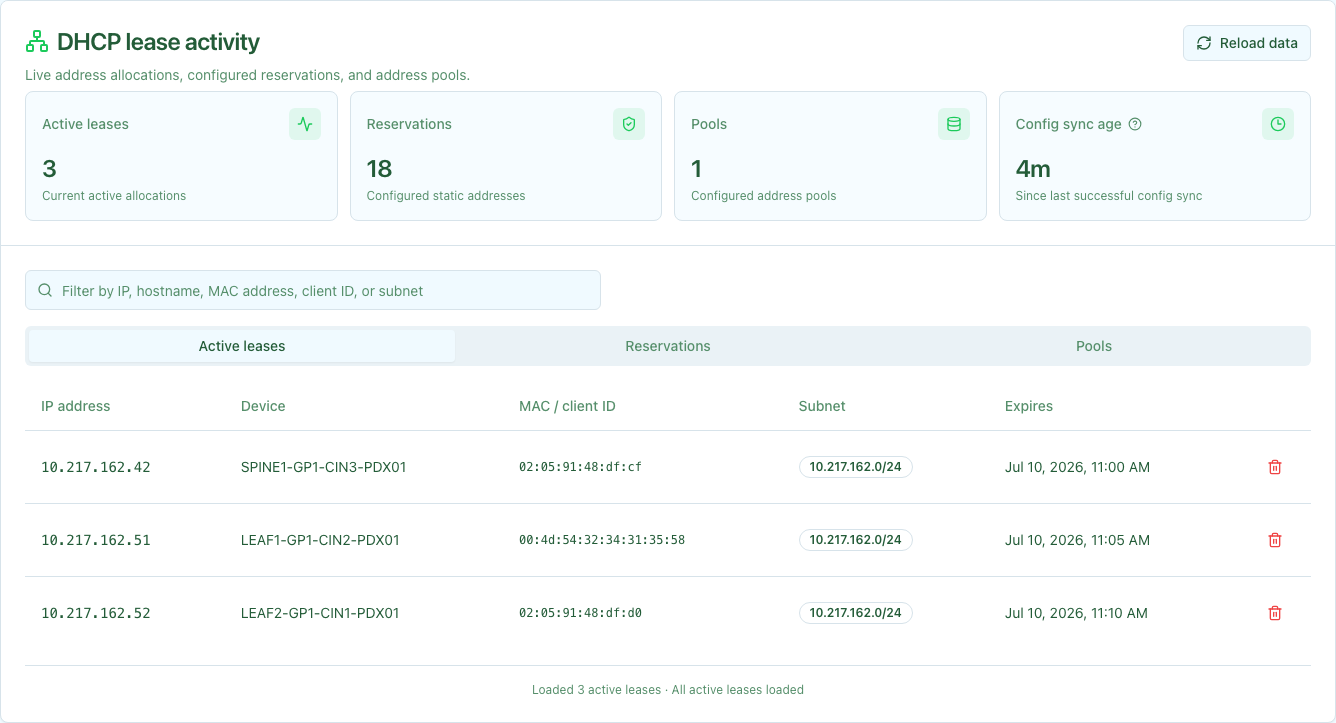
The DHCP dashboard summarizes active leases, reservations, configured pools,
and the age of the last successful background configuration sync reported by
the DHCP API’s /metrics endpoint. A configuration age older than 10 minutes
appears yellow; an age older than 30 minutes appears red. A stale value can
indicate a problem with DHCP configuration generation. Use the configuration-age
tooltip and service logs to troubleshoot it. When monitoring.grafanaUrl is
configured, View Grafana opens the dashboard in a new tab.
Leases, reservations, and pools load 100 at a time as you scroll so the dashboard remains responsive with thousands of records. Summary counts are calculated independently from the detail rows loaded in the browser. Use the filter to search the selected collection by its displayed fields. Reservation and pool results show exact filtered totals. Select the Active leases, Reservations, or Pools tab to inspect each view. You can also clear an active lease after confirming the action.
Reload data re-fetches the latest dashboard API responses. It does not trigger a configuration sync or regenerate the Kea configuration.
Collection requests default ip_version to 4; pass ip_version=6 to select IPv6. Lease and reservation item requests infer the version from the address and also accept an optional matching ip_version.
List leases with a bounded collection request:
The response contains a leases array and an opaque next_cursor. When next_cursor is not null, pass it unchanged in the next request together with the same filters. This also applies to the optional search parameter: each request scans a bounded chunk of the lease inventory, and following next_cursor continues the same search through the next chunk. The dashboard follows these cursors automatically as you scroll.
Reservations and configured pools use the same bounded query parameters:
These responses contain reservations or pools, an exact total_count for the current filter, and an opaque next_cursor. The optional subnet parameter on all three collection routes matches one exact configured prefix; records without a configured subnet do not match it. Pass the cursor unchanged with the same ip_version, limit, search, and subnet values to continue.
Look up the device holding a lease:
Look up a configured reservation by address:
Delete a lease so the address can be reassigned:
Lease responses use the Config Manager schema and include subnet prefixes. A successful delete returns 204 No Content; a missing lease returns 404 Not Found.
Related Documentation
- DHCP Modeling in Nautobot - Detailed guide on tagging and config contexts
- Network ZTP Service - Zero Touch Provisioning integration
- Nautobot Getting Started - Understanding Nautobot data model
- API Reference