

InfiniBand PKey Creation
The InfiniBand PKey Creation workflow provisions a new InfiniBand Partition Key (PKey) on the UFM subnet manager and records it in Nautobot. A PKey is the IB fabric’s tenant-isolation primitive — the per-tenant equivalent of a VLAN in Ethernet networks. Member interfaces are added in a separate step through IB PKey Member Add.
Creation is idempotent on the canonical PKey value. Re-running with an existing PKey returns the existing record rather than allocating a duplicate.
Prerequisites
Before running, confirm:
- UFM device modeled in Nautobot. The workflow looks up the device named in UFM Host to derive the site that owns the UFM credentials.
- UFM credentials configured. Site-scoped (or global) UFM credentials must be loaded by the installer. See Install Guide → UFM Credentials for the configuration keys and rotation behavior.
- A free PKey in the allocation range. The default range is
0x0001–0x7FFE. Either let the workflow auto-pick the next free value, or pass an explicit PKey that is not already allocated on UFM.
Running the workflow
- Navigate to the Config Manager URL for your environment.
- Click the + in the top right and select IBPKeyCreationWorkflow.
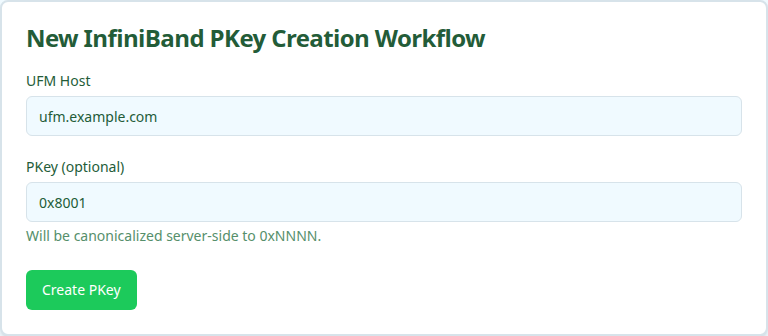
- Fill in the form using the field reference below and submit.
After submission, a status page shows the five execution stages.
Execution stages
The workflow runs five stages. No approval is required.
-
resolve_context— Resolve the UFM device’s site.Looks up
hostin Nautobot to derive the device’s Site for credential resolution. Skipped whensiteis supplied through the API. -
validate_pkey— Confirm PKey availability on UFM.Fetches the current PKey list from UFM and either picks the next free value in the allocation range (when PKey was left blank) or asserts that the user-supplied PKey is not already allocated.
-
create_pkey— Create the PKey on UFM.Calls the UFM REST API to allocate the partition. The stage records whether the PKey was newly created or already existed.
-
verify_pkey— Confirm propagation by the SM.Re-reads the PKey from UFM to verify the subnet manager has accepted it and it is queryable.
-
record_nautobot— Persist the PKey in Nautobot.Writes an
InfiniBandPKeyrow in Nautobot, which becomes the source of truth for which PKey values are in use.
Verifying outcomes
After the workflow reports success, confirm:
- All five stages show green in the workflow status page.
- UFM lists the PKey. Hit
GET /ufmRest/resources/pkeyson the UFM server and look for the canonical0xNNNNvalue in the response. - Nautobot lists the PKey. Open Multi-Tenancy → InfiniBand PKeys in Nautobot and confirm the new entry exists with the expected value.
Common issues
validate_pkey fails with “PKey already exists on UFM”.
The supplied PKey is already allocated. Pick a different value, or use auto-assign by leaving PKey blank.
validate_pkey fails with “No PKeys available in the range”.
The allocation window is exhausted. Widen pkey_min/pkey_max via the API, or audit existing PKeys on UFM and reclaim unused values before retrying.
create_pkey succeeds but verify_pkey fails.
UFM accepted the PKey but the subnet manager has not yet propagated it. This is usually transient. Wait briefly and retry the stage, or re-run the workflow.
resolve_context fails with “UFM device not found in Nautobot”.
The value typed in UFM Host does not match any device name in Nautobot. Confirm the device is modeled and that you used its Nautobot name, not an IP or DNS alias.
Related guides
- IB PKey Member Add — add device interfaces to the new PKey.
- IB PKey Member Update — reconcile membership to a declarative interface list.
- IB PKey Member Delete — remove device interfaces from the PKey.