

InfiniBand PKey Member Update
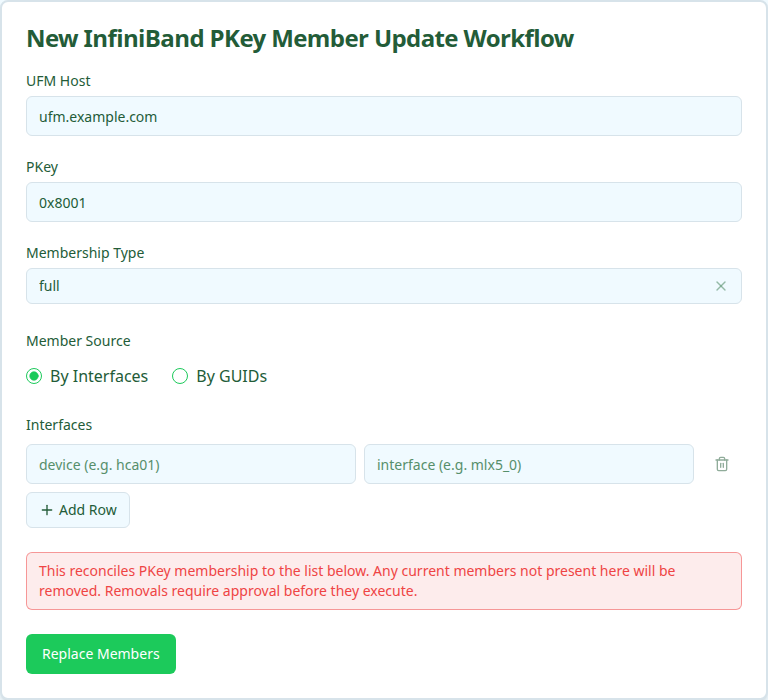
The InfiniBand PKey Member Update workflow reconciles a PKey’s membership to a declarative list of interfaces or GUIDs. Members already attached are left alone, missing ones are added, and members not in the submitted list are removed. The UI labels this as “Replace PKey Membership” — the submitted list is treated as the desired complete state.
Use this when you want the PKey to match an exact set of members. If you only want to add or only want to remove, prefer IB PKey Member Add or IB PKey Member Delete.
Removals require approval
When the computed diff contains any removals, the workflow pauses at the validate_diff stage and waits for approval before touching Nautobot or UFM. Additions-only runs auto-approve.
Prerequisites
Before running, confirm:
- PKey exists and the desired Overlay record is already created. This workflow will not create Overlays. If the PKey has no Overlay linked in Nautobot, you have two options:
- Run IB PKey Member Add once first — it lazily creates an Overlay at the PKey’s Site when the PKey row is orphaned — then come back to Update to reconcile membership.
- Create the Overlay manually in Nautobot under Multi-Tenancy → Overlays → IB PKey (click the
+button), then return here.
- Every interface in the desired list has an
ib_guidpopulated in Nautobot (By-Interfaces mode only). - You are ready to approve removals. Any current member not in your submitted list will be removed.
Running the workflow
- Navigate to the Config Manager URL for your environment.
- Click the + in the top right and select IBPKeyMemberUpdateWorkflow.
- Fill in the form using the field reference below and submit.
After submission, a status page shows the execution stages.
Execution stages
The workflow runs the following stages. validate_diff requires approval when removals are present.
-
resolve_context— Resolve site, overlay, and canonical PKey from Nautobot. -
resolve_desired— Resolve the submitted interfaces or GUIDs to canonical interface records. -
query_current— Fetch current OverlayAssignments and compute the diff.Reads the current
OverlayAssignmentset from Nautobot, intersects it with the desired set, and produces three lists: members to add, members to remove, and members unchanged. The stage output displays the diff with device/interface/GUID for each line. -
validate_diff— Approval gate.If there are no removals, the workflow auto-approves and continues. If there are removals, the stage pauses in
PENDING_APPROVALstate and shows the full diff. An operator must approve or reject through the status page before the workflow proceeds. Rejection aborts cleanly without modifying Nautobot or UFM. -
update_nautobot— Sync OverlayAssignment records.Creates new assignments and deletes removed ones in Nautobot.
-
update_ufm— Apply the diff to UFM.Removes the stale GUIDs from the PKey first, then adds the new GUIDs with the chosen membership type.
-
verify_ufm— Verify final UFM state matches the desired set.Re-reads the PKey membership from UFM and confirms it equals the resolved desired set, no more and no less.
Approving (or rejecting) the diff
When the workflow pauses at validate_diff:
- Open the workflow’s status page.
- Inspect the displayed diff (one line per add/remove with device, interface, and GUID).
- Click Approve to apply the change, or Reject to abort.
If you reject, no changes are made. The downstream stages display as UNREACHABLE in the status page and the workflow records verified: false in its output.
Verifying outcomes
After the workflow reports success, confirm:
- All stages show green (or
UNREACHABLEfor the post-rejection case). - UFM membership equals the submitted set. No extra GUIDs, no missing GUIDs.
- Nautobot OverlayAssignments equal the submitted set. Removed members no longer appear under the Overlay.
Common issues
The diff looks wrong (too many adds or removes).
The desired list is treated as the complete state. If you only meant to add three new members without disturbing the others, you must include the existing members in the submission too — or switch to the Add workflow instead.
validate_diff is stuck in PENDING_APPROVAL.
Someone needs to approve or reject through the workflow status page. There is no auto-timeout; the workflow waits indefinitely.
update_ufm fails after update_nautobot succeeded.
Nautobot and UFM are now temporarily out of sync. Re-run the workflow with the same desired list; the diff stage will recompute and only the still-pending changes will be reapplied.
Related guides
- IB PKey Creation — create the PKey.
- IB PKey Member Add — add members without touching existing ones.
- IB PKey Member Delete — remove specific members without touching others.