

Cable Validation
The Cable Validation workflows validate physical cabling against the intended topology in the configured DCIM. They compare what each switch reports over LLDP (and, where LLDP is unavailable, what its FDB and ARP tables show) against the cabling the DCIM says should be in place, and produce a per-interface report of every mismatch.
Two variants are available:
- Site Cable Validation — fans out across every in-scope device at a site. Used during new-site bringup and any time you want a full picture of cable health (before a maintenance window, after large-scale recabling, periodic auditing).
- Device Cable Validation — targets a single device. Used to re-validate after fixing a specific cabling, MAC, or hostname issue without re-running the full site.
The site workflow runs the device workflow as a child workflow per device, so the issue categories and the underlying validation logic are identical between the two — only the scope and the report download format differ.
Site-launched device validations have a ten-minute overall timeout, including retries and waits for manual stage retries. A timed-out device appears among the failed devices in the site report, allowing the remaining results to be reported. Standalone device validations retain their normal stage retry behavior.
The report becomes available before cable statuses are persisted to the DCIM. The report remains visible while its stage is in progress, so operators can begin reviewing results without waiting for the DCIM writes. See DCIM cable status updates for the status mapping and provider behavior.
Cable validation can detect:
- Cable swaps
- Unpowered servers
- Swapped racks
- Incorrect MAC addresses supplied by a partner
- Incorrect cable purchases
How each connection is evaluated
Cable validation runs from the perspective of each in-scope network device. For each enabled interface with a connected interface modeled in the DCIM, it compares the intended far end with observations from the local device in this order:
- Does the intended neighbor have the required DCIM data? The connected device must have a name and role. Missing required data stops validation for the device before any link-state result is produced.
- Is the local link operationally up? If not, the workflow reports
Link is down. This check applies to both full validation and link-state-only validation after the required DCIM data passes validation. - Is the interface tagged for link-state-only validation? If the link is up and the local interface has
cable-validation-link-state-only, the connection passes without an identity check. - Does LLDP identify the intended neighbor? The reported neighbor device and interface are compared with the far-end device and interface in the DCIM. The comparison is case-insensitive. The workflow also handles devices that advertise an interface MAC instead of a port or system name, including the supported DPU MAC-offset behavior.
- Does the expected far-end MAC appear on the correct local interface? The workflow takes the MAC from the connected far-end interface in the DCIM and looks for it in the local device’s FDB or ARP table.
- Classify the result. A connection passes when either LLDP or the MAC check matches. If neither matches, the report distinguishes a wrong observed neighbor from a link that is up but has no usable neighbor data.
The workflow also reports an LLDP neighbor on an interface that has no intended connection in the DCIM as Unexpected connection found. It does not treat every unmodeled FDB entry as an unexpected cable because a port can legitimately learn multiple MAC addresses.
An operationally up link does not prove that it reaches the intended host or port. Link-state-only validation is an intentionally temporary, lower-confidence result for cases where the data needed for full validation is not available yet.
DCIM cable status updates
When the provider supports cable status persistence, validation records these results on each modeled cable:
The configured DCIM integration reads the current value before writing. If the status is already correct, the workflow makes no change. This avoids unnecessary DCIM writes and events on repeated site validations. Deployments without cable-status persistence support treat the update as a no-op.
For a site validation, the format_result stage displays the Markdown report and Excel link, then remains In Progress while it applies the collected cable statuses. For a standalone device validation, validate_connections behaves the same way. Status writes run concurrently within each device and have a fifteen-minute activity timeout per device. The stage becomes Complete only after persistence succeeds.
If persistence fails, the stage is marked Failed, but its output retains the report and replaces the progress message with a warning that cable statuses may be partially updated. Resolve the reported DCIM error and rerun validation; unchanged statuses will be skipped on the next run.
Validation tags
Apply validation tags to the interface on the in-scope network device—the interface from which the workflow collects link, LLDP, FDB, and ARP state. For a high-speed leaf-to-host connection, this is normally the leaf switch interface. The cable and connected far-end interface must still be modeled in the DCIM.
cable-validation-link-state-only
Use cable-validation-link-state-only when the intended connection is known but there is not yet enough neighbor identity data for a meaningful full check. The common initial bringup case is a high-speed host port whose MAC addresses are not delivered with the original inventory data. Those MACs become available only after the compute management system discovers the host and updates the DCIM. Hosts may also provide no reliable LLDP identity during this stage.
With this tag, the workflow evaluates only whether the local switch interface is operationally up:
- Link down: report
Link is downwith any available transceiver troubleshooting details. - Link up: consider the interface valid for this run without comparing LLDP, FDB, or ARP data to the intended far end.
Use the tag during the first validation pass as follows:
- Confirm the cable and both endpoints are modeled correctly in the DCIM.
- Add
cable-validation-link-state-onlyto each affected in-scope switch interface before the first cable-validation run. - Run site cable validation and resolve all link-down results. Treat a clean link-state-only result as confirmation of physical signal only, not confirmation that the host is connected to the correct port.
- Allow the compute management system to discover the hosts and populate their high-speed interface MAC addresses in the DCIM.
- Verify that the MAC is assigned to the correct far-end host interface, then remove
cable-validation-link-state-onlyfrom the switch interface. - Re-run device or site cable validation. The connection now receives full LLDP-or-MAC validation and can detect swapped host links.
Do not leave the tag in place after the required MAC or reliable LLDP data becomes available. Doing so permanently hides wrong-neighbor and cable-swap errors on an otherwise healthy link.
The report lists findings, not every passing interface. An up link-state-only interface therefore does not appear with a special “partial validation” result. Before final site acceptance, filter DCIM interfaces by the cable-validation-link-state-only tag, resolve every remaining temporary use, and run full validation again.
To add or remove the tag, open the local switch interface in the DCIM, edit its Tags field, and save the interface. For many host-facing ports, use the interface list and bulk-edit the selected interfaces. The workflow reads the current tags at the start of each run, so re-run validation after changing them.
cable-validation-ignore
Use cable-validation-ignore only when an interface is deliberately outside the workflow’s scope. It skips the intended-connection checks and suppresses unexpected-neighbor findings on that interface. It is not the right substitute for missing host MAC data when the physical link still needs an initial link-state check.
Do not apply both validation tags to the same interface. If both are present, cable-validation-ignore takes precedence and even the link-state check is skipped.
Prerequisites
Before running cable validation, confirm the following are in place:
- Devices have completed ZTP and reached the
Provisioned(orActive) status in the DCIM. Running validation against devices that are still provisioning or unreachable produces noisy failures. See New Site Bringup for the bringup sequence. - Intended cabling is captured in the DCIM. The workflow compares observed state against enabled interfaces and connected endpoints in the DCIM, so the inventory data must reflect the design. Use
cable-validation-link-state-onlytemporarily when an intended connection should be checked for link state but its far-end identity data is not available. Usecable-validation-ignoreonly for interfaces that are deliberately outside validation scope. - Devices are running a supported platform — Cumulus Linux, NVOS, Arista EOS, or Juniper Junos. Devices on other platforms are filtered out automatically.
- Network reachability from Config Manager to every in-scope device’s management address, so the workflow can query LLDP neighbors and the MAC/ARP tables.
Running site cable validation
Use this for site bringup or any time you need a full-site view.
-
Navigate to the Config Manager URL for your environment.
-
Click the + in the top right and select SiteCableValidationWorkflow.
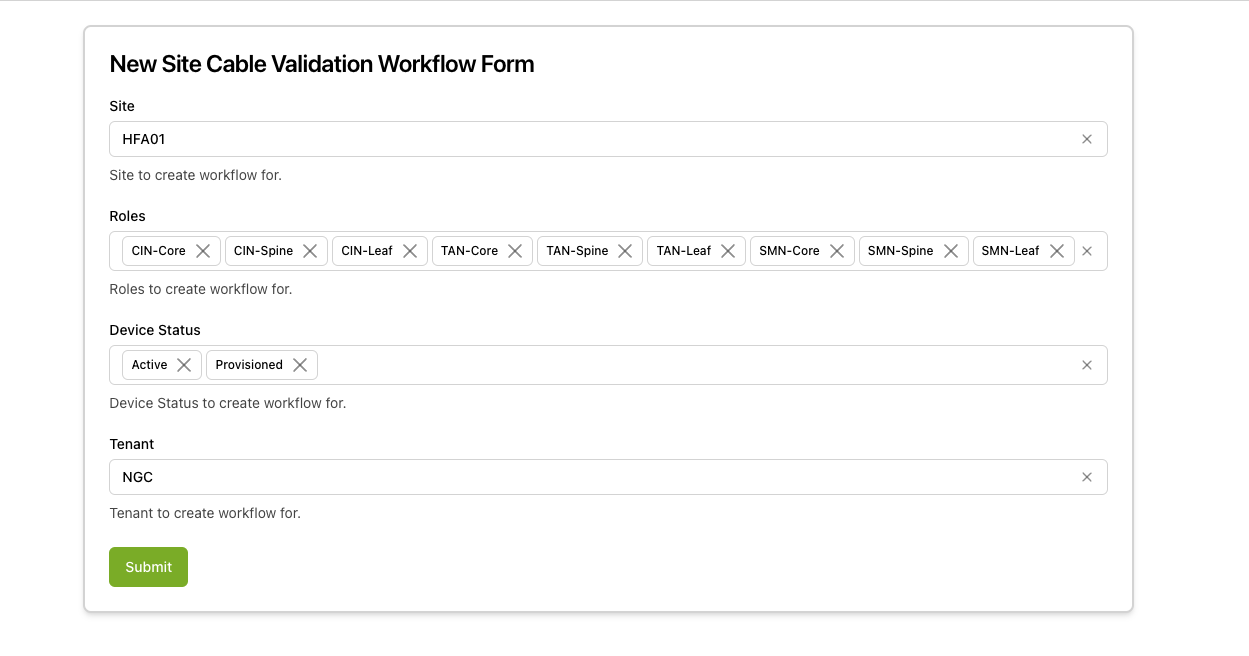
Fill in the form using the field reference below.
-
Submit the form. A status page appears showing the three workflow stages. Progress for the per-device child workflows is reported incrementally; once fewer than ten devices remain, the page links directly to each remaining child workflow so you can drill in on stragglers. This may take a few minutes as the workflow reaches out to every device in scope.
-
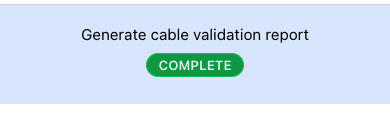
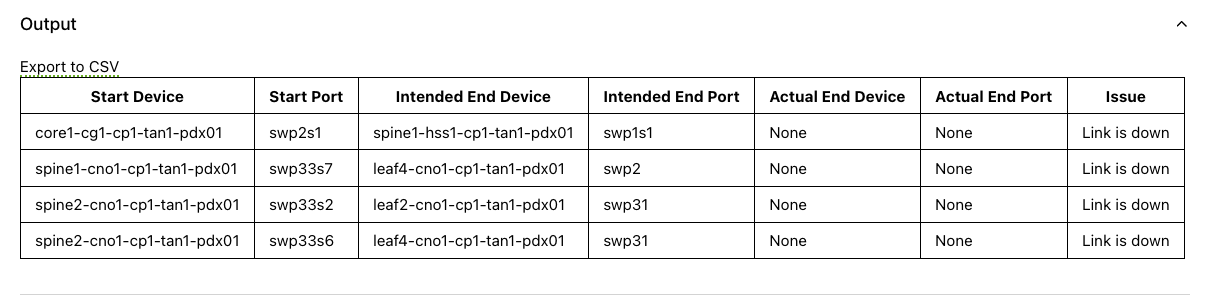
When Generate Cable Validation report starts, the status page selects it and displays the report while DCIM persistence continues. You can review the Markdown table or download the Excel workbook immediately. The stage remains In Progress until the cable status writes finish.
-
Address any issues, then re-run the workflow to confirm they are resolved.
Running device cable validation
Use this to re-validate a single device after fixing an issue without re-running the full site.
- Navigate to the Config Manager URL for your environment.
- Click the + in the top right and select DeviceCableValidationWorkflow.
- Fill in the form using the field reference below and submit.
A typical device report is available in well under a minute, dominated by the round-trip time to query LLDP and the FDB. The workflow may remain in progress longer while it persists cable statuses to the DCIM.
Execution stages
Site cable validation
The site workflow runs three stages. None require manual approval.
-
get_devices_to_validate— Resolve the device list from the DCIM.Calls the DCIM for all devices matching the site, role, status, tenant, and device-type filters, then drops anything not on a supported platform (Cumulus Linux, NVOS, Arista EOS, Juniper Junos). The resolved device list is rendered as a Markdown table on the stage page. If no devices match the filters, the remaining stages are marked Unreachable and the workflow returns immediately with an explanatory message.
-
validate_devices— Run a device cable validation child per device.For each device, the site workflow starts a device cable validation child workflow, cloning the parent’s
User,ReadRoles, andExecuteRolessearch attributes and attaching the per-deviceDeviceID. The stage waits for all children to complete, updating the page incrementally as each one finishes (N/total completed, success/failure counts, and a list of remaining devices once fewer than ten are left). A child that fails is recorded againstfailed_devicesrather than stopping the stage, so a single unreachable switch does not block the rest of the report. -
format_result— Aggregate per-device results into the site report.Combines every child’s interface findings into the consolidated Markdown report, with the list of
failed_devicespreserved verbatim at the top so operators know which switches were skipped versus which were validated and clean. The report renders inline on the stage page and is also offered as a downloadable Excel workbook for cases where the result set is too large to view in the UI. The workbook has two sheets: Cable Issues lists every interface finding, and Host Summary provides per-switch issue counts for triage. After publishing the report, this stage remains in progress while it persists the cable statuses returned by the child workflows.
Device cable validation
The device workflow runs six stages. The three data-collection stages (get_device_intended_neighbors, get_device_actual_neighbors, get_device_mac_table) run in parallel once the hostname check has passed.
-
get_device_data— Fetch the device record from the DCIM.Loads the device by UUID and attaches device search attributes to the workflow for observability. When the workflow is invoked as a child of site cable validation, the parent passes the already-fetched record so this stage is effectively a no-op.
-
validate_device_hostname— Confirm the device’s running hostname matches the DCIM.Logs into the device and reads its configured hostname, then compares it against the DCIM name. A mismatch fails the workflow before any cabling work begins, since cabling validation against the wrong device would produce misleading findings.
-
get_device_intended_neighbors— Read intended cabling from the DCIM.Pulls every enabled interface with a connected interface from the DCIM. For each connection, it records the far-end device, interface, role, rack position, and interface MAC when present. It also records
cable-validation-ignoreandcable-validation-link-state-onlytags on the local interface. -
get_device_actual_neighbors— Read observed cabling from the device.Queries the device for its LLDP neighbor table on every interface. This is the primary source of truth for what is physically connected.
-
get_device_mac_table— Read the FDB and ARP table from the device.Pulls the MAC table (FDB) and ARP table off the device. MAC and ARP entries are the fallback validator for links where LLDP is not available — most commonly IPMI/BMC connections to hosts. When LLDP is absent, the FDB MAC must match the MAC recorded in the DCIM.
-
validate_connections— Compare intended vs actual and produce the report.Joins the three data sources and applies the decision order in How each connection is evaluated. It validates the required intended-neighbor fields before checking link state. After that prerequisite passes, an up interface marked link-state-only passes immediately; otherwise either LLDP or the expected far-end MAC must match. The stage then classifies every mismatch (link down, wrong neighbor, no neighbor found, unexpected connection), decorates findings with the stable
IDhash used across runs, and formats the per-device Markdown report. For a standalone device run, the report appears while this stage persists cable statuses; a site-launched child returns its pending updates to the parent instead. This stage is not retryable — if validation logic or DCIM persistence raises, the run fails outright rather than masking a real error behind a retry.
The workflow’s final output is a DeviceCableValidationResult whose interfaces field maps each invalid interface name to its findings.
Interpreting the report
Actual vs. Intended
The results in the report show the device/port pair being validated (Start Device/Port) and then what the intended connection should be (based on what is in the DCIM) compared to the actual observed connection on the device.
Issue
The category of mismatch — see Cable validation issues below for the full catalog.
Troubleshooting Information
An optional column containing any additional info the device provides about this link that may help operators diagnose the issue. The information depends entirely on the device being validated, but can often be helpful — for example, indicating that there is no cable or optic plugged into a port, or that there is a cable but no light. Consult the device documentation for further help on these messages.
ID Field
A hash of certain columns of the report that persists across multiple reports. This helps track issues being fixed across runs since the ID remains the same for every (start device, start port, end device, end port) group.
Downloadable report
The result page includes a download link so you still get the full result set when it is too large to display in the UI.
Site Cable Validation downloads an Excel workbook (.xlsx) with two sheets:
- Cable Issues is the complete set of interface findings. The UI’s table is truncated for very large result sets (showing a “too many results” notice instead), but this sheet always contains every finding.
- Host Summary lists one switch per row with its rack, missing-cable count, mis-cabled count, unexpected connections, and total issues. The list is sorted so the switches with the most missing cables come first. Use this sheet to triage which switches to address first.
Device Cable Validation downloads a CSV of that single device’s findings.
Cable validation issues
The possible validation failures are:
Link is down
A link that is expected to be present and up is operationally down. Either a bad cable/optic, or one end of the link is disabled.
Incorrect cabling, actual should match intended
The cabling modeled in the DCIM does not match what was found on the network. This can be due to:
- LLDP data — the physical cabling does not match what is modeled in the DCIM.
- MAC address — the MAC seen on the switch FDB does not match the expected MAC in the DCIM. Either the inventory MAC is wrong, or the physical cabling is wrong. This is used when LLDP is not available, usually for IPMI/BMC connections.
Link is up but no neighbor found
A link is present but no LLDP neighbor or MAC address was found, so the link could not be validated. Retrying the validation may resolve the issue. If it does not, check the status of the devices on either end to see why they are not operating properly. This error may also occur when a cable mismatch leads to a low-light condition.
Unexpected connection found
A neighbor was found that is not modeled in the DCIM. This could mean the inventory is out of date, or that there are connections not in scope for Config Manager validation (commonly custom cabling for the site or connections to devices not managed in the DCIM).
If there are connections in the DCIM that are deliberately outside validation scope, add the cable-validation-ignore tag to the in-scope switch interfaces and re-run the cable validation workflow. If the connection should be validated later but currently lacks host MAC or reliable LLDP data, use cable-validation-link-state-only instead.
Common issues and troubleshooting
One or more devices are listed as failed.
A failed device means the per-device child workflow itself errored — most often because the device is unreachable over its management IP or its hostname does not match the DCIM. The device’s findings are excluded from the report; fix the underlying issue and either re-run the site workflow or run a targeted device cable validation against just that device. The results page lists unreachable devices separately and excludes their results from the report.
Hostname validation failed.
The hostname configured on the device does not match the DCIM. Either the device was renamed in the inventory without re-applying configuration, or you are running validation against the wrong device. Reconcile the names — typically by re-rendering and re-applying the device’s configuration — and re-run.
Stage get_device_actual_neighbors or get_device_mac_table failed.
The device is unreachable, the management credentials are wrong, or the device is on an unsupported platform. Confirm the device is reachable on its management IP, that ZTP has completed, and that the platform field in the DCIM is set correctly. If the device was just reprovisioned, give LLDP a minute or two to populate before retrying.
The report is visible, but its stage says DCIM cable status persistence failed.
The validation itself completed, but one or more cable status writes failed. The report remains valid for the observations collected during the run. Some cable statuses may have been updated before the failure. Resolve the DCIM connectivity, permissions, missing-cable, or bootstrap-data error shown by the workflow and rerun validation. The rerun skips statuses that already match.
The report shows duplicate findings for the same link.
Validation runs from both ends of a link when possible. Some deduplication is applied, but two devices may still report different errors for the same cable. Treat them as a single physical issue and resolve once.
Multiple runs report different MACs for the same port.
Unstable FDBs usually indicate a misbehaving device on one end of the link — investigate the neighboring switch or host rather than retrying validation.
Server links are flapping between runs.
Servers can churn LLDP/MAC state if they are stuck in a PXE boot loop on a partially provisioned site. If the links are modeled and should be checked for physical signal during bringup, tag the leaf-side interfaces with cable-validation-link-state-only. Remove the tag and run full validation after the server-side identity data stabilizes. Reserve cable-validation-ignore for connections that are intentionally outside scope. On InfiniBand sites, server links are out of scope here — they are validated by a separate workflow.
Link is up but no neighbor found on multiple links.
LLDP and the FDB were both empty for those interfaces. Retry the workflow first — LLDP can briefly miss neighbors right after a port flap. If the issue persists, check the neighbor on the far side of each link; an unpowered or misconfigured neighbor is the most common cause. Setting Ignore No Neighbor to true on the device workflow will hide these from the report, which is appropriate during a partial bringup but should not be the default.
Validation found unexpected connections that are legitimately out of scope.
For connections that exist in the DCIM but should not be validated (custom site cabling or neighbors not managed in the DCIM), add the cable-validation-ignore tag to those interfaces and re-run for a clean report.
High-speed host links fail because the intended MAC is empty or has not been discovered yet.
During initial bringup, add cable-validation-link-state-only to the leaf-side interfaces and validate physical link state first. After the compute management system populates the host interface MACs in the DCIM, verify their interface assignments, remove the tag, and re-run full validation. Do not use the temporary clean report as evidence that host links are in the correct order; only the later identity-aware pass can detect swaps.
Related guides
- New Site Bringup — bringup procedure that runs site cable validation as part of site handoff.
- Connected Host Metadata — discover what is connected to a switch via LLDP + FDB without doing a validation pass.
- Hardware Validation — sibling site-wide validation for hardware health.
- Network Topology Requirements — the topology and cabling constraints the validation enforces against.