

InfiniBand PKey Member Add
The InfiniBand PKey Member Add workflow attaches device interfaces to an existing InfiniBand PKey partition on UFM and records the corresponding OverlayAssignment rows in Nautobot. Use this after creating the PKey with IB PKey Creation.
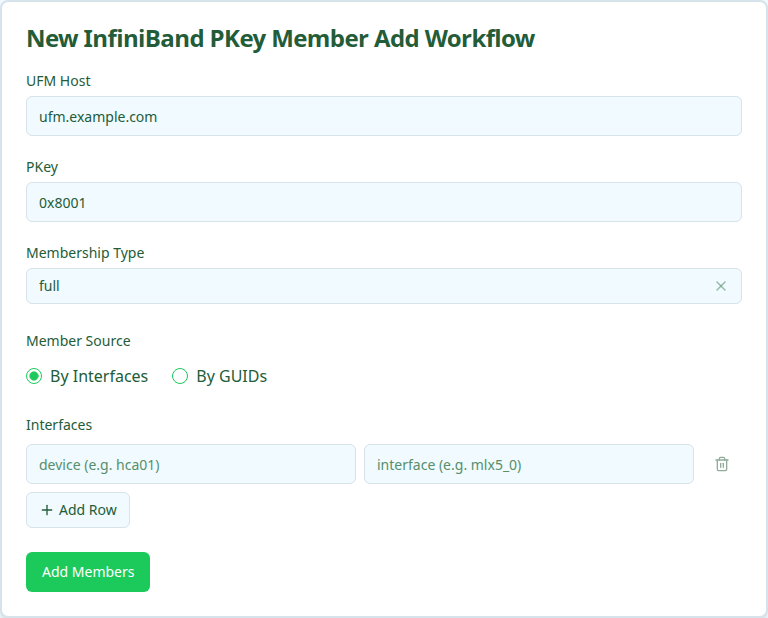
Members can be specified by Nautobot interface (device + interface, resolved to a GUID server-side) or by raw IB GUID. Pick one mode per submission.
Add is additive. Members already attached to the PKey are not re-added.
Prerequisites
Before running, confirm:
- PKey exists. Create it first with IB PKey Creation or by another mechanism. The workflow fails if the PKey is not present on UFM.
- By-Interfaces mode requires
ib_guidin Nautobot. Each interface must carry acustom_fields.ib_guidvalue matching0x+ 16 hex characters. The resolver fails fast with the offendingdevice/interfacepair if any are missing. - UFM credentials available. Same requirement as PKey Creation.
Running the workflow
- Navigate to the Config Manager URL for your environment.
- Click the + in the top right and select IBPKeyMemberAddWorkflow.
- Fill in the form using the field reference below and submit.
After submission, a status page shows the five execution stages.
Execution stages
The workflow runs five stages. No approval is required.
-
resolve_context— Resolve site, overlay, and canonical PKey from Nautobot.Looks up the UFM host to derive its site, normalizes the PKey to canonical
0xNNNN, and finds (or lazily creates) the Overlay record that holds the assignments. The lazy-create only fires when an orphan PKey row exists with no Overlay; the new Overlay is placed at the device’s Site. -
resolve_guids— Resolve members to IB GUIDs.In By-Interfaces mode, each
device/interfaceis looked up in Nautobot and itscustom_fields.ib_guidextracted. In By-GUIDs mode, the raw GUIDs are validated and resolved back to interface records when possible (for OverlayAssignment writes downstream). -
add_members— Add GUIDs to PKey on UFM.Calls UFM to attach the resolved GUIDs with the requested Membership Type. UFM is idempotent on duplicates.
-
verify_members— Confirm GUIDs are present in PKey on UFM.Re-reads the PKey member list from UFM and asserts every submitted GUID is present.
-
record_assignments— Write OverlayAssignment rows in Nautobot.Creates an
OverlayAssignmentlinking the PKey’s Overlay to each resolved interface so Nautobot reflects the new membership state.
Verifying outcomes
After the workflow reports success, confirm:
- All five stages show green.
- UFM reflects the new members.
GET /ufmRest/resources/pkeys/<pkey>?guids_data=trueshould list every submitted GUID with the chosen membership type. - Nautobot reflects the new assignments. Open the Overlay record in Nautobot’s Multi-Tenancy → Overlays view and confirm an
OverlayAssignmentexists for each interface.
Common issues
resolve_guids fails with “interface missing ib_guid”.
The named interface exists in Nautobot but its custom_fields.ib_guid field is empty. Populate it (for example via the IB Port GUID Discovery workflow) before re-running, or switch to By-GUIDs mode if you already have the raw values.
resolve_guids fails with “device/interface not found”.
The device or interface you submitted does not match any Nautobot record. Check spelling and confirm the interface is modeled.
add_members fails with “PKey not found”.
The PKey does not exist on UFM. Run IB PKey Creation first.
verify_members fails.
UFM accepted the add call but membership did not propagate. Usually transient. Re-run the workflow or retry the stage.
Related guides
- IB PKey Creation — allocate the PKey before adding members.
- IB PKey Member Update — reconcile membership to a declarative list (use when you want to replace, not extend).
- IB PKey Member Delete — remove specific members.