

3D Multi Camera Detection and Tracking (MV3DT)
The Real Time Video Intelligence CV Microservice leverages NVIDIA DeepStream SDK to generate metadata for each stream that downstream microservices can use to generate spatial metrics and alerts.
The microservice features metropolis-perception-app, a DeepStream pipeline that builds on the built-in deepstream-test5 app in the DeepStream SDK.
This perception app provides a complete application that takes streaming video inputs, decodes the incoming streams, performs inference & tracking, and sends the metadata to other microservices using the defined Protobuf schema.
The application features a modular architecture that pipelines the same RT-DETR detector used by the 2D single-camera profile with Multi-View 3D Tracking (MV3DT), a distributed real-time multi-view multi-target 3D tracking framework introduced in DeepStream 8.0.
RT-DETR generates 2D bounding boxes for warehouse-relevant classes such as people, humanoid robots, autonomous mobile robots, and warehouse equipment. Refer to the TAO RT-DETR Finetuning page for more details on the model architecture and training process.
MV3DT is implemented as an additional module in the NvMultiObjectTracker low-level tracker library. Each camera performs object detection and Single-View 3D Tracking (SV3DT) with an optional pose estimation model, producing global 3D measurements from 2D image coordinates using its camera projection matrix and 3D object models. Cameras with overlapping fields of view (FOVs) collaborate over an MQTT message broker to:
- Negotiate decentralized, globally unique IDs when targets first appear in the camera network.
- Propagate IDs across overlapping camera handovers and through occlusions.
- Fuse 3D measurements from peer cameras with the local Kalman filter for robust state estimates.
Tracking outputs include 3D foot location, visibility, velocity, class labels, and globally consistent instance IDs, enabling sophisticated multi-camera fusion and analytics capabilities.
Warehouse MV3DT also enables appearance-based re-association. The tracker extracts CLIP-ReID features and streams them over kafka. These are saved by reid-embed microservice in it’s gallery. Tracker queries the reid-embed gallery to re-associate Person tracks that geometry and MQTT handoff would otherwise lose e.g. when there are camera coverage gaps or when a person is occluded for a long time.
For detailed information on all components, APIs, and customization options, refer to the Object Detection and Tracking. To deploy the standalone MV3DT stack from natural-language prompts, see the MV3DT Agent Skills walkthrough.
The diagram below shows the perception pipeline used in the microservice:
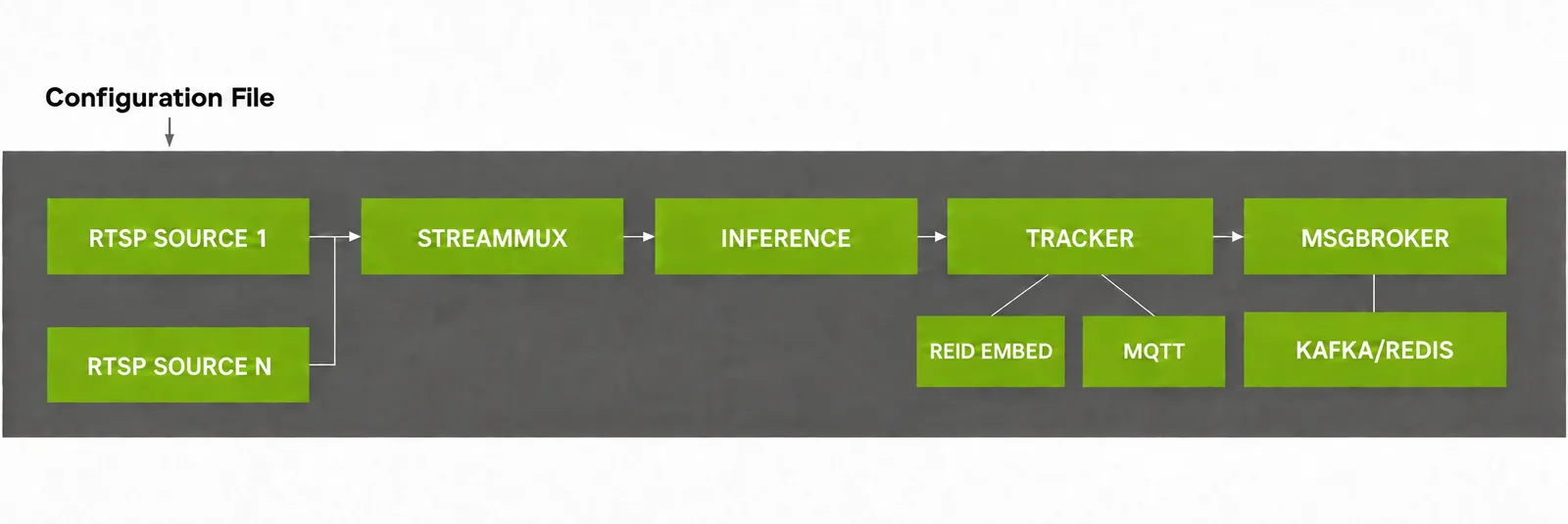
Expected behavior: transient ID mismatches across cameras.
Unlike a centralized BEV-based method (such as Sparse4D), MV3DT is distributed: each camera runs SV3DT and exchanges tracklets with its vision neighbors over MQTT for peer-target association. The same physical object may briefly receive different IDs across cameras when per-camera 3D foot-location estimates fail to match closely enough. Typical causes are communication delays, measurement noise from occlusions or imperfect object models (modelInfo dimensions and pose-based height estimation), and inaccurate camera calibration. When ID mismatches happen, you will see multiple 3D bounding boxes on the same object in the VIOS Bounding Box Overlay.
Configurations
The Perception microservice requires several configuration files that control various aspects of the 3D multi-camera detection and tracking system. These files allow users to customize the system’s behavior according to their specific requirements.
Docker Compose Volume Mounts
For docker compose deployment, the vss-rtvi-cv-mv3dt service in deploy/docker/industry-profiles/warehouse-operations/warehouse-mv3dt-app/warehouse-mv3dt-app.yml mounts host paths into the container as follows:
The $VSS_DATA_DIR/models/ host directory is mounted at /opt/storage/, which persists ONNX models and TensorRT engine files across container restarts. Inside that tree, RT-DETR sits at /opt/storage/ (rtdetr_warehouse_*.onnx), pose at /opt/storage/BodyPose3DNet/, and CLIP-ReID at /opt/storage/reid/ (reid_model.onnx and its engine). DeepStream pipeline configs (ds-main-config-mv3dt.txt, ds-pgie-config.yml, ds-mv3dt-tracker-config.yml, and related files) live on the host under $VSS_APPS_DIR/industry-profiles/warehouse-operations/warehouse-mv3dt-app/deepstream/configs/ and appear in the container under metropolis_perception_app/configs/. Per-camera camInfo/<sensor_id>.yml files live under $VSS_APPS_DIR/industry-profiles/warehouse-operations/warehouse-mv3dt-app/calibration/sample-data/$SAMPLE_VIDEO_DATASET/camInfo/ on the host and appear in the container at /tmp/camInfo/.
Inference Configuration File
The main configuration file for RT-DETR, ds-pgie-config.yml, handles properties related to model inference and controls the core functionality of the 2D detection system, which will be fed into the MV3DT module. This YAML configuration file contains two main sections: property and class-attrs-all.
Model and Inference Properties
Enabling Transporter (or other filtered) detection. Class 4 (Transporter) is filtered out by default because SV3DT models each object as a vertical cylinder and assumes the top of the cylinder (the object’s “head”) is visible (see the Single-View 3D Tracking section in the Gst-nvtracker documentation). Payloads on top of transporters typically occlude that head, degrading SV3DT’s 3D foot-location estimate and MV3DT cross-camera fusion. If you still want to enable Transporter detection and tracking, remove 4 from filter-out-class-ids and ensure every per-camera camInfo/<sensor_id>.yml file has a classID: 4 entry in its modelInfo block. The same procedure applies to other filtered classes such as Pallet (class 6).
Input/Output Properties
Detection and Filtering Properties
DeepStream Configuration File
The DeepStream main configuration file (ds-main-config-mv3dt.txt) builds on the DeepStream test5 application configuration and provides essential settings for the overall pipeline. This file controls various aspects of the application, including source configuration, stream multiplexing, message broker settings, and visualization parameters.
Key Configuration Sections
For a complete understanding of all configuration options, refer to the DeepStream SDK Documentation.
Tracker Configuration File
The tracker configuration files configure the multi-camera tracking component that maintains a single global identity per target across the camera network. The tracker configuration consists of two files:
- Tracker plugin configuration in
ds-main-config-mv3dt.txtunder the[tracker]section - Low-level tracker configuration in
ds-mv3dt-tracker-config.yml
RT-DETR performs detection per frame, and the NvMultiObjectTracker low-level library associates detections across time within each camera and across overlapping cameras using the MV3DT module. For detailed information about the tracker plugin parameters, refer to the DeepStream Tracker Plugin Documentation. For detailed information about the MV3DT module, refer to the DeepStream MV3DT Documentation.
Tracker Plugin Configuration (in ds-main-config-mv3dt.txt)
Low-Level Tracker Configuration (ds-mv3dt-tracker-config.yml)
The MV3DT tracker configuration extends the standard 2D NvMultiObjectTracker configuration with two Single-View 3D Tracking (SV3DT) sections, ObjectModelProjection and PoseEstimator; two Multi-View 3D Tracking (MV3DT) sections, MultiViewAssociator and Communicator; and two appearance ReID sections, ReID and ReIDService. The file is organized as follows:
BaseConfig: Top-level tracker settings shared across all modules.TargetManagement: Settings for target lifecycle management.TrajectoryManagement: Settings for target ID assignment, trajectory archiving, and tracklet re-association.DataAssociator: Settings for per-frame matching of detector outputs to existing tracklets.StateEstimator: Settings for the motion model (for example, Kalman filter) used for motion prediction and state update.VisualTracker: Settings for visual feature extraction used when the detector misses or partially captures a target.ObjectModelProjection: Settings for SV3DT back-projection of 2D bounding boxes into the world ground plane using each camera’s calibration matrix and 3D object model.PoseEstimator: Settings for the optional pose-estimation network that refines the SV3DT 3D foot location from body keypoints.ReID: Settings for the CLIP-ReID model that extracts appearance features from tracked objects.ReIDService: Settings for the HTTP client that queries the external appearance gallery to re-associate tracks that geometry and MQTT handoff lose.MultiViewAssociator: Settings for MV3DT cross-camera ID propagation and multi-view measurement fusion.Communicator: Settings for the MQTT-based transport module that lets each camera share and receive tracklets with its vision neighbors.
Refer to the DeepStream MV3DT Documentation and the Single-View 3D Tracking section in the Gst-nvtracker documentation for the complete parameter reference.
MQTT Publish/Subscribe Configuration File
The pub_sub_info_config.yml file declares the MQTT publish/subscribe graph used by MV3DT to exchange 3D tracklets across cameras. For each camera, it specifies the single topic the camera publishes to and the list of peer topics it subscribes to. The file format uses two top-level keys, pubBrokerTopicStr and subPeerBrokerTopicStrs, where each value follows the pattern <broker-host>:<broker-port>;<topic>:
Any valid pub/sub graph is accepted, but for MV3DT the recommended topology is a vision-neighbor graph, in which each camera subscribes only to peers whose fields of view (FOVs) overlap with its own — its vision neighbors. Refer to the DeepStream MV3DT Documentation for more details.
On container startup, the microservice writes the runtime pub/sub config to /tmp/generated/pub_sub_info_config.yml using one of two paths:
- Template provided. If a
pub_sub_info_config.ymlexists in the mounted configs directory, the start script uses it as-is and only rewrites the broker host and port toMQTT_HOST:MQTT_PORT. The pub/sub graph defined in the template is preserved. - No template. If no template is provided, the start script auto-derives a fully-connected graph (every camera subscribes to every other camera) from the camInfo files mounted under
/tmp/camInfo, usingMQTT_HOST:MQTT_PORTas the broker endpoint.
For custom datasets, refer to 3D Multi Camera Detection and Tracking (MV3DT) for steps to generate a template, including a utility script that builds a vision-neighbor graph from camera calibration.
MQTT Protocol Adaptor Configuration File
The config_mqtt.txt file configures authentication and connection properties for the MQTT protocol adaptor used by the MV3DT communicator. For most use cases, the default configuration will work without modification.
Please refer to the DeepStream MQTT Protocol Adaptor Documentation for more information.
Kafka Configuration File
The ds-kafka-config.txt file contains the Kafka configuration parameters used by the message-broker sink that publishes per-frame metadata to downstream microservices. This file configures the Kafka producer settings for the Perception microservice.
The partition key setting ensures that messages from the same sensor go to the same Kafka partition, maintaining message ordering per camera stream.
Camera Information Files
MV3DT requires a per-camera camInfo file (for example, camInfo/Camera.yml) for every camera in the network. Each file contains the 3x4 projection matrix (that transforms a 3D world coordinate point to a 2D camera image coordinate point), plus per-class object model dimensions.
For custom datasets, refer to Update Camera Information Configuration for steps to update per-camera camInfo/<sensor_id>.yml files from a calibration.json.
Labels File
The ds-detector-labels.txt file contains the class labels that the RT-DETR model can detect. Each line in the file corresponds to a class that the model recognizes. Users can customize this file to match their specific detection requirements.
The file format uses a newline-separated list of object class names:
These class labels represent the seven object categories that the RT-DETR warehouse model can detect:
- Person: Human workers in warehouse environments
- Agility_Digit_Humanoid: Agility Robotics Digit humanoid robot
- Fourier_GR1_T2_Humanoid: Fourier Intelligence GR1_T2 humanoid robot
- Nova_Carter: NVIDIA Nova Carter autonomous mobile robot
- Transporter: Warehouse transport vehicles
- Forklift: Industrial forklifts
- Pallet: Warehouse pallets and cargo containers
Class IDs that should be detected but excluded from tracking (for example, static pallets) can be filtered out using the filter-out-class-ids parameter in ds-pgie-config.yml.
Deployment Customization
This section covers common configuration changes that users may need to make when adapting the MV3DT pipeline for their specific deployment scenarios.
Modifying the Number of Input Streams
When updating the number of input streams/cameras, you must update the batch size settings in the configuration files to ensure consistency. To swap in a different set of cameras (calibration matrices and vision-neighbor graph), refer to Running on a Custom Dataset.
The related deepstream configuration files can be found in the following directory for docker compose deployment: deploy/docker/industry-profiles/warehouse-operations/warehouse-mv3dt-app/deepstream/configs/
Update DeepStream Configuration
Modify the ds-main-config-mv3dt.txt file to update source and batch size settings:
The default configuration uses dynamic source management (use-nvmultiurisrcbin=1), which allows adding/removing camera streams at runtime via HTTP API without restarting the application. The max-batch-size parameter sets the upper limit for concurrent streams.
Running on a Custom Dataset
Adapting MV3DT to a new set of cameras requires camInfo files (camInfo/<sensor_id>.yml) and an MQTT publish/subscribe configuration file (pub_sub_info_config.yml). Each subsection below shows how to generate one of these using the provided utility scripts under tools/rtvi-cv-mv3dt-utils.
Update Camera Information Configuration
For every camera, provide a camInfo file at $VSS_APPS_DIR/industry-profiles/warehouse-operations/warehouse-mv3dt-app/calibration/sample-data/<SAMPLE_VIDEO_DATASET>/camInfo/<sensor_id>.yml. The camInfo/ directory is mounted into the perception container at /tmp/camInfo, so each entry under ObjectModelProjection.cameraModelFilepath in ds-mv3dt-tracker-config.yml references the file using its in-container path:
A utility script (generate_cam_info_configs.py) is provided under tools/rtvi-cv-mv3dt-utils that converts a single calibration.json into one <sensor_id>.yml per camera. Pass one --class CLASS_ID HEIGHT RADIUS flag per tracked object class to populate modelInfo consistently across all cameras. The following is an example command:
Place the generated camInfo/ directory under the calibration sample-data path above so that it is mounted into the container on the next start.
Update Publish/Subscribe Configuration
Provide a pub_sub_info_config.yml template that declares one publish topic per sensor and subscribes each camera to its actual vision neighbors. If you do not provide a template, the start script auto-generates a fully-connected publish/subscribe graph, which is suitable for small deployments but not recommended for large camera networks.
A utility script (generate_pub_sub_configs.py) is provided under tools/rtvi-cv-mv3dt-utils that computes the vision-neighbor graph from the camInfo files and emits a pub_sub_info_config.yml whose subscriptions reflect actual vision-neighbor relationships rather than a fully-connected graph. The following is an example command:
The --neighbor_criteria flag controls how vision neighbors are selected and accepts two formats:
overlap_threshold:Tkeeps neighbor cameras whose pairwise FOV-overlap fraction (between 0 and 1) is at leastT. Larger values yield sparser graphs (only strongly overlapping cameras are linked); smaller values yield denser graphs.top_N:Kkeeps theKneighbor cameras with the largest overlap per camera, regardless of the absolute overlap value.
Place the generated pub_sub_info_config.yml under $VSS_APPS_DIR/industry-profiles/warehouse-operations/warehouse-mv3dt-app/deepstream/configs/ so that it is mounted into the container on the next start.
Integrating a New RT-DETR Model
The MV3DT pipeline reuses the same RT-DETR detector as the 2D single-camera profile, so model swapping follows the same workflow as for the 2D pipeline. This is useful when you fine-tune RT-DETR on a custom dataset via TAO Toolkit.
Model Compatibility Requirements
Ensure your new model meets these requirements:
- Exported as ONNX format from TAO Toolkit with
serialize_nvdsinfer: true - Uses the same input dimensions (640x640 or compatible resolution)
- Has compatible output tensors (
pred_boxesandpred_logits) - Follows the RT-DETR architecture pattern for 2D object detection
Update RT-DETR Configuration
- Place your new model file and label file in the appropriate directories on the host. The container accesses them through the volume mounts shown in Docker Compose Volume Mounts:
- Place your new ONNX model (for example,
your_new_rtdetr_model.onnx) in$VSS_DATA_DIR/models/on the host. - Place your new labels file (for example,
your_new_labels.txt) in$VSS_APPS_DIR/industry-profiles/warehouse-operations/warehouse-mv3dt-app/deepstream/configs/on the host.
- Update the
ds-pgie-config.ymlaccordingly:
The Perception microservice automatically builds the TensorRT engine for the new model on first run. Engine files persist under $VSS_DATA_DIR/models/ (mounted at /opt/storage/ in the container).
Your labels file must list labels in the same order your model was trained with.
- Update input dimensions if your model uses a different resolution:
- Adjust per-class detection thresholds if needed (example):
After making these changes, restart the Perception microservice for the changes to take effect. For detailed instructions on fine-tuning RT-DETR models via TAO Toolkit, refer to the TAO RT-DETR Finetuning page.