

NVIDIA NeMo Agent Toolkit Workflow as an A2A Client#
Agent-to-Agent (A2A) Protocol is an open standard from the Linux Foundation that enables agent-to-agent communication and collaboration. The protocol standardizes how agents discover capabilities, delegate tasks, and exchange information.
You can create a workflow that connects to remote A2A agents and provides a function interface for interacting with their capabilities.
This guide covers how to use NeMo Agent Toolkit as an A2A client. For information on publishing workflows as A2A servers, refer to A2A Server.
Per-User A2A Clients
A2A clients are per-user function groups, which means:
Each user gets their own isolated A2A client instance with separate connections, authentication, and session state
Workflows using A2A clients must be registered as per-user using
@register_per_user_functionor use one of the builtin per-user workflows (such asper_user_react_agent)Shared workflows (such as
react_agent) cannot use A2A client function groups directly
For multi-user deployments, this provides automatic isolation between users. See Writing Per-User Functions for details on creating per-user workflows.
Installation#
A2A client functionality requires the nvidia-nat-a2a package. Install it with:
uv pip install "nvidia-nat[a2a]"
Note
Authentication: For connecting to OAuth2-protected A2A agents, see A2A Authentication.
A2A Client Configuration#
NeMo Agent Toolkit enables workflows to interact with remote A2A agents through function groups.
Basic Configuration#
function_groups:
  currency_agent:
    _type: a2a_client
    url: http://localhost:11000
    task_timeout: 60

workflow:
  _type: per_user_react_agent  # Per-user workflow required for A2A clients
  tool_names:
    - currency_agent
  llm_name: nim_llm
The a2a_client function group connects to a remote A2A agent, discovers its skills through the Agent Card, and provides a function interface for invoking those skills.
Note: Since A2A clients are per-user, the workflow must also be per-user. The example above uses per_user_react_agent, which is the per-user version of the builtin ReAct agent. See the examples section for complete implementations.
Configuration Options#
The a2a_client function group supports the following configuration options:
Parameter |
Type |
Description |
Default |
|---|---|---|---|
|
string |
A2A agent URL |
Required |
|
string |
Path to agent card endpoint |
|
|
int |
Task timeout in seconds |
300 |
|
boolean |
Embed discovered skills in function description |
|
|
string |
Reference to authentication provider |
None |
Note: You can get the complete list of configuration options and their schemas by running:
nat info components -t function_group -q a2a_client
Multiple A2A Clients#
You can connect to multiple A2A agents in the same per-user workflow:
function_groups:
  calculator_agent:
    _type: a2a_client
    url: http://localhost:10000

  currency_agent:
    _type: a2a_client
    url: http://localhost:11000

workflow:
  _type: per_user_react_agent  # Per-user workflow required for A2A clients
  tool_names:
    - calculator_agent
    - currency_agent
Note: All A2A clients in a workflow will be per-user, providing isolated connections for each user.
Three-Level API Architecture#
The A2A client provides three levels of API access, allowing you to choose the right abstraction level for your use case.
Skills & Metadata] end AC -->|discovers| FG[Function Group
agent_name] subgraph "Three-Level API" L1["Level 1: High-Level
agent_name.call(query)
Natural language interface"] L2["Level 2: Helpers
agent_name.get_skills(), agent_name.get_info(), agent_name.get_task()
Task management utilities"] L3["Level 3: Low-Level
agent_name.send_message(), agent_name.send_message_streaming()
Raw A2A Protocol access"] end FG --> L1 FG --> L2 FG --> L3 style L1 fill:#e1f5e1,color:#000 style L2 fill:#e1e5f5,color:#000 style L3 fill:#f5e1e1,color:#000
Level 1: High-Level API (Recommended)#
Function: agent_name.call(query: str) -> str
The high-level API provides a natural language interface optimized for LLM-based agents. This is the recommended approach for most use cases.
When to use:
Standard LLM-based agents (most common)
Simple task delegation
Agent-as-a-tool pattern
Features:
Accepts natural language queries
Skills automatically embedded in function description
Agent handles skill selection and execution
Returns string response
Example:
workflow:
  _type: react_agent
  tool_names:
    - currency_agent  # Uses high-level .call() function
The LLM will see a function like:
currency_agent(query: str) -> str
Description: Currency conversion agent with the following skills:
  - convert_currency: Convert between currencies
  - get_exchange_rate: Get current exchange rates
Level 2: Helper Functions#
Functions:
agent_name.get_skills()- List available skillsagent_name.get_info()- Get agent metadataagent_name.get_task(task_id)- Get task statusagent_name.cancel_task(task_id)- Cancel a running task
When to use:
Task management and monitoring
Metadata queries
Building custom orchestration logic
Example:
# Get available skills
skills = await agent.get_skills()

# Get agent information
info = await agent.get_info()
Level 3: Low-Level Protocol API#
Functions:
agent_name.send_message(query, task_id, context_id)- Send message and get eventsagent_name.send_message_streaming(query, task_id, context_id)- Stream events
When to use:
Custom agents needing full protocol control
Advanced task management
Direct access to A2A events
Example:
# Direct protocol access
events = await agent.send_message(
    query="Convert 100 USD to EUR",
    task_id=None,
    context_id=None
)
Advanced: Understanding Agent Card Discovery#
The A2A client discovers agent capabilities through the Agent Card and creates a function interface for interacting with them. The following diagram shows the complete discovery and mapping process:
name: Dice Agent
url: http://localhost:9999
version: 1.0.0
description: Roll dice and get random numbers] S1[Skill: roll_dice
description: Roll N-sided dice
examples: Roll 2d6, Roll 1d20] S2[Skill: random_number
description: Generate random numbers
examples: Random between 1-100] AC --> S1 AC --> S2 end AC ==>|discovers & maps to| FG[Function Group
dice_agent] subgraph "Three-Level API" L1["Level 1: High-Level
dice_agent.call(query)
Natural language interface
Skills optionally embedded in description"] L2["Level 2: Helpers
dice_agent.get_skills(), dice_agent.get_info()
dice_agent.get_task(), dice_agent.cancel_task()
Task management utilities"] L3["Level 3: Low-Level
dice_agent.send_message(), dice_agent.send_message_streaming()
Raw A2A Protocol access with task and context IDs"] end FG --> L1 FG --> L2 FG --> L3 S1 -.->|embedded in description| L1 S2 -.->|embedded in description| L1 style L1 fill:#e1f5e1,color:#000 style L2 fill:#e1e5f5,color:#000 style L3 fill:#f5e1e1,color:#000
Discovery Process:
Client fetches Agent Card from
{url}/.well-known/agent-card.jsonParses agent metadata (name, version, description)
Extracts skills with their descriptions and examples
Maps skills to a function group with three API levels
Optionally embeds skill details in high-level function description
Transport Support#
The A2A client uses the transport protocol specified in the agent’s Agent Card. The A2A Python SDK automatically selects the appropriate transport based on the agent’s capabilities. Default transport is JSON-RPC over HTTP.
Coming Soon:
Explicit transport configuration options
Support for additional transport protocols (gRPC, HTTP/REST)
Streaming Support#
The A2A client automatically enables streaming support when connecting to agents. Streaming is handled at the protocol level through the low-level send_message_streaming() function, which yields events as they arrive from the remote agent.
For most use cases, the high-level call() function is sufficient. Use send_message_streaming() only when you need direct access to streaming events.
Examples#
The following examples demonstrate A2A client usage:
Math Assistant A2A Example - A2A communication with hybrid tool composition. Refer to
examples/A2A/math_assistant_a2a/README.md.
CLI Utilities#
The A2A client includes CLI utilities for testing and debugging.
Quick reference:
# Discover an A2A agent
nat a2a client discover --url http://localhost:10000

# call the agent
nat a2a client call --url http://localhost:10000 --message "Your query here"
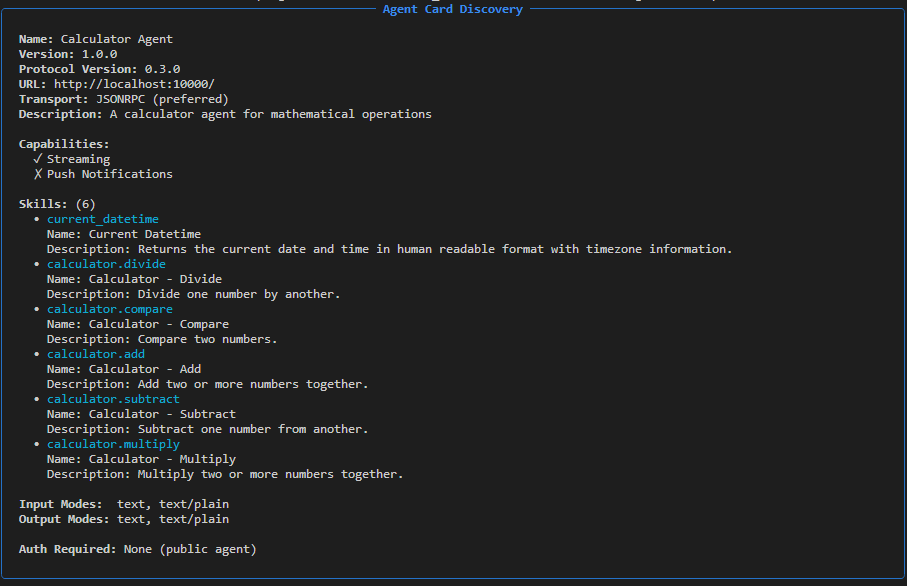
Discover Agent#
The discover command connects to an A2A agent and displays its Agent Card, which contains information about capabilities, skills, and configuration.
Basic usage:
nat a2a client discover --url $A2A_SERVER_URL
Output example:
Call Agent#
Call an A2A agent with a message and get a response. This is useful for quick testing and one-off queries.
Usage:
nat a2a client call --url $A2A_SERVER_URL --message "What is 2 + 2?"
Output example:
Query: What is 2 + 2?

The sum of 2 and 2 is 4.

(0.85s)
Troubleshooting#
Connection Issues#
Agent Not Reachable:
# Verify agent is running and accessible
curl http://localhost:10000/.well-known/agent-card.json | jq
Performance Issues#
Timeouts:
Increase
task_timeoutin configurationCheck network latency to remote agent
Protocol Compliance#
The A2A client is built on the official A2A Python SDK to ensure protocol compliance. For detailed protocol specifications, refer to the A2A Protocol Documentation.